Top 12 Best All in One Liquid Cooler You Can’t Miss!
There are few things more frustrating than a PC that overheats during a demanding session, especially when a cheap or poorly chosen cooler causes noise spikes or fails to keep temperatures down. Choosing the best all in one liquid cooler can mean the difference between stable performance and sudden shutdowns.
These coolers usually offer quieter operation and better heat handling than traditional air coolers, but only if they match the build and workload properly.
Key factors that separate a reliable all in one liquid cooler include radiator size, pump quality, and compatibility with your case and CPU socket. Radiators typically come in 120mm, 240mm, or 360mm sizes; larger ones generally cool more efficiently but need more space.
A quiet, durable pump keeps the coolant flowing steadily without adding noise. Finally, fittings must align precisely with your CPU and chassis to avoid installation headaches and leaks. Paying attention to these can avoid many common issues.
Need a Quick Check?
| Image | Product | Price |
|---|---|---|
Our Top Picks 1  | ARCTIC Liquid Freezer III 360 | Check Price |
Our Top Picks 2  | ARCTIC Liquid Freezer III 360 | Check Price |
Our Top Picks 3  | ASUS ROG Strix LC III | Check Price |
Our Selected Top 12 All in One Liquid Cooler You Can Trust
This list features carefully chosen all-in-one liquid coolers that balance performance and reliability. Each review covers how well the cooler operates, the types of users it fits best, and highlights its main advantages and drawbacks to help make an informed decision.
1. ARCTIC Liquid Freezer III Pro 360
Powerful cooling combined with smart design makes the ARCTIC Liquid Freezer III Pro 360 a great choice for anyone pushing their desktop or gaming console to the limit. It shines in delivering efficient heat dissipation, especially for Intel and AMD CPUs, helping hardware run cooler under heavy loads.
Setup isn’t complicated thanks to the native offset mounting that aligns perfectly with the CPU hotspot, boosting heat transfer right where it matters. The integrated VRM fan quietly manages voltage converter temperatures, making daily operation quieter and more reliable. With ARCTIC’s P12 PRO fans running more quietly at low speeds, this cooler stays efficient without much noise during lighter tasks.
It handles intense workloads well, keeping temperatures down even during demanding sessions. The build quality feels solid with a contact frame thoughtfully designed for Intel sockets to optimize pressure distribution. Reviews praise its quiet operation and cooling power, but some note the maximum fan speed can get a bit loud at top RPMs when pushing the system hard.
Quiet operation at most speeds and effective cooling under heavy load stand out as the biggest positives. A frequent note from reports is that fan noise rises noticeably when running at full speed, which can be distracting during intense gaming or rendering.
Those who value quiet performance with occasional peak cooling will appreciate this cooler. Users who prioritize absolute silence or very low power draw may want to explore other options better suited to those needs.
Pros
- Optimized contact pressure for better heat dissipation
- Quiet P12 PRO fans especially at low speeds
- Integrated VRM fan improves voltage converter cooling
- Supports both Intel and AMD sockets
Cons
- Fan noise can increase at maximum 3000 rpm
- Relatively high power consumption at 3.96 watts
| Specification | Details |
|---|---|
| Power Connector Type | 4-Pin |
| Voltage | 12 volts |
| Wattage | 3.96 watts |
| Maximum Rotational Speed | 3000 rpm |
| Air Flow Capacity | 77 cfm |
| Cooling Method | Liquid |
2. ARCTIC Liquid Freezer III Pro 360 A-RGB
Hot CPUs demand serious cooling power, especially when gaming or crunching data nonstop. Great for anyone with Intel LGA1851 or AMD setups, it stands out with a smart design that targets the CPU hotspot precisely for cooler running and longer CPU life.
Installation takes a moment as the cold plate is offset to match the CPU’s heat points exactly, making sure that heat moves away quickly. The included ARCTIC P12 PRO fans work quietly even while spinning up to 3000 rpm when you push your system hard.
The built-in VRM fan keeps voltage converters cool, avoiding performance hiccups during heavy loads.
Performance is strong with a good airflow rating of 77 cfm and quiet operation at lower speeds. The liquid cooling method keeps temps down efficiently while the build feels solid without being bulky.
People like the quiet yet powerful fans most, but some note the higher maximum speed fan noise can be noticeable under intense workloads.
The integrated VRM fan combined with offset cold plate offers targeted cooling that users appreciate for lowering CPU and voltage converter temperatures. The trade-off is noticeable fan noise when the system pushes the cooler into its highest speed range.
Those running intense workloads or overclocking will find the cooling performance reliable and reassuring. Casual users or quiet PC seekers might prefer a different solution with less audible fan speed spikes under heavy load.
Pros
- Optimized cold plate for hotspot heat transfer
- Quiet ARCTIC P12 PRO fans at low speed
- Built-in PWM VRM fan for extra cooling
- Compatible with latest Intel and AMD sockets
Cons
- Fan noise noticeable at maximum speed
- Uses additional power with VRM fan active
| Specification | Details |
|---|---|
| Maximum Rotational Speed | 3000 rpm |
| Air Flow Capacity | 77 cfm |
| Voltage | 12 volts |
| Wattage | 3.96 watts |
| Power Connector Type | 4-Pin |
3. ASUS ROG Strix LC III 360 ARGB LCD
A sharp 2.1” 480×480 IPS LCD that can rotate 360° stands out as the coolest feature to customize your PC’s look while keeping tabs on system stats. Ideal for PC builders who want both strong cooling and a striking display on their liquid cooler.
Installation matches what you’d expect for a 360mm AIO, and the sleeved tubing feels tough and reliable. The ARGB fans are quiet, running with 0dB tech when you’re not pushing hard, so day-to-day noise stays low. Rotating the LCD lets you adjust the display for any case layout, showing system info or custom art easily.
Cooling performance holds up thanks to a new Asetek cold plate and a gen7 V2 pump with a strong motor. It runs at a maximum fan speed of 360 rpm while producing about 36 dB, which balances airflow and noise well. Build quality includes reinforced tubing and fans that match ROG aesthetics.
Most praise focuses on the visual appeal and solid cooling, while a few note that the 3-pin power connector is less common compared to 4-pin setups.
ASUS ROG Strix LC III 360 ARGB LCD stands out with its unique 2.1-inch LCD screen that rotates fully, displaying system stats or custom images. Cooling performance is strong thanks to the gen7 V2 pump and Asetek cold plate. Common feedback mentions the ARGB lighting adds a nice look but some find the LCD more of a novelty without much.
People who want a visual flair and solid cooling with good compatibility across Intel and AMD sockets will appreciate this cooler. Those needing quieter operation might look for something with less fan noise. It fits well with ROG components, but builders on a budget or those prioritizing pure cooling performance over display features might prefer a simpler model.
Pros
- Rotatable 2.1” LCD for custom visuals
- Quiet fans with 0dB technology
- Durable, sleeved tubing
- Wide Intel and AMD compatibility
Cons
- Uses 3-pin power connector, less common
- Some find 360 rpm max speed limiting under heavy loads
| Specification | Details |
|---|---|
| Voltage | 12 volts |
| Wattage | 10 watts |
| Cooling Method | Fan |
| Noise Level | 36 db |
| Maximum Rotational Speed | 360 rpm |
4. NZXT Kraken Core 240 RGB

Gamers and multitaskers looking for a quiet and efficient cooling solution will appreciate the NZXT Kraken Core 240 RGB. It shines in keeping CPUs cool under heavy load while keeping noise levels low, making it ideal for those who want performance without loud fans.
Setting up the cooler is straightforward because it connects directly to your motherboard, reducing cable clutter and speeding up the build process. The single-frame design holds two optimized fans that push air through the radiator smoothly.
Fan speeds can be adjusted with PWM control, letting you find the right balance between cooling power and noise for daily tasks or intense gaming sessions.
The pump runs at up to 3,100 RPM, delivering strong water cooling while maintaining a quiet 31.9 dB noise level. The fans provide good airflow at 75.05 CFM with high static pressure to move air efficiently through radiator fins. The solid build minimizes cable mess with a clean install.
On the downside, some might find the 5V power voltage and 8.88-watt power consumption limiting for very high-end systems. The cooler impresses with quiet operation and effective temperature control.
The cooler’s strong points are quiet operation and efficient temperature control thanks to the high-speed pump and optimized fans. Common complaints mention the limited power voltage and pump speed that might not suit extreme builds.
This setup suits gamers and multitaskers who want reliable cooling with low noise and easy installation. Those running very high-end CPUs or heavy overclocking may want to look for options offering higher power and pump speeds.
Pros
- Quiet operation during heavy loads
- Easy motherboard connectivity
- Adjustable PWM fan control
- Single-frame design simplifies installation
Cons
- Lower power input may limit extreme cooling
- Pump max speed might be insufficient for big overclocks
| Specification | Details |
|---|---|
| Maximum Rotational Speed | 3100 rpm |
| Noise Level | 31.9 db |
| Air Flow Capacity | 75.05 cfm |
| Power Connector Type | 4-Pin |
| Voltage | 5 volts_of_direct_current |
| Wattage | 8.88 watts |
5. ARCTIC Liquid Freezer III Pro 240

Offering tailored pressure distribution and an integrated VRM fan, this cooler is great for anyone wanting serious CPU temperature control without fuss. Its standout feature directs cooling exactly where the CPU heats most, making it ideal for Intel and AMD systems demanding long-term reliability.
Setting up matches the design’s thoughtful features like native offset mounting which targets heat hotspots. The included ARCTIC P12 PRO fan balances quiet operation with strong airflow, especially noticeable at low speeds. Day-to-day use benefits from steady PWM control, keeping the VRM fan efficient and temperature spikes minimal.
Performance is solid, managing high loads with a maximum rotational speed of 3000 rpm and airflow capacity of 77 cfm. The build quality feels durable with a contact frame designed specifically for newer Intel sockets to extend CPU life. Most praise highlights quiet cooling power, while some point out the fan noise rises under heavy workloads.
The strongest praise focuses on quiet and effective cooling, especially at low speeds; the most frequent complaint mentions that fan noise becomes more audible when the system is under high load. Many appreciate the well-directed heat transfer and efficient VRM cooling as long as the unit isn’t pushed beyond typical workloads.
Anyone aiming for reliable and cooler CPU operation with moderate to heavy use will be satisfied. Those seeking an ultra-quiet setup for idle or extremely high wattage CPUs might want to consider alternatives better tuned for whisper-quiet performance or extreme overclocking demands.
Pros
- Optimized contact pressure boosts CPU lifespan
- Quieter ARCTIC P12 PRO fan especially at low speeds
- Integrated VRM fan improves voltage converter cooling
- Native offset mounting targets CPU hotspots efficiently
Cons
- Fan noise increases noticeably under heavy load
- Limited wattage might not suit extreme overclocking
| Specification | Details |
|---|---|
| Cooling Method | Water |
| Power Connector Type | 4-Pin |
| Voltage | 12 volts |
| Wattage | 3.96 watts |
| Maximum Rotational Speed | 3000 rpm |
| Air Flow Capacity | 77 cfm |
6. Thermalright Aqua Elite 120 V3

Thermalright Aqua Elite 120 V3 is a compact all-in-one liquid cooler designed for desktop users who want solid cooling performance with eye-catching ARGB lighting. It stands out mainly because of its effective heat dissipation combined with quiet operation and a visually appealing setup.
Installation is straightforward thanks to the included 120mm ARGB fan and well-built water cooling components. The fourth generation pump head and black aluminum fin heat sink work together quietly at 25.6 dB. The water pipe has a protective mesh to improve durability, making it practical for daily PC use without worry about leaks.
Lighting can be synced with motherboard software, adding a customizable touch to your build.
Performance excels at keeping CPU temperatures low without producing much noise, thanks to its 1500 rpm fan speed and efficient 66.17 cfm airflow. The build feels solid with quality materials, though some mention that the fan’s airflow could be stronger for very high-end CPUs.
Most find the cooler reliable and long-lasting while enjoying the soft lighting effects.
The liquid cooler offers reliable cooling with low noise and attractive lighting syncing, while some users find the fan airflow a bit underwhelming for higher-end CPUs. The durable design and quiet pump are often praised, though lighting control depends heavily on motherboard compatibility.
Ideal for desktop users looking for tasteful RGB effects and steady cooling without loud fans. Those needing stronger airflow for serious overclocking or without 5V 3-pin lighting headers would be better served by alternatives.
Pros
- Quiet operation at 25.6 dB
- Durable water pipe with protective mesh
- ARGB lighting syncs with motherboard
- Compact 120mm size fits many builds
Cons
- Fan airflow might be limiting for heavy overclocking
- Requires compatible 5V 3-pin motherboard header for lighting
| Specification | Details |
|---|---|
| Power Connector Type | 4-Pin |
| Voltage | 12 volts |
| Wattage | 7.2 watts |
| Noise Level | 25.6 db |
| Maximum Rotational Speed | 1500 rpm |
| Air Flow Capacity | 66.17 cfm |
7. Be Quiet! Pure Loop 3 240mm

Running quietly in the background, Pure Loop 3 240mm suits anyone wanting strong cooling power without noisy distractions. Its standout feature is the whisper-quiet pump combined with solid cooling capacity, keeping high-performance CPUs at comfortable temperatures during demanding tasks.
Installation fits a range of Intel and AMD sockets, making it versatile for many builds. The two 120mm fans maintain steady speeds thanks to their closed loop motor design, which helps overcome radiator resistance. Day-to-day use is simple, with PWM controls keeping noise low and cooling consistent, even at peak loads.
It handles intense CPU loads impressively, keeping temps down with 59.6 cfm airflow from the fans. Build quality shows in the 6-pole 3-phase motor ensuring smooth pump operation.
Most users praise its near-silent performance. A common downside is fan speed hitting up to 2100 rpm, which can be audible during heavy tasks.
The pump runs exceptionally quietly thanks to its 6-pole 3-phase motor, while the fan noise can become noticeable when spinning up to 2100 rpm during intensive CPU use. It maintains stable fan speeds regardless of radiator resistance, ensuring efficient cooling throughout.
Those needing a quiet, reliable cooler for demanding applications will find this model fitting perfectly. Users particularly sensitive to fan noise under max load may want to explore alternatives with lower peak fan speeds or more advanced noise reduction.
Pros
- Quiet pump operation at various RPM levels
- High air pressure fans cool liquid efficiently
- Compatible with multiple Intel and AMD sockets
- Consistent fan speed despite radiator resistance
Cons
- Fans can become noisy at maximum 2100 rpm
- Power consumption of 5.4 watts could be lower
| Specification | Details |
|---|---|
| Cooling Method | Water |
| Compatible Devices | Intel sockets: 1851/1700/1200/1151/1150/1155, AMD sockets: AM5/AM4 |
| Noise Level | 36.8 dB |
| Maximum Rotational Speed | 2100 rpm |
| Air Flow Capacity | 59.6 cfm |
| Power Connector Type | 4-Pin |
8. ARCTIC Liquid Freezer III Pro 240 A-RGB
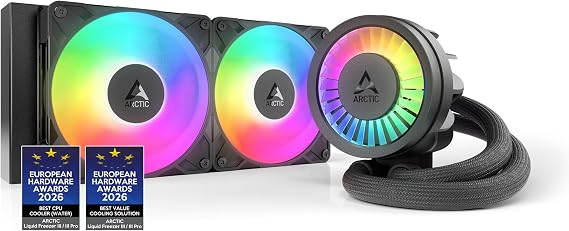
Excellent cooling power makes it a solid choice for anyone looking for quiet and efficient all-in-one liquid cooling. It especially suits those running Intel or AMD rigs who want reliable CPU and VRM cooling with good build quality.
Installation is straightforward thanks to the native offset mounting that aligns perfectly with CPU hotspots. The included ARCTIC P12 PRO fans run quietly even at higher speeds, helping keep temperatures down without constant noise.
The integrated PWM-controlled VRM fan adds extra security by cooling the voltage converters, which is great for sustained performance under load.
It handles heat very well, keeping CPUs cool with the optimized contact pressure frame and offset cold plate. The build feels solid, with attention to details like power connectors and fan control.
People praise its quiet operation and effective cooling. The most frequent complaint involves the maximum rotational speed listed as 1 rpm, which seems like a data error rather than a real issue.
Quiet fan operation with effective CPU and VRM cooling is a consistent compliment. The listed 1 rpm maximum speed in specs appears to be a reporting mistake, not reflecting real performance. Setup aligns well with CPU hotspots for efficient heat transfer.
Suits those needing stable, quiet cooling for Intel or AMD systems with attention to VRM temperatures. Users looking for detailed maximum fan speed info or ultrahigh power handling might want to consider other options.
Pros
- Optimized contact pressure improves heat dissipation
- Quiet and powerful ARCTIC P12 PRO fans included
- Integrated VRM fan keeps voltage converters cool
- Designed for Intel and AMD mounting compatibility
Cons
- Maximum rotational speed data shows 1 rpm, likely incorrect
- Wattage of 3.96 watts may concern high-power users
| Specification | Details |
|---|---|
| Power Connector Type | 4-Pin |
| Voltage | 12 volts |
| Wattage | 3.96 watts |
| Cooling Method | Water |
| Compatible Devices | AMD, Intel |
| Air Flow Capacity | 77 cfm |
9. Thermalright Aqua Elite 240 V3

Aluminium fins and an advanced pump head shape set this cooler apart, designed for desktop users wanting efficient liquid cooling. It suits anyone looking for reliable heat dissipation paired with low noise, focusing on long-lasting performance without fuss.
Setting it up is straightforward thanks to the included 240mm radiator with standard 120mm ARGB fans. Day-to-day, the pump’s low vibration and protective water pipe mesh help keep operation quiet and prevent leaks, while the ARGB lighting adds a subtle touch of style.
Monitoring fan speed via a 4-pin connector keeps noise at a manageable 25 db during normal use.
Cooling performance meets expectations with a maximum fan speed of 1800 RPM, handling airflow of 66.17 CFM efficiently. The build includes a fourth-generation pump with a 40,000-hour lifespan promise, using durable materials to keep evaporation low.
Some users mention the pump noise at higher RPMs as a drawback, but construction quality and heat sinking get consistent praise.
The cooler offers strong heat dissipation with a long-lasting pump rated for 40,000 hours, favored for quiet operation at normal speeds. However, the noise level rises when RPM nears its 2800 maximum, which some consider a drawback.
Users needing reliable daily cooling and modest noise will appreciate its design and build. Those seeking ultra-quiet setups or larger radiator options might want to explore other liquid cooling products.
Pros
- Low vibration pump for quieter operation
- ARGB fan adds customizable lighting
- Durable water-cooled design with protective mesh
- High airflow with balanced noise level
Cons
- Pump noise noticeable at top speeds
- Limited to 240mm radiator size only
| Specification | Details |
|---|---|
| Power Connector Type | 4-Pin |
| Voltage | 5 volts |
| Wattage | 2.64 watts |
| Noise Level | 25 db |
| Maximum Rotational Speed | 1800 rpm |
| Air Flow Capacity | 66.17 cfm |
10. Noctua NL-LC1-24 240mm

Quiet operation stands out right away with this 240mm all-in-one liquid cooler, designed for those building Small Form Factor (SFF) and near-silent desktop PCs. Its compact size fits well in tighter spaces without compromising on efficient cooling and whisper-quiet pump performance.
Setup involves mounting the compact 240mm radiator and connecting two included Noctua NF-A12x25 G2 PWM 120mm fans, which run quietly thanks to their speed-offset design. The innovative pump noise absorber reduces vibrations noticeably, making day-to-day use pleasantly quiet.
Power connection requires a simple 4-pin setup at 12 volts, and the unit’s water cooling method handles heat without fuss or maintenance.
Handling heat from high-performance CPUs is smooth with this cooler thanks to the Asetek Emma V2 platform’s efficient thermal management. Its build quality is reliable and solid, with the main praises highlighting exceptional quietness during operation.
The most common drawback mentioned centers on the pump’s maximum speed being capped at 1800 rpm, which might limit cooling during extreme CPU loads.
Quieter pump operation is achieved through a 3-layer acoustic soundproofing structure combined with a tuned-mass damper effect, making this cooler impressively silent. The most frequent complaint is the 1800 rpm maximum fan speed, which some find restrictive during intense processor cooling demands.
Those building compact, near-silent desktop PCs and prioritizing noise control will appreciate this cooler’s design. Users needing maximum thermal headroom under heavy loads might want to consider alternatives offering higher pump speeds and cooling capacity.
Pros
- Very quiet pump with soundproofing layers
- Compact 240mm radiator fits Small Form Factor PCs
- Efficient cooling with award-winning fans
- Low noise level at 22.5 dB
Cons
- Pump max speed limited to 1800 rpm
- May struggle in extreme CPU load conditions
| Specification | Details |
|---|---|
| Cooling Method | Water |
| Radiator Size | 240mm |
| Noise Level | 22.5 dB |
| Maximum Fan Speed | 1800 rpm |
| Fan Air Flow Capacity | 107.3 cubic meter per hour |
| Power Connector Type | 4-Pin |
| Voltage | 12 volts |
| Wattage | 1.8 watts |
11. ASUS Prime LC 360 ARGB

Powerful heat dissipation and a striking look make this liquid cooler a good choice for anyone who wants strong CPU cooling with style. It pairs particularly well with Prime motherboards, offering a balance of performance and design that can suit many desktop builds.
Setting up the cooler is straightforward, with reinforced sleeved tubing that feels sturdy during installation and long-term use. The pre-installed ARGB fans provide quiet airflow and customizable lighting, which keeps things visually interesting without needing extra parts. The 3-pin power connector works with most setups, making it easy to integrate into your system.
Its cooling performance is solid, thanks to a specially designed CPU contact area that helps get heat away from your processor quickly. Build quality stands out with durable tubing and the infinity mirror lenses add a futuristic look.
The biggest plus mentioned is how well it complements Prime motherboards, while some find the lighting effects heavy on power connectors.
Strong heat dissipation at the CPU contact surface delivers effective cooling, while the ARGB lighting stands out but uses additional power. Setup is made easier by durable tubing and an eye-catching design. The cooler fits well in systems prioritizing style and Prime motherboard aesthetics.
Ideal for those who want reliable performance with a visually appealing package, especially if using a Prime board. Users needing precise fan control might look elsewhere due to the 3-pin power connector limit. Suitable for desktop builders valuing both function and appearance.
Pros
- Strong heat dissipation at CPU contact area
- Customizable infinity mirror lenses for unique look
- Durable, sleeved tubing
- High-performance pre-installed ARGB fans
Cons
- 3-Pin power connector may limit fan control options
- ARGB lighting can draw noticeable power
| Specification | Details |
|---|---|
| Power Connector Type | 3-Pin |
| Cooling Method | Fan, Water |
| Compatible Devices | Desktop |
| Air Flow Capacity | 360 cubic_centimeters_per_minute |
12. SilverStone NovaPeak 360

Keeping a high-performance desktop cool without loud fans is key for serious PC builders. Perfect for those who want quiet operation and solid cooling, the SilverStone NovaPeak 360 excels in maintaining stable CPU temperatures while staying discreet with its minimalistic design and low noise level.
Installation is straightforward thanks to compatibility with many Intel and AMD sockets. The waterblock’s slight convex copper baseplate helps it sit tightly on the CPU, ensuring good heat transfer.
Dual-ball bearing PWM fans come with sound dampening pads, making daily operation noticeably quieter than many liquid coolers. The white LED indicator on the waterblock is simple and subtle, so it’s not flashy but still shows the pump’s working status.
Cooler performance lives up to the task with the pump’s three-phase, six-pole motor delivering smooth flow and keeping noise under control at about 35.1 dB. The all-black design looks clean and avoids flashy RGB distractions. A few reports mention the maximum rotational speed of 2200 rpm can still cause faint noise at full load, but most agree the cooler runs efficiently and quietly during normal use.
Strongest praise highlights smooth and quiet pump operation paired with efficient heat transfer from the copper baseplate. The most common drawback is occasional noise from fans spinning at their top speed, which some find noticeable during heavy loads.
Anyone looking for a dependable, silent cooling system without flashy lights will appreciate this model. Those wanting full RGB customization or ultra-silent operation at max load might want to explore other options.
Pros
- Quiet operation with sound dampening fan pads
- Copper baseplate for improved CPU contact
- Wide socket compatibility for Intel and AMD
- Subtle white LED waterblock indicator
Cons
- Fans reach 2200 rpm causing noticeable noise at max speed
- No RGB lighting for users who want customizable aesthetics
| Specification | Details |
|---|---|
| Cooling Method | Water |
| Noise Level | 35.1 db |
| Maximum Rotational Speed | 2200 rpm |
| Power Connector Type | 4-Pin |
| Voltage | 12 volts |
Comparison of Top All in One Liquid Coolers
| Product | Compatible Devices | Cooling Method | Maximum Rotational Speed | Noise Level |
|---|---|---|---|---|
| ARCTIC Liquid Freezer III 360 | Desktop, Gaming Console | Liquid | 3000 rpm | – |
| ARCTIC Liquid Freezer III 360 | Cpu | Liquid | 3000 rpm | – |
| ASUS ROG Strix LC III | Cpu, Desktop, Server | Fan | 360 rpm | 36 db |
| NZXT Kraken Core 240 | Desktop | Water | 3100 rpm | 31.9 db |
| ARCTIC Liquid Freezer III 240 | AMD, Intel | Water | 3000 rpm | – |
| Thermalright Aqua Elite 120 V3 | Desktop | Water | 1500 rpm | 25.6 db |
| be quiet! Pure Loop 3 | Intel, AMD sockets | Water | 2100 rpm | 36.8 db |
| ARCTIC Liquid Freezer III 240 | AMD, Intel | Water | 1 rpm | – |
| Thermalright Aqua Elite 240 V3 | Desktop | Air, Water | 1800 rpm | 25 db |
| Noctua NL-LC1 240 | Desktop | Water | 1800 rpm | 22.5 db |
| ASUS Prime LC 360 ARGB | Desktop | Fan, Water | – | – |
| SilverStone NovaPeak 360 | Desktop | Water | 2200 rpm | 35.1 db |
- Compatible DevicesDesktop, Gaming Console
- Cooling MethodLiquid
- Maximum Rotational Speed3000 rpm
- Noise Level–
- Compatible DevicesCpu
- Cooling MethodLiquid
- Maximum Rotational Speed3000 rpm
- Noise Level–
- Compatible DevicesCpu, Desktop, Server
- Cooling MethodFan
- Maximum Rotational Speed360 rpm
- Noise Level36 db
- Compatible DevicesDesktop
- Cooling MethodWater
- Maximum Rotational Speed3100 rpm
- Noise Level31.9 db
- Compatible DevicesAMD, Intel
- Cooling MethodWater
- Maximum Rotational Speed3000 rpm
- Noise Level–
- Compatible DevicesDesktop
- Cooling MethodWater
- Maximum Rotational Speed1500 rpm
- Noise Level25.6 db
- Compatible DevicesIntel, AMD sockets
- Cooling MethodWater
- Maximum Rotational Speed2100 rpm
- Noise Level36.8 db
- Compatible DevicesAMD, Intel
- Cooling MethodWater
- Maximum Rotational Speed1 rpm
- Noise Level–
- Compatible DevicesDesktop
- Cooling MethodAir, Water
- Maximum Rotational Speed1800 rpm
- Noise Level25 db
- Compatible DevicesDesktop
- Cooling MethodWater
- Maximum Rotational Speed1800 rpm
- Noise Level22.5 db
- Compatible DevicesDesktop
- Cooling MethodFan, Water
- Maximum Rotational Speed–
- Noise Level–
- Compatible DevicesDesktop
- Cooling MethodWater
- Maximum Rotational Speed2200 rpm
- Noise Level35.1 db
How to Choose the Right All in One Cooler
Choosing the right all in one cooler depends on factors like cooling performance, noise levels, radiator size, and compatibility with your case and CPU. Prioritizing these aspects ensures efficient cooling, reduces the risk of overheating, and helps avoid costly replacements or complications later.
Cooling Performance
Some CPUs easily hit temperatures above 80°C during gaming or video editing without proper cooling. A liquid cooler must keep the processor well under 70°C under load for stable performance and to prevent thermal throttling.
The effectiveness depends heavily on the radiator size and how efficiently it moves heat away from the CPU.
Look for a pump with a good flow rate and a radiator designed with dense fins and copper or aluminum material for faster heat dissipation. Compatibility with your CPU socket type (like AM4, LGA1200, or LGA1700) also matters to ensure proper mounting. The cooler should support TDP values above your CPU’s rating to avoid overheating during intensive tasks or overclocking.
A cooler that matches these specs will keep your processor cooler and quieter under stress.
Radiator Size and Fit
Radii commonly come in 120mm increments, with 120mm, 240mm, and 360mm options available. A larger radiator generally means better cooling but requires enough space in your PC case.
Some smaller cases only fit a 120mm radiator, while mid-towers usually accommodate 240mm or sometimes 360mm. Checking your case specs beforehand saves frustration during installation.
Clearance around RAM slots and motherboard components can cause trouble if the cooler’s tubes or radiator block access. Fans mounted on a radiator can also interfere with tall RAM heatsinks. Some coolers offer adjustable mounting brackets or slim-profile fans to improve compatibility.
Installation ease varies, but mounting holes on the radiator should line up perfectly with your case to avoid awkward fits.
Noise Levels
Idle fan noise can be barely noticeable on some units, around 20-30 decibels, which means you won’t hear it over normal background noise. However, when the CPU is under heavy load, fans can ramp up to 40 decibels or more.
Loud fans get tiring during long gaming sessions or rendering tasks.
Pump noise is another factor; some pumps emit a faint humming or occasional vibrations that may be distracting in a quiet room. Coil whine can appear but is less common.
User control via software or BIOS for fan and pump speeds helps reduce noise when high cooling isn’t needed. Look for units that include PWM fans or offer manual speed adjustment for a better sound balance.
Build Quality and Materials
A cooler with thick, reinforced tubing feels sturdier and less prone to kinks or cracking. Radiators made with quality aluminum or copper resist corrosion and conduct heat better. Cheaper models may use thinner metal or lower-grade plastic parts, which can degrade faster.
The cold plate often uses polished copper to improve heat transfer. Pumps with solid, well-sealed housing reduce risks of leakage.
Over time, poor-quality seals or materials can lead to coolant leaks or mineral buildup. Better materials mean the unit ages more gracefully and avoids failures related to corrosion or tube brittleness.
Maintenance and Longevity
Cleaning is a simple job if fans and radiators can be removed without disassembling the entire system. Dust buildup on radiator fins lowers cooling efficiency, so access for cleaning tools or compressed air is important. Fans with standard connectors make replacement straightforward.
Typical pump lifespan ranges between 3 to 7 years depending on build quality and usage. Coolant may evaporate or degrade, but sealed units usually don’t require refilling. Warranties covering at least 3 years offer reassurance against pump failure or leaks, since replacing these components can be costly and time-consuming.
Optimizing Performance: Installation and Setup Tips for All-in-One Liquid Coolers
Installing an all-in-one liquid cooler properly is crucial for optimal cooling performance. Start by securing the radiator in a location with good airflow, typically the top or front of the case, depending on your setup. Use the included mounting brackets and screws firmly, but avoid overtightening, which can damage components or casing.
Apply the thermal paste that comes pre-applied or add a small pea-sized amount if reapplying to ensure effective heat transfer between the CPU and the cold plate.
Connect the pump’s power cable to the correct header on your motherboard, usually labeled CPU_FAN or water pump, to monitor pump speed and system temperatures. Don’t forget to configure your BIOS or fan control software to prioritize pump operation and set fan curves appropriately.
Keeping tubes clear of kinks and ensuring no obstruction to fans contributes to consistent liquid flow and air exchange.
Maintenance Essentials to Extend the Lifespan of Your All-in-One Liquid Cooler
Regular maintenance plays a significant role in extending the functional life of an all-in-one liquid cooler. Dust buildup on radiators and fans reduces cooling efficiency, so clean these components with compressed air or a soft brush every few months. Check for any signs of leaks or corrosion around fittings and tubes to catch potential problems early before they impact performance.
While most all-in-one liquid coolers are sealed and do not require refilling, monitoring pump noise and temperatures can help detect issues. Excessive noise or rising CPU temperatures might indicate pump failure or reduced liquid flow.
Reapplying thermal paste annually can maintain thermal conductivity between the processor and cold plate. Ensuring case airflow remains unobstructed also helps dissipate heat efficiently and prolongs cooler longevity.
Comparing All-in-One Liquid Coolers with Custom Loop Systems: Pros and Cons
All-in-one liquid coolers come pre-assembled and sealed, making them simpler to install compared to custom loop systems. They save time and reduce the risk of leaks or errors during assembly.
Maintenance is generally straightforward, focused on cleaning and monitoring rather than fluid replacement or component compatibility checks.
- All-in-one liquid coolers: Compact, easier to install, lower upfront cost, and typically reliable for standard cooling needs.
- Custom loops: Offer better cooling performance and customization options but require significant time investment, regular maintenance, and higher costs for parts and fluids.
Choosing between the two depends on your comfort level with DIY PC building, desired cooling performance, and budget. For most users, an all-in-one liquid cooler provides a practical balance of efficiency and convenience without the complexity of custom setups.
People Also Asked
How Do I Properly Maintain an All in One Liquid Cooler?
Cleaning the radiator fins and fans regularly keeps an all in one liquid cooler working well. Dust buildup reduces cooling efficiency, so using compressed air every few months helps maintain airflow. Checking for any leaks or unusual noises is also important.
What Size Radiator Fits in a Standard Mid Tower Case?
Most standard mid tower cases fit a 240mm or 280mm radiator comfortably. Measuring your case before buying ensures you pick a size that won’t interfere with other components like RAM or GPU. Some cases support up to 360mm, but that’s less common.
Are All in One Liquid Coolers Safe for My CPU?
An all in one liquid cooler is safe for your CPU as long as it is installed correctly. Securely mounting the cold plate and applying the right amount of thermal paste are key steps. Also, ensure the pump is running to avoid overheating.
How Long Does an All in One Liquid Cooler Typically Last?
An all in one liquid cooler typically lasts around 5 to 7 years. The pump is the part most likely to fail, so listening for any unusual sounds helps catch problems early. Replacing the cooler after this period keeps temperatures stable.
What Are Common Issues with All in One Liquid Coolers?
Common issues with all in one liquid coolers include pump failure, leaks, and fan noise. Over time, dust can clog fins and reduce cooling performance. Monitoring CPU temperatures regularly helps spot performance drops related to these problems.
Conclusion
Choosing a good all-in-one liquid cooler comes down to a few key factors: cooling performance, noise levels, and compatibility with your case and CPU socket. It’s important that the cooler fits your PC layout and that it can handle the heat your processor generates without being too loud.
Durability and ease of installation can also make a difference over time.
Make sure to pick a cooler that suits the space you have available and fits your budget. Consider how often you plan to use it and whether you want something quieter or easier to maintain.
Check the comparison table and the detailed picks above to find the model that matches your needs best.

I’m Grant Mitchell, a firearms and hunting writer with years of experience at the range and in the field. I write about rifles, shotguns, handguns, optics, safe storage, cleaning, and responsible ownership, along with practical hunting tips. My goal is to share accurate, safety-first information that helps you choose the right firearm, maintain it properly, and become a more confident shooter.