Top 12 Best All in One CPU Cooler You Can’t Miss!
Cheap or poorly designed CPU coolers often struggle with noise, poor heat dissipation, or installation difficulties, which can lead to system instability or thermal throttling. The best all in one CPU cooler addresses these issues by providing efficient cooling without excessive noise or complicated setup. Regular air coolers sometimes can’t keep up with high-performance chips, pushing users toward liquid models that manage heat better in compact setups.
What sets a good all in one CPU cooler apart is primarily the quality of its pump and radiator. Pumps with low noise levels and reliable flow rates, usually around 300 to 500 liters per hour, help maintain safe operating temperatures. Radiator size matters too; 240mm or larger radiators generally offer better cooling capacity but require compatible case space.
Durable tubing and easy-to-clean fans also extend the cooler’s lifespan and make maintenance simpler.
Need a Quick Check?
| Image | Product | Price |
|---|---|---|
Our Top Picks 1  | ARCTIC Liquid Freezer III 360 | Check Price |
Our Top Picks 2  | be quiet! Light Loop 360 | Check Price |
Our Top Picks 3  | ASUS ROG Strix LC III | Check Price |
Our Selected Top 12 All in One Cpu Cooler You Can Trust
This list features carefully chosen all-in-one CPU coolers, each evaluated for performance, compatibility, and design. Readers will find clear insights on which type of user each cooler suits best, along with their main advantages and potential drawbacks to help make an informed decision.
1. ARCTIC Liquid Freezer III Pro 360
Highly engineered with a native offset mounting design and an integrated VRM fan, this all-in-one liquid cooler suits desktop builders who prioritize efficient cooling and CPU longevity. Its standout feature distributes contact pressure perfectly, promoting better heat dissipation and a longer-lasting processor.
Setup involves mounting the optimized cold plate carefully, which aligns the cooling surface directly with high-heat CPU areas, making installation precise. The ARCTIC P12 PRO fans operate quietly even at low speeds but ramp up efficiently when needed.
The built-in VRM fan actively cools voltage converters, maintaining stable performance during heavy use without extra noise or complexity.
Heat management excels under load thanks to the fans’ 3000 rpm maximum speed and the strategic placement of the cold plate. Construction feels solid and well-thought-out, prioritizing durability.
Positive notes frequently mention cooler temperatures and quiet operation. Common criticism points to the larger size affecting compatibility in smaller cases.
The cooler delivers excellent temperature control with quiet operation at low speeds, often praised for reducing CPU heat effectively. Most users note the unit’s size challenges fitting smaller cases as the primary downside. The integrated VRM fan helps stabilize performance, making it a comprehensive cooling solution.
A strong match for gamers and workstation users who have enough space for installation and want solid cooling performance. Those with compact PC cases or noise sensitivity at maximum fan speeds might consider alternative options better suited for tighter builds or quieter environments.
Pros
- Optimized pressure distribution for better cooling
- Quiet, powerful P12 PRO fans
- PWM-controlled VRM fan for added voltage converter cooling
- Compatible with both Intel and AMD sockets
Cons
- Large size may limit case compatibility
- Higher fan speeds can increase noise levels
| Specification | Details |
|---|---|
| Power Connector Type | 4-Pin |
| Voltage | 12 volts |
| Wattage | 3.96 watts |
| Cooling Method | Liquid |
| Maximum Rotational Speed | 3000 rpm |
| Air Flow Capacity | 77 cfm |
2. Be Quiet! Light Loop 360mm CPU Liquid Cooler
Stunning lighting is what grabs attention first with the Light Loop 360mm CPU cooler. It’s designed for people who want powerful water cooling combined with a bold light show, making it perfect for anyone building a PC where looks matter just as much as cooling performance.
Setting up the cooler involves installing three Light Wings LX 120mm fans that run quietly at up to 2100 rpm with PWM control. The 4-pin power connector keeps things straightforward and compatible with most modern Intel and AMD sockets.
The lighting setup lets you customize colors and effects, so daily use means keeping your system cool while enjoying a vivid display without much noise interference.
Cooling power is solid for a 360mm AIO, managing heat efficiently with a quiet 36.8 dB noise level. The build feels premium, especially with the illuminated block and fan blades. Praise often goes to the visual effects, while some mention that the noise level, although low, can get noticeable at max fan speed.
The light show from the LEDs stands out as the best feature, giving the system a unique look. Noise stays low during most use, but pushing fans to full speed makes it audible. Cooling efficiency meets expectations for a 360mm water cooler with solid airflow.
Anyone wanting a balance of strong cooling and vibrant aesthetics will appreciate this unit. Those prioritizing ultra-quiet performance or simpler lighting setups might look for alternatives with less fan noise or fewer LEDs to manage.
Pros
- Vivid, customizable LED lighting with 64 LEDs total
- Quiet operation even at higher speeds
- Compatible with a wide range of Intel and AMD sockets
- Powerful 360mm radiator for strong cooling
Cons
- Noise can be noticeable at maximum fan speed
- Lighting effects may require extra setup effort
| Specification | Details |
|---|---|
| Voltage | 12 volts |
| Wattage | 5.4 watts |
| Cooling Method | Water |
| Maximum Rotational Speed | 2100 rpm |
| Noise Level | 36.8 db |
| Air Flow Capacity | 61.8 cfm |
3. ASUS ROG Strix LC III 360 ARGB LCD CPU Cooler
Choosing the ASUS ROG Strix LC III 360 ARGB LCD brings high cooling power matched with unique visual flair. It suits gamers and PC builders who want top-tier cooling combined with a customizable display that shows system stats or artwork on a 2.1” IPS LCD.
Setting it up is straightforward, with compatibility covering Intel LGA 1700, 1200, 115X and AMD AM5, AM4 sockets. The rotatable 480×480 screen lets you personalize the display angle, keeping important info visible. Premium ROG ARGB fans run quietly and only spin up when needed thanks to 0dB technology, making daily use quieter than many comparable units.
Cooling is handled by a new Asetek cold plate and Gen7 V2 pump, delivering steady thermal performance. The reinforced sleeved tubing adds durability, supporting long-term reliability. Reviews show users loving the LCD panel’s customization, though a few mention the noise level can reach up to 36 dB under load.
The standout feature is definitely the customizable 2.1” LCD screen that rotates and shows system stats or art, making monitoring easy while also adding personal style. The most common point raised is the noise level, which can get noticeable at 36 dB when cooling hard.
This cooler fits people who want a powerful, visually distinct AIO with quiet day-to-day use. Anyone prioritizing ultra-low noise or on a tighter budget might consider simpler cooling solutions without the LCD display and ARGB features.
Pros
- 2.1” IPS LCD with fully rotatable display
- Strong cooling with Asetek cold plate and Gen7 V2 pump
- Highly durable sleeved tubing
- Quiet operation with 0dB fan technology
Cons
- Noise can reach 36 dB under heavy load
- Requires compatible ROG motherboard to match aesthetics
| Specification | Details |
|---|---|
| Cooling Method | Fan |
| Power Connector Type | 3-Pin |
| Voltage | 12 volts |
| Wattage | 10 watts |
| Noise Level | 36 db |
| Maximum Rotational Speed | 360 rpm |
4. ASRock Pro 360 ARGB Liquid CPU Cooler

Keeping CPU temperatures low during intense workloads is critical, especially for gamers and creative professionals. The ASRock Pro 360 ARGB Liquid CPU Cooler suits setups needing substantial cooling power combined with attractive lighting.
Its defining feature is the large 360mm radiator designed for efficient heat removal from modern CPUs.
Setting up the cooler is straightforward with broad CPU compatibility including AMD AM5/AM4 and Intel LGA1851/LGA1700 sockets. The PWM-controlled pump and three 120mm fans adjust speeds automatically for quiet operation when idle and ramp up cooling under load.
Customizable ARGB lighting on the pump head and fans lets you personalize system looks easily.
The cooling performance keeps CPU temperatures stable during heavy use without sounding too loud, thanks to the balanced pump speed of 1200-3200 RPM and fan speed up to 2100 RPM. Quality materials like the aluminum radiator contribute to durability. Single biggest praise focuses on effective heat dissipation, while some note noise levels reaching 31 db under full load.
Heat dissipation stands out as the strongest point, with the cooler maintaining low CPU temperatures well. Users frequently mention the noise level rising at maximum fan speeds as a drawback, which can be noticeable in quiet environments.
Those building powerful desktops with high thermal demands and a preference for striking lighting effects will appreciate this model. Users prioritizing silent operation above all may want to consider air coolers or liquid options with quieter fan profiles.
Pros
- Large 360mm radiator for strong cooling
- ARGB lighting customizable on pump and fans
- PWM control balances noise and performance
- Supports latest AMD and Intel CPU sockets
Cons
- Noise can reach 31 dB under heavy load
- Relies on 4-pin connector limiting compatibility
| Specification | Details |
|---|---|
| Cooling Method | Liquid |
| Power Connector Type | 4-Pin |
| Maximum Rotational Speed | 2100 rpm |
| Noise Level | 31 db |
| Voltage | 12 volts |
| Air Flow Capacity | 62.6 cfm |
5. ARCTIC Liquid Freezer III Pro 360 A-RGB

With a maximum rotational speed of 3000 rpm, this cooler is designed for intense heat dissipation, making it ideal for anyone pushing their CPU hard or wanting quieter operation at low speeds. Its integrated VRM fan sets it apart by managing voltage converter temperatures for more stable performance over time.
Setup involves installing the offset mounting bracket that aligns the cold plate with the CPU hotspot to improve heat transfer. The P12 PRO fan quietly ramps up under load without much noise disruption. Its PWM-controlled VRM fan automatically adjusts to maintain cooler motherboard components, which helps in preserving total system reliability during extended sessions.
Performance remains solid under demanding tasks, delivering efficient liquid cooling that keeps temperatures in check. The build feels sturdy with thoughtful touches like optimized contact pressure for Intel’s latest sockets.
Positive reviews often mention the quiet, powerful cooling, while some users note that the cooler’s size demands ample case space to fit comfortably.
Users appreciate the quiet performance during normal workloads combined with strong cooling under heavy CPU use. A common downside is its bulky size, which can make fitting it into certain cases a challenge.
Strong cooling and quieter fans suit anyone building high-performance PCs who has enough space inside their case. Those limited on space or sensitive to peak fan noise may want to consider smaller or fan-less cooling options.
Pros
- Powerful cooling with quiet low-speed operation
- Integrated VRM fan improves motherboard reliability
- Optimized mounting for better heat transfer
- Compatible with Intel and AMD sockets
Cons
- Requires substantial case space for installation
- Fan speed can be loud near maximum rpm
| Specification | Details |
|---|---|
| Maximum Rotational Speed | 3000 rpm |
| Air Flow Capacity | 77 cfm |
| Voltage | 12 volts |
| Wattage | 3.96 watts |
| Power Connector Type | 4-Pin |
| Cooling Method | Liquid |
6. Thermalright Aqua Elite 240 V3 CPU Cooler

People building a desktop that needs reliable and quiet cooling will appreciate this cooler. It suits those who want a strong combination of air and water cooling in one compact unit.
Its standout feature is a low vibration design that keeps noise down while managing heat effectively.
Installation is straightforward thanks to the standard 120mm ARGB fan that fits most cases easily. The pump head runs quietly at up to 2800 RPM and includes a colorful ARGB halo, which adds a bit of style. The protective mesh on the water pipes gives confidence in durability, and the low evaporation design means less maintenance over time.
Cooling power comes from a black aluminum fin heat sink paired with a fourth-generation pump, offering solid heat dissipation. The cooler runs at a maximum speed of 1800 RPM with airflow of 66.17 cfm, keeping temperatures well managed. Most praise centers on the quiet operation, though some mention the pump can be a bit noisy at full speed.
The strongest praise notes the cooler’s quiet operation combined with efficient heat dissipation thanks to its black aluminum fin design and advanced pump head. The most common complaint highlights the pump noise when running near its maximum 2800 RPM speed. This affects the overall silent experience in some setups.
Those needing a balance between strong cooling and subtle lighting will find this unit suitable. People prioritizing absolute silent operation or requiring voltage flexibility may want to consider alternatives. Compact case builders will appreciate its standard fitting and straightforward installation features.
Pros
- Low vibration for quiet operation
- Durable protective mesh on water pipes
- ARGB lighting adds visual appeal
- Compact 240mm size fits many cases
Cons
- Pump can be noisy at peak speed
- Limited voltage options (5 volts only)
| Specification | Details |
|---|---|
| Power Connector Type | 4-Pin |
| Voltage | 5 volts |
| Wattage | 2.64 watts |
| Noise Level | 25 db |
| Maximum Rotational Speed | 1800 rpm |
| Air Flow Capacity | 66.17 cfm |
7. ARCTIC Liquid Freezer III Pro 240 A-RGB
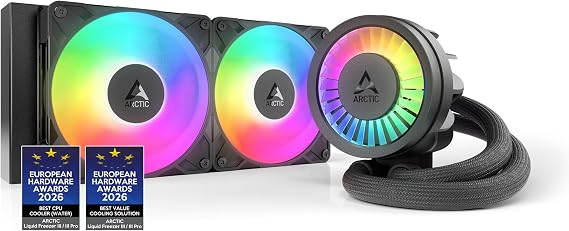
Liquid Freezer III Pro 240 A-RGB stands out with its optimized contact pressure and an integrated VRM fan, making it ideal for anyone wanting to keep their Intel or AMD CPU cool without unnecessary noise. Its best feature is the clever positioning of the cold plate, which targets the CPU hotspot for more efficient heat transfer than usual.
Setting it up involves mounting the cold plate slightly offset, which fits perfectly on both Intel and AMD sockets. The ARCTIC P12 PRO FAN runs quietly even at higher speeds, so daily use means less noise but consistent airflow.
The PWM-controlled VRM fan adds extra cooling to voltage converters, contributing to stable system performance during longer sessions.
Performance-wise, it handles high loads well, offering powerful cooling without getting loud. The build quality feels solid, especially with the contact frame designed for optimal pressure distribution to extend CPU lifespan.
Some users mention that while the cooler is effective, it can be a bit bulkier than simpler air coolers.
Strongest praise centers on how the cooler efficiently directs pressure and airflow to the CPU hotspot, keeping temperatures in check without much noise. A common complaint points out its bulky size, which may require more space and careful case compatibility consideration.
People who want quiet operation and strong cooling on newer Intel or AMD builds will appreciate this liquid cooler. Those with small cases or simple cooling needs might find a smaller or air-based cooler a better fit.
Pros
- Optimized pressure for better heat dissipation
- Integrated VRM fan for voltage converter cooling
- Quieter at low speeds than previous models
- Compatible with both Intel and AMD sockets
Cons
- Bulky compared to traditional air coolers
- Maximum rotational speed listed unusually low
| Specification | Details |
|---|---|
| Power Connector Type | 4-Pin |
| Voltage | 12 volts |
| Wattage | 3.96 watts |
| Cooling Method | Water |
| Air Flow Capacity | 77 cfm |
| Maximum Rotational Speed | 1 rpm |
8. MSI MAG Coreliquid A13 240 CPU Liquid Cooler

MSI MAG Coreliquid A13 240 is a liquid CPU cooler built to handle high-performance desktops, especially those using the latest LGA 1851 sockets. Its standout feature is a split-flow radiator design paired with an integrated pump that aims to cut down motor noise while delivering solid cooling power.
Setup involves mounting the aluminium radiator and hooking up the high-speed pump, which runs at up to 3800 RPM. The pump’s ceramic bearings help it stay quiet during long sessions. Managing the 4-pin power connector and fitting the cooler into your case is straightforward, thanks to its compatible design for various desktop builds.
Performance-wise, it keeps temperatures well under control with an efficient water cooling system and 60.78 cfm airflow. Build quality is solid, with durable components designed to last. Praised for quiet operation due to the motor resonance reduction, it sometimes faces criticism for its noise when the pump hits maximum speed at 5200 rpm.
Praise centers around the quiet and reliable pump made with ceramic bearings that reduce noise and increase lifespan. Complaints mostly mention the noisier pump operation when spun up to its maximum rotational speed of 5200 rpm. Cooling stays effective but noise grows at those peak levels.
People building a high-end desktop with the latest CPU sockets will find this cooler a good fit, especially for those valuing quiet operation at normal speeds. Anyone extremely sensitive to occasional pump noise spikes or looking for lower power draw might want to consider alternative options.
Pros
- Quiet operation thanks to ceramic bearings
- Supports newest LGA 1851 socket out of the box
- Durable split-flow aluminium radiator
- High airflow capacity of 60.78 cfm
Cons
- Pump noise increases noticeably at max speed
- Power consumption at 2.16 watts might concern minimalists
| Specification | Details |
|---|---|
| Power Connector Type | 4-Pin |
| Voltage | 12 volts_of_direct_current |
| Wattage | 2.16 watts |
| Maximum Rotational Speed | 5200 rpm |
| Air Flow Capacity | 60.78 cfm |
| Noise Level | 14.4 db |
9. Thermalright Aqua Elite 120 V3 CPU Cooler

Quiet and effective cooling strikes a great balance in this water-cooled CPU cooler. Perfect for anyone looking to reduce processor temperatures with a low vibration design and a 120mm ARGB fan that adds neat lighting effects while running smoothly. Its standout feature is the combination of solid cooling performance and an integrated lighting sync option.
Setup is straightforward, including a pump head from the latest generation and a black aluminum fin heat sink that fits well on most desktop CPUs. The water pipe has a protective mesh that helps avoid damage or leaks, and the fan connects via a 4-pin power connector for precise speed control at up to 1500 rpm.
It’s quiet in daily use, running at just 25.6 dB, so background noise stays minimal.
Heat management holds up nicely under load thanks to its 66.17 CFM airflow capacity, keeping temperatures down without loud fans. Build quality feels solid with durable materials meant to last long and prevent evaporation. Most praise points go to its quiet operation and efficient heat dissipation, though some mention that the lighting sync requires compatible 5V 3-pin motherboard headers to function fully.
Fans appreciate the quiet yet efficient cooling performance combined with a durable build designed to avoid common water cooling issues like evaporation. The ARGB lighting effect is a popular feature but depends heavily on having a compatible motherboard for proper syncing and control.
People who want a reliable, visually appealing cooler for gaming or intensive tasks will find this fits well. Those without a compatible motherboard header for lighting or aiming for the lowest possible wattage might want to consider other options.
Pros
- Low vibration pump for quieter operation
- ARGB lighting synced with 5V 3-pin motherboard
- Protective mesh on water pipes for durability
- Effective cooling with 120 cold row aluminum fins
Cons
- Lighting sync needs specific motherboard support
- Wattage slightly higher than some competing models
| Specification | Details |
|---|---|
| Power Connector Type | 4-Pin |
| Voltage | 12 volts |
| Wattage | 7.2 watts |
| Noise Level | 25.6 db |
| Maximum Rotational Speed | 1500 rpm |
| Air Flow Capacity | 66.17 cfm |
10. ARCTIC Liquid Freezer III Pro 240

Liquid Freezer III Pro 240 offers reliable cooling performance and smart design for those building a mid to high-end PC. It stands out mainly due to its quiet but powerful fans and clever heat transfer solutions that keep your CPU running cooler longer.
Setup involves mounting using the native offset system made for both Intel and AMD sockets, which helps direct cooling exactly where it’s needed most. The included P12 PRO fans operate quietly at low speeds yet ramp up efficiently under load. The integrated VRM fan is a subtle but valuable addition, maintaining stable power delivery by cooling the voltage converters.
Cooling feels very solid with a maximum fan speed of 3000 rpm and 77 cfm airflow, handling intense workloads without noticeable noise. Build quality reflects the focus on both performance and durability, especially with the contact frame optimized for Intel sockets to evenly distribute pressure and avoid damage. The most common downside is the occasional difficulty in fitting in smaller cases due to its size.
Reviews commend the quietness and strength of the fans even at low speeds, contributing to excellent cooling without loud noise. The main complaint focuses on its bulk making installation in compact builds a challenge.
Ideal for users with mid to high-end setups that have enough space for installation and demand consistent CPU and VRM cooling. Users with smaller cases or noise-sensitive setups might want to explore more compact or quieter options.
Pros
- Quiet and powerful P12 PRO fans
- Offset mounting for targeted cooling
- Integrated VRM fan for voltage stability
- Optimized pressure for CPU longevity
Cons
- May be difficult to fit in smaller cases
- Maximum fan speed can be noisy under full load
| Specification | Details |
|---|---|
| Cooling Method | Water |
| Maximum Rotational Speed | 3000 rpm |
| Air Flow Capacity | 77 cfm |
| Power Connector Type | 4-Pin |
| Voltage | 12 volts |
| Wattage | 3.96 watts |
11. ASUS Prime LC 360 ARGB CPU Liquid Cooler

Aluminum and reinforced sleeved tubing give this liquid cooler a durable feel right from the start. Designed for desktop builds that want strong cooling and eye-catching looks, its key strength is a large, efficient CPU contact area that helps keep temperatures down during heavy use.
Setup goes smoothly thanks to pre-installed ARGB fans that also add vibrant lighting effects. Installation complements Prime motherboards well, matching their style and color scheme.
The reinforced tubing resists wear better than many coolers in this category, making it reliable day after day, especially for those who like a visually striking setup with practical cooling power.
Cooling performance ranks highly, with a fan and water combo pushing air effectively through the system. The main highlight is its quiet operation and how the customized infinity mirror lenses improve the look without sacrificing function.
Some found the 3-Pin power connector less flexible than others, but durability and steady airflow came up as consistent positives in feedback.
The strongest praise centers on how effectively the CPU contact area keeps temperatures low alongside quiet and reliable fan operation. Common criticism involves the 3-Pin connector limitation, which doesn’t suit all motherboard setups. Users often appreciate the durability of the sleeved tubing and the visual appeal from the ARGB lighting.
Gamers and PC builders wanting reliable cooling with style will find this liquid cooler fits well. Those needing broader power connector compatibility or simpler cleaning processes might look for alternatives that better match those specific needs.
Pros
- Powerful heat dissipation from specially designed contact area
- Customizable infinity mirror lenses for unique look
- Comes with high-performance pre-installed ARGB fans
- Durable reinforced sleeved tubing
Cons
- 3-Pin power connector offers limited compatibility
- Lacks detailed cleaning instructions for maintenance
| Specification | Details |
|---|---|
| Cooling Method | Fan, Water |
| Power Connector Type | 3-Pin |
| Compatible Devices | Desktop |
| Air Flow Capacity | 360 cubic_centimeters_per_minute |
12. Noctua NL-LC1-24 240mm AIO CPU Cooler

Quiet operation stands out immediately with this 240mm all-in-one cooler, ideal for anyone building a small form factor PC that needs efficient cooling without noise. It suits users looking for a premium liquid cooling solution with reliable thermal performance in limited space.
Setup is straightforward thanks to the compact radiator and well-designed mounting hardware. The pump noise absorber reduces vibration noticeably, which makes daily use much quieter than many other AIOs. Two NF-A12x25 G2 PWM 120mm fans keep airflow effective but gentle on the ears thanks to speed-offset for low noise operation.
Thermal performance meets industry-leading standards through the Asetek Emma V2 platform, making sure heat stays under control during heavy workloads. Build quality is top tier, combining solid materials with an acoustic soundproofing structure in the pump. The biggest compliment is how silent it runs, while a common drawback is the 240mm radiator size requiring some careful case placement for fit.
The quietness of the pump combined with the noise-optimized fans delivers a nearly silent cooling experience, praised in reviews. However, installing the 240mm radiator in smaller cases has been noted as a common challenge.
Those building near-silent Small Form Factor PCs will be pleased with this cooler. Users who require larger radiators or faster pump speeds might need to look elsewhere.
Pros
- Low noise thanks to pump noise absorber
- Compact 240mm radiator fits smaller cases
- Efficient airflow with award-winning fans
- Reliable thermal performance from Asetek platform
Cons
- Radiator size may limit installation options
- Pump rotational speed maxes at 1800 rpm
| Specification | Details |
|---|---|
| Cooling Method | Water |
| Radiator Size | 240mm |
| Noise Level | 22.5 db |
| Maximum Rotational Speed | 1800 rpm |
| Air Flow Capacity | 107.3 cubic meter per hour |
| Power Connector Type | 4-Pin |
Best All in One CPU Coolers Comparison Table
| Product | Cooling Method | Air Flow Capacity | Noise Level | Max Rotational Speed |
|---|---|---|---|---|
| ARCTIC Liquid Freezer III 360 | Liquid | 77 cfm | – | 3000 rpm |
| be quiet! Light Loop 360 | Water | 61.8 cfm | 36.8 db | 2100 rpm |
| ASUS ROG Strix LC III | Fan | – | 36 db | 360 rpm |
| ASRock Pro 360 ARGB | Liquid | 62.6 cfm | 31 db | 2100 rpm |
| ARCTIC Freezer III Pro 360 | Liquid | 77 cfm | – | 3000 rpm |
| Thermalright Aqua Elite 240 V3 | Air, Water | 66.17 cfm | 25 db | 1800 rpm |
| ARCTIC Liquid Freezer III 240 | Water | 77 cfm | – | 1 rpm |
| MSI MAG Coreliquid A13 240 | Water | 60.78 cfm | 14.4 db | 5200 rpm |
| Thermalright Aqua Elite 120 V3 | Water | 66.17 cfm | 25.6 db | 1500 rpm |
| ARCTIC Liquid Freezer III 240 | Water | 77 cfm | – | 3000 rpm |
| ASUS Prime LC 360 ARGB | Fan, Water | 360 cfm | – | – |
| Noctua NL-LC1 240 | Water | 107.3 m³/h | 22.5 db | 1800 rpm |
- Cooling MethodLiquid
- Air Flow Capacity77 cfm
- Noise Level–
- Max Rotational Speed3000 rpm
- Cooling MethodWater
- Air Flow Capacity61.8 cfm
- Noise Level36.8 db
- Max Rotational Speed2100 rpm
- Cooling MethodFan
- Air Flow Capacity–
- Noise Level36 db
- Max Rotational Speed360 rpm
- Cooling MethodLiquid
- Air Flow Capacity62.6 cfm
- Noise Level31 db
- Max Rotational Speed2100 rpm
- Cooling MethodLiquid
- Air Flow Capacity77 cfm
- Noise Level–
- Max Rotational Speed3000 rpm
- Cooling MethodAir, Water
- Air Flow Capacity66.17 cfm
- Noise Level25 db
- Max Rotational Speed1800 rpm
- Cooling MethodWater
- Air Flow Capacity77 cfm
- Noise Level–
- Max Rotational Speed1 rpm
- Cooling MethodWater
- Air Flow Capacity60.78 cfm
- Noise Level14.4 db
- Max Rotational Speed5200 rpm
- Cooling MethodWater
- Air Flow Capacity66.17 cfm
- Noise Level25.6 db
- Max Rotational Speed1500 rpm
- Cooling MethodWater
- Air Flow Capacity77 cfm
- Noise Level–
- Max Rotational Speed3000 rpm
- Cooling MethodFan, Water
- Air Flow Capacity360 cfm
- Noise Level–
- Max Rotational Speed–
- Cooling MethodWater
- Air Flow Capacity107.3 m³/h
- Noise Level22.5 db
- Max Rotational Speed1800 rpm
How to Choose the Right All in One CPU Cooler
Focusing on cooling performance, compatibility with your CPU and case, and noise levels ensures an efficient and quiet system. Choosing the right size and quality materials helps avoid installation issues and potential overheating, ultimately saving money by preventing damage and unnecessary replacements.
Cooling Performance
Some coolers come with a 120mm radiator and a single fan, while others stretch to 360mm with three fans. This size difference directly affects how much heat the system can handle. A larger radiator combined with multiple fans generally moves heat away more efficiently, which matters if the CPU’s heat output is high.
The pump’s design and its flow rate play a crucial role, too; a slow pump results in less coolant movement, causing temperatures to rise under load.
Matching the cooler’s capacity to the CPU’s TDP rating helps avoid thermal throttling. For example, a CPU with a 150W TDP benefits from a bigger radiator and at least two 120mm fans running at moderate speeds. Pumps with ceramic bearings tend to last longer and maintain flow rates better.
Understanding these specs means a system that runs cooler and quieter over time, without surprises during heavy tasks.
Compatibility and Fit
Knowing your CPU socket type is essential since mounting brackets vary across brands and models. Missing this detail can result in a cooler that doesn’t fit properly or at all. Measuring the case space where the radiator will go helps avoid clearance issues, not all cases support larger radiators or thick fan setups without blocking cables or other components.
The cooler’s size can also interfere with tall RAM modules or obstruct certain motherboard ports. A bulky water block or thick radiator means less room for airflow or connecting cables.
Checking dimensions and comparing those to your motherboard layout prevents awkward fits or forced compromises on hardware choices.
Noise Levels
Fan noise becomes noticeable in quiet rooms especially when fans ramp up under load. Fans with fluid dynamic bearings typically run quieter and last longer compared to sleeve bearings, though this varies by model.
The pump runs all the time and can be a noise source if it’s low-quality or poorly mounted.
Coolers with software that lets you customize fan curves help keep noise low during lighter workloads and increase cooling only when necessary. Sound dampening features like rubber mounts or specially designed fans reduce vibrations and hum. Over time, a quieter cooler makes using the computer more comfortable without sacrificing performance.
Build Quality and Materials
Radiators made with copper fins and tubes transfer heat more effectively than aluminum-only designs but usually come at a higher price. The water block should use copper as well for better conductivity and longer lifespan.
Plastic parts may crack or degrade faster under heat and pressure.
Tubing quality is another area often overlooked. Thick, flexible rubber or reinforced tubing can prevent leaks and resist kinks better than thin silicone ones. Corrosion-resistant coatings inside the loop and durable seals matter for avoiding coolant degradation and leaks, which can cause damage over months or years of use.
Ease of Installation and Maintenance
Mounting kits that come with clear step-by-step instructions and all required brackets save frustration during installation. Some systems use a backplate and thumbscrews that make the process smoother and more secure. Separate mounting arms or adapter kits for different sockets add convenience for future upgrades.
Cleaning is easier if the radiator fins and fans can be accessed without full disassembly. Dust buildup quickly reduces cooling efficiency, so features like removable fan clips or easily reachable fin areas help maintain performance without major teardown. Practical maintenance design extends the life of the cooler and keeps temperatures down consistently.
Optimizing All-in-One CPU Cooler Performance Through Proper Installation
Proper installation is crucial for an all-in-one CPU cooler to perform at its best. Begin by cleaning the CPU surface thoroughly before applying thermal paste to ensure efficient heat transfer.
Use a pea-sized amount of thermal compound in the center only. Secure the cooler evenly to avoid uneven pressure, which can create hot spots. Mount the radiator in a position that allows consistent airflow, typically at the top or front of the case, depending on your setup.
Connect the pump and fan cables to the appropriate headers on the motherboard to enable speed control and monitoring. Avoid overly tightening screws to prevent damaging the CPU or motherboard.
Ensuring good cable management also improves airflow around the cooler, which aids heat dissipation. Following these installation practices helps maintain stable CPU temperatures and prevents premature wear on pump and fan components.
Routine Maintenance Tips to Prolong the Lifespan of Your AIO Cooler
Maintaining an all-in-one cooler does not require much effort but is essential for durability. Dust buildup on fans and the radiator reduces cooling efficiency, so regular cleaning with compressed air or a soft brush is necessary, especially if the PC operates in a dusty room. Checking fan speeds and pump operation every few months helps spot potential failures early.
Ensure that the radiator’s fins remain straight and clear for optimal airflow. The sealed design means you don’t need to refill the coolant, but be alert to any unusual noises or temperature spikes that could indicate a compromised seal or pump issue.
Keeping the mounting secure and the cooler free of debris extends its lifespan and maintains stable system temperatures over time.
Comparing All-in-One Coolers with Custom Liquid Cooling Solutions
All-in-one CPU coolers offer a simpler setup compared to custom liquid cooling loops, requiring minimal maintenance and no custom plumbing. They come pre-filled and sealed, making them more user-friendly, especially for those who don’t want to build or maintain a custom loop. Custom loops provide more cooling capacity and customization options, such as using different coolant colors, radiator sizes, or water blocks for various components.
However, they demand more time, knowledge, and ongoing maintenance like coolant replacement and leak checks. AIO coolers are more compact and easier to install in most cases but might offer slightly less cooling efficiency under heavy loads.
Choosing between the two often depends on the user’s comfort with hardware, budget, and the level of cooling performance required.
People Also Asked
How Do I Install an All in One CPU Cooler Properly?
Proper installation requires securely mounting the radiator and fan inside your case, applying thermal paste sparingly on the CPU, and attaching the pump unit firmly to the CPU socket. Tighten screws evenly to avoid uneven pressure. Check the manual for correct orientation to ensure the tubes do not kink and airflow is optimal.
Will an All in One Cooler Fit in My PC Case?
Most all in one coolers fit mid to full tower cases, but clearance can be tight in smaller cases. Measure your case’s radiator mounting area and compare it with the cooler’s radiator size to confirm compatibility. Take note of RAM height and GPU length to avoid interference around the radiator mounting spots.
How Long Do All in One CPU Coolers Typically Last?
All in one CPU coolers typically last between 5 to 7 years before performance degradation or pump failure is noticeable. Regular dust cleaning around the radiator and fans can help maintain cooling efficiency over time. Watch for any unusual noises, which may signal the pump is starting to fail.
Can an All in One Cooler Cause Damage to My CPU?
Damage to the CPU is rare if the cooler is installed properly and maintained, but improper mounting can cause uneven pressure, affecting thermal transfer. Avoid using too much thermal paste as it can spill over and cause short circuits. Monitor temperatures during the first boot to catch any installation issues early.
What Are Common Issues with All in One CPU Coolers?
Common issues include pump failure, fan noise, and coolant leaks, although leaks are rare. Fans can accumulate dust reducing airflow, so clean them periodically. Watch out for vibration noises from the pump, which may indicate it’s wearing out and could impact cooling performance.
Conclusion
Choosing the right all-in-one CPU cooler mainly comes down to two things: how well it fits your case and how quiet it runs. Cooling performance matters most if you plan to push your CPU hard or want to keep temps low for long periods. Also, think about the ease of installation so you’re not stuck with complicated setup.
Consider your available space and budget carefully before picking. Some coolers are bulkier or more expensive but might be too much for casual use.
Check the comparison table to match features with your needs, then look at the detailed picks above to find one that fits your setup well.

I’m Grant Mitchell, a firearms and hunting writer with years of experience at the range and in the field. I write about rifles, shotguns, handguns, optics, safe storage, cleaning, and responsible ownership, along with practical hunting tips. My goal is to share accurate, safety-first information that helps you choose the right firearm, maintain it properly, and become a more confident shooter.