Top 12 Best Air CPU Cooler for i7 7700k You Can’t Miss!
Overheating is a common issue that people encounter when using an inadequate cooling solution for their i7 7700k processor. A poorly chosen cooler can cause the CPU to throttle under load, leading to reduced performance and louder fan noise. Finding the best air cpu cooler for i7 7700k means addressing these heat management challenges directly to keep the system stable during gaming or heavy multitasking.
The most important factors for a good air CPU cooler with the i7 7700k are the size and efficiency of the heatsink and fan, compatibility with your case and motherboard, and build quality. Larger heatsinks with dense aluminum fins combined with heat pipes made of copper provide better heat dissipation. Fans around 120mm or larger running quietly at 1500-2000 RPM balance airflow with noise.
A cooler must also fit the CPU socket without obstructing RAM slots or PCIe cards and offer easy access for routine cleaning to prevent dust buildup.
Need a Quick Check?
| Image | Product | Price |
|---|---|---|
Our Top Picks 1  | Thermalright Peerless Assassin 120 SE | Check Price |
Our Top Picks 2  | Thermalright Assassin X120 SE ARGB | Check Price |
Our Top Picks 3  | Thermalright Peerless Assassin Vision MAX | Check Price |
Our Selected Top 12 Air Cpu Cooler for I7 7700k for Different Needs
This list features a variety of air CPU coolers compatible with the i7 7700k, highlighting performance, suitability for different user needs, and key advantages and disadvantages of each option. Readers will gain insight into which cooler matches their specific requirements.
1. Thermalright Peerless Assassin 120 SE CPU Cooler
Choosing a cooler that can handle the heat of an i7 7700k without loud noise or bulky size is important. The Thermalright Peerless Assassin 120 SE stands out by offering reliable air cooling with a noise level that won’t drown out your setup. It fits well in standard desktops and focuses on efficient heat dissipation.
Setup involves attaching the cooler with the included mounting bracket, which feels sturdy and secure. The 4-pin power connector allows for PWM control, so fan speed adjusts based on your CPU temperature.
It spins at a maximum of 1550 rpm, balancing airflow and sound. Regular cleaning is straightforward since the design isn’t overly complex, keeping dust buildup manageable during daily use.
Heat removal works well up to 265 watts, enough to keep the i7 7700k stable under typical loads. The build uses durable materials that are solid without feeling heavy, which ensures it stays firmly in place.
Users note that the cooler runs quietly at 25.6 db, yet some mention it isn’t the smallest cooler, so tight cases might present a challenge.
Heat management is effective, and noise remains low, making it a strong choice for cooling an i7 7700k. However, some find the size a drawback for compact cases, limiting its universal fit. The sturdy mounting system also scores well, giving confidence in long-term stability.
Those with mid-sized to larger cases who value quieter cooling will appreciate its balance of airflow and noise. This cooler might not be the best match for very small form factors or setups demanding ultra-compact components.
Pros
- Quiet operation at only 25.6 db
- Good airflow with 66.17 cfm
- Compatible with most desktop setups
- Mounting bracket feels secure and reliable
Cons
- Not suitable for very tight spaces
- Fan speed maxes out at 1550 rpm
| Specification | Details |
|---|---|
| Power Connector Type | 4-Pin |
| Voltage | 12 volts |
| Wattage | 265 watts |
| Noise Level | 25.6 db |
| Maximum Rotational Speed | 1550 rpm |
| Air Flow Capacity | 66.17 cfm |
2. Thermalright Assassin X120 SE ARGB CPU Cooler
Keeping an Intel i7 7700k cool under load can be tricky, but this CPU cooler handles it with quiet efficiency. It fits well in most setups and shines at maintaining lower temperatures without being noisy, making it a solid choice for users who want reliable air cooling with a bit of style from the ARGB lighting.
Installation is straightforward thanks to the included mounting brackets and the anti-falling off design, which keeps everything secure. The 4-pin connector gives you decent control over fan speed via your motherboard.
Day-to-day noise is low at 25.6 dB, so it won’t be distracting, while the fan’s 1550 rpm speed balances airflow and sound nicely during gaming or heavy workloads.
Cooling performance does well, moving up to 66.17 cfm of air to keep temperatures lower on the i7 7700k. Its build quality reflects Thermalright’s experience, with solid materials and careful engineering evident in how quietly and efficiently it runs.
Some users mention it’s a bit bulky, so checking case clearance is wise, but overall it handles heat without fuss and runs quietly.
It is praised for its quiet performance and efficient cooling, keeping the i7 7700k running cool without much fan noise. The main drawback is its size, as some users find it difficult to fit in smaller cases due to its bulk.
Gamers and PC builders who want an effective cooler with customizable lighting will appreciate this model. Those with compact or tight computer cases might want to consider smaller alternatives despite the solid cooling support it offers.
Pros
- Quiet operation at only 25.6 dB
- Good airflow capacity of 66.17 cfm
- Secure mounting brackets prevent loosening
- Attractive ARGB lighting included
Cons
- May be bulky for smaller cases
- Fan speed maxes out at 1550 rpm
| Specification | Details |
|---|---|
| Power Connector Type | 4-Pin |
| Voltage | 12 volts |
| Cooling Method | Air |
| Noise Level | 25.6 db |
| Maximum Rotational Speed | 1550 rpm |
| Air Flow Capacity | 66.17 cfm |
3. Thermalright Peerless Assassin 120 Vision MAX ARGB CPU Cooler
Featuring a 5-inch IPS LCD screen on its radiator, the cooler offers real-time monitoring and personalized display, perfect for anyone running an i7 7700k who wants to keep track of system status while enjoying strong cooling power. Its standout feature is the combination of dual-tower design and powerful fans that maximize cooling efficiency.
Setup involves attaching the dual fans and connecting the 4-pin power cable, which is straightforward for a desktop build. Daily use means quiet operation at 27 dB, with the fans spinning up to 2150 RPM to maintain airflow. The included software allows customization of the display background, letting you keep an eye on temperatures without extra tools.
Six pure copper heat pipes with a nickel-plated base deliver solid heat transfer, keeping the CPU cool under load. The build feels sturdy and well-designed with a magnetically attached top cover.
Praises focus on its strong cooling capacity and informative LCD, while a noted downside is the cooler’s relatively large size, which can cause clearance issues in smaller cases.
The built-in LCD screen receives a lot of praise for real-time system monitoring, while the size of the cooler is the most common complaint, especially in compact setups. Strong cooling performance comes from quality materials and high fan speeds, but the cooler demands enough case space.
Users with mid or full tower desktops and room to spare will appreciate the cooling and display features. Those with small cases or tight clearances might want to look for a more compact cooler to avoid fitment issues.
Pros
- 5-inch IPS LCD screen for monitoring
- High-speed 2150 rpm fans
- Six pure copper heat pipes for strong cooling
- Quiet operation at 27 dB
Cons
- Large size may not fit smaller PC cases
- Software customization could be more intuitive
| Specification | Details |
|---|---|
| Power Connector Type | 4-Pin |
| Cooling Method | Air |
| Noise Level | 27 dB |
| Maximum Rotational Speed | 2150 rpm |
| Air Flow Capacity | 69 cfm |
4. Thermalright Assassin X90 SE V2 CPU Cooler

People looking for a reliable air cooler for their i7 7700k that balances decent airflow with low noise will find a fit with the Thermalright Assassin X90 SE V2. It stands out for being quiet while still providing solid cooling, making it suitable for builds where noise matters as much as temperature control.
Installing the cooler is straightforward thanks to its standard mounting system compatible with desktop CPUs. The 4-pin power connector supports PWM, which helps adjust fan speed automatically depending on workload. Running at a maximum of 2200 rpm, the fan provides enough airflow at just 25 db noise, keeping the system relatively quiet during regular tasks and gaming sessions.
The air cooling method effectively manages heat generated by the i7 7700k without demanding extra power, only 1.2 watts at 12 volts. The cooler feels well-built with solid materials, supporting consistent long-term performance.
The main praise highlights its quiet operation, but some users mention it could push more air for extreme overclocking setups.
The strongest praise is its quiet cooling performance that keeps noise down to 25 db while maintaining steady airflow. The common complaint centers on the airflow capacity, which some find insufficient for very high CPU loads or aggressive overclocking.
This cooler suits users prioritizing quiet operation and decent temperature management for an i7 7700k in typical gaming or work setups. Those pushing their CPU beyond stock speeds or needing extreme cooling might want to explore options with higher airflow and fan speeds.
Pros
- Quiet operation at 25 db noise level
- Supports PWM with 4-pin connector
- Reasonable airflow of 32.77 cfm
- Low power consumption at 1.2 watts
Cons
- Airflow may be limited for heavy overclocking
- Fan speed maxes out at 2200 rpm, no higher boost
| Specification | Details |
|---|---|
| Power Connector Type | 4-Pin |
| Voltage | 12 volts |
| Wattage | 1.2 watts |
| Maximum Rotational Speed | 2200 rpm |
| Noise Level | 25 db |
| Air Flow Capacity | 32.77 cfm |
5. Be Quiet! Pure Rock Pro 3 CPU Cooler

Pure Rock Pro 3 Silver stands out with its six nickel-plated copper heat pipes, perfect for keeping an i7 7700k cool under pressure. Designed for those pushing their CPUs with overclocking or demanding workloads, it delivers serious cooling without taking up too much space.
Setting it up involves attaching one of the optimized Pure Wings 3 120mm PWM fans, known for its specially angled blades that push a strong airflow right over the fins. The funnel-shaped air outlet on the cooler directs air efficiently, which makes a noticeable difference during daily use, especially when multitasking or gaming for extended periods.
Performance-wise, it handles the heat from the i7 7700k effectively, maintaining good temps during heavy tasks. The build quality feels solid with its nickel-plated base and heat pipes, providing durability and efficient heat transfer.
The main praise lies in its quiet operation and powerful cooling, while some mention the noise level hitting 34.8 dB at peak fan speed as a minor downside.
The most positive feedback highlights strong and quiet cooling performance with the nickel-plated copper pipes and fan design doing their job well. The common complaint centers around noticeable noise when the fan spins at full speed, especially under heavy load.
Anyone needing reliable cooling for an overclocked i7 7700k in a mid-size case will appreciate this cooler’s balance of efficiency and noise levels. Those with very small cases or noise sensitivity at peak fan speeds might want to explore quieter or lower-profile options.
Pros
- Excellent cooling for overclocked CPUs
- Six nickel-plated copper heat pipes
- Optimized 120mm PWM fan blades
- Quiet operation at moderate speeds
Cons
- Noisy at maximum 2000 rpm fan speed
- May be bulky for very compact cases
| Specification | Details |
|---|---|
| Cooling Method | Air |
| Maximum Rotational Speed | 2000 rpm |
| Noise Level | 34.8 db |
| Power Connector Type | 4-Pin |
| Voltage | 12 volts |
| Wattage | 3.6 watts |
6. Cooler Master i70C ARGB Low Profile CPU Cooler

Cooler Master i70C ARGB Low Profile CPU Cooler is designed for those wanting efficient cooling with a neat, minimalist look. It suits small builds where space and quiet operation matter, standing out for balancing performance and compact design without loud noise.
Installation is straightforward thanks to simplified brackets that fit modern Intel sockets easily. The fan speed can be adjusted via PWM between 650 and 1,800 RPM, letting you control noise versus airflow.
The anodized black fins have a clean aesthetic while the frosted blades diffuse the ARGB lighting attractively, making it practical and visually appealing in day-to-day use.
It handles a 95W TDP CPU well, keeping temperatures under control without getting noisy. The copper insert base efficiently dissipates heat, contributing to steady cooling. Reviews praise how quiet it runs but note it might struggle a bit under very heavy loads.
The build quality is solid, mixing aluminum fins with copper to keep weight low and durability high.
Quiet operation and ease of installation are standout points, while limited airflow means it can struggle when heavily taxed. The balanced mix of aluminum fins and copper base helps it keep temps down quietly during typical workloads.
Those building compact systems or looking for a low-profile cooler with lighting will appreciate its design. Users running CPUs above the 95W thermal limit or needing stronger airflow might want to look for more powerful fans or larger coolers.
Pros
- Low noise level at 28 dB
- Easy installation with redesigned brackets
- Compact size fits low-profile builds
- Adjustable fan speed for custom cooling
Cons
- May not cool well beyond 95W CPUs
- Airflow capacity limited to 37 cfm
| Specification | Details |
|---|---|
| Cooling Method | Fan |
| Maximum Rotational Speed | 1800 rpm |
| Noise Level | 28 db |
| Air Flow Capacity | 37 cfm |
| Wattage | 95 watts |
| Power Connector Type | 4-Pin |
7. Noctua NH-U9S CPU Cooler
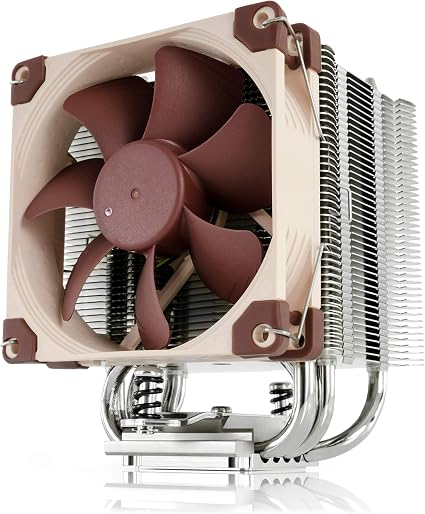
Quiet and compact, it fits neatly into small builds like HTPCs or ITX cases, making it great for anyone needing solid cooling without the bulk. Its biggest strength lies in maintaining low noise while keeping temperatures down, especially in tight spaces where bigger coolers won’t fit.
Setup is straightforward thanks to the SecuFirm2 mounting system, and it comes with a thermal paste for better heat transfer. The 92mm fan adjusts its speed automatically to keep noise minimal, running quietly in everyday use. Its 125mm height means it doesn’t block RAM or PCIe slots, which is a relief for builds with tight clearances.
Performance-wise, it effectively cools CPUs like the i7 7700k without being loud, keeping temperatures steady under load. The build quality is solid and durable.
Users appreciate how quiet it runs, though some mention it’s not the absolute best if pushing very high overclocks where extra cooling power may be needed.
Many find the quiet operation and compact design perfect for small form factor builds, especially where noise matters. Some note its cooling performance could fall short in extreme overclocking situations, requiring a bigger or dual-fan cooler.
Ideal for users with space constraints or who prioritize silent operation during normal to moderate CPU loads. Those planning heavy overclocking might consider larger coolers with higher airflow to keep temperatures under control.
Pros
- Compact size fits small builds easily
- Very quiet operation with automatic fan control
- Does not block RAM or PCIe slots
- Includes high-quality thermal paste and mounting kit
Cons
- Cooling power limited for heavy overclocking
- Only a single 92mm fan, less airflow than larger models
| Specification | Details |
|---|---|
| Height | 125mm |
| Fan Size | 92mm |
| Compatibility | Intel LGA1851, LGA1700, LGA1200, LGA115x and AMD AM5 & AM4 |
| Fan Support | PWM with Low-Noise Adaptor |
| Cooling Type | Single-tower air cooler |
8. Cooler Master Hyper 212 Spectrum V3 CPU Cooler

Great for anyone with an Intel i7 7700k who wants reliable air cooling without any hassle. It stands out with simple installation and reliable airflow, making it a solid pick for gamers and PC builders wanting dependable CPU temps.
Setting it up is straightforward thanks to redesigned brackets for LGA 1700 and 1851 sockets. The Spectrum 120 fan balances airflow with noise control, spinning between 650 and 1,750 RPM using PWM to adjust as needed.
The frosted aRGB blades add a nice touch for customizing your rig’s look. Daily use means quiet operation while handling heat effectively.
Cooling performance is strong due to four heat pipes and a nickel-plated copper base, which keeps CPUs like the i7 cool under load. Build quality feels solid and durable. The main praise centers on its effective cooling on both AMD and Intel platforms.
Some find the noise level at top speed (27.2 dB) noticeable, but it’s still manageable.
Strong cooling is delivered by the heat pipes and nickel-plated copper base, keeping the CPU temperature stable. The redesigned brackets make installation easier on newer sockets. The main drawback is that the fan noise can be loud at full speed for some users.
It suits those who want reliable cooling with easy installation and some lighting flair. People sensitive to noise or seeking higher airflow might want to explore other cooling options.
Pros
- Simple installation on modern sockets
- Adjustable fan speed for noise control
- Four heat pipes for strong cooling
- Customizable aRGB frosted blades
Cons
- Noise noticeable at maximum fan speed
- Airflow capacity listed as 1.89 milliliters/second seems low
| Specification | Details |
|---|---|
| Power Connector Type | 4-Pin |
| Voltage | 3 volts |
| Wattage | 250 watts |
| Maximum Rotational Speed | 1750 rpm |
| Noise Level | 27.2 db |
9. Be Quiet! Dark Rock 5 CPU Cooler

Constructed with six copper heat pipes and a dense aluminum fin array, it is built to handle the high thermal output of the i7 7700k. Designed for users who want powerful air cooling combined with low noise levels, the cooler’s biggest strength lies in its balance between strong heat dissipation and quiet operation.
Installation involves fitting it onto Intel sockets ranging from 1150 to 1851, so compatibility won’t be a problem for a 7700k setup. The Silent Wings 4 fan runs quietly due to fluid-dynamic bearings and rubberized mounts, which reduces vibration noise during everyday tasks or intense workloads. Its funnel-shaped frame helps distribute air evenly across the fins, keeping temperatures stable when pushing the CPU hard.
Performance-wise, it handles the i7 7700k well with a cooling capacity of 210 watts, showing solid results under load thanks to the ceramic particle coating aiding heat transfer. Built solidly with premium materials, it stays impressively quiet at 29.8 dB noise level. The most frequent praise mentions how silent it is, while some users wish it came with easier installation instructions.
The silent operation is frequently highlighted as a major plus, making it ideal for those sensitive to noise. On the downside, installation complexity is the most common issue, requiring careful handling to fit correctly. The materials and design work well to maintain a cool system even under heavy workloads.
Users who prioritize quiet cooling with strong thermal performance will appreciate this cooler. People looking for easy installation or a simpler setup process might want to explore alternatives with more straightforward mounting systems.
Pros
- Runs quietly even at high RPMs
- Strong cooling with six copper heat pipes
- Compatible with a wide range of Intel sockets
- Rubberized fan frame reduces vibration noise
Cons
- Installation can be tricky for some users
- Fan speed may be louder at maximum RPM
| Specification | Details |
|---|---|
| Power Connector Type | 4-Pin |
| Voltage | 12 volts |
| Wattage | 210 watts |
| Noise Level | 29.8 db |
| Maximum Rotational Speed | 2100 rpm |
| Air Flow Capacity | 55 cfm |
10. Thermalright Silver Soul 110 Black CPU Cooler

Quiet operation stands out immediately with this air cooler, making it a solid choice for anyone running an i7 7700k who values low noise. It suits everyday users and gamers alike who want reliable cooling without loud fans getting in the way. Its single biggest strength lies in how quietly it runs while keeping temps in check.
Installation is straightforward enough with standard mounting brackets that fit most desktop setups. The 4-pin power connector allows for PWM control, helping adjust fan speed based on temperature.
Its airflow capacity of 54 cfm combined with a maximum rotational speed of 1500 rpm means it strikes a balance between airflow and noise. Cleaning is simple, as the black finish hides dust build-up fairly well.
The five 6mm heat pipes use the AGHP technique, which prevents cooling issues regardless of cooler orientation. It manages CPU loads with TDP ranging from 95 to 200W, handling an i7 7700k’s heat output effectively. Build quality feels dependable with solid materials, although some found the cooling performance slightly less impressive under sustained heavy load.
Most praise centers on how quiet it is, while a few mention it could cool better in extreme overclocking.
Its quiet running is often praised, making it excellent for noise-conscious use. However, some note that under aggressive overclocking, cooling performance does not fully keep up. The cooler is solidly built with a technique that ensures stable heat transfer even if the orientation changes, which many find reassuring.
Anyone needing near-silent cooling for an i7 7700k will appreciate this cooler’s strengths. Those pushing their CPUs hard for extended periods might want to explore options with higher cooling capacity. It fits well in typical desktop environments where moderate noise and solid performance matter most.
Pros
- Quiet 23 dB operation suits noise-sensitive setups
- AGHP technique prevents inverse gravity cooling issues
- Compatible with CPUs up to 200W TDP
- Moderate airflow balances cooling and sound
Cons
- May struggle with heavy overclocking heat
- Voltage rating quite high at 72 volts
| Specification | Details |
|---|---|
| Power Connector Type | 4-Pin |
| Voltage | 72 volts |
| Wattage | 7.2 watts |
| Noise Level | 23 db |
| Maximum Rotational Speed | 1500 rpm |
| Air Flow Capacity | 54 cfm |
11. Thermalright Assassin X120R SE V2 CPU Cooler

Excellent cooling power paired with broad case compatibility makes this a solid choice for anyone with an i7 7700k looking to keep temperatures well-managed without a radical upgrade. Its moderate size and quiet fan speed stand out, fitting comfortably in most setups while delivering dependable airflow.
Installation goes smoothly thanks to included metal fasteners that suit both Intel and AMD sockets, reducing any hassle. The fan runs quietly at a maximum 1550 RPM, which means it stays unobtrusive during regular tasks or gaming. Its 120mm size balances well between airflow and case fit, while cleanup is simple thanks to the accessible fan blades and aluminum heatsink materials.
Cooling results are solid, supported by four heatpipes and a pure copper base that work together efficiently to pull heat away from the CPU. The cooler’s aluminum fins hold up well for long-term use, but a few mention that it could feel a little bulky in smaller cases.
Noise stays low at just over 22 dB under load, appreciated by anyone sensitive to sound.
Strong cooling efficiency comes from the combination of pure copper base and four heatpipes, paired with a fan that keeps noise comfortably low. Most note the easier installation enabled by specific fasteners, but tight spaces might struggle due to its dimensions.
People who want solid cooling without excess noise or complex setup will appreciate this model. Those with very small cases or who need extreme overclocking might look for smaller or higher-performing alternatives.
Pros
- Broad case compatibility with 148mm height
- Quiet fan noise below 25 dB
- Effective heat dissipation with copper base and heatpipes
- Easy installation on Intel and AMD sockets
Cons
- May be bulky for compact cases
- Fan speed capped at 1550 RPM
| Specification | Details |
|---|---|
| Fan Speed (Max) | 1550 rpm |
| Air Flow Capacity | 66.17 CFM |
| Noise Level | 22 dB |
| Power Connector Type | 4-Pin |
| Wattage | 15 watts |
| Dimensions (HxWxL) | 148x71x120 mm |
12. Noctua NH-U12A chromax.Black CPU Cooler

Keeping your i7 7700k cool during intense tasks calls for a cooler that fits easily and runs quietly. The Noctua NH-U12A chromax.Black offers powerful air cooling in a 120mm size that suits most tower cases and avoids blocking important slots on your motherboard.
It stands out for quiet operation without sacrificing cooling power.
Installation is straightforward thanks to its moderate 158mm height, fitting well in standard tower cases without overhanging RAM or PCIe slots. Two advanced 120mm fans adjust their speed automatically, so noise drops to a whisper when your system is idle but kicks in fully under load.
The all-black design blends nicely with different color schemes, keeping your build looking clean.
Cooling performance is excellent, maintaining safe CPU temperatures during heavy use without loud fan noise. The cooler’s build quality feels solid and well put together. Most praise highlights how quiet it stays at low workloads, while a common comment points to its premium price as a drawback.
It’s a serious piece of kit for enthusiasts wanting consistent, quiet cooling.
Many users appreciate how quietly it runs at low usage levels while still delivering excellent cooling when pushed hard. The main downside noted is the higher cost relative to simpler models, which might deter budget builds.
Ideal for those who want strong cooling performance in a compact size without extra noise. Folks with tight budgets or who want simpler setups might look for less expensive alternatives.
Pros
- Fits most tower cases with 158mm height
- Doesn’t block RAM or PCIe slots
- Quiet at idle with PWM fan control
- Powerful cooling using dual NF-A12x25 fans
Cons
- Premium price compared to other air coolers
- Fans can reach 2000 rpm under heavy load
| Specification | Details |
|---|---|
| Power Connector Type | 4-Pin |
| Voltage | 12 volts |
| Cooling Method | Air |
| Noise Level | 22.6 db |
| Maximum Rotational Speed | 2000 rpm |
| Air Flow Capacity | 102.1 cfm |
Best Air CPU Coolers for i7 7700k Comparison
| Product | Noise Level | Max RPM | Air Flow Capacity | Compatible Devices |
|---|---|---|---|---|
| Thermalright Peerless Assassin 120 SE | 25.6 db | 1550 rpm | 66.17 cfm | Desktop |
| Thermalright Assassin X120 SE ARGB | 25.6 db | 1550 rpm | 66.17 cfm | Desktop |
| Thermalright Peerless Assassin Vision MAX | 27 db | 2150 rpm | 69 cfm | Desktop |
| Thermalright Assassin X90 SE V2 | 25 db | 2200 rpm | 32.77 cfm | Desktop |
| be quiet! Pure Rock Pro | 34.8 db | 2000 rpm | – | Intel & AMD sockets |
| Cooler Master i70C ARGB Low | 28 db | 1800 rpm | 37 cfm | Desktop |
| Noctua NH-U9S | – | – | – | Intel & AMD |
| Cooler Master Hyper 212 Spectrum | 27.2 db | 1750 rpm | – | Desktop |
| be quiet! Dark Rock 5 | 29.8 db | 2100 rpm | 55 cfm | Intel & AMD sockets |
| Thermalright Silver Soul 110 Black | 23 db | 1500 rpm | 54 cfm | Desktop |
| Thermalright Assassin X120R SE V2 | 22 db | 1550 rpm | 66.17 cfm | Desktop |
| Noctua NH-U12A chromax.Black | 22.6 db | 2000 rpm | 102.1 cfm | Desktop |
- Noise Level25.6 db
- Max RPM1550 rpm
- Air Flow Capacity66.17 cfm
- Compatible DevicesDesktop
- Noise Level25.6 db
- Max RPM1550 rpm
- Air Flow Capacity66.17 cfm
- Compatible DevicesDesktop
- Noise Level27 db
- Max RPM2150 rpm
- Air Flow Capacity69 cfm
- Compatible DevicesDesktop
- Noise Level25 db
- Max RPM2200 rpm
- Air Flow Capacity32.77 cfm
- Compatible DevicesDesktop
- Noise Level34.8 db
- Max RPM2000 rpm
- Air Flow Capacity–
- Compatible DevicesIntel & AMD sockets
- Noise Level28 db
- Max RPM1800 rpm
- Air Flow Capacity37 cfm
- Compatible DevicesDesktop
- Noise Level–
- Max RPM–
- Air Flow Capacity–
- Compatible DevicesIntel & AMD
- Noise Level27.2 db
- Max RPM1750 rpm
- Air Flow Capacity–
- Compatible DevicesDesktop
- Noise Level29.8 db
- Max RPM2100 rpm
- Air Flow Capacity55 cfm
- Compatible DevicesIntel & AMD sockets
- Noise Level23 db
- Max RPM1500 rpm
- Air Flow Capacity54 cfm
- Compatible DevicesDesktop
- Noise Level22 db
- Max RPM1550 rpm
- Air Flow Capacity66.17 cfm
- Compatible DevicesDesktop
- Noise Level22.6 db
- Max RPM2000 rpm
- Air Flow Capacity102.1 cfm
- Compatible DevicesDesktop
How to Choose the Best Air CPU Cooler
Choosing the right air CPU cooler for an i7 7700k depends on factors like cooling efficiency, noise levels, and compatibility with your case and motherboard. Prioritizing these ensures stable performance, prevents overheating, and avoids unnecessary replacements, ultimately saving money and reducing hassle.
Compatibility and Fit
Several coolers fail to fit properly because they don’t support the LGA 1151 socket or interfere with nearby components. The small spacing between RAM slots and the cooler can cause clearance issues, especially with taller memory modules.
Height restrictions inside the case also come into play, as some coolers exceed common clearance limits of around 160-165mm.
Choosing a cooler with confirmed LGA 1151 support prevents installation headaches. Verify the cooler’s height against your case’s CPU cooler clearance spec. Also, check how close the fan and heatsink come to RAM slots.
Models with a narrow profile or offset fan positions help avoid conflicts. This saves time on returns or risky modifications to fit everything properly.
Cooling Performance
The heat output from this processor can reach 95W or more under load. Standard stock coolers often struggle to maintain safe temperatures with prolonged heavy use. A good air cooler for this chip needs sufficient heat dissipation through ample surface area and efficient airflow.
Look for coolers with multiple copper heat pipes and dense aluminum fin stacks. Fans that push air steadily without stalling improve overall cooling.
The thermal paste and base contact also matter, a smooth, polished copper base that makes full contact with the CPU lid and quality thermal compound ensure better heat transfer. Cheap paste and small or uneven contact surfaces lead to higher temperatures and throttling over time.
Noise Levels
Fan noise can become noticeable, especially at high speeds during gaming or rendering sessions. Many coolers reach over 30 decibels under load, which might be distracting in quiet environments.
Fans with PWM control adjust speeds based on CPU temperature, reducing noise during light tasks.
For users valuing quiet operation, fans optimized for low noise at mid to high RPM ranges are preferable. Look for specifications showing noise levels around 20-25 decibels at normal speeds. Features like fluid dynamic or sleeve bearings also contribute to quieter and longer-lasting fans.
Saving a few decibels in noise makes long sessions more comfortable.
Build Quality and Materials
Durability is more than just looks. Copper heat pipes paired with aluminum fins are common because copper transfers heat well while aluminum keeps weight down. Some cheap coolers use lower quality materials that degrade faster or don’t conduct heat efficiently.
The fan’s build varies greatly; fans with ball or fluid dynamic bearings last longer and maintain stable operation. Mounting brackets should feel solid, with screws or clips that don’t loosen over time. A flimsy bracket can cause uneven pressure on the CPU, hurting thermal performance and risking damage during transport or upgrades.
Installation and Maintenance
Struggling to mount a cooler wastes time and can lead to damage. User-friendly mounting systems that use screws with clear backplates or thumbscrews reduce stress.
Some coolers require removal of motherboard components, but well-designed models minimize this.
Cleaning also affects long-term performance. Designs that allow easy fan removal and give good access to the fin stack help prevent dust buildup, which blocks airflow and raises temperatures. Cooling efficiency drops over time without maintenance, so accessible parts save effort and prolong the cooler’s effective life.
Optimal Installation Techniques for Maximizing CPU Cooler Performance
Proper installation plays a critical role in how well an air CPU cooler functions on an i7 7700k. Applying the right amount of thermal paste is essential; too much or too little can cause inadequate heat transfer from the CPU to the cooler’s base.
Use a pea-sized amount centered on the CPU heat spreader.
When mounting the cooler, ensure it sits evenly and firmly against the CPU surface. Uneven pressure can reduce cooling efficiency and increase temperatures.
- Align the cooler’s bracket properly with the motherboard mounting points.
- Tighten screws in a diagonal pattern to distribute pressure evenly.
- Route fan cables carefully to allow airflow without obstruction.
Positioning the airflow so that it directs hot air out of the case quickly also affects overall performance. Orient the cooler so the fan blows air towards an exhaust vent or rear case fan, preventing heat buildup inside the chassis.
Effective Maintenance Practices to Prolong Air Cooler Lifespan
Keeping an air cooler in good condition extends its ability to cool the i7 7700k efficiently. Dust accumulation on the fan blades and heatsink fins blocks airflow and insulates heat, reducing cooling effectiveness.
Clean dust out regularly using compressed air or a soft brush.
Check that the mounting remains tight over time. Vibrations from the system running can loosen screws, decreasing contact pressure between the cooler and CPU.
Retighten them if needed, but avoid over-tightening.
- Inspect fan operation and listen for unusual noises that might suggest bearing wear.
- Replace the thermal paste approximately every couple of years to maintain good heat transfer.
Ignoring these maintenance steps can lead to higher CPU temperatures and potentially shorten the lifespan of both the cooler and the processor.
Comparing Air Coolers with AIO Liquid Coolers for the i7 7700k
Air coolers for the i7 7700k offer straightforward installation and reliable performance without the complexity of liquid cooling setups. Their efficiency depends heavily on case airflow and the size of the heatsink.
AIO liquid coolers typically provide lower temperatures under high loads due to more efficient heat dissipation through liquid and larger radiator surfaces. However, they involve pump components that may fail and require more maintenance.
- Air coolers have no moving parts other than fans, so they tend to have longer lifespans with less risk of mechanical failure.
- AIO coolers take up less space around the CPU, which can help with compatibility in compact cases.
- Sound levels may be higher on air coolers with large fans, whereas AIO pumps add a different noise profile.
Choosing between the two depends on prioritizing ease of use, noise, space, and thermal performance based on your specific setup.
People Also Asked
How Do I Know If My Air Cooler Fits i7 7700k?
Check the compatible CPU socket for your cooler; i7 7700k uses an LGA 1151 socket. Confirm that the air cooler supports this socket type and verify the physical dimensions to ensure it fits in your PC case without obstructing other components.
What Maintenance Is Required to Keep an Air CPU Cooler Effective?
Clean dust from the heatsink and fan blades regularly to maintain airflow and cooling efficiency. Every few months is usually enough unless your environment is very dusty or pet hair tends to accumulate inside your PC.
Can an Air Cooler Safely Handle i7 7700k Overclocking Heat?
A good quality air cooler can handle moderate overclocking on an i7 7700k, but extreme overclocking might push temperatures higher than ideal. Monitoring temperatures under load is important to avoid thermal throttling or damage.
How Long Does a Typical Air CPU Cooler Last Before Replacement?
Many air coolers can last 5-7 years or more, depending on fan wear and dust buildup. Replace the thermal paste occasionally, about every 2-3 years, to maintain heat transfer efficiency.
What Common Problems Might Occur with Air Cooling for i7 7700k?
Common issues include dust clogging, fan wear or failure, and inadequate mounting pressure reducing contact with the CPU. Addressing these early prevents overheating and unstable performance during heavy use.
Conclusion
Choosing the right air CPU cooler for an i7 7700k mostly comes down to cooling performance, noise level, and compatibility with your case and motherboard. The cooler needs to keep temperatures in check under load without running too loud.
Checking the size and fan speed helps find a model that fits your setup and won’t cause issues during installation.
Think about how much space you have inside your PC and how much noise you can tolerate. Also, consider your budget and how often you’ll push your CPU hard.
Review the comparison table and the detailed picks above to find a balance that suits your needs best.

I’m Grant Mitchell, a firearms and hunting writer with years of experience at the range and in the field. I write about rifles, shotguns, handguns, optics, safe storage, cleaning, and responsible ownership, along with practical hunting tips. My goal is to share accurate, safety-first information that helps you choose the right firearm, maintain it properly, and become a more confident shooter.