Top 12 Best Air Cooler for Ryzen That Will Boost Performance
Overheating is a common issue with Ryzen processors running under heavy load. The best air cooler for ryzen prevents thermal throttling and loud fan noises that cheap or ill-fitting coolers often cause.
It’s frustrating to deal with sudden slowdowns or unstable performance just because the cooler can’t handle the heat output.
A quality air cooler for Ryzen usually features a solid copper base or heat pipes for efficient heat transfer from the CPU. Cooling fins need to be dense but not so compact that airflow gets restricted. Compatibility with the motherboard socket and enough clearance for nearby RAM or VRM components is essential.
Fans typically range from 120mm to 140mm for balanced airflow and noise control, and ease of cleaning makes maintenance simpler over time.
Need a Quick Check?
| Image | Product | Price |
|---|---|---|
Our Top Picks 1  | Thermalright Peerless Assassin 120 SE | Check Price |
Our Top Picks 2  | Thermalright Peerless Vision MAX ARGB | Check Price |
Our Top Picks 3  | Thermalright PS120SE Air Cooler | Check Price |
Our Selected Top 12 Air Cooler for Ryzen Worth Buying
This list features carefully chosen air coolers designed for Ryzen processors, highlighting their cooling efficiency, compatibility, and noise levels. Each review covers the performance, ideal user scenarios, and the strengths and weaknesses to help you find the best fit for your needs.
1. Thermalright Peerless Assassin 120 SE CPU Cooler
Running quietly at just 25.6 dB, the Thermalright Peerless Assassin 120 SE offers powerful air cooling with a 265-watt capacity, making it a solid choice for Ryzen builds that demand strong heat management without excess noise.
Setting it up is straightforward thanks to the 4-pin power connector compatible with most desktop motherboards. The fan speed maxes out at 1550 rpm, striking a nice balance between airflow and quiet operation.
Its 66.17 CFM airflow capacity ensures steady cooling performance during regular and intense workloads.
Cooling effectiveness stands out with consistent heat dissipation under load, supported by a sturdy build typical of Thermalright’s long experience in the field. Positive feedback highlights its quiet fan and solid construction.
Some users note it could feel bulky in tighter cases or with larger RAM modules nearby.
Works quietly while delivering strong cooling power, making it dependable for Ryzen processors. Some find its size inconvenient in compact setups or when paired with tall RAM sticks.
Suitable for anyone prioritizing cooling and noise control who has a standard or spacious case. Those with compact builds or specific clearance needs may want to look for a slimmer cooler.
Pros
- Quiet operation at 25.6 dB
- High cooling power with 265-watt capacity
- Moderate fan speed helps control noise
- Solid and reliable construction
Cons
- May be bulky in smaller cases
- Can interfere with larger RAM modules
| Specification | Details |
|---|---|
| Power Connector Type | 4-Pin |
| Voltage | 12 volts |
| Wattage | 265 watts |
| Noise Level | 25.6 db |
| Maximum Rotational Speed | 1550 rpm |
| Air Flow Capacity | 66.17 cfm |
2. Thermalright Peerless Assassin 120 Vision MAX ARGB
People looking for a powerful and visually interesting air cooler for a Ryzen processor will appreciate what this cooler offers. Best suited for those who want effective temperature control with a cool display feature, it stands out mainly for its 5-inch IPS LCD screen that shows real-time system info right on the radiator.
Setting it up involves dealing with the dual-tower design and two fans, which might take some space inside your case but is manageable. Daily use is straightforward thanks to the TRCC software that allows you to customize the display background. The magnetic top cover makes accessing or removing the screen easy, and the fans spin up to a high speed of 2150 rpm without getting too loud at 27 dB.
Cooling performance is very strong due to six pure copper heat pipes and a nickel-plated copper base that keeps temperatures down efficiently. The cooler’s build feels solid, with quality materials that suggest longevity.
Most praise goes to the combination of effective cooling and the added display, while the size and potential fit issues inside smaller cases are mentioned as the most common drawbacks.
Users often highlight the cooler’s excellent cooling combined with the unique LCD screen as a strong point. On the downside, the larger size and added parts like the magnetic cover can make installation trickier, especially for compact PC builds.
This cooler works well for enthusiasts who want both performance and visual customization. Those with tight spaces or who prioritize easy installation might prefer a smaller, simpler air cooler instead.
Pros
- Built-in 5-inch IPS LCD for real-time monitoring
- High-speed fans run quietly at 27 dB
- Six pure copper heat pipes for better cooling
- Customizable display via TRCC software
Cons
- Dual-tower size may cause fit issues in small cases
- Magnetic top cover adds complexity during installation
| Specification | Details |
|---|---|
| Power Connector Type | 4-Pin |
| Cooling Method | Air |
| Maximum Rotational Speed | 2150 rpm |
| Noise Level | 27 db |
| Air Flow Capacity | 69 cfm |
3. Thermalright PS120SE CPU Air Cooler
Designed for Ryzen processors with higher heat output, this air cooler stands out for its impressive TDP range from 105W to 280W. It suits desktop users looking for a cooler that handles both moderate and heavy CPU loads without breaking the bank.
Its 4th generation AGHP technology sets it apart by improving heat transfer regardless of mounting orientation.
Installing the cooler requires aligning its heatpipes and mounting carefully, but the 4-pin power connector makes fan control straightforward. Fan speeds up to 1650 rpm create enough airflow to manage Ryzen CPUs efficiently, while noise stays relatively low at 25.6 dB. You can expect consistent cooling throughout daily workloads, and the ability to keep temperatures down without frequent adjustments.
The cooler does a solid job managing higher wattage Ryzen chips thanks to seven 6mm heatpipes with AGHP technology that actively improves cooling whether it sits vertically or horizontally. Its build feels sturdy and thoughtfully designed, though some may find the size a bit bulky inside smaller cases.
Many users appreciate the low noise level during operation while a few mention it can be heavy and slightly challenging to clean.
The cooler’s best feature is its ability to cool CPUs with TDPs up to 280W quietly, thanks to its 7x6mm heatpipes and AGHP technology. The most common downside mentioned is its weight and size, making installation and maintenance a little cumbersome for some setups.
This cooler is perfect for users with powerful Ryzen processors who require strong cooling during heavy workloads. Those with compact cases or who prioritize easy cleaning should consider smaller or simpler models instead.
Pros
- Handles high TDP Ryzen CPUs well
- Quiet operation at 25.6 dB noise level
- Works in vertical and horizontal orientations
- Strong airflow at 66.17 cfm
Cons
- Somewhat bulky size for small cases
- Can be heavy and tricky to clean
| Specification | Details |
|---|---|
| CPU Cooler TDP | 105W to 280W |
| Power Connector Type | 4-Pin |
| Noise Level | 25.6 db |
| Maximum Rotational Speed | 1650 rpm |
| Air Flow Capacity | 66.17 cfm |
| Voltage | 12 volts |
4. Thermalright PS120SE ARGB CPU Air Cooler

Thermalright PS120SE ARGB is an air cooler designed for Ryzen CPUs, offering durable cooling through its advanced AGHP 4th generation heatpipe technology. Its major strength lies in combining solid cooling performance with a quiet operation, fitting well in a variety of desktop chassis due to its moderate height.
Setup requires mounting the cooler using its standard fittings which are compatible with many chassis models. The 4-Pin power connector and 12-volt operation make it straightforward to plug into most motherboards. Day-to-day use is marked by a consistent airflow of 66.17 CFM, enough to keep Ryzen processors cool without creating distracting noise, rated at 25.6 dB.
Performance-wise, it manages to keep temperatures low thanks to seven 6mm heatpipes employing the AGHP technique. It’s built with industrial strength PBT + PC materials and features S-FDB bearings for durability, promising extended service life.
The strongest praise highlights its quiet operation, while the common complaint involves its maximum fan speed of 1500 RPM feeling a bit limited under heavy load.
Quiet running is the standout feature praised consistently, ensuring low noise during operation. On the downside, the maximum fan speed of 1500 rpm can feel restricted when cooling high temperatures under heavy Ryzen workloads.
Those looking for reliable, quiet cooling without extreme overclocking will appreciate this cooler. Users requiring higher fan speeds or working in very compact cases might want to explore other options better suited for those demands.
Pros
- Quiet operation at only 25.6 dB
- Durable S-FDB bearing fan design
- Compatible with a wide range of chassis
- Use of high-quality industrial materials
Cons
- Max fan speed limited to 1500 rpm
- Height at 154mm may restrict very compact builds
| Specification | Details |
|---|---|
| Cooling Method | Air |
| Maximum Rotational Speed | 1500 rpm |
| Air Flow Capacity | 66.17 cfm |
| Power Connector Type | 4-Pin |
| Noise Level | 25.6 db |
| Voltage | 12 volts_of_direct_current |
5. Thermalright Assassin X120 Refined SE ARGB CPU Cooler

Staying cool while running a Ryzen processor is simple with the Thermalright Assassin X120 Refined SE ARGB. It fits well in most desktop setups and offers one of the quietest operations around, making it ideal for those who want solid cooling without the noise.
Its biggest strength lies in balancing airflow with low sound levels.
Setting it up requires attaching the mounting brackets, which are sturdy and secure. The 4-pin connector allows for easy PWM control, so fan speeds adjust smoothly based on your CPU temperature. Daily use feels quiet thanks to its 25.6 db noise rating and the cooler’s max speed topping out at 1550 rpm, making it unobtrusive whether gaming or working.
Performance-wise, it handles Ryzen processors well, keeping temperatures in check under load without much fuss. The build quality feels reliable with well-crafted materials, making it a steady performer.
Most users praise how quiet it runs, but some mention it might not push as much airflow as bigger coolers. It’s a neat balance of performance and silence.
Quiet running stands out as its strongest feature, praised consistently for making gaming or work sessions more comfortable. A handful of users found airflow could be better for extreme CPU loads, which is a trade-off for its lower noise level.
Those who prioritize a low noise environment alongside decent cooling will be happy with this. Anyone needing extreme airflow for heavy overclocking or high temperatures might want to look at slightly larger coolers instead.
Pros
- Quiet operation at 25.6 dB
- Good airflow at 66.17 cfm
- Solid, secure mounting brackets
- Compatible with most desktop Ryzen setups
Cons
- Airflow may not match larger coolers
- Some might find installation a bit tricky
| Specification | Details |
|---|---|
| Power Connector Type | 4-Pin |
| Voltage | 12 volts |
| Cooling Method | Air |
| Noise Level | 25.6 db |
| Maximum Rotational Speed | 1550 rpm |
| Air Flow Capacity | 66.17 cfm |
6. AMD Wraith Prism CPU Cooler
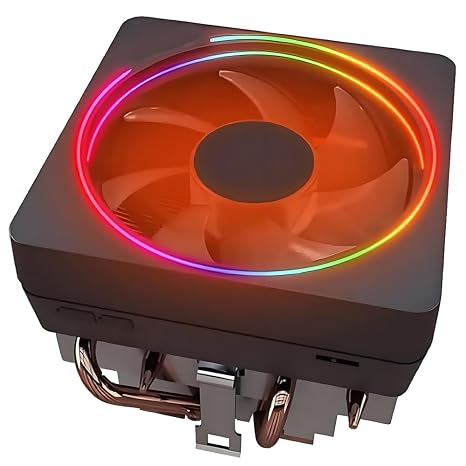
Great for Ryzen builds, the AMD Wraith Prism CPU Cooler offers solid cooling with quiet operation. Suited for Ryzen 5, 7, and 9 processors, it stands out for its compatibility and efficient heat dissipation without needing extra purchases.
Installation is straightforward using the standard bracket on most AMD motherboards, though the cooler itself doesn’t include the bracket. It comes with thermal paste pre-applied, making setup quicker.
The 4-pin fan connector fits modern motherboards, providing good control over fan speed and noise levels without manual tweaking.
Cooling performance holds up well under load thanks to the aluminum heatsink, copper base, and four 6 mm heat pipes. It runs quietly at 14 db max noise with a 2800 rpm fan speed cap and provides decent airflow at 45 cfm.
Reviews praise its cooling ability and quietness, while a common downside noted is the lack of included mounting hardware.
The cooler receives strong praise for keeping Ryzen processors cool quietly. Common complaints focus on the missing standard bracket, which may require users to rely on their motherboard’s pre-installed mounting hardware.
Gamers and general desktop users with compatible AMD sockets will appreciate the blend of noise reduction and heat management. Those lacking a motherboard bracket or wanting higher fan speed options should look for alternatives.
Pros
- Compatible with AM4 and AM5 sockets and others
- Pre-applied thermal paste for easy mounting
- Quiet operation at 14 db noise level
- Effective heat transfer with copper heat pipes
Cons
- Does not include mounting bracket
- Fan speed maxes out at 2800 rpm
| Specification | Details |
|---|---|
| Power Connector Type | 4-Pin |
| Voltage | 12 volts_of_direct_current |
| Wattage | 105 watts |
| Noise Level | 14 db |
| Maximum Rotational Speed | 2800 rpm |
| Air Flow Capacity | 45 cfm |
7. Cooler Master Hyper 212 Spectrum V3 CPU Cooler

Copper and nickel-plated base paired with four heat pipes create solid cooling for Ryzen 7 and Intel i7 processors. Ideal for users wanting efficient heat management without constant noise distractions. What stands out most is its ability to balance powerful cooling and quiet operation smoothly.
Setup is straightforward thanks to the redesigned brackets compatible with AM5 and LGA 1851|1700 platforms, making installation less frustrating. The Spectrum 120 fan spins between 650 and 1,750 RPM, controlled by a PWM 4-pin header, so you can dial the fan speed to your needs.
The frosted blade adds a nice visual touch without complicating the build.
It handles processor temperatures well under typical loads, showing reliable cooling performance with a manageable noise level around 27.2 dB. The solid construction feels durable, while some users mention the airflow capacity at 1.89 milliliters per second might limit extreme overclocking. Quiet and stable, but not suited for pushing CPUs to their thermal limits.
Cooling works consistently well, with many appreciating the quiet performance and easy mounting system. Some users find the airflow capacity limiting for extreme processor loads, which affects cooling under heavy overclocking.
Processors running at typical speeds will benefit from this cooler, especially with Ryzen 7 chips needing efficient yet unobtrusive cooling. Those planning to push their CPUs hard or requiring maximum airflow might want to look at higher-capacity options instead.
Pros
- Quiet operation at low to mid fan speeds
- Easy installation on latest AM5 sockets
- Reliable cooling for Ryzen 7 processors
- Customizable aRGB lighting with frosted blades
Cons
- Airflow capacity may limit heavy overclocking
- Moderate noise at maximum fan speed
| Specification | Details |
|---|---|
| Power Connector Type | 4-Pin |
| Voltage | 3 volts |
| Wattage | 250 watts |
| Noise Level | 27.2 db |
| Maximum Rotational Speed | 1750 rpm |
| Air Flow Capacity | 1.89 milliliters_per_second |
8. Be Quiet! Pure Rock Pro 3 CPU Cooler

Silent operation stands out the most with this cooler, making it a great pick for Ryzen users who want quiet performance. It suits people looking for reliable CPU temperature control without loud fans.
Its biggest strength is keeping chips cool under heavy loads while staying discreet.
Setting it up requires matching the cooler with AM4 or AM5 sockets, which fits most Ryzen processors. The 4-pin power connector and PWM control let you adjust fan speed easily to balance cooling and noise. The Pure Wings 3 fan with optimized blades pushes air precisely over the heat sink, helping maintain steady airflow day to day without annoying noise spikes.
Performance stays solid thanks to six nickel-plated copper heat pipes that transfer heat efficiently from the CPU. The cooler handles overclocked systems without breaking a sweat.
Build quality feels sturdy with a nickel-plated base for durability. Praise often goes to its quiet operation, while some mention fan speeds hitting 2000 rpm can raise noise levels on higher settings.
The quiet fan performance gets most praise, making it suitable for noise-sensitive environments, though running at maximum speeds can result in audible noise. Installation can be a bit tricky in compact builds, which is a recurring note among users.
This cooler suits anyone wanting efficient air cooling for Ryzen processors with low noise priorities. People with very small PC cases or who want absolutely silent cooling might want to consider alternative solutions.
Pros
- Quiet operation even under heavy loads
- Strong heat transfer with six copper heat pipes
- Easy fan speed control with PWM connector
- Compatible with the latest Ryzen sockets
Cons
- Fan noise increases noticeably above 1500 rpm
- Some users find installation tight in small cases
| Specification | Details |
|---|---|
| Compatible Devices | AM5/AM4 (AMD sockets), Intel sockets 1851/1700/1200/1151/1150/1155 |
| Cooling Method | Air |
| Noise Level | 34.8 dB |
| Maximum Rotational Speed | 2000 rpm |
| Power Connector Type | 4-Pin |
| Wattage | 3.6 watts |
9. Thermalright Peerless Assassin 120 Digital ARGB CPU Cooler

Strong cooling power with dual fans and six pure copper heat pipes suits Ryzen builds needing serious heat dissipation. Its combination of a dual-tower design and a high-speed 1850RPM fan makes it ideal for those who want quiet and efficient cooling beyond basic air coolers.
Installation fits standard desktop setups well with a 120mm fan size and dual-fan layout providing good airflow. The magnetic top cover adds a touch of style, while the 4-pin PWM control keeps fan speed adjustable and noise low during everyday use, making it easy to maintain a stable system temperature without drawing much attention.
Cooler handles demanding Ryzen CPU loads effectively due to the combination of six copper heat pipes and a pure copper base. Built solidly with S-FDB bearing fans for long lifespan, it runs quietly at 25.6dB. Most praise is for its strong cooling performance; some note that its size might not fit smaller or cramped cases comfortably.
The strongest praise highlights the effective cooling combined with quiet fans that keep temperatures down without loud noise. A common complaint focuses on the larger size, which can cause fitment issues in smaller PC cases or those with tight interiors.
People with mid to full tower ATX desktop cases who want reliable cooling for Ryzen CPUs will appreciate the performance and quietness. Users with small-form-factor or compact cases may want to consider lower-profile coolers due to its height and size.
Pros
- Strong cooling from six pure copper heat pipes
- Quiet operation at or below 25.6 dB
- Dual fans improve airflow and heat dissipation
- Long-lasting S-FDB bearing fans
Cons
- May not fit well in compact or small cases
- Relatively tall height of 162mm requires clearance check
| Specification | Details |
|---|---|
| Fan Speed | 1850 RPM +10% |
| Air Flow Capacity | 88.89 CFM |
| Noise Level | ≤25.6 DB(A) |
| Fan Size | 120x120x28mm |
| Power Connector Type | 4-Pin PWM |
10. Thermalright Peerless Assassin 120 Vision MAX ARGB
Keeping a Ryzen CPU cool under pressure can be tricky, especially with overclocking or intense workloads. The Thermalright Peerless Assassin 120 Vision MAX ARGB suits those who want strong air cooling with extra flair and real-time system info on a built-in display. Its standout feature is the 5-inch IPS LCD that shows vital stats right on the cooler.
Setting it up is straightforward, thanks to the 4-pin power connector and compatibility with desktop builds. The ARGB lighting adds a customizable glow through motherboard controls, making your setup look good without fuss. Day-to-day use means having constant visual feedback on temperatures and fan speeds, which helps you keep an eye on how demanding tasks affect your system.
Cooling performance is solid with 6 heat pipes using the AGHP Gen 5.0 technology to maintain efficient heat transfer in multiple orientations. Airflow capacity at 69 cfm and a maximum fan speed of 2150 rpm keep temps down while the noise level stays reasonable at 27 dB. The cooler is well-built, but some note the fan can get louder at peak speeds.
The built-in 5-inch LCD is praised for giving clear, immediate feedback on system status, making monitoring easy and convenient. The most common complaint concerns fan noise rising at full speed, which might be distracting in quiet environments.
Gamers or enthusiasts wanting eye-catching lighting and active monitoring will appreciate this air cooler’s features. Users with smaller cases or those sensitive to noise should consider other options for a better fit or quieter operation.
Pros
- Built-in 5-inch IPS LCD for real-time monitoring
- AGHP Gen 5.0 heat pipe technology for effective cooling
- Customizable ARGB lighting with motherboard software
- Low noise level during standard use
Cons
- Fan noise increases noticeably at max speed
- Larger size may challenge compact cases
| Specification | Details |
|---|---|
| Cooling Method | Air |
| Noise Level | 27 db |
| Maximum Rotational Speed | 2150 rpm |
| Air Flow Capacity | 69 cfm |
| Power Connector Type | 4-Pin |
11. Cooler Master V4 Alpha 3DHP CPU Cooler
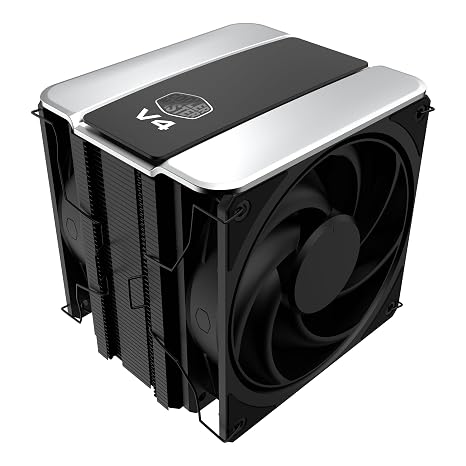
Two patented 3DHP heat pipes deliver about 30% better cooling compared to typical air coolers. Well-suited for Ryzen builds needing efficient heat management without excess noise. Its single biggest strength lies in quietly maintaining lower CPU temperatures under daily workloads.
Setup is straightforward thanks to broad CPU socket compatibility, fitting neatly in a range of case sizes. The pre-installed Mobius 120mm fans in push-pull configuration push a steady airflow that helps keep temperatures down.
Noise levels stay low with the 3DHP technology reducing turbulence, making this cooler easy to live with during long hours on the desktop.
Performance is solid at cooling Ryzen CPUs efficiently, and the construction feels durable with a minimalistic black design that blends in well. Most users appreciate how quiet it runs relative to other air coolers.
The occasional complaint focuses on fan speed cap at 2050 rpm, limiting top-end cooling for overclockers.
Cooling performance ranks notably higher than standard air coolers while maintaining remarkably low noise levels. The most frequent drawback cited is the top rotational speed of the fans, which might restrict overclocking potential for heavy users.
Anyone looking for quiet and efficient cooling on a Ryzen CPU will find it suitable, especially in mid-range builds. Those wanting aggressive overclocking or flashy aesthetics should consider other options with higher fan speeds or RGB features.
Pros
- 30% better cooling with patented 3DHP heat pipes
- Quiet operation with minimized radiator turbulence
- Pre-installed push-pull Mobius 120mm fans improve airflow
- Wide socket compatibility fits many system builds
Cons
- Fan speed limited to 2050 rpm for maximum cooling
- Minimalistic design may feel plain for RGB enthusiasts
| Specification | Details |
|---|---|
| Power Connector Type | 4-Pin |
| Voltage | 12 volts |
| Cooling Method | Fan |
| Noise Level | 2.05 db |
| Maximum Rotational Speed | 2050 rpm |
12. Thermalright Peerless Assassin 120 Vision MAX ARGB

Enthusiasts running Ryzen systems looking for strong, reliable air cooling will appreciate the peerless performance here. It excels in managing heat for demanding setups, especially when CPU temperatures matter most, thanks to its advanced heat pipe technology and dual-fan design.
Setup involves mounting the cooler securely, which feels sturdy and well thought out. The dual fans spin up to 2150 RPM with PWM temperature control, so noise stays low unless the CPU gets busy. Soft pads around fans reduce vibration, making it quieter in daily use.
The offset design gives enough room around RAM and GPUs, easing compatibility headaches.
Cooling power is impressive as heat dissipates quickly, even under load. The nickel-plated copper base and pure copper heat pipes are solid choices for thermal conduction.
Fans deliver consistent airflow of 69 CFM with a noise level capped at 27 dB. Most praise centers on strong cooling results and quiet operation. Some find the twin-tower size bulky inside smaller cases.
The strongest point is efficient heat dissipation combined with quiet airflow, keeping Ryzen CPUs cool during demanding tasks. Common feedback highlights the cooler’s large size, which can limit fitting options in compact cases. The construction quality and advanced cooling tech earn consistent positive remarks.
Ideal for users with medium to large cases aiming for solid air cooling paired with quiet operation. Those with smaller builds or who prioritize minimal size may want to look at alternatives with a slimmer profile or lower fan speeds by default.
Pros
- Advanced AGHP heat pipe tech for better cooling
- Dual fans with PWM for dynamic speed control
- Low noise operation under normal loads
- Offset design fits around RAM and GPUs well
Cons
- Size might not suit small PC cases
- Fans can be loud at maximum speed
| Specification | Details |
|---|---|
| Power Connector Type | 4-Pin |
| Cooling Method | Air |
| Maximum Rotational Speed | 2150 rpm |
| Noise Level | 27 db |
| Air Flow Capacity | 69 cfm |
Best Air Coolers for Ryzen Comparison Table
| Product | Noise Level | Max RPM | Air Flow Capacity | Wattage |
|---|---|---|---|---|
| Thermalright Peerless Assassin 120 SE | 25.6 db | 1550 rpm | 66.17 cfm | 265 watts |
| Thermalright Peerless Vision MAX ARGB | 27 db | 2150 rpm | 69 cfm | – |
| Thermalright PS120SE Air Cooler | 25.6 db | 1650 rpm | 66.17 cfm | 280 watts |
| Thermalright PS120SE ARGB | 25.6 db | 1500 rpm | 66.17 cfm | – |
| Thermalright Assassin X120 Refined ARGB | 25.6 db | 1550 rpm | 66.17 cfm | – |
| AMD Wraith Prism | 14 db | 2800 rpm | 45 cfm | 105 watts |
| Cooler Master Hyper 212 Spectrum | 27.2 db | 1750 rpm | – | 250 watts |
| be quiet! Pure Rock Pro | 34.8 db | 2000 rpm | – | 3.6 watts |
| Thermalright Peerless Assassin 120 Digital | 25.6 db | 1850 rpm | 88.89 cfm | – |
| Thermalright Peerless Vision MAX ARGB | 27 db | 2150 rpm | 69 cfm | – |
| Cooler Master V4 Alpha 3DHP | 2.05 db | 2050 rpm | – | – |
| Thermalright Peerless Vision MAX ARGB | 27 db | 2150 rpm | 69 cfm | – |
- Noise Level25.6 db
- Max RPM1550 rpm
- Air Flow Capacity66.17 cfm
- Wattage265 watts
- Noise Level27 db
- Max RPM2150 rpm
- Air Flow Capacity69 cfm
- Wattage–
- Noise Level25.6 db
- Max RPM1650 rpm
- Air Flow Capacity66.17 cfm
- Wattage280 watts
- Noise Level25.6 db
- Max RPM1500 rpm
- Air Flow Capacity66.17 cfm
- Wattage–
- Noise Level25.6 db
- Max RPM1550 rpm
- Air Flow Capacity66.17 cfm
- Wattage–
- Noise Level14 db
- Max RPM2800 rpm
- Air Flow Capacity45 cfm
- Wattage105 watts
- Noise Level27.2 db
- Max RPM1750 rpm
- Air Flow Capacity–
- Wattage250 watts
- Noise Level34.8 db
- Max RPM2000 rpm
- Air Flow Capacity–
- Wattage3.6 watts
- Noise Level25.6 db
- Max RPM1850 rpm
- Air Flow Capacity88.89 cfm
- Wattage–
- Noise Level27 db
- Max RPM2150 rpm
- Air Flow Capacity69 cfm
- Wattage–
- Noise Level2.05 db
- Max RPM2050 rpm
- Air Flow Capacity–
- Wattage–
- Noise Level27 db
- Max RPM2150 rpm
- Air Flow Capacity69 cfm
- Wattage–
How to Choose the Best Air Cooler for Ryzen
Selecting the right air cooler for Ryzen depends on factors like cooling efficiency, compatibility with your CPU socket, and noise levels. Prioritizing these ensures stable performance and prevents overheating, ultimately saving money on potential repairs and avoiding system instability or throttling issues.
Compatibility with Ryzen Cpus
A common frustration with CPU coolers is buying one that physically fits the socket but doesn’t support the exact Ryzen model, causing poor contact or instability. The AM4 and newer AM5 sockets differ slightly, and coolers not designed for these can lead to uneven pressure on the CPU.
Beyond socket shape, matching the cooler’s TDP rating to or above the CPU’s heat output is crucial. A Ryzen 7 with a 105W TDP needs a cooler rated for at least that or higher to avoid thermal throttling.
Compatibility may also involve BIOS or firmware updates, especially on newer Ryzen platforms where motherboard firmware must recognize cooler sensors for fan control. Checking manufacturer documentation or user forums before purchase saves headaches during installation and daily use.
Cooling Performance
Airflow capacity, measured in cubic feet per minute (CFM), directly affects how well the cooler can expel heat. Fans running at speeds around 1000-2000 RPM provide effective airflow without excessive noise on most models. The arrangement and density of heat sink fins also matter; thin and closely spaced fins increase surface area but can obstruct airflow if too dense.
Many coolers come with heat pipes made of copper or aluminum that transfer heat from the CPU base to the fins more efficiently. A design with at least 4 heat pipes tends to provide noticeably better thermal performance under sustained loads common with Ryzen processors.
Noise Levels
Running a powerful fan at full speed usually produces distracting noise in a workspace or gaming environment. Look at the decibel (dB) rating, aiming for models that stay under 30-35 dB at typical load speeds. Fans with PWM (pulse-width modulation) control adjust speed dynamically, so noise is reduced during low-demand periods.
Blade shape and bearing design affect how quietly a fan operates. Fans with fluid dynamic bearings tend to last longer and run more quietly compared to sleeve bearing types. Cooler models designed with noise reduction in mind use curved fan blades or anti-vibration mounts to keep hum and vibration levels low.
Size and Fitment
Many users underestimate how much cooler size can limit case compatibility. Taller air coolers may not fit mid-tower cases or interfere with side panel clearance.
Check the cooler height, often between 120mm and 165mm for models that suit common mid-towers. Width and depth also matter for RAM clearance; some coolers block the first or second RAM slot if too wide.
Motherboard components like VRMs or capacitors near the socket can limit how coolers attach. Look for mounting kits relevant to your socket and whether they allow easy installation without removing the motherboard. A simple installation process reduces risk of damaging parts and ensures firm, even contact with the CPU.
Build Quality and Maintenance
Coolers built with solid copper bases and heat pipes conduct heat better and resist warping over time compared to cheaper aluminum-only models. Fans made with high-quality plastics and durable bearings also outlast budget options, maintaining performance longer.
Dust buildup inside fins and fans reduces cooling efficiency, so a design that allows easy cleaning makes a big difference. Removable fan clips and accessible heat sink surfaces help maintain airflow without full disassembly. Bearings in the fan should be rated for tens of thousands of hours of operation to avoid noisy or failing fans down the line.
Optimizing Air Cooler Performance for Ryzen CPUs in Different Environments
Air cooler performance can vary significantly depending on the environment where the Ryzen CPU operates. Ambient room temperature directly influences how effectively air coolers dissipate heat. Cooler surroundings help maintain lower CPU temperatures, while warmer rooms can reduce cooling efficiency.
Placement inside the case also matters; an air cooler needs good airflow to function optimally. Ensure intake and exhaust fans work together to create a consistent air path.
Dust buildup inside the case restricts airflow and reduces the cooler’s ability to move heat away from the processor.
Tips for optimizing air cooler performance:
- Position the PC where it’s not exposed to direct sunlight or heat sources.
- Use additional case fans to improve air circulation if needed.
- Regularly check that fan speeds align with CPU load and temperature.
- Ensure thermal paste is applied correctly and replaced as required for best contact.
Essential Maintenance Practices to Extend the Lifespan of Your Ryzen Air Cooler
Maintaining an air cooler for a Ryzen processor involves routine cleaning and monitoring to keep it functioning well over time. Dust accumulation on the heatsink fins and fan blades reduces airflow, causing higher CPU temperatures.
Use compressed air to blow out dust every few months. Check the fan for any wobbling or noise, as this can indicate bearing wear, which may necessitate replacement.
Basic maintenance steps include:
- Removing the cooler carefully to clean heatsink fins without bending them.
- Reapplying high-quality thermal paste every 1-2 years depending on usage intensity.
- Verifying that all mounting screws remain tight to maintain proper contact pressure.
- Inspecting fan cables and connectors for damage or loose connections.
These efforts keep the cooler running efficiently, helping maintain stable Ryzen CPU temperatures and preventing thermal throttling.
Comparing Air Cooling and Liquid Cooling Solutions for Ryzen Processors
Air cooling and liquid cooling serve the same basic purpose but offer different advantages for Ryzen processors. Air coolers are typically easier to install and require less maintenance, making them suitable for everyday users who want reliable cooling without much hassle. They perform well for moderate to heavy workloads, provided that the case has proper airflow.
Liquid coolers, especially all-in-one (AIO) units, can deliver lower temperatures under intense load because liquid transfers heat more efficiently than air. However, they involve more complex installation and potential risks such as pump failure or leaks.
These systems often cost more and require occasional maintenance to ensure the pump functions correctly.
The choice depends on the user’s comfort with hardware, budget, space inside the PC case, and the level of performance required for tasks like gaming or content creation. For many Ryzen setups, a high-quality air cooler strikes a practical balance between noise, cooling capacity, and ease of use.
People Also Asked
How to Properly Size an Air Cooler for Ryzen CPUs?
Choose an air cooler based on the Ryzen CPU’s TDP rating to ensure adequate cooling. Checking the cooler’s specified TDP support helps avoid overheating issues during heavy tasks.
Is This Air Cooler Compatible with All Ryzen Processor Models?
Many air coolers support a wide range of Ryzen socket types, but verifying socket compatibility is crucial before buying. Ryzen uses AM4 or AM5 sockets, so matching is important for mounting.
What Are Common Problems Using an Air Cooler on Ryzen Systems?
Poor contact with the CPU surface and insufficient thermal paste application often cause cooling inefficiencies. Cleaning the CPU and cooler surfaces before installation improves heat transfer.
How Long Does a Typical Air Cooler Last for Ryzen CPUs?
A good air cooler typically lasts 5 to 7 years if kept dust-free and the fan is well maintained. Periodic cleaning of dust buildup keeps the fan running smoothly and extends life span.
What Safety Precautions Should I Take When Installing the Air Cooler?
Secure the cooler firmly but avoid over-tightening screws to prevent motherboard damage. Applying thermal paste evenly and handling components with care also reduces installation risks.
Conclusion
Choosing the right air cooler for a Ryzen processor comes down to three main points: cooling performance to keep temperatures stable, compatibility with your specific Ryzen model and case size, and noise levels during operation. These factors affect your system’s reliability and comfort while running demanding applications or gaming.
Consider your setup space and how much noise you can tolerate before making a decision. Also, think about your budget and how often you plan to use your PC at high loads. For a clearer picture and side-by-side details, check the comparison table and the models listed earlier to find the cooler that fits your needs best.

I’m Grant Mitchell, a firearms and hunting writer with years of experience at the range and in the field. I write about rifles, shotguns, handguns, optics, safe storage, cleaning, and responsible ownership, along with practical hunting tips. My goal is to share accurate, safety-first information that helps you choose the right firearm, maintain it properly, and become a more confident shooter.