Top 12 Best AIO Cooler Under 100 That Will Blow Your Mind
Trying to cool down a PC with the wrong AIO cooler often means dealing with high temperatures, noise, or leaks. The best aio cooler under 100 strikes a balance between affordability and solid performance, which is not easy to find but crucial for keeping a build stable and quiet. Cheaper or poorly made options tend to have weaker pumps or inadequate radiator sizes, leading to overheating or less efficient cooling over time.
The key factors in an effective AIO cooler at this price include the radiator size, pump strength, and build quality. Most models under $100 offer a 120mm or 240mm radiator, with 240mm typically providing better heat dissipation. A reliable pump that maintains steady RPMs without excess noise is important to prevent thermal throttling.
The materials used for the tubing and the water block, usually copper for heat transfer and reinforced rubber or plastic, affect durability and ease of maintenance. A good fit for your case and CPU socket ensures better contact and performance too.
Need a Quick Check?
| Image | Product | Price |
|---|---|---|
Our Top Picks 1  | ARCTIC Liquid Freezer III Pro | Check Price |
Our Top Picks 2  | MSI MAG Coreliquid A13 240 | Check Price |
Our Top Picks 3  | Minorsonic 360mm AIO Cooler | Check Price |
Our Selected Top 12 Aio Cooler Under 100 for Every Budget
This list features reliable all-in-one coolers suitable for various budgets and needs. Each review covers performance, ideal users, and highlights both strengths and weaknesses to help you make an informed decision for your cooling setup.
1. ARCTIC Liquid Freezer III Pro 360 CPU Cooler
Massive size and triple-fan setup stand out right away with the ARCTIC Liquid Freezer III Pro 360, suited for anyone looking to cool high-performance CPUs without breaking a hundred bucks. Its standout feature is the integrated VRM fan that specifically cools voltage converters for steady system reliability.
Installation involves mounting the cold plate with a native offset for Intel and AMD, which focuses cooling where the CPU gets hottest. The P12 PRO fans run quietly at low speeds but can ramp up to 3000 rpm for heavy loads, balancing noise and cooling well. The 4-pin power connector uses a standard 12-volt setup, making integration straightforward in most desktop builds.
It excels in heat dissipation thanks to its optimized contact pressure distribution and efficient liquid cooling, while the build feels solid and thoughtfully designed. Most praise revolves around how quiet it stays during normal tasks, whereas the main complaint centers on its large size, which can make fitting it inside some cases challenging.
The cooler is praised for staying quiet during everyday use and effectively cooling, thanks to the optimized contact and VRM fan. Common issues include its large size, which can complicate installation in smaller or tightly packed cases.
Suitable for users with spacious cases and demands for consistent CPU and VRM cooling. Those with smaller builds or noise sensitivity under heavy load might look for alternatives with smaller footprints or quieter peak performance.
Pros
- Integrated VRM fan improves voltage converter cooling
- Quiet operation at low speeds
- Optimized contact pressure for better heat transfer
- P12 PRO fan provides strong airflow
Cons
- Large dimensions make case compatibility an issue
- Higher maximum fan speed can increase noise under load
| Specification | Details |
|---|---|
| Maximum Rotational Speed | 3000 rpm |
| Air Flow Capacity | 77 cfm |
| Power Connector Type | 4-Pin |
| Voltage | 12 volts |
| Wattage | 3.96 watts |
| Cooling Method | Liquid |
2. MSI MAG Coreliquid A13 240 CPU Liquid Cooler
MSI MAG Coreliquid A13 240 is designed for desktop users looking to cool high-performance CPUs without breaking the bank. Its standout feature is the split-flow water cooling system combined with a powerful integrated pump, providing lasting durability and quiet operation, ideal for setups that need efficient cooling under moderate noise.
Setting up the cooler is straightforward, thanks to out-of-the-box support for LGA 1851 sockets. The aluminium radiator with an integrated three-phase pump keeps things compact, while the pump’s top speed of 3800 RPM and ceramic bearings balance cooling power with low noise.
The 4-pin power connector and 12V operation make it compatible with most desktop motherboards. Day-to-day use stays quiet since the noise level stays around 14.4 dB, making it a quiet but effective cooler.
Performance-wise, the cooling method relies on water with a max fan speed of 5200 RPM, pushing air at 60.78 CFM for solid heat dissipation. The split-flow radiator design with its durable pump reduces motor resonance, extending the cooler’s life.
Strong points include its quiet operation and sturdy build, while some users mention the fan speed variation as a minor drawback during intense loads.
Many find the cooler impressively quiet and durable due to its ceramic bearings and split-flow radiator. The pump runs smoothly, though some note the fan speed variations during heavier usage can be distracting. The build quality is well-liked and matches the product’s performance.
Those who want a reliable, quiet liquid cooler compatible with newer Intel sockets will appreciate this model. Users expecting absolute silence or who prioritize lowest fan noise at peak loads might want to explore alternatives with lower max RPM fans.
Pros
- Supports latest LGA 1851 sockets out of the box
- Quiet operation with low noise levels
- Durable aluminium radiator with integrated pump
- High airflow capacity at 60.78 CFM
Cons
- Fan speed can fluctuate noticeably under load
- Noise may reach higher levels at maximum RPM
| Specification | Details |
|---|---|
| Power Connector Type | 4-Pin |
| Voltage | 12 volts_of_direct_current |
| Wattage | 2.16 watts |
| Noise Level | 14.4 db |
| Maximum Rotational Speed | 5200 rpm |
| Air Flow Capacity | 60.78 cfm |
3. Minorsonic 360mm AIO CPU Cooler
Keeping a gaming or work PC cool during long sessions can be a challenge that the Minorsonic 360mm AIO CPU Cooler handles well. Designed for users needing strong cooling without breaking the bank, its main strength is the high-speed ceramic bearing pump that promises reliability over time.
Installing the cooler involves standard mounting steps, and from day one, its quiet operation makes it easy to work or game without distraction. The 4-pin power connector and fan running up to 1600 rpm allow for controlled speed and noise. The advanced motor cuts down on vibration, so you rarely notice the pump running even under heavier loads.
Thermal performance stays solid thanks to quick heat transfer and faster coolant flow, which is key during demanding tasks. The build feels sturdy, centered around that industrial-grade motor and ceramic bearing pump. The best praise points to its quiet operation, while some users mentioned noise levels reaching around 30 dB at higher speeds.
Most appreciate the silent, smooth operation driven by the ceramic bearing pump and industrial motor, which keeps things cool without loud distractions. A few find the noise level noticeable when the fan spins at its maximum 1600 rpm speed.
Anyone needing dependable cooling for intense CPU tasks will find this a good fit. Users wanting near-silent operation at all times may want to look at coolers with lower noise thresholds or adjustable fan profiles.
Pros
- Long-lasting ceramic bearing pump
- Quiet operation with minimal vibration
- Effective cooling for heavy workloads
- Compatible with standard 4-pin connectors
Cons
- Noise reaches 30 dB at top fan speed
- Power consumption limited to 5 watts
| Specification | Details |
|---|---|
| Power Connector Type | 4-Pin |
| Voltage | 12 volts |
| Wattage | 5 watts |
| Noise Level | 30 dB |
| Maximum Rotational Speed | 1600 rpm |
4. Thermalright Aqua Elite 360 V6 CPU Liquid Cooler

Pumping at up to 2800RPM, the Thermalright Aqua Elite 360 V6 stands out with its powerful fourth-generation vortex water pump, making it a solid choice for anyone looking to keep their desktop CPU cool without breaking the bank. Its colorful ARGB lighting adds a nice visual touch for those who care about aesthetics.
Setting it up is straightforward since the ARGB lighting syncs easily with most motherboards using a 5V 3-pin connection. The pre-installed CPU fan keeps noise at a manageable 29.8 dB while pushing a good 70.84 CFM of air.
The 4-pin power connector ensures stable operation, making it practical for regular use at home or office setups.
Cooler performance lives up to expectations with efficient heat dissipation thanks to the vortex pump design and decent airflow. It feels sturdy enough, and the ARGB pump head lights give it a unique look. Some users mention limited lighting ports on motherboards as a minor drawback, but overall, it balances cooling and lighting well.
The strongest praise lies in the capable heat dissipation achieved by the vortex pump coupled with the appealing ARGB lighting. The most common issue users face involves insufficient lighting interfaces on certain motherboards, which can limit customization options.
People wanting a well-cooled and visually engaging liquid cooler will find it fitting. Those with motherboard lighting limitations or expecting exact pump speed consistency might want to explore alternatives better suited to those needs.
Pros
- Powerful fourth-generation vortex water pump
- ARGB lighting with motherboard synchronization
- Relatively quiet operation at 29.8 dB
- Good air flow of 70.84 CFM
Cons
- Limited lighting interfaces on some motherboards
- Pump rotational speed difference: 2800RPM vs 2000RPM max
| Specification | Details |
|---|---|
| Maximum Rotational Speed | 2000 rpm |
| Air Flow Capacity | 70.84 cfm |
| Noise Level | 29.8 db |
| Power Connector Type | 4-Pin |
| Cooling Method | Water |
5. ARCTIC Liquid Freezer III Pro 360 A-RGB CPU Cooler

People building high-performance gaming or workstation PCs will appreciate a cooler that balances strong thermal management with quieter operation. Suited for those wanting reliable CPU cooling under heavy loads, it stands out with optimized pressure distribution and an integrated VRM fan to protect vital components.
Installation goes smoothly thanks to the native offset mounting that centers the cold plate right where it’s needed on Intel and AMD chips. The P12 PRO fan handles low noise operation well, only ramping up speed when the system is put under stress.
The liquid cooling keeps the CPU temperatures steady during long gaming or rendering sessions, while the VRM fan independently cools the voltage regulators for added system stability.
It cools effectively, with the P12 PRO fan reaching up to 3000 rpm and moving 77 cfm of air as needed. The build quality feels solid, using careful pressure optimization to evenly distribute contact and minimize strain on the CPU. Praise often points to the quiet but powerful fan, while some mention that the size requires good case compatibility before purchase.
The most praised feature is the quiet yet powerful fan that keeps temperatures low without excessive noise. The typical complaint concerns the cooler’s large size, which requires checking your case space prior to installation. Daily usage benefits from the optimized contact pressure that extends CPU life and the additional VRM fan that helps maintain stable voltage delivery.
Someone building a strong, performance-focused rig who prioritizes temperature management and system reliability will find this a solid choice. Those with smaller cases or looking for ultra-quiet operation at max load might want to consider other options.
Pros
- Quiet operation at low fan speeds
- Efficient heat transfer with offset mounting
- Integrated VRM fan for extra component cooling
- Compatible contact frame for LGA1851 and LGA1700
Cons
- Large size demands sufficient case space
- Fan can get loud at maximum speed
| Specification | Details |
|---|---|
| Power Connector Type | 4-Pin |
| Voltage | 12 volts |
| Wattage | 3.96 watts |
| Maximum Rotational Speed | 3000 rpm |
| Air Flow Capacity | 77 cfm |
| Cooling Method | Liquid |
6. Thermalright Aqua Elite 120 V3 CPU Liquid Cooler

Offering quiet operation alongside solid cooling, the Thermalright Aqua Elite 120 V3 suits anyone wanting dependable water cooling without spending a lot. Its biggest strength lies in the balance between efficient heat dissipation and low noise levels.
Setup includes connecting the 4-pin power cable and syncing the ARGB lighting through the 5V 3-pin motherboard connection. The included 120mm ARGB fan runs quietly at 1500 rpm, moving 66.17 cfm of air with minimal vibration.
The whole unit feels solid thanks to a black aluminum fin heat sink and a mesh water pipe that promises durability.
Cooling works well, handling desktop CPUs efficiently with stable performance thanks to the fourth generation pump head design. Build quality feels sturdy with materials meant to extend life and reduce evaporation. Most common praise centers on quiet operation, while some mention the ARGB sync setup can be a bit fiddly.
Quiet cooling performance stands out, keeping noise low while maintaining good heat dissipation. Some find the ARGB lighting setup a bit complicated and fiddly to get perfectly synced with the motherboard.
Great for desktop users who want solid cooling with low noise and attractive lighting effects. Those looking for larger fans or simpler LED controls might want to explore other options.
Pros
- Quiet operation at just 25.6 db
- Durable black aluminum fin heat sink
- ARGB lighting syncs with standard 5V 3-pin headers
- Low vibration pump design
Cons
- ARGB synchronization can be tricky
- Limited to 120mm fan size
| Specification | Details |
|---|---|
| Cooling Method | Water |
| Power Connector Type | 4-Pin |
| Maximum Rotational Speed | 1500 rpm |
| Noise Level | 25.6 db |
| Air Flow Capacity | 66.17 cfm |
| Voltage | 12 volts |
7. Thermalright Frozen Notte 240 V2 CPU Cooler

Thermalright Frozen Notte 240 V2 is a water-cooled CPU cooler designed for desktop PCs. It stands out for its strong cooling ability thanks to a full copper mirror base combined with a 240mm aluminum fin plate. Ideal for users prioritizing effective temperature management with added ARGB lighting features.
Setting it up involves attaching a 120mm ARGB fan with a 3-pin power connector, which syncs lighting effects through a 5V 3-pin motherboard header. The high polymer woven water pipe adds durability and reduces evaporation. Its noise level stays fairly low at 27.7 dB, making daily operation quiet without sacrificing airflow.
Cooling performance is solid, with an airflow capacity of 72.37 CFM and a carefully designed water block that quickly transfers heat. Build quality shows attention to detail, combining copper, aluminum, and strong plastics for longevity. Common feedback includes praise for efficient cooling and the well-synced lighting, while some mention setup complexity or minor noise concerns.
Cooling performance and the synchronized ARGB lighting receive solid praise, creating an attractive yet efficient cooling setup. The most noted drawback is the somewhat complex installation process combined with minor noise that appears in some setups.
Those focused on strong water cooling and stylish lighting will like this cooler a lot. Users new to AIO coolers or seeking the quietest operation might consider different models with simpler installation or even lower noise profiles.
Pros
- The full copper mirror base improves heat transfer efficiency
- High polymer woven water pipe for durability
- ARGB lighting syncs well with motherboard
- Quiet operation at 27.7 dB
Cons
- Maximum rotational speed stated as 1 rpm seems inaccurate
- Installation may feel complicated for beginners
| Specification | Details |
|---|---|
| Power Connector Type | 3-Pin |
| Voltage | 12 V |
| Wattage | 1.5 watts |
| Cooling Method | Water |
| Noise Level | 27.7 dB |
| Air Flow Capacity | 72.37 CFM |
8. ARCTIC Liquid Freezer III Pro 240 A-RGB CPU Cooler
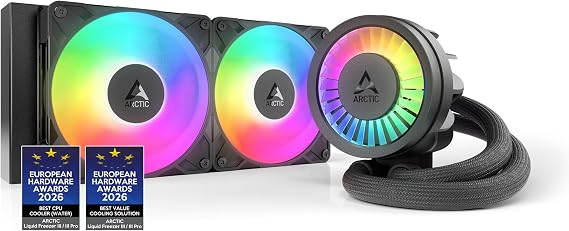
Running quiet and cool without taking up too much space, the ARCTIC Liquid Freezer III Pro 240 A-RGB suits anyone looking for solid cooling under $100. Its strongest feature is that it keeps a stable temperature on both Intel and AMD systems thanks to its optimized contact pressure and a shifted cold plate center.
Setup feels straightforward, especially with the native mounting options for Intel LGA1851 and LGA1700 sockets, plus AMD compatibility. The included P12 PRO fan runs quieter than standard models and adjusts its speed for different workloads. An integrated VRM fan adds extra support by keeping voltage converters cool.
Daily use involves minimal noise and good airflow, around 77 CFM, even under load.
Performance shines in how efficiently it moves heat from the CPU, partly due to its contact frame design and the powerful fan that can ramp up when needed. Build quality is solid with thoughtful engineering to extend CPU lifespan. Some mention the VRM fan can be a bit noisy, but most appreciate the balance of sound and power.
The strong cooling capability combined with quiet operation makes temperature control reliable during daily tasks and heavy loads. At the same time, the integrated VRM fan noise is often the main issue people mention, which can bother those sensitive to sound.
Good fit for users needing effective water cooling on common Intel or AMD platforms without spending a lot. Those who prefer ultra-silent builds or need extremely high fan speeds might want to explore other options.
Pros
- Quiet P12 PRO fan with strong cooling performance
- Optimized contact pressure extends CPU life
- Integrated VRM fan for voltage converter cooling
- Compatible with Intel and AMD sockets
Cons
- VRM fan can produce noticeable noise at times
- Maximum rotational speed data is not practical (1 rpm listed)
| Specification | Details |
|---|---|
| Power Connector Type | 4-Pin |
| Voltage | 12 volts |
| Wattage | 3.96 watts |
| Cooling Method | Water |
| Compatible Devices | AMD, Intel |
| Air Flow Capacity | 77 cfm |
9. ARCTIC Liquid Freezer III Pro 240 CPU Cooler

Great for anyone wanting strong cooling without busting the budget, this water cooler really stands out in performance. It suits both Intel and AMD users and shines mainly because of its optimized mounting that targets the CPU hotspot efficiently.
Setting it up is straightforward thanks to the native offset mounting system that centers the cold plate on the CPU’s hottest spot. Daily operation benefits from the P12 PRO fan, which ramps up quietly yet delivers impressive airflow. The integrated VRM fan helps keep voltage converters cool, meaning it handles both CPU and nearby components during intense sessions.
The standard 4-pin power connector fits most setups without fuss.
It excels at keeping temperatures down under load, with impressive airflow capacity of 77 cfm and a maximum fan speed of 3000 rpm. Solid build quality ensures durability, and users appreciate cool VRMs for system stability. The main downside noted is occasional fan noise when pushed to maximum speed, making silence-seekers less thrilled.
The optimized pressure contact and offset mounting ensure excellent CPU hotspot cooling, which many find boosts performance, though maximum fan speed can get a bit loud. This balance makes it reliable but not completely silent during heavy use.
Ideal for gamers and workstation users who value strong cooling over ultra-quiet operation. Those needing whisper-quiet rigs might look toward alternatives with lower noise profiles.
Pros
- Efficient native offset mounting for better heat transfer
- Quiet at low speeds with powerful fan performance
- Integrated VRM fan improves voltage regulator cooling
- Compatible with multiple Intel and AMD sockets
Cons
- Fan noise noticeable at maximum RPM
- Higher power consumption than some air coolers
| Specification | Details |
|---|---|
| Cooling Method | Water |
| Air Flow Capacity | 77 cfm |
| Maximum Rotational Speed | 3000 rpm |
| Power Connector Type | 4-Pin |
| Voltage | 12 volts |
| Wattage | 3.96 watts |
10. Antec Skeleton 240 ARGB CPU Cooler

Copper is the main material behind the Antec Skeleton 240 ARGB’s cooling system, paired with a unique skeleton-frame pump head design. It fits those wanting strong cooling power with an eye-catching, customizable ARGB setup. Its biggest strength lies in combining efficient heat transfer with vibrant lighting effects.
Setup involves aligning the universal brackets, which suit most Intel and AMD sockets like LGA 1700 and AM5. The elastic, high-density tubing adds flexibility during installation. Daily operation is quietly managed by hydraulic bearing fans running up to 2000 rpm, and the ARGB lighting synchronizes smoothly with motherboard controls for a personal touch without fuss.
Cooling performance excels due to a large copper base and high-density fins that help maintain low temperatures under load. The build feels solid with durable tubing and a quiet pump. Praise often highlights its strong cooling impact and impressive lighting, while some find fan noise reaching 32 db noticeable during intense use.
Strong cooling combined with vivid ARGB lighting often gets praise, while noise at peak fan speeds is the main complaint. The quiet hydraulic bearings help keep sound manageable in most scenarios though.
Gamers and PC builders wanting eye-catching aesthetics and solid performance will appreciate it. Those needing ultra-quiet operation or lower power draw might want to look elsewhere.
Pros
- Massive copper base for efficient cooling
- Fully customizable ARGB lighting
- Universal compatibility with major sockets
- Quiet hydraulic bearing fans
Cons
- Noise level can be noticeable at max fan speed
- Power consumption at 120 watts is on the higher side
| Specification | Details |
|---|---|
| Power Connector Type | 4-Pin |
| Voltage | 120 volts |
| Wattage | 120 watts |
| Noise Level | 32 db |
| Maximum Rotational Speed | 2000 rpm |
| Air Flow Capacity | 72.29 cubic_centimeters_per_minute |
11. Antec Skeleton Matrix 360 ARGB CPU Cooler

Vivid ARGB lighting is the first thing that stands out, making this cooler a good fit for those who want a blend of style and solid cooling on a budget. It’s powerful enough to keep temperatures down even under heavy load, making it great for gamers and productivity builds alike.
Installation is straightforward with support for a wide range of Intel and AMD sockets, so compatibility won’t be an issue. The pump uses a 4-pin connector and the LED a 3-pin, which allows easy motherboard sync of the colorful lighting.
Daily operation is quiet thanks to the hydraulic bearing fans, and the flexible, high-density tubing feels sturdy and resilient around the case.
Its main job is cooling, and with a copper base plate and high-density fins, it manages heat removal well during intense workloads. The fans spin up to 2800 rpm and push 74.23 cfm of airflow to help with this. Customers often praise the quiet, stable operation, but some note the noise level can rise under full speed.
The durable design helps it last without frequent maintenance or noise issues.
Antec Skeleton Matrix 360 ARGB CPU Cooler offers strong cooling thanks to its large copper base plate and high-density fins. Powerful PWM ARGB radiator fans move air well, keeping temperatures down under load. Some notice the ARGB lighting is bright but can be tricky to sync perfectly with all motherboards, though it still adds a clear visual touch.
People seeking an efficient cooler for gaming or heavy workloads will appreciate the performance on Intel and AMD sockets alike. Those who prefer quieter or completely silent setups might want to look at passive coolers or air coolers with larger heatsinks. The lighting customization might appeal more to users who want their PC aesthetics to stand out rather than those.
Pros
- Striking ARGB lighting fully customizable
- Strong cooling performance under all loads
- Wide compatibility with Intel and AMD sockets
- Quiet and durable hydraulic bearing fans
Cons
- Noisy at maximum fan speeds
- Requires motherboard support for full lighting control
| Specification | Details |
|---|---|
| Cooling Method | Water |
| Power Connector Type | Pump: 4-pin | LED: 3-pin |
| Maximum Rotational Speed | 2800 rpm |
| Noise Level | 32.13 dB |
| Air Flow Capacity | 74.23 cfm |
12. Thermalright Aqua Elite 240 V3 CPU Cooler

Offering impressive cooling power with a quiet operation, the Thermalright Aqua Elite 240 V3 suits anyone wanting a reliable AIO cooler without breaking the bank. Its standout feature is the fourth generation pump head combined with a well-sized black aluminium fin heat sink for efficient heat dissipation.
Installation is straightforward, aided by the protective mesh on the water pipes that help prevent damage during setup. The included 120mm ARGB fan runs quietly at 25 dB and spins up to 1800 rpm, keeping noise low while maintaining airflow of 66.17 cfm. The 4-pin power connector and 5-volt input make compatibility with many desktop configurations easy.
Performance-wise, it cools effectively thanks to its octagonal pump head running at speeds up to 2800 RPM ± 10%. The build prioritizes long life with a pump rated for around 40,000 hours and low vibration design. While many praise the quietness and cooling ability, some users mention the fan speed limit restricts peak cooling.
The quiet performance combined with strong cooling comes from the advanced pump head and designed airflow, making it an effective solution for many systems. Most common complaint centers on the capped fan speed restricting maximum cooling potential under heavy loads.
Anyone prioritizing silence and steady cooling in normal desktop use will appreciate this cooler. Users wanting top-end cooling with higher fan speeds might want to consider other options that offer more power or voltage flexibility.
Pros
- Low vibration and quiet operation
- Long lifespan pump design
- Efficient black aluminium fin heat sink
- ARGB lighting for visual customization
Cons
- Fan speed capped at 1800 rpm limits peak cooling
- Voltage limited to 5 volts may reduce power options
| Specification | Details |
|---|---|
| Power Connector Type | 4-Pin |
| Voltage | 5 volts |
| Wattage | 2.64 watts |
| Noise Level | 25 db |
| Maximum Rotational Speed | 1800 rpm |
| Air Flow Capacity | 66.17 cfm |
Best AIO Coolers Under 100 Comparison Table
| Product | Compatible Devices | Cooling Method | Max Rotational Speed | Air Flow Capacity |
|---|---|---|---|---|
| ARCTIC Liquid Freezer III Pro | Desktop, Gaming Console | Liquid | 3000 rpm | 77 cfm |
| MSI MAG Coreliquid A13 240 | Desktop | Water | 5200 rpm | 60.78 cfm |
| Minorsonic 360mm AIO Cooler | Cpu | Water, Fan | 1600 rpm | – |
| Thermalright Aqua Elite 360 V6 | Desktop | Water | 2000 rpm | 70.84 cfm |
| ARCTIC Liquid Freezer III Pro | Cpu | Liquid | 3000 rpm | 77 cfm |
| Thermalright Aqua Elite 120 V3 | Desktop | Water | 1500 rpm | 66.17 cfm |
| Thermalright Frozen Notte 240 V2 | Desktop | Water | 1 rpm | 72.37 cfm |
| ARCTIC Liquid Freezer III Pro | AMD, Intel | Water | 1 rpm | 77 cfm |
| ARCTIC Liquid Freezer III Pro | AMD, Intel | Water | 3000 rpm | 77 cfm |
| Antec Skeleton 240 ARGB | Desktop | Water | 2000 rpm | – |
| Antec Skeleton Matrix 360 ARGB | Desktop | Water | 2800 rpm | 74.23 cfm |
| Thermalright Aqua Elite 240 V3 | Desktop | Air, Water | 1800 rpm | 66.17 cfm |
- Compatible DevicesDesktop, Gaming Console
- Cooling MethodLiquid
- Max Rotational Speed3000 rpm
- Air Flow Capacity77 cfm
- Compatible DevicesDesktop
- Cooling MethodWater
- Max Rotational Speed5200 rpm
- Air Flow Capacity60.78 cfm
- Compatible DevicesCpu
- Cooling MethodWater, Fan
- Max Rotational Speed1600 rpm
- Air Flow Capacity–
- Compatible DevicesDesktop
- Cooling MethodWater
- Max Rotational Speed2000 rpm
- Air Flow Capacity70.84 cfm
- Compatible DevicesCpu
- Cooling MethodLiquid
- Max Rotational Speed3000 rpm
- Air Flow Capacity77 cfm
- Compatible DevicesDesktop
- Cooling MethodWater
- Max Rotational Speed1500 rpm
- Air Flow Capacity66.17 cfm
- Compatible DevicesDesktop
- Cooling MethodWater
- Max Rotational Speed1 rpm
- Air Flow Capacity72.37 cfm
- Compatible DevicesAMD, Intel
- Cooling MethodWater
- Max Rotational Speed1 rpm
- Air Flow Capacity77 cfm
- Compatible DevicesAMD, Intel
- Cooling MethodWater
- Max Rotational Speed3000 rpm
- Air Flow Capacity77 cfm
- Compatible DevicesDesktop
- Cooling MethodWater
- Max Rotational Speed2000 rpm
- Air Flow Capacity–
- Compatible DevicesDesktop
- Cooling MethodWater
- Max Rotational Speed2800 rpm
- Air Flow Capacity74.23 cfm
- Compatible DevicesDesktop
- Cooling MethodAir, Water
- Max Rotational Speed1800 rpm
- Air Flow Capacity66.17 cfm
How to Choose the Right AIO Cooler Under 100
Key factors to consider include cooling efficiency, noise levels, and compatibility with your PC case and CPU socket. Choosing the right balance prevents overheating and reduces the need for costly upgrades or replacements, ensuring reliable performance and long-term savings.
Cooling Performance
Radiator size and fan setup directly influence how heat leaves your system. Smaller radiators struggle to cool high-TDP CPUs because their surface area for heat exchange is limited. Multiple fans or larger 240mm or 280mm radiators improve airflow and heat dissipation, especially under heavy loads.
The pump is the heart of circulation; a low-quality pump can cause inconsistent liquid flow, leading to higher CPU temperatures or even system crashes during intensive tasks.
A good unit matches or surpasses your CPU’s thermal design power (TDP). For mid-range processors, a 240mm radiator with two 120mm fans and a reliable pump is generally enough. Higher-end chips may require 280mm or larger radiators.
Pay attention to pump specifications or user feedback on stable cooling performance, as cheap pumps often fail to maintain consistent flow rates under load.
Compatibility and Fit
The cooler has to fit your setup precisely. Not all models support every CPU socket or motherboard size, which can cause headaches during installation.
Radiator and fan dimensions must also correspond with your PC case space, especially in compact builds or small form factor cases that can only accept 120mm or 140mm radiators.
Component clearance matters for RAM and graphics cards. Some coolers have bulky pumps or tubing that block tall RAM modules or make installing a large GPU problematic.
Taking measurements of your case and component placements beforehand helps avoid fitment issues. Common radiator sizes to check compatibility for are 120mm, 240mm, 280mm, or 360mm.
Noise Levels
Fans spinning too fast generate a noticeable hum or buzz. A fan rated around 1200 to 2000 RPM often presents a manageable noise level, but the quality of the fan blades and motor also impacts sound.
Lower quality fans can rattle or produce higher-pitched whining under load.
The pump can be silent or produce a faint drone, depending on its design and bearing type. Cheap pumps frequently emit rattling noises that worsen over time. Choosing a cooler with a balanced setup means accepting slightly higher noise for better temperatures or opting for quieter operation at the expense of maximum thermal capacity.
Build Quality and Materials
Platforms that use sturdy radiators made from aluminum or copper resist damage during installation and maintain performance over time. Tubing made from reinforced rubber or braided nylon better prevents leaks and kinks, which cause coolant loss and system failures.
Components prone to corrosion shorten lifespan, especially if incompatible metals are present in the cooling loop.
Long-lasting units have quality pump bearings such as ceramic or dual ball bearings, which reduce wear and noise. Fan durability equals stable airflow without early bearing failures. Skimping here leads to premature malfunction or reputationally high replacement needs.
Ease of Installation and Maintenance
Mounting hardware must clearly indicate compatibility with your socket and motherboard. Kits including backplates and multiple brackets make fitting straightforward, avoiding scrambling for extra parts.
Clear instruction manuals speed up the process and reduce installation errors that impact performance.
Some models allow refilling the coolant, which extends use but requires careful handling to avoid spills. Ease of access to radiator fins and fans for dust cleaning keeps the cooling system effective. Designs that let you easily detach fans or clean the radiator surface without full disassembly save time in the long run.
Optimizing AIO Cooler Performance with Proper Installation Techniques
Proper installation significantly impacts the efficiency of an AIO cooler. Ensuring the cold plate of the cooler is securely and evenly mounted to the CPU surface allows for optimal thermal transfer. Use the correct amount of thermal paste; too little or too much can reduce heat conductivity.
Align the radiator so that the tubing is positioned to avoid sharp bends or kinks that restrict coolant flow. Pay attention to the orientation of the pump and fans, installing the radiator with fans set for intake or exhaust affects case airflow patterns.
Secure screws gently but firmly to prevent uneven pressure that could damage the CPU or cooler base. Connecting the pump and fan cables to the proper motherboard headers enables effective fan speed and pump control, which can maintain balanced noise levels and cooling performance.
Routine Maintenance Practices to Prolong AIO Cooler Lifespan
Regular maintenance extends the functional life of an AIO cooler by preventing common issues like dust buildup and coolant degradation. Cleaning dust from radiator fins and fan blades every few months maintains airflow and cooling efficiency. Use compressed air at a moderate distance to avoid damaging delicate fins.
Checking for leaks around the pump and radiator fittings is crucial; any signs of moisture require immediate attention to avoid hardware damage. Fans may wear out over time, so monitoring for unusual noises or reduced speeds helps identify when replacements are needed.
While most AIO coolers are sealed units, ensuring the pump is running steadily by monitoring its speed through software prevents overheating. Keeping the case environment clean and properly ventilated also reduces strain on the cooler.
Comparing AIO Coolers to Traditional Air Cooling Solutions for Budget Builds
Budget builders often weigh the choice between AIO coolers and traditional air coolers. AIO coolers provide better temperature control in compact spaces due to radiator placement flexibility, which benefits small form-factor cases. However, quality air coolers offer reliable performance with fewer points of failure since they lack pumps and liquid circuits.
Air coolers generally cost less and require minimal maintenance compared to AIOs, which may need monitoring for pump health and occasional cleaning. Noise levels depend on fan design; some air coolers are quieter, but decent AIO models balance pump and fan noise effectively.
Installation complexity differs; air coolers tend to be simpler to mount, avoiding potential pitfalls like improper radiator orientation. The decision depends on case compatibility, budget, and preference for cooling style.
People Also Asked
How Do I Install an AIO Cooler Properly on My CPU?
Start by mounting the radiator to the case and applying thermal paste to the CPU before attaching the water block firmly but not too tight. Make sure the hoses are not kinked and the pump cable is properly connected to the motherboard for optimal cooling performance.
What Size AIO Cooler Fits in a Mid-Tower PC Case?
A 240mm or 280mm AIO cooler usually fits well in most mid-tower cases, but it’s important to check your specific case’s radiator compatibility before buying. Some mid-towers only support up to 240mm radiators, so measuring the mounting points saves frustration.
Are AIO Coolers Safe to Use with Overclocked Processors?
AIO coolers can handle moderate overclocking as long as the cooler is rated for your CPU’s TDP and the pump and fans run efficiently. Avoid pushing your CPU too far without proper monitoring of temperatures and fan speeds as excessive heat can shorten cooler lifespan.
How Long Does an Average AIO Cooler Last Before Maintenance?
About 3 to 5 years is common before you might notice reduced performance or noise issues indicating the need for maintenance or replacement. It’s a good practice to check fan operation and listen for pump noise every few months, as early signs of failure help prevent overheating.
What Common Problems Should I Watch for with AIO Coolers?
Watch for pump noise, leaking coolant, and rising CPU temperatures as common issues with AIO coolers. Securing all cables and regularly cleaning dust from the radiator can prevent performance drops and avoid damage from leaks or failed pump units.
Conclusion
Choosing an AIO cooler under 100 comes down to a few key points: reliable cooling performance, noise levels, and compatibility with your case and CPU socket. Keeping these in mind helps find a balance between staying cool and keeping your setup quiet without spending too much.
Make sure to pick a cooler that fits your case size and aligns with your budget and usage habits. For more details, refer back to the comparison table and the picks listed earlier to find the option that matches your needs best.

I’m Grant Mitchell, a firearms and hunting writer with years of experience at the range and in the field. I write about rifles, shotguns, handguns, optics, safe storage, cleaning, and responsible ownership, along with practical hunting tips. My goal is to share accurate, safety-first information that helps you choose the right firearm, maintain it properly, and become a more confident shooter.