Top 12 Best AIO Cooler for LGA 1700 That Beat the Rest!
Heat buildup is a common headache for those using the LGA 1700 socket, especially when the cooler isn’t up to the task. The best aio cooler for lga 1700 helps avoid thermal throttling and loud fan noise by maintaining consistent temperatures under load, which cheap or poorly matched coolers often fail to do. Many end up with systems that get too hot too fast or have mounting issues that prevent proper contact with the CPU.
Size and compatibility matter a lot since the LGA 1700 socket has a new mounting pattern different from previous Intel sockets. A cooler with a radiator around 240mm or larger generally provides quieter and more efficient cooling. The pump’s build quality also makes a difference; a PWM-controlled pump with ceramic bearings usually lasts longer and sounds less buzzy.
Easy to clean designs with accessible fans and tubing help maintain performance over time without much hassle.
Need a Quick Check?
| Image | Product | Price |
|---|---|---|
Our Top Picks 1  | ARCTIC Liquid Freezer 360 Pro | Check Price |
Our Top Picks 2  | MSI MAG Coreliquid A13 240 | Check Price |
Our Top Picks 3  | ARCTIC Liquid Freezer 360 Pro | Check Price |
Our Selected Top 12 Aio Cooler for Lga 1700 Worth Considering
This list features a carefully chosen set of all-in-one coolers compatible with the LGA 1700 socket. Each review covers performance, suitability for different users, and highlights the main advantages and disadvantages to help you make an informed decision.
1. ARCTIC Liquid Freezer III Pro 360 CPU Cooler
Great for anyone running an Intel LGA1700 build, ARCTIC’s Liquid Freezer III Pro 360 stands out for its effective heat dispersion. It’s designed to offer solid cooling power while paying attention to extending CPU life, making it a reliable choice for gamers and power users alike.
Setup fits well with the LGA1700 socket due to optimized contact pressure distribution that protects the CPU. Its P12 PRO fans operate quietly at low speeds but ramp up powerfully when things heat up during intense tasks. A dedicated VRM fan keeps voltage converters cool, which helps maintain performance stability during long sessions.
Performance is strong with the native offset cold plate ensuring key hot spots get the best cooling. Its build is thoughtful, balancing noise and airflow at up to 3000 rpm. Users praise the quiet operation and effective thermal management, while some note the fan speed can get pretty high under heavy load.
The Liquid Freezer III Pro 360 effectively manages heat even during high-load tasks, praised especially for its quiet operation at lower fan speeds. Common issues focus on the fan noise when pushed to full capacity and the more involved installation process compared to simpler coolers.
It suits users running demanding applications or gaming who want reliable cooling paired with quieter performance. Those looking for a more straightforward or silent solution might want to consider other options with simpler fan controls or air cooling solutions.
Pros
- Optimized contact pressure protects CPU lifespan
- Quiet P12 PRO fans at low speeds
- Integrated VRM fan improves stability
- High airflow capacity of 77 cfm
Cons
- Fans can be loud at maximum speed
- Complex installation compared to air coolers
| Specification | Details |
|---|---|
| Cooling Method | Liquid |
| Maximum Rotational Speed | 3000 rpm |
| Air Flow Capacity | 77 cfm |
| Voltage | 12 volts |
| Power Connector Type | 4-Pin |
2. MSI MAG Coreliquid A13 240 CPU Liquid Cooler
Keeping an LGA 1700 CPU cool during intense workloads is easier with a liquid cooler designed for demanding setups. It suits gamers and creators who want reliable water cooling without constant noise.
Its standout feature is the split-flow radiator combined with a high-performance pump that balances power and quiet operation well.
Setting the cooler up feels straightforward with its out-of-the-box compatibility for newer sockets. The integrated pump operates quietly, thanks to ceramic bearings, and the aluminum radiator’s split-flow design aids in efficient heat dissipation.
Its low noise level means it won’t distract during long sessions, and managing cables is simpler with the standard 4-pin connector and 12-volt supply.
Performance shines with its pump speed going up to 3800 RPM and a maximum fan speed hitting 5200 RPM to keep temperatures in check. The build quality is solid, spotlighting durability and reduced motor resonance. Reviews highlight its quiet operation as a key strength, though some users mention occasional installation challenges due to radiator size and mounting.
Quiet operation is noted as a major benefit, with pump and bearing design helping reduce noise and vibration. Installation can be tricky due to the radiator size, making mounting less straightforward on some cases.
It’s well-suited for anyone needing a quiet but powerful water cooler for modern Intel sockets. Users with limited case space or who want simpler mounting might look at more compact alternatives.
Pros
- Out of box LGA 1851 support
- Quiet operation with ceramic bearings
- Durable integrated pump design
- Effective split-flow radiator cooling
Cons
- Radiator size can complicate installation
- Pump speed can be loud at max RPM
| Specification | Details |
|---|---|
| Power Connector Type | 4-Pin |
| Voltage | 12 volts_of_direct_current |
| Wattage | 2.16 watts |
| Noise Level | 14.4 db |
| Maximum Rotational Speed | 5200 rpm |
| Air Flow Capacity | 60.78 cfm |
3. ARCTIC Liquid Freezer III Pro 360 A-RGB CPU Cooler
Cooling power pushes to a 3000 rpm max fan speed, making it ideal for anyone wanting serious heat management on the LGA1700 platform. It’s especially suited for those running demanding CPUs that generate a lot of heat, offering a strong balance of airflow and quiet operation.
Setup fits the LGA1700 socket perfectly thanks to the optimized contact frame, which helps distribute pressure evenly for good thermal contact. The included ARCTIC P12 PRO fan runs quietly even at higher speeds and adjusts PWM automatically.
A built-in VRM fan adds protection by cooling voltage regulators, which can be crucial during long gaming or rendering sessions.
Performance excels in keeping temperatures low, with the offset mounting placing the cold plate directly on the CPU hotspot for efficient heat transfer. The build quality feels solid without any flimsy parts. Many users find the cooling very effective, though some mention the integrated VRM fan can be a bit noisy under full load.
Cooling performance receives strong praise for efficient heat transfer and quiet fan operation at most speeds. Common complaints focus on the VRM fan causing noticeable noise when running at full speed. Setup and integration with LGA1700 sockets are generally well appreciated due to optimized mounting features.
Anyone wanting reliable CPU and VRM cooling with quieter operation at low to medium loads will find this cooler suitable. Those sensitive to noise under maximum workload or looking for ultra-low wattage options might want to consider alternatives.
Pros
- Optimized contact pressure for better heat dissipation
- Quieter P12 PRO fan especially at low speeds
- Integrated VRM fan for added voltage regulation cooling
- Offset mounting targets CPU hotspot effectively
Cons
- VRM fan can be noisy during heavy load
- Consumes close to 4 watts, higher than some competitors
| Specification | Details |
|---|---|
| Maximum Rotational Speed | 3000 rpm |
| Air Flow Capacity | 77 cfm |
| Power Connector Type | 4-Pin |
| Voltage | 12 volts |
| Wattage | 3.96 watts |
| Cooling Method | Liquid |
4. Thermalright Frozen Notte 240 Black ARGB CPU Cooler

People building a PC with an LGA 1700 socket and wanting a water cooler that balances solid cooling and cool looks will find this suitable. Its biggest strength lies in combining efficient heat dissipation with striking ARGB lighting that syncs perfectly with the motherboard.
Setting it up involves mounting the water block with its full copper mirror base, ensuring good contact with the CPU. The 240mm black aluminum fin cold plate and the water pipe are designed to reduce wear and maintain performance.
Daily use means quiet operation at just 27.7 dB, with the 120mm ARGB fan moving plenty of air without eating much power.
It does its cooling job well, keeping temps in check thanks to the low resistance water passage and quality materials. The copper base and polymer water tubing stand out for longevity. Bright lighting effects are praised most, but the synchronized ARGB system takes up a 3-pin power connector, which can limit lighting port options.
The ARGB lighting synchronization is highly praised for creating a vibrant look while the cooling components perform well with durable materials like the copper base. The main issue mentioned is the use of a 3-pin connector for lighting, which might reduce the number of available sync ports on some motherboards.
Those who prioritize quiet, steady cooling with attractive lighting will appreciate this cooler. Users needing more flexible or higher-speed fan control might consider other options better suited to varied lighting and fan power setups.
Pros
- Full copper mirror base for better heat transfer
- Quiet operation at just 27.7 decibels
- ARGB lighting syncs smoothly with motherboard
- Durable high polymer woven water pipe
Cons
- ARGB uses a 3-pin connector, may limit motherboard ports
- Maximum rotational speed listed as 1 rpm seems unusually low
| Specification | Details |
|---|---|
| Cooling Method | Water |
| Noise Level | 27.7 db |
| Air Flow Capacity | 72.37 cfm |
| Maximum Rotational Speed | 1 rpm |
| Voltage | 12 V |
| Power Connector Type | 3-Pin |
5. Thermalright Aqua Elite 240 V3 CPU Cooler

Thermalright Aqua Elite 240 V3 stands out with its unique octagonal pump head and quiet ARGB fan, ideal for anyone building a desktop with an LGA 1700 socket who cares about reliable, low-noise cooling. Its key feature is the low vibration combined with efficient heat dissipation thanks to a large black aluminium fin heat sink plate.
Installation is straightforward for anyone familiar with liquid coolers, with a 4-pin power connector that fits most desktop motherboards. It runs quietly at 25 db, making daily use nearly silent and comfortable.
The protective mesh on the water pipe boosts durability, making it easy to use over long periods. The 120mm ARGB fan offers some customizable lighting without overwhelming your setup.
Heat management is solid enough for most mid to high-range CPUs, thanks to the 240 size radiator and fourth-generation pump operating at 2800 RPM max speed. The build uses quality materials, like the aluminium sink and a long-lasting pump with a lifespan up to 40,000 hours. Common praise focuses on its quiet operation, while some mention that the pump speed can sound a little high under heavy loads.
Quiet operation is the biggest positive, with many users appreciating how the low vibration pump keeps noise minimal. The main drawback mentioned is that during intense tasks, the pump can become noticeably louder, which might distract some. The lifespan of 40,000 hours suggests long-term reliability, balancing that noise issue over time.
This cooler suits those who prioritize quiet daily use and decent RGB effects in their PC builds. Gamers or professionals pushing CPUs hard may want to consider options with higher max pump speed or airflow, as this model’s limitations could affect cooling in extreme scenarios.
Pros
- Low vibration pump reduces noise
- ARGB lighting adds subtle customization
- Durable water pipe with mesh protection
- Large aluminium fin heat sink improves cooling
Cons
- Pump speed can get loud under heavy load
- Fan speed maxes at 1800 rpm, limiting airflow at times
| Specification | Details |
|---|---|
| Power Connector Type | 4-Pin |
| Voltage | 5 volts |
| Wattage | 2.64 watts |
| Noise Level | 25 db |
| Maximum Rotational Speed | 1800 rpm |
| Air Flow Capacity | 66.17 cfm |
6. Thermalright Frozen Notte 360 Black ARGB CPU Cooler
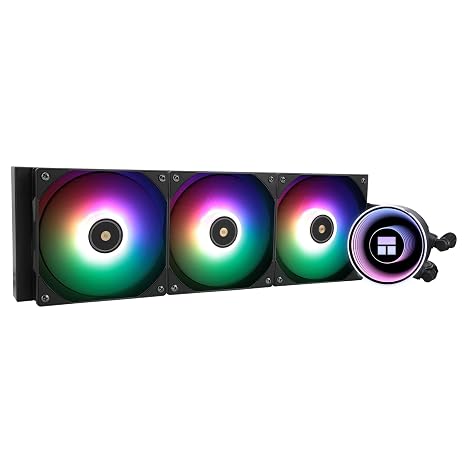
Thermalright Frozen Notte 360 Black ARGB is a water-cooled CPU cooler designed for those who want solid thermal performance paired with good looks. It works best for LGA 1700 users seeking a quiet setup combined with effective heat dissipation, standing out mostly because of its large 360mm radiator and ARGB fans.
Setup involves mounting a sizable 397 by 120 by 27mm radiator that fits well in cases supporting 360mm coolers. The three included 120mm ARGB fans run quietly through a 4-pin PWM connector, while the pump maintains a steady 5300 RPM speed using a 12V 3-pin connection. The water line length of 450mm offers flexible routing options, and the copper base ensures good contact on the CPU surface.
It handles CPU heat loads effectively thanks to its full copper mirror base and extensive fin design, keeping temperatures well controlled under load. The build uses durable materials like a high polymer woven water pipe, which adds reliability.
Most mention the quiet operation as a key benefit, while some note the radiator’s length can challenge smaller cases.
The cooler is praised for maintaining low temperatures quietly thanks to its well-designed copper base and effective 360mm radiator. A common issue is the radiator’s size, which can be tricky to accommodate in smaller or compact builds.
Anyone with a spacious case looking for a quiet, ARGB-equipped liquid cooler will appreciate its performance and design. Those with small or mid-sized cases may want to consider alternatives with smaller radiators for easier installation.
Pros
- Quiet operation with low noise rating
- Strong cooling for high power CPUs
- Durable water piping and copper base
- ARGB fans add customizable style
Cons
- Radiator length may not fit all cases
- Pump speed is fixed, limiting control
| Specification | Details |
|---|---|
| Heat Sink Size | 397 * 120 * 27mm |
| Water Conduit Length | 450mm |
| Water Pump Speed | 5300RPM ± 10% |
| Fan Size | 120mm ARGB |
| Cooling Power | 150 watts |
| Noise Level | 1 db |
7. ARCTIC Liquid Freezer III Pro 240 CPU Cooler

Cooling feels reliable and strong, well-suited for someone aiming to keep an Intel LGA1700 running cool during heavy workloads. Its best feature is the optimized contact pressure, which keeps the CPU cooler for longer while reducing heat buildup.
Setup involves a straightforward installation with the native offset mounting that aligns perfectly with the processor hotspot for efficient heat transfer. The integrated VRM fan quietly manages the temperature of voltage regulators, which keeps the system stable even under load. The ARCTIC P12 PRO fans run smoothly with a wide speed range, so noise stays low unless pushing the system hard.
The cooler’s water-based method and clever design let it handle demanding tasks without struggling to dissipate heat. Build quality is solid, especially in the contact frame for Intel CPUs, providing consistent performance. Most appreciate the quiet operation at low fan speeds, while a common complaint is the higher noise levels when the fans ramp up close to max rpm.
Performance is praised for quiet cooling when running at moderate speeds, while noise under heavy load is frequently mentioned as a downside. The built-in VRM fan is a notable advantage, helping to maintain voltage stability close to the CPU.
Those running powerful Intel setups who value quieter, efficient cooling during everyday use will appreciate this cooler. Users prioritizing ultra-low noise levels at full system stress might look for alternatives with quieter high rpm fans.
Pros
- Optimized contact pressure for Intel LGA1700
- Quiet operation at low fan speeds
- Integrated VRM fan improves system stability
- High airflow capacity of 77 cfm
Cons
- Fan noise can spike near maximum rpm
- Higher wattage than some competing coolers
| Specification | Details |
|---|---|
| Power Connector Type | 4-Pin |
| Voltage | 12 volts |
| Wattage | 3.96 watts |
| Maximum Rotational Speed | 3000 rpm |
| Air Flow Capacity | 77 cfm |
8. CoolerMaster MasterLiquid ML240L RGB V2 CPU Cooler

Strong cooling paired with customizable RGB lighting make the CoolerMaster MasterLiquid ML240L RGB V2 a solid pick for anyone running an LGA 1700 setup. It’s especially well-suited for those who want reliable temperature control with a visually engaging touch.
Installation is straightforward thanks to compatible mounting kits for Intel’s Alder Lake LGA1700 socket. The dual-chamber pump runs quietly, and the updated SickleFlow fan blades deliver steady airflow while keeping noise around 30 decibels.
You can easily adjust the RGB lighting to match your build’s style, adding a bit of personality without extra hassle.
It keeps processors cool effectively, handling a wattage of 260 with water cooling. The high industrial-grade EPDM seal aims at preventing leaks and extending lifespan. Most praise highlights its quiet performance and effective heat management, while some note that the lighting, though bright, might not be as eye-catching as higher-end RGB options.
The MasterLiquid ML240L V2 stands out for its quiet airflow and effective cooling at moderate power loads. Its industrial-grade sealing is designed to reduce leaks and longevity concerns. Users often praise its silent operation but sometimes wish for more intense lighting effects.
Those seeking steady cooling with decent RGB customization will appreciate this cooler. People looking for very high wattage cooling or the brightest lighting might look for alternatives better suited to those specific needs.
Pros
- Quiet operation with 30 dB noise level
- Customizable RGB lighting effects
- Strong, leak-resistant industrial-grade seal
- Compatible with Intel LGA1700 socket
Cons
- RGB lighting less vivid than premium models
- 260W may limit overclocking potential
| Specification | Details |
|---|---|
| Maximum Rotational Speed | 1800 rpm |
| Noise Level | 30 db |
| Power Connector Type | 4-Pin |
| Voltage | 12 volts |
| Air Flow Capacity | 62 cfm |
| Wattage | 260 watts |
9. Thermalright Aqua Elite 360 V3 CPU Cooler

Built with a focus on strong airflow and vibrant lighting, this cooler suits anyone upgrading to a high-performance LGA 1700 setup wanting solid cooling with eye-catching ARGB effects. Its standout feature is the impressive 66.17 CFM airflow that helps keep your processor temperatures in check during demanding tasks.
Setting up involves plugging the 4-pin power connector and syncing the ARGB fan and water block lighting to the 5V 3-pin header on your motherboard. Day-to-day, the cooler runs quietly at 25.6 db, while the lighting adds an attractive visual flair without interfering with performance.
The water cooling method keeps things efficient during heavier loads without being overly loud or complicated.
Cooler performance is reliable and consistent in managing heat from the latest Intel and AMD chips, supporting enhanced cooling efficiency. The construction feels sturdy, with a well-engineered radiator and fans designed for longevity.
Common praise centers on its quiet operation, while a frequent complaint is the need for compatible motherboard lighting headers to fully utilize the ARGB features.
Excellent quiet running performance and effective heat suppression help maintain optimal CPU temperatures during intense use. Most users note vibrant lighting that pairs well with motherboards supporting 5V headers, though some mention the limitation if their board lacks lighting synchronization options.
Those looking for a dependable water cooler with strong airflow and lighting effects will find this model satisfying. Opt for other solutions if your motherboard doesn’t support 5V ARGB headers or you prioritize simpler, non-lighting focused cooling options.
Pros
- Strong airflow output at 66.17 CFM
- Quiet operation with 25.6 db noise level
- ARGB lighting synchronized with motherboard
- Compatible with high-end Intel and AMD processors
Cons
- Requires compatible 5V 3-pin header for lighting
- May not fully utilize ARGB without motherboard sync
| Specification | Details |
|---|---|
| Power Connector Type | 4-Pin |
| Voltage | 5 volts |
| Wattage | 4.8 watts |
| Noise Level | 25.6 db |
| Maximum Rotational Speed | 1500 rpm |
| Air Flow Capacity | 66.17 cfm |
10. Cooler Master 240 Core II AIO CPU Cooler

ARGB lighting grabs attention right away, making it a good fit for gamers wanting a visually striking cooler. It excels at cooling Ryzen 7 and LGA 1700 CPUs, thanks to its dual-chamber design that focuses water flow precisely where the heat builds up.
Easy installation on recent sockets is a big plus for quick setups.
Setting up involves compatible brackets for AM5, AM4, LGA 1851, and LGA 1700 platforms, which makes the mounting straightforward and saves time. The dynamic PWM fan adjusts quietly between 650 and 1,750 RPM, balancing noise and airflow without drawing attention.
Included thermal paste with wide temperature tolerance assures stable heat transfer without extra work on your part.
Its cooling ability is solid, tackling CPU hotspots effectively while staying quiet at about 30 dB noise level. Built with a dual-chamber system, it handles water circulation well under load. The most praised feature is quiet operation despite good airflow, while some mention the 3-pin power connector may limit precise speed control compared to 4-pin fans.
Quiet operation with good airflow stands out as a key strength. The common drawback is the 3-pin power connector, which can make precise fan speed control harder compared to 4-pin options. It manages heat effectively without much noise.
Gamers and builders wanting stylish lighting and easy setup on current sockets will be satisfied. Those seeking more advanced fan control or pushing CPUs to high overclocks may want to explore other coolers.
Pros
- ARGB lighting fully customizable
- Quiet PWM fan from 650 to 1,750 RPM
- Easy installation with multiple socket support
- Includes thermal paste with wide temperature range
Cons
- 3-pin connector limits fan speed control
- Wattage at 12 watts may restrict overclocking potential
| Specification | Details |
|---|---|
| Power Connector Type | 3-Pin |
| Voltage | 12 volts_of_alternating_current |
| Wattage | 12 watts |
| Noise Level | 30 db |
| Maximum Rotational Speed | 1750 rpm |
| Air Flow Capacity | 70.5 cfm |
11. MSI MAG CoreLiquid I360 Black CPU Liquid Cooler

Excellent cooling power made for modern CPUs sets this apart in a crowded market. Anyone with an LGA 1700 or 1851 socket will appreciate how quickly it drops temperatures compared to air coolers. Its split-flow radiator design and integrated pump contribute to consistent cooling performance that stays reliable.
Installation is straightforward thanks to out-of-the-box support for the LGA 1700 and 1851 sockets. The aluminum radiator features split-flow water cooling technology combined with an integrated three-phase pump, which reduces motor resonance for quieter operation.
The 400mm tubes have triple-layer plastic and reinforced mesh that prevent leaks, keeping the whole loop sealed securely. Running the pump at up to 2500 rpm maintains steady cooling without excessive noise.
Temperature control is solid, handling demanding CPU loads without struggle. Build quality feels tough with high-grade materials used throughout, notably the evaporation-proof tubing and sturdy radiator.
Most users mention how well it holds up over time. Noise levels around 32.8 dB are low but not silent, and some note the pump sound is noticeable under load.
The cooler’s strongest praise focuses on its durable design and effective temperature management thanks to the split-flow radiator and integrated pump. The most common complaint revolves around the pump noise becoming evident under heavy CPU demand, which some users find distracting.
Anyone who wants reliable cooling for LGA 1700 or 1851 builds with minimal leak risk will be satisfied here. Users with compact cases or those seeking absolute silence may want to consider quieter or smaller alternatives.
Pros
- Supports latest LGA 1700 / 1851 sockets immediately
- Durable split-flow radiator with integrated pump
- Evaporation-proof, reinforced tubing prevents leaks
- Quiet operation with manageable noise levels
Cons
- Pump noise noticeable during intense workloads
- Installation can be bulky in smaller cases
| Specification | Details |
|---|---|
| Power Connector Type | 4-Pin |
| Cooling Method | Water |
| Compatible Devices | Desktop |
| Noise Level | 32.8 db |
| Maximum Rotational Speed | 2500 rpm |
12. CORSAIR iCUE Link Titan II 360 RX LCD CPU Cooler

Keeping your LGA 1700 CPU cool under heavy loads can be a challenge, especially when you want clear info at a glance. Designed for desktop users, the CORSAIR iCUE Link Titan II 360 RX LCD CPU Cooler stands out by combining solid water cooling with a vibrant 5 IPS LCD that shows temps and custom visuals right on the cooler.
Installation is more straightforward than usual thanks to the unified fan frame that reduces screws and cables. Daily use benefits from quiet operation thanks to second-generation RX fans featuring magnetic dome bearings and AirGuide tech.
The large LCD screen serves not only to display important CPU temperatures but can also act as a secondary monitor in Windows, adding some fun and customization options for your setup.
Cooling performance is solid, handling typical desktop heat loads effectively at a noise level of 32.8 dB. The build feels reliable with a focus on quiet, efficient operation. Most praise centers around the clear, bright LCD display and the quiet fans.
One common complaint is related to the setup complexity around customizing the display content, which can take some time to master.
The standout feature is the large, clear LCD that shows real-time CPU temperatures and customizable images, which many find a great addition. Some users find configuring the display software to be less intuitive, creating a learning curve. Noise is generally low but noticeable compared to simpler air coolers.
Anyone wanting a visually engaging CPU cooler that doubles as a mini display will find this appealing. Users who prioritize quiet operation above all else or want an easy plug-and-play experience might want to explore other options.
Pros
- Large, bright 5″ IPS LCD for real-time data and visuals
- Quiet operation with optimized RX II fans
- Unified fan frame simplifies installation
- Built-in thermal sensors for monitoring
Cons
- Customizing LCD content can be complicated
- Noise level slightly high for very quiet setups
| Specification | Details |
|---|---|
| Cooling Method | Water |
| Compatible Devices | Desktop |
| Noise Level | 32.8 db |
| Display Size | 5″ IPS LCD |
| Display Resolution | 720×1280 |
Best AIO Coolers for LGA 1700 Comparison Table
| Product | Cooling Method | Max RPM | Air Flow Capacity | Noise Level |
|---|---|---|---|---|
| ARCTIC Liquid Freezer 360 Pro | Liquid | 3000 rpm | 77 cfm | – |
| MSI MAG Coreliquid A13 240 | Water | 5200 rpm | 60.78 cfm | 14.4 db |
| ARCTIC Liquid Freezer 360 Pro | Liquid | 3000 rpm | 77 cfm | – |
| Thermalright Frozen Notte 240 ARGB | Water | 1 rpm | 72.37 cfm | 27.7 db |
| Thermalright Aqua Elite 240 V3 | Air, Water | 1800 rpm | 66.17 cfm | 25 db |
| Thermalright Frozen Notte 360 ARGB | Air, Water | 1 rpm | 72.37 cfm | 1 db |
| ARCTIC Liquid Freezer 240 Pro | Water | 3000 rpm | 77 cfm | – |
| CoolerMaster MasterLiquid ML240L V2 | Water | 1800 rpm | 62 cfm | 30 db |
| Thermalright Aqua Elite 360 V3 | Water | 1500 rpm | 66.17 cfm | 25.6 db |
| Cooler Master 240 Core II | Fan, Water | 1750 rpm | 70.5 cfm | 30 db |
| MSI MAG CoreLiquid I360 Black | Water | 2500 rpm | – | 32.8 db |
| CORSAIR iCUE Link Titan II | Water | – | – | 32.8 db |
- Cooling MethodLiquid
- Max RPM3000 rpm
- Air Flow Capacity77 cfm
- Noise Level–
- Cooling MethodWater
- Max RPM5200 rpm
- Air Flow Capacity60.78 cfm
- Noise Level14.4 db
- Cooling MethodLiquid
- Max RPM3000 rpm
- Air Flow Capacity77 cfm
- Noise Level–
- Cooling MethodWater
- Max RPM1 rpm
- Air Flow Capacity72.37 cfm
- Noise Level27.7 db
- Cooling MethodAir, Water
- Max RPM1800 rpm
- Air Flow Capacity66.17 cfm
- Noise Level25 db
- Cooling MethodAir, Water
- Max RPM1 rpm
- Air Flow Capacity72.37 cfm
- Noise Level1 db
- Cooling MethodWater
- Max RPM3000 rpm
- Air Flow Capacity77 cfm
- Noise Level–
- Cooling MethodWater
- Max RPM1800 rpm
- Air Flow Capacity62 cfm
- Noise Level30 db
- Cooling MethodWater
- Max RPM1500 rpm
- Air Flow Capacity66.17 cfm
- Noise Level25.6 db
- Cooling MethodFan, Water
- Max RPM1750 rpm
- Air Flow Capacity70.5 cfm
- Noise Level30 db
- Cooling MethodWater
- Max RPM2500 rpm
- Air Flow Capacity–
- Noise Level32.8 db
- Cooling MethodWater
- Max RPM–
- Air Flow Capacity–
- Noise Level32.8 db
How to Choose the Best AIO Cooler for LGA 1700
Choosing the right AIO cooler for LGA 1700 involves considering compatibility, cooling performance, and build quality to ensure efficient heat management. Prioritizing these factors helps avoid installation issues and prevents overheating, ultimately saving money and reducing the need for future upgrades or repairs.
Socket Compatibility and Mounting
Some AIO coolers designed before the LGA 1700 socket became standard often require additional mounting kits to fit this newer Intel platform. Without proper support, users might struggle with unstable contact between the cooler’s cold plate and the CPU, leading to higher temperatures and potential system instability.
A cooler that includes hardware explicitly for the LGA 1700 socket or supports it out of the box avoids these headaches.
The mounting system should hold the cooler firmly in place without needing frequent retightening. A stable mount prevents unwanted movement that can disrupt thermal transfer. Ease of installation also depends on the motherboard layout and cooler design, some models offer simple backplate mounting with thumbscrews, while others may be more involved.
Look for clear instructions and mounting hardware matching your CPU socket specifications.
Cooling Performance and Radiator Size
Choosing the right radiator size directly affects cooling efficiency and case compatibility. Radiators measuring 120mm tend to fit compact cases but may struggle with high-heat CPUs, while 240mm and 360mm options require spacious cases but provide better heat dispersion. Users should measure available space in the PC case to ensure a proper fit without blocking airflow or interfering with other components.
Effective cooling depends on the radiator’s thickness and fin density too. A denser fin arrangement dissipates heat more effectively but may need stronger fans to push air through. Pump power also matters, a higher flow rate generally supports better heat transfer inside the loop.
Match your cooler’s performance specs to your CPU’s thermal design power (TDP) and any overclocking plans for stable temperatures.
Noise Levels and Pump Quality
Fans and pumps generate varying noise, often rising when the CPU is under load. Some users notice a distracting hum or whining sound if the pump quality is poor or aging. Decibel ratings around 20-30 dBA at idle indicate quiet operation, but load noise can spike significantly depending on fan speed and pump RPM.
Durability of the pump is critical; a failing pump may increase noise or cause serious cooling issues. It is helpful when the cooler offers PWM fan control, allowing adjustments between quiet mode and performance mode. Fans with fluid dynamic bearings typically last longer and spin more quietly, providing a better experience overall.
Build Materials and Durability
The use of solid copper cold plates improves heat transfer compared to aluminum, but copper costs more. Reinforced rubber or nylon braided tubing resists kinks and cracking, which prevents leaks as the cooler ages.
Look for models with anticorrosion coatings on the radiator and seals rated to withstand thermal cycling without degradation. High-quality fittings that use secure clamps or compression fittings reduce chances of leaks during installation and normal operation.
These build materials and features directly impact the device’s lifespan and reliability.
Ease of Maintenance and Cleaning
Dust buildup on radiator fins and fans leads to reduced cooling effectiveness over time. Some coolers have easily removable fan screws or clips, letting users clean fans without disassembling the entire unit.
Accessible radiator placement within the case also simplifies this task.
Tubing designed to be flexible but firm helps avoid internal stress that could cause leaks, lowering maintenance needs. Certain coolers include dust filters or designs that reduce dust accumulation inside the radiator.
Easy maintenance extends the cooler’s effective working life and keeps temperatures stable without frequent downtime.
Optimizing AIO Cooler Performance on LGA 1700 Motherboards
Compatibility plays a key role in getting the best cooling performance from an AIO cooler on an LGA 1700 motherboard. The mounting bracket must fit the socket precisely to ensure even pressure across the CPU surface. Uneven contact can reduce thermal transfer and increase temperatures.
Besides proper mounting, thermal paste application is crucial. Use a small, pea-sized amount placed in the center of the CPU before installing the cooler. Spreading the paste too thin or thick affects heat conduction negatively.
Fan placement and radiator position also influence cooling efficiency. Mounting the radiator in front of or above the case intake allows cooler airflow through the radiator fins.
Also, ensure fans are oriented to push air in the correct direction, toward exhaust or intake, depending on your case airflow configuration.
- Check cooler compatibility with LGA 1700 mounting kits
- Apply thermal paste sparingly and correctly
- Position radiator for optimal airflow
- Set fan direction according to case airflow
Maintenance and Cleaning Tips to Prolong Your AIO Cooler’s Lifespan
Regular maintenance keeps an AIO cooler functioning well and extends its lifespan. Dust buildup on the radiator fins and fans restricts airflow, causing higher CPU temperatures. Clean these parts with compressed air or a soft brush every few months.
Inspecting tubing for signs of wear, leaks, or kinks is also important. Blocked or damaged tubes impede coolant flow, reducing the cooler’s effectiveness.
Although AIO coolers are usually sealed, any coolant evaporation or leaks require immediate attention.
Fans should be checked too. Dust inside the fan blades and bearing can cause noise or reduce speed.
Cleaning fan blades and replacing faulty fans helps maintain consistent performance.
- Use compressed air to remove dust from radiator and fans
- Check tubing for cracks or leaks frequently
- Make sure fan blades are clean and spin freely
- Consider replacing fans if they become noisy or slow
Common Installation Mistakes to Avoid with LGA 1700 AIO Coolers
Improper installation is a common cause of inefficient cooling with LGA 1700 AIO coolers. One frequent mistake is not securing the mounting bracket tightly enough. Loose mounting results in poor CPU contact and higher temperatures.
Over-tightening screws can also cause damage to the motherboard or warping of the cooler’s cold plate. Use even, moderate pressure, tightening screws in a diagonal pattern to distribute force evenly.
Another issue is incorrect radiator or fan orientation. Installing fans backward or mounting the radiator where airflow is restricted leads to insufficient heat dissipation. Also, misaligning the pump connections or routing tubing improperly can put strain on components and shorten their life.
- Firmly secure mounting bracket without over-tightening
- Tighten screws diagonally and evenly
- Verify correct fan airflow direction
- Position radiator to ensure unrestricted airflow
- Route tubing without sharp bends or kinks
People Also Asked
Will This AIO Cooler Fit My LGA 1700 Socket?
The AIO cooler will fit an LGA 1700 socket if it specifically includes a bracket or mounting hardware for this socket type. Check the package contents or product specifications for compatibility. Some older models need an updated mounting kit for LGA 1700 support.
How Do I Properly Install an AIO Cooler on LGA 1700?
To install an AIO cooler on an LGA 1700 socket, secure the mounting bracket to the motherboard first, then apply thermal paste to the CPU before placing the cooler. Tighten screws evenly to avoid uneven pressure that can reduce cooling efficiency.
What Maintenance Is Needed to Keep an AIO Cooler Working Well?
Maintenance of an AIO cooler generally involves checking for dust build-up on the radiator and fans and ensuring the tubes are not kinked. Cleaning the radiator fans with compressed air every few months keeps airflow optimal.
Can an AIO Cooler Cause Damage to the LGA 1700 Motherboard?
An AIO cooler can cause damage if installed incorrectly, such as overtightening screws that might stress the motherboard or if a leak develops. Ensure the cooler is mounted securely and check for any signs of fluid leak periodically.
How Long Does an AIO Liquid Cooler Typically Last with Regular Use?
An AIO liquid cooler typically lasts around 4 to 7 years with regular use before pump failure or coolant degradation might occur. Monitoring pump noise and temperatures can help spot when replacement is needed.
Conclusion
Choosing an AIO cooler for the LGA 1700 socket comes down to three key factors: compatibility with your motherboard and case, the cooling capacity relative to your CPU’s heat output, and how noisy the system runs under load. Making sure the cooler fits properly and can handle your processor’s thermal demands is essential for keeping your system stable.
Noise level is something to consider if you prefer a quiet setup.
Take a moment to check the size of your case to avoid clearance issues. Also, think about your budget and how often you’ll be pushing your CPU hard, which affects how much cooling power you really need. The comparison table above can help guide your choice based on these points and the detailed picks listed earlier.

I’m Grant Mitchell, a firearms and hunting writer with years of experience at the range and in the field. I write about rifles, shotguns, handguns, optics, safe storage, cleaning, and responsible ownership, along with practical hunting tips. My goal is to share accurate, safety-first information that helps you choose the right firearm, maintain it properly, and become a more confident shooter.