Top 12 Best AIO Cooler 120mm That Will Boost Your PC!
Overheating can sneak up fast when using a low-quality or improperly sized cooler, causing your system to throttle or shut down. The best aio cooler 120mm offers a compact solution that fits smaller cases without compromising on heat dissipation. Without the right model, you risk loud fans, insufficient cooling, and sometimes even leaks, which can cost time and money to fix.
A reliable 120mm AIO cooler typically stands out through its pump quality, radiator thickness, and fan speed control. A sturdy pump avoids noise spikes and maintains water flow, usually around 1.0 to 1.5 liters per minute. Radiators around 27–30mm thick provide decent surface area for cooling.
The fans should operate quietly in the 800 to 1500 RPM range while delivering adequate airflow, generally 40–60 CFM, to keep temperatures stable without being too loud.
Need a Quick Check?
| Image | Product | Price |
|---|---|---|
Our Top Picks 1  | Thermalright Aqua Elite 120 V3 | Check Price |
Our Top Picks 2  | Thermalright FW SE 120 ARGB | Check Price |
Our Top Picks 3  | Thermalright Frozen Notte 120 ARGB | Check Price |
Our Selected Top 12 Aio Cooler 120mm for Different Needs
This list features twelve carefully chosen 120mm AIO coolers designed for various needs and setups. Each review explains the performance, ideal user, and key advantages and disadvantages to help you identify the cooler that best matches your requirements.
1. Thermalright Aqua Elite 120 V3 CPU Cooler
Black aluminium fins and a compact 120mm design shape a water cooling unit ideal for desktop users wanting reliable cooling with minimal noise. The standout feature lies in its quiet operation combined with a visually appealing ARGB lighting setup that matches modern motherboard sync capabilities.
Installation involves fitting a 120mm fan and connecting a 4-pin power plug to your desktop. The pump head uses a fourth generation design, supporting stable water circulation while the protective mesh around the tubing guards against damage during handling. Daily operation stays impressively quiet at just 25.6 db, and the ARGB fan provides both airflow and eye-catching lighting effects that sync with your motherboard’s 5V 3-pin ARGB header.
Cooling performance benefits from a high airflow capacity of 66.17 cfm at up to 1500 rpm, keeping CPU temperatures down during high demand. The build quality highlights durable materials promising low evaporation and long lifespan.
Most praise focuses on the effective heat dissipation and quiet pump, while some note the design requires careful fitting due to its compact size and protective mesh.
Quiet operation combined with good heat dissipation stands out as the main strength. Most find the protective mesh around the tubing helpful but mention that it can make installation a bit fiddly, especially in tight cases.
Those wanting a visually appealing cooler with solid, quiet performance in a small form factor will appreciate this water cooler. Users needing more aggressive cooling or simple installation might consider larger or simpler alternatives.
Pros
- Low vibration and noise operation
- ARGB fan syncs with motherboard lighting
- Protective mesh for water pipe durability
- Compact 120mm size fits most desktop cases
Cons
- Installation can be tight due to mesh cover
- 120mm radiator limits cooling potential
| Specification | Details |
|---|---|
| Voltage | 12 volts |
| Wattage | 7.2 watts |
| Noise Level | 25.6 db |
| Maximum Rotational Speed | 1500 rpm |
| Air Flow Capacity | 66.17 cfm |
| Power Connector Type | 4-Pin |
2. Thermalright FW SE 120 ARGB AIO Water Cooler
Bright and customizable with its 2-inch IPS LCD screen, this 120mm AIO cooler suits anyone wanting a blend of good cooling and unique visuals. Its standout strength is the magnetic drive pump that lowers noise while boosting heat absorption, making it great for quieter gaming or workstations.
Setting it up is straightforward thanks to the standard 4-pin power connector. The screen can display custom images or animations like GIFs, which adds character to your build.
It keeps an eye on CPU temperature in real-time, so daily monitoring is simple and visually appealing without adding distraction. The fan runs quietly, around 29.8 dB, helping to keep things cool without sounding noisy.
Cooling performance stays solid with the liquid method and a maximum rotational speed of 2000 rpm, ensuring efficient airflow at 70.84 cfm. The unit feels well-built, with durable materials that handle the pressure of constant use.
Strongest praise focuses on the quiet operation and clear temperature monitoring, while a common complaint notes the screen size might be a bit small for more detailed visuals.
Quiet operation is frequently praised alongside effective heat absorption, thanks to the magnetic pump system. Many find the temperature display useful, though some feel the 2-inch screen restricts the detail of custom images. Real-time monitoring stands out as a helpful feature during regular use.
Ideal for users wanting a balance between performance and flair, especially in smaller cases. Those looking for larger cooling capacity or bigger display screens might consider other options better suited to those needs.
Pros
- Quiet magnetic drive pump reduces operational noise
- 2-inch IPS LCD screen for clear real-time temperature display
- Supports custom images and animations on the screen
- Good airflow at steady 2000 rpm fan speed
Cons
- Screen size may be too small for detailed customization
- Limited to 120mm size, which might not fit all builds
| Specification | Details |
|---|---|
| Power Connector Type | 4-Pin |
| Cooling Method | Liquid |
| Noise Level | 29.8 db |
| Maximum Rotational Speed | 2000 rpm |
| Air Flow Capacity | 70.84 cfm |
3. Thermalright Frozen Notte 120 ARGB White CPU Cooler
The EK-AIO 240 D-RGB offers a compact design that effectively keeps your CPU temperatures low without taking up too much space in your build. Thermalright Frozen Notte 120 ARGB White suits those with limited space who still want solid water cooling performance. Its biggest strength lies in a high-performance pump combined with an efficient 120mm ARGB fan and a copper base designed for better heat transfer.
Getting it set up isn’t complicated thanks to standard 120mm sizing, making it compatible with most PC cases. The cold plate features a white aluminum fin design paired with a high polymer woven protective water pipe, making day-to-day operation quiet and reliable.
The 4-pin power connector allows precise fan control while maintaining a low noise level around 27.7 dB during use.
Cooling power comes from the thick copper mirror plane base and a cold head spinning up to 2800 RPM, which helps keep heavy workloads in check. Built with an all-aluminum alloy cover combined with a mirror electroplated finish, it looks clean but also adds durability.
The common complaint in reviews points to the 2000 RPM max fan speed as sometimes limiting airflow during intense tasks.
Strong points include a highly effective copper base and a well-built pump delivering long-term CPU cooling. The main drawback users notice is the fan speed limit of 2000 rpm, which could restrict cooling when the system is pushed hard.
This cooler fits well with users who need efficient water cooling in a smaller format with minimal noise. Those seeking extremely high airflow under heavy load might want to consider larger or faster fan options instead.
Pros
- Solid cooling from copper mirror base and cold plate
- Quiet operation at under 28 dB noise
- Standard 120mm ARGB fan with good airflow
- Durable and stylish aluminum alloy pump cover
Cons
- Fan speed capped at 2000 rpm may limit peak cooling
- ARGB lighting might not suit all build themes
| Specification | Details |
|---|---|
| Maximum Rotational Speed | 2000 rpm |
| Air Flow Capacity | 72.37 cfm |
| Noise Level | 27.7 db |
| Voltage | 12 volts_of_direct_current |
| Power Connector Type | 4-Pin |
4. ARCTIC Liquid Freezer III Pro 360 CPU Cooler

Keeping a CPU cool under heavy loads can be a real challenge, especially for gamers and creative professionals. This liquid cooler suits anyone needing reliable, quiet performance in a 120mm form factor. Its biggest strength lies in balancing powerful heat dissipation with low noise levels.
Setting it up involves fitting the contact frame optimized for Intel sockets like LGA1851 and LGA1700, which helps distribute pressure evenly for durable CPU use. The ARCTIC P12 PRO fan operates quietly even when ramping up to 3000 rpm. A unique VRM fan keeps voltage regulators cool, so your system stays stable during demanding tasks without extra noise.
Daily maintenance is low thanks to liquid cooling and sturdy construction.
It performs exceptionally well cooling the CPU hotspot thanks to its offset mounting that targets heat efficiently. The liquid method handles high airflow of 77 cfm quietly, and the build feels solid. Praise often highlights the quiet operation under load, while common complaints mention the cooler’s size can be tricky in compact builds.
Users often praise the low noise levels while maintaining strong cooling across intense workloads, thanks to the offset mounting and VRM fan. The quietness under stress stands out. The most frequent downside concerns the bulkiness, which can make installation difficult in smaller desktop cases.
People building high-performance gaming or workstation PCs with enough space will find this cooler reliable and quiet. Compact system builders needing a smaller footprint might want to consider alternatives with less demanding size requirements.
Pros
- Quiet fan operation, even at high speeds
- Integrated VRM fan for extra voltage regulator cooling
- Optimized mounting improves heat transfer efficiency
- Compatible with Intel and AMD sockets
Cons
- Large size may limit compatibility in compact cases
- Consumes close to 4 watts, higher power than some alternatives
| Specification | Details |
|---|---|
| Power Connector Type | 4-Pin |
| Voltage | 12 volts |
| Wattage | 3.96 watts |
| Maximum Rotational Speed | 3000 rpm |
| Air Flow Capacity | 77 cfm |
5. Thermalright Aqua Elite 120 V3 Liquid CPU Cooler

Boasting a maximum rotational speed of 1500 rpm and a noise level of just 25.6 dB, this liquid cooler is geared for anyone wanting solid cooling performance without noisy fans. It suits compact builds that need dependable heat dissipation in a 120mm format while keeping a subtle look thanks to ARGB lighting.
Setup involves syncing the ARGB fan and water-cooling header through a 5V 3-pin motherboard connection, allowing the lighting effects to match the rest of your system easily. The low vibration pump head and specially designed aluminum fin heat sink help maintain quiet operation day-to-day, while the protective mesh water pipe adds durability. Regular maintenance is minimal due to its low evaporation design.
Cooling efficiency stands out thanks to the combination of a fourth-generation pump and a 120 cold row aluminum fin surface. The cooler handles heat well by maintaining good airflow at 66.17 CFM while running quietly. Build quality is solid with attention to longevity, although some mention the light sync can occasionally face issues if the motherboard lacks enough ARGB headers.
Strong points include reliable cooling and low noise during regular use, alongside attractive ARGB lighting effects. Common feedback notes occasional trouble with lighting synchronization when the motherboard’s ARGB support is limited. Maintenance is simple due to the cooler’s low evaporation rate and sturdy components.
Those building a compact desktop with standard 120mm fan brackets and wanting quiet operation will find this cooler a solid choice. Users needing advanced lighting features without many ARGB headers should consider an alternative, as the sync relies heavily on compatible motherboard connections.
Pros
- Quiet operation at 25.6 dB
- ARGB lighting syncs well with motherboard
- Durable protective mesh on water pipe
- Good cooling performance with 66.17 CFM airflow
Cons
- Light sync needs motherboard with enough ARGB headers
- Limited to standard 120mm fan size
| Specification | Details |
|---|---|
| Maximum Rotational Speed | 1500 rpm |
| Noise Level | 25.6 dB |
| Air Flow Capacity | 66.17 CFM |
| Power Connector Type | 4-Pin |
| Voltage | 12 volts of direct current |
| Cooling Method | Water |
6. ARCTIC Liquid Freezer III Pro 240 CPU Cooler

People building powerful PCs that need solid cooling in a compact 120mm setup will find this cooler a practical choice. It stands out mainly for its efficient heat transfer design that targets the hottest parts of the CPU, helping to keep temperatures down for longer processor life.
Setting it up involves fitting the native offset mounting, designed to align directly with CPU hotspots on Intel and AMD systems. The integrated VRM fan adds an extra layer of cooling by focusing on voltage converters, while the ARCTIC’s P12 PRO fan provides quieter but strong airflow, especially noticeable at lower speeds during everyday use.
Performance-wise, the cooler handles heat dissipation very well due to the optimized contact pressure and water cooling method. It’s made to last with a sturdy design that many appreciate for reliability.
The most noted drawback is the fan speed, which can reach up to 3000 rpm, sometimes leading to higher noise levels under heavy loads.
Many appreciate the cooler’s strong cooling performance and targeted heat dissipation, with quieter fans during lighter loads. The common downside includes noticeable noise when the fan spins at the maximum 3000 rpm during heavy use.
This cooler suits users focused on maintaining lower CPU temperatures and voltage regulator stability in both Intel and AMD systems. Those sensitive to noise at full fan speed might want to consider alternatives with lower maximum RPM limits.
Pros
- Efficient heat transfer with offset cold plate
- Quiet operation at low fan speeds
- Integrated VRM fan cools voltage converters
- Compatible with AMD and Intel platforms
Cons
- Fan noise can get loud near max speed
- Power consumption at 3.96 watts may be notable
| Specification | Details |
|---|---|
| Power Connector Type | 4-Pin |
| Voltage | 12 volts |
| Wattage | 3.96 watts |
| Maximum Rotational Speed | 3000 rpm |
| Air Flow Capacity | 77 cfm |
| Cooling Method | Water |
7. Dracaena.io 120mm AIO CPU Cooler
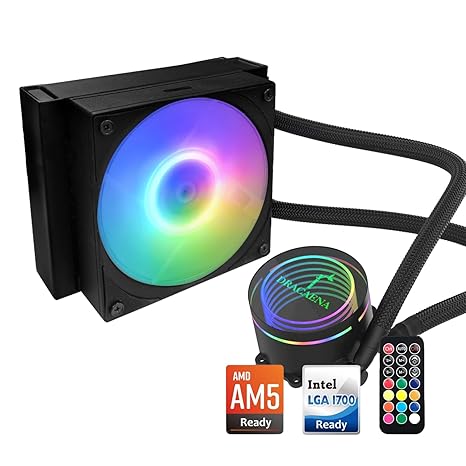
Compact design and efficient cooling power make this 120mm AIO liquid cooler stand out for gamers and productivity users with moderate heat output. Its ability to handle up to 180W TDP ensures good performance in tight spaces without sacrificing cooling capacity.
Installing the cooler is straightforward due to its compact radiator, fitting easily into standard desktop cases. The ARGB PWM fan lets you adjust airflow between 30 and 65 CFM, and the pump operates quietly at 2400 RPM. Daily operation benefits from a low noise level under 29 dBA, keeping your setup both cool and quiet while adding a customizable lighting touch.
Heat dissipation is effective for CPUs within the 180W TDP, maintaining stable temperatures under load. The hydraulic bearing pump has a solid reputation for durability with a specified 40,000-hour lifespan. The build feels sturdy, but some users mention the 3-pin connector can limit fan control flexibility compared to 4-pin PWM options.
Strong cooling capacity with quiet performance ranks highest among daily positives. The 3-pin power connector is the most frequent concern, as it restricts fan speed control compared to PWM alternatives. The liquid cooler’s balance between airflow and noise satisfies users looking for both efficiency and silence.
Ideal for desktop builds with mid-range heat demands and modest interior space. Users requiring advanced fan speed customization or larger radiators may want to seek different options for more flexibility and cooling headroom.
Pros
- Handles up to 180W TDP efficiently
- Quiet operation below 29 dBA
- Customizable ARGB lighting options
- Durable hydraulic bearing pump
Cons
- 3-pin connector limits precise fan control
- Radiator size may restrict upgrade options
| Specification | Details |
|---|---|
| Cooling Method | Water |
| Power Connector Type | 3-Pin |
| Maximum Rotational Speed | 2400 rpm |
| Air Flow Capacity | 65 cfm |
| Noise Level | 28.8 dB |
| Wattage | 180 watts |
8. Thermalright Aqua Elite 120 V3 Liquid CPU Cooler

Thermalright Aqua Elite 120 V3 Liquid CPU Cooler offers efficient cooling for desktop CPUs, especially suited for users wanting a compact 120mm AIO with a unique pump design. Its standout feature is the octagonal-shaped cold pump head that combines strong cooling with a colorful ARGB glow effect.
Setup is straightforward with a 4-pin power connector making it easy to plug into most motherboards. The pump’s maximum rotation speed of 2800 RPM ensures active heat dissipation, while the fan spins up to 1500 RPM, delivering an airflow of 66.17 CFM.
Noise stays low at 23 dB, so it won’t be distracting during daily use.
Cooling performance holds up well under consistent loads, thanks to the 4th generation water pump design that supports long-term durability with a 40,000-hour lifespan. The build quality feels solid, but some users mention that while the pump head design is eye-catching, it might add a bit of height inside tighter cases.
It handles heat efficiently but requires proper case clearance for installation.
Reliable cooling backed by a durable pump is praised consistently, alongside quiet operation during typical use. A commonly noted issue is the bulkier pump head design that can complicate installation in smaller cases or those with limited clearance.
Enthusiasts who prioritize low noise and visual appeal will appreciate this cooler, especially in mid-sized desktop builds. Users with very compact cases or those needing higher fan speeds for extreme overclocking may want to consider other options.
Pros
- Long pump lifespan of 40,000 hours
- Quiet operation at 23 dB
- Impressive airflow of 66.17 CFM
- Attractive ARGB lighting on pump head
Cons
- Pump head height may limit compatibility
- Fan max speed limited to 1500 RPM
| Specification | Details |
|---|---|
| Maximum Rotational Speed | 1500 rpm |
| Air Flow Capacity | 66.17 cfm |
| Noise Level | 23 db |
| Power Connector Type | 4-Pin |
| Voltage | 5 volts |
9. 120mm AIO CPU Liquid Cooler

Feels just right for anyone needing solid cooling in a smaller setup, especially those with mid-range Intel or AMD CPUs. The standout feature is its wide compatibility across many socket types, making it a flexible choice if you switch processors or build multiple PCs.
Setting it up is straightforward thanks to its compatibility with many Intel and AMD sockets. The addressable RGB fans sync easily with the motherboard through a 5V 3-pin ARGB header, so lighting matches the rest of your rig.
The PWM fans adjust speed based on temperature, which keeps noise down while maintaining good airflow at 58 CFM.
Performance-wise, it handles heat well for a 120mm AIO, running quietly thanks to PWM temperature control. Build quality is solid with a sturdy 4-pin power connector and proven design. Users praise its silent operation and RGB lighting effects.
Some mention it could struggle a bit with very high wattage CPUs, as 230 watts is close to its upper limit.
The quiet PWM fans combined with customizable ARGB lighting create a cooling experience that is both effective and visually appealing. Complaints mostly focus on the cooler reaching its limit with higher wattage CPUs and potential issues if your motherboard lacks the ARGB sync header.
Those using CPUs within the 230-watt range and interested in customizable lighting will appreciate this cooler. Anyone with a very high-power CPU or without a 5V 3-pin header might want to explore alternatives offering higher cooling capacity or different lighting options.
Pros
- Supports wide range of Intel and AMD sockets
- ARGB lighting synchronizes with motherboard
- Quiet PWM fans with temperature control
- Good airflow for 120mm size
Cons
- May struggle with CPUs above 230 watts
- ARGB sync requires compatible motherboard header
| Specification | Details |
|---|---|
| Power Connector Type | 4-Pin |
| Wattage | 230 watts |
| Air Flow Capacity | 58 cfm |
| ARGB Sync | 5V 3pin motherboard header |
10. EK AIO 120mm D-RGB CPU Cooler

Quiet and compact, the EK AIO 120mm D-RGB is a solid liquid cooling option for desktop users wanting reliable CPU temps without fuss. Great for those with mid-sized cases who want decent airflow and attractive RGB lighting in a simple package.
Installation goes smoothly, though the LGA 1700 socket needs an extra kit to fit properly. The 4-pin power connector is standard and the cooler runs quietly at 30 dB even when the fan spins up to a maximum 2200 rpm.
Managing the D-RGB lighting is straightforward, letting you customize colors and effects to suit your setup without extra software complications.
Cooling performance holds up well under regular loads, helping keep your CPU temperature down consistently thanks to a water-based system. The build feels sturdy with good airflow at 66.04 cfm, but some users mention the need to buy an additional mounting kit for newer sockets like LGA 1700 as a minor inconvenience.
Users find the cooler runs quietly while providing stable temperatures, which makes it reliable in daily use. Most note the inconvenience of needing to buy a separate LGA 1700 mounting kit for the latest Intel CPUs as the only real drawback.
Anyone with a compatible socket seeking a compact, easy-to-install liquid cooler with RGB lighting will like this. Not the best fit for those wanting higher cooling capacity beyond 120mm or who want everything included for the newest Intel models without added cost.
Pros
- Maintenance-free liquid cooling design
- Fully addressable D-RGB lighting
- Quiet operation at maximum fan speeds
- Compatible with many Intel and AMD sockets
Cons
- LGA 1700 socket requires an extra purchase
- Limited to 120mm radiator size
| Specification | Details |
|---|---|
| Cooling Method | Water |
| Socket Compatibility | Intel LGA 1700 (kit required), 1150-2066; AMD AM4 |
| Noise Level | 30 db |
| Maximum Rotational Speed | 2200 rpm |
| Air Flow Capacity | 66.04 cfm |
| Power Connector Type | 4-Pin |
11. Thermalright Frozen Notte 120 ARGB Black CPU Cooler

Copper and aluminum form the heart of a high-performance cooling solution designed for desktop CPUs. Its ARGB lighting adds a touch of style for those who like some flair while keeping their systems chill. Best suited for users wanting solid cooling in a compact 120mm size without giving up visual customization.
Setup involves fitting the water block with a full copper mirror base onto your CPU, paired with a black aluminum fin cold plate and a protective high polymer woven water pipe. The 120mm ARGB fan runs quietly at 27.7 dB, spinning up to 2000 rpm to push a good volume of air at 72.37 cfm. Everyday use means having a cooler that balances decent airflow with quiet operation while showing off ARGB lighting effects.
Cooling is impressive thanks to the 0.1mm pitch copper bottom and a pump that can reach speeds up to 2800 RPM with stable long-term performance. The build feels solid with an all-aluminum alloy cover and mirror electroplated acrylic finish giving it a premium look. Most praise focuses on its strong cooling output and aesthetic, while common criticism points to noise levels creeping up at higher speeds.
Strong cooling with copper base and powerful pump ensures good heat dissipation and stable performance. Many find the ARGB fan to be well-balanced for airflow and noise, though higher speeds increase sound notably. Build quality impresses with premium materials, making it feel sturdy and reliable.
Enthusiasts looking for effective 120mm AIO cooling with visual flair will appreciate this model. Users who are sensitive to noise or seeking extremely quiet operation might prefer other options. Compact design fits many setups without sacrificing cooling power or aesthetic appeal.
Pros
- High airflow at 72.37 cfm supports effective cooling
- Quiet operation around 27.7 dB during normal use
- Durable build with copper and aluminum components
- ARGB fan adds customizable lighting effects
Cons
- Fan speed can reach noisy levels at 2000 rpm
- Water pipe limits flexibility compared to custom loops
| Specification | Details |
|---|---|
| Power Connector Type | 4-Pin |
| Voltage | 12 volts_of_direct_current |
| Cooling Method | Water |
| Noise Level | 27.7 db |
| Maximum Rotational Speed | 2000 rpm |
| Air Flow Capacity | 72.37 cfm |
12. Thermalright FW SE 120 ARGB CPU Cooler

Widely recognized for its quiet operation, this 120mm liquid cooler is a solid pick for anyone looking to keep their CPU temperatures down without adding much noise. Ideal for desktop builds, its low noise level stands out as its biggest strength, appealing to those who want a cooler that works quietly in the background.
Installation is straightforward with a compatible 4-pin power connector, making it easy to get started. The PWM temperature control keeps the fan speed balanced, so it spins up only when needed, reducing noise and vibration during everyday tasks. The unit’s compact size fits well in most builds without crowding other components or requiring special adjustments.
Performance delivers steady cooling through a high-speed pump paired with a fan capable of 2000 rpm and 70.84 CFM airflow. Its build quality reflects thoughtful design, with reduced noise and vibration thanks to the fan’s optimized blades.
Reviews praise its quiet operation, while some mention that the noise level can peak near 29.8 dB under heavy load.
Quiet operation receives consistent praise, especially in everyday use, while some notice noise nearing its 29.8 dB rating when running demanding tasks. The fan’s design successfully reduces vibrations, helping it stay less obtrusive than other coolers at similar performance levels.
Quiet PC builders or those with standard mid-sized cases will appreciate this model’s balance of noise and cooling power. Users seeking extremely low noise under peak loads or those with compact cases might want to explore alternatives better suited to those specific needs.
Pros
- Quiet operation with noise below 30 dB
- Strong airflow at 70.84 CFM
- PWM fan control adjusts speed by temperature
- Compact size fits most desktop setups
Cons
- Noise level rises under heavy CPU load
- Not suitable for non-standard or tight cases
| Specification | Details |
|---|---|
| Noise Level | 29.8 dB |
| Fan Speed | 2000 rpm ±10% |
| Air Flow Capacity | 70.84 CFM |
| Power Connector | 4-Pin |
| Voltage | 12 volts_of_direct_current |
| Cooler Size | 157 x 120 x 52 mm |
Best 120mm AIO Coolers Compared Side by Side
| Product | Noise Level | Max RPM | Air Flow Capacity | Wattage |
|---|---|---|---|---|
| Thermalright Aqua Elite 120 V3 | 25.6 db | 1500 rpm | 66.17 cfm | 7.2 watts |
| Thermalright FW SE 120 ARGB | 29.8 db | 2000 rpm | 70.84 cfm | – |
| Thermalright Frozen Notte 120 ARGB | 27.7 db | 2000 rpm | 72.37 cfm | – |
| ARCTIC Liquid Freezer III Pro | – | 3000 rpm | 77 cfm | 3.96 watts |
| Thermalright Aqua Elite 120 V3 | 25.6 db | 1500 rpm | 66.17 cfm | 7.2 watts |
| ARCTIC Liquid Freezer III Pro | – | 3000 rpm | 77 cfm | 3.96 watts |
| Dracaena.io 120mm AIO | 28.8 db | 2400 rpm | 65 cfm | 180 watts |
| Thermalright Aqua Elite 120 V3 | 23 db | 1500 rpm | 66.17 cfm | – |
| Generic 120mm AIO Cooler | – | – | 58 cfm | 230 watts |
| EK AIO 120mm D-RGB | 30 db | 2200 rpm | 66.04 cfm | 7.8 watts |
| Thermalright Frozen Notte 120 ARGB | 27.7 db | 2000 rpm | 72.37 cfm | – |
| Thermalright FW SE 120 ARGB | 29.8 db | 2000 rpm | 70.84 cfm | – |
- Noise Level25.6 db
- Max RPM1500 rpm
- Air Flow Capacity66.17 cfm
- Wattage7.2 watts
- Noise Level29.8 db
- Max RPM2000 rpm
- Air Flow Capacity70.84 cfm
- Wattage–
- Noise Level27.7 db
- Max RPM2000 rpm
- Air Flow Capacity72.37 cfm
- Wattage–
- Noise Level–
- Max RPM3000 rpm
- Air Flow Capacity77 cfm
- Wattage3.96 watts
- Noise Level25.6 db
- Max RPM1500 rpm
- Air Flow Capacity66.17 cfm
- Wattage7.2 watts
- Noise Level–
- Max RPM3000 rpm
- Air Flow Capacity77 cfm
- Wattage3.96 watts
- Noise Level28.8 db
- Max RPM2400 rpm
- Air Flow Capacity65 cfm
- Wattage180 watts
- Noise Level23 db
- Max RPM1500 rpm
- Air Flow Capacity66.17 cfm
- Wattage–
- Noise Level–
- Max RPM–
- Air Flow Capacity58 cfm
- Wattage230 watts
- Noise Level30 db
- Max RPM2200 rpm
- Air Flow Capacity66.04 cfm
- Wattage7.8 watts
- Noise Level27.7 db
- Max RPM2000 rpm
- Air Flow Capacity72.37 cfm
- Wattage–
- Noise Level29.8 db
- Max RPM2000 rpm
- Air Flow Capacity70.84 cfm
- Wattage–
How to Choose the Right 120mm AIO Cooler
Choosing a quality 120mm AIO cooler depends on factors like radiator performance, fan quality, and compatibility with your case and CPU socket. Selecting the right balance ensures efficient cooling, reduces noise, and prevents costly upgrades or repairs down the line.
Cooling Performance
Running a demanding application or gaming session can push a processor to its thermal limits quickly. A 120mm cooler with a compact radiator needs a fan capable of high airflow to transfer heat efficiently.
Radiator thickness and fan speed ratings (CFM) greatly influence how well heat moves away from the CPU block. A pump that maintains steady coolant circulation without fluctuations, often measured by noise and RPM stability, prevents temperature spikes under sustained load.
Low-quality pumps might cause inconsistent flow, leading to overheating during intense workloads. Models using ceramic bearings often last longer and run quieter. Look for radiators with at least double-row fin arrangements and fans rated around 40-60 CFM for effective cooling.
Strong coolant movement combined with sufficient airflow keeps temperatures stable across varied CPU demands.
Compatibility and Fit
Mounting an all-in-one cooler can become a real headache if it does not fit the CPU socket or interferes with surrounding components. Support for major CPU socket types such as Intel LGA 1200/1700 or AMD AM4 is essential to avoid compatibility issues. Clearance around the RAM slots and GPU is crucial, especially with tall memory modules or large video cards close to the CPU area.
Many 120mm coolers fit compact cases, but double-check dimensions for depth and height to prevent tight squeezes. A straightforward mounting system with durable backplates cuts down installation time and lowers the chance of loose fittings. Sturdy brackets also help maintain even pressure, improving thermal contact and reliability over time.
Noise Levels
Fan noise varies widely depending on RPM settings. Some 120mm fans become quite loud above 2000 RPM, causing distracting background noise during long sessions. Pump noise is often overlooked but can contribute constant humming, especially when under load.
Quiet operation matters for those who work or play in noise-sensitive environments.
Quality units run fans and pumps at lower audible frequencies without sacrificing cooling. Persistent high-pitched whines or rattling usually signal cheaper bearings or imbalanced blades. Keeping noise below around 30-35 dB at typical loads maintains a comfortable acoustic profile in a desktop setup.
Build Quality and Materials
The longevity of a cooler depends heavily on the durability of its components. Radiators made from copper or nickel-plated materials conduct heat better and resist corrosion over time.
Pump housings constructed from solid metal or reinforced plastic stand up to thermal cycling and physical stress better than thin, cheap alternatives. Tubing should be flexible but tough, using rubber or braided designs to reduce leaks and kinks.
Material quality directly impacts how well heat transfers from the CPU and how long the entire system stays sealed. Proper corrosion resistance prevents coolant discoloration and blockages years into use. Cheaper models with poor materials often degrade faster, leading to failing pumps or radiator cracks.
Installation and Maintenance
Clear, step-by-step mounting instructions save a lot of frustration during installation. Some coolers include easy-to-align brackets and screws that lock securely without requiring excessive force. Access to clean dust from fans and radiator fins is important as blocked airflow reduces performance and increases CPU temperatures.
Designs allowing simple removal of fans or radiator panels make this maintenance straightforward. Most sealed liquid coolers require minimal upkeep but noting whether refilling or flushing coolant is possible adds future-proofing.
Regular dusting combined with an uncomplicated setup ensures steady cooling efficiency over time.
Optimizing 120mm AIO Cooler Performance Through Proper Installation
Correct installation plays a critical role in how well a 120mm AIO cooler performs. The radiator should be mounted so the pump stays below the radiator to avoid air bubbles accumulating in the pump.
Securing the cooler firmly while ensuring good contact between the cold plate and the CPU surface improves heat transfer significantly. Tighten the mounting screws evenly in a diagonal pattern to apply uniform pressure.
Additional points to consider during installation:
- Use manufacturer-recommended thermal paste rather than pre-applied pastes for better results.
- Ensure radiator fans are oriented to push or pull air efficiently, depending on your case airflow.
- Route tubing carefully to avoid sharp bends that can restrict coolant flow.
These details help maintain optimal thermal performance and reduce noise levels by preventing pump strain or airflow turbulence.
Routine Maintenance Tips to Extend the Lifespan of Your 120mm AIO Cooler
Maintaining a 120mm AIO cooler involves regular checks to keep cooling efficiency stable over time. Dust buildup on radiator fins and fan blades restricts airflow, causing temperatures to rise. Cleaning these components every few months with compressed air or a soft brush helps avoid this problem.
Check the pump operation by listening for unusual noises or monitoring temperature spikes that can indicate pump issues. While sealed, closed-loop AIO coolers generally don’t require coolant replacement, keeping the unit away from extreme heat sources and ensuring proper case ventilation extends durability.
Routine maintenance steps:
- Clean radiator and fans to remove dust buildup
- Inspect tubing for cracks or leaks
- Confirm pump is running quietly and consistently
Routine care reduces the chance of premature failure and preserves quiet operation over long periods.
Comparing 120mm AIO Coolers with Air Coolers: Pros and Cons for Different Builds
120mm AIO coolers and traditional air coolers each have strengths suited to different PC builds. AIO coolers tend to be more compact, fitting easily in tight cases where large air coolers might not fit.
They also usually handle heat distribution better under sustained heavy loads thanks to liquid cooling circulation.
However, air coolers typically require less maintenance, lack moving pumps, and avoid potential liquid leakage risks inherent to AIOs. Many air coolers are also quieter at idle since they rely on fewer or larger fans spinning slowly.
Choosing between the two depends on build specifics:
- Use AIOs in compact or high-performance setups demanding lower temps
- Choose air coolers for simpler builds focused on reliability and low upkeep
- Consider case clearance and noise tolerance before deciding
Evaluating these factors helps match the cooling solution to user needs without overspending or compromising performance.
People Also Asked
How Do I Install a 120mm AIO Cooler Safely?
Secure the radiator in your case and firmly attach the pump block on the CPU following the included instructions. Apply thermal paste if needed and ensure all screws are tightened evenly to avoid leaks or poor contact. Avoid overtightening as it can damage the motherboard or cooler components.
What Size Case Fits a 120mm AIO Cooler?
Cases with a mounting point for 120mm fans or radiators will fit a 120mm AIO cooler. Most mid-tower and some smaller cases have space for at least one 120mm radiator slot, often at the rear or top. Check your case manual for fan/radiator compatibility before purchasing an AIO cooler.
How Long Does a 120mm AIO Cooler Usually Last?
A 120mm AIO cooler typically lasts around 3 to 5 years, depending on usage and maintenance. Dust buildup on the radiator and fan can reduce cooling efficiency over time, so regular cleaning helps prolong lifespan. Replacing the cooler after several years ensures consistent performance.
Can I Use a 120mm AIO Cooler with My CPU Socket?
Most 120mm AIO coolers come with mounting brackets for common CPU sockets including Intel LGA and AMD AM series. Check the product specifications to confirm compatibility with your CPU socket before buying. Proper bracket installation is key to getting good contact and cooling.
What Common Problems Should I Watch for with AIO Coolers?
Leaks, pump noise, and insufficient cooling are common issues to watch for with AIO coolers. Regularly check for any wet spots around fittings and listen for unusual sounds from the pump. Ensuring good airflow and proper mounting will help avoid overheating problems.
Conclusion
Choosing the right 120mm AIO cooler mainly comes down to cooling performance, noise levels, and compatibility with your case and CPU socket. Consider how much heat your processor generates and whether the cooler can handle it quietly. Make sure the cooler will fit inside your PC build without clearance issues for RAM or other components.
Pick a cooler that fits your actual setup and budget rather than chasing the highest specs. When you don’t overclock or run heavy workloads often, a simpler model might be enough. Check the comparison table above again to match features with your needs before making a decision.

I’m Grant Mitchell, a firearms and hunting writer with years of experience at the range and in the field. I write about rifles, shotguns, handguns, optics, safe storage, cleaning, and responsible ownership, along with practical hunting tips. My goal is to share accurate, safety-first information that helps you choose the right firearm, maintain it properly, and become a more confident shooter.