Top 12 Best AIO 360mm Cooler That Will Blow Your Mind
Overheating and noisy fans are what many face with poor CPU cooling setups, especially those who try to cut corners with inadequate liquid coolers. The best aio 360mm cooler offers a level of quiet efficiency that typical air coolers and smaller rads often can’t match.
Being large enough to handle high thermal loads, these coolers are designed for systems pushed hard through gaming or heavy multitasking.
Key factors that separate a solid aio 360mm cooler include radiator thickness and build quality. A thickness around 30mm paired with copper fins improves heat dissipation, while quality sealed tubing reduces the risk of leaks.
Pump reliability and ease of mounting also matter, since a strong pump maintains consistent flow without excessive noise, and a good mount ensures firm contact with the CPU for optimal thermal transfer.
Need a Quick Check?
| Image | Product | Price |
|---|---|---|
Our Top Picks 1  | ARCTIC Liquid Freezer III Pro | Check Price |
Our Top Picks 2  | ARCTIC Liquid Freezer III Pro | Check Price |
Our Top Picks 3  | Noctua NL-LC1-36 Cooler | Check Price |
Our Selected Top 12 Aio 360mm Cooler for Every Budget
This list features a variety of 360mm all-in-one coolers that balance performance and value across different budgets. Each review covers how well the cooler performs, who it is best suited for, and highlights its main strengths and potential drawbacks.
1. ARCTIC Liquid Freezer III Pro 360 CPU Cooler
Great for anyone wanting efficient cooling on a desktop or gaming console, the ARCTIC Liquid Freezer III Pro 360 handles heavy CPU loads with ease thanks to its powerful liquid cooling design. Its standout feature is the optimized contact pressure for better heat dissipation, keeping your processor safe and cool during long sessions.
Installation is straightforward, with dedicated mounts for both Intel and AMD that position the cold plate right above the CPU hotspot. The ARCTIC P12 PRO fans run quietly at low speeds but kick up smoothly under load, while the integrated VRM fan actively cools voltage converters without adding noise.
Daily operation remains quiet and effective, making it low-maintenance over time.
Cooling performance is impressive, easily managing high loads thanks to a maximum speed of 3000 rpm and good airflow. The build feels solid, with thoughtful details like a 4-pin power connector and native offset mounting designed to improve heat transfer.
Most users appreciate its quiet operation, though some mention the fan speed can be high when pushed to maximum, which might be noticeable in very quiet rooms.
Quiet operation stands out during most uses, with the added VRM fan ensuring voltage components stay cool. Fans do ramp up and become audible when under high load, which some people find a bit noisy.
The cooler suits gamers and power users prioritizing strong cooling and reliability. Those looking for absolute silence or very low power use might look at alternatives with quieter or less power-hungry fans.
Pros
- Optimized contact pressure for better heat dissipation
- Quieter ARCTIC P12 PRO fans with higher speed range
- Integrated PWM-controlled VRM fan for extra cooling
- Supports Intel LGA1851 and LGA1700 with native offset mounting
Cons
- Fans can get noticeably loud at maximum speed
- Power consumption relatively high at nearly 4 watts
| Specification | Details |
|---|---|
| Power Connector Type | 4-Pin |
| Voltage | 12 volts |
| Wattage | 3.96 watts |
| Maximum Rotational Speed | 3000 rpm |
| Air Flow Capacity | 77 cfm |
| Cooling Method | Liquid |
2. ARCTIC Liquid Freezer III Pro 360 A-RGB CPU Cooler
Aluminum and copper construction combined with a specialized contact frame deliver focused cooling performance for high-end Intel and AMD processors. Well-suited for desktop users who want a quiet yet powerful CPU cooling solution with added VRM temperature control. Its best strength lies in balancing strong cooling with low noise levels.
Setup involves mounting the pump with an offset cold plate designed to align directly with CPU hotspots, which helps maintain consistent contact pressure. Fans are PWM-controlled for automatic speed adjustments based on temperature, making day-to-day operation smooth without manual tuning.
The integrated VRM fan actively cools voltage converters, supporting reliability during heavy loads.
Performance-wise, it stays cool under intense workloads and keeps noise down even at higher fan speeds thanks to the P12 PRO fan’s efficient airflow and quieter design. The build feels solid, especially with the enhanced heat dissipation frame for newer Intel sockets.
One common drawback is the pump running slightly louder compared to some other AIOs, but most find it acceptable given the cooling benefits.
Cooling efficiency and quiet operation stand out positively, especially through the P12 PRO fan and dedicated VRM cooling. The pump noise may bother some, especially during demanding tasks when fans ramp up to maximum rpm. The cooling system is solid, delivering focused pressure right on the CPU hotspot.
Great for users seeking strong thermal management paired with noise-conscious fans and those running Intel LGA1851 or LGA1700 sockets. Those requiring near-silent operation at full load might want to consider other solutions with lower maximum fan speeds or quieter pumps.
Pros
- Quiet P12 PRO fans at low to moderate speeds
- The integrated VRM fan improves motherboard cooling.
- Optimized contact for Intel LGA1851 and LGA1700 CPUs
- Good Air Flow Capacity of 77 cfm
Cons
- Pump noise noticeable under high load
- Maximum fan speed at 3000 rpm can be loud
| Specification | Details |
|---|---|
| Maximum Rotational Speed | 3000 rpm |
| Air Flow Capacity | 77 cfm |
| Power Connector Type | 4-Pin |
| Voltage | 12 volts |
| Wattage | 3.96 watts |
3. Noctua NL-LC1-36 360mm AIO CPU Cooler
Quiet operation is the first thing that stands out with this 360mm AIO cooler, making it ideal for users who want strong cooling without intrusive noise. It’s especially suited for gamers or professionals building near-silent desktops, combining performance with a design focused on low vibration and sound levels.
Setup involves fitting the large radiator and three NF-A12x25 G2 PWM fans, which deliver a good balance between airflow and silent running thanks to speed offset technology. The pump features a unique noise absorber that cuts down vibrations, leading to quieter day-to-day use. It requires a 4-pin power connection and sits comfortably in most modern desktop builds.
Thermal performance stays consistently strong due to the premium Asetek Emma V2 platform and the sizeable radiator pushes heat out efficiently. The build quality reflects Noctua’s reputation with solid components, though some mention the overall size as a challenge in smaller cases. The noise level remains impressively low at 22.5 db during operation, earning praise for quietness but occasional notes on radiator clearance.
Many appreciate how quiet the pump runs due to its innovative noise absorber, making this cooler notably silent during heavy loads. The most frequent issue lies in the 360mm radiator size, which can be a tight fit or require more spacious cases, limiting installation flexibility.
Ideal for anyone prioritizing near-silent operation without sacrificing cooling, especially in mid to large towers. Users with smaller or compact cases should look for smaller alternatives to avoid installation challenges or clearance issues.
Pros
- Exceptionally quiet pump with soundproofing layers
- Three PWM fans with optimized speed offset
- Strong cooling from large 360mm radiator
- Reliable Asetek Emma V2 cooling technology
Cons
- Radiator size may not fit all cases easily
- Wattage at 1.8 watts could limit power headroom
| Specification | Details |
|---|---|
| Power Connector Type | 4-Pin |
| Voltage | 12 volts |
| Wattage | 1.8 watts |
| Noise Level | 22.5 db |
| Maximum Rotational Speed | 1800 rpm |
| Air Flow Capacity | 107.3 cubic meter per hour |
4. Thermalright Peerless Vision 360 CPU AIO Cooler

The 360mm cooler combines unique looks with serious cooling power. The Thermalright Peerless Vision 360 CPU AIO Cooler stands out with its magnetic pump head featuring a 3.95-inch full screen display, bringing style and functionality for PC enthusiasts who want both performance and eye-catching design.
Setup involves snapping the magnetic pump head into place, which is quick and straightforward. The three TL-M12Q PWM fans run quietly thanks to their S-FDB bearings, spinning up to 2000 rpm for efficient heat dissipation.
The infinity mirror lighting adds an elegant touch, making it a smart pick for those who value appearance in daily PC use alongside reliable cooling.
Cooling performance handles heat efficiently with a water-based system rated at 45 watts and fans pushing nearly 69 cfm airflow. The design feels solid with a narrow bezel screen delivering clear visuals at 480×480 resolution and 60Hz refresh rate.
Most praise highlights the effective cooling and attractive visuals, while some note the noise level at peak speeds can be noticeable.
Strong points include effective cooling paired with an eye-catching magnetic screen that’s easy to install. Some mention that when fans hit top speed, noise levels can jump, which might be distracting in quieter setups.
Those who want a visual centerpiece plus solid cooling will appreciate this model. It may not suit users prioritizing ultra-quiet performance or extremely high screen resolution on the pump head display.
Pros
- Unique 3.95-inch magnetic screen display
- Quiet operation due to S-FDB bearing fans
- High airflow fans at 2000 rpm
- Attractive infinity mirror lighting effects
Cons
- Noise can be noticeable at maximum fan speed
- Screen resolution limited to 480×480 pixels
| Specification | Details |
|---|---|
| Power Connector Type | 4-Pin |
| Wattage | 45 watts |
| Cooling Method | Water |
| Noise Level | 28.2 db |
| Maximum Rotational Speed | 2000 rpm |
| Air Flow Capacity | 68.9 cfm |
5. Antec Ultra 360 ARGB Liquid CPU Cooler

Keeping a powerful desktop cool under heavy loads is essential for reliable performance, especially when running gaming or creative software. The Antec Ultra 360 ARGB Liquid CPU Cooler suits anyone looking for strong cooling combined with eye-catching lighting effects.
Its standout feature is the mirror lighting pump head that adds visual appeal while maintaining solid heat management.
Installing the cooler involved a straightforward process, compatible with various Intel and AMD sockets, which simplifies fitting onto many recent builds. The triple 120mm ARGB PWM fans provide ample airflow at variable speeds, and the pump’s copper base plate ensures quick heat transfer away from the CPU.
Day-to-day use doesn’t demand much attention aside from occasional dusting, thanks to the well-engineered water cooling method keeping noise levels relatively low.
Cooling performance remains steady during intense workloads, benefiting from a powerful pump and large radiator fans that push up to 67.62 cfm air flow. The build quality feels solid with durable materials, although a few mention the noise level at peak fan speeds as somewhat noticeable.
Most praise its thermal capability, while some point out the 33.05 dB noise rating could be better for silence-focused setups.
The cooler stands out for its strong thermal performance combined with a stylish pump head that adds customizable layered lighting effects to any rig. Some users notice the noise level reaching 33.05 db at full speed, which may be distracting in quiet environments.
Gamers and creatives needing a large 360mm radiator AIO cooler will appreciate the performance and lighting features here. Those seeking whisper-quiet operation might want to look for other liquid coolers designed with lower noise targets.
Pros
- High air flow with 120mm ARGB PWM fans
- Efficient cooling pump with copper base plate
- Attractive multi-angle mirror lighting on pump head
- Compatibility with multiple Intel and AMD sockets
Cons
- Noisier at maximum fan speed
- Requires 3-pin connections for pump and LED
| Specification | Details |
|---|---|
| Noise Level | 33.05 db |
| Maximum Rotational Speed | 2600 rpm |
| Air Flow Capacity | 67.62 cfm |
| Power Connector Type | Pump: 3-pin | LED: 3-pin |
| Voltage | 12 volts_of_direct_current |
| Wattage | 20 watts |
6. MSI MAG Coreliquid A13 360 CPU Liquid Cooler

Running at speeds up to 3800 RPM with a quiet 14.4 dB noise level, this 360mm AIO cooler is ideal for anyone stacking a powerful rig who values a balance between strong cooling and low noise. It stands out for its split-flow radiator combined with an integrated pump designed to reduce motor noise and boost durability.
Setting it up on a desktop with LGA 1851 sockets is straightforward thanks to out-of-the-box compatibility. The integrated pump runs quietly thanks to ceramic bearings, making daily use simple without loud distractions. Its water cooling method keeps your CPU temperature down effectively during gaming or heavy multitasking.
The aluminum radiator handles heat well, with the unique split-flow design preventing coolant bottlenecks. It’s built solidly, so it feels reliable even under long workloads.
Most find the low noise level impressive for a high-performance pump, although a few mention the 25-watt power draw could be a consideration in smaller setups.
The pump’s quiet operation paired with strong cooling stands out as a key benefit, appreciated by most who use it for high-demand tasks. Some users find the 25-watt power requirement a drawback, especially in builds where power efficiency matters.
Suitable for anyone looking for reliable, quiet cooling on high-end CPUs with LGA 1851 sockets. Those prioritizing ultra-low power consumption or who want a smaller, less powerful cooler might consider other options.
Pros
- Runs quiet with noise as low as 14.4 dB
- Supports LGA 1851 out of the box
- Durable split-flow radiator design
- High-performance pump with ceramic bearings
Cons
- Consumes 25 watts, higher than some competitors
- Maximum rotational speed of 5200 rpm could mean louder operation at peak
| Specification | Details |
|---|---|
| Power Connector Type | 4-Pin |
| Voltage | 10 volts_of_direct_current |
| Wattage | 25 watts |
| Cooling Method | Water |
| Noise Level | 14.4 db |
| Maximum Rotational Speed | 5200 rpm |
7. Be Quiet! Pure Loop 3 360mm AIO Cooler

Enthusiasts running heavy loads and gamers pushing their CPUs hard will find this cooler a reliable choice. Its biggest strength lies in its quiet operation combined with strong cooling, making it a solid pick for anyone wanting to keep temperatures low without noisy fans.
Installation takes some patience but is straightforward with compatibility across Intel and AMD sockets. The three Pure Wings 3 fans keep a steady speed due to their closed loop motor function, so you won’t get sudden noise spikes even under pressure. The powerful PWM pump’s whisper-quiet performance means it won’t distract you during extended sessions.
Cooling performance holds up well during intensive tasks, maintaining low CPU temps even at peak load. The build feels solid with effective airflow through the large 360mm radiator.
High praise highlights its quiet pump and fan operation, while the most frequent gripe is the slightly high maximum rotational speed causing noise at full load.
The quiet pump stands out as a major positive, keeping noise levels low even during demanding use. Some noise occurs when fans hit their top speed, which can be noticeable. The cooler handles heat well but might draw attention if pushed to extremes.
People wanting a powerful cooler that stays whisper-quiet most of the time will appreciate this unit. Those sensitive to occasional fan noise or seeking a smaller footprint should consider alternatives with lower max rpm or different cooling sizes.
Pros
- Quiet PWM pump with smooth 6-pole motor
- Fans maintain steady speed under resistance
- Wide Intel and AMD socket compatibility
- High air pressure for effective radiator cooling
Cons
- Fans can get loud at maximum 2100 rpm speed
- Installation requires careful handling due to size
| Specification | Details |
|---|---|
| Cooling Method | Water |
| Noise Level | 30.9 db |
| Maximum Rotational Speed | 2100 rpm |
| Air Flow Capacity | 59.6 cfm |
| Power Connector Type | 4-Pin |
8. Thermalright Frozen Notte 360 Black ARGB CPU Cooler
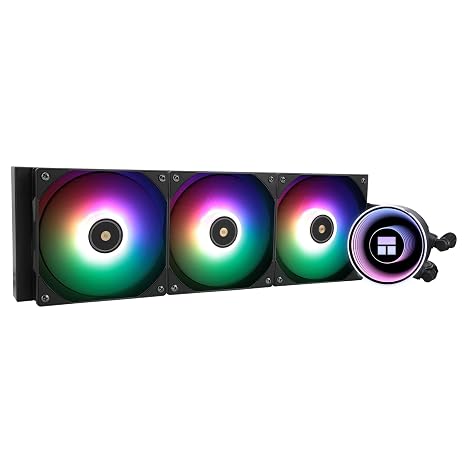
Thermalright Frozen Notte 360 Black ARGB stands out with its large 360mm radiator paired with three ARGB fans, making it perfect for anyone looking to keep a powerful CPU cool. Its biggest strength lies in combining solid cooling ability with quiet operation thanks to a thoughtful design focused on airflow and heat dissipation.
Setting up the unit involves mounting the sizable water-cooled heat sink, which measures 397 120 27mm, so desk space and case compatibility matter. The 450mm water conduit length offers some flexibility in positioning.
The three included 120mm PWM fans sync with the cooling head for constant performance, while the full copper mirror base boosts heat transfer. Noise is very low, letting you run it near silently all day.
Thermalright nails efficient cooling through a mix of copper and black aluminum fins, alongside a high-speed pump spinning around 5300RPM. Its build quality feels solid with polymer-woven protective tubing adding durability. Most praise appreciates its cool temps under load and silent fan profile.
A recurring downside is the large radiator size, which might not fit all cases comfortably.
Performance stays strong thanks to the full copper mirror base and triple fan setup, keeping CPU temperatures low with minimal noise. The most common concern involves the cooler’s large radiator dimensions, making installation tricky in smaller or less roomy PC cases.
Gamers or content creators with roomy PC cases who care about silent cooling will find it a good match. Compact builds or setups with limited radiator clearance might be better off with smaller or simpler cooling options.
Pros
- Effective CPU cooling with copper base and aluminum fins
- Low noise operation around 1 dB
- Three 120mm fans improve airflow considerably
- Durable, high polymer woven water tubes
Cons
- Large radiator size may not fit all cases
- Pump speed runs at high 5300RPM, which could impact longevity
| Specification | Details |
|---|---|
| Heat Sink Size | 397 * 120 * 27mm |
| Water Conduit Length | 450mm |
| Pump Speed | 5300RPM ± 10% |
| Fan Size | 120mm ARGB |
| Fan Connector Type | 4-pin PWM |
| Noise Level | 1 dB |
9. Thermalright Frozen Warframe 360 SE ARGB AIO Cooler
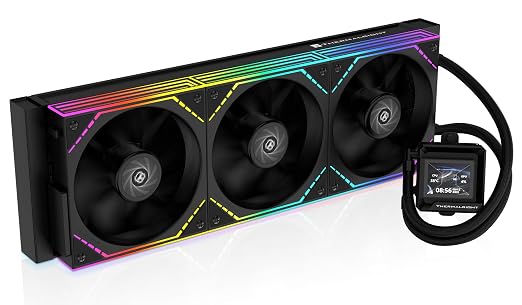
Thermalright Frozen Warframe 360 SE ARGB AIO Cooler suits gamers and creators wanting solid cooling combined with a unique visual touch. Its standout feature is the 2 LCD screen that lets you personalize your PC while maintaining stable temperatures during intense tasks.
Setup is fairly straightforward with mounting support for AMD and Intel platforms covering AM5, AM4, LGA1851, 1700, 1200, and 115X sockets. The three daisy-chained 120mm PWM fans keep cable clutter down and push plenty of air with adjustable speeds up to 2000 RPM. Daily use includes system monitoring through the LCD screen that shows status or custom images, adding both utility and flair.
Performance is reliable with the 397×120×27mm aluminum radiator and 3000 RPM pump ensuring effective heat dissipation. The fans achieve an airflow of 68.9 CFM while maintaining a noise level of 28.2 dB. Build quality feels solid, though some note the pump noise can be a bit audible during heavy load.
Most users appreciate the customizable display, but a minor drawback is its power consumption of 3 watts.
Users find the customizable LCD screen a unique and practical addition that personalizes their builds while keeping tabs on system status. However, the pump noise stands out as a common downside when the CPU is under sustained stress, affecting overall quietness.
Those seeking a powerful cooler with visual customization will appreciate this model’s features and compatibility. Users prioritizing ultra-quiet operation might want to consider alternatives with lower pump noise levels.
Pros
- Customizable 2″ LCD screen for system info and images
- Supports wide range of AMD and Intel sockets
- High airflow fans reduce internal case temperatures
- Compact daisy-chain fan design cuts down cable clutter
Cons
- Pump noise can be noticeable under heavy load
- Consumes 3 watts, a bit higher than some competitors
| Specification | Details |
|---|---|
| Cooling Method | Water |
| Radiator Size | 397×120×27 mm |
| Pump Speed | 3000 RPM |
| Fan Speed | Up to 2000 RPM |
| Air Flow Capacity | 68.9 CFM |
| Noise Level | 28.2 dB |
10. Be Quiet! Silent Loop 3 360mm ARGB CPU Cooler
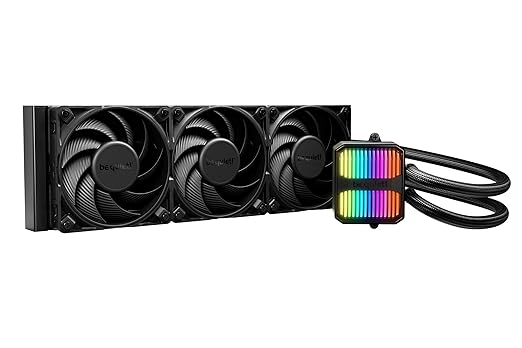
Quiet operation stands out immediately with this 360mm water cooler, ideal for anyone needing strong cooling without noise distractions. Supporting a wide range of CPU sockets, including Threadripper, it’s a solid pick for high-performance builds where silence matters most.
Installation involves a dampened, adjustable pump with a 6-pole motor, reducing vibrations during use. Three Silent Wings 4 120mm PWM fans adjust speed based on temperature, running quietly at up to 2500 rpm.
The large CPU plate covers a broad area, fitting well even on large CPUs without causing installation hassles.
Cooling performance holds up well under load thanks to the engineered block and 3-chamber pump design that cuts down noise and turbulence. Build quality is sturdy, with neat radiator corners supporting the fans quietly.
Praise often mentions how whisper-quiet it runs despite strong cooling, while noise at full fan speed can spike up to 38.8 dB for some users.
The combination of a dampened pump and specialized fan design keeps noise impressively low during day-to-day use, yet the maximum noise at full speed can catch attention. The cooling block and pump design work well to prevent turbulence, contributing to both efficiency and quiet operation.
Builders prioritizing silent performance with high-end CPUs will appreciate this cooler’s abilities and coverage. Users seeking ultra-quiet operation at all fan speeds or a lower power draw might consider other options better tailored to those specific needs.
Pros
- Very quiet operation under normal loads
- Wide CPU plate supports large CPUs like Threadripper
- Adjustable, low-vibration pump design
- Three high-speed PWM fans maximize cooling
Cons
- Noise level can reach 38.8 dB at max fan speed
- Some may find 3.6 watts power usage higher than expected
| Specification | Details |
|---|---|
| Voltage | 12 volts |
| Wattage | 3.6 watts |
| Maximum Rotational Speed | 2500 rpm |
| Noise Level | 38.8 db |
| Compatible Sockets | Intel: 1851/1700/1200/1151/1150/1155; AMD: AM5/AM4/TR5/TR4 |
11. Cooler Master Elite Liquid 360 AIO CPU Cooler

Great for Ryzen 9 builds, providing quiet, stable cooling with a stylish hexagon cap for ARGB fans. Its standout feature is the quiet operation combined with easy installation on AM5 and Intel platforms. Perfect for anyone looking to cool high-end CPUs with minimal noise.
Setup is straightforward thanks to pre-installed brackets for AM5, AM4, LGA 1851, and LGA 1700 sockets, making installation painless. The cryoFuze thermal paste comes pre-applied and handles extreme temperature ranges, so you don’t need to worry about thermal conductivity. Fans run quietly from 650 to 2100 rpm, letting you keep noise low while maintaining good airflow.
It keeps Intel Ultra 9 and Ryzen 9 CPUs cool without running loud, with a 3-pin, 12-volt pump that doesn’t require any maintenance. The translucent hexagon ARGB cap adds style without sacrificing function.
Quiet operation and low noise are top selling points, while a common complaint is the 3-pin power connector, which limits control compared to 4-pin PWM fans.
Low noise at most speeds and easy installation stand out as significant benefits. The 3-pin connector design is the most frequently noted drawback, restricting precise fan speed management compared to 4-pin PWM alternatives.
Ideal for anyone running powerful Ryzen 9 or Intel Ultra 9 CPUs who wants good cooling without adding noise. Users needing finer fan control or lower noise at maximum speeds might prefer a cooler with 4-pin connectors instead.
Pros
- Quiet fan operation with dynamic PWM control
- Easy installation on AM5 and Intel sockets
- Pre-applied thermal paste with wide temperature range
- Customizable ARGB lighting with hexagon design
Cons
- 3-pin connector limits fan speed control options
- Noise level can reach 30 dB at top RPM
| Specification | Details |
|---|---|
| Power Connector Type | 3-Pin |
| Voltage | 12 volts |
| Wattage | 12 |
| Maximum Rotational Speed | 2100 rpm |
| Noise Level | 30 db |
| Air Flow Capacity | 84.2 cubic_inches_per_minute |
12. Thermalright Frozen Infinity 360 Black CPU Cooler

Aluminum and copper combine in a water-cooled radiator design that measures 39712052mm, perfect for desktop users wanting a powerful 360mm AIO cooler. It’s especially suited for those looking for strong CPU cooling without oversized noise.
Its standout feature is the high-speed cooling system with three temperature-controlled fans.
Setup involves mounting the radiator with its three TL-M12 fans rated at 12412025mm each, which spin up to 2000 RPM while keeping noise below 28.2 decibels. The fans feature ARGB lighting and a bearing system designed for reduced friction and vibration, helping maintain quieter operation over time. Its compact cold header at 636360mm fits neatly without being intrusive, making day-to-day use straightforward.
Performance hits the mark with a maximum airflow of 68.9 CFM, well-suited to keep heavy CPUs cool under load. The build quality is solid, featuring an excellent S-FDB bearing that prolongs fan life and minimizes noise.
Frequent compliments highlight the efficient cooling and quiet operation while a noted drawback is that its noise level, while low, can increase when both fans and pump run at maximum speed.
Strong cooling performance combined with quiet operation stands out, but the noise can rise noticeably when pushing the pump and fans to maximum speeds. The ARGB lighting adds a visual touch appreciated by many, while the radiator size demands enough room inside the case.
Those needing efficient, low-noise cooling for a high-performance CPU will appreciate this cooler. It works well for builds with sufficient interior space. People with smaller cases or highly noise-sensitive environments might want to look for a smaller or quieter alternative.
Pros
- High airflow with temperature-controlled fans
- Quiet operation under normal loads
- ARGB lighting with infinite mirror effects
- Durable S-FDB bearing reduces vibration
Cons
- Noise increases at full fan and pump speed
- Relatively large radiator size requires space
| Specification | Details |
|---|---|
| Maximum Rotational Speed | 2000 rpm |
| Noise Level | 28.2 db |
| Air Flow Capacity | 68.9 cfm |
| Fan Size | 124*120*25 mm |
| Radiator Size | 397*120*52 mm (including fan) |
Best AIO 360mm Cooler Comparison Table
| Product | Cooling Method | Noise Level | Max Rotational Speed | Air Flow Capacity |
|---|---|---|---|---|
| ARCTIC Liquid Freezer III Pro | Liquid | – | 3000 rpm | 77 cfm |
| ARCTIC Liquid Freezer III Pro | liquid | – | 3000 rpm | 77 cfm |
| Noctua NL-LC1-36 Cooler | Water | 22.5 db | 1800 rpm | 107.3 m³/h |
| Thermalright Peerless Vision 360 | Water | 28.2 db | 2000 rpm | 68.9 cfm |
| Antec Ultra 360 ARGB | Water | 33.05 db | 2600 rpm | 67.62 cfm |
| MSI MAG Coreliquid A13 | Water | 14.4 db | 5200 rpm | – |
| be quiet! Pure Loop 3 | Water | 30.9 db | 2100 rpm | 59.6 cfm |
| Thermalright Frozen Notte 360 ARGB | Air, Water | 1 db | 1 rpm | 72.37 cfm |
| Thermalright Frozen Warframe 360 SE | Water | 28.2 db | 2000 rpm | 68.9 cfm |
| be quiet! Silent Loop 3 | Water | 38.8 db | 2500 rpm | – |
| Cooler Master Elite Liquid 360 | Water | 30 db | 2100 rpm | 84.2 ci/min |
| Thermalright Frozen Infinity 360 | Air | 28.2 db | 2000 rpm | 68.9 cfm |
- Cooling MethodLiquid
- Noise Level–
- Max Rotational Speed3000 rpm
- Air Flow Capacity77 cfm
- Cooling Methodliquid
- Noise Level–
- Max Rotational Speed3000 rpm
- Air Flow Capacity77 cfm
- Cooling MethodWater
- Noise Level22.5 db
- Max Rotational Speed1800 rpm
- Air Flow Capacity107.3 m³/h
- Cooling MethodWater
- Noise Level28.2 db
- Max Rotational Speed2000 rpm
- Air Flow Capacity68.9 cfm
- Cooling MethodWater
- Noise Level33.05 db
- Max Rotational Speed2600 rpm
- Air Flow Capacity67.62 cfm
- Cooling MethodWater
- Noise Level14.4 db
- Max Rotational Speed5200 rpm
- Air Flow Capacity–
- Cooling MethodWater
- Noise Level30.9 db
- Max Rotational Speed2100 rpm
- Air Flow Capacity59.6 cfm
- Cooling MethodAir, Water
- Noise Level1 db
- Max Rotational Speed1 rpm
- Air Flow Capacity72.37 cfm
- Cooling MethodWater
- Noise Level28.2 db
- Max Rotational Speed2000 rpm
- Air Flow Capacity68.9 cfm
- Cooling MethodWater
- Noise Level38.8 db
- Max Rotational Speed2500 rpm
- Air Flow Capacity–
- Cooling MethodWater
- Noise Level30 db
- Max Rotational Speed2100 rpm
- Air Flow Capacity84.2 ci/min
- Cooling MethodAir
- Noise Level28.2 db
- Max Rotational Speed2000 rpm
- Air Flow Capacity68.9 cfm
How to Choose the Right AIO 360mm Cooler
Choosing the right AIO 360mm cooler involves considering compatibility with your case, effective cooling performance, and quiet operation. Paying attention to build quality and ease of installation helps avoid potential issues, ensuring your system stays cool and reliable without unnecessary expenses or complications.
Cooling Performance
Radiator size directly impacts cooling efficiency, with 360mm radiators providing more surface area to dissipate heat than smaller options. Fan airflow capacity, measured in CFM, determines how much air moves through the radiator; fans rated around 60-75 CFM balance cooling and noise well. Pump speed affects how quickly coolant circulates; speeds around 2000 to 2800 RPM are common, but reliability over time matters more than peak speed.
Poor pump performance leads to fluctuating temperatures and potential overheating.
The quality of thermal paste and how well it spreads between the CPU and cold plate also influence temperatures. A paste with good thermal conductivity and consistency helps avoid hot spots. Consistent contact between the cold plate and CPU heat spreader matters; uneven mounting pressures reduce efficiency.
Paying attention to these specifics prevents wasted performance and keeps the system stable during heavy loads.
Compatibility and Fit
Support for multiple CPU socket types, like Intel’s LGA and AMD’s AM series, ensures the cooler fits your processor without gaps or mounting issues. Clearances around RAM slots and motherboard components make a difference when you use tall RAM modules or custom PCBs; tight layouts can block airflow or complicate installation.
The case must have enough space to accommodate a 360mm radiator, typically requiring mounting points on the top or front panel. Not all mid-tower cases support such large radiators without modifications.
Checking mounting options and clearance for other components like GPUs helps avoid frustration during build and upgrades.
Noise Levels
Fans spin faster under load, increasing noise levels noticeably. Fans that push air efficiently at lower RPM tend to be quieter. Noise around 30-40 dB at idle is common; double that under full load in louder models.
Pump sounds include a humming or slight buzzing, usually steady but sometimes annoying if coil whine or vibration occurs.
Fan speed control through the motherboard or dedicated controllers helps manage noise by lowering RPM during light use. Quiet modes often reduce cooling capacity slightly but improve day-to-day comfort.
Choosing models with PWM fan control and good bearings reduces overall sound distractions.
Build Quality and Materials
Pump housings constructed from metal or high-quality plastic resist cracks and heat damage over years of use. Tubing made from thick, flexible rubber or braided nylon is less prone to kinking and prevents coolant leaks.
Radiators welded at seams with corrosion-resistant coatings maintain integrity even under constant moisture and heat.
Fan frames built from durable plastic or metal hold the blades firmly, preventing wobble and noise. Weak construction often leads to rattling or early cracks.
A well-built cooler avoids leaks and corrosion, extending system life without unexpected failures.
Installation and Maintenance
Mounting hardware that includes clear instructions, proper brackets, and thumb screws speeds up installation and reduces the risk of uneven mounting pressure. Coolers with modular or tool-less designs make securing easier even for first-time builders. Poorly designed mounts cause frustration and can degrade cooling due to poor contact.
Routine cleaning is simpler if fans and radiator fins are easy to access without disassembling the entire system. Dust buildup severely reduces cooling performance, so open designs or removable fans help maintain efficiency over time. Availability of replacement fans, tubing, or thermal paste ensures longevity without full replacement.
Maximizing Cooling Performance with 360mm AIO Coolers
360mm AIO coolers provide a larger surface area compared to smaller radiators, which helps dissipate heat more efficiently. This size is often favored for managing the heat output of high-performance CPUs during intense workloads like gaming or content creation. The triple-fan setup on a 360mm radiator allows for better airflow, making it easier to maintain lower temperatures without pushing fans to maximum speed. Placement inside the case matters as well; mounting the radiator where fresh air is most available can improve cooling efficiency.
Proper fan orientation to create consistent airflow across the radiator fins ensures that hot air is expelled promptly. Compatibility with case size is critical since not all cases can accommodate 360mm radiators. With these coolers, users often see a noticeable drop in CPU temperature compared to smaller AIOs or air coolers, which helps sustain boost clock speeds for longer periods under load.
Routine Maintenance and Cleaning for Extended Cooler Lifespan
Regular maintenance is key to keeping a 360mm AIO cooler working at its best. Dust buildup on fans and radiator fins significantly reduces cooling performance by blocking airflow. Cleaning these areas every few months with compressed air or a soft brush can prevent overheating issues. Checking pump operation is also important; a quiet pump usually means everything is running smoothly, while unusual noises could indicate wear or impending failure.
Securing all fittings and tubes periodically helps avoid leaks caused by vibration or thermal expansion. Over time, thermal paste between the CPU and the cooler block can degrade, so reapplying it every few years can maintain good thermal conductivity. Keeping these maintenance steps in a routine extends the cooler’s lifespan and ensures consistent CPU cooling.
Comparing 360mm AIO Coolers with Custom Water Cooling Loops
360mm AIO coolers offer a middle ground in cooling solutions compared to full custom water loops. They deliver strong cooling performance without the complexity and setup time of a custom loop. While custom loops can be tailored with radiators, pumps, and blocks to specific needs, they require more space and regular upkeep. In contrast, AIOs are pre-assembled and require minimal setup, making them practical for most users who want efficient cooling without dealing with liquid refills or leak risks. Custom loops may provide slightly better cooling margins and aesthetic customization but come with a higher cost and potential maintenance challenges.
For many, a 360mm AIO cooler balances noise levels, cooling capacity, and ease of installation effectively, fitting well in mainstream and enthusiast builds without the commitment of a custom setup.
People Also Asked
How Do I Install a 360mm AIO Cooler Properly?
Secure the mounting bracket on the CPU socket, apply thermal paste, then attach the radiator and fans inside your case, ensuring good airflow direction. Tighten screws evenly to avoid stress on the CPU. Double-check connections for pump power and fan headers to ensure everything functions properly.
What Size Case Supports a 360mm AIO Cooler?
Most mid-tower and full-tower cases support 360mm radiators, typically mounting them at the top or front. Check your case specifications for radiator clearance; some require removing drive cages or fan brackets for a smooth fit. Measure the space to confirm there’s room for the radiator plus fan thickness.
Are 360mm AIO Coolers Safe to Use Long-Term?
360mm AIO coolers are reliable for long-term use but should be monitored for potential leaks or pump failure. Keep an eye on CPU temperatures and odd noises from the pump. Running the system within recommended temperature limits helps prolong the cooler’s lifespan.
How Often Should I Maintain or Replace the Coolant?
Many AIO units are sealed and maintenance-free for years, but dust buildup on the radiator and fans requires cleaning every few months. Replacing coolant typically isn’t necessary unless leaks or performance drops appear. Regular external cleaning improves airflow and cooling efficiency.
What Common Issues Occur with 360mm AIO Coolers?
Common issues include pump noise, air bubbles reducing performance, and radiator fan failures. Installation mistakes like improper mounting pressure or poor thermal paste spread can cause high temps. Blowing dust out regularly helps prevent overheating and ensures consistent cooling.
Conclusion
Cooling performance, noise level, and reliability are the main factors to consider with a 360mm AIO cooler. It needs to keep your CPU cool under load without being too loud. Build quality and durability also count since this is a long-term investment.
Compatibility with your case and motherboard is essential to avoid installation issues.
Check your case space and make sure it can fit a 360mm radiator. Keep your budget and how often you run demanding tasks in mind. The comparison table and individual picks above cover different options to help you find the right balance for your setup.
Review those carefully before making your decision.

I’m Grant Mitchell, a firearms and hunting writer with years of experience at the range and in the field. I write about rifles, shotguns, handguns, optics, safe storage, cleaning, and responsible ownership, along with practical hunting tips. My goal is to share accurate, safety-first information that helps you choose the right firearm, maintain it properly, and become a more confident shooter.