Top 12 Best 8700K CPU Cooler That Will Boost Your PC Now
Overheating and loud fans are common problems when using a low-quality or ill-fitting cooler for an 8700k processor. The best 8700k cpu cooler keeps temperatures stable under load without pushing fan noise into unbearable territory.
A poorly chosen cooler often struggles to manage the chip’s heat output, leading to throttling and shortened component life.
The key factors that set a good 8700k cpu cooler apart include strong thermal performance, efficient heat dissipation through quality materials like copper or aluminum, and proper size to ensure a secure fit inside typical mid-tower cases. Coolers with multiple heat pipes and a fan speed range from 500 to 2000 RPM balance cooling power with noise.
Easy access for cleaning also helps maintain performance over time by preventing dust buildup.
Need a Quick Check?
| Image | Product | Price |
|---|---|---|
Our Top Picks 1  | Thermalright Peerless Assassin | Check Price |
Our Top Picks 2  | ARCTIC Liquid Freezer III Pro | Check Price |
Our Top Picks 3  | ARCTIC Liquid Freezer III Pro | Check Price |
Our Selected Top 12 8700k Cpu Cooler Picks for Every Need
This list features a variety of CPU coolers suitable for the 8700k, covering different performance levels and usage scenarios. Each review highlights the cooler’s strengths, potential drawbacks, and the type of user or system it best supports, helping readers make informed decisions.
1. Thermalright Peerless Assassin 120 SE CPU Cooler
Quiet and effective, it keeps an Intel 8700k cool without adding much noise to your workspace. Best suited for desktop users looking for strong air cooling power with a straightforward setup.
Its biggest strength lies in balancing cooling performance with a reasonable noise level.
Installation is simple due to a well-designed mounting bracket system that securely fits in most desktop cases. The 4-pin connector allows easy fan speed control, while the fan running at a max of 1550 rpm keeps noise down to about 25.6 dB, making daily use pleasant. Maintenance involves occasional dusting thanks to the air cooling method.
Handling up to 265 watts, it efficiently dissipates heat from the CPU and supports steady airflow at 66.17 cfm. The build quality reflects Thermalright’s two decades of experience in cooling solutions. Most people praise the cooler’s quiet operation and good cooling capacity, though a few mention that size can be a little bulky in smaller cases.
The cooler is praised most for its quiet performance combined with strong heat dissipation. Bulkiness is the most common issue, as it may not fit well in compact builds. Regular cleaning is necessary to maintain optimum airflow.
Users needing effective, low-noise cooling for an 8700k will find this suitable. Those with very small cases or who want a completely maintenance-free solution might want to explore other options.
Pros
- Quiet operation at just 25.6 dB
- Strong cooling capacity of 265 watts
- Easy fan speed control with 4-pin connector
- Compatible with most desktop cases
Cons
- Can be bulky for smaller cases
- Air cooler requires occasional dust cleaning
| Specification | Details |
|---|---|
| Power Connector Type | 4-Pin |
| Voltage | 12 volts |
| Wattage | 265 watts |
| Noise Level | 25.6 db |
| Maximum Rotational Speed | 1550 rpm |
| Air Flow Capacity | 66.17 cfm |
2. ARCTIC Liquid Freezer III Pro 360 CPU Cooler
Great for anyone running an Intel 8700K that needs strong cooling performance, this liquid cooler handles heat well and stays relatively quiet. Its biggest strength is how it distributes pressure for better heat transfer and longer CPU life, especially useful during intensive gaming or heavy workloads.
Setting it up takes some care but is straightforward, thanks to the native offset mounting that targets the CPU hotspot directly. The integrated VRM fan helps cool voltage converters, making the whole system more stable.
The ARCTIC P12 PRO fans run quietly even when ramped up, so day-to-day use keeps noise low without sacrificing cooling power.
It cools efficiently with a maximum fan speed of 3000 rpm and an airflow of 77 cfm, which keeps temps down under heavy load. The sturdy build shows in the optimized contact pressure and the 4-pin power connector for smooth operation. A common complaint is the size, which can make fitting into smaller cases tricky, but the strong cooling more than makes up for it.
The strongest praise lies in how quiet the fans run compared to similar coolers at high speeds, keeping temperatures under control efficiently. Most common complaints focus on its bulk and the careful steps needed during installation to avoid fitting issues.
Those with enough case space looking for reliable, quiet liquid cooling will appreciate this cooler. Users with smaller or more compact builds might prefer a smaller cooler to avoid installation headaches.
Pros
- Optimized contact pressure for better heat dissipation
- Quiet and powerful ARCTIC P12 PRO fans
- Integrated VRM fan improves voltage converter cooling
- Efficient cold plate offset targets CPU hotspot
Cons
- Large size can complicate installation
- Requires careful mounting to fit properly
| Specification | Details |
|---|---|
| Cooling Method | Liquid |
| Maximum Rotational Speed | 3000 rpm |
| Air Flow Capacity | 77 cfm |
| Voltage | 12 volts |
| Power Connector Type | 4-Pin |
| Wattage | 3.96 watts |
3. ARCTIC Liquid Freezer III Pro 360 A-RGB CPU Cooler
Aluminum and copper construction combined with liquid cooling make this cooler ideal for users seeking powerful thermal management. It suits gamers or professionals using an Intel 8700k CPU, thanks to optimized contact pressure distribution and targeted heat transfer design. Its standout feature is the integrated VRM fan that cools voltage converters alongside the CPU.
Installation involves mounting the offset cold plate, which is designed to match the CPU hotspot for better heat transfer. The included ARCTIC P12 PRO fan runs quietly at low speeds yet can push higher airflow when needed, adjusting smoothly to system demands.
It connects via a 4-pin power connector and integrates PWM control for fan speed regulation, keeping system noise manageable during daily tasks.
Cooling performance is solid thanks to the liquid setup and high maximum fan speed of 3000 rpm. The build quality feels durable with a focus on effective heat dissipation, especially for the CPU and VRM areas. The most noted praise in reviews highlights silent operation at low speed.
Some users mention that the maximum fan speed can be noisy when pushed to the limit during heavy loads.
Performance reviews emphasize very quiet operation under normal conditions as the biggest strength. Common feedback points to higher noise levels when the fan spins at its peak 3000 rpm speed. The integrated VRM fan offers extra cooling security that many find valuable for stable CPU performance.
Gamers and power users who want serious cooling without constant loud noise will appreciate this cooler. Those who prioritize the absolute quietest setup even under heavy load or want a simpler installation might look for alternatives better suited to those preferences.
Pros
- Quiet operation at low fan speeds
- Efficient heat transfer to CPU hotspot
- Integrated VRM fan improves reliability
- Powerful airflow without excessive noise
Cons
- Fan can get noisy at maximum speed
- Requires careful installation for offset mount
| Specification | Details |
|---|---|
| Power Connector Type | 4-Pin |
| Voltage | 12 volts |
| Wattage | 3.96 watts |
| Maximum Rotational Speed | 3000 rpm |
| Air Flow Capacity | 77 cfm |
| Cooling Method | Liquid |
4. Thermalright Phantom Spirit 120SE CPU Cooler

Quiet operation stands out as the biggest draw for the Thermalright Phantom Spirit 120SE. It fits well for anyone running an Intel 8700k who wants solid cooling without a lot of noise. The cooler’s 25.6 dB sound level keeps it from becoming a distracting presence in your workspace.
Installation involves a 4-pin power connector compatible with most desktop motherboards, making setup straightforward. Daily use is quiet thanks to a maximum fan speed of 1500 rpm, so it doesn’t ramp up loudly during typical workloads. Handling heat through the upgraded 7x6mm heatpipe system means it works well no matter how the cooler sits inside the case.
The cooling performance ranges between 105W and 280W TDP, which aligns well with medium to high-power CPUs like the 8700k. Its build quality feels solid, with components clearly designed to last. Common praise highlights its quiet operation, while the most frequent critique is that it might not be the best choice for the very top-end overclockers.
The cooler receives a lot of praise for its silent operation while effectively cooling CPUs within its TDP range. Most comments point out that its 4-pin connector and air flow at 66.17 cfm keep temperatures under control without generating much noise. Some note that it falls short if pushing the CPU beyond typical power levels.
Anyone looking for a quiet, reliable cooler for an Intel 8700k or similar chips will find it a good match. Those planning aggressive overclocking or needing cooling beyond 280W TDP might want to consider higher-performance options tailored for extreme use.
Pros
- Low noise operation at 25.6 dB
- Good heatpipe design for effective air cooling
- Compatible with desktop systems easily
- Moderate fan speed limits sound and wear
Cons
- Limited appeal for extreme overclocking setups
- Not the most powerful cooler for very high TDP CPUs
| Specification | Details |
|---|---|
| Power Connector Type | 4-Pin |
| Voltage | 12 volts_of_direct_current |
| Cooling Method | Air |
| Noise Level | 25.6 db |
| Maximum Rotational Speed | 1500 rpm |
| Air Flow Capacity | 66.17 cfm |
5. Thermalright Assassin X120 Refined SE CPU Cooler

Strong cooling performance sets this apart from basic CPU coolers, making it a solid choice for anyone running an Intel 8700k who needs consistent temperature control. It suits builders who want reliable air cooling without diving into liquid cooling complexity. Its biggest strength lies in managing heat while staying quiet enough for daily use.
Installation involves a secure mounting bracket that keeps the cooler steady on the CPU, fitting well in most desktop setups. The 4-pin power connector lets you adjust fan speed through your motherboard’s BIOS or software, helping balance airflow and noise.
The fan’s maximum speed of 1550 rpm and airflow at 66.17 cfm provide effective cooling without loud distractions at typical usage.
The heat pipe design paired with the fan keeps temperatures in check during heavy workloads, maintaining stable performance for the 8700k. The build feels sturdy, with materials designed to last through long sessions.
Many users note it runs quietly at 25.6 db under normal conditions, while the most common complaint involves its size, it can be bulky inside smaller cases.
This cooler maintains stable temperatures quietly, making it ideal for users who want decent cooling without noise interruptions. Some find the size challenging for compact builds, which limits its use in smaller cases.
People needing a balance of quiet and cooling strength in mid-sized or larger desktops will like this. Those with small cases or wanting higher fan speed options might look for alternatives.
Pros
- Quiet operation around 25.6 db
- Effective heat pipe cooling design
- Fan speed adjustable via 4-pin connector
- Good airflow at 66.17 cfm
Cons
- Large size may cause fit issues in small cases
- Maximum fan speed is moderate, not high-end
| Specification | Details |
|---|---|
| Power Connector Type | 4-Pin |
| Voltage | 12 volts_of_direct_current |
| Cooling Method | Heat pipe and fan-based |
| Noise Level | 25.6 db |
| Maximum Rotational Speed | 1550 rpm |
| Air Flow Capacity | 66.17 cfm |
6. Noctua NH-U9S CPU Cooler
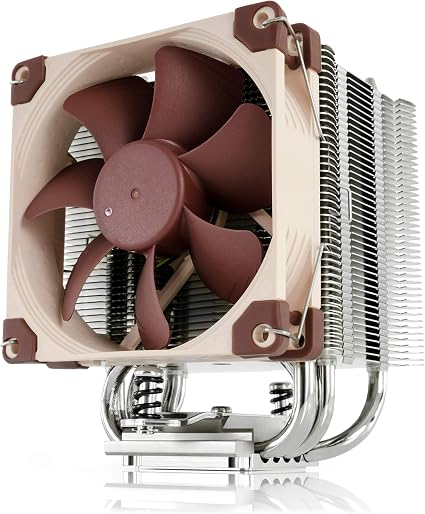
Cooling an Intel Core i7-8700K in a tight PC case is a challenge many face. Designed for compact setups, this cooler fits well without blocking RAM or PCIe slots.
Its main strength lies in balancing solid cooling with a small footprint, perfect for small form factor and HTPC builds.
Setting it up comes with a high-end thermal paste and an easy mounting system that supports several Intel sockets including LGA115x, along with AMD AM4 and AM5. The 92mm fan with PWM control adjusts speeds quietly, so everyday use means cool temperatures without much noise or space concerns. It stays clear of components around the CPU, making it simple to install and maintain in tight spaces.
Cooling performance holds its own for a single-tower cooler of just 125mm height. Built with quality materials and a reliable mounting system, it’s sturdy and long-lasting. Most users note how quiet the fan runs while delivering enough airflow to keep the 8700K stable.
A common gripe is the fan size limits maximum cooling compared to larger models.
The cooler is praised for running quietly while keeping temperatures solid given its small footprint. The main limitation noted is that the 92mm fan can’t match the cooling power of bigger models, which might impact heavy overclocking or high TDP CPUs.
Those building small or mid-sized PCs will find it a great fit due to size and compatibility. People looking for maximum cooling on high-power CPUs might want to consider larger options instead.
Pros
- Compact size ideal for small cases
- Quiet 92mm fan with automatic speed control
- Does not block RAM or PCIe slots
- Includes high-quality thermal paste and mounting kit
Cons
- Fan size limits maximum cooling potential
- Not ideal for large tower or high-end overclocking setups
| Specification | Details |
|---|---|
| Height | 125mm |
| Fan Size | 92mm |
| Compatibility | Intel LGA1851, LGA1700, LGA1200, LGA115x & AMD AM5 & AM4 |
| Included Thermal Paste | NT-H1 |
| Noise Control | PWM support with Low-Noise Adaptor |
| Warranty | 6 years manufacturer’s warranty |
7. Noctua NH-L9x65 CPU Cooler

Just 65mm tall, this compact cooler fits perfectly in HTPCs and small ITX builds without blocking RAM or PCIe slots. Its size makes it a solid choice for those needing efficient cooling in tight spaces without sacrificing compatibility or quiet operation.
Installation is straightforward thanks to the SecuFirm2 mounting system and included high-end thermal paste. The slim 92mm fan runs quietly, adjusting speeds automatically via PWM support and a low-noise adaptor.
Everyday use keeps noise minimal and maintains optimal airflow without getting in the way of other components.
Cooling performance suits CPUs with moderate heat output, providing reliable air cooling while staying surprisingly quiet at 23.6 dB noise level. The build quality feels solid, and the offset mounting boosts efficiency. Some users wish for more raw cooling power, but the cooler’s size limits potential for high-heat CPUs.
Quiet operation stands out, aided by the slim, PWM-controlled fan and low-noise adaptor. Many appreciate how compact it is, though some find the cooling insufficient for more demanding processors. The mounting system and included thermal paste simplify installation without fuss.
Ideal for users building small form factor PCs or HTPCs with moderate heat CPUs that need silent, space-saving cooling solutions. Users with high-wattage CPUs should consider larger or more powerful coolers for better thermal performance.
Pros
- Very compact low-profile design
- Quiet fan with PWM and low-noise adaptor
- Does not block RAM or PCIe slots
- Easy installation with high-quality mounting system
Cons
- Cooling power limited for high-heat CPUs
- Fan speed can get noisy near max rpm
| Specification | Details |
|---|---|
| Total Height | 65mm |
| Fan Size | 92mm |
| Maximum Rotational Speed | 2500 rpm |
| Noise Level | 23.6 db |
| Power Connector Type | 4-Pin |
| Wattage | 2.52 watts |
8. Be Quiet! Pure Rock 3 Black CPU Cooler

Ideal for gamers, multimedia enthusiasts, and everyday PC users, this cooler handles up to 190W TDP, making it solid for Intel and AMD systems. Its standout feature is efficient heat transfer through well-designed heat pipes and fins, all wrapped up in an understated black design that fits most builds.
Installation is straightforward, thanks to compatibility with Intel sockets 1851/1700/1200/1151/1150/1155 and AMD’s AM5/AM4. The 120mm PWM fan adjusts speeds up to 2000 rpm, balancing cooling and noise. The fan blades are optimized, keeping airflow steady without much disruption, helping your system stay cool during regular workloads and gaming sessions.
Performance-wise, it delivers strong cooling through four 6mm heat pipes that efficiently move heat to wide aluminum fins. Build quality feels solid, with minimal bends in the pipes preserving heat transfer. Most users appreciate the quiet operation at 34.8 dB.
Some do mention the fan can get louder at max speed, which is its main downside.
Cools effectively with low noise in everyday use, thanks to optimized fan blades and solid heat pipe design. The most frequent complaint concerns the fan noise rising at its maximum 2000 rpm speed, which can be distracting depending on your environment.
Great choice if your build stays under 190W TDP and you prefer quiet operation most of the time. Users needing extreme cooling for heavy overclocking should look for higher-capacity alternatives.
Pros
- Supports up to 190W TDP cooling
- Quiet at typical speeds
- Compatible with a wide range of Intel and AMD sockets
- Four efficient 6mm heat pipes
Cons
- Fan noise noticeable at full speed
- Not for overclocking beyond 190W TDP
| Specification | Details |
|---|---|
| Cooling Method | Air |
| Power Connector Type | 4-Pin |
| Voltage | 12 volts |
| Wattage | 190 watts |
| Maximum Rotational Speed | 2000 rpm |
| Noise Level | 34.8 db |
9. Thermalright Aqua Elite 120 V3 AIO CPU Cooler

Water cooling with the Thermalright Aqua Elite 120 V3 stands out thanks to its quiet operation and strong heat dissipation. Perfect for anyone running an Intel 8700k who wants good cooling paired with customizable ARGB lighting. Its single biggest strength is the balance it strikes between cooling efficiency and low noise levels.
Installation is straightforward, using the integrated 120mm ARGB fan and the black aluminium fin heat sink plate to keep temperatures down. The pump’s low vibration design helps reduce noise, making daily use quieter than many other AIO coolers. Connection to the motherboard’s 5V 3-pin supports synchronized lighting effects without extra hassle.
The protective mesh on the water pipe adds durability during regular handling or PC moves.
Performance-wise, it cools reliably, maintaining safe temps under load, thanks to its fourth generation pump head and efficient cold row design. Build quality feels solid with premium materials ensuring long life. The most frequent compliment is about the quietness during operation, while some find that the lighting sync requires a compatible motherboard to work perfectly.
The quiet pump and efficient cooling consistently receive praise for keeping temperatures down without much noise. Common concerns focus on lighting synchronization issues unless paired with certain motherboard models, which some users find limiting.
Those who want a calm, effective cooling setup for everyday to moderate gaming or work will find it appealing. Users pushing extreme overclocks or lacking motherboard ARGB control might want to explore other cooling options.
Pros
- Quiet operation with low vibration pump
- Durable water pipe with protective mesh
- Bright, syncable 120mm ARGB fan light
- Efficient heat dissipation with aluminium fins
Cons
- Lighting sync needs compatible motherboard
- Wattage (7.2W) limits extreme overclocking potential
| Specification | Details |
|---|---|
| Cooling Method | Water |
| Noise Level | 25.6 db |
| Maximum Rotational Speed | 1500 rpm |
| Air Flow Capacity | 66.17 cfm |
| Voltage | 12 volts |
| Power Connector Type | 4-Pin |
10. MSI MAG Coreliquid A13 360 CPU Cooler

MSI MAG Coreliquid A13 360 is a liquid CPU cooler built to handle demanding processors like the 8700k with ease. Its best feature is the integrated split-flow radiator with a powerful pump, balancing strong cooling performance and quiet operation. A great choice for anyone wanting reliable, high-end water cooling.
Setting it up involves standard liquid cooler installation but benefits from the integrated pump within the radiator, which reduces motor noise. Running at up to 3800 RPM with ceramic bearings, the pump stays quiet while maintaining solid water flow.
The 360mm aluminum radiator fits nicely in larger cases designed for cooling, keeping heat away without adding weight or complexity.
Performance delivers stable, low temperatures even under heavier loads thanks to the split-flow water cooling system. The build quality feels durable with premium materials like ceramic bearings in the pump. Praise highlights quiet operation at just 14.4 dB, while some mention the high rotational speed of up to 5200 RPM could lead to noise spikes during maximum cooling demands.
Quiet operation stands out as the major strength, thanks to the ceramic bearing pump that keeps noise low around 14.4 dB. Most users note that the pump’s speed can increase up to 5200 RPM under heavy load, which sometimes raises noise levels higher than expected.
People with spacious PC cases who want consistent, cool performance for their 8700k will appreciate this cooler. Those with smaller cases or sensitive to pump noise during intensive workloads might look for an alternative with lower maximum RPM or smaller radiator size.
Pros
- Strong cooling for high-performance CPUs
- Quiet operation due to ceramic bearing pump
- Durable aluminum radiator with split-flow design
- Supports latest LGA 1851 socket out of the box
Cons
- High maximum RPM can cause occasional noise
- Requires a case that fits 360mm radiator
| Specification | Details |
|---|---|
| Cooling Method | Water |
| Noise Level | 14.4 db |
| Maximum Rotational Speed | 5200 rpm |
| Power Connector Type | 4-Pin |
| Voltage | 10 volts_of_direct_current |
| Wattage | 25 watts |
11. Thermalright Phantom Spirit 120 SE CPU Cooler

Cooling your 8700k feels steady and reliable with a decent balance between noise and airflow. It suits someone who wants quiet daily operation without constantly checking temps.
Its strongest point lies in the thoughtful heat dissipation design which keeps things running cool even under sustained load.
Setting it up is straightforward, though its size and memory-cut corners help avoid interference with RAM modules, making installation less of a headache. The air cooling method, combined with a 4-pin connector, means you can control fan speed easily through your motherboard.
Running at 1500 rpm max with noise under 26 dB, it stays discreet during regular use.
It cools efficiently thanks to the blackened nano coating and electroplated heat pipes, spreading heat away quickly from the CPU. The build quality feels solid with durable S-FDB bearings ensuring longevity. It’s praised for quiet operation and solid cooling, though a few mention it could be more aggressive in higher overclock scenarios.
The cooler’s standout feature is its quiet performance coupled with efficient heat spreading using the nano coating and electroplated pipes. Many appreciate the low noise level, though some find it less capable for heavily overclocked 8700k setups. Installation works well around RAM but may feel cramped in smaller builds.
Anyone running a moderately clocked 8700k will find the balance between cooling and silence satisfying. Those pushing heavy overclocks or looking for ultra-low temps might want to consider a higher capacity cooler. It fits best in cases with enough clearance for its design and benefits users prioritizing quiet daily operation.
Pros
- Quiet operation below 26 dB
- Memory cut corner design for better RAM fit
- Long service life with durable S-FDB bearings
- Good airflow at 66.17 cfm
Cons
- Not the most aggressive cooling for overclocking
- Setup can be tight in compact cases
| Specification | Details |
|---|---|
| Cooling Method | Air |
| Maximum Rotational Speed | 1500 rpm |
| Noise Level | 25.6 db |
| Air Flow Capacity | 66.17 cfm |
| Power Connector Type | 4-Pin |
| Voltage | 12 volts |
12. Noctua NH-C14S CPU Cooler

Excellent for anyone wanting a cooler that balances strong airflow with low profile design, the NH-C14S fits where many others won’t. Its standout feature is the top-flow setup that keeps your RAM clear while packing in power.
Installation goes smoothly with the SecuFirm2 mounting system and included NT-H1 thermal paste, fitting a range of Intel and AMD sockets. The fan’s position can shift above or below the fins depending on how much clearance you need for tall RAM modules, which helps in tight builds. You get a 140mm fan that adjusts speeds quietly thanks to PWM and a Low-Noise Adaptor, making everyday operation quiet without sacrificing cooling.
Cooling performance is solid thanks to six heatpipes and effective top-flow airflow across nearby components. Built sturdily with premium materials, it stays reliable over time. Most praise focuses on how quiet it runs and its flexibility with RAM height, but some users point out that the total height of 142mm might still be tight in very small cases.
The NH-C14S is praised for running quietly while maintaining strong cooling, thanks largely to the efficient 140mm fan and well-designed heatpipe layout. Most users highlight the convenience of switching fan positions to fit RAM clearance needs, though some find the overall height still a challenge in compact cases.
Those building mid-sized towers or systems with tall RAM modules will appreciate this cooler’s versatility and quiet operation. People with very small form factor builds may want to shop for lower profile alternatives to ensure a perfect fit without compromises.
Pros
- Top-flow design for high RAM clearance
- Quiet 140mm NF-A14 fan with PWM support
- Includes NT-H1 thermal paste and SecuFirm2 mount
- Supports multiple Intel and AMD sockets
Cons
- Total height might not fit very small cases
- Fan position adjustment can be fiddly for first-timers
| Specification | Details |
|---|---|
| Height | 142mm |
| Fan Size | 140mm |
| Heatpipes | 6 |
| Compatibility | Intel LGA1851, LGA1700, LGA1200, LGA115x & AMD AM5 & AM4 |
| Warranty | 6 years |
Best 8700k CPU Coolers Comparison Table
| Product | Cooling Method | Noise Level | Maximum RPM | Air Flow Capacity |
|---|---|---|---|---|
| Thermalright Peerless Assassin | Air | 25.6 db | 1550 rpm | 66.17 cfm |
| ARCTIC Liquid Freezer III Pro | Liquid | – | 3000 rpm | 77 cfm |
| ARCTIC Liquid Freezer III Pro | Liquid | – | 3000 rpm | 77 cfm |
| Thermalright Phantom Spirit 120SE | Air | 25.6 db | 1500 rpm | 66.17 cfm |
| Thermalright Assassin X120 SE | Heat pipe and fan | 25.6 db | 1550 rpm | 66.17 cfm |
| Noctua NH-U9S | Air | – | – | – |
| Noctua NH-L9x65 | Air | 23.6 db | 2500 rpm | 57.5 m³/h |
| be quiet! Pure Rock 3 | Air | 34.8 db | 2000 rpm | – |
| Thermalright Aqua Elite 120 V3 | Water | 25.6 db | 1500 rpm | 66.17 cfm |
| MSI MAG Coreliquid A13 360 | Water | 14.4 db | 5200 rpm | – |
| Thermalright Phantom Spirit 120 SE | Air | 25.6 db | 1500 rpm | 66.17 cfm |
| Noctua NH-C14S | Air | – | – | – |
- Cooling MethodAir
- Noise Level25.6 db
- Maximum RPM1550 rpm
- Air Flow Capacity66.17 cfm
- Cooling MethodLiquid
- Noise Level–
- Maximum RPM3000 rpm
- Air Flow Capacity77 cfm
- Cooling MethodLiquid
- Noise Level–
- Maximum RPM3000 rpm
- Air Flow Capacity77 cfm
- Cooling MethodAir
- Noise Level25.6 db
- Maximum RPM1500 rpm
- Air Flow Capacity66.17 cfm
- Cooling MethodHeat pipe and fan
- Noise Level25.6 db
- Maximum RPM1550 rpm
- Air Flow Capacity66.17 cfm
- Cooling MethodAir
- Noise Level–
- Maximum RPM–
- Air Flow Capacity–
- Cooling MethodAir
- Noise Level23.6 db
- Maximum RPM2500 rpm
- Air Flow Capacity57.5 m³/h
- Cooling MethodAir
- Noise Level34.8 db
- Maximum RPM2000 rpm
- Air Flow Capacity–
- Cooling MethodWater
- Noise Level25.6 db
- Maximum RPM1500 rpm
- Air Flow Capacity66.17 cfm
- Cooling MethodWater
- Noise Level14.4 db
- Maximum RPM5200 rpm
- Air Flow Capacity–
- Cooling MethodAir
- Noise Level25.6 db
- Maximum RPM1500 rpm
- Air Flow Capacity66.17 cfm
- Cooling MethodAir
- Noise Level–
- Maximum RPM–
- Air Flow Capacity–
How to Choose the Right 8700k CPU Cooler
Choosing the right cooler involves considering factors like compatibility with your CPU socket, cooling performance, noise levels, and physical size to fit your case. Getting these right ensures efficient heat management, prolongs your CPU’s life, and prevents costly overheating or installation issues.
Cooling Performance
Many users find their CPU running hotter than expected during gaming or heavy workloads. This usually means the cooler’s heat dissipation isn’t keeping pace. The cooling system has to move heat away quickly, which depends largely on the fan speed measured in RPM and the volume of air it can push, often rated in cubic feet per minute (CFM).
A fan with low CFM won’t cool effectively even if it spins fast. Matching the cooler’s thermal design power (TDP) rating to your CPU is critical to avoid thermal throttling.
For a CPU with around 95 watts TDP, a cooler supporting at least that rating ensures it can handle typical loads without overheating.
Good cooling in daily use means stable CPU temperatures under load, fewer performance drops, and a cooler system overall. Look for coolers with dual or triple heat pipes made of copper, combined with fans capable of at least 50-70 CFM.
This setup efficiently pulls heat from the processor and blows it away, keeping your computer running smoothly during demanding applications.
Compatibility and Size
Several coolers might fit one motherboard but block nearby components or won’t fit inside smaller cases. The physical size of the cooler, especially its height, determines if it clears the side panel of your PC case.
Some tower-style coolers stand over 150mm tall, which can clash with compact builds. Compatibility with the socket around the processor is essential; certain mounting brackets are designed precisely for that CPU type to ensure a snug fit.
Clearance for RAM and other motherboard elements shouldn’t be overlooked. A cooler overhanging the RAM slots can block the installation of tall memory modules. Check the cooler dimensions and mounting style.
A common setup includes easy-to-install brackets with enough space around the socket for at least 40mm RAM modules. Users tend to prefer coolers that fit well without removing components or compromising system layout.
Noise Levels
Fan noise varies significantly between models and affects daily comfort, especially in quiet environments. At idle or light use, good coolers run fans very slowly or stop them altogether, keeping noise minimal. During gaming or rendering, fan speeds ramp up, which can become distracting if the cooler is loud.
The type of fan bearing plays a large role; fluid dynamic bearings usually produce less noise and last longer compared to sleeve bearings.
Striking a balance between noise and cooling performance can be tricky. Fans rated around 20-30 decibels at idle and 35-40 decibels under load tend to be tolerable without constant headaches.
Silent operation at idle paired with efficient heat removal during tasks is what users really notice over time, especially for extended gaming or work sessions.
Build Quality and Materials
The build quality of a cooler often reflects in long-term performance and reliability. Coolers with copper heat pipes conduct heat more efficiently than pure aluminum ones, speeding up the cooling process.
Aluminum fins are lightweight and help spread heat but should be paired with quality copper pipes for best results. Good assembly ensures heat pipes make solid contact with the base plate for quicker heat transfer.
Durable materials reduce corrosion or warping after years of use. Some coolers come with preapplied thermal paste; its quality impacts the initial thermal connection between CPU and cooler. Poor paste can cause higher idle temperatures or require reapplication sooner.
Users benefit from solid construction that stays intact and efficient after multiple system upgrades or cleanings.
Ease of Installation and Maintenance
Installing a CPU cooler can be a frustrating experience if the mounting system is complicated or unclear. A straightforward bracket design with clear, step-by-step instructions saves users time and reduces the chance of improper seating, which can hurt cooling performance.
Some coolers provide extra screws and brackets compatible with various sockets, adding flexibility to the process.
Maintaining airflow requires occasional cleaning of fans and fins. Coolers with fans that are easy to remove or cases with accessible layouts make dust removal less of a chore. A cooler offering quick-release fans or fewer tight spaces means less hassle during upkeep.
Clear documentation and included mounting hardware ensure fewer trips to the hardware store or multiple attempts to get things right on the first try.
Optimizing Cooling Performance for Intel Core i7-8700K Under Load
Keeping the Intel Core i7-8700K cool during heavy workloads is crucial since it tends to run hot under sustained load. The cooler you choose should deliver consistent thermal performance without throttling.
A good fit combines a high-quality heatsink with efficient fans that maintain steady airflow directly over the CPU. Proper installation of thermal paste also plays a key role in heat transfer. Fans with adjustable speeds allow for balancing noise and cooling, ensuring the chip stays within safe temperature limits while gaming or rendering.
Aligning the cooler to optimize airflow through the case, rather than against it, improves overall temperature control. In many situations, having multiple case fans to exhaust hot air complements the CPU cooler’s function and stabilizes temperatures. This setup minimizes thermal spikes when the processor switches from idle to full load, preserving performance in demanding tasks.
Maintenance Tips to Prolong the Lifespan of Your 8700K CPU Cooler
Cleaning dust buildup on the cooler’s fins and fans is essential for sustained performance. Over time, dust restricts airflow and reduces heat dissipation, causing the CPU to run hotter.
Use compressed air in short bursts to avoid damaging fan blades. Checking fan bearings for unusual noise or wobbling helps catch early signs of wear. Reapplying thermal paste every couple of years ensures optimal contact between the CPU and the cooler base.
Tighten mounting brackets occasionally to maintain pressure and prevent loosening from thermal expansion. Avoid running the cooler’s fans at maximum speed constantly, as this can accelerate wear; instead, use software controls or BIOS settings to manage fan curves. Keeping the inside of your case clean and cables organized helps maintain unobstructed airflow, which supports the cooler’s efficiency over time.
Comparing Air vs. Liquid Cooling Solutions for the 8700K Processor
Air cooling for the i7-8700K typically involves a large heatsink paired with one or more fans, making it straightforward to install and maintain. Air coolers tend to be less expensive and do not require specialized components like pumps or tubing. They are also less prone to leaks and issues related to coolant evaporation.
On the other hand, liquid cooling solutions use a closed-loop system to move heat away from the CPU to a radiator. These systems can achieve lower temperatures, especially under overclocked conditions, and often produce less noise at higher performance levels.
However, they require more physical space and careful mounting, plus routine inspection for leaks or pump failure. The choice depends on the balance between noise tolerance, cooling needs, case compatibility, and the willingness to perform occasional maintenance.
People Also Asked
How Do I Install an 8700k CPU Cooler Properly?
Install the 8700k cooler by applying a small pea-sized amount of thermal paste on the CPU, then mounting the cooler securely without overtightening screws. Checking that the cooler makes full contact with the CPU surface helps improve heat transfer and prevents hotspots.
Will This CPU Cooler Fit in My PC Case?
Check your PC case’s CPU cooler height clearance before buying since many coolers vary in size. Measuring from the motherboard to the side panel lets you avoid fit issues, especially with larger air coolers which can be bulky around RAM slots and PCIe cards.
Can This Cooler Keep My 8700k Temperatures Under Control?
A good air or liquid cooler can keep the 8700k temperatures below 80°C under heavy load in a well-ventilated case. Proper case airflow matters too; ensure intake and exhaust fans create steady airflow to avoid heat build-up around the cooler.
How Long Does an 8700k CPU Cooler Usually Last?
Most 8700k CPU coolers last several years if cleaned regularly to remove dust buildup on fins and fans. Fan bearings may wear out first but are often replaceable, so simple maintenance can extend the cooler’s life significantly.
What Are Common Issues with 8700k CPU Coolers?
Noise from aging fan bearings and insufficient thermal paste application are common issues with 8700k coolers. Keeping the fan clean and properly seated prevents overheating and loud operation, which often comes from dust or loose mounting brackets.
Conclusion
Choosing a cooler for the 8700k depends mainly on how well it handles heat, how noisy it is, and how easy it fits into your PC case. A good balance between these factors will keep the processor running smoothly without making too much noise or being difficult to install.
Consider your case size and budget before deciding, especially if you plan to use the PC heavily. Take a look at the comparison table and the detailed picks above to find the option that matches your needs and setup.

I’m Grant Mitchell, a firearms and hunting writer with years of experience at the range and in the field. I write about rifles, shotguns, handguns, optics, safe storage, cleaning, and responsible ownership, along with practical hunting tips. My goal is to share accurate, safety-first information that helps you choose the right firearm, maintain it properly, and become a more confident shooter.