Top 12 Best 80mm CPU Cooler That Will Boost Your PC!
Overheating, loud noise, and poor fit are all too common problems without the best 80mm cpu cooler. Many small coolers either push insufficient air or vibrate excessively, leading to performance drops and distracting sounds during regular use.
A cheap model can quickly become a bottleneck for PC stability, especially in compact cases where airflow is limited and space is tight.
A quality 80mm CPU cooler offers efficient heat dissipation with a balanced fan speed, usually between 1,500 and 3,500 RPM, while maintaining low noise levels. The fan blade design and motor bearings matter a lot for durability and quiet operation.
Heat pipes or solid copper bases often improve cooling by transferring heat away from the processor faster. Compatibility with socket size and case clearance also determines whether the cooler fits properly without blocking memory slots or other components. Easy access to screws and dust filters makes occasional cleaning less of a chore.
Need a Quick Check?
| Image | Product | Price |
|---|---|---|
Our Top Picks 1  | Thermalright Assassin X90 SE | Check Price |
Our Top Picks 2  | Kingwin 80mm Silent Fan | Check Price |
Our Top Picks 3  | Noctua NF-A8 PWM Fan | Check Price |
Our Selected Top 12 80mm Cpu Cooler for Every Budget
This list features a variety of 80mm CPU coolers suited for different needs and budgets. Each review covers performance, ideal users, and key strengths and weaknesses to help you find the best fit for your system’s cooling requirements.
1. Thermalright Assassin X 90 SE V2 CPU Cooler
Thermalright Assassin X 90 SE V2 is a compact 80mm air cooler designed to keep desktop CPUs running cool in tight spaces. It fits well where larger coolers won’t and stands out for its quiet operation, making it a good choice for systems where space and noise control matter most.
Installation involves attaching the cooler with its mounting brackets, which hold it securely without fuss. The 4-pin power connector allows easy connection to motherboard headers and lets you adjust fan speed.
Running at up to 2200 rpm, it balances airflow and noise, producing 25 dB under load. Cleaning is straightforward since the design doesn’t trap too much dust, maintaining consistent airflow.
Cooling performance is solid for an 80mm cooler, moving 32.77 cfm of air to keep CPUs from overheating. Its build quality feels durable, crafted to last without flimsy parts. Positive comments highlight how quiet it is despite decent airflow.
Some users note that the size limits overall heat dissipation compared to bigger coolers, which might not handle high-TDP CPUs as well.
Praise for the cooler often focuses on how quietly it runs even while moving decent airflow, making it suitable for noise-sensitive setups. A frequent complaint is that its small 80mm fan size restricts cooling capacity, which can struggle with more demanding processors.
Those working with compact builds or quiet environments will find it well-suited to their needs. Users needing serious cooling power or working with high-TDP CPUs should consider larger options for better heat management.
Pros
- Quiet operation at full speed
- Compact size fits small cases easily
- Easy to install with secure mounting
- Reasonably efficient airflow for size
Cons
- Limited cooling compared to larger models
- Not ideal for very high TDP CPUs
| Specification | Details |
|---|---|
| Power Connector Type | 4-Pin |
| Voltage | 12 volts |
| Wattage | 1.2 watts |
| Maximum Rotational Speed | 2200 rpm |
| Air Flow Capacity | 32.77 cfm |
| Noise Level | 25 db |
2. Kingwin 80mm Silent Computer Case Fan
Quiet operation stands out in this compact 80mm fan, making it a solid choice for anyone wanting to keep noise down. Well-suited for quiet PC setups, office desktops, or home servers, it quietly pushes air where it’s needed most without drawing attention.
Installation fits standard 80mm mounts easily, which helps when replacing a worn-out fan or refreshing airflow. The three-pin connector works with most desktop motherboards and controllers. Its optimized blades keep ventilation steady, so daily use means your system stays cooler without raising the volume in your room.
Performance delivers a steady 30 cubic feet per minute airflow at a max speed of 1700 rpm, balancing cooling power with quiet running at just 25 decibels. The build is straightforward and durable, handling heavy-duty scenarios like mining rigs without fuss. Reviews often praise its noise level, though some mention the airflow could be stronger for extreme cooling needs.
Quiet performance at 25 dB is the biggest highlight in reviews, making it well-suited for noise-sensitive environments. However, some users find that the airflow at 30 CFM doesn’t quite meet the demands of intense cooling setups.
Ideal for users who want silent and reliable cooling in standard cases, office PCs, or mining rigs with moderate heat generation. Those running overclocked or high-end systems needing stronger airflow might want to explore larger fans.
Pros
- Quiet operation with low noise levels
- Fits standard 80mm mounting points
- Good airflow for its size
- Durable build for heavy use
Cons
- Airflow might be insufficient for high-end cooling
- Only a 3-pin connector, limiting control options
| Specification | Details |
|---|---|
| Power Connector Type | 3-Pin |
| Voltage | 12 volts |
| Noise Level | 25 db |
| Maximum Rotational Speed | 1700 rpm |
| Air Flow Capacity | 30 cfm |
3. Noctua NF-A8 PWM 80mm Quiet Fan
Quiet cooling in a small package makes this fan great for compact PC builds and devices like NAS units. It delivers reliable airflow with minimal noise, which stands out for those wanting efficient cooling without the usual fan racket. The automatic speed control via PWM adds convenience for balancing performance and sound.
Setting it up is straightforward thanks to the included anti-vibration mounts and screws, plus an extension and y-cable to connect multiple fans on one header. Its broad speed range lets you dial in just the right airflow for your system, whether it’s running at full 2200 RPM or slowed down with the low-noise adaptor. Handling daily operation is easy with stable voltages and a trusted 4-pin PWM connector.
It cools well in tight spaces, moving air at up to 55.5 cubic meters per hour while barely disturbing the surroundings with 17.7 dB of sound. Its solid construction aims for durability, boasting over 150,000 hours mean time to failure. Most praises focus on the quiet operation and reliable performance, while some find its max speed a bit limited for heavy-duty cooling needs.
Quiet operation earns the most praise, making it suitable for noise-sensitive environments. The common complaint is that the maximum 2200 RPM speed sometimes falls short for high-performance CPU cooling demands.
Ideal for small form factor PCs and quiet home servers where space and noise matter. Users requiring high airflow and aggressive cooling should consider larger or faster fans.
Pros
- Runs very quietly even at higher speeds
- Good airflow for its compact size
- Includes vibration mounts and cables
- Durable design with long lifespan
Cons
- Max speed may be low for intense cooling needs
- Limited to 80 mm cases and setups
| Specification | Details |
|---|---|
| Maximum Rotational Speed | 2200 RPM |
| Noise Level | 17.7 dB(A) |
| Dimensions | 80 x 80 x 25 mm |
| Air Flow Capacity | 55.5 cubic meter per hour |
| Voltage | 12 volts |
| Connector Type | 4-Pin PWM |
4. Thermalright TL-8015 80mm PWM CPU Fan

Compact design with a focus on durable construction makes this 80mm PWM fan suitable for those needing efficient cooling in tight spaces. Its standout feature is the balance between airflow and noise, delivering solid performance without being overly loud.
Installation is straightforward thanks to the standard 4-pin power connector compatible with most desktop setups. Running at a maximum of 2200 rpm, the fan adjusts speed automatically via PWM control to match cooling demands, helping maintain a quieter environment during light tasks.
Cleaning is simple as the fan’s blades and frame are easily accessible.
It cools effectively with an airflow capacity of 28.4 cfm while maintaining noise levels at 23.3 dB, which users appreciate for quiet operation. The build feels sturdy, reflecting Thermalright’s experience in cooling accessories. Some notices mention the fan could spin faster for extreme cooling, but overall reliability in daily use is commonly praised.
The fan’s quiet operation and steady airflow make it well-suited for regular desktop use, providing comfort without excess noise. Some find the cooling power just shy of what intense gaming or overclocking might require. The straightforward design allows for easy installation and maintenance, keeping things simple.
Ideal for users who want reliable cooling in limited spaces and prefer quieter fans. Those needing higher cooling capacity under heavy loads might want to consider larger or more powerful models instead.
Pros
- Quiet operation at 23.3 dB
- Adjusts speed with PWM control
- Compact size fits tight spaces well
- Sturdy build quality reflects brand expertise
Cons
- Maximum speed may not suit heavy overclockers
- Airflow could be stronger for extreme cooling
| Specification | Details |
|---|---|
| Power Connector Type | 4-Pin |
| Voltage | 12 volts_of_direct_current |
| Noise Level | 23.3 db |
| Maximum Rotational Speed | 2200 rpm |
| Air Flow Capacity | 28.4 cfm |
5. Noctua NH-L9x65 Low-Profile CPU Cooler

Compact with a total height of just 65mm, the Noctua NH-L9x65 suits those building small form factor PCs or HTPCs. Its key strength lies in fitting easily without blocking RAM or PCIe slots on most motherboards, making it a solid choice when space is tight.
Setup is straightforward thanks to the SecuFirm2 mounting system, compatible with various Intel and AMD sockets. The included NT-H1 thermal paste means no extra purchases are needed for thermal transfer.
Daily operation is quiet because the slim 92mm fan uses PWM to adjust speed automatically and comes with a low-noise adaptor, keeping noise levels down even under load.
Cooling performance handles low to moderate heat CPUs efficiently, such as Intel 285K or AMD Ryzen 7950X3D models. The build quality is sturdy, with a good design that avoids interference with components. Most praise centers on its quiet operation, though some mention its cooling might fall short on very high TDP processors.
Users praise the cooler’s quietness and compact fit, making it ideal for small builds. A common drawback is its limited cooling power for high-performance CPUs generating more heat. The balance between size and cooling efficiency is clear.
Builders focusing on small cases with moderate CPU heat will appreciate this cooler’s design. Anyone using high TDP chips should look for larger cooling solutions to ensure adequate temperature control.
Pros
- Very low profile fits tight cases without blocking slots
- Quiet operation due to PWM fan and low-noise adaptor
- Easy installation with comprehensive mounting system
- Includes high-quality thermal paste for better heat transfer
Cons
- Cooling capability limited to low to moderate heat CPUs
- Fan speed can reach 2500 rpm, which may be noticeable under load
| Specification | Details |
|---|---|
| Cooling Method | Air |
| Noise Level | 23.6 db |
| Maximum Rotational Speed | 2500 rpm |
| Air Flow Capacity | 57.5 cubic meter per hour |
| Wattage | 2.52 watts |
6. Thermalright Assassin X120 Refined SE CPU Cooler

Cooling down a desktop processor in a compact space can be tough, but the Thermalright Assassin X120 Refined SE stands out for its balance of power and size. It suits users looking for a reliable 80mm cooler that keeps temperatures low without being overly loud or bulky.
Installing this cooler is straightforward thanks to its well-designed mounting system. The 4-pin connector lets you control fan speed easily, which is handy for adjusting noise levels during daily tasks.
Running on 12 volts and spinning up to 1550 rpm, the fan manages airflow well without overwhelming sound, making it suitable for regular desktop use.
The heat pipe and fan combination does a solid job managing heat for an 80mm model. The cooler is built with quality materials that feel durable and well put together. Praise often centers on the quiet operation at 25.6 dB, while some note that airflow could be better in extremely demanding conditions.
Thermalright Assassin X120 Refined SE CPU Cooler consistently keeps temperatures low for small form factor builds thanks to its efficient 80mm fan and compact design. It fits well in cases with limited space but can get a bit noisy under heavy load, which is the most common complaint among those using it for gaming or intensive tasks.
People assembling compact PCs where space is tight will find the Assassin X120 Refined SE meets cooling needs effectively. Those wanting quieter operation during high CPU usage might want to look at options with larger fans or liquid cooling, as noise levels can be a drawback in quiet environments.
Pros
- Quiet operation at 25.6 dB under load
- Good airflow of 66.17 cfm for its size
- Durable build with quality materials
- Fan speed controllable via 4-pin connector
Cons
- Airflow may struggle in extreme heat situations
- Limited to desktop devices only
| Specification | Details |
|---|---|
| Power Connector Type | 4-Pin |
| Voltage | 12 volts_of_direct_current |
| Cooling Method | Heat pipe and fan-based |
| Noise Level | 25.6 db |
| Maximum Rotational Speed | 1550 rpm |
| Air Flow Capacity | 66.17 cfm |
7. Noctua NH-U9S Single Tower CPU Cooler
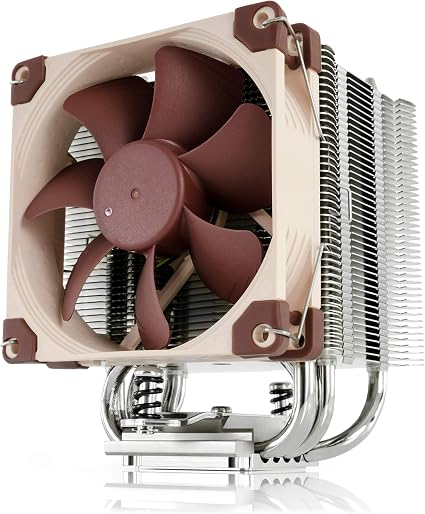
Finding a powerful CPU cooler that fits into small cases without blocking RAM or PCIe slots can be tricky. The Noctua NH-U9S is compact enough for ITX and HTPC builds while keeping your processor cool.
Its main strength lies in combining solid cooling with a small footprint that doesn’t get in the way of other components.
Installing the cooler is straightforward thanks to the SecuFirm2 mounting system, compatible with a range of Intel and AMD sockets. The 92mm NF-A9 fan adjusts speed automatically via PWM, keeping noise levels low with the included Low-Noise Adaptor. Its 125mm height makes it perfect for small form factors, and it stays clear of RAM and PCIe slots, avoiding any interference during everyday use.
The cooling performance is reliable for its size, managing heat well in tight builds without much fuss. The cooler feels solidly constructed, and the high-quality NT-H1 thermal paste helps maintain good thermal transfer.
Common praise notes the quiet operation, although some users mention it may not be the best choice for extreme overclocking due to its limited size.
The quiet operation and perfect fit for small cases earn high marks for convenience and noise control. Most users find the cooler easy to install and compatible with a broad range of motherboards. The most frequent drawback is that it may not deliver enough cooling for users pushing very demanding, high-power CPUs or heavy overclocking.
People building compact ITX or HTPC systems will appreciate its size and silence. Those needing maximum cooling power or working with larger, overclocked CPUs might want to consider larger or dual-fan alternatives for better heat management.
Pros
- Compact 125mm height fits small cases easily
- Does not block RAM or PCIe slots
- Ultra-quiet operation with Low-Noise Adaptor
- Includes premium NT-H1 thermal paste
Cons
- May struggle with very high CPU loads
- Only a single fan limits peak cooling capacity
| Specification | Details |
|---|---|
| Unit Count | 1 Count |
| Height | 125mm |
| Fan Size | 92mm |
| Compatibility | Intel LGA1851, LGA1700, LGA1200, LGA115x, AMD AM5 & AM4 |
| Warranty | 6 year manufacturer’s warranty |
8. Cooler Master Hyper 212 Black II CPU Cooler

Cooling capacity up to 220W clearly stands out, making it a solid choice for those needing reliable heat management. Perfect for gaming setups or productivity rigs with AMD Ryzen 7 and Intel Core Ultra 7 CPUs.
Its direct contact heat pipes deliver efficient cooling that won’t let your processor overheat during heavy tasks.
Setup is straightforward thanks to a user-friendly bracket design that fits well even for first-time builders. The quiet fan runs up to 1,750 RPM, balancing airflow of 75.19 CFM with low noise. The cooler’s minimalist aesthetic offers a clean look that easily blends into most desktop environments without drawing attention.
Performance-wise, heat is managed efficiently with four heat pipes using Anti-Gravity coolant flow technology. The build quality feels solid, while the cooler maintains stable operation under heavy loads.
Quieter operation is praised, but some mention that the actual airflow is closer to 42 CFM, which might limit performance in very cramped cases.
The cooler consistently provides stable performance during heavy CPU workloads thanks to its efficient heat pipe design. Some users have noted that its airflow, while fairly good, doesn’t reach the highest airflow figures advertised, which can affect cooling in compact cases.
Those running moderately powerful AMD or Intel CPUs will appreciate the balance of quiet operation and effective cooling. Builders needing extreme cooling or fitting into very small cases might want to explore other options for better airflow or quieter performance at high speeds.
Pros
- High cooling capacity suitable for heavy loads
- Quiet operation with low noise level
- Easy installation with user-friendly bracket
- Minimalist design fits various build styles
Cons
- Airflow limited to 42 CFM may restrict cooling in tight spaces
- Noise level can reach up to 26 dB under full load
| Specification | Details |
|---|---|
| Power Connector Type | 4-Pin |
| Voltage | 12 volts |
| Wattage | 2.4 watts |
| Noise Level | 26 dB |
| Maximum Rotational Speed | 2500 rpm |
| Air Flow Capacity | 42 CFM |
9. Thermalright Peerless Assassin 120 SE CPU Cooler

Enthusiasts looking for a powerful air cooler in a compact build will appreciate what this CPU cooler offers. It suits desktop users who need strong cooling performance without pushing noise levels high. The biggest strength lies in its impressive cooling capacity paired with a reasonably quiet operation.
Setting it up involves connecting the 4-pin power connector, which runs at 12 volts. The fan speed adjusts smoothly up to a maximum of 1550 rpm. Daily operation is quiet enough at 25.6 dB to stay unobtrusive in most environments.
The air flow of 66.17 cfm helps keep temperatures steady while fitting well on typical desktop CPUs.
Performance-wise, it can handle up to 265 watts, making it capable of cooling demanding processors effectively. The build quality reflects Thermalright’s two decades of experience, focusing on reliable computer accessories.
The strongest praise is about how cool and quiet it runs, while the most common downside is that it occupies more space than some smaller 80mm options.
The strongest praise from users centers on its ability to cool strongly while staying quiet, making it a practical choice for desktops focused on performance without loud fans. The most common complaint revolves around its size, as it’s bulkier compared to smaller coolers in the same category.
Anyone needing solid cooling for a demanding CPU and some extra room inside the case will find it ideal. Those with very tight spaces or ultra-compact builds should look for a smaller solution to ensure proper fit and airflow.
Pros
- Strong cooling capacity at 265 watts
- Quiet operation at 25.6 dB noise level
- Adjustable fan speed up to 1550 rpm
- Reliable 4-pin power connector
Cons
- Takes up more space than some 80mm coolers
- May not fit in very compact cases
| Specification | Details |
|---|---|
| Power Connector Type | 4-Pin |
| Voltage | 12 volts |
| Wattage | 265 watts |
| Noise Level | 25.6 db |
| Maximum Rotational Speed | 1550 rpm |
| Air Flow Capacity | 66.17 cfm |
10. SilverStone RL-KR01 Low Profile AMD CPU Cooler

Low profile design at just 54mm tall makes it great for compact builds needing solid cooling without bulk. Perfect for anyone running an AMD CPU with limited space but requiring dependable heat management. Its best strength lies in balancing space-saving size with decent cooling power for CPUs up to 95W or more.
Setting up involves straightforward installation on AM2 to AM4 sockets and even FM1/FM2, which covers a wide range of AMD systems. The included 80mm PWM fan adjusts speed based on temperature, running quietly at 33 dB thanks to dual ball bearings that ensure long-lasting performance.
Daily operation stays cool without overwhelming noise or taking up too much room inside the case.
Heat pipes and aluminum fins handle heat transfer efficiently, keeping processor temperatures in check under regular loads. The cooler feels sturdy and well-made, though some users note the fan speed can get quite high, hitting up to 3000 rpm. It manages power use at 12 watts smoothly while maintaining a solid airflow balance.
Most appreciate the quiet operation, while noise spikes under heavy loads are the main drawback.
The cooler is praised for staying quiet during everyday tasks, thanks to its well-designed fan and heat pipe structure. Common feedback points to increased noise when the fan spins up to maximum speeds during heavier loads. This reflects a good balance of silence and performance that adjusts dynamically.
Users with CPUs up to 95W seeking a low profile option will find this cooler very suitable. Those needing stronger cooling or quieter operation under high stress should consider alternatives with larger fans or thicker heat sinks.
Pros
- Compact size fits low profile systems easily
- Compatible with many AMD sockets
- Quiet operation under normal use
- Durable fan with dual ball bearings
Cons
- Fan can get louder at max speed
- Cooling limited to around 95W CPUs
| Specification | Details |
|---|---|
| Height | 54 mm |
| Fan Size | 80 mm PWM fan |
| Wattage | 12 W |
| Noise Level | 33 dB |
| Max Fan Speed | 3000 rpm |
11. Thermalright Assassin King 90 V2 CPU Cooler

Thermalright Assassin King 90 V2 is a compact air cooler designed for desktops needing reliable cooling with a small footprint. It suits users with limited space who want solid heat dissipation from a cooler that performs steadily even in different mounting orientations.
Setup involves attaching metal fasteners compatible with Intel and AMD platforms, which makes installation straightforward. The five 6mm heat pipes use an AGHP technique to counteract effects from vertical or horizontal mounting, keeping performance consistent.
A quiet 4-pin fan runs at a maximum of 2200 rpm with airflow of 44 cfm, making daily operation fairly silent at around 23.85 dB.
Cooling results are solid for an 80–90mm unit, with aluminum sink fins efficiently dispersing heat. The build is sturdy, using industrial-strength PBT+PC materials and UL class A insulation for safety and durability.
Praise often points to its long fan life thanks to S-FDB bearings, while some users mention the size may limit cooling for higher-end CPUs.
People appreciate the aggressive design that handles vertical and horizontal installation without performance loss. The long-lasting S-FDB fan bearing and industrial materials ensure reliability, but users sometimes find the cooler doesn’t keep up with very powerful processors and might interfere with tall RAM modules.
This fits well with compact builds or moderate CPUs where space is tight. High-end gaming rigs or overclocking setups would be better served by a larger cooler with more cooling capacity.
Pros
- Compact size fits small spaces well
- Quiet operation at 23.85 dB noise level
- AGHP heat pipes improve orientation flexibility
- Durable metal fasteners for Intel & AMD
Cons
- Limited cooling power for high-end CPUs
- Height at 125mm may block some RAM slots
| Specification | Details |
|---|---|
| Cooling Method | Air |
| Power Connector Type | 4-Pin |
| Maximum Rotational Speed | 2200 rpm |
| Air Flow Capacity | 44 cfm |
| Noise Level | 23.85 dB |
| CPU Cooler Dimensions | 94(L) x 77(W) x 125(H) mm |
12. Thermalright TL-8015 80mm Slim PWM Fan

Quiet operation paired with effective temperature-based speed control makes this 80mm fan an excellent choice for compact desktop builds. It suits users who want reliable cooling in a small space without constant noise.
Its main strength lies in balancing airflow and noise through smart automatic speed adjustments.
Setup requires connecting the 4-pin PWM cable to the motherboard, allowing the fan to adjust its speed based on system temperature. Four vibration damping pads around the fan reduce noise caused by friction, making it quieter during use.
Its slim 15mm profile fits well in tight cases where space is limited, and daily noise stays comfortably low thanks to the controlled maximum speed of 2200RPM.
Performance-wise, it offers up to 28.4 CFM airflow, which effectively cools desktop CPUs without drawing too much power at 2.64 watts. The build feels solid, with low vibration during operation contributing to quieter performance. Most praise highlights the quiet running and vibration control, while a noted downside is the fan noise reaching the upper limit at full speed.
Quiet performance with reduced vibration is highly valued, though noise can become noticeable when the fan ramps up to full speed. The automatic speed control works well to keep sound levels down during regular use.
Those needing cooling for small form-factor desktops with PWM control will find this fan a good fit. Users looking for near-silent operation under full load or non-PWM setups may want to consider alternatives.
Pros
- Quiet operation with vibration damping pads
- Automatic speed control via 4-pin PWM connector
- Slim 15mm thickness fits compact setups
- Good airflow for size at 28.4 CFM
Cons
- Noisy at maximum 2200 RPM speed
- Only compatible with 4-pin PWM motherboard headers
| Specification | Details |
|---|---|
| Maximum Rotational Speed | 2200 rpm |
| Noise Level | 23.3 dB |
| Air Flow Capacity | 28.4 CFM |
| Power Connector Type | 4-Pin |
| Voltage | 12 volts |
| Wattage | 2.64 watts |
Best 80mm CPU Coolers Comparison Table
| Product | Cooling Method | Noise Level | Max RPM | Air Flow Capacity |
|---|---|---|---|---|
| Thermalright Assassin X90 SE | Air | 25 db | 2200 rpm | 32.77 cfm |
| Kingwin 80mm Silent Fan | Fan | 25 db | 1700 rpm | 30 cfm |
| Noctua NF-A8 PWM Fan | Air | 17.7 db | 2200 rpm | 55.5 m³/h |
| Thermalright TL-8015 PWM Fan | Air | 23.3 db | 2200 rpm | 28.4 cfm |
| Noctua NH-L9x65 Cooler | Air | 23.6 db | 2500 rpm | 57.5 m³/h |
| Thermalright Assassin X120 SE | Heat pipe and fan | 25.6 db | 1550 rpm | 66.17 cfm |
| Noctua NH-U9S Cooler | – | – | – | – |
| Cooler Master Hyper 212 Black | Fan | 26 db | 2500 rpm | 42 cfm |
| Thermalright Peerless Assassin 120 | Air | 25.6 db | 1550 rpm | 66.17 cfm |
| SilverStone RL-KR01 AMD Cooler | Fan | 33 db | 3000 rpm | – |
| Thermalright Assassin King 90 V2 | Air | 23.85 db | 2200 rpm | 44 cfm |
| Thermalright TL-8015 Slim PWM Fan | Air | 23.3 db | 2200 rpm | 28.4 cfm |
- Cooling MethodAir
- Noise Level25 db
- Max RPM2200 rpm
- Air Flow Capacity32.77 cfm
- Cooling MethodFan
- Noise Level25 db
- Max RPM1700 rpm
- Air Flow Capacity30 cfm
- Cooling MethodAir
- Noise Level17.7 db
- Max RPM2200 rpm
- Air Flow Capacity55.5 m³/h
- Cooling MethodAir
- Noise Level23.3 db
- Max RPM2200 rpm
- Air Flow Capacity28.4 cfm
- Cooling MethodAir
- Noise Level23.6 db
- Max RPM2500 rpm
- Air Flow Capacity57.5 m³/h
- Cooling MethodHeat pipe and fan
- Noise Level25.6 db
- Max RPM1550 rpm
- Air Flow Capacity66.17 cfm
- Cooling Method–
- Noise Level–
- Max RPM–
- Air Flow Capacity–
- Cooling MethodFan
- Noise Level26 db
- Max RPM2500 rpm
- Air Flow Capacity42 cfm
- Cooling MethodAir
- Noise Level25.6 db
- Max RPM1550 rpm
- Air Flow Capacity66.17 cfm
- Cooling MethodFan
- Noise Level33 db
- Max RPM3000 rpm
- Air Flow Capacity–
- Cooling MethodAir
- Noise Level23.85 db
- Max RPM2200 rpm
- Air Flow Capacity44 cfm
- Cooling MethodAir
- Noise Level23.3 db
- Max RPM2200 rpm
- Air Flow Capacity28.4 cfm
How to Choose the Best 80mm CPU Cooler
Key factors to consider include cooling performance, size compatibility with your case, and noise levels, as these ensure efficient heat management without unwanted disruptions. Choosing the right cooler prevents overheating and reduces the need for costly repairs or replacements, saving time and money in the long run.
Size and Compatibility
Fitting an 80mm cooler into a PC isn’t always simple. Some cases have tight spaces that make installing even a small cooler tricky. The fan must clear the RAM slots and other motherboard parts or it might block airflow or impede hardware installation.
A cooler rated for common socket types, like LGA1151 or AM4, won’t work if your motherboard uses something else.
Check the cooler’s dimensions against your case’s internal layout before buying. Measure the height from the motherboard surface to the side panel and ensure at least 80mm clearance around RAM sticks. Confirm socket compatibility by verifying the mounting bracket matches your CPU socket.
These details prevent headaches during assembly and avoid frustrating returns.
Cooling Performance
The thermal design power (TDP) rating of a cooler must align with your CPU’s heat output. For example, a cooler rated around 65W TDP handles many mid-range processors effectively, but anything above that risks overheating under heavy loads. Heat dissipation efficiency depends on the heatsink design and fan airflow measured in cubic feet per minute (CFM).
Look at the size and density of the fins on the heatsink as well as the fan speed (RPM). A quiet fan spinning at 2000 RPM moving 30 to 40 CFM can keep a CPU cooler within optimal temperature ranges during gaming or multitasking. A poorly matched cooler leads to higher temperatures, throttling, and potential system instability.
Noise Levels
The noise from an 80mm fan varies widely. During normal usage, noises around 20 to 25 decibels (dB) are barely noticeable, but some models can reach 35 dB or more under load, which is distracting in quiet settings.
Fans with fluid dynamic bearings or anti-vibration mounts tend to produce less noise and last longer without developing rattles or whining.
Balancing noise with cooling is essential. When the PC is in a shared or noise-sensitive environment, quieter designs featuring lower RPMs but effective airflow work best.
For heavy workloads, some extra noise might be acceptable for better temperature control. Always check reviews or specs to see if noise reduction features are included.
Build Quality and Materials
The materials used in the heatsink significantly affect cooling effectiveness and longevity. Copper conducts heat better than aluminum but costs more and weighs more.
Many small coolers use aluminum fins with a copper base to keep prices and weight down while offering decent heat transfer.
Pay attention to the fan’s bearing type. Ball bearings last longer and perform better over time compared to sleeve bearings, especially in constant use.
Construction quality also means the mounting hardware is solid and the heatsink fins don’t bend easily, maintaining good contact with the CPU for efficient heat transfer.
Ease of Installation and Maintenance
Installation can become frustrating without the right mounting system. Some coolers include easy-to-use clips or backplates compatible with common motherboards, reducing installation time significantly.
Complicated brackets or missing instructions can turn a simple task into a hassle.
Maintenance matters for ongoing performance. Fans and heatsinks that can be easily removed for cleaning help prevent dust buildup, which drastically reduces cooling efficiency.
Check if thermal paste comes pre-applied on the cooler or if you need to buy and apply it separately, skipping or misapplying paste leads to higher CPU temps.
Optimizing CPU Cooler Performance with Proper Installation Techniques
Applying thermal paste correctly plays a crucial role in maximizing an 80mm CPU cooler’s performance. A thin, even layer helps improve heat transfer between the processor and the cooler’s base.
Align the cooler squarely on the CPU to ensure uniform contact pressure. Over-tightening screws may warp the cooler or motherboard, reducing effectiveness, so secure it firmly but gently. Pay attention to the airflow direction inside the case; the cooler’s fan should push hot air toward an exhaust vent rather than against other components.
Cable management also matters because obstructed airflow can cause temperatures to rise. Double-check that the fan spins freely without rubbing against any cables or parts. These installation steps prevent overheating and help the unit deliver consistent cooling in daily use.
Routine Maintenance Practices to Extend the Lifespan of 80mm CPU Coolers
Regular dust removal significantly affects the longevity of 80mm CPU coolers. Dust accumulation clogs fan blades and heat sink fins, which restricts airflow and causes the motor to work harder. Use compressed air or a soft brush to clean these components every few months.
Check the fan bearings for unusual noises; lubricating with a light machine oil can reduce friction if accessible. Inspect the cooler’s mounting clips and screws periodically to ensure they remain secure after case transport or upgrades.
Reapplying thermal paste every year or two helps maintain optimal thermal conductivity, as it dries out over time. Keeping these maintenance habits can prevent premature wear and keep the cooler working efficiently throughout its life.
Comparing 80mm Air Coolers with Alternative Cooling Solutions for Compact Builds
Compared to larger air coolers, 80mm CPU coolers offer a more compact profile suited for small form factor builds, but their cooling capacity is limited. They fit easily into tight cases and produce less weight stress on motherboards.
Liquid cooling solutions provide better temperature control for high-performance CPUs but require more space and careful installation. Low-profile tower air coolers may offer improved heat dissipation but can interfere with RAM clearance in compact setups. Passive cooling methods avoid noise entirely but often fall short under heavier loads.
Choosing between these depends on available space, processor thermal output, and noise preferences. For budget and ease of installation in small cases, 80mm air coolers remain a straightforward, practical choice.
People Also Asked
How Do I Install an 80mm CPU Cooler Properly?
Secure the cooler firmly to the CPU socket using the correct mounting brackets and backplate. Ensure thermal paste is applied evenly between the CPU and cooler base to improve heat transfer. Tighten screws evenly to avoid pressure spots on the CPU.
Is an 80mm CPU Cooler Compatible with All CPU Sockets?
No, an 80mm cooler is not compatible with all CPU sockets. Check the cooler’s mounting hardware specification against your CPU socket type to ensure proper fit and contact. Some coolers come with brackets for multiple sockets.
How Long Does an 80mm CPU Cooler Typically Last?
An 80mm CPU cooler can last several years with proper care. Fan bearings and thermal paste may degrade over time, so replacement or cleaning might be needed after 3-5 years. Usage conditions like dust and heat exposure affect longevity.
Can an 80mm CPU Cooler Cause Overheating Problems?
Yes, an 80mm cooler can cause overheating if it is insufficient for the CPU’s thermal output. Low airflow or poor contact surfaces reduce cooling performance. Use one rated for your CPU’s heat rating to avoid thermal issues.
What Maintenance Is Required for an 80mm CPU Cooler?
Dust buildup is the main maintenance need for 80mm coolers. Clean the fan blades and heatsink fins regularly to maintain airflow. Also check for worn fan bearings or loose mountings and replace thermal paste every couple of years for effective cooling.
Conclusion
Choosing the best 80mm CPU cooler mainly depends on cooling performance, quiet operation, and how easily it fits into your PC case. Make sure the cooler can handle your CPU’s heat output and won’t block nearby components.
Noise level matters if your build is in a quiet workspace or bedroom.
Consider the size constraints of your case and your budget before deciding. Not upgrading often means a basic model could be all you need. Check the comparison table and the detailed reviews above to see which cooler fits your needs best.

I’m Grant Mitchell, a firearms and hunting writer with years of experience at the range and in the field. I write about rifles, shotguns, handguns, optics, safe storage, cleaning, and responsible ownership, along with practical hunting tips. My goal is to share accurate, safety-first information that helps you choose the right firearm, maintain it properly, and become a more confident shooter.