Top 12 Best Budget Water Cooler CPU That Will Blow Your Mind
A cheap or poorly chosen water cooler for a CPU can quickly overheat under load, causing unexpected shutdowns or throttling. The best budget water cooler CPU setups avoid this by maintaining stable temperatures without draining your power supply or cluttering your case.
It’s common to see entry-level coolers fail because their pumps aren’t strong enough or the radiator size doesn’t match the heat output of the processor.
Heat dissipation efficiency depends mainly on radiator size and fan quality. A 120mm radiator is usually the baseline for budget models, but 240mm units offer better cooling for mid-range CPUs. The pump should have a decent flow rate around 300-500 liters per hour to keep the liquid moving, and compatibility with common CPU sockets ensures a snug fit without extra hardware.
Easy-to-clean designs with accessible tubing help prolong the cooler’s lifespan, preventing mineral build-up or leaks.
Need a Quick Check?
| Image | Product | Price |
|---|---|---|
Our Top Picks 1  | Thermalright Aqua Elite 240 V3 | Check Price |
Our Top Picks 2  | Thermalright Aqua Elite 120 V3 | Check Price |
Our Top Picks 3 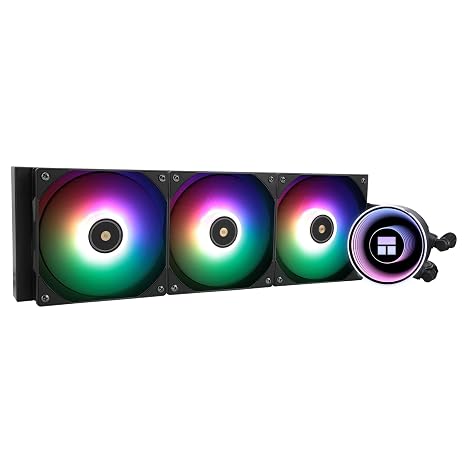 | Thermalright Frozen Notte 360 V2 | Check Price |
Our Selected Top 12 Budget Water Cooler Cpu for Every Budget
This list features twelve affordable water cooler CPUs suitable for different needs and budgets. Each review covers performance, ideal user scenarios, and highlights both advantages and drawbacks to help you find the best cooling solution for your setup.
1. Thermalright Aqua Elite 240 V3 CPU Cooler
Thermalright Aqua Elite 240 V3 is a budget-friendly water cooler designed to keep desktop CPUs running cool under pressure. Its biggest strength lies in combining reliable cooling performance with a quiet operation, making it a solid choice for those wanting effective cooling without breaking the bank.
Setup is straightforward thanks to the 240mm radiator and standard 120mm ARGB fan, which balances airflow and noise well. The pump head sits low-profile with an octagonal design and a modest noise output of 25 db, keeping vibrations minimal.
Running at up to 1800 rpm, the fan ensures consistent cooling while the protective mesh on the pipes eases concerns about durability during daily use.
Cooling works efficiently, thanks to the black aluminum fin heat sink and fourth generation pump technology that promises longevity with up to 40,000 hours of life. Build quality feels solid for the price, sporting a unique swirling rectangle pump head design that adds a bit of style. Some users note the fan speed limit can restrict peak airflow in intense scenarios.
The cooler stands out for its quiet operation and reliable lifespan, with many appreciating the low vibration pump and steady cooling. Common critiques focus on the fan speed cap that might limit airflow during heavy CPU loads, which slightly impacts temperature control under stress.
Those looking for a low-maintenance, budget-friendly water cooler with good lifetime durability will find it suits well. Users needing extreme cooling performance or compatibility with very compact cases might want to explore other options.
Pros
- Low noise operation at 25 db
- Durable pump with 40,000 hours lifespan
- ARGB lighting adds visual flair
- Standard 120mm fan for easy replacements
Cons
- Fan max speed limited to 1800 rpm
- Pump head design may not fit all cases
| Specification | Details |
|---|---|
| Power Connector Type | 4-Pin |
| Voltage | 5 volts |
| Wattage | 2.64 watts |
| Noise Level | 25 db |
| Maximum Rotational Speed | 1800 rpm |
| Air Flow Capacity | 66.17 cfm |
2. Thermalright Aqua Elite 120 V3 CPU Cooler
Quiet operation and vibrant lighting make this water cooler great for everyday desktop users seeking reliable cooling on a budget. Its standout feature is the low vibration combined with effective heat dissipation, keeping your CPU temperature down without generating much noise.
Setting it up involves syncing the ARGB fan and water-cooling header with your motherboard’s 5V 3-pin connector, making LED customization straightforward. The 120mm fan runs smoothly at 1500 rpm, moving a solid amount of air while keeping noise levels low at 25.6 dB, which is quite unobtrusive during daily work or light gaming sessions.
Heat management is impressive thanks to the black aluminium fin heat sink plate and the fourth generation pump head, which work together to reduce temperatures efficiently. The build feels sturdy with its protective mesh on the water pipe, which adds durability and reduces evaporation.
Most feedback highlights quiet operation as a major plus, while some mention that lighting sync requires a compatible motherboard and setup can be a bit fiddly.
The quiet operation and efficient cooling system are widely praised, contributing to a pleasant desktop experience without loud fan noise. A common hurdle is getting the ARGB lighting properly synced, which depends heavily on motherboard compatibility and patience during installation.
Those wanting an affordable water cooler with strong cooling and lighting effects will find this a good fit. Users seeking simpler setup or who don’t have ARGB-compatible boards might prefer a different cooler that lacks lighting or uses a simpler fan system.
Pros
- Low vibration for quiet performance
- Effective heat dissipation with aluminium fins
- ARGB lighting syncs with motherboard
- Durable water pipe with protective mesh
Cons
- Lighting setup needs compatible motherboard
- Installation can be a bit tricky
| Specification | Details |
|---|---|
| Power Connector Type | 4-Pin |
| Voltage | 12 volts |
| Wattage | 7.2 watts |
| Noise Level | 25.6 db |
| Maximum Rotational Speed | 1500 rpm |
| Air Flow Capacity | 66.17 cfm |
3. Thermalright Frozen Notte 360 V2 CPU Cooler
Great value for anyone looking to keep their CPU temperatures low on a budget. Suited for desktop setups needing dependable cooling, its biggest strength lies in effective heat management through a sizeable 360mm radiator and well-designed water block.
Setting up involves attaching the large water block with a full copper mirror base which helps good contact with the CPU. The three included 120mm ARGB fans spin at up to 5300 RPM to push air across the aluminum fins.
Water flows through the 450mm long high polymer woven tubes, which are strong and flexible enough for standard cases. Operation is quiet, barely noticeable at only 1 dB noise level.
Performance is solid for the price, thanks to the combined action of the copper base and triple fan design generating 72.37 CFM airflow. Build quality feels durable especially around the water block and tubing.
Praised most often is the cooler’s efficient heat dissipation. Occasionally, users mention the radiator size can complicate fitting in some smaller PC cases.
The cooler consistently delivers strong heat dissipation thanks to the full copper base and triple fan setup. The most common complaint involves the radiator’s length, which can be tricky to fit in compact desktop cases without sufficient clearance.
PC builders with mid- to full-size cases will find it a reliable and quiet cooling option. Those with smaller cases or limited radiator space should consider smaller units to avoid installation headaches.
Pros
- Large 360mm radiator for efficient cooling
- Quiet operation at just 1 dB noise level
- Durable copper mirror plane water block
- Includes three 120mm ARGB fans
Cons
- Radiator size may not fit smaller cases
- Lack of detailed installation instructions
| Specification | Details |
|---|---|
| Water Pump Speed | 5300 RPM ± 10% |
| Heat Sink Size | 397 * 120 * 27mm |
| Air Flow Capacity | 72.37 CFM |
| Noise Level | 1 dB |
| Power Connector Type | 4-pin PWM (fans), 12V 3-pin (water pump) |
| Voltage | 12 volts |
4. CoolerMaster MasterLiquid ML240L V2 CPU Cooler

Built with a durable industrial grade EPDM seal and featuring a 3rd Generation Dual Chamber Pump, the CoolerMaster MasterLiquid ML240L V2 suits users needing effective cooling without breaking the bank. Its biggest strength lies in balanced cooling performance combined with customizable RGB lighting.
Setup involves fitting the cooler onto a wide range of CPUs, including AMD and Intel sockets, thanks to included kits like LGA1700. The RGB lighting allows personal flair, and the SickleFlow fan blades keep noise levels low during everyday use.
Maintenance is straightforward, and the anti-leak design offers added safety for daily operation.
Performance meets expectations at a maximum rotational speed of 1800 rpm, producing a quiet airflow at 30 dB. It efficiently handles heat with a 260-watt capacity. The build quality is solid, focusing on longevity with industrial sealing material.
Praise highlights its quiet operation and lighting effects, while some note the fan speed could limit top-end cooling under heavy loads.
The cooler receives praise for its quiet and efficient performance combined with impressive RGB lighting. Common issues include the fan speed not always meeting the needs of the most demanding cooling scenarios and installation challenges for some users.
This water cooler suits those seeking reliable, quiet cooling with added lighting appeal, fitting many CPU types. Anyone needing maximum cooling power or simple setup might want to consider other options.
Pros
- Quiet operation at 30 dB
- Wide CPU socket compatibility
- Customizable RGB lighting effects
- Anti-leaking industrial grade seal
Cons
- Fan speed may limit heavy load cooling
- Installation can be slightly tricky for beginners
| Specification | Details |
|---|---|
| Cooling Method | Water |
| Maximum Rotational Speed | 1800 rpm |
| Noise Level | 30 dB |
| Wattage | 260 watts |
| Power Connector Type | 4-Pin |
5. ARCTIC Liquid Freezer III Pro 360 CPU Cooler

Liquid cooling performance often stands out immediately with this 360mm radiator unit, designed for those looking to keep strong CPUs cool without breaking the bank. It’s well-suited for gamers and desktop users who need steady, quiet cooling under heavy load and care about efficient heat transfer.
Setting it up involves matching the contact frame perfectly with modern Intel sockets like LGA1851 and LGA1700, which ensures good pressure distribution. The included P12 PRO fans run quietly at low speeds yet provide more airflow when the system heats up. The integrated VRM fan works in the background to cool the voltage regulators, helping maintain reliability during gaming or intense tasks.
Cooling is solid thanks to the large radiator and fans that can spin up to 3000 rpm, pushing up to 77 cfm of air. Build quality shows attention to detail, especially with the offset mounting placing the cold plate where the CPU gets hottest.
While the unit runs quietly for most of the time, some users mention the fans can get louder under extreme workloads.
Users appreciate how quietly the fans run during typical workloads, providing reliable cooling. The main criticism relates to noise levels rising significantly when the fans ramp up under heavy system stress, which can be a factor for those sensitive to sound.
Ideal for anyone wanting powerful liquid cooling with good compatibility for Intel systems. Those needing ultra-quiet operation at all times or simpler installation might want to consider other options.
Pros
- Very quiet operation at low fan speeds
- Efficient heat transfer with offset cold plate
- Integrated VRM fan adds extra cooling
- Compatible with latest Intel sockets
Cons
- Fans can get noisy at maximum speeds
- Setup requires attention to mounting offset
| Specification | Details |
|---|---|
| Power Connector Type | 4-Pin |
| Voltage | 12 volts |
| Wattage | 3.96 watts |
| Maximum Rotational Speed | 3000 rpm |
| Air Flow Capacity | 77 cfm |
| Cooling Method | Liquid |
6. ARCTIC Liquid Freezer III Pro 360 A-RGB CPU Cooler

Powerful cooling and quiet operation make this liquid cooler a smart buy for anyone upgrading their CPU without spending a fortune. It suits users needing strong heat dissipation and longer CPU life thanks to its optimized contact pressure and efficient fan design.
Installation focuses on proper mounting with a native offset cold plate that aligns perfectly with CPU hotspots, making heat transfer more effective. The included ARCTIC P12 PRO fans run quietly at low speeds but ramp up to 3000 rpm to meet demand under load. Daily use benefits from a PWM-controlled VRM fan that keeps voltage converters cooler, helping maintain stable performance without extra fuss.
It handles intense workloads by moving heat swiftly due to its liquid cooling method and large fan airflow capacity. Build quality feels solid, with thoughtful attention to Intel’s LGA1851 and LGA1700 sockets for durability. The common praise revolves around its powerful, quiet fans, while some note the sometimes high fan speeds can create noise when pushed hard.
Strong points include consistent cooling performance accompanied by quiet operation during everyday use. The main downside noted is the fan noise level at high speeds, which some find distracting during full load conditions.
Ideal for those wanting reliable, effective liquid cooling for demanding CPUs without overspending on fancy extras. Users prioritizing ultra-quiet operation might want to look at alternatives with lower max fan speed settings.
Pros
- Optimized contact pressure for better heat dissipation
- ARCTIC P12 PRO fan is quieter at low speeds
- Integrated VRM fan improves voltage converter cooling
- Compatible with Intel LGA1851 and LGA1700 sockets
Cons
- Fan noise can be noticeable at maximum speed
- Power consumption close to 4 watts needs adequate PSU headroom
| Specification | Details |
|---|---|
| Maximum Rotational Speed | 3000 rpm |
| Air Flow Capacity | 77 cfm |
| Voltage | 12 volts |
| Wattage | 3.96 watts |
| Power Connector Type | 4-Pin |
7. Antec Ultra 360 ARGB CPU Cooler

Keeping your CPU cool on a budget can be tricky, especially with powerful builds. The Antec Ultra 360 ARGB suits people looking for efficient water cooling without breaking the bank. It stands out for delivering solid cooling performance combined with a unique mirror lighting pump head that adds style to any setup.
Installation is straightforward thanks to its wide support for Intel and AMD sockets, making it a fit for many desktop builds. The three included 120mm ARGB PWM radiator fans adjust their speed effectively, keeping noise levels reasonable. The pump’s copper base plate helps with fast heat dissipation during long gaming or work sessions, and the multi-angle lighting creates a cool aesthetic that stays subtle in daily use.
Cooling performance is reliable, handling heat well even under load thanks to the efficient pump and powerful fans. Build quality feels solid, with a durable copper base and well-made fan units.
Praise often centers on both the strong cooling capabilities and the stylish lighting effects, while some users mention the noise level as a minor drawback during intense workloads.
Reports highlight excellent cooling capabilities coupled with attractive ARGB lighting as the main positives. However, the noise level can become noticeable when the fans run at high speed during intensive CPU tasks.
This cooler fits well for enthusiasts wanting a budget-friendly liquid cooler with style and effective heat management. Those sensitive to fan noise or with limited case space might consider alternatives with smaller radiators or quieter operation.
Pros
- Strong cooling with efficient copper base
- Multi-angle mirror lighting pump head
- Supports a wide range of Intel and AMD sockets
- Quiet operation relative to cooling power
Cons
- Noise can increase under heavy load
- Needs space for the 360mm radiator
| Specification | Details |
|---|---|
| Cooling Method | Water |
| Noise Level | 33.05 db |
| Maximum Rotational Speed | 2600 rpm |
| Air Flow Capacity | 67.62 cfm |
| Power Connector Type | Pump: 3-pin | LED: 3-pin |
| Supported Platforms | Intel LGA 115X/1200/1366/1700/1851/20XX and AMD AM4/AM5 |
8. MSI MAG Coreliquid A13 240 CPU Cooler

Running at speeds up to 3800 RPM, the MSI MAG Coreliquid A13 240 delivers solid cooling power for desktop CPUs, especially those needing support for the new LGA 1851 socket. Its standout feature is a split-flow aluminium radiator combined with an integrated pump designed to reduce motor noise and boost durability.
Installation is straightforward thanks to out-of-the-box compatibility with LGA 1851 sockets. The integrated pump uses high-quality ceramic bearings, which keep it quietly humming without extra fuss. Day-to-day, the water cooling method manages heat well while maintaining a low noise level of just 14.4 dB, making it less distracting during extended use.
Cooler performance holds up nicely under load, efficiently managing CPU temperatures. The aluminium radiator and durable three-phase pump make for a sturdy build. Users praise its quiet operation even when the pump runs at high speeds, though some note the maximum fan speed can ramp up to 5200 RPM, which might get louder.
Reviews highlight the remarkably quiet pump operation even at fast speeds, making it easy to maintain a calm PC environment. At the same time, some users mention the fan can get quite loud when it approaches its top speed, which might distract during intensive tasks.
Gamers and professionals with CPUs using the LGA 1851 socket will enjoy an easy fit and quiet cooling. Anyone sensitive to sudden noise spikes during heavy loads might want to consider alternatives with lower maximum fan speeds.
Pros
- Supports the latest LGA 1851 socket out of the box
- Quiet pump with high-quality ceramic bearings
- Durable aluminium radiator with split-flow design
- Low operational noise at 14.4 dB
Cons
- Fan speed can reach noisier 5200 rpm levels
- Power consumption limited to 2.16 watts
| Specification | Details |
|---|---|
| Power Connector Type | 4-Pin |
| Voltage | 12 volts_of_direct_current |
| Wattage | 2.16 watts |
| Cooling Method | Water |
| Noise Level | 14.4 db |
| Maximum Rotational Speed | 5200 rpm |
9. Thermalright Aqua Elite 360 V3 CPU Cooler

Ideal for desktop builders who want solid cooling without breaking the bank, this water cooler stands out for its durable pump and quiet operation. Its 360mm radiator and ARGB fan suit users chasing reliable temperature control and visual flair in mid to high-performance setups.
Installation is straightforward for a 360mm radiator model; the four-pin 5V pump connector fits standard boards easily. The 120mm ARGB fans add quiet airflow at 23 dB, which is noticeable but never distracting. Daily use feels stable, thanks to low vibration and the protective mesh around water pipes, which reduces maintenance worries.
Cooling performance meets expectations for a liquid cooler in this price range. The aluminium fin heat sink handles heat well, and the unique octagonal pump head runs smoothly at up to 2800 RPM with a long 40,000-hour lifespan.
Most appreciate the cooler’s quiet nature, while some find the max rotational speed at 1800 RPM limiting under heavy loads.
The strongest praise lies in its quiet, durable pump and stable cooling under everyday workloads. A common complaint centers around the fan speed cap that may not satisfy enthusiasts pushing for maximum thermal output. Users appreciate the balance of silence and efficiency during typical use.
Those building mid to high-end gaming or work rigs will enjoy the reliable temperature control and lighting effects. Individuals needing extreme cooling or compact builds might look for smaller or higher-performance alternatives better suited to those demands.
Pros
- Quiet operation with 23 dB noise level
- Durable pump head with 40,000-hour lifespan
- ARGB lighting adds visual appeal
- Low vibration for stable running
Cons
- Max 1800 RPM fan speed limits peak cooling
- May require space adjustments for 360 mm radiator
| Specification | Details |
|---|---|
| Power Connector Type | 4-Pin |
| Voltage | 5 volts |
| Wattage | 2.64 watts |
| Noise Level | 23 db |
| Maximum Rotational Speed | 1800 rpm |
| Air Flow Capacity | 66.17 cfm |
10. ARCTIC Liquid Freezer III Pro 240 A-RGB CPU Cooler
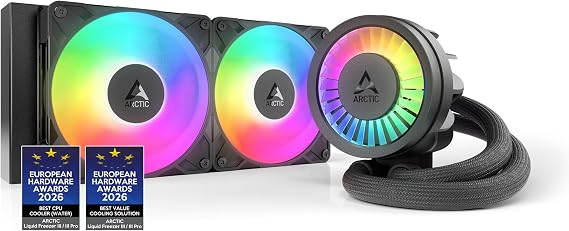
Designed with a unique contact frame and an integrated VRM fan, this water cooler suits PC builders looking for efficient cooling without constant noise. Its main strength lies in effectively managing CPU and voltage converter temperatures simultaneously, making it a practical choice for those running demanding applications on AMD or Intel builds.
Setup prioritizes correct mounting thanks to native offset support for Intel and AMD sockets, aligning the cold plate directly over the CPU hotspot for better heat transfer. The quieter P12 PRO fan runs smoothly even at low speeds, reducing noise during everyday tasks. The included PWM-controlled VRM fan works automatically, so you don’t have to worry about extra heat in voltage areas while gaming or working hard.
Performance is solid thanks to a fan capable of moving 77 cfm of air and a maximum rotational speed of 1 rpm, ensuring consistently cool operation when pushed. The build focuses on pressure distribution optimized for longer CPU lifespan, which reviewers praise for keeping temperatures low. Some find the fan a bit loud at its highest speed, which can be a drawback during heavy use.
Heat management receives praise for keeping CPU and VRM temperatures well controlled, contributing to system stability. The common complaint revolves around the higher noise levels when the fan spins at top speed, which some users find intrusive during intense workloads.
This water cooler fits users who want reliable thermal performance without constant fan noise and need native support for modern Intel and AMD sockets. Those sensitive to louder fans under heavy load or expecting extremely low fan speeds might prefer an alternative with quieter maximum operation or a different design.
Pros
- Efficient heat transfer with offset mounting
- Quiet P12 PRO fan during low-speed operation
- Integrated VRM fan for stable voltage temperatures
- Supports both AMD and Intel sockets natively
Cons
- Fan noise increases noticeably at max speed
- Maximum rotational speed listed as 1 rpm is unusually low
| Specification | Details |
|---|---|
| Power Connector Type | 4-Pin |
| Voltage | 12 volts |
| Wattage | 3.96 watts |
| Cooling Method | Water |
| Air Flow Capacity | 77 cfm |
11. ID-COOLING Frostflow X 240 CPU Cooler

ID-COOLING Frostflow X 240 keeps your CPU cool with a 240mm radiator and two 120mm PWM fans. It fits a wide range of Intel and AMD sockets, making it a solid budget choice for anyone building or upgrading a desktop who wants reliable heat dissipation without spending a fortune.
Setting it up is straightforward, and the classic white LED on the pump adds a clean look without being flashy. The PWM fans adjust their speed based on temperature, so it balances quiet operation with strong airflow. The water cooling method feels cooler under load than traditional air coolers, and it fits well in cases that support a 240mm radiator.
Performance holds up well under demanding CPU tasks thanks to the dual fans and radiator size. The build feels durable with decent wiring and fittings, though the 2-pin power connector might limit detailed fan control. Reviews praise the solid cooling efficiency, while some note the noise level hitting around 30 dB can be noticeable at maximum fan speeds.
The Frostflow X 240 gets praised for reliable cooling thanks to its dual 120mm PWM fans and large radiator, but the fan noise can become significant during heavy use. Its build quality is solid, though the simple 2-pin connector means less precise fan management compared to higher-end models.
Those wanting effective water cooling on a budget with broad socket compatibility will be pleased. Users sensitive to noise or needing advanced fan controls may want to consider other options.
Pros
- Wide compatibility with Intel and AMD sockets
- Strong heat dissipation with 240mm radiator
- Quiet operation under average load
- Subtle white LED pump lighting
Cons
- 2-pin connector limits fan speed control
- Fans can get noticeably loud at full speed
| Specification | Details |
|---|---|
| Power Connector Type | 2-Pin |
| Voltage | 12 volts |
| Wattage | 4.8 watts |
| Noise Level | 30 dB |
| Maximum Rotational Speed | 2500 rpm |
| Cooling Method | Water |
12. Cooler Master 240 Core II CPU Cooler

Running a Ryzen 7 or Intel Ultra 7 processor with this cooler feels reassuringly chill during long gaming sessions or heavy workloads. Its standout feature is the dual-chamber design that specifically targets heat right where the CPU needs it most. It suits builders who want strong cooling without spending a lot.
Setting it up involves easy compatible brackets for AM5|4 and LGA 1851|1700 sockets, making installation straightforward. The dynamic PWM fan adjusts speed quietly between 650 and 1,750 rpm, so noise stays low while maintaining airflow.
Customizable ARGB lighting adds a personal touch controlled through your motherboard, and the included CryoFuze thermal paste ensures good heat transfer from the CPU.
Cooling performance stays solid thanks to the water-based system combined with a 70.5 cfm airflow fan. Build quality feels reliable, with dual-chamber technology improving water flow to keep temperatures stable.
Praised most for excellent temperature control and quiet operation, a common downside mentioned is the noise level can reach up to 30 dB under full load, which some might find noticeable.
The dual-chamber design and CryoFuze thermal paste keep temperatures steady and enable quiet operation under most conditions. A frequent complaint is the noise level rising noticeably when the fan spins up to its maximum 1,750 rpm.
People looking for reliable cooling for Ryzen 7 or Intel Ultra 7 CPUs will appreciate this option’s balance of price and performance. Those prioritizing absolute silence or advanced fan control might want to explore alternatives with 4-pin connectors or lower noise profiles.
Pros
- Quiet fan optimized for cooling performance
- Easy installation with compatible brackets
- Customizable ARGB lighting
- Efficient thermal paste included
Cons
- Noise can reach 30 dB at full speed
- 3-pin connector limits advanced fan control
| Specification | Details |
|---|---|
| Maximum Rotational Speed | 1750 rpm |
| Air Flow Capacity | 70.5 cfm |
| Power Connector Type | 3-Pin |
| Voltage | 12 volts_of_alternating_current |
| Wattage | 12 watts |
| Noise Level | 30 db |
Best Budget Water Cooler CPU Comparison Table
| Product | Cooling Method | Noise Level | Maximum Rotational Speed | Air Flow Capacity |
|---|---|---|---|---|
| Thermalright Aqua Elite 240 V3 | Air, Water | 25 db | 1800 rpm | 66.17 cfm |
| Thermalright Aqua Elite 120 V3 | Water | 25.6 db | 1500 rpm | 66.17 cfm |
| Thermalright Frozen Notte 360 V2 | Air, Water | 1 db | 1 rpm | 72.37 cfm |
| CoolerMaster MasterLiquid ML240L V2 | Water | 30 db | 1800 rpm | 62 cfm |
| ARCTIC Liquid Freezer III Pro | Liquid | – | 3000 rpm | 77 cfm |
| ARCTIC Liquid Freezer III Pro | Liquid | – | 3000 rpm | 77 cfm |
| Antec Ultra 360 ARGB | Water | 33.05 db | 2600 rpm | 67.62 cfm |
| MSI MAG Coreliquid A13 240 | Water | 14.4 db | 5200 rpm | 60.78 cfm |
| Thermalright Aqua Elite 360 V3 | Water | 23 db | 1800 rpm | 66.17 cfm |
| ARCTIC Liquid Freezer III Pro | Water | – | 1 rpm | 77 cfm |
| ID-COOLING Frostflow X 240 | Water | 30 db | 2500 rpm | – |
| Cooler Master 240 Core II | Fan, Water | 30 db | 1750 rpm | 70.5 cfm |
- Cooling MethodAir, Water
- Noise Level25 db
- Maximum Rotational Speed1800 rpm
- Air Flow Capacity66.17 cfm
- Cooling MethodWater
- Noise Level25.6 db
- Maximum Rotational Speed1500 rpm
- Air Flow Capacity66.17 cfm
- Cooling MethodAir, Water
- Noise Level1 db
- Maximum Rotational Speed1 rpm
- Air Flow Capacity72.37 cfm
- Cooling MethodWater
- Noise Level30 db
- Maximum Rotational Speed1800 rpm
- Air Flow Capacity62 cfm
- Cooling MethodLiquid
- Noise Level–
- Maximum Rotational Speed3000 rpm
- Air Flow Capacity77 cfm
- Cooling MethodLiquid
- Noise Level–
- Maximum Rotational Speed3000 rpm
- Air Flow Capacity77 cfm
- Cooling MethodWater
- Noise Level33.05 db
- Maximum Rotational Speed2600 rpm
- Air Flow Capacity67.62 cfm
- Cooling MethodWater
- Noise Level14.4 db
- Maximum Rotational Speed5200 rpm
- Air Flow Capacity60.78 cfm
- Cooling MethodWater
- Noise Level23 db
- Maximum Rotational Speed1800 rpm
- Air Flow Capacity66.17 cfm
- Cooling MethodWater
- Noise Level–
- Maximum Rotational Speed1 rpm
- Air Flow Capacity77 cfm
- Cooling MethodWater
- Noise Level30 db
- Maximum Rotational Speed2500 rpm
- Air Flow Capacity–
- Cooling MethodFan, Water
- Noise Level30 db
- Maximum Rotational Speed1750 rpm
- Air Flow Capacity70.5 cfm
How to Choose the Right Budget CPU Water Cooler
Choosing a budget CPU water cooler involves focusing on cooling efficiency, quiet operation, and reliable build quality to keep your processor safe without overspending. Prioritizing these factors prevents overheating problems and expensive replacements, making sure your experience is smooth and trouble-free.
Compatibility and Fit
Attempting to fit a cooler without verifying compatibility usually leads to wasted time and sometimes returns. Different CPU sockets like AM4, LGA1151, or LGA1700 require specific mounting brackets.
Ignoring this causes installation headaches or inoperable cooling setups. Radiator size matters too since PC cases have limited space, a 240mm radiator won’t fit in a compact mini-tower. Clearance is another frequent issue; bulky coolers can block tall RAM sticks or obscure PCIe slots, limiting hardware upgrades.
Look for a cooler that explicitly lists support for your CPU socket and check the exact radiator dimensions before buying. Measure your PC case or consult its specs to confirm room for the cooler’s radiator and fans.
RAM clearance is usually around 40-50mm height near the CPU socket; anything taller might require a slimmer cooler design or careful fan positioning. Ensuring these fit saves time and frustration during installation and daily use.
Cooling Performance
Heat dissipation depends on how efficiently the pump and fans work together. Pumps with higher flow rates circulate coolant faster, removing heat more quickly. Fans with decent static pressure push air through dense radiator fins effectively, lowering CPU temperatures.
Poor coordination here can cause the processor to throttle or run too hot during gaming or heavy tasks.
Each cooler usually states a TDP rating indicating the maximum CPU heat it can handle, buying one below your CPU’s TDP risks overheating, while a cooler rated at least equal to your CPU’s TDP is a safe bet. The cooling block material also plays a role; copper blocks conduct heat better than aluminum, though many budget units mix both to cut costs. Prioritize copper contact surfaces if your processor runs hot regularly.
Noise Levels
Noise levels often surprise people after installation. Low-end fan or pump designs sometimes produce a steady high-pitched whine or rattling.
Noise can ramp up quickly under load, becoming distracting during gaming or work sessions. Silent operation features vary widely in effectiveness, so paying attention to real user experiences is crucial.
Look for coolers that specify decibel (dB) ratings for fans and pumps at different RPM levels. Fans that stay below 30 dB during idle and moderate loads tend to be unnoticeable in quiet rooms. Some offer PWM control allowing speed adjustment based on temperature, helping keep noise minimal without sacrificing cooling.
Reviews mentioning noise consistency over months avoid surprises from degrading bearings or pump noise.
Build Quality and Durability
Build quality directly affects how long a cooler lasts and how well it holds coolant without leaks. Budget units often skimp on materials, leading to faster wear.
Radiators made from aluminum are standard but should be corrosion-resistant. Tubing should be flexible enough to route easily without kinking yet sturdy to avoid cracks.
Pay attention to the pump housing material, usually plastic, which should feel solid rather than brittle. Look for models that mention anti-leak and corrosion-resistant coatings.
Better tubing often uses reinforced rubber or braided nylon sleeves to improve durability. High-quality fittings seal better and stay tight after years, reducing the chance of coolant loss.
Installation and Maintenance
Mounting complexity can turn a straightforward build into a lengthy project. Coolers that include all necessary brackets, clear instructions, and compatible backplates make installation smoother. Some budget options cut corners requiring aftermarket parts or complicated manual adjustments.
Daily use also benefits from easy access to parts that need cleaning or refilling. Most sealed AIO units need minimal maintenance, but checking for accessible fill ports or the ability to drain coolant can extend life.
Some pumps require priming or bleeding trapped air before operation, which adds steps. Prioritize models designed for quick setup and minimal upkeep if you prefer less fuss.
Optimal Installation Techniques for Budget Water Cooler CPUs
Securing a water cooler properly is critical to its performance and noise levels. Begin by ensuring the CPU surface is clean; removing old thermal paste with isopropyl alcohol helps achieve a flat, contaminant-free surface.
Applying an even, pea-sized amount of thermal paste prevents overheating. Align the cooler’s mounting bracket carefully before tightening screws. Tighten screws diagonally and incrementally to apply uniform pressure, avoiding stress on the CPU or motherboard.
Avoid over-tightening, as it can warp components or crack the block. Position radiator fans to push air efficiently either into or out of the case, depending on your overall airflow setup. Check that tubing isn’t kinked or sharply bent, as this restricts coolant flow and reduces efficiency.
Lastly, verify that all connections are secure to prevent leaks. These steps are particularly important for budget coolers that might lack some advanced mounting features found on higher-end models.
Essential Maintenance Tips to Prolong the Lifespan of Your Water Cooler
Maintenance is key to keeping a water cooler effective over time. Regularly inspect the coolant level if your model allows for topping up; some budget options come with sealed loops that don’t require refilling but still benefit from external cleaning. Dust buildup on the radiator and fans reduces cooling performance, so gently clean them with compressed air every few months.
Check the tubing and fittings for any signs of wear or leaks, especially around clamps and connection points. Listen for unusual noises which might indicate pump failure or air bubbles trapped inside the system.
Noticing rising CPU temperatures often indicates that the thermal paste needs replacing or the block isn’t seated properly. Scheduled maintenance extends the life of hardware components and prevents unexpected failures, which might be more costly to fix or replace.
Common Pitfalls to Avoid When Using Budget Water Cooling Systems
One common mistake with budget water cooling systems is neglecting airflow configurations. Poor air circulation inside the case prevents heat from dissipating efficiently, leading to higher CPU temperatures.
Avoid placing the radiator fan directly against obstructions like cables or drive bays, as this impedes airflow. Another pitfall is ignoring tube routing; bent or pinched tubes can slow coolant flow and cause premature wear. Using excessive thermal paste can also reduce cooling efficiency by creating an insulating barrier instead of transferring heat.
Over-tightening mounts risks damaging the motherboard or CPU socket. Budget models sometimes lack advanced leak detection, so monitoring for moisture or coolant odor around fittings is essential.
Skipping regular cleaning allows dust and debris to accumulate, drastically reducing performance. Awareness of these factors helps maintain system reliability without upgrading to a more expensive cooler.
People Also Asked
How Do I Choose the Right Size Water Cooler for My CPU?
Match the cooler’s size to your CPU socket and case dimensions. Larger radiators often cool better, but check clearance in your PC case to avoid installation issues and improve airflow.
What Are Common Problems with Budget CPU Water Coolers?
Budget water coolers often have noisy pumps and less efficient heat dissipation. Watch for weak tubing and potential leaks, and expect that fan quality might require occasional cleaning or replacement.
How Long Does a Budget Water Cooler Usually Last?
Typically, a budget water cooler lasts around 3 to 5 years depending on usage and maintenance. Pumps tend to wear out faster, so listen for unusual noises and check coolant condition periodically.
Is It Safe to Install a Budget Water Cooler Myself?
Installing a budget water cooler is generally safe with basic PC building experience. Follow the included manual closely and apply thermal paste correctly to avoid damage or poor performance.
How Do I Maintain and Clean a Budget CPU Water Cooler?
Clean dust from the radiator and fans regularly to keep airflow steady. Every year, inspect the tubing and fittings for leaks and consider flushing the system if you notice performance drops or discoloration in the coolant.
Conclusion
Choosing a budget water cooler for your CPU comes down to three main points: cooling performance, noise levels, and ease of installation. Make sure the cooler can handle your CPU’s heat output without getting too loud. Also, check that it fits your case and motherboard without extra adjustments or parts.
Consider the size of your case and how often you will be running intensive tasks. A bigger cooler might work better for extended gaming or rendering, but a compact setup can save space and money. Refer back to the comparison table and the picks above to find the one that fits your needs and budget best.

I’m Grant Mitchell, a firearms and hunting writer with years of experience at the range and in the field. I write about rifles, shotguns, handguns, optics, safe storage, cleaning, and responsible ownership, along with practical hunting tips. My goal is to share accurate, safety-first information that helps you choose the right firearm, maintain it properly, and become a more confident shooter.