Top 12 Best Budget RGB CPU Cooler That Will Blow Your Mind
Cheap or poorly made CPU coolers with RGB can quickly become more trouble than they’re worth. A low-quality model often fails to keep temperatures down, leading to loud fan noise under load or even occasional thermal throttling.
Finding the best budget rgb cpu cooler means balancing decent cooling performance with the aesthetics of RGB lighting, without spending too much or sacrificing reliability. Many budget options can look good at first, but don’t hold up after extended use or during heavy workloads.
Key factors separating a solid budget RGB CPU cooler include the size and quality of the heatsink, the fan’s airflow rating (usually measured in CFM), and build materials like a copper base versus aluminum only. A cooler that supports easy fan replacement or cleaning helps extend its life. Compatibility with your CPU socket type and case size also matters, since a cooler too tall or wide often won’t fit well or can interfere with RAM slots or GPU clearance.
Need a Quick Check?
| Image | Product | Price |
|---|---|---|
Our Top Picks 1 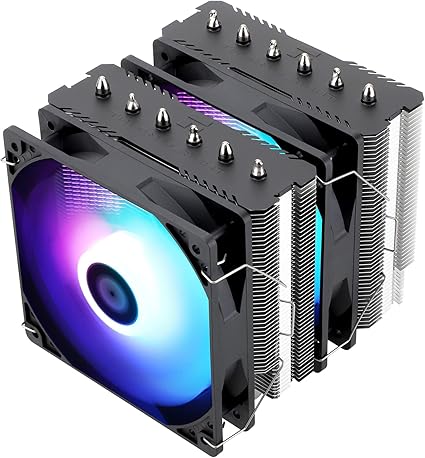 | Thermalright Peerless Assassin | Check Price |
Our Top Picks 2  | Thermalright Assassin X120 SE | Check Price |
Our Top Picks 3  | ID-COOLING SE-214-XT V2 | Check Price |
Our Selected Top 12 Budget Rgb Cpu Cooler Worth Considering
This list features twelve budget-friendly RGB CPU coolers chosen for their performance and value. Each review covers cooling efficiency, compatibility, design features, and ideal user scenarios, highlighting the strengths and weaknesses to help you find the best fit for your system and needs.
1. Thermalright Peerless Assassin 120 SE ARGB CPU Cooler
Feels sturdy and looks good with subtle RGB lighting, making it a solid pick for budget-conscious gamers and builders. Its biggest strength lies in balancing quiet operation with enough airflow to keep typical desktop processors cool without breaking the bank.
Setup is straightforward, thanks to the standard 4-pin power connector. Day-to-day use is quiet, running at just 25 dB noise level, which means it won’t be distracting during work or gaming sessions. The cooler spins up to 1550 rpm, providing decent airflow of 66.17 CFM to push heat away efficiently, while the ARGB adds a bit of visual flair without extra fuss.
Performance does a good job handling heat under normal desktop loads, with a 7-watt power draw that feels efficient. Build quality reflects Thermalright’s experience, and the mounting system is secure once installed.
Most people appreciate the quiet fan and solid cooling capacity. Common gripe comes down to wanting more cooling power for heavily overclocked setups.
Most praise focuses on how quietly and effectively it cools regular desktop processors while adding a touch of style with ARGB lighting. The main complaint is that it may not handle very high thermal loads as well as higher-end coolers.
People looking for reliable cooling without loud fans will be happy with this product. Those pushing processors beyond stock speeds or requiring extreme thermal solutions might want to explore stronger options.
Pros
- Quiet operation at 25 dB noise level
- Good airflow of 66.17 CFM for budget cooling
- ARGB lighting adds subtle visual appeal
- Solid build quality and secure mounting
Cons
- Cooling power may fall short for heavy overclocking
- Mid-range fan speed limits extreme performance
| Specification | Details |
|---|---|
| Power Connector Type | 4-Pin |
| Voltage | 12 volts_of_direct_current |
| Wattage | 7 watts |
| Noise Level | 25 db |
| Maximum Rotational Speed | 1550 rpm |
| Air Flow Capacity | 66.17 cfm |
2. Thermalright Assassin X120 Refined SE ARGB CPU Cooler
Great value for those wanting a solid RGB air cooler on a budget, fitting well in most desktop builds. It stands out by combining decent airflow and quiet operation, making it a reliable choice for moderate gaming and everyday computing.
Setting it up involved a standard 4-pin power connector, which worked smoothly with the motherboard fan headers. The cooler runs quietly at 25.6 dB, barely noticeable during daily use. Its ARGB lighting adds a nice touch without being distracting.
The rotational speed maxes out at 1550 rpm, keeping temperatures in check without too much noise.
Cooling performance holds up well for a mid-range air cooler, moving 66.17 CFM of air efficiently. Build quality reflects Thermalright’s experience, with a sturdy frame and solid mounting brackets ensuring it stays secure.
Most users praised the quiet operation, while the occasional note mentioned it might not handle high-end CPUs under heavy loads.
The quiet running at 25.6 dB and effective airflow around 66 CFM make it practical for most general uses, though some have noted its limits on top-tier processors during heavy work. It’s a sturdy, dependable cooler that performs quietly even with RGB lighting active.
Those using mainstream or mid-range CPUs will find a good balance of cooling and noise control here. Users running extreme workloads or high-end chips might want to look at higher-capacity coolers for better thermal headroom and fan speeds.
Pros
- Quiet operation at only 25.6 dB
- Solid airflow of 66.17 CFM
- ARGB lighting brings subtle RGB flair
- Easy 4-pin power connection
Cons
- May struggle with high-end CPUs under load
- Fan speed capped at 1550 rpm limits max cooling
| Specification | Details |
|---|---|
| Power Connector Type | 4-Pin |
| Voltage | 12 volts |
| Cooling Method | Air |
| Noise Level | 25.6 db |
| Maximum Rotational Speed | 1550 rpm |
| Air Flow Capacity | 66.17 cfm |
3. ID-COOLING SE-214-XT V2 ARGB CPU Cooler
Aluminum fins set on an upgraded tower heatsink with direct touch heatpipes define this CPU cooler, well suited for budget builds seeking reliable RGB styling and improved cooling. Its standout feature is the efficient heat dissipation made possible by the updated fan and heatsink design.
Setting up feels straightforward since the reinforced fan clips and upgraded fin locking keep everything firmly in place during installation and daily use. The 4-pin connector allows for PWM control, giving you the ability to adjust fan speeds quietly. Airflow and noise balance well at 27.2 db, making it a practical cooler for everyday desktop use.
The cooler handles CPU heat steadily thanks to the higher static pressure fan, pushing air effectively through the dense fins. Built for durability, its fin-lock structure and solid clips reduce vibrations and ensure long-lasting performance. One noted downside is the noise level when the fan hits maximum speed of 2000 rpm, which can be noticeable under load.
The cooler’s strong suit lies in its improved heat dissipation through an upgraded fan and direct touch heatpipes, providing steady cooling without too much noise at normal RPMs. Most users find the vibration control effective, but some note that the fan gets louder when pushed to maximum speed.
Those building a mid-range desktop wanting solid performance and RGB effects will find this cooler suits their needs well. Builds with tight space constraints or noise sensitivity at peak fan speeds might consider alternative options.
Pros
- Upgraded fan increases static pressure for better cooling
- Secure fan clips reduce vibration and improve durability
- ARGB lighting adds visual appeal to any build
- Balanced noise level for quiet operation at moderate speeds
Cons
- Fan noise noticeable at full 2000 rpm speed
- May not fit all compact PC cases due to tower size
| Specification | Details |
|---|---|
| Cooling Method | Air |
| Power Connector Type | 4-Pin |
| Maximum Rotational Speed | 2000 rpm |
| Noise Level | 27.2 db |
| Air Flow Capacity | 58 cfm |
4. Gamma A40 ARGB CPU Cooler

Compact design stands out with a height of just 133mm, making it a great fit for smaller PC cases. Ideal for anyone looking for efficient cooling without sacrificing space. Its biggest strength is handling up to 200W TDP, which is impressive for a cooler of this size.
Setup is straightforward, compatible with both Intel and AMD mainstream platforms. The ARGB lighting adds a bit of flair and syncs easily with other devices, perfect for customizing your build’s look. The 100mm fan runs quietly enough at 29.5 dB, making daily system noise hardly noticeable during use.
Cooling performance matches what you’d expect for a 200W capacity, keeping temperatures in check pretty well. The four direct-touch heatpipes improve heat transfer, showing solid build quality without bulk. Most users praise its quiet operation while a few note the fan speed reaching 2400 rpm can be a bit loud under heavy load.
Many users praise the cooler for its quiet operation and solid cooling on par with its 200W rating. Common complaints focus on the fan noise when hitting 2400 rpm, which can be noticeable during intense workloads.
People who need a compact, capable cooler for mid-range CPUs will find this suitable, especially with its easy installation and good look. Those who want advanced fan control or ultra-low noise might want to consider alternatives with PWM connectors or larger fans.
Pros
- Compact height fits most cases easily
- Supports up to 200W TDP cooling
- Quiet operation under normal use
- Customizable ARGB lighting with sync
Cons
- Fan can get loud at max speed
- Only 3-pin connector limits fan control
| Specification | Details |
|---|---|
| Height | 133 mm |
| Supported TDP | 200 W |
| Fan Size | 100 mm |
| Noise Level | 29.5 dB |
| Power Connector Type | 3-Pin |
| Maximum Rotational Speed | 2400 RPM |
5. ARCTIC Liquid Freezer III Pro 360 AIO CPU Cooler

Liquid cooling enthusiasts looking for a strong cooler on a budget will appreciate the ARCTIC Liquid Freezer III Pro 360 AIO. It offers serious heat dissipation power with a design that targets the hottest parts of your CPU.
Its best feature is the integrated VRM fan, which helps keep voltage converters cool for steady performance during intense use.
Installation is straightforward thanks to the native offset mounting, which centers the cold plate on the CPU hotspot for better heat transfer. The included ARCTIC P12 PRO fans run quieter and more powerfully than their predecessors, especially at low speeds, keeping noise down during regular tasks. The 4-pin power connector and PWM control mean fan speeds adjust automatically depending on the system load.
It lives up to expectations by delivering effective cooling with a maximum fan speed of 3000 rpm and airflow capacity of 77 cfm. The build quality feels solid, with thoughtful design elements like the optimized contact pressure frame for Intel sockets, extending CPU life.
Some find the cooler’s size challenging for tighter cases, but the cooling itself is reliable and quiet under load.
Effective cooling is the standout feature, with the VRM fan keeping crucial components cool for steady operation. Most complaints come from the cooler’s size, which can be tricky to fit into smaller builds.
Those wanting strong liquid cooling and quiet operation during everyday use will benefit most. Smaller PC cases or anyone sensitive to fan noise under max load may want to explore alternatives.
Pros
- Integrated VRM fan cools voltage converters effectively
- Quieter and more powerful P12 PRO fans at low speeds
- Optimized contact pressure for longer CPU life
- Native offset mounting improves heat transfer efficiency
Cons
- Large size may not fit smaller or compact cases
- Maximum fan speed can be noisy under heavy load
| Specification | Details |
|---|---|
| Cooling Method | Liquid |
| Maximum Rotational Speed | 3000 rpm |
| Air Flow Capacity | 77 cfm |
| Voltage | 12 volts |
| Power Connector Type | 4-Pin |
| Wattage | 3.96 watts |
6. AMD Wraith Prism CPU Cooler
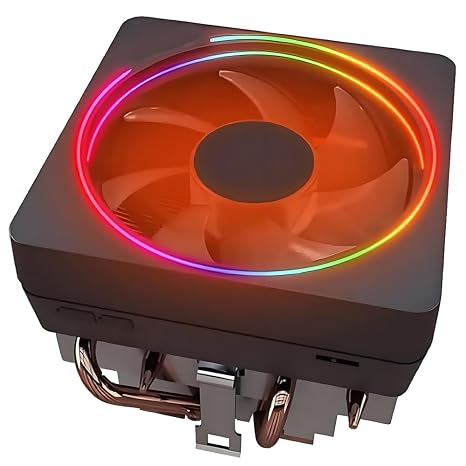
When you want reliable cooling that fits most Ryzen processors and comes with RGB flair, this cooler is a solid pick for budget builds. Its biggest strength lies in its compatibility and ready-to-go mounting that fits into existing AMD setups without extra hassle.
Getting it set up involves using the standard bracket already on many AMD motherboards, so mounting feels straightforward. The pre-applied thermal paste saves a step and makes installation clean. Running the cooler day-to-day, the 2800 rpm fan spins quietly at 14 dB and moves enough air to keep temperatures in check with minimal noise disruption.
It does well moving heat thanks to the aluminum heatsink, copper base, and four thick direct-contact heat pipes. Built tough enough to handle a 105-watt TDP, it makes a reliable workhorse in a desktop environment. The most frequent compliment centers on its quiet operation, while a common gripe is that the RGB lighting control can be a bit tricky depending on your motherboard.
Quite a few appreciate how quiet this cooler runs while managing heat efficiently even under significant load. A common issue is dealing with the RGB lighting controls, which can vary in functionality depending on your motherboard’s software.
It works well for anyone wanting solid cooling and simple installation without spending extra on separate brackets. People seeking advanced lighting effects or smoother setup of RGB controls might want to look for a different option.
Pros
- Compatible with various AMD sockets
- Comes with pre-applied thermal paste
- Quiet operation at 14 dB noise level
- Effective heat transfer with copper heat pipes
Cons
- RGB lighting control can be inconsistent
- Bracket for mounting not included with cooler
| Specification | Details |
|---|---|
| Power Connector Type | 4-Pin |
| Voltage | 12 volts_of_direct_current |
| Wattage | 105 watts |
| Noise Level | 14 db |
| Maximum Rotational Speed | 2800 rpm |
| Air Flow Capacity | 45 cfm |
7. Cooler Master Hyper 212 Spectrum V3 ARGB CPU Cooler

1750 RPM fan speed makes this cooler a solid choice for AMD R7 and Intel i7 builds looking for strong airflow on a budget. It suits anyone wanting efficient heat management with easy installation on newer sockets.
Installation is straightforward thanks to redesigned brackets fitting AM5 and LGA 1851|1700 platforms without fuss. The Spectrum 120 fan runs quietly and adjusts between 650 and 1,750 RPM via PWM control, letting you find the right balance between noise and airflow.
The frosted blades spread the ARGB lighting nicely, adding a touch of color without being overly bright.
Four heat pipes combined with a silver nickel-plated copper base keep temperatures well in check under normal load. The materials feel solid and the cooler sits firmly once secured. Common praise highlights how quiet it can run, but some mention the airflow might fall short for heavy overclocking.
It handles everyday CPU cooling reliably and looks decent doing it.
Quiet operation stands out as the biggest positive, keeping noise under 28 dB while still providing decent cooling. Installation gets easier with the redesigned brackets, but airflow limitations can cause concerns in more demanding scenarios.
Anyone building a mid-range gaming or productivity desktop will find its performance and lighting appealing. Those pushing CPUs hard for sustained overclocking might want to look toward more powerful coolers with higher air capacity.
Pros
- Supports AM5 and LGA 1851|1700 socket platforms
- Quiet operation at low RPM settings
- Optimized PWM blades improve airflow
- Attractive frosted ARGB blade lighting
Cons
- May struggle with extreme overclocking loads
- Air flow measurement seems low for high-end CPUs
| Specification | Details |
|---|---|
| Maximum Rotational Speed | 1750 rpm |
| Noise Level | 27.2 db |
| Voltage | 3 volts |
| Cooling Method | Fan |
| Power Connector Type | 4-Pin |
| Air Flow Capacity | 1.89 milliliters_per_second |
8. ARCTIC Liquid Freezer III Pro 360 AIO CPU Cooler

People building a gaming or high-performance PC on a budget will appreciate the ARCTIC Liquid Freezer III Pro 360. It’s a liquid cooler that stands out for its impressive cooling power combined with thoughtful design features that help protect your CPU and motherboard components.
Installation is straightforward thanks to the native offset mounting designed for both Intel and AMD sockets. The contact frame ensures good pressure for efficient heat transfer without being too harsh on the CPU. The included P12 PRO fans run quietly, especially at low speeds, so daily use doesn’t bring unnecessary noise.
The integrated VRM fan actively cools voltage regulators, making it reliable during intensive workloads.
It cools very well under heavy loads thanks to the triple 120mm fans spinning up to 3000 rpm and a high airflow of 77 cfm. Build quality is solid, with a focus on long-lasting performance and stable cooling.
The most praised feature is its quiet operation at moderate speeds, while the common complaint revolves around the VRM fan sometimes being audible under high load.
The standout feature is how quiet the cooler runs when not pushed to full speed, keeping noise levels low during typical daily use. On the downside, the VRM fan noise becomes more apparent when the system is under heavy stress, which might bother users who prioritize absolute silence.
This cooler is ideal for anyone wanting a strong, reliable liquid cooling solution without breaking the bank, especially for gaming or multitasking PCs. Users seeking the quietest experience or working with small cases might want to look at alternatives that have smaller or fewer fans.
Pros
- Excellent cooling performance for demanding CPUs
- Quiet operation at low and moderate speeds
- Integrated VRM fan helps motherboard stability
- Optimized mounting for better heat transfer
Cons
- VRM fan can be noticeable under heavy load
- Relatively high max fan speed may increase noise
| Specification | Details |
|---|---|
| Cooling Method | Liquid |
| Maximum Rotational Speed | 3000 rpm |
| Air Flow Capacity | 77 cfm |
| Voltage | 12 volts |
| Power Connector Type | 4-Pin |
| Wattage | 3.96 watts |
9. ARCTIC Freezer 36 A-RGB CPU Cooler

Known for its effective cooling with bright A-RGB lighting, the ARCTIC Freezer 36 A-RGB suits gamers and PC builders looking for strong performance on a budget. Its standout feature lies in a cooling design that handles high-end CPUs without requiring a big investment.
Installation involves using original AMD mounting screws for AM4/AM5 sockets or the Intel mounting frame for LGA1851 and LGA1700. Once set up, the 120 mm fan manages airflow quietly at up to 2000 rpm, providing consistent cooling.
The 4-pin power connector ensures easy integration without complicated connectors or software.
Heat is quickly transferred via 4 offset heat pipes to the heatsink, with pressure-optimized fans dissipating it efficiently. The build feels solid and straightforward, though some note the need to source original AMD screws separately can be a minor hassle. It performs its cooling duty well and is durable enough for regular use.
Strong cooling performance combined with vibrant A-RGB lighting makes this cooler an appealing choice. A common inconvenience is having to provide original AMD mounting screws, which aren’t included for AMD sockets. This can slow down installation if screws are missing.
Builders wanting powerful air cooling with RGB flair will appreciate this model. Those unfamiliar with sourcing AMD screws or preferring quieter fans might want to look elsewhere for a more plug-and-play option or lower noise level.
Pros
- Efficient cooling with 4 offset heat pipes
- Pressure-optimised 120 mm fans
- Supports popular AMD and Intel sockets
- Bright and attractive A-RGB lighting
Cons
- Requires original AMD screws for AM4/AM5 mounting
- Fan speed can reach a noticeable 2000 rpm
| Specification | Details |
|---|---|
| Power Connector Type | 4-Pin |
| Voltage | 12 volts |
| Wattage | 1.32 watts |
| Maximum Rotational Speed | 2000 rpm |
| Air Flow Capacity | 48.8 cfm |
| Compatible Devices | AM4, AMD: AM5, Intel: LGA1851, LGA1700 |
10. Antec Skeleton 240 ARGB AIO CPU Cooler

Antec Skeleton 240 ARGB AIO CPU Cooler stands out with its superb cooling efficiency and vibrant customizable lighting, especially suited for budget-conscious PC builders looking for solid performance and eye-catching aesthetics. The large copper base plate ensures it handles heat effectively under all workloads.
Setting it up involves attaching the universal mount, which fits a wide range of Intel and AMD sockets, making compatibility straightforward. The ARGB lighting syncs nicely with most motherboards, letting you tweak colors without hassle. The pump and fans run quietly thanks to hydraulic bearings and high-density tubing that feel durable and keep noise levels low during daily use.
It excels at cooling, with high-density fins and powerful fans providing consistent airflow and temperature control at a maximum 2000 rpm. The skeleton-frame pump head adds visual appeal while maintaining functionality. Reviewers appreciate the quiet operation and strong cooling but note that the tubing can feel a bit stiff, making installation a touch tricky sometimes.
The standout feature is the effective cooling combined with quiet operation, thanks to the copper base and hydraulic bearing fans. The most common criticism revolves around the tubing stiffness, which can make installation somewhat less straightforward than expected.
Those looking for a budget-friendly cooler with strong performance and good lighting effects will find it a worthy choice. People who prioritize very easy installation or extreme cooling for high-end overclocking might want to explore other options.
Pros
- Strong cooling with copper base plate
- Customizable ARGB lighting syncs well
- Quiet operation at 32 dB noise level
- Wide socket compatibility
Cons
- Elastic tubing can be stiff and tricky to install
- Fans may struggle at very high workloads
| Specification | Details |
|---|---|
| Voltage | 120 volts |
| Noise Level | 32 dB |
| Power Connector Type | 4-Pin |
| Maximum Rotational Speed | 2000 rpm |
| Air Flow Capacity | 72.29 cubic centimeters per minute |
| Cooling Method | Water |
11. Thermalright Peerless Assassin 120 Vision MAX ARGB CPU Cooler

Cooling is quiet yet powerful, making it a solid choice for anyone on a budget who still wants a visually interesting setup. Perfect for desktop builds where both temperature control and style count, its standout feature is the unique 5-inch IPS LCD screen that shows real-time system stats right on the cooler.
Installing the dual fans and setting up the magnetic top cover takes some care, but it fits snugly on most desktop CPUs. The TRCC software makes customizing the display straightforward, allowing personal themes and live information to stay visible.
Daily use is pretty low maintenance, with the fans running quietly enough at 27 dB while still spinning up to 2150 RPM when needed.
Cooling feels efficient thanks to six pure copper heat pipes and a nickel-plated base that contact the CPU well. The build quality is solid, with the dual tower design managing heat effectively.
Praise often goes to its great cooling performance and unique screen, while some complain about the complexity of software and the footprint inside smaller cases.
The cooler effectively keeps CPU temperatures low while running quietly, thanks to its powerful fans and quality materials. The standout 5-inch display adds a personal touch by showing stats and customized themes, although some find the accompanying software somewhat complicated to manage.
Gamers and PC builders seeking quiet yet efficient cooling with a cool display will appreciate this model. Those with compact cases or less patience for software setup might want to consider simpler, smaller air coolers without extra features.
Pros
- Strong cooling with six copper heat pipes
- Magnetically attached top cover with IPS LCD
- Quiet operation at 27 db noise level
- Supports custom display themes via software
Cons
- Software can be tricky to set up properly
- Larger size may not fit smaller cases well
| Specification | Details |
|---|---|
| Maximum Rotational Speed | 2150 rpm |
| Noise Level | 27 db |
| Air Flow Capacity | 69 cfm |
| Power Connector Type | 4-Pin |
| Voltage | 12 volts_of_direct_current |
12. Thermalright Aqua Elite 120 V3 AIO CPU Cooler

Great for budget-conscious builders wanting solid cooling and cool lighting, this AIO suits mid-range desktop setups. Its main strength lies in combining a quiet pump and fan with decent performance and ARGB lighting that syncs well with most motherboards.
Setup is straightforward with the standard 120mm ARGB fan and a 4-pin power connector, making connections easy. The water pipe has a protective mesh that adds durability without fuss. Noise stays low at 25.6 dB during normal use, so it won’t be a distraction.
Syncing the RGB lighting via the 5V 3-pin header creates smooth, customizable effects that work nicely alongside other PC components.
Cooling feels reliable due to the fourth generation pump head and the black aluminium fin heat sink, which helps keep temperatures down without pumping up noise. The build uses quality materials designed to reduce vibration and evaporation, promising a longer life.
Common remarks praise its quiet operation, while some mention fan speed restrictions at a max of 1500 rpm as a limitation for extreme overclocking.
The quiet pump and low vibration are widely praised, offering very effective cooling without noticeable noise. The most common complaint involves fan speed limits, which may restrict maximum heat dissipation during intense CPU loads.
Users with mid-level gaming or productivity PCs will find great value here, enjoying both performance and lighting effects. Those running heavily overclocked CPUs or needing extreme cooling should look for models with higher fan speed and larger heat sinks.
Pros
- Quiet operation with low vibration pump
- ARGB lighting syncs well with motherboards
- Durable mesh-protected water pipe
- Standard 120mm fan fits most cases
Cons
- Max fan speed capped at 1500 rpm
- Not ideal for high-end overclocking
| Specification | Details |
|---|---|
| Cooling Method | Water |
| Maximum Rotational Speed | 1500 rpm |
| Noise Level | 25.6 db |
| Air Flow Capacity | 66.17 cfm |
| Power Connector Type | 4-Pin |
| Voltage | 12 volts |
| Wattage | 7.2 watts |
Best Budget RGB CPU Coolers Comparison Table
| Product | Cooling Method | Noise Level | Max Rotational Speed | Air Flow Capacity |
|---|---|---|---|---|
| Thermalright Peerless Assassin | Air | 25 db | 1550 rpm | 66.17 cfm |
| Thermalright Assassin X120 SE | Air | 25.6 db | 1550 rpm | 66.17 cfm |
| ID-COOLING SE-214-XT V2 | Air | 27.2 db | 2000 rpm | 58 cfm |
| Gamma A40 ARGB Cooler | Air | 29.5 db | 2400 rpm | 41 cfm |
| ARCTIC Liquid Freezer III Pro | Liquid | – | 3000 rpm | 77 cfm |
| AMD Wraith Prism Cooler | Fan | 14 db | 2800 rpm | 45 cfm |
| Cooler Master Hyper 212 V3 | Fan | 27.2 db | 1750 rpm | 1.89 ml/s |
| ARCTIC Liquid Freezer III Pro | Liquid | – | 3000 rpm | 77 cfm |
| ARCTIC Freezer 36 A-RGB | Air | – | 2000 rpm | 48.8 cfm |
| Antec Skeleton 240 AIO | Water | 32 db | 2000 rpm | – |
| Thermalright Peerless Assassin Vision | Air | 27 db | 2150 rpm | 69 cfm |
| Thermalright Aqua Elite 120 V3 | Water | 25.6 db | 1500 rpm | 66.17 cfm |
- Cooling MethodAir
- Noise Level25 db
- Max Rotational Speed1550 rpm
- Air Flow Capacity66.17 cfm
- Cooling MethodAir
- Noise Level25.6 db
- Max Rotational Speed1550 rpm
- Air Flow Capacity66.17 cfm
- Cooling MethodAir
- Noise Level27.2 db
- Max Rotational Speed2000 rpm
- Air Flow Capacity58 cfm
- Cooling MethodAir
- Noise Level29.5 db
- Max Rotational Speed2400 rpm
- Air Flow Capacity41 cfm
- Cooling MethodLiquid
- Noise Level–
- Max Rotational Speed3000 rpm
- Air Flow Capacity77 cfm
- Cooling MethodFan
- Noise Level14 db
- Max Rotational Speed2800 rpm
- Air Flow Capacity45 cfm
- Cooling MethodFan
- Noise Level27.2 db
- Max Rotational Speed1750 rpm
- Air Flow Capacity1.89 ml/s
- Cooling MethodLiquid
- Noise Level–
- Max Rotational Speed3000 rpm
- Air Flow Capacity77 cfm
- Cooling MethodAir
- Noise Level–
- Max Rotational Speed2000 rpm
- Air Flow Capacity48.8 cfm
- Cooling MethodWater
- Noise Level32 db
- Max Rotational Speed2000 rpm
- Air Flow Capacity–
- Cooling MethodAir
- Noise Level27 db
- Max Rotational Speed2150 rpm
- Air Flow Capacity69 cfm
- Cooling MethodWater
- Noise Level25.6 db
- Max Rotational Speed1500 rpm
- Air Flow Capacity66.17 cfm
How to Choose the Right Budget RGB CPU Cooler
Choosing the right budget RGB CPU cooler involves balancing cooling performance, noise levels, and compatibility with your CPU socket and case size. Good airflow and reliable lighting effects improve both function and aesthetics, preventing overheating and unnecessary future upgrades, ultimately saving money and hassle.
Cooling Performance
Running a demanding application or gaming for hours often pushes a CPU cooler to its limits. A cooler with a small fan or fewer heat pipes struggles to keep temperatures down, causing thermal throttling or system instability. Larger fans pushed more air quietly, while multiple heat pipes improve heat conduction away from the CPU.
Typical budget coolers feature fans around 120mm and two to four heat pipes made of copper or aluminum. Good daily experience comes from coolers maintaining CPU temps below 80°C under load. Proper airflow design and quality bearings also influence sustained performance, helping keep the CPU stable during prolonged sessions.
Compatibility and Size
Small form factor cases can leave little room around the CPU socket. Coolers that are too tall or wide clash with tall RAM modules or VRM heatsinks, preventing proper installation.
The mounting system must support the socket type, common ones include Intel’s LGA115x, LGA1200, and AMD’s AM4.
Clearance matters for both height (usually under 160mm) and width to avoid conflicts. Compatibility lists and measurements are crucial.
A cooler that fits well leaves enough space for cables and makes system maintenance easier without having to rearrange other components.
Rgb Lighting Quality
RGB lighting varies widely in brightness and color control. Budget models often come with basic LEDs that glow but may lack vibrancy or customizable effects beyond a few preset modes.
Integration with motherboard software such as ASUS Aura Sync or MSI Mystic Light lets you sync colors with other components for a consistent look.
Some coolers use a single lighting zone, while others offer separately addressable LEDs for more dynamic effects. A quality RGB system allows adjustments in brightness and color ranges, giving a personalized aesthetic without compromising cooler function.
Noise Levels
Coolers with less effective noise damping often produce constant fan whirs, especially at higher speeds needed during gaming or rendering. Rubber mounts and fluid dynamic bearing fans reduce vibrations and mechanical noise, making the system quieter under load.
Balancing adequate airflow with minimal noise means fans ramp up only when necessary and operate smoothly at idle. Expect budget coolers to reach around 30-40 dBA under stress; quieter models generally use larger fans spinning slower to achieve the same cooling.
Build Quality and Durability
Heat sinks made from copper base plates and aluminum fins provide good thermal conductivity without excessive weight. Plastic fan frames should feel solid and not flex under pressure, as weak materials lead to rattling or shortened lifespan.
Mounting brackets must hold the cooler firmly to avoid vibrations that cause noise and decrease contact quality. Dust buildup impacts performance over time but can be mitigated with easy-to-remove fans and widely spaced fins that simplify cleaning, extending cooler longevity.
Optimizing RGB Lighting Effects for Your Budget CPU Cooler
Many budget RGB CPU coolers come with software that allows you to customize lighting effects. These programs often provide presets like breathing, flashing, or color cycling. You can adjust brightness and speed to suit your preference without overloading the system.
Some coolers use standard 4-pin or 3-pin RGB headers, so check your motherboard’s compatibility before attempting advanced control.
Beyond the software, physical placement of the cooler affects how the RGB lighting appears inside your case. Position the cooler in a way that the lighting faces a side panel window or an open area to maximize visibility. Also, consider pairing the RGB CPU cooler with case fans that support synchronized lighting for a cohesive look.
Tips for better lighting:
- Use motherboard RGB headers for coordinated effects.
- Keep cables organized to avoid blocking light.
- Test different preset modes to find what suits your setup.
Common Installation Mistakes to Avoid with Budget RGB CPU Coolers
Installing a budget RGB CPU cooler requires attention to detail to avoid common pitfalls. One frequent mistake is applying too much or too little thermal paste.
Excessive paste can spill onto the motherboard, potentially causing short circuits, while too little leads to poor heat transfer.
Another issue is incorrect mounting pressure. The cooler must be firmly attached without overtightening the screws, as this can warp the motherboard or damage the cooler.
Tighten screws diagonally and incrementally to ensure even pressure.
Improper cable connection happens often too. Some users forget to plug in the RGB headers or fan connectors, resulting in no lighting or fan operation.
Double-check that all cables are properly seated in their headers before closing your case.
Common installation tips:
- Clean the CPU surface before applying thermal paste.
- Confirm cooler compatibility with your CPU socket type.
- Test the cooler functionality outside the case, if possible.
Comparing Budget RGB CPU Coolers with AIO Liquid Cooling Alternatives
Budget RGB air coolers typically cost less and are simpler to install compared to AIO (all-in-one) liquid cooling systems. Air coolers rely on heatsinks with fans to dissipate heat, which means fewer components that can fail.
They usually require less maintenance and avoid risks of leaks that come with liquid cooling.
AIO liquid coolers, on the other hand, deliver effective heat dissipation for high-performance CPUs through circulating coolant and radiators. This advantage often justifies their higher price.
However, they are bulkier and can be more challenging to mount properly.
For users on a budget, air coolers with RGB lighting provide decent CPU temperatures alongside visual customization. The noise levels can vary, but many budget air coolers operate quietly at standard load. AIO coolers tend to maintain lower temperatures in overclocked setups, but the added cost and complexity might not suit every build.
People Also Asked
How Do I Install a Budget RGB CPU Cooler Safely?
Turn off your PC and unplug it before starting, then carefully apply the thermal paste and mount the cooler according to the instructions. Make sure the fan cable is connected to the CPU fan header on the motherboard to avoid overheating.
Will a Budget RGB CPU Cooler Fit in My PC Case?
Most budget RGB coolers are designed to fit within standard ATX cases, but checking the cooler’s height and your case’s CPU cooler clearance is important. Measuring your case space first helps avoid fitting issues.
How Long Do Budget RGB CPU Coolers Typically Last?
Budget RGB coolers usually last around 3 to 5 years with regular PC use until the fan may start to wear out or get noisy. Keeping the fan clean from dust helps extend its lifespan.
What Are Common Problems with Budget RGB CPU Coolers?
Common issues include noisy fans, poor RGB synchronization, and sometimes less effective cooling compared to premium models. Regularly cleaning the cooler and ensuring firm attachment can prevent some problems.
Can I Control Lighting Effects on a Budget RGB Cooler?
Many budget RGB coolers allow lighting control via motherboard software or included controllers, though options may be limited. Make sure your motherboard supports RGB headers if you want to customize colors and effects.
Conclusion
Choosing a budget RGB CPU cooler mainly boils down to effective cooling performance, compatibility with your CPU socket and case size, and the quality of the RGB lighting control. Balancing how well it cools with your specific setup is key.
Also, consider noise levels since some budget coolers can get loud under load.
Think about how much space you have inside your case and how much you want to spend before making a decision. Planning to upgrade your system later means a slightly better cooler could save you money down the line. Check the comparison table and picks above for options that match your needs and budget.

I’m Grant Mitchell, a firearms and hunting writer with years of experience at the range and in the field. I write about rifles, shotguns, handguns, optics, safe storage, cleaning, and responsible ownership, along with practical hunting tips. My goal is to share accurate, safety-first information that helps you choose the right firearm, maintain it properly, and become a more confident shooter.