Top 12 Best Budget CPU Cooler for Ryzen 5 7600X Revealed!
Overheating is a familiar issue for anyone running a Ryzen 5 7600X without a proper cooling solution. A weak or poorly matched cooler can cause the CPU to throttle, leading to slower performance during gaming or heavy multitasking.
Finding the best budget cpu cooler for ryzen 5 7600x means avoiding those heat spikes without spending a fortune.
A solid budget CPU cooler balances cooling performance with physical compatibility. Look for a cooler that can dissipate at least 95 watts of heat, since the 7600X’s TDP demands it.
Size matters too, it should fit your case and motherboard without blocking RAM slots. Materials like copper heat pipes and aluminum fins help with heat transfer. Lastly, easy maintenance is key; coolers with removable fans or snap-off grills make periodic cleaning simpler and extend the cooler’s lifespan.
Need a Quick Check?
| Image | Product | Price |
|---|---|---|
Our Top Picks 1  | Thermalright Assassin X120 Refined | Check Price |
Our Top Picks 2  | Thermalright Peerless Assassin 120 SE | Check Price |
Our Top Picks 3  | Thermalright PS120SE | Check Price |
Our Selected Top 12 Budget Cpu Cooler for Ryzen 5 7600x Worth Your Money
This list features carefully chosen affordable CPU coolers compatible with the Ryzen 5 7600x, highlighting their cooling performance, suitability for different users, and key advantages and drawbacks. It helps you find a balance between efficiency and budget for your specific cooling needs.
1. Thermalright Assassin X120 Refined SE CPU Air Cooler
Running cool and quiet is what stands out most with this CPU cooler, making it a solid match for anyone using a Ryzen 5 7600X on a budget. Its single biggest strength lies in balancing decent airflow with surprisingly low noise, which keeps your gaming or work sessions comfortable.
Setting it up involves a straightforward 4-pin connection, and thanks to its heat pipe and fan design, it keeps heat under control while running at a reasonable 1550 rpm max speed. The noise level stays at 25.6 db, so it’s not distracting during long hours of use.
The cooler fits well on standard desktop setups, avoiding complicated installations or bulky profiles.
Performance-wise, it cools the Ryzen 5 7600X reliably without pushing the fan speed too high. The build quality is dependable, reflecting Thermalright’s two decades of experience.
It mainly draws praise for its quiet operation and solid cooling performance. Some users do mention it could be a bit louder when running at full speed, which can be noticed in very quiet rooms.
The quietness during most use stands out as the strongest praise, while the louder fan noise at peak speed is the most common complaint. It handles heat well without overwhelming your setup with noise.
Ideal for users seeking a budget cooler that stays quiet under normal loads. Those with very compact cases or who need totally silent operation might want to look elsewhere.
Pros
- Quiet operation at lower speeds
- Decent airflow of 66.17 cfm
- Easy to install on desktop CPUs
- Reliable build from experienced brand
Cons
- Fan noise noticeable at max speed
- May not suit very small case sizes
| Specification | Details |
|---|---|
| Power Connector Type | 4-Pin |
| Voltage | 12 volts_of_direct_current |
| Cooling Method | Heat pipe and fan-based |
| Noise Level | 25.6 db |
| Maximum Rotational Speed | 1550 rpm |
| Air Flow Capacity | 66.17 cfm |
2. Thermalright Peerless Assassin 120 SE CPU Cooler
Great cooler for anyone running a Ryzen 5 7600X on a budget, delivering solid cooling power without breaking the bank. Its standout strength lies in balancing strong performance and quiet operation, perfect for daily gaming or work setups.
Setup is straightforward thanks to a well-designed mounting bracket, so it fits most desktop cases easily. The 4-pin power connector allows precise fan speed control, keeping noise low at 25.6 dB even under load.
Day-to-day, it stays reliable, offering consistent cooling with a maximum rotational speed of 1550 rpm, which helps maintain stable CPU temperatures.
It handles heat well with an airflow capacity of 66.17 cfm, matching the demands of the Ryzen 5 7600X effectively. The solid build quality is clear, coming from a brand with over 20 years in this space.
Most praise highlights its quiet operation during gaming. Some note that its size may be a bit bulky for tight cases, limiting compatibility in smaller builds.
Users appreciate the quiet operation during demanding tasks, making it comfortable to run for hours. The main issue mentioned is its bulky size, which might cause installation challenges in some compact PC builds.
People looking for effective and quiet cooling on a budget will be satisfied. Those with small cases or tight space restrictions should consider a smaller cooler for better fitment.
Pros
- Strong cooling for Ryzen 5 7600X
- Quiet fan operation under load
- Easy to install mounting system
- Durable build by experienced brand
Cons
- May be bulky for compact cases
- Limited compatibility in small form factors
| Specification | Details |
|---|---|
| Power Connector Type | 4-Pin |
| Voltage | 12 volts |
| Wattage | 265 watts |
| Noise Level | 25.6 db |
| Maximum Rotational Speed | 1550 rpm |
| Air Flow Capacity | 66.17 cfm |
3. Thermalright PS120SE CPU Air Cooler
Aluminum fins and seven 6mm heatpipes make for a solid air cooler built to handle Ryzen 5 7600X’s heat without fuss. Suited for budget-conscious builders wanting good thermal performance without sinking big money into liquid cooling.
Installing the cooler is straightforward with the 4-pin power connector easily plugging into your motherboard. The fan speed maxes out at 1650 rpm, keeping noise at a reasonable 25.6 dB during normal use.
The airflow capacity of 66.17 CFM ensures air keeps moving to stop temperatures from climbing too much during gaming or work sessions.
Performance lives up to its claimed 280W TDP range thanks to its upgraded AGHP heatpipe technology that works efficiently in different orientations. The aluminum build feels sturdy while also staying lightweight enough to not stress the motherboard.
Praise often notes the quiet fan and solid cooling, while a few mention the size could challenge small cases.
The cooler is praised for maintaining quiet operation while keeping temperatures in check. Complaints tend to focus on its bulk potentially complicating installation in compact builds. Day-to-day use means solid cooling without noisy fans, valuable for anyone running Ryzen 5 7600X without pushing extreme overclocks.
Those with mid-sized or larger cases will find this cooler a reliable choice. People with tight space or ultra-compact setups should look at lower-profile options to avoid fit issues. Budget buyers wanting a solid air cooling solution get good value here without paying extra for features they don’t need.
Pros
- Handles high TDP up to 280 watts
- Quiet fan at 25.6 dB
- Effective AGHP heatpipe tech
- Uses standard 4-pin power connector
Cons
- Large size may not fit smaller cases
- Fan speed limited to 1650 rpm
| Specification | Details |
|---|---|
| Power Connector Type | 4-Pin |
| Voltage | 12 volts |
| Wattage | 280 watts |
| Noise Level | 25.6 db |
| Maximum Rotational Speed | 1650 rpm |
| Air Flow Capacity | 66.17 cfm |
4. Cooler Master Hyper 212 Black II CPU Air Cooler

Known for its straightforward design and reliable cooling power, the Cooler Master Hyper 212 Black II stands out as a great choice for Ryzen 5 7600X users who need good performance without breaking the bank. Its biggest strength lies in handling up to 220W TDP, making it capable of managing heat during heavy workloads.
Installation is simple thanks to its user-friendly bracket, which makes the mounting process easy even for first-time PC builders. Daily operation remains quiet due to the fan’s low noise of 26 dB while delivering a decent airflow of 42 CFM. The fan speed can adjust up to 1750 RPM, balancing cooling and noise during gaming or productivity tasks.
Cooling relies on four heat pipes with Anti-Gravity Technology that keep temperatures stable on demanding CPUs like the Ryzen 5 7600X. Its build is sturdy with a clean black finish that fits well in most setups.
Many appreciate the quiet operation and effective heat transfer, though some find the airflow not as high as higher-priced models.
Four heat pipes with direct contact technology provide consistent and stable cooling even under heavy loads, praised for keeping things quiet during use. Some users note the airflow at 42 CFM feels limited compared to pricier options with higher RPM fans.
Those looking for a budget-friendly cooler that performs well with Ryzen 5 7600X and suits quieter environments will find this a solid pick. For intensive overclocking or needing higher airflow, exploring models with stronger fans might be better.
Pros
- Handles up to 220W cooling capacity
- Quiet operation at 26 dB noise level
- Easy installation bracket design
- Sleek black finish fits many builds
Cons
- Airflow could be stronger for extreme cases
- Fan max speed lower than some competitors
| Specification | Details |
|---|---|
| Power Connector Type | 4-Pin |
| Voltage | 12 volts |
| Wattage | 2.4 watts |
| Noise Level | 26 dB |
| Maximum Rotational Speed | 2500 rpm |
| Air Flow Capacity | 42 CFM |
5. AMD Wraith Cooler Prism CPU Fan
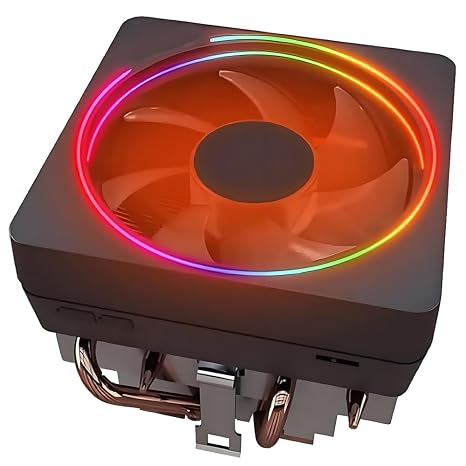
Good cooling capability on a budget makes this cooler a solid pick for anyone running a Ryzen 5 7600x. It’s designed specifically for AMD sockets and stands out for its efficient heat dissipation, which keeps the CPU temperatures manageable during regular use without breaking the bank.
Installation is straightforward thanks to the pre-applied silicone thermal paste, allowing direct mounting on compatible CPUs without extra hassle. The cooler fits AM4 and AM5 sockets easily, using the standard brackets found on most AMD motherboards. Day-to-day, the fan runs quietly at around 14 dB, making it suitable for quiet build preferences while providing steady airflow to support the processor’s needs.
Combining an aluminum heatsink with a pure copper base and four direct-contact copper heat pipes helps this cooler manage heat well under typical workloads. Many find the build solid and appreciate the low noise level, but some note it doesn’t keep temperatures as low as more expensive options during heavy gaming or overclocking sessions.
Many users appreciate the quiet fan and effective cooling for everyday tasks, noting it handles standard Ryzen 5 7600x workloads well without excessive noise. Common remarks mention it falls short on temperature control when pushing the CPU hard, especially beyond stock settings.
Builders looking for reliable stock-level cooling at a budget price will be satisfied. Those planning serious overclocking or demanding maximum cooling might want to consider a stronger aftermarket cooler for better performance.
Pros
- Compatible with AM4 and AM5 sockets
- Pre-applied thermal paste for easy installation
- Quiet operation at 14 dB
- Efficient heat transfer with copper heat pipes
Cons
- Not as cool under heavy overclocking
- Does not include mounting bracket
| Specification | Details |
|---|---|
| Power Connector Type | 4-Pin |
| Voltage | 12 volts_of_direct_current |
| Wattage | 105 watts |
| Noise Level | 14 db |
| Maximum Rotational Speed | 2800 rpm |
| Air Flow Capacity | 45 cfm |
6. AMD Wraith Stealth AM4/AM5 CPU Cooler

Keeping a Ryzen 5 7600X cool without spending too much is easier when using a cooler that fits both AM4 and AM5 sockets. The AMD Wraith Stealth offers quiet and efficient cooling in a compact package, making it a great match for budget-conscious builders looking for reliable stock-level cooling.
Installation takes just a few minutes thanks to a simple screw-mount design that fits straight onto compatible motherboards. The fan runs quietly at just 30 dB while the aluminum heatsink with optimized fins helps pull heat away quickly.
Its compact size keeps it from blocking other components, making everyday gaming and work sessions more comfortable.
Heat is managed well for a cooler of this size; it handles typical Ryzen workloads without spiking temperatures. The build uses a modest 2-watt fan running at up to 2000 rpm, which keeps noise low yet airflow sufficient. Many appreciate its simple setup and quiet operation, though some users wish it handled high loads better.
Users find the cooler very quiet and straightforward to install, making it suitable for everyday use without noise distractions. The most common issue involves its limited cooling capacity, which may not keep up under sustained heavy workloads or overclocking.
People assembling a budget build with moderate CPU use will appreciate the balance of silence and adequate heat dissipation. Those planning to push their Ryzen 5 7600X hard might want to consider a higher-performance cooler to avoid thermal throttling.
Pros
- Compatible with AM4 and AM5 sockets
- Quiet operation at 30 dB
- Easy to install with simple screw-mount
- Lightweight with an aluminum heatsink
Cons
- Not optimal for heavy overclocking
- Basic design limits cooling under high loads
| Specification | Details |
|---|---|
| Power Connector Type | 4-Pin |
| Voltage | 12 volts |
| Wattage | 2 watts |
| Noise Level | 30 dB |
| Maximum Rotational Speed | 2000 rpm |
| Cooling Method | Air |
7. Thermalright Peerless Assassin 120 Vision MAX CPU Air Cooler

2150 RPM fans combined with six pure copper heat pipes make the Thermalright Peerless Assassin 120 Vision MAX a serious contender for anyone looking to keep a Ryzen 5 7600X cool on a budget. Its standout feature is the dual-tower design paired with a 5-inch IPS LCD screen on top, providing real-time monitoring.
Setup involves mounting the dual fans on the twin towers, which isn’t complicated but does take a bit of patience due to the cooler’s size. The magnetic top cover with its LCD screen is a unique touch, showing system info without needing extra software running all the time.
The included TRCC control software lets you customize backgrounds, perfect for those who like a bit of personal flair on their rig.
This air cooler does a solid job of keeping temperatures under control thanks to its nickel-plated copper base making good contact with the CPU and high air flow at 69 CFM. The build quality feels durable and reliable, backed by customer praise for performance and the cool display feature. On the downside, some find the fans noisy at peak speeds, hitting 27 dB, which is noticeable in quiet rooms.
Performance is appreciated for strong cooling ability and the eye-catching, customizable LCD, which users find both useful and visually appealing. A common complaint revolves around the fan noise at maximum RPMs, which can be distracting in quieter settings.
Those wanting a cooler that doubles as a display centerpiece and provides solid thermal performance will find this cooler suits their needs well. People with smaller cases or who prioritize silent operation might look for lower-profile or quieter alternatives.
Pros
- Strong cooling from dual-tower design and six copper heat pipes
- Customizable 5-inch IPS LCD for real-time monitoring
- High airflow at 69 CFM
- Durable nickel-plated copper base
Cons
- Fans can get loud at full speed (27 dB)
- Larger size requires ample case space
| Specification | Details |
|---|---|
| Maximum Rotational Speed | 2150 rpm |
| Air Flow Capacity | 69 cfm |
| Power Connector Type | 4-Pin |
| Voltage | 12 volts_of_direct_current |
| Noise Level | 27 db |
8. Vetroo V5 CPU Air Cooler

People building on a budget with a Ryzen 5 7600X will find this cooler fits well. It suits those wanting a good balance of quiet operation and solid cooling without extra bulk.
The biggest strength lies in its effective heat dissipation thanks to five direct contact heat pipes.
Installing the cooler goes smoothly, supported by brackets compatible with AMD AM5 and AM4 sockets. The PWM control adjusts fan speed dynamically between 800 and 1700 RPM, keeping noise low around 30.8 dB during normal use.
The ARGB lighting syncs with your motherboard’s 5V 3-Pin port for easy customization without separate controllers.
Cooling performance keeps the Ryzen chip stable, using a copper base combined with densely packed aluminum fins to transfer heat well. Build quality stands out with nine fan blades and eight rubber vibration pads, resulting in quieter airflow.
Positive notes praise efficient cooling, while some mention the maximum airflow of 52 CFM could be limiting under heavy overclocking.
The cooler is praised for providing solid cooling with low noise in everyday scenarios thanks to its direct heat pipes and vibration dampening. Common feedback points out the airflow could struggle in high-demand overclocking setups. The ARGB lighting adds some customization flair that is well-liked as well.
This cooler fits well for regular gaming or work PCs using Ryzen 5 7600X and moderate cooling needs. Those pushing high overclock speeds or heavy loads might want to look toward something with higher airflow and fan speeds.
Pros
- Quiet operation thanks to vibration pads
- ARGB sync compatible with motherboard
- Compatible with latest Ryzen sockets
- Good heat transfer with five heat pipes
Cons
- Max airflow of 52 cfm may limit peak cooling
- Not the quietest at maximum fan speed
| Specification | Details |
|---|---|
| Maximum Rotational Speed | 1700 rpm |
| Air Flow Capacity | 52 cfm |
| Noise Level | 30.8 db |
| Voltage | 12 V |
| Supported Sockets | Intel LGA 1851/1700/1200/1150 & AMD AM5/AM4 |
9. Thermalright Assassin X 120R Digital ARGB CPU Air Cooler

Among budget-friendly coolers for Ryzen 5 7600X, the Thermalright Assassin X 120R Digital ARGB stands out for its adjustable PWM fan speed that can hit 2000RPM. It suits those wanting strong cooling with dynamic noise control to keep their build quiet without fussing over manual changes.
Installation is straightforward for an air cooler, sliding right onto most standard desktop sockets. The 4-pin power connector and PWM function let the fan adjust speed based on actual temperature, so it isn’t running full blast all the time. Silicone pads help reduce vibration noise, so it’s less distracting in daily use.
The ARGB lighting adds a simple aesthetic touch without complicating setup.
Cooling performance holds up well under load due to the high airflow at 70.84 CFM and strong 2000 RPM fan speeds. Its build uses UL CLASSA insulation and industrial-grade PBT+PC materials for durability and safety.
Many mention quiet operation as a plus, though some note the fan can get a bit noisy at max speed. It cools effectively while offering reliable materials and safety features.
Most praise praised the fan’s ability to automatically adjust speed based on temperature, keeping the noise manageable during normal use. The common complaint is the fan noise when it spins at full 2000 rpm under heavy loads.
Anyone looking for a reliable air cooler that balances quiet operation and strong airflow will appreciate this model. Those needing an ultra-compact cooler or absolute silence might prefer alternatives with lower max fan speed or smaller size.
Pros
- Dynamic PWM fan speed up to 2000 RPM
- Silicone pads reduce vibration noise
- Industrial grade PBT+PC materials for safety
- ARGB lighting improves the look of your system
Cons
- Fan can be noisy at maximum speed
- May be bulky for compact cases
| Specification | Details |
|---|---|
| Maximum Rotational Speed | 2000 rpm |
| Noise Level | 29.8 db |
| Air Flow Capacity | 70.84 cfm |
| Power Connector Type | 4-Pin |
| Voltage | 12 volts of direct current |
10. Cooler Master Hyper 212 Spectrum V3 CPU Air Cooler

Cooler Master Hyper 212 Spectrum V3 is a budget-friendly air cooler designed to keep Ryzen 5 7600X temperatures under control. It’s best for those wanting a reliable cooling solution without breaking the bank, focusing on solid airflow and easy installation.
Setup is straightforward thanks to redesigned brackets that fit AM5 sockets perfectly. The 120mm Spectrum fan runs quietly between 650 and 1,750 RPM, allowing you to pick the right balance of noise and airflow.
The PWM 4-pin connector ensures the fan speed adjusts automatically as the CPU heats up. Day-to-day, its RGB lighting adds a nice visual touch without distracting from performance.
Cooling depends on four heat pipes and a silver nickel-plated copper base, offering good thermal performance for Ryzen 5 chips. Build quality feels durable with a well-finished base and frosted fan blades for lighting effects. Most find it effective at keeping temps manageable.
The frequent downside mentioned is the fan noise can get noticeable at higher speeds, but it remains acceptable for budget range. Installation is generally praised for being simpler than older models.
Many users appreciate how the cooler delivers good thermal performance while maintaining a clear, customizable RGB look. Installing it is also faster compared to previous versions. Noise is the most repeated issue, especially when the fan spins at full throttle, which can get distracting.
Perfect choice for those on a budget who want stable cooling for Ryzen 5 7600X without complicated setup. Users seeking the quietest possible cooler or extremely high airflow might want to explore higher-end or liquid cooling options instead.
Pros
- Simple installation on AM5 socket
- Adjustable fan speeds with PWM support
- Sturdy nickel-plated copper base
- Customizable RGB lighting effects
Cons
- Fan noise audible at maximum speed
- Airflow measurement unit unclear
| Specification | Details |
|---|---|
| Maximum Rotational Speed | 1750 rpm |
| Noise Level | 27.2 dB |
| Power Connector Type | 4-Pin |
| Voltage | 3 volts |
| Cooling Method | Fan |
| Air Flow Capacity | 1.89 milliliters_per_second |
11. Thermalright Assassin Spirit 120 EVO CPU Air Cooler

Feels solid and reliable when installed, fitting snugly on a Ryzen 5 7600X without taking up too much space. Ideal for those on a budget who want a strong air cooler that keeps temperatures down quietly. Its main strength is efficient cooling paired with a compact design.
Setup involves attaching the 4-pin connector to your motherboard and making sure the cooler’s size fits inside your case. Day-to-day use is quiet, reaching a noise level of just 27 dB even when the fan spins at up to 1850 rpm.
The aluminum build helps keep the weight manageable and makes cleaning easier over time.
Performance is impressive for the price, with an airflow capacity of 70.4 cfm that keeps the Ryzen 5 7600X running cool under load. The cooler’s aluminum construction feels sturdy.
The most common praise points to how quiet it runs, while some mention it could be a tad taller than ideal for smaller setups.
Quiet performance stands out in daily use, keeping temperatures down without a loud fan. Most feedback points out its height as a limitation in compact PC builds. The aluminum construction feels solid and adds longevity to regular cleaning and maintenance.
People with mid-sized or larger cases looking for solid cooling on a budget will find it suitable. Users with very compact builds might want to explore alternative coolers with lower height profiles to avoid fitment issues.
Pros
- Quiet operation at 27 dB
- Compact size fits most cases
- Good airflow of 70.4 cfm
- Sturdy aluminum construction
Cons
- Taller height may limit some small cases
- Fan speed maxes at 1850 rpm only
| Specification | Details |
|---|---|
| Size | 120 (L) x 73 (W) x 156 (H) mm (4.72 x 2.87 x 6.14 inches) |
| Cooling Method | Air |
| Noise Level | 27 dB |
| Maximum Rotational Speed | 1850 rpm |
| Air Flow Capacity | 70.4 cfm |
| Voltage | 12 volts |
12. Thermalright Phantom Spirit 120SE CPU Air Cooler

Great cooling power at an affordable price suits anyone building a Ryzen 5 7600X rig on a budget. The standout feature is its ability to handle a wide TDP range from 105W to 280W, making it flexible for moderate to heavy loads without driving up noise or cost.
Setting it up involves a standard 4-pin power connector, compatible with most desktop motherboards. The fan speed maxes out at 1500 rpm, which keeps noise levels relatively low around 25.6 dB during everyday use.
Its air cooling approach with a 66.17 cfm airflow means it moves a solid amount of air without being overwhelming. The inverted gravity heatpipe design makes it adaptable to different case orientations.
Performance is strong for its price, cooling the CPU well under typical gaming and productivity tasks. The build feels solid, with a focus on durability and efficient heat transfer. Praise focuses on its impressive cooling for the value, while the most frequent drawback mentioned relates to its noise level, which can be noticeable when pushing closer to its 1500 rpm limit.
Cooling efficiency impresses users within its power limits, maintaining safe CPU temperatures without excessive noise most of the time. Noise becomes a noticed issue mainly when the fan runs at full speed near 1500 rpm under heavier workloads.
Anyone looking for a reliable budget air cooler for the Ryzen 5 7600X with good thermal performance will be satisfied. Users wanting ultra-quiet operation or the absolute best cooling might want to look elsewhere for options designed specifically for lower noise or extreme thermal demands.
Pros
- Handles wide TDP range, up to 280W
- Quiet under normal loads at 25.6 dB
- Strong airflow of 66.17 cfm
- Works with various case orientations
Cons
- Can get loud near maximum fan speed
- May require careful mounting for optimal cooling
| Specification | Details |
|---|---|
| Power Connector Type | 4-Pin |
| Voltage | 12 volts_of_direct_current |
| Cooling Method | Air |
| Noise Level | 25.6 db |
| Maximum Rotational Speed | 1500 rpm |
| Air Flow Capacity | 66.17 cfm |
Best Budget CPU Coolers for Ryzen 5 7600x Comparison
| Product | Noise Level | Max Rotational Speed | Air Flow Capacity | Wattage |
|---|---|---|---|---|
| Thermalright Assassin X120 Refined | 25.6 db | 1550 rpm | 66.17 cfm | – |
| Thermalright Peerless Assassin 120 SE | 25.6 db | 1550 rpm | 66.17 cfm | 265 watts |
| Thermalright PS120SE | 25.6 db | 1650 rpm | 66.17 cfm | 280 watts |
| Cooler Master Hyper 212 Black | 26 db | 2500 rpm | 42 cfm | 2.4 watts |
| AMD Wraith Prism | 14 db | 2800 rpm | 45 cfm | 105 watts |
| AMD Wraith Stealth AM4/AM5 | 30 db | 2000 rpm | – | 2 watts |
| Thermalright Peerless Assassin Vision MAX | 27 db | 2150 rpm | 69 cfm | – |
| Vetroo V5 | 30.8 db | 1700 rpm | 52 cfm | 150 watts |
| Thermalright Assassin X 120R ARGB | 29.8 db | 2000 rpm | 70.84 cfm | – |
| Cooler Master Hyper 212 Spectrum | 27.2 db | 1750 rpm | 1.89 ml/s | 250 watts |
| Thermalright Assassin Spirit 120 EVO | 27 db | 1850 rpm | 70.4 cfm | 1.92 watts |
| Thermalright Phantom Spirit 120SE | 25.6 db | 1500 rpm | 66.17 cfm | – |
- Noise Level25.6 db
- Max Rotational Speed1550 rpm
- Air Flow Capacity66.17 cfm
- Wattage–
- Noise Level25.6 db
- Max Rotational Speed1550 rpm
- Air Flow Capacity66.17 cfm
- Wattage265 watts
- Noise Level25.6 db
- Max Rotational Speed1650 rpm
- Air Flow Capacity66.17 cfm
- Wattage280 watts
- Noise Level26 db
- Max Rotational Speed2500 rpm
- Air Flow Capacity42 cfm
- Wattage2.4 watts
- Noise Level14 db
- Max Rotational Speed2800 rpm
- Air Flow Capacity45 cfm
- Wattage105 watts
- Noise Level30 db
- Max Rotational Speed2000 rpm
- Air Flow Capacity–
- Wattage2 watts
- Noise Level27 db
- Max Rotational Speed2150 rpm
- Air Flow Capacity69 cfm
- Wattage–
- Noise Level30.8 db
- Max Rotational Speed1700 rpm
- Air Flow Capacity52 cfm
- Wattage150 watts
- Noise Level29.8 db
- Max Rotational Speed2000 rpm
- Air Flow Capacity70.84 cfm
- Wattage–
- Noise Level27.2 db
- Max Rotational Speed1750 rpm
- Air Flow Capacity1.89 ml/s
- Wattage250 watts
- Noise Level27 db
- Max Rotational Speed1850 rpm
- Air Flow Capacity70.4 cfm
- Wattage1.92 watts
- Noise Level25.6 db
- Max Rotational Speed1500 rpm
- Air Flow Capacity66.17 cfm
- Wattage–
How to Choose the Right Budget CPU Cooler
Choosing a budget CPU cooler for the Ryzen 5 7600x involves balancing cooling performance, noise levels, and compatibility with your case and motherboard. Prioritizing these factors ensures efficient heat management and quiet operation, preventing overheating issues and reducing the need for costly upgrades or replacements.
Compatibility and Socket Support
One common problem with budget coolers is incompatibility with the AM5 socket, which leads to wasted time and frustration. Some models lack official support for this socket, so they won’t fit securely or maintain proper contact with the processor’s heat spreader.
A cooler compatible with AM5 ensures a snug fit and efficient heat transfer, which keeps the CPU stable under load.
Besides socket compatibility, clearance around the CPU is critical. Some coolers extend over RAM slots or motherboard components, blocking tall memory modules or blocking airflow.
Checking the cooler’s dimensions and mounting points can prevent these issues. The cooler’s rated TDP should match or exceed the processor’s 105 W design power to avoid overheating. Aim for a cooler with at least that TDP rating to maintain system stability.
Cooling Performance and Efficiency
Maintaining safe temperatures when the CPU is under heavy load depends heavily on the cooler’s design and materials. Air coolers with heat pipes transfer heat from the base to large fin arrays where fans remove it. Liquid coolers move heat through a pump and radiator system, but budget sets often sacrifice pump quality, impacting reliability.
The effectiveness of heat pipes made from copper and a thick, flat base plate generally improves conduction. Less expensive coolers sometimes use thinner or less efficient materials, causing higher core temperatures. Fans with the ability to push strong airflow through dense fins help reduce heat buildup.
Look for cooling solutions rated or tested to keep CPU temps below 80°C during stress tests.
Noise Levels
Harsh noise can quickly become tiring during extended gaming or work sessions. Fan speeds that reach over 1500 RPM often produce distracting noise, especially with lower-quality fans.
Many budget coolers now offer PWM control, allowing the motherboard to vary fan speed based on temperature. This keeps noise low during idle or light use and ramps up only when needed.
Finding the right balance between noise and cooling is essential. Fans that produce 30 to 35 dBA at maximum speed are common in this range. Lower noise levels matter if your PC setup is near your workspace or sleeping area.
The key is a cooler that maintains reasonable temps without sounding like a vacuum cleaner.
Size and Physical Fit
Large coolers can hit the side of PC cases, especially in compact mid-towers or small form factor builds. Measuring cooler height before buying prevents clearance issues.
Many budget options range from 120mm to 160mm tall, which fits in most standard cases but may not fit in slim designs.
Fan size plays a role in airflow and noise. A 120mm fan is a common standard, providing decent airflow without excessive noise or weight. Speaking of weight, heavy coolers risk bending thin or budget motherboards over time, especially when carried or moved frequently.
Choose coolers weighing under 700 grams for safer operation and less motherboard strain.
Ease of Installation and Maintenance
A smooth installation process can save a lot of headaches, especially with socket-specific mounting hardware. Some budget coolers still use outdated brackets requiring extra tools or time. User-friendly mounting systems compatible with AM5 sockets reduce the risk of uneven pressure and assure good thermal contact quickly.
Cleaning dust buildup is another factor often overlooked. Coolers with easily removable fans and accessible heatsink fins allow for straightforward maintenance without disassembling the entire system.
Durable components and straightforward access mean the cooler stays efficient longer and can be replaced or serviced without hassle in the future.
Effective Installation Tips for Optimal Cooling Performance
Applying thermal paste correctly is key to getting the best cooling performance. Use a pea-sized amount in the center of the CPU and let the pressure of the cooler spread it evenly. Make sure the mounting bracket lines up precisely to avoid uneven pressure.
Tighten screws diagonally and gradually rather than all the way on one side to ensure consistent contact between the cooler base and the CPU heat spreader.
Check that the fan orientation promotes airflow toward the rear or top exhaust of your case for effective heat dissipation. Use the motherboard manual to identify the correct fan headers so speed control works properly. Clear any cables that could block airflow around the cooler whenever possible.
- Spread thermal paste with care to avoid excess or air bubbles.
- Secure mounting hardware evenly for firm contact.
- Position fans to push hot air out efficiently.
- Connect the fan to the CPU fan header to maintain speed control.
Maintenance Practices to Prolong Your CPU Cooler’s Lifespan
Dust buildup is the main enemy of CPU cooler efficiency. Regularly removing dust from the heatsink fins and fan blades keeps airflow strong and heat transfer effective. Use a can of compressed air or a soft brush to avoid damaging delicate fins.
Avoid using a vacuum cleaner directly as it can create static and harm components.
Check that fan bearings remain smooth and quiet over time. A noisy or slow fan often indicates it’s time for a replacement.
Also, verify the thermal paste every year or two. Old thermal paste dries out and loses thermal conductivity, so reapplying it can reduce temperatures noticeably.
- Clean dust every few months to prevent buildup.
- Listen for unusual fan noises indicating wear.
- Reapply thermal paste after extended periods of use.
- Inspect mounting tightness periodically to avoid loosening.
Comparing Budget Air Coolers with Entry-Level Liquid Cooling Options
Budget air coolers provide solid performance and reliability for the Ryzen 5 7600X, especially in standard use cases. They are easier to install and maintain compared to entry-level liquid cooling options. Fans on air coolers can be replaced individually if damaged, while liquid coolers have more points of potential failure like pumps and tubing.
Entry-level liquid coolers can offer slightly lower temperatures under heavy loads but typically at higher cost and complexity. Air coolers rely on heatpipes and fins to dissipate heat directly, which makes them less prone to leaks or pump noise. This makes air coolers a practical choice for budget-conscious builds.
- Air coolers are simpler and usually quieter at moderate workloads.
- Liquid coolers can achieve lower temps but involve more maintenance.
- Price differences can be significant between the two types.
- Longevity tends to be higher for air cooling without active components.
People Also Asked
Will This Cooler Fit Ryzen 5 7600X Socket Properly?
Most budget CPU coolers designed for AM5 or AM4 sockets will fit the Ryzen 5 7600X since it uses the AM5 socket, which is backward compatible with many AM4 coolers. Always check for included mounting brackets to ensure compatibility with the Ryzen setup.
How Do I Install a Budget CPU Cooler on Ryzen 5 7600X?
Installation usually involves aligning the cooler’s mounting bracket to the backplate, applying thermal paste if not pre-applied, and securing it with screws. Take care to tighten screws evenly in a cross pattern to ensure good contact with the CPU surface.
Is This Budget Cooler Safe to Run 7600X Under Load?
A decent budget cooler can handle the 7600X under load if the case has proper airflow and you don’t push the CPU to its thermal limits with extended heavy use. Monitoring temperatures during heavy tasks helps avoid overheating.
How Long Do Budget CPU Coolers Typically Last on Ryzen?
Budget coolers typically last several years if kept clean and their fans are functioning properly, but fan bearings can wear out faster than higher-end models. Regular dusting prolongs their lifespan and maintains cooling efficiency.
What Common Problems Occur with Budget Coolers on Ryzen 7600X?
Common issues include inadequate mounting pressure, noisy fans, and lower cooling performance compared to premium coolers. Fans may develop rattling sounds or slower rotation speeds after a few years, which reduces cooling ability.
Conclusion
Choosing a budget CPU cooler for the Ryzen 5 7600X mainly requires focusing on cooling performance, noise levels, and compatibility with your PC case. Proper heat dissipation keeps the processor running smoothly, while quieter operation helps maintain a good environment during use.
Checking the cooler’s dimensions ensures it fits without obstructing other components.
Consider your available space, budget, and how often you plan to use your system before making a choice. For example, a more compact cooler suits small cases better, while a larger one might offer better cooling for heavy workloads.
Take another look at the comparison table and the picks above to find the cooler that fits your needs best.

I’m Grant Mitchell, a firearms and hunting writer with years of experience at the range and in the field. I write about rifles, shotguns, handguns, optics, safe storage, cleaning, and responsible ownership, along with practical hunting tips. My goal is to share accurate, safety-first information that helps you choose the right firearm, maintain it properly, and become a more confident shooter.