Top 12 Best Budget Cooler for 5700X3D You Can’t Miss!
The 5700x3d is a powerful processor that tends to run hot under heavy loads, making a cheap or unsuitable cooler a common point of frustration. A poorly chosen cooler can lead to thermal throttling, loud fan noise, and reduced CPU lifespan. Finding the best budget cooler for 5700x3d means addressing these problems without spending too much, ensuring stable performance during gaming or demanding tasks.
Cooling this CPU well involves a few key factors: thermal design power (TDP) capacity, fan size and speed, and compatibility with the AM4 socket. A budget cooler that handles at least 95 watts TDP provides enough headroom for the 5700x3d. Larger fans, from 120 to 140 mm, often run quieter while moving more air.
The mounting system should fit the socket securely to avoid uneven contact, which affects heat transfer. Solid aluminum or copper baseplates and heat pipes also play a big role in keeping temperatures manageable over time.
Need a Quick Check?
| Image | Product | Price |
|---|---|---|
Our Top Picks 1  | Thermalright Peerless Assassin 120 SE | Check Price |
Our Top Picks 2  | ARCTIC Liquid Freezer III Pro | Check Price |
Our Top Picks 3  | Thermalright Assassin X 120R ARGB | Check Price |
Our Selected Top 12 Budget Cooler for 5700x3d for Different Needs
This list features affordable coolers compatible with the 5700x3d, covering a range of performance levels and designs to suit various user needs. Each product is evaluated for cooling efficiency, noise levels, and suitability, highlighting strengths and potential drawbacks to help readers choose the best fit for their setup.
1. Thermalright Peerless Assassin 120 SE CPU Cooler
Quiet and efficient cooling makes the Thermalright Peerless Assassin 120 SE a solid choice for anyone running a 5700X3D on a budget. Its cooling power at a reasonable noise level stands out, offering great value without requiring a big investment.
Installation is straightforward thanks to its standard mounting system and 4-pin power connector, giving you control over fan speed through your motherboard. The 1550 rpm maximum fan speed keeps things cool without turning into a distraction, making it well-suited for everyday tasks and gaming alike.
Cooling performance hits the mark with a 265-watt capacity and 66.17 cfm airflow, which keeps CPU temperatures stable under load. The build feels sturdy and carefully designed for effective heat dissipation. A common complaint is the fan’s noise level at full speed, which can be noticeable in very quiet setups despite its moderate 25.6 dB rating.
The cooler keeps temperatures under control with a strong cooling wattage and decent airflow, though some find the fan noise a bit loud when pushed to full rpm. This balance between performance and noise is the key takeaway.
Those wanting a reliable air cooler with good performance will find this suitable, especially if budget matters. Users seeking near-silent operation or liquid cooling solutions may want to explore other options.
Pros
- Strong cooling capacity for budget price
- Quiet operation under most conditions
- Supports standard desktop mounting setups
- Good airflow at 66.17 cfm
Cons
- Fan noise can get noticeable at max speed
- Limited to air cooling, no liquid option
| Specification | Details |
|---|---|
| Power Connector Type | 4-Pin |
| Voltage | 12 volts |
| Wattage | 265 watts |
| Cooling Method | Air |
| Noise Level | 25.6 db |
| Maximum Rotational Speed | 1550 rpm |
2. ARCTIC Liquid Freezer III Pro 360 CPU Cooler
Built around a liquid cooling system, the ARCTIC Liquid Freezer III Pro 360 suits those running a high-performance 5700X3D looking for quiet but powerful cooling. Its standout feature is the integrated VRM fan, specifically designed to keep voltage converters cool for steady performance during intense loads.
Setting it up involves mounting the optimized contact frame, which fits Intel sockets LGA1851 and LGA1700 perfectly, ensuring even pressure on the CPU. The ARCTIC P12 PRO fans run quietly at low speeds and ramp up powerfully when needed, making noise less of a concern during gaming or heavy processing.
The liquid cooling method combined with a thoughtful offset cold plate keeps heat away efficiently.
It handles heat well, keeping the CPU core and voltage regulators consistently cool under pressure. Build quality feels solid, with a focus on helping CPU longevity through optimized contact pressure distribution.
Most people appreciate the quiet operation at low fan speeds, while some note the VRM fan can occasionally be a bit noticeable. Maintenance and cleaning are straightforward, thanks to the design.
Quiet performance is a strong point, with fans running smoothly without much noise except for occasional VRM fan buzz. The cooler’s optimized pressure distribution supports CPU health over time, though some find the VRM fan’s sound noticeable during intense use.
People looking for efficient, quiet liquid cooling that helps keep voltage components cool will appreciate this model. Those sensitive to any additional fan noise or looking for more advanced fan control may want to consider alternatives.
Pros
- Quiet operation especially at low speeds
- Includes VRM fan for extra voltage regulator cooling
- Optimized contact pressure preserves CPU lifespan
- High airflow at 77 cfm
Cons
- VRM fan can be slightly audible during load
- Relies on a 4-pin connector, limiting fan control options
| Specification | Details |
|---|---|
| Power Connector Type | 4-Pin |
| Voltage | 12 volts |
| Wattage | 3.96 watts |
| Cooling Method | Liquid |
| Maximum Rotational Speed | 3000 rpm |
| Air Flow Capacity | 77 cfm |
3. Thermalright Assassin X 120R Digital ARGB CPU Cooler
Quiet operation is what stands out most with the Assassin X 120R Digital ARGB CPU Cooler, making it ideal for anyone wanting solid cooling without loud fans. Its ability to adjust fan speed automatically based on temperature suits users who prefer a hands-off approach to cooling management.
Setting up the cooler is straightforward thanks to the 4-pin power connector and PWM fan control, which adjusts speed up to 2000RPM depending on CPU temperatures. The silicone pads around the fan help reduce noise from fan rotation while the industrial-grade PBT+PC materials make the unit feel sturdy and well-made.
Routine cleaning should be easy since it’s a standard air cooler.
Cooling performance keeps the Ryzen 7 5700X3D in check well, reaching speeds up to 2000 RPM while delivering maximum airflow of 70.84 CFM. The build feels reliable with UL CLASSA safety insulation and S-FDB bearing that minimizes fan blade shaking. Most praise focuses on the quiet noise level of 29.8 dB, while some users note the fan occasionally spins up louder under heavy load.
Quiet operation stands out as the best feature, attributed to silicone pads and a well-balanced fan setup. The most common downside is that under intense load, noise levels rise, which may bother some users.
Those wanting a simple, quiet cooler with strong airflow will like it. Users needing ultra-low noise under heavy gaming or demanding tasks may want to consider other options with additional fans or liquid cooling solutions.
Pros
- Fan speed automatically adjusts via PWM function
- Noise level kept low with silicone corner pads
- Uses industrial grade, durable PBT+PC materials
- Strong airflow capacity of 70.84 cfm
Cons
- Fan can get noticeably louder during heavy CPU loads
- Only one fan included, no push-pull option
| Specification | Details |
|---|---|
| Power Connector Type | 4-Pin |
| Voltage | 12 volts_of_direct_current |
| Maximum Rotational Speed | 2000 rpm |
| Air Flow Capacity | 70.84 cfm |
| Noise Level | 29.8 db |
| Cooling Method | Air |
4. Thermalright PS120SE ARGB CPU Cooler

Need a budget-friendly cooler that handles the Ryzen 7 5700X3D without breaking a sweat? Thermalright’s PS120SE ARGB delivers solid cooling power with quiet operation, making it ideal for gamers and PC builders prioritizing effective air cooling and neat aesthetics.
Its standout feature is the advanced heatpipe technology, offering reliable heat dissipation at an accessible price.
Setting it up is straightforward with the 4-pin power connector that works well for PWM control. It stays quiet during daily tasks, thanks to a noise level of just 25.6 dB, which is pleasant for long hours of gaming or work. The height of 154mm fits in most cases, so compatibility rarely becomes an issue, and the ARGB lighting adds a nice visual touch without compromising function.
Cooling is efficient thanks to 7 heatpipes using AGHP’s upgraded 4th generation technology, which helps manage the Ryzen’s heat effectively. It moves a respectable 66.17 CFM of air at up to 1500 RPM. Construction uses industrial-grade materials for good durability and heat resilience.
The most common praise highlights its low noise, while some notes mention it isn’t the absolute coolest option for extreme overclocking.
The cooler receives strong praise for running quietly while maintaining steady temperatures for Ryzen 7 5700X3D during typical use. Some users note that it may struggle to keep temperatures low under intense overclocking scenarios, reflecting its positioning as a budget air cooler rather than a high-end solution.
Gamers and office users wanting quiet and reliable cooling will appreciate this model’s balance of performance and noise. Those pushing their 5700X3D to extreme limits or seeking the absolute best cooling efficiency should consider higher-end alternatives.
Pros
- Quiet operation at 25.6 dB
- Good air flow of 66.17 CFM
- Compatible height fits most chassis
- Durable industrial-grade materials
Cons
- May underperform with heavy overclocking
- Only 1500 RPM max fan speed
| Specification | Details |
|---|---|
| Power Connector Type | 4-Pin |
| Voltage | 12 volts_of_direct_current |
| Noise Level | 25.6 db |
| Maximum Rotational Speed | 1500 rpm |
| Air Flow Capacity | 66.17 cfm |
| Height | 154mm |
5. AMD Wraith Prism CPU Cooler
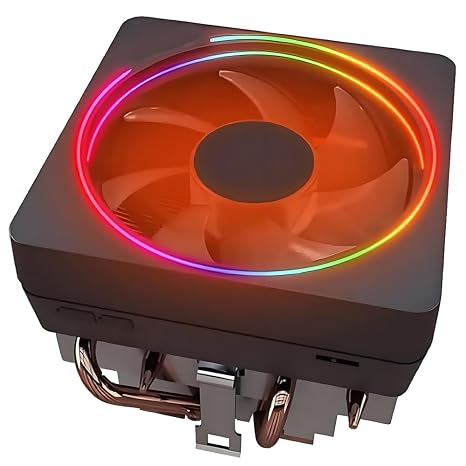
When cooling a Ryzen 7 5700X, managing heat without overspending can be tricky. The AMD Wraith Prism CPU Cooler stands out by offering solid compatibility with AM4 and AM5 sockets and an effective cooling solution suited for mid-range setups. Its biggest strength is balancing performance and affordability while staying within AMD’s recommended specs.
Installing the cooler is straightforward thanks to the pre-applied silicone thermal paste and standard bracket support on most AMD motherboards. The fan plugs into a 4-pin connector, allowing good control over cooling speed and noise. Daily use reveals quiet operation at 14 dB noise level and steady airflow at 45 CFM, making it manageable for regular desktop environments without overwhelming noise or complexity.
Performance-wise, the cooler handles heat well during typical workloads by combining four copper heat pipes and an aluminum heatsink. Its pure copper base improves heat transfer, keeping temperatures reasonable without pushing sound levels past a gentle hum. Build quality feels solid, though some reports mention it might struggle slightly under very heavy loads.
The fan speed topping out at 2800 rpm provides a balance between cooling power and noise.
The cooler is praised for quiet operation and effective heat dissipation thanks to its copper heat pipes and well-designed heatsink. A common downside is limited performance when pushed beyond moderate workloads, which can keep temperatures higher than desired.
People running regular desktop tasks or gaming on a Ryzen 7 5700X will find this cooler a reasonable and straightforward choice. Those needing stronger performance under heavy overclocking or sustained demanding loads should consider a more powerful aftermarket cooler.
Pros
- Compatible with multiple AMD motherboards and sockets
- Quiet operation at 14 dB noise level
- Pre-applied thermal paste for easy installation
- Good balance of airflow and fan speed
Cons
- May struggle under very heavy CPU loads
- Standard bracket must be used, not included
| Specification | Details |
|---|---|
| Power Connector Type | 4-Pin |
| Voltage | 12 volts_of_direct_current |
| Wattage | 105 watts |
| Noise Level | 14 db |
| Maximum Rotational Speed | 2800 rpm |
| Air Flow Capacity | 45 cfm |
6. Thermalright Peerless Assassin 120 Vision MAX ARGB CPU Cooler

A 5-inch IPS LCD screen on the radiator stands out, showing real-time system data. Perfect for users wanting both strong cooling and visual monitoring, it brings a fresh twist to air cooling while fitting well with mid-range builds like the 5700x3d.
Setting it up involves dealing with a dual-tower design and two fans, which can feel a bit bulky at first. The magnetic top cover is easy to handle, and the included TRCC software lets you customize the LCD display.
Day-to-day, the quieter 27 db noise level means the fan rarely feels intrusive, even during heavier workloads.
Cooling is solid thanks to six pure copper heat pipes and a nickel-plated copper base, reaching fan speeds up to 2150 rpm. It keeps temperatures steady without excessive noise.
The build quality feels sturdy throughout. Most people appreciate the screen for monitoring, while some mention the size could challenge certain PC cases.
The standout feature is the bright, customizable LCD screen for system data, which users find helpful for keeping an eye on temperatures and performance. Some struggle with fitting the cooler in compact PC cases due to its size and weight from the dual fans and towers.
Gamers and PC builders with enough space will appreciate the combination of powerful cooling and visual feedback. Those with smaller cases or limited clearance might want to consider more compact coolers to avoid installation hassles.
Pros
- Includes a 5-inch IPS LCD for real-time monitoring
- Efficient six copper heat pipes for cooling
- Quiet operation with 27 db noise level
- Customizable display with TRCC software
Cons
- Large size may not fit smaller cases easily
- Dual-tower design can be heavy to install
| Specification | Details |
|---|---|
| Maximum Rotational Speed | 2150 rpm |
| Noise Level | 27 db |
| Air Flow Capacity | 69 cfm |
| Power Connector Type | 4-Pin |
| Cooling Method | Air |
| Compatible Devices | Desktop |
7. Thermalright Phantom Spirit 120SE CPU Cooler

People building a mid-range desktop with an AMD Ryzen 7 5700X3D will find the Thermalright Phantom Spirit 120SE to be a solid cooling choice. Its key advantage lies in handling high CPU TDPs, making it suitable for those wanting reliable air cooling within a familiar size and noise range.
Installation fits most desktop setups easily thanks to the included mounting brackets and a 4-pin power connector for PWM fan control. Daily operation stays quiet with a noise level at 25.6 dB and 1500 rpm maximum fan speed, providing steady airflow at 66.17 CFM to keep temperatures stable under regular workloads or moderate gaming.
Cooling performance matches a power range from 105W up to 280W thanks to the advanced 7x6mm heatpipe design using AGHP technology. The cooler’s build reflects solid materials and workmanship, focusing on efficient heat dissipation. Positive notes highlight its quiet operation, while some mention its size could interfere with tall RAM modules in tight cases.
Quiet running and strong cooling capacity stand out as the biggest advantages. The most frequent drawback is occasional RAM clearance issues, especially in more compact builds or with taller memory sticks.
Those prioritizing quiet, effective cooling for a 5700X3D desktop will appreciate this air cooler. Users with limited case space or tall RAM would benefit more from a lower-profile option.
Pros
- Handles high TDP CPUs up to 280W
- Quiet operation at just 25.6 dB
- Good airflow of 66.17 CFM
- Supports PWM control via 4-pin connector
Cons
- May conflict with tall RAM modules in smaller cases
- Limited to 1500 rpm maximum fan speed
| Specification | Details |
|---|---|
| Cooling Method | Air |
| Maximum Rotational Speed | 1500 rpm |
| Noise Level | 25.6 db |
| Power Connector Type | 4-Pin |
| Air Flow Capacity | 66.17 cfm |
| CPU Cooler TDP Range | 105W to 280W |
8. Thermalright Assassin X120 Refined SE ARGB CPU Cooler

Designed for desktop use, the Thermalright Assassin X120 Refined SE ARGB cooler stands out for its quiet operation paired with substantial airflow. It fits well for anyone running a powerful CPU like the 5700X3D who needs effective air cooling without too much noise.
Its biggest strength lies in balancing cooling effectiveness and noise control.
Setup involves a 4-pin power connection running at 12 volts, making compatibility straightforward with most modern motherboards. Noise stays low at 25.6 dB even when the fan spins at its max 1550 rpm.
The 66.17 CFM airflow efficiently moves air through the system, helping cool the processor consistently during normal workloads and heavier tasks alike.
Performance comes through solidly in air cooling, delivering reliable temperature management suited for demanding desktop CPUs. The build quality reflects Thermalright’s 20 years of expertise, with durable components and an anti-fall mounting bracket that adds stability. Most praise highlights its quiet yet effective cooling, while a few note the fan speed could be higher for extreme overclocking scenarios.
Quiet performance paired with solid airflow is what people appreciate most, while the limited maximum fan speed can leave power users wanting more. The mounting bracket helps keep the cooler firmly in place, adding to user confidence over time.
Ideal for those wanting a balance between noise and cooling for a 5700X3D build. Users planning heavy overclocking or pushing limits may need to look for higher RPM options with stronger cooling potential.
Pros
- Quiet operation even at peak fan speed
- Strong air flow for effective cooling
- Sturdy mounting system for secure installation
- Compatible with a wide range of desktops
Cons
- Fan speed maxes out at 1550 rpm
- Cooling might fall short for extreme overclocking
| Specification | Details |
|---|---|
| Power Connector Type | 4-Pin |
| Voltage | 12 volts |
| Cooling Method | Air |
| Noise Level | 25.6 db |
| Maximum Rotational Speed | 1550 rpm |
| Air Flow Capacity | 66.17 cfm |
9. ARCTIC Liquid Freezer III Pro 360 A-RGB CPU Cooler

ARCTIC Liquid Freezer III Pro 360 A-RGB is a liquid CPU cooler designed to handle high-performance processors like the Ryzen 7 5700X3D. Its standout feature is the efficient heat transfer around the CPU hotspot, making it ideal for users who need reliable cooling without constant noise.
Setting up this cooler is straightforward thanks to the native offset mounting system that aligns perfectly with both Intel and AMD sockets. The integrated VRM fan runs quietly, keeping voltage modules cool during intense workloads.
Fans adjust their speed automatically through PWM, meaning the system stays quiet during everyday use but ramps up when the CPU heats up.
Performance delivers powerful cooling with up to 3000 rpm fan speed and an airflow capacity of 77 cfm. The build quality feels solid, focusing on durability with optimized contact pressure on the CPU.
Frequent praise notes its quiet operation even at higher loads, although some find the size challenging to fit in smaller cases.
Quiet operation during heavy CPU use gets the most praise, along with effective cooling around the center hotspot on the processor. A common complaint involves the cooler’s size, which can pose challenges for smaller builds and requires double-checking case compatibility.
Users running powerful CPUs who have mid to large PC cases will appreciate this cooler’s quiet and steady performance. Those with compact systems or tight space constraints may want to look for smaller or less power-consuming alternatives.
Pros
- Quiet operation even under heavy load
- Efficient heat transfer to CPU hotspot
- Integrated VRM fan for voltage stability
- High airflow with 3000 rpm max speed
Cons
- May not fit smaller PC cases easily
- Power consumption near 4 watts
| Specification | Details |
|---|---|
| Power Connector Type | 4-Pin |
| Voltage | 12 volts |
| Wattage | 3.96 watts |
| Maximum Rotational Speed | 3000 rpm |
| Air Flow Capacity | 77 cfm |
| Cooling Method | Liquid |
10. Thermalright Peerless Assassin 120 Vision MAX ARGB CPU Cooler
Cooling a Ryzen 7 5700X3D can be tricky, but this cooler handles it without feeling bulky or noisy. It’s great for anyone wanting strong cooling without pushing their budget too far.
Its standout feature is the quiet yet powerful airflow combined with a customizable ARGB look.
Installing the cooler is straightforward thanks to the dual-tower design and two 120mm fans. The 4-pin PWM connection lets fan speeds adjust automatically based on temperature, keeping noise under 27 dB most of the time.
The magnetically attached top cover with a small IPS LCD screen adds a bit of flair without complicating daily use or cleaning.
Six pure copper heat pipes and a nickel-plated base keep temperatures down efficiently during heavy loads. The fans spin at a high 2150 RPM to push 69 CFM of airflow, which matches well with the compact heatsink size.
People like the strong cooling performance and quiet operation but mention the cooler’s height might conflict with some larger cases or RAM modules.
The cooler offers impressive quietness paired with excellent airflow through six copper heat pipes, reflecting strong cooling capabilities. The most common drawback is its somewhat tall build, causing compatibility issues with some larger RAM or smaller PC cases.
Users needing solid cooling for a Ryzen 7 5700X3D without loud fans will appreciate this cooler. Those with compact cases or tall RAM should consider a lower-profile option to avoid clearance troubles.
Pros
- Quiet operation under typical loads
- Strong airflow for effective cooling
- Magnetic top cover with IPS LCD screen
- Dual-tower design fits in many cases
Cons
- Height may interfere with tall RAM modules
- May not fit well in compact cases
| Specification | Details |
|---|---|
| Fan Speed | 2150 RPM ±10% |
| Noise Level | ≤27 dB(A) |
| Air Flow | 69 CFM |
| Dimensions (LxWxH) | 125 x 135 x 164 mm |
| Fan Size | 120 x 120 x 25 mm |
| Power Connector | 4-Pin PWM |
11. Thermalright Frozen Notte 120 ARGB Liquid CPU Cooler

Excellent for anyone building a rig around the Ryzen 7 5700X3D on a budget, delivering a great balance of cooling power and visual flair. Its best feature is how well the ARGB lighting syncs with a compatible motherboard while still keeping the CPU temperatures under control.
Setting up goes smoothly thanks to the synchronized ARGB lighting system that connects to the 5V 3-pin header, making it easy to match your build’s colors. The pump head runs quietly at 2800RPM±10%, paired with a 120mm PWM fan that spins up to 2000 RPM, balancing airflow and noise. The all-aluminum water block adds to the aesthetic while ensuring solid heat transfer.
Cools the 5700X3D effectively, with a copper base that has a fine 0.1mm pitch for better contact and heat dissipation. The build feels solid with mirror electroplating giving a sharp look but can show fingerprints easily.
Biggest advantage is stable and quiet operation; common complaint highlights the lighting needing a compatible motherboard for full effect.
Quiet operation combined with visually appealing ARGB lighting is its strongest feature. The main drawback is the dependency on compatible motherboard headers for full lighting potential, limiting use in some builds. The cooling performance and noise levels are well balanced for everyday gaming and productivity tasks with the 5700X3D.
People who want both efficient cooling and customizable lighting will be happy here. Those without a suitable 5V 3-pin ARGB header or who dislike maintaining the mirror surface might want to look for alternatives that sacrifice lighting for durability or simpler installation.
Pros
- ARGB lighting syncs perfectly with motherboard headers
- Quiet pump and fan operation at max speeds
- Copper base with 0.1mm pitch for efficient cooling
- Aluminum and mirror electroplated build looks premium
Cons
- Lighting effects require specific 5V 3-pin motherboard header
- Mirror finish prone to fingerprints and smudges
| Specification | Details |
|---|---|
| Maximum Rotational Speed | 2000 rpm |
| Noise Level | 27.7 dB |
| Air Flow Capacity | 72.37 cfm |
| Power Connector Type | 4-Pin |
| Voltage | 12 volts_of_direct_current |
12. Noctua NH-D15 chromax.Black CPU Cooler

Constructed from premium materials with a dual-tower design, this cooler is built for serious heat management, best suited for users wanting quiet and powerful air cooling on their 5700X3D setup. Its biggest strength lies in balancing strong cooling performance with low noise.
Installation requires some care due to its size, but once mounted, the dual 140mm fans handle adjustments automatically with PWM control. The Low-Noise Adaptors help keep it whisper quiet during idle times, while the build works well with many colour schemes thanks to the all-black finish. Regular cleaning is straightforward thanks to the accessible fan design.
Cooling matches some all-in-one watercoolers, with six heatpipes and wide heat sink area ensuring efficient heat dissipation. The fan speed maxes out at 1500 rpm for heavier loads, but stays quiet at 24.6 dB when idle.
Common praise highlights quiet but powerful cooling, while some mention the bulky size as a space concern in smaller cases.
Quiet cooling performance stands out, matching many liquid coolers with low noise levels under load and idling almost silently. Users sometimes find the cooler’s size challenging when fitting inside compact cases or airflow-limited setups.
The cooler suits overclockers and silent enthusiasts who have enough space in their PC case and want powerful air cooling. Compact PC builders or those seeking simpler setups might want to consider smaller or liquid cooling solutions instead.
Pros
- Quiet operation at idle thanks to Low-Noise Adaptors
- Dual 140mm fans provide strong airflow
- Compatible with various case colour schemes
- Fan speed adjusts automatically with load
Cons
- Large size may cause fit issues in smaller cases
- Installation requires careful handling due to bulk
| Specification | Details |
|---|---|
| Power Connector Type | 4-Pin |
| Voltage | 12 volts |
| Cooling Method | Air |
| Noise Level | 24.6 db |
| Maximum Rotational Speed | 1500 rpm |
| Air Flow Capacity | 140.2 cubic meter per hour |
Best Budget Coolers for 5700X3D Compared
| Product | Cooling Method | Noise Level | Air Flow Capacity | Max Rotational Speed |
|---|---|---|---|---|
| Thermalright Peerless Assassin 120 SE | Air | 25.6 db | 66.17 cfm | 1550 rpm |
| ARCTIC Liquid Freezer III Pro | Liquid | – | 77 cfm | 3000 rpm |
| Thermalright Assassin X 120R ARGB | Air | 29.8 db | 70.84 cfm | 2000 rpm |
| Thermalright PS120SE ARGB | Air | 25.6 db | 66.17 cfm | 1500 rpm |
| AMD Wraith Prism | Fan | 14 db | 45 cfm | 2800 rpm |
| Thermalright Peerless Assassin Vision MAX | Air | 27 db | 69 cfm | 2150 rpm |
| Thermalright Phantom Spirit 120SE | Air | 25.6 db | 66.17 cfm | 1500 rpm |
| Thermalright Assassin X120 Refined ARGB | Air | 25.6 db | 66.17 cfm | 1550 rpm |
| ARCTIC Liquid Freezer III Pro | Liquid | – | 77 cfm | 3000 rpm |
| Thermalright Peerless Assassin Vision MAX | Air | 27 db | 69 cfm | 2150 rpm |
| Thermalright Frozen Notte 120 ARGB | Water | 27.7 db | 72.37 cfm | 2000 rpm |
| Noctua NH-D15 chromax.Black | Air | 24.6 db | 140.2 m³/h | 1500 rpm |
- Cooling MethodAir
- Noise Level25.6 db
- Air Flow Capacity66.17 cfm
- Max Rotational Speed1550 rpm
- Cooling MethodLiquid
- Noise Level–
- Air Flow Capacity77 cfm
- Max Rotational Speed3000 rpm
- Cooling MethodAir
- Noise Level29.8 db
- Air Flow Capacity70.84 cfm
- Max Rotational Speed2000 rpm
- Cooling MethodAir
- Noise Level25.6 db
- Air Flow Capacity66.17 cfm
- Max Rotational Speed1500 rpm
- Cooling MethodFan
- Noise Level14 db
- Air Flow Capacity45 cfm
- Max Rotational Speed2800 rpm
- Cooling MethodAir
- Noise Level27 db
- Air Flow Capacity69 cfm
- Max Rotational Speed2150 rpm
- Cooling MethodAir
- Noise Level25.6 db
- Air Flow Capacity66.17 cfm
- Max Rotational Speed1500 rpm
- Cooling MethodAir
- Noise Level25.6 db
- Air Flow Capacity66.17 cfm
- Max Rotational Speed1550 rpm
- Cooling MethodLiquid
- Noise Level–
- Air Flow Capacity77 cfm
- Max Rotational Speed3000 rpm
- Cooling MethodAir
- Noise Level27 db
- Air Flow Capacity69 cfm
- Max Rotational Speed2150 rpm
- Cooling MethodWater
- Noise Level27.7 db
- Air Flow Capacity72.37 cfm
- Max Rotational Speed2000 rpm
- Cooling MethodAir
- Noise Level24.6 db
- Air Flow Capacity140.2 m³/h
- Max Rotational Speed1500 rpm
How to Choose the Best Budget Cooler for 5700X3D
Choosing the right budget cooler for the 5700X3D depends mainly on cooling performance, noise levels, and compatibility with your case. Prioritizing these factors ensures efficient heat management, prevents overheating, and avoids costly upgrades or damage, ultimately saving money and hassle in the long run.
Compatibility and Fit
Coolers that don’t fit properly cause more headaches than just poor temperature control. Many overlook the importance of compatibility with the AM4 socket standard, which this processor uses. A cooler designed for a different socket can lead to wasted money or require additional brackets that may not always work well.
Clearance around RAM sticks is another frequent snag; tall RAM modules often clash with larger coolers, blocking easy installation or airflow.
Measure the case’s interior dimensions carefully and cross-check height and width specs of the cooler. Some units exceed 160mm in height, which may not fit in mid-tower cases.
Keep in mind the cooler’s footprint to avoid obstructing PCIe slots or motherboard components. Compatibility means no surprises during build and better airflow overall.
Cooling Performance
Processors like the Ryzen 7 produce a lot of heat under load, so the cooler’s TDP rating must match or exceed the chip’s output. A cooler rated below about 105W TDP struggles to maintain safe temperatures during gaming or rendering sessions.
The number and quality of heat pipes or the design of fins also affect how quickly heat transfers away from the CPU.
Fans with speeds above 1500 RPM can offer better airflow but might increase noise. Look for models that balance fan speed with effective heat dissipation.
Bulkier heatsinks with dense aluminum fins typically handle heat better than compact ones. Airflow direction and fan placement within the case also impact the cooler’s real-world efficiency.
Noise Levels
Coolers running at full speed generate noticeable noise, which can get distracting during work or gaming. Noise levels vary significantly and should be considered based on personal tolerance and environment.
Fans with PWM control adjust their speed dynamically according to temperature, reducing noise during idle or low workloads.
Some coolers claim high performance but at the cost of loud operation. Finding one that keeps noise under 30 dBA while maintaining thermal control leads to a more pleasant experience. Look for models with higher quality bearings and balanced fan blades, which help reduce annoying whines or rattles.
Build Quality and Materials
Durability starts with the materials. Copper bases and heat pipes are better conductors of heat than aluminum alone but increase cost and weight.
Aluminum fins allow for lightweight and affordable builds but can be less effective if poorly designed. Fan blades made from sturdy plastic resist warping over time and reduce vibration noise.
Mounting mechanisms that are sturdy and easy to handle help prevent loose contact with the CPU, which can degrade cooling performance quickly. Ball-bearing or fluid-dynamic bearing fans last longer and maintain quieter operation than sleeve bearings.
These build qualities reduce the chance of frequent replacements or maintenance.
Ease of Installation and Maintenance
Installing a cooler can turn into a frustrating ordeal without clear mounting instructions or compatible brackets for the motherboard. Many coolers now offer toolless or simplified mounting systems that speed up installation and reduce mistakes, a bonus especially for first-time builders. Secure attachment ensures consistent pressure and better heat transfer.
Regular cleaning is essential for performance but some coolers trap dust in hard-to-reach places requiring full disassembly. Designs with removable fan clips or open fin stacks make wiping dust off simpler and quicker.
This ease of maintenance extends the cooler’s effective lifespan and keeps noise levels down.
Optimal Installation Techniques for Maximizing Cooler Performance with the 5700X3D
Applying thermal paste evenly is one of the most important steps to ensure efficient heat transfer between the 5700X3D and its cooler. Using too much paste can cause spillage and reduce cooling efficiency, while too little leaves gaps.
A small pea-sized amount in the middle of the CPU usually works best.
Mounting the cooler with firm, even pressure keeps contact consistent across the CPU die. Uneven tightening can cause hotspots and reduce cooling performance.
Follow the cooler’s mounting sequence carefully, usually in a diagonal pattern to distribute pressure evenly.
Securing proper airflow within the case helps the cooler work effectively. Make sure intake and exhaust fans are positioned to create a clear air path over the cooler’s heat sink or radiator.
- Check that all fan cables are connected and spinning properly.
- Avoid cable clutter around the cooler, which can obstruct airflow.
- Regular maintenance, like dusting off fins and fans, prevents buildup that reduces cooling potential.
Common Cooling Mistakes to Avoid When Using Budget Coolers on the 5700X3D
One common mistake is relying only on the default fan curve settings provided by motherboard software. Budget coolers often require manual adjustment to increase fan speed under load for effective temperature control.
Running a cooler at low speed to reduce noise may cause the 5700X3D to run hotter than necessary.
Another frequent error is poor case ventilation. Budget coolers cannot compensate for inadequate airflow; a case with obstructed intake or exhaust will trap hot air around the CPU, reducing cooler efficiency.
Skipping regular cleaning is also a major issue. Dust buildup on the cooler’s fins and fan blades reduces airflow and heat dissipation.
Budget coolers generally have simpler designs, making them vulnerable to performance loss if neglected.
- Don’t overtighten mounting screws, which can warp the cooler base and damage the CPU.
- Avoid mixing incompatible thermal pastes; stick to reputable brands tested with your cooler.
- Never block airflow intake or exhaust vents with cables or hardware.
Comparing Air vs. Liquid Budget Coolers: Which Suits the 5700X3D Better?
Air coolers typically offer easier installation and lower maintenance compared to liquid coolers. For a 5700X3D, budget air coolers can handle the thermal load reasonably well, especially in cases with good airflow. They also avoid potential issues like pump failure or liquid leaks.
Budget liquid coolers often provide slightly better peak cooling performance under heavy loads, thanks to their direct heat exchange with a radiator. However, their installation can be more involved, requiring space for the radiator and fans inside the case.
Both options have noise considerations; air coolers usually produce stable noise levels, while budget liquid coolers may generate additional pump noise alongside fan sound.
- Air coolers are generally more reliable over time due to simpler mechanics.
- Liquid coolers free up space around the CPU socket, which can help with RAM clearance.
- The price difference between entry-level air and liquid coolers is often minimal, making airflow and case compatibility key deciding factors.
People Also Asked
Does This Cooler Fit Well with the 5700x3d CPU?
This cooler usually fits well with the 5700x3d, as the mounting brackets match the AM4 socket. It’s good to double-check clearance around your RAM and motherboard components before final installation to avoid tight spots.
How Long Do Budget Coolers Typically Last with Heavy Use?
Budget coolers often last about 3 to 5 years under heavy use before their performance noticeably drops. Cleaning dust off the fan and heatsink can stretch their effective life by reducing heat buildup.
Is Additional Maintenance Required for This Cooler Model?
This cooler model requires minimal maintenance, mostly occasional cleaning of dust from the fins and fan blades. Applying a fresh coat of thermal paste every couple of years can maintain good heat transfer.
Are There Common Overheating Problems with This Cooler on 5700x3d?
Overheating issues are uncommon with this cooler on the 5700x3d, provided it is properly mounted and the case airflow is adequate. Monitoring CPU temperatures during heavy workloads is a good practice to catch any problems early.
What Safety Precautions Should I Take When Installing the Cooler?
Use gentle pressure and evenly tighten the screws in a cross pattern during installation to avoid damaging the motherboard or CPU. Make sure the cooler’s base is fully seated on the CPU before securing it to ensure proper contact for heat dissipation.
Conclusion
Choosing a budget cooler for the 5700x3d mainly comes down to cooling efficiency, noise levels, and compatibility with your case and motherboard. Make sure the cooler can handle the chip’s heat output without running too loud. Size and mounting options are also important since not all coolers fit every setup easily.
Think about the space inside your case and how much you plan to push the CPU before deciding. Matching the cooler to your budget and use case helps avoid overspending or buying something too weak.
Check the comparison table and the detailed reviews above to find the right balance for your build.

I’m Grant Mitchell, a firearms and hunting writer with years of experience at the range and in the field. I write about rifles, shotguns, handguns, optics, safe storage, cleaning, and responsible ownership, along with practical hunting tips. My goal is to share accurate, safety-first information that helps you choose the right firearm, maintain it properly, and become a more confident shooter.