Top 12 Best Budget AM4 CPU Cooler That Beats Expensive Fans!
Many PC builders have dealt with overheating issues due to a poorly chosen or cheap cooler that just couldn’t handle the AM4 socket’s demands. A reliable best budget am4 cpu cooler keeps your processor running at safe temperatures without breaking the bank, which is important for maintaining performance during long gaming sessions or heavy workloads.
Ineffective coolers often have small fans or mediocre heat sinks that fail to dissipate heat fast enough, causing frequent thermal throttling or unstable operation.
Key factors that set a good budget AM4 cooler apart include solid contact with the CPU via a quality copper or aluminum base, adequate fan size typically around 92mm or larger, and compatibility with the AM4 socket mounting system. A heat sink height of around 120mm usually fits most standard PC cases while still providing steady airflow.
Quiet operation is another plus, so look for a cooler with a fan speed adjustable between 600 and 1500 RPM. Easy installation and simple cleaning access also matter for practical, everyday use.
Need a Quick Check?
| Image | Product | Price |
|---|---|---|
Our Top Picks 1  | AMD Wraith Stealth | Check Price |
Our Top Picks 2  | Thermalright Assassin X120 SE ARGB | Check Price |
Our Top Picks 3  | AMD Wraith Stealth AM4 AM5 | Check Price |
Our Selected Top 12 Budget Am4 Cpu Cooler Picks for Every Need
This list features carefully chosen budget-friendly CPU coolers compatible with AM4 sockets, covering a range of performance levels and sizes. Each review describes how well the cooler works, who it is best suited for, and its main advantages and disadvantages.
1. AMD Wraith Stealth CPU Cooler
Running cool and quiet on an AM4 socket, this CPU cooler is a solid match for budget builds that need reliable heat management without fuss. Its biggest strength lies in simplicity, you get a straightforward aluminum heatsink and a quiet 90mm fan that fits snugly without extra adapters or pins.
Installation is simple thanks to direct screw mounting to the AM4 motherboard. The pre-applied thermal paste means no messy application on your end. The 4-pin PWM connector helps keep fan speed adjusted to the CPU temperature, so you won’t hear it ramping up unnecessarily during light tasks.
The 3.5-inch fan size is compact but covers just enough area for everyday cooling needs.
Cooling performance covers mainstream usage well, handling the heat from regular tasks without overheating. Built solidly with an aluminum heatsink and a sturdy mounting system, the cooler feels durable and steady once installed. The quiet operation earns the most praise, while a common complaint is that it’s not designed for heavy overclocking or pushing high power CPUs beyond stock specs.
Quiet operation is a major plus here, with the cooler handling everyday heat effectively thanks to its aluminum heatsink and decent fan size. Installation is made easy by direct mounting and pre-applied thermal paste, but the unit struggles when pushed beyond standard CPU workloads.
Ideal for budget or midrange AM4 setups running stock speeds, it keeps temperatures under control without noise disturbances. Those planning to overclock or use more powerful processors should consider more capable cooling solutions to avoid thermal issues.
Pros
- Simple direct screw mounting
- Pre-applied thermal paste included
- Quiet 90mm fan design
- Compact size fits easily
Cons
- Not designed for heavy overclocking
- Cooling limited for high power CPUs
| Specification | Details |
|---|---|
| Supports Motherboard Socket | AM4 |
| Heatsink Material | Aluminum |
| Fan Size | 3.5-inch 90mm |
| Power Connector | 4-pin PWM (9-inch length) |
| Pre-applied Thermal Paste | Yes |
2. Thermalright Assassin X120 SE ARGB CPU Cooler
Ideal for budget-conscious builders wanting solid AM4 cooling, this air cooler offers surprisingly strong airflow at a modest noise level. Its main strength lies in balancing performance with a straightforward installation that fits most desktop setups without fuss.
Installation is simple thanks to standard mounting brackets that suit AM4 sockets well. The 4-pin, 12-volt fan connector allows manual speed control if needed. Daily operation stays quiet at just 25.6 dB, while the airflow of 66.17 CFM keeps CPU temperatures stable throughout extended use.
Cleaning is manageable given its design, preventing dust build-up without major hassle.
Performance-wise, this cooler handles heat dissipation efficiently at a maximum 1550 rpm fan speed. Its build quality reflects Thermalright’s 20-year experience, focused on sturdy parts and reliable materials.
Common praise highlights its quiet cooling at decent airflow, though some mention that it could be bulkier than ultra-compact alternatives.
Users appreciate the quiet fan paired with solid airflow, making it effective for routine tasks without noise distractions. A common downside is its size, which can interfere with taller RAM modules in some builds.
Builders favoring quiet but efficient air cooling on a budget will find this a good match. Anyone working in cramped cases or requiring ultra-compact solutions might consider alternatives.
Pros
- Quiet operation around 25.6 dB
- Strong airflow of 66.17 CFM
- Compatible with AM4 socket
- Simple, reliable mounting system
Cons
- Taller height may block some RAM slots
- Fan speed max is moderate, not high
| Specification | Details |
|---|---|
| Power Connector Type | 4-Pin |
| Voltage | 12 volts |
| Cooling Method | Air |
| Noise Level | 25.6 db |
| Maximum Rotational Speed | 1550 rpm |
| Air Flow Capacity | 66.17 cfm |
3. AMD Wraith Stealth AM4 AM5 CPU Cooler
Pure aluminum fins and base make for a compact and efficient air cooler that fits a wide range of Ryzen processors. Suited for gamers and PC builders on a budget looking for reliable and straightforward cooling without extra bells and whistles.
Setting it up is pretty simple with a pre-applied thermal paste that saves time and mess. The 4-pin power connector lets the fan speed adjust automatically based on CPU temperature, keeping noise down at around 30 dB in most cases. It slides right onto AM4 or AM5 sockets, so compatibility won’t be an issue with many Ryzen chips.
Cooling keeps the CPU comfortable under normal workloads, thanks to pure aluminum parts that dissipate heat decently. The quiet fan operates max at 2000 rpm, balancing airflow and sound. Most users appreciate the easy installation and steady performance, though some mention it’s not enough for overclocking or heavy multitasking.
People appreciate how easy it is to install, especially with thermal paste already applied. The cooler operates quietly under regular loads but struggles a bit when pushed hard, which is a common point of feedback.
Great for those running standard or moderately demanding Ryzen builds looking for an affordable cooler. It’s less suited for anyone planning high overclocking or intensive workloads where stronger cooling is essential.
Pros
- Wide compatibility with AM4 and AM5 sockets
- Pre-applied thermal paste simplifies installation
- Quiet fan keeps noise around 30 dB
- Efficient aluminum fins and base for heat dissipation
Cons
- Limited cooling capacity for heavy overclocking
- Fan speed can get loud near maximum RPM
| Specification | Details |
|---|---|
| Power Connector Type | 4-Pin |
| Cooling Method | Air |
| Noise Level | 30 db |
| Maximum Rotational Speed | 2000 rpm |
4. Thermalright Assassin X120R SE V2 CPU Cooler

Sized to fit most cases at 148mm tall, this CPU cooler brings solid cooling power to budget builds on the AM4 platform. It suits anyone looking for an affordable option with a quiet fan and straightforward installation, with its main strength lying in balancing efficient airflow and noise control.
Installation uses metal fasteners compatible with AMD sockets, making the setup stable and easy to handle. The cooler’s aluminum heatsink paired with a copper base spreads heat well.
Running at up to 1550 RPM, the fan moves good airflow while staying under about 25.6 dB, so it’s quiet enough for daily work or gaming sessions without distraction.
It cools effectively given its size and price point, thanks to four heatpipes handling heat transfer. The cooler feels solidly built, with components that don’t feel cheap.
Most people note the quiet operation positively, but some find the fan speed modest, which might limit cooling under very heavy loads. The height compatibility helps it fit in many mid-sized cases without clearance issues.
The cooler is appreciated for its quiet fan and ease of installation, which helps keep noise low while staying effective for everyday tasks. Some users mention the cooling capacity feels somewhat limited when pushing a CPU hard, reflecting the modest fan speed.
This is a good choice for budget builds and users who prioritize quiet operation in smaller cases. Those needing heavy overclocking or maximum cooling might want to consider options with higher RPM fans or dual-fan setups.
Pros
- Quiet fan operation under typical conditions
- Supports AMD and Intel with metal fasteners
- Compact height fits many desktop cases
- Good airflow at 66.17 CFM
Cons
- Fan speed may limit cooling in high loads
- Only a single fan included
| Specification | Details |
|---|---|
| Maximum Rotational Speed | 1550 rpm |
| Power Connector Type | 4-Pin |
| Voltage | 12 volts |
| Wattage | 15 watts |
| Noise Level | 22 dB |
5. AMD Wraith Prism CPU Cooler
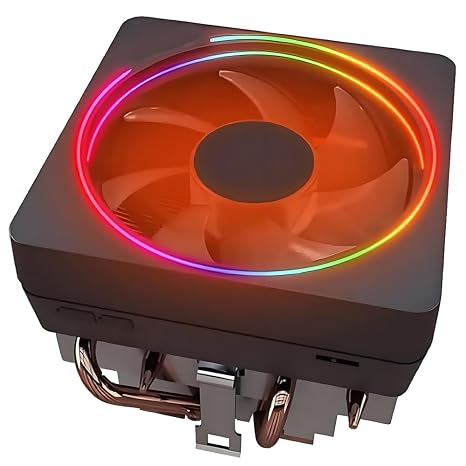
Strong cooling paired with wide socket compatibility makes this a solid choice for budget builds on AM4 processors. It is especially useful for anyone aiming to keep Ryzen CPUs cool without spending extra on aftermarket units.
Efficient heat transfer stands out as the key benefit here.
Setup involves mounting the cooler using the standard bracket found on most AMD motherboards, making installation straightforward. Pre-applied silicone thermal paste means no separate application is needed, saving time and reducing mess.
Its 4-pin power connector allows for PWM control to adjust fan speed according to system load, keeping noise levels balanced in daily operation.
Performance holds up well with a maximum rotational speed of 2800 rpm and airflow rated at 45 cfm, ensuring effective heat dissipation. The combination of aluminum heatsink, copper base, and four 6 mm copper heat pipes provides a durable and effective cooling solution. Most users praise its quiet operation at 14 dB, while the common drawback is that it is not included with a mounting bracket, requiring motherboard compatibility for fitting.
The cooler offers efficient heat transfer and keeps noise low at 14 dB during most operations, but the need for motherboard-compatible mounting brackets can complicate installation. It handles heat well with its copper base and heat pipes, making it a reliable choice for managing Ryzen CPU temperatures.
Those looking for a budget-friendly cooler that fits most AMD sockets and keeps noise down will appreciate this product. Users without a compatible bracket or who want quieter operation under full load should consider alternative cooling solutions.
Pros
- Wide socket compatibility including AM4 and AM5
- Pre-applied thermal paste for easy installation
- Quiet operation with noise at 14 dB
- Effective heat dissipation with copper heat pipes
Cons
- Mounting bracket not included with cooler
- Fan can spin up to 2800 rpm, which might be loud under load
| Specification | Details |
|---|---|
| Power Connector Type | 4-Pin |
| Voltage | 12 volts_of_direct_current |
| Wattage | 105 watts |
| Maximum Rotational Speed | 2800 rpm |
| Air Flow Capacity | 45 cfm |
| Noise Level | 14 db |
6. Thermalright Peerless Assassin 120 SE CPU Cooler

Keeping your CPU cool without breaking the bank matters a lot when building a desktop on a budget. Good airflow and quiet operation usually come with a higher price, but the Thermalright Peerless Assassin 120 SE slides right into the sweet spot for AM4 users who want solid cooling performance without fuss.
Installation is straightforward thanks to the 4-pin power connector and decent mounting design, fitting most AM4 sockets without hassle. Running at a max speed of 1550 rpm, the fan moves air at a comfortable 66.17 cfm while producing noise levels below 26 db, making it easy to live with day in and day out.
Keeping the cooler clean is simple due to its accessible fan and radiator design.
Cooling power reaches up to 265 watts, enough to handle a range of desktop CPUs without overheating. Construction feels sturdy and well-made, showing Thermalright’s experience in computer accessories.
The strongest praise comes from its quiet operation at good airflow rates, though some users note the fan speed limit could restrict maximum cooling on very hot setups.
Running quietly while delivering decent airflow stands out as the biggest plus. Most complaints focus on limited fan speed affecting extreme cooling needs. Everyday use feels balanced between performance and noise.
Anyone looking for reliable, budget-friendly air cooling for typical desktop CPUs will find it fits well. Those aiming for overclocking or very high power CPUs might want to consider options with more powerful fans or dual-radiator setups.
Pros
- Quiet operation below 26 dB at full speed
- Good airflow of 66.17 CFM keeps temps down
- Strong cooling power rated at 265 watts
- Easy to clean and maintain over time
Cons
- Fan speed capped at 1550 rpm limits max cooling
- Only a single 120mm fan may restrict cooling upgrades
| Specification | Details |
|---|---|
| Power Connector Type | 4-Pin |
| Voltage | 12 volts |
| Wattage | 265 watts |
| Noise Level | 25.6 db |
| Maximum Rotational Speed | 1550 rpm |
| Air Flow Capacity | 66.17 cfm |
7. ID-COOLING SE-214-XT V2 CPU Cooler

With a 120mm fan that pushes 58 cfm of airflow and runs quietly at 30 dB, it’s a strong choice for a budget AM4 CPU cooler. Suited well for gamers and everyday PC builders who want solid cooling without spending a lot.
Its most notable strength is balancing decent cooling power with modest noise levels.
Setting up involves attaching the fan clips to the upgraded fin-locks, which hold the aluminum fins firmly in place to reduce vibration. The direct touch heatpipes improve heat transfer, helping keep temps stable during long sessions.
Running at a maximum 2000 rpm speed, the fan provides consistent airflow but remains quiet enough for daily tasks and gaming.
Performance-wise, it keeps the CPU cool under typical loads without any overheating concerns. The build quality feels reliable thanks to reinforced clips and a sturdy heatsink design. Most users appreciate the quiet operation, while complaints mostly mention it isn’t the best for heavy overclocking or very high TDP processors.
The fan runs quietly while maintaining stable cooling, praised for reduced vibrations and solid heatsink contact with the CPU. Common complaints highlight its limits in cooling power, especially on processors with high thermal output or overclocked settings.
Those building a budget desktop or gaming rig with a standard AM4 CPU will find it offers good value and performance. Users aiming for aggressive overclocking or handling very power-hungry chips should consider a cooler with higher wattage capacity or more advanced cooling features.
Pros
- Improved heatpipe direct contact for better cooling
- Secure fan clips minimize vibration and noise
- Balanced airflow with low noise at 30 dB
- Compatible with AM4 sockets and desktop setups
Cons
- Not ideal for heavy overclocking demands
- Limited wattage might struggle in high TDP CPUs
| Specification | Details |
|---|---|
| Power Connector Type | 4-Pin |
| Wattage | 1 watts |
| Cooling Method | Air |
| Noise Level | 30 db |
| Maximum Rotational Speed | 2000 rpm |
| Air Flow Capacity | 58 cfm |
8. Thermalright Assassin Spirit 120 EVO CPU Cooler

People looking for a budget-friendly AM4 CPU cooler that offers solid cooling without taking up too much space will find this option suits them well. Its standout feature lies in balancing good airflow with low noise, making it a smart pick for compact desktop builds that need decent heat management.
Installation is straightforward thanks to its standard size and mounting system tailored for AM4 sockets. The cooler runs quietly at 27 dB thanks to its 4-pin 12-volt fan that spins up to 1850 RPM.
Daily operation stays cool under moderate workloads, and the aluminium body keeps it lightweight while being easy to clean, avoiding dust buildup over time.
Performance-wise, it handles heat effectively without being overly loud or bulky. Its air cooling method moves up to 70.4 CFM through aluminium fins that fit snugly in smaller cases. The most praised aspect is how quiet it runs during normal tasks, while some find the height of 156 mm somewhat limiting for very tight spaces or tall RAM modules.
The quiet running at 27 dB combined with solid airflow capacity of 70.4 CFM is the strongest praise. The cooler’s height of 156 mm causes installation challenges in smaller cases or with taller RAM.
Users needing a low-noise cooler that fits a standard mid-tower build will appreciate this product. Those with very compact setups or high-performance CPUs might want to explore alternatives with slimmer profiles or more powerful fans.
Pros
- Quiet operation at moderate load
- Efficient air cooling with 70.4 CFM airflow
- Compact size fits most mid-sized builds
- Aluminium body keeps weight low
Cons
- Height of 156 mm may block tall RAM modules
- Fan speed maxes at 1850 RPM limiting high-end cooling
| Specification | Details |
|---|---|
| Noise Level | 27 db |
| Air Flow Capacity | 70.4 cfm |
| Maximum Rotational Speed | 1850 rpm |
| Power Connector Type | 4-Pin |
| Voltage | 12 volts |
9. Thermaltake Gravity A2 CPU Cooler

Offering solid cooling at a budget-friendly price, the Thermaltake Gravity A2 suits low power AM4 processors without breaking the bank. Its standout feature is a well-designed aluminum heatsink that can handle heat dissipation efficiently up to 95W, making it a practical choice for basic desktop builds.
Installing the cooler is straightforward thanks to its compact size and lightweight construction. The 92 mm 7-bladed fan runs quietly at 33.5 dB and connects via a standard 4-pin power connector, allowing for PWM control. The fan spins up to 3500 rpm and pushes out a decent airflow of 46.24 cfm, providing decent cooling without much noise or fuss in everyday use.
Performance on low-power CPUs is steady, keeping temperatures well managed without drawing excessive power. The aluminum extrusion heatsink feels solid and does a good job dispersing heat, although users mention the noise level increases when the fan speeds up to its max RPM. Build quality is good for the price, with some users wishing for quieter operation at peak fan speeds.
The cooler offers efficient heat dissipation and quiet operation at low to moderate speeds, which users appreciate for budget builds. Noise at maximum fan speed is the most common complaint, especially when the system heats up under load.
Those running low power or stock settings on AM4 processors will find reliable and straightforward cooling here. Users looking for cooler operation under heavy loads or overclocking should consider a higher-tier product instead.
Pros
- Effective heat dissipation for low-power CPUs
- Quiet 92mm fan under normal load
- Compact size fits most AM4 sockets easily
- Easy installation with 4-pin connector
Cons
- Fan noise increases noticeably at max rpm
- Not designed for high-performance or overclocked CPUs
| Specification | Details |
|---|---|
| Cooling Method | Fan, Thermal |
| Power Connector Type | 4-Pin |
| Noise Level | 33.5 db |
| Maximum Rotational Speed | 3500 rpm |
| Air Flow Capacity | 46.24 cfm |
| Wattage | 95 watts |
10. Thermalright Assassin X120R SE PLUS CPU Cooler

Thermalright Assassin X120R SE PLUS is a budget-friendly AM4 CPU cooler known for quiet cooling and solid airflow. It fits well for anyone looking to keep a desktop system cool without loud fan noise or high power draw.
The low noise level stands out as its biggest strength.
Setting up the cooler is straightforward thanks to its standard 4-pin power connector and compatibility with desktop AM4 sockets. Running at a maximum 1500 rpm, the fan keeps airflow steady at 58 cfm. Day-to-day operation is quite quiet at 25.6 dB, which helps maintain a calm working environment without sacrificing cooling capacity.
Cooling performance is reliable for most budget builds, as the cooler uses air to dissipate heat effectively with its 15-watt power consumption. Build quality matches Thermalright’s experience in computer accessories. Praises often mention how quiet it runs, while some note that the 15W power might limit heavy overclocking or extremely hot processors.
The strongest praise is for the quiet fan operation, which makes it a good choice for users sensitive to noise. One common complaint revolves around its limited wattage, which could struggle with hotter or overclocked CPUs.
This cooler suits users with mid-range or budget CPUs who prioritize silent operation over raw cooling power. Anyone running high-performance or heavily overclocked processors may want to look for a cooler with higher wattage and faster fan speeds.
Pros
- Quiet operation at 25.6 dB
- Good airflow with 58 cfm
- Low power usage at 15 watts
- Easy 4-pin connection
Cons
- Limited cooling power for high-end CPUs
- Fan speed maxes at 1500 rpm
| Specification | Details |
|---|---|
| Power Connector Type | 4-Pin |
| Voltage | 12 volts |
| Wattage | 15 watts |
| Noise Level | 25.6 db |
| Maximum Rotational Speed | 1500 rpm |
| Air Flow Capacity | 58 cfm |
11. Thermalright PS120SE CPU Cooler

Quiet operation combined with solid cooling power makes it a solid pick for budget-conscious AM4 builds. Suited for those needing effective heat dissipation without breaking the bank, it handles a range of CPUs up to 280W TDP without fuss.
Setting it up involves standard mounting steps, and the 4-pin connector allows for PWM control to fine-tune fan speed. Daily use benefits from a noise level around 25.6 dB, so it stays unobtrusive during work or gaming sessions. Its air cooling method works reliably without adding weight or complexity.
The seven 6mm heatpipes use an advanced design to improve heat transfer, reflecting in the cooler’s ability to manage TDP between 105W and 280W. Build quality is thoughtful, with a focus on durable materials and mounting brackets sourced from a long-established brand. Some feedback mentions that it’s not the quietest at maximum rpm of 1650, but performance for price stands out.
Cooling power shines thanks to seven 6mm heatpipes and upgraded AGHP technology, letting it manage thermal loads from 105W to 280W. Noise levels hover around 25.6 dB but ramp up close to 1650 rpm, which can be distracting in silent setups.
The cooler suits users looking for value and strong air cooling with flexible PWM fan control. Anyone needing an ultra-quiet or ultra-compact option might want to consider alternatives tailored for minimal noise or small cases.
Pros
- Handles high TDP CPUs up to 280W
- Quiet at moderate fan speeds
- Advanced heatpipe design improves cooling
- Simple, reliable 4-pin PWM control
Cons
- Noise increases noticeably near max RPM
- Setup can feel bulky in compact cases
| Specification | Details |
|---|---|
| Cooling Method | Air |
| Noise Level | 25.6 db |
| Maximum Rotational Speed | 1650 rpm |
| Air Flow Capacity | 66.17 cfm |
| Power Connector Type | 4-Pin |
| Wattage | 280 watts |
12. Thermalright AXP120-X67 Low Profile CPU Cooler

Excellent for compact desktop builds, this CPU cooler fits snugly while delivering solid air cooling. Its key strength lies in balancing low profile design with effective heat dissipation, making it well-suited for budget-conscious users who need a reliable solution without bulk.
Setup involves standard mounting that aligns well even in cramped spaces around AM4 sockets. The 4-pin connector allows PWM control, so you can easily adjust fan speeds for noise or cooling preference.
Daily operation stays quiet at 26.1 dB, and the 1800 rpm max speed ensures airflow keeps temperatures in check without excessive noise.
Cooling performance is straightforward: it handles typical desktop processor heat loads adequately thanks to 59 CFM airflow capacity. Build quality feels solid with thermal right’s typical attention to detail. The strongest praise highlights its quiet operation, while complaints mainly address its modest cooling power on very high TDP CPUs.
Quiet operation at a modest noise level is the top praise, making it pleasant for daily desktop use. Complaints mainly come from users expecting more cooling power, as it performs best with mid-range processors rather than extreme heat loads.
Those building a small form factor PC or aiming for silent operation will find this cooler well suited. Users needing heavy-duty cooling or running high-end overclocked CPUs might want to consider alternatives with stronger airflow and thermal capacity.
Pros
- Compact low profile fits tight spaces well
- Quiet operation at 26.1 decibels
- Adjustable PWM fan speed
- Reasonable airflow of 59 CFM
Cons
- Limited cooling for very high TDP CPUs
- Relatively low power rating of 3.6 watts
| Specification | Details |
|---|---|
| Power Connector Type | 4-Pin |
| Voltage | 12 volts |
| Wattage | 3.6 watts |
| Noise Level | 26.1 db |
| Maximum Rotational Speed | 1800 rpm |
| Air Flow Capacity | 59 cfm |
Best Budget AM4 CPU Coolers Comparison Table
| Product | Cooling Method | Noise Level | Max RPM | Air Flow Capacity |
|---|---|---|---|---|
| AMD Wraith Stealth | Air | – | – | – |
| Thermalright Assassin X120 SE ARGB | Air | 25.6 db | 1550 rpm | 66.17 cfm |
| AMD Wraith Stealth AM4 AM5 | Air | 30 db | 2000 rpm | – |
| Thermalright Assassin X120R SE V2 | Air | 22 db | 1550 rpm | 66.17 cfm |
| AMD Wraith Prism | Fan | 14 db | 2800 rpm | 45 cfm |
| Thermalright Peerless Assassin 120 SE | Air | 25.6 db | 1550 rpm | 66.17 cfm |
| ID-COOLING SE-214-XT V2 | Air | 30 db | 2000 rpm | 58 cfm |
| Thermalright Assassin Spirit 120 EVO | Air | 27 db | 1850 rpm | 70.4 cfm |
| Thermaltake Gravity A2 | Fan, Thermal | 33.5 db | 3500 rpm | 46.24 cfm |
| Thermalright Assassin X120R SE PLUS | Air | 25.6 db | 1500 rpm | 58 cfm |
| Thermalright PS120SE | Air | 25.6 db | 1650 rpm | 66.17 cfm |
| Thermalright AXP120-X67 Low Profile | Air | 26.1 db | 1800 rpm | 59 cfm |
- Cooling MethodAir
- Noise Level–
- Max RPM–
- Air Flow Capacity–
- Cooling MethodAir
- Noise Level25.6 db
- Max RPM1550 rpm
- Air Flow Capacity66.17 cfm
- Cooling MethodAir
- Noise Level30 db
- Max RPM2000 rpm
- Air Flow Capacity–
- Cooling MethodAir
- Noise Level22 db
- Max RPM1550 rpm
- Air Flow Capacity66.17 cfm
- Cooling MethodFan
- Noise Level14 db
- Max RPM2800 rpm
- Air Flow Capacity45 cfm
- Cooling MethodAir
- Noise Level25.6 db
- Max RPM1550 rpm
- Air Flow Capacity66.17 cfm
- Cooling MethodAir
- Noise Level30 db
- Max RPM2000 rpm
- Air Flow Capacity58 cfm
- Cooling MethodAir
- Noise Level27 db
- Max RPM1850 rpm
- Air Flow Capacity70.4 cfm
- Cooling MethodFan, Thermal
- Noise Level33.5 db
- Max RPM3500 rpm
- Air Flow Capacity46.24 cfm
- Cooling MethodAir
- Noise Level25.6 db
- Max RPM1500 rpm
- Air Flow Capacity58 cfm
- Cooling MethodAir
- Noise Level25.6 db
- Max RPM1650 rpm
- Air Flow Capacity66.17 cfm
- Cooling MethodAir
- Noise Level26.1 db
- Max RPM1800 rpm
- Air Flow Capacity59 cfm
How to Choose the Right Budget AM4 CPU Cooler
Choosing a good budget AM4 CPU cooler involves balancing cooling performance, noise levels, and size compatibility with your case. Prioritizing efficient heat dissipation and quiet operation prevents overheating and reduces the need for replacements, ultimately saving money and avoiding troubleshooting headaches.
Compatibility and Fit
Some coolers labeled compatible with AM4 sockets can still cause problems if RAM modules or motherboard components are too close. This might result in blocked RAM slots or awkward cable management, leading to frustration during setup and potential damage later.
Personally, I’ve learned how crucial it is to check the height and width of the cooler and compare it with your motherboard’s layout.
Clearance matters not just around the socket but also inside the case. Low-profile RAM or coolers with narrow fin stacks help prevent interference. Before purchasing, confirm the cooler’s dimensions, especially height, to make sure it won’t block airflow or touch the side panel.
Motherboards with densely packed components need extra attention, and smaller cases demand compact designs to fit without turreted airflow disruption.
Cooling Performance
Heat dissipation scales with the CPU’s thermal design power, so matching the cooler’s capacity to the CPU is vital. Cooling units with multiple copper heat pipes and a broad fin array tend to spread heat efficiently.
Thermal paste quality also plays a significant role; some coolers come with decent pre-applied paste, but reapplying a reputable paste usually improves temps noticeably.
Fan performance matters as well. A fan with higher airflow (measured in CFM) moves more air over the fins, while static pressure ensures air can penetrate dense heat sink fins. Both should balance out; a fan that moves a lot of air but has poor static pressure might fail under heavy load.
This reflects in lower sustained temperature control during gaming or intensive tasks.
Noise Levels
Noise can quickly become an annoyance, especially in quiet environments or during light computer use. Fans rated around 20-30 dBA generally remain unobtrusive. PWM fan control helps by adjusting speeds dynamically, keeping the cooler quiet when the CPU is idle and ramping up only when temperatures demand it.
Vibration from fans can add to noise levels and sometimes cause annoying rattles against the chassis. Rubber mounts or vibration dampeners help reduce these sounds. Some coolers feature built-in noise reduction technology that makes a measurable difference for daily use, especially if your workspace relies on low ambient noise.
Build Quality and Materials
The combination of copper heat pipes and aluminum fins strikes a good balance between efficient heat transfer and weight. Cheap coolers may skimp on materials, resulting in less durability and weaker cooling.
Mounting brackets and screws should feel solid, as flimsy hardware can lead to installation struggles or uneven contact pressure, causing higher CPU temperatures.
Fan bearings also impact lifespan and noise. Sleeve bearing fans are cheaper but wear out faster and get louder.
Ball or fluid dynamic bearings typically last longer and run quieter under extended use. I’ve found paying a little extra for better bearings avoids replacement hassle after a year or two of use.
Ease of Installation and Maintenance
Clear mounting instructions prevent hours wasted on guesswork. A backplate with spring-loaded screws or tool-free clips can simplify attachment, especially for those swapping coolers frequently.
Installing a cooler also matters when trying to build or upgrade on a limited desk space.
Maintenance is often overlooked but critical. A cooler that allows easy removal of fans or features accessible fin gaps simplifies dust cleaning.
This keeps cooling performance steady over years. Fans that are user-replaceable mean spending less time searching for compatible spares or buying entirely new units when one fails.
Optimizing Performance: Installation and Thermal Paste Application Tips
Mounting a budget AM4 CPU cooler correctly makes a big difference in its performance. Begin by cleaning both the CPU surface and the cooler’s base with isopropyl alcohol to remove old thermal paste and debris. Applying the right amount of thermal paste is crucial; too much can cause overheating, too little reduces heat transfer efficiency.
A pea-sized drop in the center of the CPU is usually enough.
When setting the cooler in place, press it down evenly without sliding it around to avoid smearing the paste unevenly. Secure the mounting brackets tightly but not excessively to prevent damage to the motherboard or CPU. Double-check that the fan connectors are properly attached to the motherboard’s CPU fan headers for accurate speed control.
This careful approach helps keep temperatures low and noise levels manageable on a budget-friendly AM4 cooler.
Maintaining Your AM4 CPU Cooler for Long-Term Efficiency
Fan dust buildup is the most common cause of declining cooler performance. Regular cleaning every few months using compressed air or a soft brush removes dust from the heatsink fins and fan blades.
Avoid using a vacuum behind the heatsink, as it can damage the fan motor. Check that the fan spins freely and replace any that show signs of wobbling or noise.
Tighten mounting screws if the cooler loosens over time, as vibrations can reduce contact pressure and thermal transfer efficiency. Monitor your CPU temperatures during heavier workloads to spot cooling issues early. When thermal paste is older than two years, reapplying it helps keep heat conduction at its best.
Taking these steps extends the life and keeps your cooler performing well compared to heavier investments.
Comparing Air vs. Liquid Coolers: Which Budget Option Suits Your Needs?
Air coolers are usually simpler and cheaper, relying on a heatsink and fan to dissipate heat. They offer reliable performance for most budget builds without the added complexity of liquid systems. Installation tends to be more straightforward, and there is less risk of leaks or pump failures.
Liquid coolers can provide lower temperatures and quieter operation but usually come at a higher price and require maintenance like occasional coolant checks. Budget liquid coolers may also have smaller radiators that limit cooling potential.
- Choose air coolers for reliable, straightforward cooling at a lower cost.
Practical use and budget constraints will dictate the best choice given each system’s thermal demands.
People Also Asked
Will This Budget AM4 Cooler Fit My PC Case?
This budget AM4 cooler usually fits most mid-tower or larger PC cases but might be an issue in very compact cases. Measuring your case clearance beforehand helps avoid surprises during installation.
How Do I Properly Install an AM4 Budget CPU Cooler?
Mount the bracket on the motherboard’s AM4 socket first, apply thermal paste sparingly, then attach the cooler securely. Tighten screws evenly to ensure good contact without bending the motherboard.
Is It Safe to Use a Budget Cooler for AM4 Processors?
Budget coolers are generally safe for standard AM4 processors, though they may struggle with higher TDP models under heavy load. Monitoring temperatures after installation confirms if cooling is adequate.
How Long Do Budget AM4 CPU Coolers Typically Last?
A budget AM4 cooler can last several years with proper maintenance like cleaning dust off the fan and heatsink. Eventually, fan bearings might wear out but replacement fans are often available.
What Common Problems Occur with Budget AM4 CPU Coolers?
Common issues include fan noise from cheaper motors and less effective heat dissipation causing higher CPU temps. Regular dusting and checking fan operation can reduce performance problems.
Conclusion
Choosing a budget AM4 CPU cooler means focusing on good cooling performance, quiet operation, and compatibility with your case. Look for models that fit your CPU socket snugly and keep temperatures in check without blowing noise. These factors ensure your processor runs smoothly without needing an expensive cooler.
Consider the size of your computer case and how much you want to spend before deciding. Planning to push your system hard or keep it for a while makes investing a bit more in a cooler with better durability and cooling a smart choice. Check the comparison table and the earlier picks to find one that matches your setup and budget.

I’m Grant Mitchell, a firearms and hunting writer with years of experience at the range and in the field. I write about rifles, shotguns, handguns, optics, safe storage, cleaning, and responsible ownership, along with practical hunting tips. My goal is to share accurate, safety-first information that helps you choose the right firearm, maintain it properly, and become a more confident shooter.