Top 12 Best Budget AIO Cooler That Will Blow Your Mind
Overheating and noise problems frequently crop up with budget all-in-one coolers that aren’t up to scratch. The best budget aio cooler avoids these issues by using higher-quality pumps and radiator fans that maintain stable temperatures without excessive sound.
Cheap models often fail quickly or run too loud, causing frustration and potential CPU throttling under load.
The key to a good budget aio cooler lies in the radiator size, pump reliability, and fan performance. Radiators starting at 120mm fit most cases while providing adequate surface area for heat dissipation.
A pump speed around 2500–3000 RPM usually balances noise and coolant flow well. Fans should be PWM-controlled for variable speed depending on load and rated around 40–50 CFM airflow to keep temps low without constant high noise. A sturdy mounting system and corrosion-resistant tubing also make a difference in durability and safety over time.
Need a Quick Check?
| Image | Product | Price |
|---|---|---|
Our Top Picks 1  | ARCTIC Liquid Freezer III 360 | Check Price |
Our Top Picks 2  | Thermalright Aqua Elite 360 ARGB | Check Price |
Our Top Picks 3  | MSI MAG Coreliquid A13 240 | Check Price |
Our Selected Top 12 Budget Aio Cooler Picks for Every Need
This list features carefully chosen budget-friendly all-in-one coolers, each reviewed for performance, compatibility, and features. Readers will find clear insights into which coolers suit different needs, along with their main advantages and limitations to help make an informed decision.
1. ARCTIC Liquid Freezer III Pro 360
Designed with a focus on efficient heat transfer, the ARCTIC Liquid Freezer III Pro 360 suits gamers and desktop users needing strong cooling without breaking the bank. Its biggest strength is the integrated VRM fan that helps keep voltage converters cool alongside the CPU.
Setup involves mounting the cold plate precisely toward the CPU hotspot, thanks to native offset mounting for both Intel and AMD sockets. The contact frame optimizes pressure on the CPU for better heat dissipation and longer chip lifespan.
The P12 PRO fans are quiet even under load, and the PWM-controlled VRM fan automatically adjusts to temperature changes, helping everything run smoothly on a daily basis.
Cooling power is solid with a maximum rotational speed of 3000 rpm and an airflow of 77 cfm, which handles high loads well. The build feels sturdy, and ARCTIC’s attention to mounting details improves cooling efficiency.
Most praise notes the quiet operation despite the strong airflow, while complaints mention its size and complexity may challenge some setups.
Quiet running fans and effective VRM cooling are strong points that make the system reliable under long sessions. Some find the unit bulky and a bit tricky to install due to the size and precise mounting requirements.
Those with spacious cases and experience with liquid cooling will appreciate its design and performance. Users with tight case interiors or seeking the simplest installation might look at other options better suited to compact builds.
Pros
- Integrated VRM fan for stable voltage converter cooling
- Optimized contact frame improves CPU heat dissipation
- Quiet P12 PRO fans even at higher speeds
- Compatible with Intel and AMD native offset mounting
Cons
- Large radiator can be hard to fit in smaller cases
- Installation requires careful mounting and patience
| Specification | Details |
|---|---|
| Power Connector Type | 4-Pin |
| Voltage | 12 volts |
| Wattage | 3.96 watts |
| Maximum Rotational Speed | 3000 rpm |
| Air Flow Capacity | 77 cfm |
| Cooling Method | Liquid |
2. Thermalright Aqua Elite 360 V6 ARGB
Bright ARGB lighting stands out on this budget-friendly 360mm AIO cooler, perfect for anyone wanting both style and decent cooling power without spending too much. Its most noticeable feature is the vortex round cold pump head with colorful lighting effects that make your build pop visually.
Setup involves syncing the ARGB lighting with your motherboard’s 5V 3-pin header, which is pretty straightforward and looks great in action. The pre-installed fans and pump run quietly at about 29.8 dB, and you get good airflow at 70.84 CFM, making daily use comfortable without loud noise.
Maintenance is typical for water cooling but the sturdy build suggests it holds up well over time.
Cooling performance benefits from a pump speed maxing out at 2800 RPM and fans topping out at 2000 RPM, which keeps temperatures in check reasonably well. The build feels solid with its updated fourth-generation pump and good airflow capacity. Strong points include lighting and quiet operation, though some users mention occasional difficulty fitting it into smaller cases due to size.
Many appreciate the bright and customizable ARGB lighting paired with low noise during regular use. On the downside, some find installation tricky in compact builds and notice pump noise at its highest speeds.
This cooler suits users who want strong visual appeal and effective cooling on a budget, especially in mid to large cases. Those with smaller enclosures or sensitive to occasional pump noise should consider other options.
Pros
- Vortex pump head with colorful ARGB lighting
- Quiet operation at 29.8 dB noise level
- Good airflow of 70.84 CFM for a 360mm radiator
- Syncs lighting directly with motherboard headers
Cons
- May not fit easily in smaller cases
- Pump speed noise can rise near 2800 RPM
| Specification | Details |
|---|---|
| Power Connector Type | 4-Pin |
| Cooling Method | Water |
| Noise Level | 29.8 db |
| Maximum Rotational Speed | 2000 rpm |
| Air Flow Capacity | 70.84 cfm |
3. MSI MAG Coreliquid A13 240
Choosing an AIO cooler that balances quiet operation and solid cooling power makes the MSI MAG Coreliquid A13 240 a practical option. Perfect for gamers or content creators wanting good cooling without noisy fans, its key strength lies in a well-engineered pump and radiator that supports modern CPUs like LGA 1851 right out of the box.
Setting it up involves standard water cooling installation, made easier by integrated pump design that runs up to 3800 RPM with ceramic bearings, keeping noise low at 14.4 dB. In daily use, the radiator’s unique split-flow system quietly circulates the coolant and reduces motor noise, letting you focus on work or play without distraction from your PC’s cooling system.
The cooler handles heat effectively, thanks to strong airflow at 60.78 CFM and a durable aluminum radiator. Build quality feels solid, matching the durable pump design aimed at long-term reliability. Most praise focuses on how quietly it runs, while those using high-load setups sometimes wish for even stronger cooling performance under heavy stress.
The quiet operation of the pump coupled with durable ceramic bearings earns strong praise across most reviews. Common complaints revolve around the cooling performance struggling slightly during extended heavy use, and the fans getting loud when pushed to their highest speeds. This suggests good but not extreme cooling capability.
Those who need solid, quiet everyday PC cooling with compatibility for newer CPUs will find this cooler suitable. Users running ultra high-end processors or who want very low temperatures during intense gaming or rendering might want to consider options with stronger radiators or larger fans.
Pros
- Quiet pump with ceramic bearings reduces noise significantly
- Supports latest LGA 1851 CPUs straight away
- Aluminum radiator with split-flow design for durability
- Strong airflow capacity at 60.78 CFM
Cons
- Cooling could be stronger under sustained heavy loads
- Noisy fans at maximum rotational speed (5200 rpm)
| Specification | Details |
|---|---|
| Power Connector Type | 4-Pin |
| Voltage | 12 volts_of_direct_current |
| Wattage | 2.16 watts |
| Noise Level | 14.4 db |
| Maximum Rotational Speed | 5200 rpm |
| Air Flow Capacity | 60.78 cfm |
4. Thermalright Aqua Elite 120 V3

Hot components in a compact PC case need constant cooling, especially on a budget. Designed for desktops, the Thermalright Aqua Elite 120 V3 offers reliable water cooling with low vibration and lasting durability. Its best feature is maintaining steady temperatures without much noise, making it great for everyday users watching both cooling and quiet operation.
Setup is straightforward thanks to the 120mm ARGB fan and a secure cooling block with a 4th generation pump head. The included protective mesh water pipe adds durability, preventing wear over time. Controlling the lighting effects syncs easily via the motherboard’s 5V 3pin header, so you get a coordinated look without extra software.
Noise stays low at 25.6 db, so it won’t disrupt daily work or gaming.
Cooling performance covers typical desktop needs with a water-based solution, running the pump at 1500 rpm and delivering 66.17 cfm airflow. The cooler uses a black aluminum fin heat sink plate that efficiently dissipates heat. Most find it sturdy and efficient, though some mention the ARGB controller or software synchronization can occasionally be tricky to align perfectly with different motherboards.
The strongest praise highlights the quiet pump and lasting build quality, making it a dependable choice for consistent cooling. The most common complaint concerns occasional issues with syncing ARGB lighting to some motherboards, which may require extra setup effort.
Anyone seeking solid performance and quiet operation on a budget will appreciate this cooler. Those needing bigger cooling solutions or flawless lighting sync might want to explore other options.
Pros
- Low vibration pump head for quieter operation
- Durable protective mesh on water pipe
- ARGB lighting syncs with motherboard
- Effective cooling with black aluminum fins
Cons
- ARGB light sync can be inconsistent
- Limited to 120mm fan size for larger builds
| Specification | Details |
|---|---|
| Power Connector Type | 4-Pin |
| Voltage | 12 volts |
| Wattage | 7.2 watts |
| Noise Level | 25.6 db |
| Maximum Rotational Speed | 1500 rpm |
| Air Flow Capacity | 66.17 cfm |
5. ARCTIC Liquid Freezer III Pro 360 A-RGB

Cooler performance peaks with a 3000 rpm fan speed pushing up to 77 cfm airflow, fitting well for anyone looking to keep high-load CPUs cool and quiet. Best suited for Intel LGA1851 and LGA1700 sockets, it guarantees efficient heat dissipation and longer CPU life.
Installation is straightforward thanks to native offset mounting designed to align the cooling plate with the CPU hotspot for better heat transfer. The integrated VRM fan quietly spins up only when needed to cool voltage converters. Fans adjust smoothly with PWM control, maintaining balance between noise and cooling power in daily use.
Cooling power meets expectations with solid liquid cooling and a powerful P12 PRO fan. The deliberate build quality offers reliability, and it stands out for quiet operation at low speeds.
Some find the fan noise noticeable at maximum speed, which is a trade-off for extra cooling under heavy load.
The most praised aspect is the quiet yet powerful cooling that keeps both CPU and VRMs cool under load. The main complaint revolves around fan noise when running at full 3000 rpm, which can be louder than expected during intensive tasks.
Anyone running a system with compatible Intel sockets who wants quiet cooling during normal use will appreciate its design. Those who need silent operation at all times or require compatibility beyond Intel LGA1851/1700 might want to explore other options.
Pros
- Optimized contact pressure for Intel CPUs
- Quiet operation at lower fan speeds
- Integrated PWM VRM cooling fan
- High airflow of 77 cfm at max speed
Cons
- Fan noise noticeable at top speed
- Specific fit mainly for Intel LGA1851 / LGA1700
| Specification | Details |
|---|---|
| Power Connector Type | 4-Pin |
| Voltage | 12 volts |
| Wattage | 3.96 watts |
| Cooling Method | Liquid |
| Maximum Rotational Speed | 3000 rpm |
| Air Flow Capacity | 77 cfm |
6. Antec Skeleton 240 ARGB

People looking for an affordable all-in-one water cooler that handles mainstream CPUs well will appreciate its solid cooling power. Great for budget-conscious builders, it stands out with a distinctive ARGB pump head that adds some style without breaking the bank.
Installation is straightforward thanks to universal compatibility with a broad range of Intel and AMD sockets. The setup feels secure with elastic high-density tubing, while the customizable ARGB lighting syncs smoothly with most motherboards. It stays quiet during daily use, so noise won’t be a distraction even under typical workloads.
The cooling performance is impressive for the price, with a large copper base plate and high-density fins enabling effective heat transfer. The fans run at up to 2000 rpm and provide good airflow, but some users mention the pump noise can be noticeable under load.
Build quality appears solid and durable, suited for regular desktop cooling needs.
The cooler receives praise for delivering reliable temperature control via its large copper base plate and high-density fins. The most frequent complaint revolves around the pump noise, which some find audible during heavy use.
This cooler suits users wanting a quiet system with good cooling efficiency on a budget. Those seeking near-silent operation or maximum airflow for overclocking may want to explore other options.
Pros
- Supports Intel and AMD sockets widely
- Customizable ARGB lighting on pump head
- Quiet hydraulic bearing fans
- Efficient copper base plate cooling
Cons
- Pump noise can be noticed under load
- Airflow lower than some higher-end models
| Specification | Details |
|---|---|
| Voltage | 120 volts |
| Wattage | 120 watts |
| Noise Level | 32 db |
| Maximum Rotational Speed | 2000 rpm |
| Air Flow Capacity | 72.29 cubic_centimeters_per_minute |
| Power Connector Type | 4-Pin |
7. Antec Ultra 360 ARGB

Compact and stylish, the Ultra 360 ARGB suits those looking for strong cooling power in a budget-friendly AIO cooler. The standout feature is its lighting pump head, combining solid thermal performance with eye-catching multi-angle ARGB effects that add character to any build. It supports a wide range of Intel and AMD sockets, making it versatile.
Installation is straightforward with compatibility for many desktop platforms like Intel LGA 115X through 20XX and AMD AM4/AM5. The powerful 120mm PWM radiator fans operate quietly at 33.05 dB, striking a good balance between airflow and noise.
Its efficient pump and copper base plate promise consistent cooling without frequent maintenance or complicated setup.
Cooling results are reliable thanks to the combination of a highly efficient pump and a generously sized copper base, which helps with heat transfer. The cooler delivers strong air flow at 67.62 CFM and maintains noise at a manageable 33.05 dB.
Users appreciate the layered lighting effects on the pump head but note the pump’s 3-pin power connector can limit customization for some setups.
Strong cooling performance and eye-catching ARGB lighting qualify as the biggest highlights, with consistent airflow and thermal efficiency noted by many. Common drawbacks include the pump’s 3-pin power connection, which some find restricting, and modest noise levels during heavier use.
Anyone wanting a budget-friendly cooler with reliable thermal management and customizable lighting will appreciate this model. Users looking for ultra-quiet operation or more advanced pump controls might want to consider alternatives with 4-pin pump connectors and lower noise figures.
Pros
- Supports most Intel and AMD desktop platforms
- Powerful 120mm ARGB PWM radiator fans
- Highly efficient cooling pump and large copper base
- Distinctive multi-angle lighting effects on pump head
Cons
- Pump uses 3-pin connector, limiting power customization
- Noise around 33 dB may be noticeable under load
| Specification | Details |
|---|---|
| Power Connector Type | Pump: 3-pin | LED: 3-pin |
| Voltage | 12 volts_of_direct_current |
| Noise Level | 33.05 db |
| Maximum Rotational Speed | 2600 rpm |
| Air Flow Capacity | 67.62 cfm |
8. CoolerMaster MasterLiquid ML240L RGB V2

CoolerMaster MasterLiquid ML240L RGB V2 is a budget-friendly all-in-one liquid cooler designed for desktop PCs. It works well for gamers and enthusiasts who want reliable cooling combined with customizable RGB lighting without spending too much.
The standout feature is its quiet airflow paired with strong cooling performance thanks to its dual chamber pump.
Setting up the cooler is straightforward, and the mounting supports a wide range of AMD and Intel sockets including the latest Intel LGA1700. The SickleFlow fans create a quiet airflow at up to 1800 rpm, which keeps noise levels around 30 dB during regular use.
Its industrial-grade EPDM seal aims to prevent leaks, helping keep the system safe over time.
In terms of cooling power, it handles heat efficiently, thanks mainly to the 260-watt water cooling capacity. The build quality feels solid with good materials to ensure durability.
The major compliment is how quiet the fan is even under load. Some users have noted that the RGB lighting might not be as bright as expected in very bright rooms.
The coolest feature widely appreciated is the quiet yet effective cooling, with many noticing how the pump and fans maintain low noise levels even under load. Some mention that the RGB brightness isn’t very strong and could look weaker in bright environments compared to other coolers.
People who want solid performance without loud fans and enjoy customizable lighting will like this cooler. Those seeking very bright RGB effects or higher maximum fan speeds might want to explore other options.
Pros
- Quiet SickleFlow fans at 30 dB noise
- Supports a wide range of AMD and Intel sockets
- Customizable RGB lighting with updated design
- Durable industrial-grade EPDM seal to prevent leaks
Cons
- RGB lighting could be brighter in well-lit rooms
- Some users may find fan speed limit a bit low
| Specification | Details |
|---|---|
| Voltage | 12 volts |
| Power Connector Type | 4-Pin |
| Wattage | 260 watts |
| Noise Level | 30 dB |
| Maximum Rotational Speed | 1800 rpm |
| Air Flow Capacity | 62 cfm |
9. ARCTIC Liquid Freezer III Pro 240 A-RGB
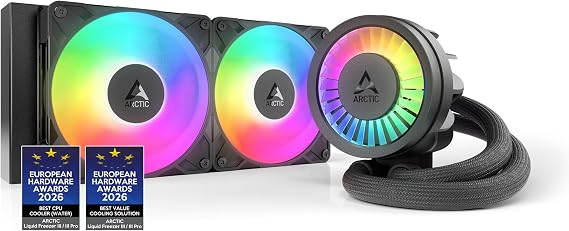
Cooling a powerful PC without breaking the bank feels straightforward with this AIO cooler. It suits anyone needing solid heat management and a quieter solution, especially for gaming or content creation setups. Its standout feature is the integrated VRM fan, which helps keep those critical voltage converters nice and cool.
Setting it up is pretty straightforward, thanks to the native offset mounting that targets the CPU hotspot directly, improving heat transfer. The ARCTIC P12 PRO fan runs quietly at low speeds but ramps up when needed, so daily use balances low noise with strong airflow.
The included 4-pin power connector and PWM control make fan speed adjustments smooth without manual tweaking.
This cooler handles heat dissipation efficiently, especially on Intel platforms where the contact pressure is optimized for longer CPU life. Its build quality feels solid, with good materials used on the pump and fans.
Most praise centers on its quiet operation and VRM cooling, while some note that the maximum rotational speed listed as 1 rpm seems off or confusing in the specs.
Quiet operation and lower VRM temperatures stand out as main positives, with praise focusing on efficient cooling and minimal noise. Confusion arises around the spec stating 1 rpm max fan speed, which doesn’t match typical fan behavior.
Those prioritizing quiet, effective cooling especially on Intel builds will appreciate this model. Users needing verified AMD compatibility or clearer fan speed details might want to consider other options.
Pros
- Quiet operation even under high load
- Integrated VRM fan improves overall system cooling
- Optimized contact pressure for Intel CPUs
- Strong airflow capacity of 77 cfm
Cons
- Maximum rotational speed specification looks incorrect
- May require careful fit check for some AMD setups
| Specification | Details |
|---|---|
| Power Connector Type | 4-Pin |
| Voltage | 12 volts |
| Wattage | 3.96 watts |
| Cooling Method | Water |
| Maximum Rotational Speed | 1 rpm |
| Air Flow Capacity | 77 cfm |
10. ARCTIC Liquid Freezer III Pro 240

Affordable and efficient, the ARCTIC Liquid Freezer III Pro 240 suits gamers and PC builders looking for strong CPU cooling without breaking the bank. Its biggest strength lies in optimized cooling performance that keeps CPU and VRMs cooler for sustained use.
Setup involves mounting the cold plate precisely on the CPU hotspot thanks to native offset mounting for Intel and AMD sockets. The integrated VRM fan runs quietly on PWM control, helping keep voltage regulators cool under load.
The P12 PRO fans strike a good balance between noise and airflow, adjusting well to different thermal demands.
Cooling is consistent and powerful with airflow up to 77 cfm at speeds reaching 3000 rpm. The contact frame design improves pressure distribution, which means better heat dissipation and longer CPU life.
Most praise highlights how quiet it stays during normal use, while the main gripe concerns fan noise near max speed under heavy load.
The strongest praise centers on how quietly the cooler runs during everyday tasks, even with integrated VRM cooling making a notable difference. The most common complaint is the fan noise when pushed to full speed under heavy CPU loads, which some find intrusive.
Those who want solid cooling with minimal noise during typical use will appreciate this cooler. People intending to run extreme overclocks or who prioritize ultra-silent systems might want to consider alternatives with lower top fan speeds or different cooling designs.
Pros
- Optimized contact pressure for better heat dissipation
- Quiet operation especially at low fan speeds
- Includes PWM-controlled VRM fan for extra cooling
- Compatible with both Intel and AMD sockets
Cons
- Fans get noisy at maximum speed
- Relatively high maximum fan speed may not suit silent setups
| Specification | Details |
|---|---|
| Power Connector Type | 4-Pin |
| Voltage | 12 volts |
| Wattage | 3.96 watts |
| Maximum Rotational Speed | 3000 rpm |
| Air Flow Capacity | 77 cfm |
| Cooling Method | Water |
11. ID-COOLING Frostflow X 240

Aluminum and plastic make up the build of the Frostflow X 240, offering a solid base for a budget-friendly liquid cooler. Ideal for gamers and PC builders aiming for decent CPU temperature control without spending too much, its standout feature is the 240mm radiator matched with two 120mm PWM fans for effective heat dissipation.
Installation is straightforward, with broad compatibility covering Intel and AMD sockets like LGA1700 and AM5. The white LED lighting on the pump adds a simple but nice touch to the setup.
The 2-pin power connector and PWM fans help regulate fan speed automatically, keeping noise to a reasonable 30 dB during normal use while adjusting cooling performance based on CPU demand.
Performance-wise, the cooler does well managing heat thanks to the twin fans and large radiator. The build quality feels good for its price, and the white LEDs add a subtle visual appeal. Common feedback points out the noise level is noticeable under full load, which may bother quieter setups.
Despite this, it holds CPU temps comfortably low during gaming or work tasks.
The best feature is how the dual 120mm fans combined with the 240mm radiator keep the CPU temperatures down effectively. A notable downside is the increased noise output when the fans ramp up to maximum speed, which could be distracting in quiet environments.
Fans who want solid cooling without splurging on high-end gear will appreciate this option. It suits typical gaming or productivity PCs but might disappoint users seeking ultra-quiet performance or advanced power connectivity options.
Pros
- Two 120mm PWM fans for improved airflow
- Supports multiple Intel and AMD sockets
- White LED lighting on pump for subtle look
- Reasonable noise level during moderate use
Cons
- Noise can increase noticeably under high load
- 2-Pin connector limits power options
| Specification | Details |
|---|---|
| Voltage | 12 volts |
| Wattage | 4.8 watts |
| Cooling Method | Water |
| Noise Level | 30 db |
| Maximum Rotational Speed | 2500 rpm |
| Power Connector Type | 2-Pin |
12. Thermalright Frozen Notte 360 Black ARGB V2
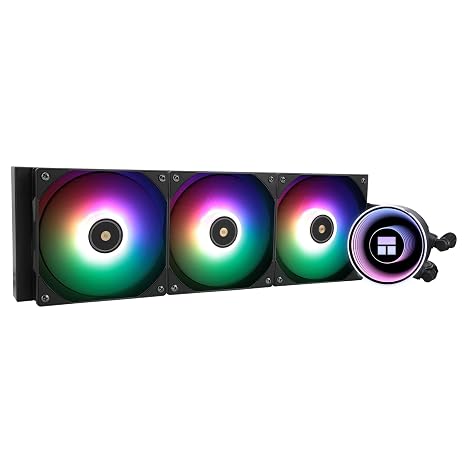
Thermalright’s Frozen Notte 360 Black ARGB V2 features a large 360mm radiator, making it an ideal choice for strong cooling without breaking the bank. It suits desktop users aiming for solid performance and reliable temperature control on their CPUs.
Its biggest strength lies in its combination of a full copper mirror base and three synchronized ARGB fans for effective heat dissipation.
Setting up involves a water block with a full copper base, ensuring good contact and heat transfer. The 450mm water conduit offers enough length for most builds, while the three attached 120mm ARGB fans keep airflow high at 72.37 CFM each. On a daily basis, the water pump speed of 5300 RPM quietly maintains circulation.
Users benefit from the woven protective water pipes, helping avoid wear and tear during regular use.
Performance-wise, it cools the CPU well thanks to the 360 specification black aluminum fin cold plate working alongside the copper base. Most praise focuses on its efficient cooling and quiet operation, alongside durable materials. On the downside, some mention the water pump’s noise at full speed as a potential issue in very quiet setups.
The build feels solid with good longevity components like the high polymer pipes and ARGB fans.
The strongest point about this cooler is how efficiently it manages CPU temperatures without much noise, thanks to the copper base and well-sized fans. The main complaint revolves around the water pump’s sound when pushed near maximum speed, which might distract in super-quiet environments.
Those who want powerful cooling in mid to large PC cases will appreciate this model’s size and performance. Users with compact builds or who prioritize minimal noise might look for a smaller or quieter alternative instead.
Pros
- Effective cooling with full copper mirror base
- Long water conduit fits most desktop builds
- Three synchronized ARGB 120mm fans included
- Durable high polymer protective water pipes
Cons
- Water pump noise noticeable at higher speeds
- Relatively large radiator may limit small cases
| Specification | Details |
|---|---|
| Water Pump Speed | 5300RPM ± 10% |
| Radiator Size | 397 * 120 * 27mm |
| Water Conduit Length | 450mm |
| Fan Size | 120mm ARGB |
| Air Flow Capacity | 72.37 cfm |
| Noise Level | 1 db |
Best Budget AIO Coolers Comparison Table
| Product | Cooling Method | Maximum Rotational Speed | Air Flow Capacity | Noise Level |
|---|---|---|---|---|
| ARCTIC Liquid Freezer III 360 | Liquid | 3000 rpm | 77 cfm | – |
| Thermalright Aqua Elite 360 ARGB | Water | 2000 rpm | 70.84 cfm | 29.8 db |
| MSI MAG Coreliquid A13 240 | Water | 5200 rpm | 60.78 cfm | 14.4 db |
| Thermalright Aqua Elite 120 V3 | Water | 1500 rpm | 66.17 cfm | 25.6 db |
| ARCTIC Liquid Freezer III 360 | Liquid | 3000 rpm | 77 cfm | – |
| Antec Skeleton 240 ARGB | Water | 2000 rpm | – | 32 db |
| Antec Ultra 360 ARGB | Water | 2600 rpm | 67.62 cfm | 33.05 db |
| CoolerMaster ML240L RGB V2 | Water | 1800 rpm | 62 cfm | 30 db |
| ARCTIC Liquid Freezer III 240 | Water | 1 rpm | 77 cfm | – |
| ARCTIC Liquid Freezer III 240 | Water | 3000 rpm | 77 cfm | – |
| ID-COOLING Frostflow X 240 | Water | 2500 rpm | – | 30 db |
| Thermalright Frozen Notte 360 ARGB | Air, Water | 1 rpm | 72.37 cfm | 1 db |
- Cooling MethodLiquid
- Maximum Rotational Speed3000 rpm
- Air Flow Capacity77 cfm
- Noise Level–
- Cooling MethodWater
- Maximum Rotational Speed2000 rpm
- Air Flow Capacity70.84 cfm
- Noise Level29.8 db
- Cooling MethodWater
- Maximum Rotational Speed5200 rpm
- Air Flow Capacity60.78 cfm
- Noise Level14.4 db
- Cooling MethodWater
- Maximum Rotational Speed1500 rpm
- Air Flow Capacity66.17 cfm
- Noise Level25.6 db
- Cooling MethodLiquid
- Maximum Rotational Speed3000 rpm
- Air Flow Capacity77 cfm
- Noise Level–
- Cooling MethodWater
- Maximum Rotational Speed2000 rpm
- Air Flow Capacity–
- Noise Level32 db
- Cooling MethodWater
- Maximum Rotational Speed2600 rpm
- Air Flow Capacity67.62 cfm
- Noise Level33.05 db
- Cooling MethodWater
- Maximum Rotational Speed1800 rpm
- Air Flow Capacity62 cfm
- Noise Level30 db
- Cooling MethodWater
- Maximum Rotational Speed1 rpm
- Air Flow Capacity77 cfm
- Noise Level–
- Cooling MethodWater
- Maximum Rotational Speed3000 rpm
- Air Flow Capacity77 cfm
- Noise Level–
- Cooling MethodWater
- Maximum Rotational Speed2500 rpm
- Air Flow Capacity–
- Noise Level30 db
- Cooling MethodAir, Water
- Maximum Rotational Speed1 rpm
- Air Flow Capacity72.37 cfm
- Noise Level1 db
How to Choose the Right Budget AIO Cooler
Cooling performance, noise levels, and build quality are essential factors to consider when selecting a budget AIO cooler. Choosing the right balance ensures efficient temperature control and quiet operation, preventing potential damage or costly replacements while maintaining a comfortable environment for your system.
Cooling Performance
Running a demanding game or a heavy rendering task puts a cooler’s efficiency to the test. The pump and radiator fans need to move heat away quickly to keep CPU temperatures stable.
A slow or weak pump often results in higher temps and thermal throttling, especially during long sessions. Radiators come in sizes like 120mm, 240mm, or 280mm, with bigger ones generally offering better heat dissipation but requiring enough case space.
A good cooler balances fan speed with pump flow rate. Fans rated around 1500 to 2000 RPM work well to provide airflow without excessive noise.
Pumps that maintain consistent speeds without pulsating noises are a sign of solid design. Matching the cooler to your CPU’s thermal design power (TDP) is essential; low-profile coolers struggle with high TDP chips, so check the specs for compatibility with CPUs that produce 95W or more.
Compatibility and Fit
Most coolers support common sockets like Intel’s LGA115x and AMD’s AM4, but few cover all current and legacy sockets without extra brackets. Radiator dimensions must align with your case’s mounting spots, popular sizes are 240mm or 280mm, but some small cases only fit 120mm units.
It’s frustrating when the radiator ends up hitting cables or components you didn’t account for.
Clearance around the CPU is often overlooked. Thick RAM modules with tall heat spreaders can be blocked if the cold plate or tubing sits too close.
Cases with tight layouts demand slim tubing and compact pump heads. Measure your motherboard and case interior beforehand, including how high your RAM sticks sit, to avoid compatibility issues during installation.
Noise Levels
Quiet operation becomes noticeable when the system idles for long periods. Fans spinning at full speed not only produce distraction but also wear down faster. Cooler fans that maintain below 30 dBA at idle create a much calmer environment.
At max load, loud fans breaking into 40+ dBA can fatigue users over time.
Pumps also generate a faint humming or buzz, sometimes amplifying vibrations. Higher quality pumps minimize this noise. Several models include PWM fan control or software to adjust fan curves, letting users tailor noise levels against performance demands.
Without control, fans often run at full speed unnecessarily, disrupting overall acoustics.
Build Quality and Materials
Tubing made from reinforced rubber or braided nylon tends to last longer and resist kinks better than cheap plastic options. Pumps with ceramic bearings often outlive those with cheaper ball bearings, leading to less risk of pump failure.
Radiator fins should be made from corrosion-resistant aluminum with solid welds to prevent leaks over time.
Fittings and clamps must be tight and well-machined; loose connections often cause leaks or coolant evaporations. Long-term reliability depends on materials that resist corrosion and chemical breakdown. Avoid coolers with visible glue or plastic parts that look fragile since these are potential weak points after months of operation.
Installation and Maintenance
Installation often requires patience, especially with backplates that aren’t pre-installed. Clear diagrams and all necessary screws and brackets save time.
Some coolers use standardized mounting, making crossings between Intel and AMD platforms simpler. The position of tubes, plus radiator mounting options, influence how easy it is to fit inside your case without awkward bends.
Maintenance varies little between sealed units, but accessible fan screws and radiator surfaces make cleaning dust straightforward. Unlike custom loops, these systems do not need refilling, avoiding leaks or fluid degradation concerns. Still, keeping fins clean improves cooling efficiency and extends pump life, so periodic dusting is recommended.
Proper Installation Techniques for Optimal Cooling Performance
Ensuring the best contact between the cooler’s cold plate and the CPU is crucial for effective heat transfer. Applying a pea-sized amount of thermal paste evenly avoids air gaps that reduce cooling efficiency. Mount the radiator in a position that allows good airflow, typically in front or top of the case, to prevent hot air recirculation.
Use the screws provided to secure the radiator firmly but avoid overtightening, which can warp the motherboard or damage mounting brackets. When connecting the pump and fan headers, keep cable management tidy to prevent tangling and allow unobstructed fan operation.
- Confirm radiator orientation so tubes are at the bottom or side to reduce pump noise and potential air bubbles
- Check fan direction to ensure they push hot air out of the case
- Tighten all connections securely to avoid coolant leaks
Following these installation details helps maintain consistent cooling performance and keeps noise levels manageable.
Routine Maintenance Tips to Extend the Lifespan of Your AIO Cooler
Dust buildup on radiator fins and fan blades reduces an AIO cooler’s efficiency by blocking airflow. Regular cleaning with compressed air or a soft brush prevents this problem.
Avoid spraying liquid directly on any electronics or coolant lines during cleaning.
Check the coolant lines periodically for any signs of leakage, hardening, or discoloration. While modern units rarely need coolant replacement, visible wear could affect cooling over time. Listen for unusual pump noises, which might indicate bearing wear or air trapped inside the system.
- Clean fans and radiator every 2-3 months depending on environmental dust levels
- Ensure fan screws remain tight after extended use to avoid vibration noise
- Monitor CPU temperatures regularly to spot any decline in cooling efficiency
Consistent maintenance helps extend the lifespan of the components and maintains stable system temperatures.
Comparing Budget AIO Coolers to Air Coolers: When to Choose Each
Budget AIO coolers provide straightforward installation and generally fit more compact builds where airflow space is limited. Their liquid cooling design offers even surface contact across the CPU’s heat spreader, which can improve cooling efficiency compared to standard air coolers.
Air coolers tend to be more durable with fewer parts that can fail over time. They are often quieter at lower loads since they can rely on passive heat dissipation and have simpler fan setups. Installation is usually less complex, though large air coolers can struggle to fit inside small cases and may block RAM slots.
- Choose a budget AIO cooler if space inside the case is tight or if you want cleaner cable routing
- Pick an air cooler for long-term reliability and slightly easier maintenance routines
- Assess your case size, noise preference, and budget constraints carefully before deciding
This clear comparison helps users select a cooling solution that matches their system needs and build style.
People Also Asked
How Do I Size a Budget AIO Cooler for My CPU?
Choose an AIO cooler that fits your CPU socket and matches your CPU’s heat output, typically measured in TDP. Checking the cooler’s size against your case space is important, as some budget models may have limited radiator size options.
What Are Common Problems with Budget AIO Coolers?
Common issues include pump noise, leaks, and less efficient cooling compared to premium models. Budget AIOs sometimes use lower quality tubing which can kink or degrade faster, so make sure installation avoids tight bends.
How Long Does a Budget AIO Cooler Usually Last?
Budget AIO coolers generally last between three to five years before performance drops or leaks start to appear. Keeping an eye on pump noise and coolant discoloration can help you catch problems early.
Is It Safe to Install a Budget AIO Cooler Myself?
Installing a budget AIO cooler is generally safe if you carefully follow the included instructions and use the proper mounting hardware. Taking time to apply thermal paste evenly will improve cooling performance and avoid hotspots.
How Do I Maintain and Clean My Budget AIO Cooler?
Regularly cleaning the radiator fins with compressed air and checking for dust buildup on fans keeps the cooler running efficiently. Avoid disassembling the cooler itself as this may void warranty and cause leaks.
Conclusion
Choosing a budget AIO cooler means focusing on key factors: compatibility with your CPU and case, sufficient cooling performance for your needs, and quiet operation. Pay attention to radiator size and fan quality since they directly affect cooling efficiency and noise levels. Also, consider the ease of installation to avoid extra hassle.
Keep your case dimensions and your budget in mind to avoid buying a cooler that won’t fit or is overkill for your setup. To keep your system for a while, prioritize durability and warranty. Check the comparison table and earlier picks to find a cooler that fits your requirements without overspending.

I’m Grant Mitchell, a firearms and hunting writer with years of experience at the range and in the field. I write about rifles, shotguns, handguns, optics, safe storage, cleaning, and responsible ownership, along with practical hunting tips. My goal is to share accurate, safety-first information that helps you choose the right firearm, maintain it properly, and become a more confident shooter.