Top 12 Best Be Quiet CPU Cooler That Will Blow Your Mind
Many people who invest in a computer struggle with noise and heat issues caused by subpar cooling solutions. The best be quiet cpu cooler solves this problem by reducing fan noise without sacrificing cooling efficiency, which is crucial when running demanding applications or games that push the processor hard.
A noisy cooler can drown out other sounds and become an annoying distraction during work or entertainment.
A good quiet CPU cooler relies on several key features: quality materials like copper heat pipes and dense aluminum fins for effective heat dissipation, balanced fan size and speed to keep noise low while moving enough air, and compatibility with common CPU sockets and case sizes. Efficient coolers typically use fan speeds between 1000 and 1500 RPM to stay quiet while keeping temperatures safely under 75°C during heavy use.
Ease of installation and cleaning also plays a practical role in maintaining performance over time.
Need a Quick Check?
| Image | Product | Price |
|---|---|---|
Our Top Picks 1  | be quiet! Dark Rock 5 | Check Price |
Our Top Picks 2  | be quiet! Pure Rock Low | Check Price |
Our Top Picks 3  | be quiet! Pure Loop 3 | Check Price |
Our Selected Top 12 Be Quiet Cpu Cooler for Every Budget
This list features carefully chosen CPU coolers suitable for a range of budgets and needs. Each review explains how well the cooler performs, highlights its advantages and disadvantages, and identifies the types of users or builds it best supports.
1. Be Quiet! Dark Rock 5 CPU Cooler
Dark Rock 5 is a high-performance air cooler designed for those who want quiet operation without compromising on cooling power. It suits users running demanding workloads who need a reliable solution that stays cool and quiet under pressure.
Setting it up is straightforward with compatibility across many Intel and AMD sockets like AM4 and 1200. The Silent Wings 4 fan runs quietly thanks to its fluid-dynamic bearing and rubberized frame which reduces vibrations.
Daily use means low noise output even when the fan spins up to 2100 rpm, and the unique black ceramic coating helps keep the heat transfer efficient.
Cooling is solid with six copper heat pipes working through a dense aluminum fin array to handle up to 210 watts of power. The cooler feels well-built and substantial, with the main praise highlighting its quietness and strong air pressure.
Some mention the fan speed can be noticeable if pushed hard, but overall it balances noise and performance effectively.
Quiet performance stands out thanks to the fluid-dynamic bearing fan and tight blade clearance, but the fan noise becomes more noticeable at full speed. The cooler handles heavy workloads reliably without overheating, while the solid build feels premium and effective.
People needing a quiet, powerful air cooler for intensive tasks will find it a great match. Those with tight space inside smaller cases or seeking an ultra-compact cooler might want to consider smaller alternatives instead.
Pros
- Quiet operation with vibration-reducing fan frame
- Strong air pressure for efficient cooling
- Broad compatibility with Intel and AMD sockets
- Durable build with heat-optimized ceramic coating
Cons
- Fan noise can increase at maximum speed
- Large size may limit case compatibility
| Specification | Details |
|---|---|
| Cooling Method | Air |
| Compatible Devices | Intel sockets: 1851/1700/1200/1151/1150/1155, AMD sockets: AM5/AM4 |
| Noise Level | 29.8 db |
| Maximum Rotational Speed | 2100 rpm |
| Air Flow Capacity | 55 cfm |
| Power Connector Type | 4-Pin |
2. Be Quiet! Pure Rock Low Profile CPU Cooler
Finding a CPU cooler that fits in tight spaces without making too much noise can be tricky. Perfect for small form factor builds, this one stands out for its extremely compact height of just 45mm. It suits you well when case clearance is limited, delivering quiet performance without compromising on compatibility.
Installation is straightforward across many Intel and AMD sockets including the latest AM5 and Intel 1700. The included 92mm fan runs quietly at a maximum speed of 2500 rpm, consuming just 4.2 watts while pushing 33 cubic feet per minute of airflow. Daily operation means your system stays cool without sounding loud, thanks to the fan’s 30.6dB noise level.
Cooling performance meets the needs of mid-range CPUs, holding temperatures down reliably in small builds. The cooler’s build feels solid, with a focus on compactness rather than extreme thermal capacity.
Most praise highlights the effective quiet operation, while a frequent drawback noted is the limited cooling power for high TDP processors.
The be quiet! Pure Rock Low Profile CPU Cooler is praised for fitting easily into small cases thanks to its 45mm height. It keeps temperatures stable without much noise, running at a quiet 30.6dB(A). Some mention that the cooling could be better on high-end processors, especially under heavy loads, where it might not be enough for serious overclocking.
Compact PC builders and those with limited space will appreciate this cooler’s size and quiet operation. It works well for standard CPUs in small form factor setups. Systems with high power or heavy overclocking needs should look for a larger cooler with more heat dissipation capacity.
Pros
- Extremely compact height fits most small cases
- Quiet operation at only 30.6 dB(A)
- Supports both Intel and AMD sockets
- Low power consumption of 4.2 watts
Cons
- Cooling capacity limited for high-performance CPUs
- Fan speed can reach 2500 rpm, which might be noticeable
| Specification | Details |
|---|---|
| Socket Compatibility Intel | 1700 / 1200 / 1150 / 1151 / 1155 |
| Socket Compatibility AMD | AM5 / AM4 |
| Height | 45 mm |
| Fan Size | 92 mm |
| Maximum Noise Level | 30.6 dB(A) |
| Air Flow Capacity | 33 cfm |
3. Be Quiet! Pure Loop 3 240mm AiO Water Cooler
Immense cooling power paired with whisper-quiet operation suits those running demanding applications on Intel or AMD CPUs. The standout feature is its powerful PWM pump combined with two high-speed 120mm fans that keep temperatures low without much noise.
Setting it up on compatible Intel and AMD sockets is straightforward, and the pump’s 6-pole 3-phase motor runs smoothly, maintaining silence during daily tasks and heavy loads. Fans handle the radiator with consistent speed thanks to their closed loop motor function, making airflow steady regardless of water resistance or dust buildup.
Cooling performance stays strong even during peak CPU performance, reflecting the 59.6 CFM airflow and 2100 RPM fan speed. The build quality feels solid, especially the quiet pump design.
Praise focuses on its silent operation, while noise levels can peak around 36.8 dB under heavy load according to users.
The pump operates quietly due to its 6-pole 3-phase motor, praised for smooth, low-noise cooling during peak CPU use. The most common complaint notes that noise can rise as fans reach their maximum 2100 rpm speed, especially under heavier workloads.
This cooler suits users prioritizing low noise and strong thermal management for high-performance CPUs. Those seeking ultra-quiet operation at all times may want to consider a model with lower max fan speeds or passive cooling features instead.
Pros
- Quiet pump with smooth 6-pole 3-phase motor
- Two 120mm PWM fans with closed loop motor function
- Strong cooling for demanding applications
- Compatible with recent Intel and AMD sockets
Cons
- Noise level can reach 36.8 dB under full load
- Fans run up to 2100 rpm, which might be loud for some
| Specification | Details |
|---|---|
| Cooling Method | Water |
| Voltage | 12 V |
| Wattage | 5.4 W |
| Maximum Rotational Speed | 2100 rpm |
| Noise Level | 36.8 dB |
| Air Flow Capacity | 59.6 cfm |
4. Be Quiet! Light Loop 360mm CPU Liquid Cooler

Great for PC builders who want strong cooling and eye-catching lighting, the Light Loop 360mm is a water cooler that stands out with its unique LED setup. Its biggest strength lies in pairing effective cooling with customizable looks that make your build pop.
Installation is straightforward thanks to compatibility with popular Intel and AMD sockets. The three 120mm PWM fans run at speeds up to 2100 rpm, making it easy to manage noise and airflow dynamically.
The water cooling method keeps components cool without taking up much space, while the individual LEDs on the fans add a personal touch to your rig’s aesthetics.
Cooling performance is solid with a maximum airflow of 61.8 cfm, keeping high-demand CPUs in check. The build quality feels sturdy, especially the illuminated cooling block and fans.
The standout praise centers on the impressive lighting system, although some mention the noise level reaching 36.8 dB as a downside during heavy loads.
The cooler is frequently praised for its vibrant lighting and solid cooling performance, balancing visual appeal with effective heat management. Some users note that the higher noise level and power consumption may be more noticeable during intensive tasks.
Those who prioritize a visually striking build with reliable cooling will find it suits their needs well. Users who prefer near-silent operation might want to consider alternatives with lower noise output.
Pros
- Strong airflow with three high-speed 120mm fans
- Numerous LEDs provide customizable lighting effects
- Compatible with a wide range of Intel and AMD sockets
- Effective water cooling method for better thermal management
Cons
- Noise level can reach 36.8 dB under load
- Higher power draw of 5.4 watts
| Specification | Details |
|---|---|
| Compatible Devices | Intel sockets: 1851/1700/1200/1151/1150/1155, AMD sockets: AM5/AM4 |
| Maximum Rotational Speed | 2100 rpm |
| Air Flow Capacity | 61.8 cfm |
| Noise Level | 36.8 db |
| Voltage | 12 volts |
| Power Connector Type | 4-Pin |
5. Be Quiet! Silent Loop 3 360mm AiO Liquid Cooler
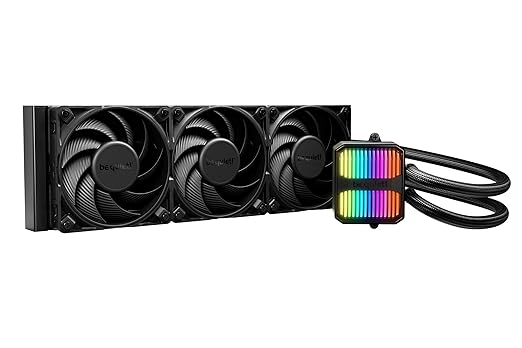
Powerful cooling performance combined with near-silent operation makes the be quiet! Silent Loop 3 360mm ideal for high-end builds. It suits anyone who wants solid temperature control without loud fan noise, especially with Threadripper support included.
Its quiet pump and fans really set it apart from other liquid coolers.
Setup involves mounting the wide CPU plate that fits a variety of Intel and AMD sockets, including Threadripper. The adjustable pump helps reduce noise by managing turbulence. Three 120mm PWM fans run quietly even at higher speeds thanks to special radiator corner mounts.
Day-to-day, it stays pretty quiet while keeping CPU temperatures well under control.
Cooling feels consistent thanks to the engineered cooling block and powerful 3-chamber pump design. Build quality is solid with a focus on durability and low noise, featuring a dampened 6-pole motor. The biggest praise in reviews centers on how quietly it operates, while the main complaint is the higher noise when fans spin at their 2500 rpm max.
Quiet operation impresses most users, especially thanks to the reduced turbulence from the pump design. However, the noise climbs noticeably when fans approach their 2500 rpm limit, which some find distracting.
This cooler works great for people prioritizing silent performance without sacrificing power, especially for demanding CPUs. Those sensitive to higher fan noise might want to consider alternatives with lower max speeds.
Pros
- Very quiet operation even under load
- Wide compatibility including Threadripper sockets
- Adjustable, low-noise 3-chamber pump design
- High cooling power with large 360mm radiator
Cons
- Fans can get loud at maximum speed
- Relatively high noise level at 38.8 db top speed
| Specification | Details |
|---|---|
| Cooling Method | Water |
| Voltage | 12 volts |
| Power Connector Type | 4-Pin |
| Maximum Rotational Speed | 2500 rpm |
| Noise Level | 38.8 db |
| Compatible Sockets | Intel 1851/1700/1200/1151/1150/1155, AMD AM5/AM4/TR5/TR4 |
6. Be Quiet! Light Loop IO LCD 240mm Liquid Cooler

be quiet! Light Loop IO LCD 240mm Liquid Cooler stands out for delivering powerful cooling with nearly silent operation, perfect for anyone wanting efficient temperature control and quiet performance. Its unique 2.1-inch IPS display showing system stats or custom visuals adds a personal touch to any build.
Setting up the cooler is straightforward, with two daisy-chained Light Wings LX PWM fans simplifying cable management. These fans work quietly while offering strong airflow due to their nine blade design.
The pump and cold plate run smoothly, keeping noise levels low even when the CPU is under heavy load. Customizing the LCD display is a neat bonus for checking temps and adding some style.
Heat dissipation stays impressive thanks to a dense fin stack and a precision metal jet plate boosting coolant flow. The cooler handles high workloads without loud noise, living up to be quiet!’s reputation.
Positive feedback highlights its quiet performance and cooling efficiency, though some mention the noise level can peak around 45.6 dB under heavy stress, which might be noticeable in very quiet rooms.
Quiet operation is the standout feature paired with effective cooling, praised for keeping noise low despite a maximum noise rating of 45.6 dB, which some find audible when the fans spin at full speed. The customizable LCD adds a unique touch without negatively affecting basic performance.
People who value quiet, liquid cooling with a bit of personalization will enjoy this cooler. Those needing broader socket compatibility or absolute silence in very quiet environments might want to look for alternatives with lower maximum noise ratings or wider CPU support.
Pros
- Quiet operation even under heavy CPU load
- Customizable 2.1-inch IPS display with vivid visuals
- Strong cooling from optimized jet plate and dense fins
- Two daisy-chained PWM fans reduce cable clutter
Cons
- Noise level can reach 45.6 dB at max speed
- Limited compatibility to select Intel and AMD sockets
| Specification | Details |
|---|---|
| Cooling Method | Water |
| Compatible Devices | Intel: 1851 / 1700 / 1200 / 1150 / 1151 / 1155 AMD: AM5 / AM4 |
| Noise Level | 45.6 db |
| Maximum Rotational Speed | 2100 rpm |
| Power Connector Type | 4-Pin |
7. Be Quiet! Pure Rock 2 FX CPU Cooler

Quiet operation while keeping temperatures low makes this cooler a solid choice for anyone building a mid-range gaming or productivity PC. It fits a variety of Intel and AMD sockets and handles heat up to 150W without getting loud, which is its biggest strength.
Installation is straightforward and the asymmetrical design makes sure your RAM slots stay clear. The 120mm PWM fan adjusts speeds based on workload, keeping noise levels down during daily tasks.
The ARGB lighting adds a subtle personal touch without becoming distracting. Cleaning is simple thanks to the accessible fan design.
Four heat pipes use direct touch technology to pull heat quickly from the CPU, paired with optimized fan blades that balance airflow and silence well. The black finish looks good inside most cases.
A common complaint is that it’s not suited for very high TDP processors, but it does its stated 150W job reliably and quietly.
Cooling efficiency and silence impress most users, suited well for 150W CPUs, though some find the noise rises at peak fan speeds. The direct heat pipe design and airflow-optimized fan blades keep temperatures stable while minimizing turbulence noise.
Creates a quiet environment for everyday computing and gaming on compatible systems. Ideal for moderate CPU loads rather than extreme overclocking or high-TDP processors that require stronger cooling solutions.
Pros
- Runs quietly even at higher fan speeds
- Does not block memory slots
- ARGB lighting adds subtle visual flair
- Compatible with many Intel and AMD sockets
Cons
- Supports up to 150W TDP only
- Fan noise noticeable at maximum speed
| Specification | Details |
|---|---|
| Socket compatibility Intel | 1700 / 1200 / 2066 / 1150 / 1151 / 1155 / 2011(-3) Square ILM |
| Socket compatibility AMD | AM5 / AM4 |
| Cooling Method | Air |
| Noise Level | 24.4 db |
| Maximum Rotational Speed | 2000 rpm |
| Air Flow Capacity | 42.6 cfm |
8. Be Quiet! Shadow Rock LP CPU Cooler

Great cooling power in a compact size makes the be quiet! Shadow Rock LP perfect for small desktop builds that need quiet operation. It handles up to 130W TDP, so it suits mid-range CPUs without taking up much space or generating much noise.
Installation is straightforward, fitting well into compact cases thanks to its low profile. The 120mm Pure Wings 2 PWM fan runs quietly at speeds up to 1500 rpm, balancing airflow and silence with nine special blades designed to reduce noise turbulence.
Regular use keeps temperatures in check without drawing too much attention.
Heating is managed by four 6mm heat pipes that quickly spread heat across the fins, offering solid performance for limited space. The build feels sturdy and well-made, using quality materials to ensure reliability. Praise often points to its quiet operation, while the main downside is the cooler’s noise level at maximum fan speed, which can reach 25.5 dB.
The quietness during regular use stands out with the specially designed 120mm fan, though noise can become noticeable when the fan spins at its maximum speed of 1500 rpm. The heat pipes effectively spread heat, ensuring steady performance without overheating in a cramped system.
Those building compact desktops with mid-range CPUs will find this cooler suits their needs well, providing a balance of silence and cooling power. Users seeking cooling for high-performance or overclocked processors might want a larger cooling solution with higher TDP capability.
Pros
- Compact size fits tight spaces easily
- Quiet operation at normal fan speeds
- Good cooling capacity for 130W TDP CPUs
- Durable build with efficient heat pipes
Cons
- Noise rises to 25.5 dB at full speed
- Limited to medium TDP processors
| Specification | Details |
|---|---|
| Power Connector Type | 4-Pin |
| Voltage | 12 volts |
| Wattage | 2.4 watts |
| Noise Level | 25.5 dB |
| Maximum Rotational Speed | 1500 rpm |
| Air Flow Capacity | 51.4 cfm |
9. Be Quiet! Pure Loop 2 FX 360mm Liquid Cooler Bundle

Aluminum construction and a large 360mm radiator make this liquid cooler a solid choice for those building quiet, high-performance PCs. The Pure Loop 2 FX 360mm Liquid Cooler is best suited for users who want strong cooling power paired with customizable ARGB lighting across their setup.
Installation includes hooking up three Light Wings 120mm PWM fans along with the ARGB-PWM hub, which controls both lighting and fan speed for up to six components. These fans have noise-optimized blades that keep most turbulence quiet while still pushing good airflow through the radiator. Daily operation is smooth, with fan speeds adjusting automatically based on temperature to balance cool running and low sound.
Cooling performance is reliable, handling heat without getting loud thanks to its well-engineered fan blades designed for high static pressure. Build quality feels sturdy, especially the radiator and connections, making it dependable for daily use.
The lighting setup stands out with 18 LEDs per fan offering many customizable modes; however, some users note complexity in managing the ARGB hub. A common complaint is that the size requires sufficient case space, which might limit fit in smaller setups.
Reviews praise the quiet operation and strong cooling thanks to the nine silence-optimized blades on each fan. The most common issue reported involves the ARGB hub, which some find complicated to set up or sync correctly with other components.
Builders with enough case clearance and an interest in vibrant lighting effects will find this cooler satisfying. Those with smaller cases or who want simple lighting controls might consider more compact or straightforward models instead.
Pros
- Quiet operation with optimized fan blades
- Customizable ARGB lighting on all fans
- Includes ARGB-PWM hub for easy synchronization
- Strong static pressure ideal for radiators
Cons
- Large size requires ample case space
- ARGB hub can be tricky to configure
| Specification | Details |
|---|---|
| Cooling Method | Liquid |
| Power Connector Type | 4-Pin |
| Compatible Devices | Radiator |
| Fans Included | 3 x Light Wings 120mm PWM |
| Lighting | ARGB with 18 LEDs per fan |
10. Be Quiet! Shadow Rock Slim 2 CPU Cooler

Impressive quietness stands out immediately with the be quiet! Shadow Rock Slim 2, ideal for anyone wanting solid cooling without distracting noise. It fits well in compact builds while managing a strong 160W TDP, making it a great choice for mid-range desktop setups.
Its slim profile and quiet operation are its biggest strengths.
Installation feels straightforward thanks to the optimized mounting kit designed to align perfectly with airflow in your case. The fan runs up to 1400 rpm but stays quietly noticeable at just 23.7 dB.
You won’t struggle with fitting it on compatible sockets like AM4 or the various Intel platforms, and the 4 heat pipes do their part daily to maintain good temperatures.
Cooling power proves reliable, keeping CPUs well within safe limits even under load. Four 6mm heat pipes with HDT technology ensure efficient heat transfer.
The cooler is solidly built with a 4-pin connector and operates at a low wattage of 1.32, which helps keep power consumption minimal. Most praise highlights how quietly it works, while some point out it’s not the best for extreme overclocking setups.
Quietness ranks as the strongest attribute, praised frequently for keeping noise under control during daily tasks. Most often mentioned drawback is that it may not handle very high-end overclocking heat loads effectively.
Great for users wanting a quiet and efficient cooler without bulky dimensions. Those planning heavy overclocking or needing maximum cooling power might want to explore alternatives with higher specs.
Pros
- Very quiet operation at 23.7 dB
- Compatible with many Intel and AMD sockets
- Compact size fits in narrow spaces
- Efficient cooling with HDT heat pipes
Cons
- Not ideal for extreme overclocking
- Fan speed capped at 1400 rpm
| Specification | Details |
|---|---|
| Cooling Capacity | 160W TDP |
| Noise Level | 23.7 dB |
| Maximum Rotational Speed | 1400 rpm |
| Air Flow Capacity | 86.3 cfm |
| Power Connector Type | 4-Pin |
11. Be Quiet! Pure Loop 360mm AiO Water Cooler

Great for anyone wanting powerful cooling without a lot of noise, the be quiet! Pure Loop 360mm AiO Water Cooler stands out with its quiet operation and solid liquid cooling performance.
Perfect for high-end Intel or AMD builds needing extra heat management without the typical fan racket.
Setting it up is straightforward with compatibility across multiple Intel and AMD sockets, making it flexible for various builds. The doubly decoupled pump runs softly and barely vibrates, while the Pure Wings 2 120mm fans balance quietness and airflow effectively. The all-black design with subtle white LED lights adds a clean look inside the case.
It cools impressively well, keeping components at safe temperatures under load, and the build feels solid with aluminum-style styling that doesn’t come off cheap. The strongest praise revolves around its quietness and low vibration during operation.
On the downside, noise can reach 40.5 dB at max speed, which some might still notice in quiet rooms.
The quiet operation and low vibration from the doubly decoupled pump are praised for maintaining silence during heavy use. Some users mention the fan noise rising to 40.5 dB at full speed as the main downside, especially in quieter environments.
Anyone building a powerful system and prioritizing low noise will appreciate this cooler. Buyers with limited case space or strict noise sensitivity at maximum fan speeds might want to consider other options.
Pros
- Very quiet operation with minimal vibration
- Strong cooling performance for high-end CPUs
- Compatible with a broad range of Intel and AMD sockets
- Stylish all-black design with subtle white LED
Cons
- Noise level can be noticeable at maximum fan speed
- Requires space for a 360mm radiator
| Specification | Details |
|---|---|
| Cooling Method | Liquid |
| Compatible Devices | Intel: 1150 / 1151 / 1155 / 1200 / 2011(-3) square ILM / 2066; AMD: AM3(+) / AM4 |
| Power Connector Type | 4-Pin |
| Voltage | 12 volts |
| Noise Level | 40.5 db |
| Maximum Rotational Speed | 1800 rpm |
12. Be Quiet! Silent Loop 2 240mm Liquid Cooler

Keeping your CPU cool without drowning out the rest of your setup can be tricky. A liquid cooler designed for desktop systems, this one is great for anyone wanting strong cooling power with very little noise.
Its whisper-quiet operation stands out as the main benefit for those who value silence and efficiency.
Setting it up involves mounting a 240mm radiator and connecting the water-cooling system to your CPU. The pump’s 3-chamber design and dampening system reduce vibrations, making it quiet during daily use.
It runs smoothly on a 6-pin power connector and maintains low noise even when the fan spins up to 1800 rpm. Routine cleaning mainly involves checking the radiator and fans for dust.
Performance-wise, the cooler handles heat effectively, thanks to its water-based method and airflow capacity of 73.4 cfm. The build quality feels solid, with the pump designed to limit resonance and keep noise down. The best part is how silent it remains during heavy use.
Some find the 36.5 dB noise level noticeable in very quiet rooms, which is the main downside reported.
The quietness during heavy use is highly praised, partly due to the pump’s dampening system and 3-chamber design that limits vibrations. A common drawback is that despite being quiet, some users notice the 36.5 dB noise level in very silent environments.
People who prioritize low noise and efficient cooling will be pleased with this cooler. Those with smaller cases or who want absolute silence without any fan noise might want to look for alternatives.
Pros
- Quiet operation even under load
- Effective water cooling method
- Minimal pump vibration
- Good airflow with 240mm radiator
Cons
- 36.5 dB noise noticeable in very quiet rooms
- Requires space for large radiator installation
| Specification | Details |
|---|---|
| Power Connector Type | 6-Pin |
| Voltage | 12 volts |
| Wattage | 1.92 watts |
| Noise Level | 36.5 db |
| Maximum Rotational Speed | 1800 rpm |
| Air Flow Capacity | 73.4 cfm |
Best Be Quiet CPU Coolers Comparison Table
| Product | Cooling Method | Compatible Devices | Noise Level | Maximum Rotational Speed |
|---|---|---|---|---|
| be quiet! Dark Rock 5 | Air | Intel & AMD sockets | 29.8 db | 2100 rpm |
| be quiet! Pure Rock Low | Air | Intel & AMD sockets | 30.6 db | 2500 rpm |
| be quiet! Pure Loop 3 | Water | Intel & AMD sockets | 36.8 db | 2100 rpm |
| be quiet! Light Loop 360mm | Water | Intel & AMD sockets | 36.8 db | 2100 rpm |
| be quiet! Silent Loop 3 | Water | Intel & AMD & TR sockets | 38.8 db | 2500 rpm |
| be quiet! Light Loop IO | Water | Intel & AMD sockets | 45.6 db | 2100 rpm |
| be quiet! Pure Rock 2 | Air | Desktop LGA1851 socket | 24.4 db | 2000 rpm |
| be quiet! Shadow Rock LP | Fan | Desktop | 25.5 db | 1500 rpm |
| be quiet! Pure Loop 2 | Liquid | Radiator | – | – |
| be quiet! Shadow Rock Slim | Fan | Desktop | 23.7 db | 1400 rpm |
| be quiet! Pure Loop 360mm | Liquid | Intel & AMD sockets | 40.5 db | 1800 rpm |
| be quiet! Silent Loop 2 | Water | Desktop | 36.5 db | 1800 rpm |
- Cooling MethodAir
- Compatible DevicesIntel & AMD sockets
- Noise Level29.8 db
- Maximum Rotational Speed2100 rpm
- Cooling MethodAir
- Compatible DevicesIntel & AMD sockets
- Noise Level30.6 db
- Maximum Rotational Speed2500 rpm
- Cooling MethodWater
- Compatible DevicesIntel & AMD sockets
- Noise Level36.8 db
- Maximum Rotational Speed2100 rpm
- Cooling MethodWater
- Compatible DevicesIntel & AMD sockets
- Noise Level36.8 db
- Maximum Rotational Speed2100 rpm
- Cooling MethodWater
- Compatible DevicesIntel & AMD & TR sockets
- Noise Level38.8 db
- Maximum Rotational Speed2500 rpm
- Cooling MethodWater
- Compatible DevicesIntel & AMD sockets
- Noise Level45.6 db
- Maximum Rotational Speed2100 rpm
- Cooling MethodAir
- Compatible DevicesDesktop LGA1851 socket
- Noise Level24.4 db
- Maximum Rotational Speed2000 rpm
- Cooling MethodFan
- Compatible DevicesDesktop
- Noise Level25.5 db
- Maximum Rotational Speed1500 rpm
- Cooling MethodLiquid
- Compatible DevicesRadiator
- Noise Level–
- Maximum Rotational Speed–
- Cooling MethodFan
- Compatible DevicesDesktop
- Noise Level23.7 db
- Maximum Rotational Speed1400 rpm
- Cooling MethodLiquid
- Compatible DevicesIntel & AMD sockets
- Noise Level40.5 db
- Maximum Rotational Speed1800 rpm
- Cooling MethodWater
- Compatible DevicesDesktop
- Noise Level36.5 db
- Maximum Rotational Speed1800 rpm
How to Choose the Best Be Quiet CPU Cooler
Choosing a good CPU cooler depends on factors like size compatibility, cooling performance, and noise levels. Getting these right ensures effective temperature control without unnecessary upgrades or replacements, saving money and preventing overheating issues that could harm your system’s lifespan.
Cooling Performance
Some CPU coolers run perfectly fine at idle but struggle under heavy loads, causing higher temperatures and potential thermal throttling. The efficiency of heat dissipation varies widely depending on the cooler’s design and thermal interface material.
A good cooler in daily use keeps the CPU temperature stable during gaming or rendering, avoiding unnecessary slowdowns or fan noise spikes.
Quality thermal pads or pastes improve heat transfer between the CPU and the cooler’s base. Look for models that come with pre-applied thermal paste or include high-quality compounds like thermal grease with low thermal resistance. The fan’s airflow capacity, measured in CFM, and its speed control also matter.
Fans with PWM control adjust smoothly to workload changes, striking a balance between noise and cooling. A fan speed range from around 400 to 1500 RPM usually handles both quiet idle and heavier load scenarios well.
Size and Compatibility
Large coolers can run into clearance issues in many mid-tower cases or smaller builds, blocking RAM slots or fitting awkwardly near tall VRM heatsinks. Clearance problems lead to installation headaches and sometimes force users to choose low-profile RAM or sacrifice airflow. Measuring the cooler’s height, usually between 120mm and 160mm for popular models, helps ensure a proper fit.
Compatibility with the CPU socket is another critical factor for practical use. The cooler should support common sockets like Intel LGA 1200/1700 and AMD AM4 without additional brackets or modifications. The mounting system must not interfere with motherboard components, especially around RAM slots or PCIe connectors.
A model with adjustable mounting brackets can accommodate various board layouts more easily.
Noise Levels
Some coolers produce a constant hum or annoying whine as their fans ramp up, which becomes distracting during quiet tasks like reading or coding. Decibel levels are crucial, a quieter cooler typically stays below 25 dB at idle and 35 dB at full load.
Fans with fluid dynamic or rifle bearings tend to generate less noise and last longer than sleeve bearings.
Vibration dampening features, such as rubber pads or mounts, reduce the rattling effects that can amplify perceived noise. The fan blade design also impacts how smoothly air flows without creating turbulent noise.
Blades shaped for optimized airflow and pressure help maintain cooling while keeping noise in check.
Build Quality and Materials
Coolers using copper heat pipes paired with aluminum fins usually transfer heat effectively and resist warping over time. The quality of these materials affects thermal conductivity and mechanical stability.
Well-made fans feature sturdy frames and reliable bearings, which help avoid wobbling or early failure during regular use.
A solid mounting mechanism ensures the cooler stays firmly attached without loosening after months of use. Metal clips or screw mounts provide better durability than plastic snap-ins.
Corrosion resistance is notable in anodized aluminum fins and nickel-plated copper heat pipes, which extend the cooler’s lifespan, especially in humid environments.
Installation and Maintenance
Installing some CPU coolers can be a frustrating process requiring extra tools or unclear instructions, resulting in uneven contact or insecure mounting. A user-friendly model allows mounting and securing the cooler with basic tools, often just a screwdriver.
Clear, step-by-step instructions with illustrations or videos make the process much smoother.
Routine cleaning is necessary to prevent dust build-up, which blocks airflow and reduces cooling efficiency. Coolers with easily removable fans or open fin stacks simplify access for dust removal.
Designs that allow fans to detach without removing the entire cooler save time and effort during maintenance.
Optimizing CPU Cooler Performance with Proper Installation Techniques
Proper installation of a CPU cooler significantly impacts its cooling efficiency and noise levels. Before attaching the Be Quiet CPU cooler, clean the CPU surface thoroughly to remove old thermal paste.
Using a high-quality thermal paste applied in a thin, even layer ensures optimal heat transfer. Mount the cooler firmly but avoid over-tightening screws as this might damage the motherboard or the cooler base.
Position the cooler so that airflow aligns with the case ventilation system. This reduces hotspots and helps maintain steady airflow through the case. Cable management around the cooler also matters; avoiding blocked fan blades prevents noise caused by vibration and premature wear.
Double-check the cooler’s fan orientation after installation and run a stress test to confirm stable temperatures and quiet operation.
- Use the included mounting hardware for a secure fit.
- Apply thermal paste sparingly to avoid spillover.
- Align fan blades with overall case airflow direction.
- Keep cables away from moving parts.
Essential Maintenance Tips to Prolong the Lifespan of Your Be Quiet CPU Cooler
Regular maintenance keeps the Be Quiet CPU cooler running quietly and efficiently for years. Dust buildup on fan blades and heatsink fins reduces airflow and forces the fan to work harder, increasing noise and temperature.
Use compressed air or a soft brush to clean these parts every few months, depending on the environment.
Check fan bearings occasionally by spinning the fan manually. Any resistance or grinding noise indicates wear and may require fan replacement.
Inspect mounting components for looseness since vibrations can gradually loosen screws, leading to less effective contact with the CPU.
- Clean fan blades and heatsink fins regularly.
- Inspect the fan for bearing wear by spinning manually.
- Tighten screws to maintain firm cooler mounting.
- Replace thermal paste every couple of years.
Maintaining these points ensures stable cooling performance without added noise.
Comparing Air Cooling and Liquid Cooling Alternatives for Silent PC Builds
Choosing between air cooling and liquid cooling depends on priorities like noise level, maintenance, and system complexity. Air coolers such as those from Be Quiet are straightforward to install, require less upkeep, and generally provide reliable quiet cooling for most CPU loads.
Liquid coolers can offer lower temperatures especially under heavy loads and often feature quieter operation at idle due to larger radiators and slower fan speeds. However, they involve more complex installation and potential risks of leaks. Maintenance also tends to be more involved compared to air coolers.
- Air coolers offer ease of installation and low maintenance.
- Liquid cooling handles high thermal loads better but requires careful setup.
- Air coolers like Be Quiet models maintain good quiet performance under typical use.
- Liquid cooling suits overclocked or very high TDP CPUs for sustained cooling.
For silent PC builds aiming for balance, a high-quality air cooler is usually sufficient and simpler to manage.
People Also Asked
How Do I Install This CPU Cooler Safely and Correctly?
Apply the thermal paste provided or recommended before mounting the cooler on the CPU. Secure the cooler firmly but avoid overtightening the screws to prevent damage. Follow the installation manual step-by-step, and make sure the fan cable is connected to the right CPU fan header on your motherboard.
Is This CPU Cooler Compatible with My Motherboard and Case?
The be quiet CPU coolers usually support a wide range of Intel and AMD sockets, but check your motherboard’s CPU socket type to confirm. Also, measure your case clearance to ensure the cooler will fit without hitting the RAM or side panel. Checking these specifics beforehand avoids installation hassle.
How Long Does This Type of CPU Cooler Usually Last?
These coolers often last several years under normal use, generally around 5 to 7 years or more. Over time, fan bearings may wear out, leading to noise or lower performance, so listening for any unusual sound is a practical way to judge when replacement is needed.
What Are Common Problems with This CPU Cooler and Solutions?
Common issues include noisy fans due to dust buildup or bearings wearing out, and poor cooling performance linked to improper mounting or dried thermal paste. Cleaning the fan blades and replacing the thermal paste every couple of years can keep the cooler running smoothly.
Do I Need to Clean and Maintain This CPU Cooler Regularly?
Cleaning and maintaining the cooler regularly is important to prevent dust buildup that reduces airflow and cooling efficiency. Carefully use compressed air on the fan and heatsink every few months, especially if your PC is in a dusty environment. This keeps temperatures low and prolongs fan life.
Conclusion
Choosing the right be quiet CPU cooler comes down to noise level, cooling performance, and compatibility with your case and CPU. Quiet operation matters most for a calm workspace, while cooling power ensures your processor stays within safe temperatures. Make sure the cooler fits the size of your PC case and matches your CPU socket type to avoid installation issues.
Consider your budget and how often you plan to upgrade or use intensive applications when making a choice. Smaller cases or tighter budgets may require compromises on cooler size or features. Review the comparison table and detailed picks above to find the one that fits your setup best.

I’m Grant Mitchell, a firearms and hunting writer with years of experience at the range and in the field. I write about rifles, shotguns, handguns, optics, safe storage, cleaning, and responsible ownership, along with practical hunting tips. My goal is to share accurate, safety-first information that helps you choose the right firearm, maintain it properly, and become a more confident shooter.