Top 12 Best Arctic CPU Cooler That Will Boost Your PC!
Everyone who has dealt with overheating CPUs knows how frustrating it can be to have their system throttle performance or shut down under load. The best arctic cpu cooler tackles this problem by efficiently dissipating heat even during long gaming sessions or heavy multitasking. It’s common to see poor cooling results from cheap or ill-fitting coolers that don’t keep temperatures stable, which can shorten component lifespan and cause noisy fans running at full speed.
Choosing a good arctic cpu cooler often comes down to the quality of the materials used for heat conduction, like copper heat pipes paired with a solid aluminum fin stack. Size matters too; the cooler has to fit inside the case without blocking RAM slots or other components. Fan speed and noise levels are critical, effective models balance airflow, often between 50 and 70 CFM, with tolerable noise around 20 to 30 dBA.
Easy installation and cleaning also help maintain cooling performance over time.
Need a Quick Check?
| Image | Product | Price |
|---|---|---|
Our Top Picks 1  | ARCTIC Liquid Freezer III Pro | Check Price |
Our Top Picks 2  | ARCTIC Liquid Freezer III Pro | Check Price |
Our Top Picks 3  | ARCTIC Freezer 36 Black | Check Price |
Our Selected Top 12 Arctic Cpu Cooler Worth Your Money
This list features carefully chosen air and liquid coolers designed for efficient CPU cooling in various setups. Each review highlights performance, compatibility, strengths, and weaknesses, helping you find the best fit for your specific needs and system requirements.
1. ARCTIC Liquid Freezer III Pro 360
Offering a maximum rotational speed of 3000 rpm, this cooler handles heavy loads effectively, making it a solid fit for intensive desktop and gaming console use. Its integrated VRM fan sets it apart by actively lowering voltage converter temperatures for steady performance.
Installation feels straightforward thanks to native offset mounting tailored for both Intel and AMD sockets, which makes aligning with the CPU hotspot easier. The contact frame designed specifically for Intel LGA1851 and LGA1700 models ensures better heat dissipation and longer CPU life.
The P12 PRO fans operate quietly at low speeds but can ramp up for intense cooling when needed without excessive noise.
Cooling power stands out most, keeping temperatures low even when pushing the CPU hard. The build appears solid and thoughtfully engineered, focusing on optimized pressure and heat transfer. Many people praise its quiet operation and cooling efficiency, though a common issue mentioned is the size and weight may require careful case compatibility checks.
Strong cooling performance and quiet low-speed operation receive common praise, while size and weight are often cited as drawbacks during installation. The cooler effectively manages CPU and VRM temperatures that benefit system stability.
Gamers and desktop users looking for serious cooling paired with quieter fan operation will find this a great fit. Users with compact or lightweight cases should consider alternatives due to its size and heft.
Pros
- Powerful cooling at high speeds
- Quiet operation at low speeds
- Integrated VRM fan for voltage converter cooling
- Optimized mounting for Intel and AMD sockets
Cons
- Large size may challenge some PC cases
- Weight requires careful installation handling
| Specification | Details |
|---|---|
| Maximum Rotational Speed | 3000 rpm |
| Air Flow Capacity | 77 cfm |
| Power Connector Type | 4-Pin |
| Voltage | 12 volts |
| Wattage | 3.96 watts |
2. ARCTIC Liquid Freezer III Pro 360 A-RGB
Enthusiasts and gamers looking for powerful cooling paired with quiet operation will appreciate the Liquid Freezer III Pro 360 A-RGB. Its main strength lies in optimized cooling pressure and a smart VRM fan that actively reduces system heat beyond just the CPU, ensuring stable performance during demanding sessions.
Setup involves mounting the cooler with offset positioning over the CPU hotspot, which improves heat transfer noticeably. The integrated ARCTIC P12 PRO fans deliver strong airflow quietly, especially at lower speeds.
Day-to-day use benefits from the PWM-controlled VRM fan that helps keep voltage converters cool without adding much noise. The quieter higher max rpm fans help during intensive loads without becoming distracting.
This cooler excels at maintaining low CPU and VRM temperatures during heavy workloads. Its contact frame for newer Intel sockets like LGA1851 and LGA1700 improves longevity by distributing pressure more evenly. The build quality feels solid, with a focus on efficient cooling parts.
Users praise its quiet performance and cooling power. Some mention the sizeable 360mm radiator can be tricky to fit in smaller cases.
Strong cooling performance combined with quiet fan operation is the highlight here. The VRM fan contributes noticeably to keeping voltage converters cooler. Some users find the large 360mm radiator challenging to accommodate inside compact PC builds, which is the most frequent complaint.
People with larger cases seeking stable, cool performance during heavy use will find this cooler very satisfying. Those with small or cramped cases might want to consider smaller alternatives due to its radiator size and occasional fan noise at peak RPMs.
Pros
- Quiet P12 PRO fan even at high speeds
- Integrated VRM fan improves system stability
- Optimized contact pressure for better heat dissipation
- Offset mounting targets CPU hotspot effectively
Cons
- Large radiator may be hard to fit in small cases
- Higher max fan speed can be noisy under heavy loads
| Specification | Details |
|---|---|
| Power Connector Type | 4-Pin |
| Voltage | 12 volts |
| Wattage | 3.96 watts |
| Maximum Rotational Speed | 3000 rpm |
| Air Flow Capacity | 77 cfm |
| Cooling Method | Liquid |
3. ARCTIC Freezer 36 Black
Known for its solid cooling power, the ARCTIC Freezer 36 Black fits well with high-end CPUs needing effective heat management. Its main strength lies in the 4 offset heat pipes combined with a 120 mm fan that quickly cools down demanding processors without overkill noise or size.
Setting it up requires the AMD motherboard’s original mounting screws for AM4/AM5, which might need to be sourced separately. On Intel LGA1851 and LGA1700 platforms, the improved contact frame spreads pressure evenly, helping heat transfer.
Regular use benefits from the quiet 120 mm fan running at a max of 1800 rpm, keeping airflow good without annoying sounds or complex tweaking.
Performance holds up well even under heavy CPU loads thanks to efficient heat dissipation through the heat pipes and pressure-optimized fan. The build feels sturdy with attention to mounting details. Praise often points to how well it manages temperature while the most frequent complaint involves the need for additional AMD mounting screws, making initial setup a bit more involved.
The ARCTIC Freezer 36 Black cools high-end CPUs effectively thanks to its four offset heat pipes and pressure-optimized 120 mm fan. It provides consistent contact with the CPU through an Intel mounting frame that spreads pressure evenly. A common issue is the need for the original AMD mounting screws for AM5 or AM4 motherboards, which can be an extra step.
People running powerful Intel processors will notice solid heat dissipation from this cooler. AMD users with the correct screws on hand can also benefit. Anyone without mounting hardware or wanting a smaller, quieter cooler may want to consider alternatives better suited for different setups or size constraints.
Pros
- Effective heat transfer with offset heat pipes
- Quiet 120 mm fan with good airflow
- Compatible with newer AMD and Intel sockets
- Sturdy mounting frame for Intel CPUs
Cons
- Requires original AMD mounting screws for installation
- May need support to get replacement screws
| Specification | Details |
|---|---|
| Cooling Method | Air |
| Compatible Devices | AM4, AMD: AM5, Intel: LGA1851, LGA1700 |
| Maximum Rotational Speed | 1800 rpm |
| Air Flow Capacity | 56.3 cfm |
| Power Connector Type | 4-Pin |
4. ARCTIC Liquid Freezer III Pro 240

ARCTIC Liquid Freezer III Pro 240 is a liquid CPU cooler designed to handle high-performance setups, especially suited for Intel and AMD users focusing on efficient cooling under load. Its standout feature is a native offset mounting that targets the CPU hotspot for better heat transfer, which helps keep temperatures down effectively.
Setup includes a well-thought contact frame optimized for Intel LGA1851 and LGA1700 sockets, ensuring good pressure distribution without risking damage. The integrated VRM fan runs quietly and adjusts with PWM control, keeping voltage regulation components cooler during intense workloads. The included P12 PRO fans strike a balance, running quieter than their predecessors yet capable of pushing higher airflow when needed.
Performance delivers strong cooling results with the ability to ramp fans up to 3000 rpm and move 77 cfm of air. Build quality feels solid, with clear attention to mounting precision and fan durability.
Most praise highlights the quiet operation even at higher speeds, while the main complaint comes from those noticing the integrated VRM fan adds some extra noise when fully active.
Quiet performance across varying workloads is one of the best qualities, with the integrated VRM fan keeping temperatures stable but sometimes adding noise. Installation perks come from the precise offset mounting, though the VRM fan’s activity is a common point of note regarding sound.
Users seeking a cooler that targets CPU hot spots accurately and keeps noise low during everyday use will find this suitable. Those needing the absolute quietest setup or pushing extreme overclocks beyond wattage specs may want to consider alternatives.
Pros
- Quiet operation even at high fan speeds
- Optimized contact pressure for better heat transfer
- Integrated VRM fan improves voltage regulator cooling
- P12 PRO fans balance power and noise well
Cons
- VRM fan noise noticeable under load
- Limited wattage might restrict overclocking headroom
| Specification | Details |
|---|---|
| Power Connector Type | 4-Pin |
| Voltage | 12 volts |
| Wattage | 3.96 watts |
| Maximum Rotational Speed | 3000 rpm |
| Air Flow Capacity | 77 cfm |
| Cooling Method | Water |
5. ARCTIC Freezer 36 A-RGB

Quiet cooling with strong airflow makes this a solid choice for anyone running a high-end CPU. It suits those who want a durable air cooler that works well on both AMD and Intel platforms, especially when heat transfer is crucial.
Its standout feature is the even contact pressure delivering efficient cooling.
Setting it up requires the original motherboard screws for AMD sockets, which can be a hassle if missing but can be replaced through Arctic Support. The Intel mounting frame spreads pressure evenly across the CPU. Day-to-day, the 120 mm fans run smoothly and keep the airflow consistent without too much noise, thanks to the pressure-optimized design.
Heat moves quickly through the four offset heat pipes to the heatsink, where it’s dispersed effectively by the fans spinning up to 2000 rpm. The build feels sturdy and practical, though some might find installation tricky without the right screws. Common feedback praises the cooler’s performance on demanding CPUs, with the main complaint focusing on installation requirements for certain AMD setups.
Performance reviews consistently highlight efficient heat dissipation and quiet fans, while many note installation challenges related to AMD mounting screws. The reliable contact pressure on Intel sockets improves cooling but the requirement for original screws on AMD can complicate setup.
People running high-end CPUs looking for solid air cooling will appreciate this cooler. Those who want a quick, straightforward install or lack access to original AMD screws might prefer a different option to avoid setup issues.
Pros
- Excellent heat transfer with 4 offset heat pipes
- Pressure-optimized 120 mm fans for steady airflow
- Compatible with latest AMD and Intel sockets
- Quiet operation at full speed
Cons
- Requires original AMD screws for installation
- Installation can be tricky without correct mounting hardware
| Specification | Details |
|---|---|
| Cooling Method | Air |
| Compatible Devices | AM4, AMD: AM5, Intel: LGA1851, LGA1700 |
| Maximum Rotational Speed | 2000 rpm |
| Air Flow Capacity | 48.8 cfm |
| Wattage | 1.32 watts |
| Power Connector Type | 4-Pin |
6. ARCTIC Liquid Freezer III Pro 240 A-RGB
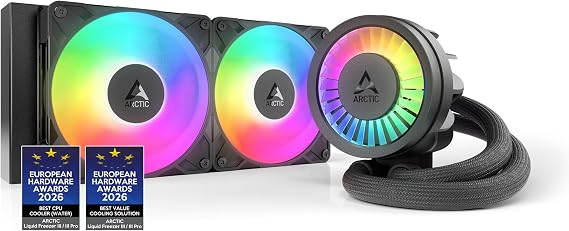
Powerful cooling with quiet operation makes it ideal for high-performance CPUs. Designed for both Intel and AMD setups, it stands out for its advanced heat dissipation and VRM temperature control.
Installation focuses on accuracy, with a contact frame optimized for Intel LGA1851 and LGA1700 sockets, ensuring even pressure on the CPU for better heat transfer. The offset cold plate is angled to target the CPU hotspot directly. The included P12 PRO fans run quietly at low speeds but deliver strong airflow during intense workloads.
It also includes a PWM-controlled VRM fan, which is a rare and useful addition to protect voltage components.
Heat management is impressive, thanks to the optimized mounting and powerful fans that push up to 77 cfm of air. The build quality feels solid, especially with attention to the mounting contacts and fan design. Among user feedback, the super quiet performance during light usage is praised, but some mention that the maximum fan speed can be louder under heavy load.
The cooling and durability really stand out.
Most users highlight the quiet operation during everyday tasks paired with effective cooling when pushed hard. The common downside is fan noise spikes at top speeds, which can be distracting during gaming or heavy workloads.
Enthusiasts running demanding CPUs and those wanting extra VRM cooling will appreciate this cooler. Casual users seeking near-silent operation at all times might prefer a quieter or less aggressive model.
Pros
- Quiet operation at low fan speeds
- Integrated VRM fan for voltage converter cooling
- Optimized mounting for better heat transfer
- Compatible with both Intel and AMD platforms
Cons
- Max fan speed can become noticeably loud
- Installation requires careful alignment for best results
| Specification | Details |
|---|---|
| Power Connector Type | 4-Pin |
| Voltage | 12 volts |
| Wattage | 3.96 watts |
| Air Flow Capacity | 77 cfm |
| Cooling Method | Water |
7. ARCTIC Freezer 36 CO

Aluminum and copper come together in a single-tower design that suits gamers and performance enthusiasts looking for reliable cooling. Its big strength lies in even heat transfer, thanks to the upgraded contact frame for Intel processors, which spreads pressure uniformly across the CPU.
Setting up is easier with the click installation system that simplifies mounting and swapping fans. Day-to-day use benefits from dual ball bearing fans that resist heat and dust, keeping noise low and performance steady.
Compatible with most 120 mm fans, it allows some customization if you’re looking for quieter or stronger airflow options.
Four offset heat pipes quickly move heat to the large heat sink, while a pressure-optimised fan helps maintain steady airflow up to 122 cfm. Built solidly, the cooler is durable but some mention that it can be a bit bulky inside compact cases. Its strongest point is reliable cooling for high-end CPUs; the main complaint revolves around size and occasional fitting issues in cramped builds.
Reliable cooling for high-end CPUs is a highlight, with fans that last longer due to dual ball bearings. Bulkiness tends to be an issue, making it less ideal for small cases.
Those running powerful Intel setups will appreciate the efficient heat transfer and durability. Users with smaller cases or looking for ultra-compact coolers might want to consider other options.
Pros
- Even pressure contact for Intel CPUs
- Dual ball bearings resist heat and dust
- Easy fan replacement with click installation
- Compatible with most 120 mm fans
Cons
- Bulky size may not fit compact cases
- Occasional difficulties during installation
| Specification | Details |
|---|---|
| Maximum Rotational Speed | 1800 rpm |
| Air Flow Capacity | 122 cfm |
| Power Connector Type | 4-Pin |
| Voltage | 12 volts |
| Wattage | 1.2 watts |
8. ARCTIC Freezer 36-S Black

Quiet operation stands out immediately with the ARCTIC Freezer 36-S Black, making it ideal for anyone running a desktop that needs dependable cooling without noise distractions. Its even mounting pressure is a key strength, helping keep temperatures low while preventing damage to your CPU.
Installation is straightforward thanks to a mounting system that works across multiple platforms, including the latest Intel and AMD sockets. The fan runs quietly at just 0.08 sones with a maximum speed of 1600 rpm, so it stays subtle even when under load.
Daily use involves little maintenance, and the steady airflow from the P12 PRO fan handles heat well during intensive tasks.
Performance-wise, the cooler effectively reduces thermal resistance to keep your CPU stable during long sessions. It feels sturdy and well-built, designed to avoid bending your processor.
A common note from users is how quiet it remains, though some mention that the fan speed could be a bit higher for extreme overclocking scenarios.
The most praised feature is the low noise level combined with consistent cooling performance, while some find the fan speed limiting under very high workloads. The mounting system also gets credit for preventing CPU damage over time.
This cooler suits users who want quiet, stable temperatures and cross-platform compatibility. Those pushing their CPUs with extreme overclocking might need a stronger fan option to stay fully cool.
Pros
- Quiet operation at only 0.08 sones
- Supports Intel LGA1851, LGA1700, AMD AM5/AM4
- Reliable mounting reduces CPU bending risk
- Effective cooling with focused airflow
Cons
- Fan speed maxes out at 1600 rpm
- Not ideal for heavy overclocking demands
| Specification | Details |
|---|---|
| Voltage | 12 volts |
| Wattage | 3.96 watts |
| Noise Level | 0.08 sones |
| Maximum Rotational Speed | 1600 rpm |
| Cooling Method | Air |
9. ARCTIC Freezer 36-S A-RGB

Great for anyone wanting a solid upgrade from basic CPU coolers, it offers a reliable way to keep temperatures down through consistent mounting pressure. Perfect for those running mid to high-level desktop processors, it balances quiet operation with strong airflow to handle work without overheating.
Setting it up is straightforward thanks to an optimized mounting system that fits Intel and AMD platforms, including the latest sockets like LGA1851 and AM5. The mounting pressure is even, so the CPU doesn’t bend and maintains good contact for efficient heat transfer. The P12 PRO fan operates at up to 1600 rpm but stays surprisingly quiet at 0.08 sones, making it easy to live with day to day.
Its air cooling method efficiently pulls heat away under heavy loads thanks to high static pressure from the fan. The build feels solid and the mounting bracket ensures the cooler stays firmly in place without flexibility in pressure. Some mention the fan speed cap as a limitation, but the low noise level is appreciated.
It’s a reliable cooler focused on performance and quiet running.
Consistent pressure during installation helps maintain low temperatures without risking damage, while many appreciate the quiet fan. On the downside, some users note the fan speed limit as a reason it may not cool aggressively enough in the most demanding scenarios.
Those running mid-range or stock-clocked CPUs looking for reliable, quiet cooling will find this fits well. Users pushing their hardware to extreme levels or needing liquid cooling performance might want to explore other options.
Pros
- Even mounting pressure prevents CPU bending
- Quiet operation at 0.08 sones noise level
- Supports latest Intel and AMD platforms
- High static pressure fan for focused airflow
Cons
- Fan speed limited to 1600 rpm
- Air cooling less efficient for extreme overclocking
| Specification | Details |
|---|---|
| Voltage | 12 volts |
| Wattage | 3.96 watts |
| Cooling Method | Air |
| Noise Level | 0.08 sones |
| Maximum Rotational Speed | 1600 rpm |
10. ARCTIC Liquid Freezer III Pro 420 A-RGB

Keeping a high-performance desktop CPU cool during intense workloads can be a challenge. Liquid Freezer III Pro 420 A-RGB is a water cooler designed for desktops that need serious heat management, especially suited for high-end Intel CPUs thanks to its optimized contact frame and integrated VRM fan. Its biggest strength lies in effective heat dissipation while maintaining low noise levels.
Setup involves mounting the cooler on Intel LGA1851 or LGA1700 sockets with optimized pressure distribution, ensuring the cold plate contacts the CPU hotspot directly. The included P14 PRO fan operates quietly with strong airflow, adjusting speed depending on load via PWM control. The integrated VRM fan quietly cools voltage converters, adding extra reliability.
Daily operation sees low noise and stable temperatures without fiddling with fan speeds.
The cooler handles heat well even under heavy processing tasks, thanks to a native offset mounting that targets the hottest CPU spots precisely. Construction feels solid, especially with a 4-pin power connection supporting stable 12-volt input at 4.2 watts. The strongest praise highlights very quiet operation even at high RPM, while a common complaint mentions its sizeable physical footprint taking up space in some builds.
Quiet cooling with high airflow and effective heat transfer defines daily use, though the unit’s size may pose challenges in smaller cases. The integrated VRM fan helps keep voltage converters within safe temperatures during intense workloads.
Those looking to manage powerful Intel desktop CPUs with minimal noise will appreciate this cooler. Users with smaller cases or who need simpler fan connection setups might want to consider more compact alternatives.
Pros
- Quiet operation even at maximum fan speed
- Integrated VRM fan supports stable voltage converter cooling
- Optimized contact pressure for better heat transfer
- Strong airflow performance with P14 PRO fan
Cons
- Large physical size can limit compatibility in some cases
- Relies on a 4-pin connector, less flexible for some setups
| Specification | Details |
|---|---|
| Cooling Method | Water |
| Voltage | 12 volts |
| Wattage | 4.2 watts |
| Noise Level | 1 sones |
| Maximum Rotational Speed | 2500 rpm |
| Air Flow Capacity | 110 cfm |
11. ARCTIC Liquid Freezer III Pro 280

Cooling power reaches a new level with the ARCTIC Liquid Freezer III Pro 280, making it ideal for anyone wanting to keep a desktop CPU cool under pressure. Its standout feature is the integrated VRM fan, which targets not just the CPU but also the voltage regulators for more reliable performance.
Setting it up involves native offset mounting designed specifically for Intel and AMD sockets, easily fitting into desktops without much fuss. The included P14 PRO fans operate quietly yet push air efficiently, especially at lower speeds. The optimized contact frame improves how pressure is distributed across the CPU, helping maintain long-term heat dissipation efficiency during daily use.
The unit performs impressively well at dissipating heat, thanks to liquid cooling assisted by high airflow fans running at up to 2500 rpm. The build quality feels solid, with particular attention paid to supporting Intel’s newer CPU sockets.
Common praise notes how quiet it runs even when working hard, while the usual complaint points out that setup can be a bit bulky compared to simpler air coolers.
The cooler receives praise for running quietly and keeping both CPU and voltage converters cool, which helps maintain stable performance over time. The most frequent complaint involves the cooler’s size making installation less straightforward than simpler setups.
This cooler suits people focused on strong thermal management who don’t mind spending time on installation. Those seeking a smaller, easier-to-mount option might want to look elsewhere.
Pros
- Integrated VRM fan cools voltage converters directly
- Optimized contact pressure boosts longer CPU lifespan
- Quiet operation even at higher fan speeds
- High air flow of 110 cfm supports heavy workloads
Cons
- Installation can feel bulky and takes space
- Higher maximum fan speed may produce occasional noise
| Specification | Details |
|---|---|
| Noise Level | 0.08 sones |
| Maximum Rotational Speed | 2500 rpm |
| Air Flow Capacity | 110 cfm |
| Power Connector Type | 4-Pin |
| Voltage | 12 volts |
| Wattage | 4.2 watts |
12. ARCTIC Liquid Freezer III Pro 420

People building high-performance desktop systems with Intel or AMD CPUs will appreciate this liquid cooler’s ability to keep temperatures in check. Its biggest strength lies in the built-in VRM fan that helps maintain stable voltage converter temperatures, ensuring reliable operation during intense use.
Installation is pretty straightforward thanks to the native offset mounting that aligns the cold plate directly over the CPU hotspot. The ARCTIC P14 PRO fan runs quietly even at low speeds but can ramp up to 2500 rpm for extra cooling power when needed.
A 4-pin power connector makes it easy to manage fan speeds through PWM control.
Cooling performance is solid under heavy loads and the contact frame is optimized to protect the CPU by distributing pressure evenly. The integrated VRM fan is praised for enhancing reliability, though some users mention the overall size may require careful fitment inside certain cases. Build quality stands out with a focus on long-term durability and effective heat transfer.
The integrated VRM fan is well-regarded for keeping voltage converters cool and improving stability during intense tasks. The only common drawback mentioned is the cooler’s size, which requires checking case compatibility before installation.
Gamers and content creators who demand strong cooling and reliable CPU temperatures will find this cooler fitting. Users with limited case space or looking for a quieter setup may want to explore alternatives with a smaller footprint or lower maximum fan speeds.
Pros
- Quiet operation at low fan speeds
- Effective VRM cooling with integrated fan
- Optimized contact frame for better heat dissipation
- High maximum fan speed supports heavy CPU loads
Cons
- Size may cause fitment issues in smaller cases
- Relatively high maximum fan speed can be noisy under load
| Specification | Details |
|---|---|
| Cooling Method | Liquid |
| Power Connector Type | 4-Pin |
| Maximum Rotational Speed | 2500 rpm |
| Air Flow Capacity | 110 cfm |
| Voltage | 12 volts |
| Wattage | 4.2 watts |
Best Arctic CPU Coolers Side by Side Comparison
| Product | Cooling Method | Compatible Devices | Max Rotational Speed | Air Flow Capacity |
|---|---|---|---|---|
| ARCTIC Liquid Freezer III Pro | Liquid | Desktop, Gaming Console | 3000 rpm | 77 cfm |
| ARCTIC Liquid Freezer III Pro | Liquid | Cpu | 3000 rpm | 77 cfm |
| ARCTIC Freezer 36 Black | Air | AM4, AM5, LGA1851, LGA1700 | 1800 rpm | 56.3 cfm |
| ARCTIC Liquid Freezer III Pro | Water | AMD, Intel | 3000 rpm | 77 cfm |
| ARCTIC Freezer 36 A-RGB | Air | AM4, AM5, LGA1851, LGA1700 | 2000 rpm | 48.8 cfm |
| ARCTIC Liquid Freezer III Pro | Water | AMD, Intel | 1 rpm | 77 cfm |
| ARCTIC Freezer 36 CO | Air | AMD Desktop | 1800 rpm | 122 cfm |
| ARCTIC Freezer 36-S Black | Air | Desktop | 1600 rpm | – |
| ARCTIC Freezer 36-S A-RGB | Air | Desktop | 1600 rpm | – |
| ARCTIC Liquid Freezer III Pro | Water | Desktop | 2500 rpm | 110 cfm |
| ARCTIC Liquid Freezer III Pro | Liquid | Desktop | 2500 rpm | 110 cfm |
| ARCTIC Liquid Freezer III Pro | Liquid | Desktop | 2500 rpm | 110 cfm |
- Cooling MethodLiquid
- Compatible DevicesDesktop, Gaming Console
- Max Rotational Speed3000 rpm
- Air Flow Capacity77 cfm
- Cooling MethodLiquid
- Compatible DevicesCpu
- Max Rotational Speed3000 rpm
- Air Flow Capacity77 cfm
- Cooling MethodAir
- Compatible DevicesAM4, AM5, LGA1851, LGA1700
- Max Rotational Speed1800 rpm
- Air Flow Capacity56.3 cfm
- Cooling MethodWater
- Compatible DevicesAMD, Intel
- Max Rotational Speed3000 rpm
- Air Flow Capacity77 cfm
- Cooling MethodAir
- Compatible DevicesAM4, AM5, LGA1851, LGA1700
- Max Rotational Speed2000 rpm
- Air Flow Capacity48.8 cfm
- Cooling MethodWater
- Compatible DevicesAMD, Intel
- Max Rotational Speed1 rpm
- Air Flow Capacity77 cfm
- Cooling MethodAir
- Compatible DevicesAMD Desktop
- Max Rotational Speed1800 rpm
- Air Flow Capacity122 cfm
- Cooling MethodAir
- Compatible DevicesDesktop
- Max Rotational Speed1600 rpm
- Air Flow Capacity–
- Cooling MethodAir
- Compatible DevicesDesktop
- Max Rotational Speed1600 rpm
- Air Flow Capacity–
- Cooling MethodWater
- Compatible DevicesDesktop
- Max Rotational Speed2500 rpm
- Air Flow Capacity110 cfm
- Cooling MethodLiquid
- Compatible DevicesDesktop
- Max Rotational Speed2500 rpm
- Air Flow Capacity110 cfm
- Cooling MethodLiquid
- Compatible DevicesDesktop
- Max Rotational Speed2500 rpm
- Air Flow Capacity110 cfm
How to Choose the Right Arctic CPU Cooler
Choosing an effective CPU cooler depends on factors like cooling performance, noise level, size compatibility, and ease of installation. Selecting the right combination ensures efficient heat management, preventing overheating and hardware damage. Careful choice helps avoid unnecessary replacements and maintains system stability.
Cooling Performance
Watching your CPU spike to dangerous temperatures during gaming or video editing is a common warning that cooling performance is lacking. Effective heat dissipation hinges on how well heat pipes move warmth from the CPU base to the cooling fins. Cooling units with multiple copper heat pipes and a dense fin array usually keep temperatures stable, even after long hours of heavy processing.
Stable CPU temperatures matter because frequent overheating triggers throttling, slowing down your system. Heat pipes of at least six millimeters in diameter paired with aluminum fins spaced tightly enough but not too dense to restrict airflow provide a solid balance.
A well-designed unit maintains temperature within safe ranges for prolonged use, meaning less risk of crashes or reduced hardware lifespan.
Compatibility and Size
PC cases range from compact mini-ITX to full tower sizes, and not all cooling units fit every build. Size plays a big role in ensuring the cooler does not block RAM slots or interfere with tall memory modules, which can cause expensive fitment headaches.
Height clearance generally between 150 to 160 millimeters suits most mid-tower cases, but checking case specs before purchase avoids surprises.
Compatibility with various CPU sockets, such as Intel’s LGA 1200, LGA 1700, and AMD’s AM4, matters to avoid compatibility issues. Many coolers include multiple mounting brackets to support different platforms. Proper clearance around the socket and nearby components improves airflow and installation ease.
Noise Levels
Running a cooler with ineffective fan speed control can lead to either noisy operation or inadequate cooling. Fans using quality fluid dynamic or rifle bearings tend to run quieter and last longer. Blade design that moves enough air at lower rpm keeps noise levels respectful during light tasks like browsing or streaming.
At idle, a cooler should stay under 20-25 decibels, close to a whisper, avoiding constant distraction. Under full load, noise may rise to 30-35 decibels, roughly equivalent to a quiet office.
Fan speed control through PWM or software enables dialing noise down when temperatures allow, balancing cooling and acoustic comfort.
Build Quality and Materials
Copper heat pipes paired with aluminum fins represent a good blend of thermal conductivity and weight for long-term use. Coolers made predominantly from plastic or cheap materials tend to wear quicker or feel flimsy. Fan blades molded from durable plastics resist cracking after extended spinning at high speed.
The mounting hardware’s quality affects stability and how tightly the cooler presses against the CPU. Solid springs or screws that don’t strip make the process less frustrating and ensure consistent contact over time. Look for included mounting kits that feel sturdy instead of lightweight or flexible.
Ease of Installation and Maintenance
Mounting complexity often leads to mistakes that reduce cooler effectiveness or cause physical damage. Clear, step-by-step instructions and included tools ease installation, especially for first-timers. Systems that allow mounting from the front side rather than flipping the motherboard save time and hassle.
Maintaining the cooler through cleaning or fan replacement is simpler when you can access it without removing the entire assembly. Preapplied thermal paste or included high-quality pastes reduce setup mistakes and improve contact between the cooler and CPU.
Easy-to-remove fan clips help with routine dusting and part swapping.
Optimal Installation Techniques for Arctic CPU Coolers
Getting the best performance out of an Arctic CPU cooler starts with how it is installed. Proper mounting pressure is crucial; too loose and your CPU temperature will rise, too tight and you risk damaging the motherboard or the cooler itself. Use the supplied mounting hardware and follow the torque specifications if available.
Applying a thin, even layer of thermal paste makes a significant difference. Arctic coolers often come with MX series pastes that spread well under the heat spreader.
Before installing, clean both the CPU and the cooler base with isopropyl alcohol to remove old paste and debris.
Tips for installation:
- Align the cooler properly with the CPU socket without forcing it
- Tighten screws in a diagonal pattern to ensure even pressure
- Check that fan cables have good airflow paths and are not pinched
Following these steps helps maintain consistent contact and effective heat transfer, which keeps your system running cooler.
Maintaining Peak Performance: Cleaning and Care Tips
Regular cleaning is essential to keep an Arctic CPU cooler performing well over time. Dust buildup reduces airflow and causes the fan to work harder, increasing noise and temperatures.
A soft brush and compressed air can clear accumulated dust from fins and fan blades without disassembling the cooler.
Care recommendations:
- Shut down and unplug your system before cleaning
- Hold fan blades steady while using compressed air to avoid damage
- Inspect the thermal paste and replace it every couple of years to maintain thermal conductivity
- Check fan bearings for any unusual noise or wobble
Keeping the cooler clean and the thermal interface fresh ensures the cooler maintains efficient heat dissipation, which helps keep CPU temperatures stable.
Comparing Arctic CPU Coolers with Other Leading Brands
Arctic CPU coolers stand out mainly for their balance of price and performance compared to other popular brands like Noctua, Cooler Master, or be quiet!. Arctic products typically provide solid cooling capacity and quieter operation at a lower cost.
Their proprietary MX thermal paste is widely appreciated for good heat transfer and ease of application.
Key differences include:
- Price: Arctic coolers often come in significantly lower price brackets
- Noise levels: Arctic fans run relatively quietly but may not match premium models
- Design: Simpler aesthetics and fewer RGB options compared to competitors
For users focused on getting effective cooling without a steep price or flashy features, Arctic remains a practical choice that covers the essentials well.
People Also Asked
How Do I Install My New Arctic CPU Cooler Properly?
Proper installation involves cleaning the CPU surface, applying the right amount of thermal paste, and securely mounting the cooler with the included brackets. Using the manual that comes with the cooler helps avoid mistakes like uneven pressure that can cause poor heat transfer.
Will This CPU Cooler Fit in a Compact PC Case?
Compatibility depends on the model, but many Arctic coolers, like the Freezer series, fit well in standard compact cases. Measuring your case’s internal height and comparing it with the cooler’s dimensions before buying prevents clearance issues with RAM or side panels.
How Long Do Arctic CPU Coolers Usually Last Under Heavy Use?
Arctic coolers can last several years even under heavy use, as their fans and heatsinks are built to handle sustained workloads. Regular cleaning of dust buildup improves longevity by maintaining efficient airflow and cooling performance.
Are There Any Common Issues with Arctic CPU Coolers I Should Know?
A common issue is fan noise increasing over time due to dust or bearing wear. Keeping the fan blades and surrounding area clean and occasionally checking for loose screws helps prevent rattling or reduced cooling efficiency.
Is It Safe to Apply Arctic Thermal Paste Myself During Installation?
Applying Arctic thermal paste yourself is safe if you follow the instructions on the packet and use only a small pea-sized amount. Spreading the paste evenly without air bubbles ensures better contact between the CPU and cooler base, which improves cooling.
Conclusion
Choosing a CPU cooler means focusing on how well it fits your CPU socket, whether it can handle the heat your processor generates, and if it keeps noise at a level you find acceptable. Size matters since some coolers won’t fit in smaller cases, and cooling capacity directly impacts your CPU’s performance and lifespan.
Pick a cooler that fits your case and budget without overspending on features you don’t need. Look at how often you plan to use your system for heavy tasks to gauge whether a higher-end cooler is necessary. For detailed comparisons and specific recommendations, check the table and options discussed above.
This helps you find a cooler that works for your setup and needs.

I’m Grant Mitchell, a firearms and hunting writer with years of experience at the range and in the field. I write about rifles, shotguns, handguns, optics, safe storage, cleaning, and responsible ownership, along with practical hunting tips. My goal is to share accurate, safety-first information that helps you choose the right firearm, maintain it properly, and become a more confident shooter.