Top 12 Best AM4 CPU Cooler That Will Blow Your Mind!
Overheating and loud fan noise are common issues with a poorly chosen or cheap cooler on an AM4 socket CPU. The best am4 cpu cooler keeps the processor temperature stable under load, avoiding thermal throttling and system crashes. A cooler that struggles with heat can also shorten your CPU’s lifespan, which makes the choice more than just about performance.
Performance mainly depends on the cooler’s ability to transfer heat efficiently. A solid copper base with multiple heat pipes and a well-sized aluminum fin stack improves heat dissipation. Fan size and speed matter too, typically, a 120mm or larger fan running around 1200 to 1500 RPM offers a good balance between airflow and noise.
Proper mounting on the motherboard, matching the AM4 bracket, and easy access for cleaning dust also set a reliable cooler apart from a mediocre one.
Need a Quick Check?
| Image | Product | Price |
|---|---|---|
Our Top Picks 1  | Thermalright Peerless Assassin 120 SE | Check Price |
Our Top Picks 2  | Thermalright Peerless Assassin Vision MAX | Check Price |
Our Top Picks 3  | be quiet! Pure Rock Pro | Check Price |
Our Selected Top 12 Am4 Cpu Cooler Picks for Every Need
This list includes a variety of AM4 CPU coolers suited for different needs, from compact options to high-performance models. Each review explains how well the cooler performs, who it is best for, and highlights its main advantages and disadvantages.
1. Thermalright Peerless Assassin 120 SE CPU Cooler
Cooling your desktop processor feels solid and reliable with the Peerless Assassin 120 SE. It suits anyone looking for quiet operation paired with strong air cooling power in a compact design. Its biggest strength lies in delivering efficient cooling without being overly noisy.
Setup is straightforward with the standard 4-pin power connector and solid mounting options. The cooler runs quietly at just 25.6 dB while spinning up to 1550 RPM, which means it won’t distract you during work or gaming sessions. Airflow at 66.17 CFM keeps heat moving well, helping maintain stable CPU temperatures day to day.
Performance-wise, it handles a wattage load of 265 W effectively, making it a solid choice for most AM4 desktop setups. The build quality from Thermalright reflects their decades of experience, ensuring sturdy construction and reliable contact with the CPU.
Most enjoy its quiet performance, while the common downside is that airflow capacity might not satisfy very high-end overclockers.
Quiet cooling performance stands out as the best feature, with many noting the fan noise stays low even under load. The common complaint centers around airflow capacity, which might not be enough if pushing your CPU far beyond stock settings.
Those using a mid-range or standard AM4 CPU looking for dependable cooling and low noise will be satisfied. Heavy overclockers or users demanding extreme airflow should consider options with higher fan speeds and greater CFM ratings.
Pros
- Quiet operation at 25.6 dB
- Compatible with AM4 desktop setups
- Strong 265-watt cooling capacity
- Reliable build from Thermalright
Cons
- Airflow may fall short for high overclocks
- Limited to max fan speed of 1550 rpm
| Specification | Details |
|---|---|
| Power Connector Type | 4-Pin |
| Voltage | 12 volts |
| Wattage | 265 watts |
| Noise Level | 25.6 db |
| Maximum Rotational Speed | 1550 rpm |
| Air Flow Capacity | 66.17 cfm |
2. Thermalright Peerless Assassin 120 Vision MAX CPU Cooler
Great for anyone looking for a powerful AM4 air cooler that doubles as a monitoring tool. Its standout feature is the built-in 5-inch IPS LCD screen on the radiator, providing real-time system data while keeping the CPU cool with impressive efficiency.
Setting it up involves handling the dual-tower design and attaching two fans, which spin up to 2150 RPM. The magnetic top cover with the screen is a nice touch for customizing backgrounds and keeping an eye on temperatures right from the cooler.
Noise stays pretty quiet at 27 dB, so it won’t be distracting during daily use.
Cooling performance is solid thanks to six pure copper heat pipes and a nickel-plated copper base that maintains good CPU contact. The high-speed fans push 69 CFM of airflow, making heat management reliable.
Many like the screen and cooling balance, while some find it a bit bulky or complex to clean because of the dual towers.
Reviews highlight the impressive cooling power combined with the innovative LCD screen for system monitoring. However, the design’s size and dust attraction on the magnetic cover come up as the main downsides.
The setup suits users wanting strong air cooling and a smart display for tracking system stats. Compact builds or those nervous about maintenance might prefer a simpler, smaller cooler without extra features.
Pros
- Built-in 5-inch IPS LCD screen for real-time monitoring
- Strong cooling with six pure copper heat pipes
- Quiet operation at 27 dB noise level
- Customizable display with TRCC software
Cons
- Dual-tower design can be bulky inside some cases
- Magnetic top cover may collect dust easily
| Specification | Details |
|---|---|
| Maximum Rotational Speed | 2150 rpm |
| Noise Level | 27 db |
| Air Flow Capacity | 69 cfm |
| Cooling Method | Air |
| Power Connector Type | 4-Pin |
| Compatible Devices | Desktop |
3. Be Quiet! Pure Rock Pro 3 CPU Cooler
Six black high-performance copper heat pipes with a nickel-plated base ensure excellent cooling in this model. It suits AM4 socket users who want a quiet and reliable air cooler that handles demanding workloads and overclocking. Its single biggest strength is balancing strong cooling performance with low noise levels.
Setting it up involves attaching the Pure Wings 3 120mm PWM fan, which has optimized blades and a special funnel-shaped air outlet for better airflow. The 4-Pin power connector allows precise fan speed control up to 2000 rpm.
Day-to-day, it runs quietly at 34.8 dB while maintaining efficient heat dissipation thanks to the heat pipes and airflow design.
Cooling efficiency stays solid even with overclocked CPUs, thanks to the six copper heat pipes transferring heat quickly. Its build feels sturdy with a nickel-plated base that makes contact with the CPU smooth. The strongest praise highlights its ability to maintain peak CPU performance in tough conditions.
The most frequent complaint notes the fan speed can reach noticeable noise levels under heavy load.
Its ability to keep CPUs cool during intense workloads gets consistent praise, making it dependable for overclocking. The most common complaint involves fan noise becoming noticeable when operating at peak speeds.
Anyone needing quiet, solid air cooling for an AM4 system will appreciate this cooler. Users sensitive to noise at high fan speeds might want to explore alternatives with quieter operation under load.
Pros
- Strong cooling with six copper heat pipes
- Quiet operation at moderate load
- Optimized fan blades increase airflow pressure
- Nickel-plated base ensures good heat transfer
Cons
- Fan noise rises near maximum 2000 rpm
- May need cleaning to maintain airflow efficiency
| Specification | Details |
|---|---|
| Voltage | 12 volts |
| Wattage | 3.6 watts |
| Cooling Method | Air |
| Noise Level | 34.8 db |
| Maximum Rotational Speed | 2000 rpm |
| Compatible Devices | AM4 / AM5 / Intel sockets 1851/1700/1200/1151/1150/1155 |
4. Thermalright Assassin X 120R CPU Cooler

Silent operation stands out the most for this air cooler, suited for anyone running an AM4 desktop who values quieter performance without constant adjustments. Its speed automatically changes with temperature, making it easy to run steadily while keeping noise in check.
Installing the cooler is straightforward given its standard 4-pin connector and PWM fan control that changes speed up to 2000RPM based on your motherboard’s temperature. The fan’s silicone corner pads help reduce the noise, and the S-FDB bearing keeps the fan stable without vibration during use. Running at 12 volts DC, it adapts to workload changes with ease.
Performance is solid, offering a good airflow capacity of 70.84 cfm that keeps your CPU cool with air. Built from sturdy PBT+PC industrial-grade materials, it feels durable and safe thanks to its UL CLASSA insulation grade. Praise often highlights its quiet operation, but some note that at maximum speed, the noise level can reach almost 30 decibels, which may bother sensitive ears.
Most praise focuses on quiet cooling and the handy auto-adjust fan speed that removes the need for manual tweaks. The main complaint is about noise when the fan hits 2000 RPM, which can be a bit much for users who want near silence.
People wanting a balance of airflow, noise reduction, and easy fan control will appreciate this cooler. Those with smaller cases or needing ultra-low noise under heavy loads might want to look toward different options.
Pros
- Quiet operation with noise-reducing silicone pads
- Automatic speed adjustment with PWM fan control
- Durable industrial grade PB+PC materials
- Stable fan mounting with S-FDB bearing
Cons
- Fan noise reaches nearly 30 dB at full speed
- Only suitable for desktop AM4 CPUs
| Specification | Details |
|---|---|
| Power Connector Type | 4-Pin |
| Voltage | 12 volts of direct current |
| Cooling Method | Air |
| Noise Level | 29.8 db |
| Maximum Rotational Speed | 2000 rpm |
| Air Flow Capacity | 70.84 cfm |
5. Cooler Master Hyper 212 Black II CPU Cooler

Cooler Master Hyper 212 Black II delivers solid cooling for powerful AMD Ryzen 7 and Intel Core Ultra 7 CPUs, handling up to 220W thermal loads efficiently. It suits anyone wanting reliable, quiet cooling for gaming or productivity without spending extra on premium liquid coolers.
Installation is straightforward thanks to its user-friendly mounting bracket, making it good for first-time builders or those upgrading their PC. The quiet fan operates quietly at up to 1,750 RPM, producing very little noise while maintaining good airflow.
The minimalist black design keeps your build looking tidy and modern.
Heat pipes with Direct Contact Technology ensure quick heat transfer, keeping temperatures in check even under heavy loads. The cooler is well built with four heat pipes and anti-gravity coolant flow for consistent cooling.
Most users note how quiet it runs, though some mention the noise can rise near maximum fan speed during intense use.
Heat pipes with Direct Contact Technology help keep CPUs cool with stable performance during extended use. The quiet fan is praised for low noise but some find it louder when pushed to maximum speed. The mounting bracket makes installation smoother and faster compared to bulkier coolers. The build quality feels solid and durable.
Any gamer or productivity user who needs good air cooling on AM4 sockets will find this cooler suitable. Those planning heavy overclocking or requiring the quietest setup might want to explore higher-end options. The balance of performance, noise, and price fits most mid-range builds well.
Pros
- Handles high thermal loads up to 220W well
- Quiet fan operation at 26 dB during normal use
- Easy and secure mounting bracket for quick install
- The minimalist black design blends well with any build.
Cons
- Fan noise increases under max speed and heavy load
- Airflow capacity limited to 42 CFM, not for extreme overclocking
| Specification | Details |
|---|---|
| Cooling Capacity | Up to 220W |
| Fan Speed | Up to 1,750 RPM PWM |
| Noise Level | 26 dB |
| Air Flow Capacity | 42 CFM |
| Power Connector | 4-Pin |
| Voltage | 12 Volts |
6. AMD Wraith Stealth CPU Cooler

Cooling a CPU without taking up too much space can be tricky, especially on an AM4 motherboard. The AMD Wraith Stealth CPU Cooler fits nicely in smaller builds and keeps things running cool. Its biggest strength is providing reliable, quiet cooling for everyday tasks without extra fuss.
Setting it up is straightforward thanks to its direct screw mounting design for the AM4 socket. The pre-applied thermal paste saves a step during installation. The 3.5-inch 90mm fan runs quietly and uses a 4-pin PWM connector for smooth speed control depending on your CPU temperature.
It handles heat well enough for most standard CPUs, although it’s not made for heavy overclocking. The aluminum heatsink feels durable and sturdy under pressure.
One common praise is that it runs quietly. A frequent complaint involves limited cooling power under intense workloads.
The cooler is praised for its quiet operation and straightforward installation. Most find it effective for everyday use but note it can get overwhelmed by heavy CPU loads. The aluminum heatsink helps keep temperatures manageable in a compact package.
Great choice for users building a modest gaming or office PC who want simple, reliable cooling. Those planning to push their CPU hard or run demanding tasks continuously might want to explore larger or more powerful alternatives.
Pros
- Pre-applied thermal paste for easy installation
- Quiet 90mm fan with PWM control
- Direct mounting on AM4 socket for secure fit
- Compact size fits smaller cases
Cons
- Cooling may struggle with high-end CPUs or overclocking
- Fan size limits maximum airflow potential
| Specification | Details |
|---|---|
| Supports Motherboard Socket | AM4 |
| Heatsink Material | Aluminum |
| Fan Size | 3.5-inch 90mm |
| Thermal Paste | Pre-applied |
| Power Connector | 4-pin PWM (9-inch length) |
7. Noctua NH-L9x65 Chromax.black CPU Cooler

Only 65mm tall, this compact CPU cooler fits perfectly in small form factor builds or HTPCs where space is tight. Ideal for systems requiring a low-profile solution, its all-black design adds a clean, minimal look while providing effective cooling without getting in the way of RAM or PCIe slots.
Setup is straightforward thanks to the SecuFirm2 mounting system and included NT-H1 thermal paste, which helps achieve good thermal contact right out of the box. The fan has a slim 92mm profile with PWM support, so it adjusts speed automatically depending on temperature, helping keep noise low during everyday use while still pushing enough air to keep the CPU stable.
Cooling performance matches its form factor well, managing typical AM4 CPUs with quiet operation at 23.6 dB noise level. Its build quality stands out since it’s designed to clear neighboring motherboard components easily, but a common drawback is that its small fan limits extreme overclocking potential. Still, it handles standard loads efficiently without much fuss.
Praise centers on how quietly it runs and fits in cramped cases without blocking slots or connectors. The most common complaint focuses on the fan size limiting cooling under heavy loads or overclocking scenarios, making it better suited to modest CPUs.
People building compact, quiet PCs with standard Ryzen processors will appreciate this cooler’s balance of size and noise. Those looking to push their CPUs hard or handle high TDP chips should look for a larger cooler with more raw cooling power.
Pros
- Compact 65mm height fits tight spaces well
- Ultra-quiet operation with PWM fan control
- Installation includes premium thermal paste
- Clearance that avoids RAM or PCIe slot interference
Cons
- Small fan limits extreme overclocking potential
- May not cool very high TDP CPUs effectively
| Specification | Details |
|---|---|
| Cooling Method | Air |
| Maximum Rotational Speed | 2500 rpm |
| Air Flow Capacity | 57.5 cubic meter per hour |
| Noise Level | 23.6 db |
| Voltage | 12 volts |
8. Thermalright Assassin X120 Refined SE CPU Cooler

Ideal for desktop users aiming for reliable cooling without excessive noise, this CPU cooler stands out with its quiet operation. Its strongest point is maintaining a low noise level while delivering effective air cooling, making it suitable for a balance of performance and low disturbance.
Setup involves a straightforward installation using its standard mounting bracket, compatible with AM4 sockets. The 4-pin 12-volt connection controls fan speed smoothly, allowing quieter operation under lighter loads.
Daily use benefits from a fan that spins up to 1550 rpm, providing ample airflow without causing a distracting hum. Cleaning stays simple with accessible fan blades thanks to the open design.
The cooler handles heat by pushing 66.17 cfm of air efficiently, keeping temperatures well-managed during typical desktop tasks or gaming. Built with attention to quality materials from a brand with two decades of expertise, it feels sturdy. The most frequent positive comment is about its quietness, while some note the cooling capacity might be less than high-end options for aggressive overclocking.
The quietness stands out as the most appreciated feature, making it easy to work or game without loud distractions. At the same time, some find it less suited for setups requiring aggressive cooling performance. The build quality is solid but performance is clearly tuned more for moderate heat loads.
People wanting a calm workspace with effective regular cooling will appreciate this cooler a lot. Those pushing high-level gaming or overclocking hard may want to consider alternatives offering stronger cooling capacity at the cost of more noise or bulk.
Pros
- Quiet operation at 25.6 dB
- Good air flow of 66.17 cfm
- Compatible with standard desktop AM4 sockets
- Sturdy build quality
Cons
- May struggle with heavy overclocking cooling
- Fan speed maxes out at 1550 rpm
| Specification | Details |
|---|---|
| Power Connector Type | 4-Pin |
| Voltage | 12 volts |
| Cooling Method | Air |
| Noise Level | 25.6 db |
| Maximum Rotational Speed | 1550 rpm |
| Air Flow Capacity | 66.17 cfm |
9. AMD Wraith Prism CPU Cooler
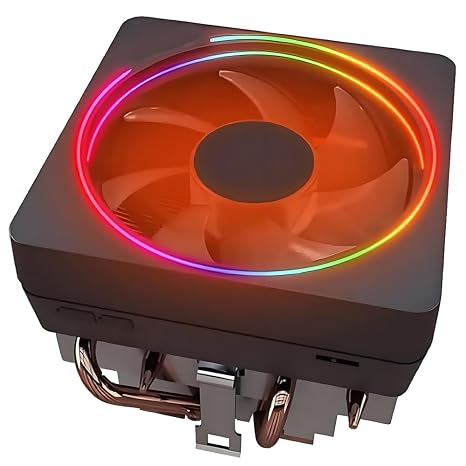
AMD’s Wraith Prism CPU cooler stands out with its compatibility across a wide range of AMD sockets and efficient heat dissipation. It suits anyone wanting reliable cooling for Ryzen processors without extra purchases or complex installation. Its biggest strength lies in combining solid cooling power with an easy-to-install design that fits many setups.
Setting up the cooler is straightforward, thanks to pre-applied silicone thermal paste and compatibility with the standard bracket found on most AMD motherboards. The fan operates at a maximum speed of 2800 rpm, plugged into a 4-pin connector, which balances cooling and noise well.
During everyday use, it keeps CPU temperatures in check and runs quietly at 14 dB, making it suitable for office and gaming rigs alike.
Performance does not disappoint; the aluminum heatsink, copper base, and four 6 mm copper heat pipes work together for efficient heat transfer. The build quality feels solid and purposeful, with no unnecessary frills.
A common praise highlights how quiet it remains under load, while the most frequent complaint mentions its size, which might interfere with tall RAM modules or cramped cases.
The quiet fan and strong heat dissipation stand out as the best features, keeping CPU temperatures stable during intense tasks. Some users notice that the cooler’s size can cause clearance issues with taller RAM sticks, making it less ideal for tightly packed builds.
Those building standard Ryzen systems or upgrading without budget for aftermarket solutions will appreciate this cooler. People with cases that have limited space or tall RAM modules might want to explore alternatives that offer slimmer profiles or different mounting options.
Pros
- Works with many AMD sockets
- Pre-applied thermal paste for easy installation
- Quiet operation at 14 dB noise level
- Effective heat transfer components
Cons
- May interfere with tall RAM modules
- Standard bracket not included with cooler
| Specification | Details |
|---|---|
| Power Connector Type | 4-Pin |
| Voltage | 12 volts_of_direct_current |
| Wattage | 105 watts |
| Noise Level | 14 db |
| Maximum Rotational Speed | 2800 rpm |
| Air Flow Capacity | 45 cfm |
10. Noctua NH-L9a-AM4 Chromax.black CPU Cooler

Noctua NH-L9a-AM4 chromax.black is a low-profile CPU cooler designed for AMD AM4 sockets. It suits those needing a compact cooler that fits ultra-small cases while still delivering reliable cooling.
Its main strength lies in combining a slim 37mm height with a highly compatible footprint that won’t block RAM or PCIe slots.
Setting up with the SecuFirm2 mounting system is straightforward, especially supported by the NT-H1 thermal paste included. The slim 92mm fan uses PWM control, keeping noise to a minimum when idling but ramping up performance as CPU load increases. It’s great for small builds where space is tight but cooling remains important, fitting on ITX, Micro-ATX, and even ATX AM4 boards without any overhang issues.
Cooling performance meets the expectations for a compact heatsink, managing temperatures well under load thanks to the proven heatsink design and efficient fan. The all-black design blends nicely with most builds, adding a clean look.
The most common complaint is the limited height, which can impose some thermal constraints in very demanding setups, but it’s generally well-built and solid for everyday use.
The cooler is praised for fitting perfectly in small form factor cases without blocking RAM or PCIe slots, while running quietly thanks to its PWM-controlled fan. Commonly noted is the limitation in cooling due to its slim height, making it less optimal for very high thermal loads.
People building ultra-compact or HTPC systems with standard Ryzen CPUs will find this cooler very effective. Those with higher TDP processors needing stronger cooling should look into larger coolers instead.
Pros
- Compact 37mm height fits small cases easily
- No RAM or PCIe slot overhang
- Quiet operation thanks to PWM fan control
- Includes quality thermal paste and easy mounting kit
Cons
- Height limits cooling potential in heavy workloads
- Only suitable for low to mid-power CPUs
| Specification | Details |
|---|---|
| Height | 37mm |
| Fan Size | 92mm slim NF-A9x14 |
| Socket Compatibility | AMD AM4 |
| Included Components | NT-H1 thermal paste, SecuFirm2 mounting system |
| Noise Control | Low-Noise Adaptor, PWM fan speed control |
| Warranty | 6 years |
11. Noctua NH-U12S SE-AM4 CPU Cooler

Quiet operation and solid cooling performance make the NH-U12S SE-AM4 ideal for anyone running an AMD system who wants reliable heat management without excess noise. Its standout feature is how quietly the fan spins even under load, making it great for daily desktop use while keeping temperatures well in check.
Setting up the cooler is straightforward, especially since it’s made specifically for the AM4 socket. The included NF-F12 120mm fan adjusts its speed automatically with PWM, matching cooling needs without manual tweaks. The low-noise adapter helps keep sound levels down, and the NT-H1 thermal compound adds a quality touch that eases installation and improves contact with the CPU surface.
It keeps processors cool without much noise, hitting a good balance between airflow and quiet operation. The build feels sturdy with premium materials, designed to last, backed by a 6-year warranty.
Common feedback notes how many appreciate its silent fan but some find the maximum fan speed of 1500 rpm limits cooling in extreme overclocking scenarios.
Quiet operation and effective heat dissipation stand out positively, supported by its 6-year warranty. Some users note the 1500 rpm fan speed can feel a bit restrictive when pushing the CPU hard. Daily use is peaceful and consistent in keeping temperatures controlled with minimal noise.
Anyone who values silent PC operation and solid cooling without extreme overclocking plans will find it reliable. Those needing higher cooling capacity or liquid solutions should look elsewhere for more aggressive temperature management options.
Pros
- Quiet NF-F12 120mm fan with PWM
- Includes low-noise adapter for less sound
- Special edition ensures perfect AM4 socket fit
- Comes with high-quality NT-H1 thermal paste
Cons
- Max fan speed may limit cooling for heavy overclocking
- Only air cooling, no liquid cooling option
| Specification | Details |
|---|---|
| Power Connector Type | 4-Pin |
| Voltage | 12 volts |
| Cooling Method | Air |
| Noise Level | 22.4 db |
| Maximum Rotational Speed | 1500 rpm |
12. Thermalright Phantom Spirit 120 EVO CPU Cooler

A solid performer for AM4 builds, great for those wanting quiet but effective cooling. It’s especially good for everyday desktop setups where noise matters most, with its low 27 dB fan noise standing out as its key strength.
Setup is straightforward with clear mounting brackets and doesn’t demand extra accessories. The 4-pin connector allows easy PWM control, so the fan speed adjusts automatically depending on your CPU load. Its compact size allows it to fit into most cases easily, and the open fin design makes regular cleaning straightforward.
Running it feels quiet and stable without sudden noise spikes.
Cooling performance keeps temps in check with a maximum 2150 rpm fan speed pushing 69 CFM of airflow. The cooler is lightweight enough not to stress your motherboard socket, but it still has a solid build typical of Thermalright’s carefully tested components. High praise goes to its quiet operation, while some users note it could cool a bit better under heavy overclocking loads.
Strong quiet performance stands out in everyday use, offering good airflow without distracting noise. The fan speed can rise noticeably when pushed hard, which some find less comfortable during intense CPU demands.
Great choice for those building a quiet, efficient desktop without extreme cooling needs. Users seeking maximum cooling for heavy overclocks might want to look for a larger, more powerful option.
Pros
- Quiet operation at low noise levels
- Good airflow for mid-range CPUs
- Easy installation on AM4 sockets
- Lightweight build reduces motherboard stress
Cons
- Not ideal for heavy overclocking
- Fan speed can get loud near max RPM
| Specification | Details |
|---|---|
| Power Connector Type | 4-Pin |
| Voltage | 12 V |
| Wattage | 2.4 watts |
| Maximum Rotational Speed | 2150 rpm |
| Air Flow Capacity | 69 cfm |
| Noise Level | 27 db |
Best AM4 CPU Coolers Comparison Table
| Product | Noise Level | Max RPM | Air Flow Capacity | Compatible Devices |
|---|---|---|---|---|
| Thermalright Peerless Assassin 120 SE | 25.6 db | 1550 rpm | 66.17 cfm | Desktop |
| Thermalright Peerless Assassin Vision MAX | 27 db | 2150 rpm | 69 cfm | Desktop |
| be quiet! Pure Rock Pro | 34.8 db | 2000 rpm | – | Intel & AMD sockets |
| Thermalright Assassin X 120R | 29.8 db | 2000 rpm | 70.84 cfm | Desktop |
| Cooler Master Hyper 212 Black | 26 db | 2500 rpm | 42 cfm | CPU, Desktop |
| AMD Wraith Stealth | – | – | – | – |
| Noctua NH-L9x65 chromax.black | 23.6 db | 2500 rpm | 57.5 m³/h | Desktop |
| Thermalright Assassin X120 Refined SE | 25.6 db | 1550 rpm | 66.17 cfm | Desktop |
| AMD Wraith Prism | 14 db | 2800 rpm | 45 cfm | Desktop, Wraith |
| Noctua NH-L9a-AM4 chromax.black | – | – | – | AM4, ITX SFF |
| Noctua NH-U12S SE-AM4 | 22.4 db | 1500 rpm | – | Desktop |
| Thermalright Phantom Spirit 120 EVO | 27 db | 2150 rpm | 69 cfm | Desktop |
- Noise Level25.6 db
- Max RPM1550 rpm
- Air Flow Capacity66.17 cfm
- Compatible DevicesDesktop
- Noise Level27 db
- Max RPM2150 rpm
- Air Flow Capacity69 cfm
- Compatible DevicesDesktop
- Noise Level34.8 db
- Max RPM2000 rpm
- Air Flow Capacity–
- Compatible DevicesIntel & AMD sockets
- Noise Level29.8 db
- Max RPM2000 rpm
- Air Flow Capacity70.84 cfm
- Compatible DevicesDesktop
- Noise Level26 db
- Max RPM2500 rpm
- Air Flow Capacity42 cfm
- Compatible DevicesCPU, Desktop
- Noise Level–
- Max RPM–
- Air Flow Capacity–
- Compatible Devices–
- Noise Level23.6 db
- Max RPM2500 rpm
- Air Flow Capacity57.5 m³/h
- Compatible DevicesDesktop
- Noise Level25.6 db
- Max RPM1550 rpm
- Air Flow Capacity66.17 cfm
- Compatible DevicesDesktop
- Noise Level14 db
- Max RPM2800 rpm
- Air Flow Capacity45 cfm
- Compatible DevicesDesktop, Wraith
- Noise Level–
- Max RPM–
- Air Flow Capacity–
- Compatible DevicesAM4, ITX SFF
- Noise Level22.4 db
- Max RPM1500 rpm
- Air Flow Capacity–
- Compatible DevicesDesktop
- Noise Level27 db
- Max RPM2150 rpm
- Air Flow Capacity69 cfm
- Compatible DevicesDesktop
How to Choose the Right AM4 CPU Cooler
Choosing the right AM4 CPU cooler depends on factors like cooling performance, noise levels, size compatibility, and ease of installation. Paying attention to these details ensures efficient heat management, quieter operation, and avoids compatibility issues, ultimately saving money and preventing frustration.
Compatibility and Socket Support
Working with a cooler that doesn’t fit properly on the AM4 socket can quickly turn into a frustrating experience. Several coolers on the market specify AM4 support but fail to mention that they might interfere with tall RAM modules or come close to blocking VRM heatsinks on certain motherboards.
It’s important to cross-check the cooler’s mounting bracket and retention system against the layout of your board.
Different AM4 platforms have chips with varying TDPs, so a cooler rated only for up to 95W might struggle on Ryzen 9 CPUs with higher thermal output. Looking at official CPU TDP support, plus any custom brackets for chipset compatibility, will help you avoid problems.
Standard brackets, backed by solid customer documentation, usually indicate that the manufacturer has tested common AM4 setups.
Cooling Performance and Efficiency
Coolers that handle thermal spikes well stay noticeably quieter during gaming or rendering sessions. The difference between air and liquid cooling in everyday use often comes down to how quickly the temperature stabilizes. Pure air coolers with large copper bases and dense fin arrays tend to dissipate heat effectively, as long as the fan speed can ramp up smoothly.
Fans spinning between 600 to 2000 RPM provide a good balance of airflow and noise control.
Liquid coolers often rely on higher thermal conductivity through their cold plates and circulating fluid, offering lower temps in compact builds. Aluminum radiators paired with copper pipes have become standard because they better conduct heat while keeping weight reasonable. Material quality matters, cheap thermal interface materials can ruin otherwise decent cooling.
Physical Size and Clearance
Running into case clearance issues is common when buying a large cooler without precise measurements. For tall air coolers, measuring from the motherboard surface to the top of your case’s side panel is crucial. Many mid-tower cases support coolers up to about 160mm tall, but some high-end models exceed this, leading to side panel interference.
Space around the socket is equally important. Some coolers with large shrouds or multiple heat pipes can block nearby motherboard slots, like the first PCIe or tall RAM sticks. With liquid coolers, radiator size and placement options can limit where you mount it, especially if your case only fits 240mm rads in the front and has limited space at the top.
Noise Levels and Fan Quality
Noise levels vary widely between models, often noticeable when your system is idle versus under load. Fans using fluid dynamic bearings generally run quieter and last longer compared to sleeve bearing fans, which might develop buzzing sounds over time.
Good quality fans keep noise below 30 dBA while idling, then ramp under 40-45 dBA at full speed, maintaining a tolerable environment.
Some coolers compromise on noise to push higher RPMs and keep temps down. A fan that constantly spins loudly during regular desktop tasks quickly becomes annoying. Checking user reviews or spec sheets for decibel ratings across different fan speeds helps ensure the cooler won’t be disruptive.
Ease of Installation and Maintenance
Mounting systems can make or break the installation experience. Brackets that require multiple screws and backplates provide sturdy contact but can be tricky to reach depending on your case. Some coolers offer tool-less or simplified mounting systems that speed up installation but may not fit all AM4 motherboards equally well.
Included thermal paste quality also affects startup temps.
Maintenance matters for liquid models since tubing and coolant can degrade or accumulate dust. Open fan designs on air coolers make it easier to blow away dust, improving longevity. Regular reapplication of thermal paste is rarely needed but should be considered after a year.
Coolant replacement intervals vary by model but might be necessary every couple years to avoid performance drops.
Optimizing AM4 CPU Cooler Installation for Maximum Performance
The size and orientation of the CPU cooler play a critical role in how effectively it can dissipate heat from AM4 processors. Ensuring the cooler makes firm, even contact with the CPU surface helps prevent hotspots and maintains consistent thermal conductivity.
It’s important to apply a thin, uniform layer of thermal paste before seating the cooler rather than spreading it unevenly or using too much. Proper mounting pressure also ensures the cooler stays in place during operation without stressing the motherboard.
Another crucial step is aligning the cooler’s fan(s) to promote airflow through the case rather than towards obstructive components. Using the supplied mounting brackets and backplates specific to the AM4 socket guarantees compatibility and stability.
Periodically checking the mounting screws for tightness after installation safeguards against loosening due to vibrations or thermal expansion.
Common Mistakes to Avoid When Setting up an AM4 CPU Cooler
Omitting thermal paste or overapplying it during AM4 CPU cooler setup significantly reduces cooling efficiency. Excess paste can spill over the CPU edges, causing poor heat transfer or even short circuits in rare cases. Not securing the cooler firmly or uneven tightening of screws leads to fluctuating temperatures by creating gaps between the heatsink and CPU.
Another frequent error involves ignoring the clearance for RAM modules or PCIe cards, which may result in obstructed airflow or mechanical interference. Many users also forget to plug in the fan header to the motherboard’s CPU_FAN socket; this disables automatic speed control and can cause overheating under load.
Avoid positioning the cooler’s fan the wrong way, as pushing hot air back into the case rather than exhaust can raise system temperatures unnecessarily.
Comparing Air Cooling and Liquid Cooling Options for AM4 CPUs
Air coolers deliver consistent performance and require less maintenance compared to liquid options on AM4 platforms. Most air models have fewer moving parts, relying on heatsinks and fans which makes them simpler to install and one less point of failure.
Larger air coolers offer high heat dissipation capacity, but their size may limit compatibility with compact cases or tall RAM modules.
Liquid coolers, usually all-in-one units, can move heat away from the CPU more efficiently due to the liquid loop’s greater thermal conductivity. They generally produce less noise at high loads as the fans and pump can operate at lower speeds. However, they add complexity during installation and carry risk of leaks, although rare with quality manufacturing.
Choosing between air and liquid depends on budget, case compatibility, and personal preferences regarding noise and cooling performance.
People Also Asked
How Do I Install an AM4 CPU Cooler Properly?
To install an AM4 CPU cooler properly, secure the backplate on the motherboard, apply a small amount of thermal paste on the CPU, and then mount the cooler according to the instructions, tightening screws evenly. Tighten screws in a diagonal pattern to ensure even pressure and avoid damaging the CPU or motherboard.
Will This AM4 Cooler Fit My Existing PC Case?
An AM4 cooler will fit most modern PC cases, but checking the cooler’s dimensions against your case’s maximum CPU cooler height is essential. Clearance can be limited by RAM or tall VRM heatsinks, so measure around your board before buying.
How Long Does an AM4 CPU Cooler Usually Last?
An AM4 CPU cooler generally lasts several years, often over five, if maintained properly by cleaning dust buildup and ensuring the fan spins freely. Over time, thermal paste might dry out, so replacing it during routine maintenance can keep temps down.
What Are Common Problems with AM4 CPU Coolers?
Common problems with AM4 CPU coolers include poor contact between the cooler and CPU due to uneven mounting, fan noise, and dust accumulation reducing airflow. Make sure the cooler is mounted flush and clean fans regularly for consistent cooling performance.
Is It Safe to Reuse Thermal Paste When Switching Coolers?
Reusing thermal paste is not recommended because it loses its effectiveness and can cause poor heat transfer. Always clean off old paste with isopropyl alcohol and apply a new, thin layer for the best cooling results.
Conclusion
Cooling performance, noise levels, and compatibility with your AM4 socket are the main factors to consider when choosing a CPU cooler. Make sure the cooler can fit inside your case and handle the heat your processor generates. Also, consider how loud the fan is during use, especially if you need a quiet setup.
Pick a cooler that fits your budget and the size of your case, whether you want something for heavier workloads or just everyday use. Check the comparison table and the detailed picks above to find a cooler that meets your specific needs without overspending or running into compatibility issues.

I’m Grant Mitchell, a firearms and hunting writer with years of experience at the range and in the field. I write about rifles, shotguns, handguns, optics, safe storage, cleaning, and responsible ownership, along with practical hunting tips. My goal is to share accurate, safety-first information that helps you choose the right firearm, maintain it properly, and become a more confident shooter.