Top 12 Best AM3 CPU Cooler That Will Boost Your PC Now
That sticky feeling in your PC case after hours of gaming or working is a sign that your cooler isn’t cutting it. The best am3 cpu cooler handles the heat without drowning in noise or obstruction.
Cheap or poorly fitting coolers can lead to overheating, throttling, and eventually hardware damage, especially on AM3 sockets designed for slightly older but still capable processors.
Size and compatibility matter most when choosing an AM3 cooler; it needs to clear your RAM slots and fit the motherboard without blocking other components. Thermal performance is key, with good models offering around 100 to 200 watts of heat dissipation using copper or aluminum fins paired with reliable fans running quietly at around 1000 to 2000 RPM.
Easy installation and straightforward cleaning options can make maintenance less of a chore over time, helping your system run cooler and last longer.
Need a Quick Check?
| Image | Product | Price |
|---|---|---|
Our Top Picks 1 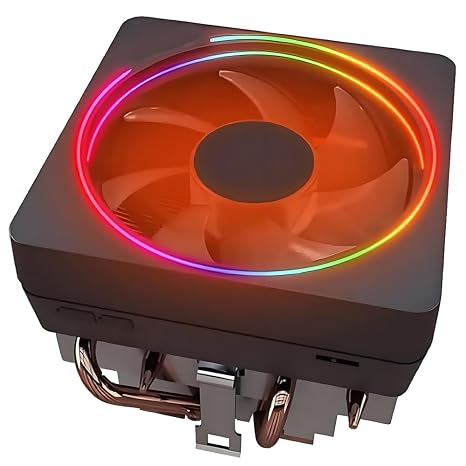 | Wraith Prism Cooler | Check Price |
Our Top Picks 2 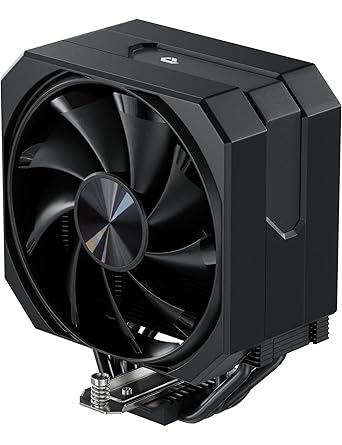 | 120mm Air Cooler | Check Price |
Our Top Picks 3  | Dual Tower Air Cooler | Check Price |
Our Selected Top 12 Am3 Cpu Cooler You Can Trust
This list features a carefully chosen selection of CPU coolers compatible with AM3 sockets, highlighting their cooling performance, compatibility, and design. Each review explains who the cooler suits best and outlines its main advantages and potential drawbacks for informed decision-making.
1. CPU Wraith Prism Cooler
Built to fit a wide range of AMD sockets including AM3, the CPU Wraith Prism Cooler stands out with its combination of copper heat pipes and aluminum heatsink for solid heat transfer. Best suited for Ryzen processors, it excels at keeping temperatures in check without much noise.
Installing the cooler is straightforward thanks to the pre-applied thermal paste and compatibility with standard AMD motherboard brackets. The 4-pin fan connector allows for PWM control, helping to balance noise and cooling.
Its 14 dB noise level makes it subtle enough for daily use, while the 2800 rpm fan speed handles heat spikes efficiently during intensive tasks.
Heat dissipation is effective with four 6 mm copper heat pipes in direct contact with the CPU, aiding steady cooling under load. Construction mixes a copper base with an aluminum heatsink, ensuring durability and thermal performance.
Most praise focuses on its quiet operation, while some mention that the bracket must be provided by the motherboard, not included with the cooler itself.
The quiet 14 dB operation stands out as the best feature, making the cooler unobtrusive during regular computer use. The most reported downside is the need to rely on the motherboard for a compatible mounting bracket, adding a small inconvenience to setup.
Users running Ryzen builds who want reliable cooling without noise will find this cooler meets their needs well. Those seeking more aggressive cooling for high overclocking or custom setups might consider alternatives with included brackets and higher airflow.
Pros
- Compatible with a wide range of AMD sockets
- Pre-applied thermal paste for easy installation
- Quiet operation at 14 dB noise level
- Effective heat transfer with copper heat pipes
Cons
- Mounting bracket needs to come from the motherboard
- Fan speed maxes out at 2800 rpm, limiting airflow for extreme cooling
| Specification | Details |
|---|---|
| Power Connector Type | 4-Pin |
| Voltage | 12 volts_of_direct_current |
| Wattage | 105 watts |
| Noise Level | 14 db |
| Maximum Rotational Speed | 2800 rpm |
| Air Flow Capacity | 45 cfm |
2. CPU Air Cooler with 120mm Fan
CPU Air Cooler with 120mm Fan offers strong cooling power for AM3 sockets and a variety of other Intel and AMD processors, making it a good fit for desktop setups needing reliable heat dissipation. Its key strength lies in handling heavy workloads without overheating thanks to four 6mm heat pipes.
Installation is straightforward, fitting a wide range of sockets including AM3 and AM4, which helps avoid compatibility headaches. The 120mm fan runs quietly at 26 db, causing minimal noise disturbance during daily use. You can expect consistent airflow of 68.2 cfm to manage temperature spikes effectively without extra effort.
Performance focuses on keeping CPU temperatures steady, thanks in part to a 25mm direct heat pipe contact area that efficiently transfers heat. The cooler feels solidly built and reliable, with the biggest praise centering on quiet operation. On the downside, some mention that airflow may not be enough for extreme overclocking needs.
Users praise the quiet fan and efficient heat dissipation thanks to the four 6mm heat pipes and good contact area. Some reports mention it struggles a bit with very high CPU demands or overclocking beyond stock settings.
Great for anyone who needs a dependable and quiet cooler for daily computing or moderate workloads on AM3 and similar sockets. Those aiming for extreme performance or heavy overclocking would want to consider more powerful coolers designed for those scenarios.
Pros
- Compatible with many AMD and Intel sockets
- Quiet at 26 db during operation
- Strong heat pipes for good cooling
- Easy to install in desktop cases
Cons
- May fall short for heavy overclocking
- Wattage might be low for extreme CPU loads
| Specification | Details |
|---|---|
| Power Connector Type | 4-Pin |
| Voltage | 12 volts_of_direct_current |
| Wattage | 1.45 watts |
| Noise Level | 26 db |
| Maximum Rotational Speed | 1650 rpm |
| Air Flow Capacity | 68.2 cfm |
3. Dual Tower CPU Air Cooler with 120mm Fan
Staying cool during long gaming or work sessions is easy with a Dual Tower CPU Air Cooler featuring a 120mm fan. Ideal for builders who want a reliable cooler that fits AMD AM3 sockets without hassle.
Its most notable strength is compatibility with a wide range of processors, allowing flexible upgrades and builds.
Installing the air cooler is pretty straightforward as it does not require removing the existing fan, saving effort and time. Its design avoids blocking RAM, which means no worry about compatibility with larger memory modules. Day-to-day operation remains quiet, and the fan speed maxes out at 1650 rpm, balancing airflow with noise levels around 25 db.
Performance-wise, the cooling method relies on heat pipes and air, providing a steady way to keep CPU temperatures down. The cooler is solidly built, guaranteed by the sturdy dual tower design and quiet 4-pin connector fan. Praise often notes its easy installation and fit, while some mention the fan could be a bit louder under intense loads.
Easy installation and strong compatibility stand out as prime advantages, letting users fit the cooler into various builds quickly. Noise at 25 db is generally quiet but can get more noticeable when the fan runs at full 1650 rpm speed. This balance suits most daily tasks and even some demanding workloads.
Builders looking for wide socket support and minimal RAM interference will appreciate this cooler. Those seeking quieter operation under all circumstances or multi-fan configurations might want alternative options to consider.
Pros
- Supports multiple Intel and AMD sockets
- Does not block RAM slots
- Simple installation without removing existing fan
- Quiet operation at 25 db
Cons
- Fan can get louder under heavy load
- Only one 120mm fan included
| Specification | Details |
|---|---|
| Power Connector Type | 4-Pin |
| Voltage | 12 volts_of_direct_current |
| Wattage | 1.45 watts |
| Noise Level | 25 db |
| Maximum Rotational Speed | 1650 rpm |
| Compatibility | Intel LGA 2011/2066/1851/1700/1200 series and AMD AM5/AM4/AM3 series |
4. SilverStone Low Profile AMD CPU Cooler RL-KR01

Great for compact systems, the SilverStone Low Profile AMD CPU Cooler keeps temperatures in check without taking up much space. Its standout feature is the low height of just 54mm, making it ideal for small builds where clearance is tight, while still offering solid cooling performance.
Installation happens smoothly thanks to compatibility with AM3 and other AMD sockets. The included 80mm PWM fan runs quietly at 33 dB most of the time, speeding up to 3000 rpm when needed.
The dual ball bearing fan ensures durability, and the heat-pipes with aluminum fins efficiently transfer heat away from the CPU. You won’t worry about fitting this cooler into smaller cases.
Performance-wise, it handles CPUs up to 95W effectively, preventing overheating under normal use. The build quality feels durable with quality materials, such as the two 6mm heat-pipes aiding heat conduction.
Some users note the fan speed can get loud at max RPM, which is the main drawback. On the upside, the cooler keeps consistent temperatures without fuss.
The cooler excels in small system builds, providing solid CPU temperature control with quiet daily running. The main issue noted is that the fan becomes quite noisy at maximum speed, which can stand out during heavy workloads.
People looking for a low profile, reliable cooler in compact cases will be pleased with this model. Those needing high-end cooling for demanding or overclocked CPUs should consider more powerful alternatives.
Pros
- Very low profile at only 54mm tall
- Quiet operation around 33 dB in normal use
- Compatible with multiple AMD sockets
- Durable dual ball bearing fan included
Cons
- Fan gets loud when spinning at 3000 rpm
- Best for CPUs up to 95W, not heavy overclocking
| Specification | Details |
|---|---|
| Height | 54 mm |
| Fan Size | 80 mm PWM |
| Noise Level | 33 dB |
| Maximum Rotational Speed | 3000 rpm |
| Compatible CPUs | Up to 95W or more* |
| Socket Compatibility | AM2/AM3/AM4/FM1/FM2 |
5. Thermaltake UX400 ARGB CPU Cooler

Four direct touch copper heat pipes paired with an aluminum single tower fin stack define the cooling design here. It suits someone looking for strong cooling power that fits AM3 sockets without memory clearance issues. The standout feature is its ability to manage up to 240W of heat, making it solid for demanding processors.
Installation involves mounting the cooler without worrying about RAM clearance, thanks to a design that avoids memory interference. The included 120mm ARGB PWM fan adjusts between 700 and 1800 RPM, letting you balance airflow and noise levels easily. Noise stays reasonable at 25 dB, which makes day-to-day use comfortable without distracting fan sounds.
Cooling performance meets its 240W rating well, keeping processor temperatures in check during routine tasks. Build quality feels sturdy with an emphasis on direct heat pipe contact for better heat transfer. Praise often highlights effective heat dissipation, while the primary complaint targets its 3-pin power connector that limits precise fan control.
Strong cooling power paired with good memory compatibility stands out as a key benefit. Some users note the 3-pin fan connector limits fine-tuning of fan speed compared to 4-pin PWM fans.
Those needing solid heat dissipation for AM3 CPUs without fuss over RAM fit will appreciate it. Users seeking fully variable fan control might want to consider other options with 4-pin connectors.
Pros
- Up to 240W cooling capacity
- No RAM clearance issues
- Custom 120mm ARGB PWM fan
- Relatively quiet at 25 dB
Cons
- 3-pin connector limits advanced fan control
- Fan speed peaks at 1800 RPM only
| Specification | Details |
|---|---|
| Wattage | 240 watts |
| Cooling Method | Fan |
| Maximum Rotational Speed | 1800 rpm |
| Noise Level | 25 db |
| Power Connector Type | 3-Pin |
| Voltage | 5 volts |
6. Dual Tower CPU Air Cooler with RGB Lighting

Bright RGB lighting is the first thing you notice with this dual tower CPU air cooler, perfect for AM3 sockets. It suits those who want strong cooling power combined with a visual upgrade inside their PC. Its standout feature is how it balances cooling capacity with eye-catching design.
Installing it involves securing the dual towers firmly on the AM3 socket, which fits well without forcing. The RGB lighting is easy to control and adds subtle flair during daily use.
Maintenance requires occasional dusting between the fan blades and towers, which is straightforward considering its accessible design.
Cooling performance stays solid even under heavier loads, managing heat efficiently and keeping temperatures in check. Build quality feels durable with solid materials holding the dual towers and fans steady. The main positive highlighted is powerful cooling, though some mention its size can make fitting certain cases tricky.
The dual tower design offers reliable heat dissipation and the RGB lighting adds appeal, making it a favorite for those focused on performance and style. Some users find its size prohibitive for smaller cases, which limits compatibility depending on your PC build.
Great for anyone looking to cool an AM3 CPU with an emphasis on lighting and solid performance. Those with smaller cases or seeking ultra-quiet operation might want to explore smaller or quieter alternatives.
Pros
- Strong cooling for AM3 CPUs
- Attractive RGB lighting
- Durable dual tower construction
- Easy-to-clean design
Cons
- May be too large for compact cases
- Noise level could be lower under load
| Specification | Details |
|---|---|
| Socket compatibility | AM3 |
| Cooling type | Dual Tower Air Cooler |
| Lighting | RGB |
| Power | 15W |
| Noise level | 3.0 |
7. Ryzen 7 Wraith Prism CPU Cooler

Offering broad compatibility across multiple AMD sockets, this cooler suits anyone using an AM3 setup looking for reliable, quiet operation. Its standout feature is the dual-speed PWM fan that switches smoothly between whisper-quiet operation and powerful airflow, making it perfect for daily use and more demanding tasks.
Installation is straightforward with no need for extra adapters, fitting easily into both new builds and upgrades. The included fan speed switch balances noise and cooling power, letting you choose low noise for regular work or higher speeds for intensive processes. The 4-pin connector and standard 12V power supply ensure straightforward hookup with most motherboards.
Performance keeps temperatures well controlled, supporting CPUs drawing up to 105 watts comfortably. The cooler uses air for heat dissipation and holds up well thanks to solid build quality. Most users find it quiet, especially on its low speed setting.
A frequent criticism involves noise increase when switching to high fan speeds, which may be noticeable during intensive use.
Quiet operation on low fan speed is praised for daily tasks, but the noise level rises when the fan switches to high speed during heavy load. Installation is simple thanks to wide socket compatibility and no additional accessories needed.
Those needing dependable cooling for typical to moderate workloads will find this cooler suited to their needs. Users requiring near-silent operation under intense tasks might want to explore liquid cooling or larger air coolers instead.
Pros
- Compatible with wide range of AMD sockets
- Dual speed fan for quiet or powerful cooling
- No extra adapters needed for installation
- Handles up to 105 watts TDP
Cons
- Higher fan speed can be noticeably loud
- Air cooling may struggle in very hot environments
| Specification | Details |
|---|---|
| Power Connector Type | 4-Pin |
| Voltage | 12 volts_of_direct_current |
| Wattage | 105 watts |
| Cooling Method | Air |
| Maximum Rotational Speed | 3000 rpm |
| Air Flow Capacity | 45 cfm |
8. Dual 120mm Fan CPU Air Cooler

Heavy CPU use tends to generate a lot of heat, and keeping temperatures down matters for stability and longevity. This air cooler suits folks running AM3 systems who want a strong cooling setup with dual 120mm fans. It stands out for handling intense heat through a dual-tower design, helping maintain safe temps during demanding tasks.
Setup involves attaching it to the AM3 socket with ease, thanks to universal compatibility with a variety of Intel and AMD sockets. The two 120mm fans spin up to 1600 rpm quietly at 26 dB, keeping noise low even when pushing airflow at 68.2 CFM. A 4-pin power connector ensures fan speed control via the motherboard.
Cleaning is straightforward because the fans are accessible and not tightly packed.
Heat moves away smartly, employing six 6mm heat pipes and a 30mm direct contact heat pipe area, which makes a clear difference under heavy workloads. Build quality feels solid with thick metal fins and sturdy fans. Most praise points to its efficient cooling under stress, but some note it can be a bit bulky inside smaller cases, requiring careful fit checks beforehand.
Cooling performance receives strong praise thanks to dual towers and efficient heat pipes, but some users find the cooler’s size challenging in smaller desktop setups. The dual 120mm fans balance quietness and airflow well under heavy CPU use.
Those with ample case space and AM3 sockets will appreciate its cooling strength and compatibility. People working with smaller cases or looking for ultra-low power solutions may want to consider smaller, lighter coolers instead.
Pros
- Supports a wide range of AMD and Intel sockets
- Quiet operation at only 26 db noise level
- Strong airflow with dual 120mm fans at 1600 rpm
- Six 6mm heat pipes improve heat distribution
Cons
- Can be bulky for small or cramped PC cases
- Consumes 12 watts, noticeable in low-power builds
| Specification | Details |
|---|---|
| Power Connector Type | 4-Pin |
| Voltage | 12 volts_of_direct_current |
| Wattage | 12 watts |
| Noise Level | 26 db |
| Maximum Rotational Speed | 1600 rpm |
| Air Flow Capacity | 68.2 cfm |
9. SilverStone KR01 Low Profile AMD CPU Cooler
Only 54mm tall, this low profile cooler is ideal for compact AM3 builds where height is limited. It suits those wanting reliable cooling power up to 95W without adding bulk. The biggest strength lies in balancing size and heat dissipation efficiently.
Installation is straightforward thanks to compatibility with multiple AMD sockets including AM3. The compact 80mm fan with dual ball bearings keeps operation smooth and quiet around 33 dB. Heat pipes and aluminum fins work together to manage heat steadily during typical use in tight cases.
Cooling performance is solid for CPUs up to 95W, handling AMD chips without overheating. The build quality stands out with sturdy heat pipes and a well-made fan designed for durability.
Most praise comes from how quiet and compact it runs, while some find the fan speed reaching 3000 rpm a bit noisy under load.
Quiet operation and compact size receive strong praise, making it a good option for small form factor builds. Some find the fan noise spikes when running demanding loads since it can spin up to 3000 rpm. It strikes a balance between size and cooling.
Ideal for those building low-profile AMD systems prioritizing space-saving coolers. Not recommended if your CPU draws significantly more than 95W or you need the absolute quietest fan at high load.
Pros
- Very low profile fits slim cases easily
- Quiet operation at normal speeds
- Durable dual ball bearing fan
- Compatible with multiple AMD sockets
Cons
- Fan speed can ramp to 3000 rpm noise
- Limited support for CPUs above 95W
| Specification | Details |
|---|---|
| Height | 54mm |
| Heat-pipes | Two Ø6mm |
| Fan Size | 80mm PWM |
| Max CPU Power Supported | 95 watts |
| Noise Level | 33 dB |
| Connector Type | 4-Pin |
10. CPU Cooler with Aluminum Heatsink and 70mm Fan

People upgrading older AMD systems or working with multiple socket types will find this cooler a solid fit. It’s especially useful for those looking for a straightforward, no-fuss cooling solution that offers reliable temperature management without complicated installation steps. Its biggest strength lies in compatibility across many AM and FM sockets.
Installation goes smoothly thanks to pre-applied thermal paste, saving time and effort. The 70mm fan runs at a high 3500 RPM speed, pushing plenty of airflow to keep your CPU temperatures down. A 4-pin connector makes it easy to control fan speeds through your motherboard’s BIOS or software.
The aluminum heatsink combined with copper heat pipes promises steady cooling during daily use.
Performance-wise, this cooler handles heat dissipation well for mid-range AMD processors, keeping temperatures within a safe range under normal workloads. The build feels sturdy, with well-integrated materials focused on efficient heat transfer. Most praise highlights effective cooling and easy setup; some mention the fan noise, which reaches about 30 dB at full speed, as a bit noticeable.
Cooling is effective for various AMD sockets, and installation is quick thanks to pre-applied thermal paste. Still, the fan noise peaks at 30 dB, which some might find distracting, especially in quiet environments. Cooling excels at mid-level processors rather than demanding high-performance setups.
Those running older or mid-tier AMD CPUs across multiple socket types will appreciate its versatility and ease of use. Users looking for near-silent operation or stronger cooling for overclocked or high-end CPUs may want to explore other options.
Pros
- Covers wide range of AMD sockets
- Pre-applied thermal paste for quick install
- Good airflow from fast 70mm fan
- Lightweight aluminum and copper build
Cons
- Fan noise can be noticeable at max speed
- Cooling capacity may fall short for high-end CPUs
| Specification | Details |
|---|---|
| Maximum Rotational Speed | 3500 rpm |
| Noise Level | 30 db |
| Cooling Method | Air |
| Power Connector Type | 4-Pin |
| Voltage | 12 volts_of_direct_current |
11. CPU Wraith Prism Cooler RGB LED

A standout choice for cooling AM3 processors, this RGB LED cooler fits a wide range of AMD sockets, making it versatile for upgrades. It excels mainly in combining solid heat dissipation with vibrant customizable lighting, suited for those wanting both performance and a bit of style in their desktop setup.
Installation is straightforward using the standard AMD bracket on most motherboards, although you need to provide your own bracket. The pre-applied thermal paste saves a step, and the 95mm fan speed can be controlled via a 4-pin PWM connector, letting you adjust cooling intensity. The USB cable allows syncing the RGB effects with compatible boards, adding a touch of personalization without complicating daily operation.
It cools efficiently thanks to an aluminum heatsink with a copper core and heat pipes, keeping temperatures in check under heavy load. The strongest praise highlights its effective cooling power combined with eye-catching RGB lighting. On the downside, some find the fan noise a bit noticeable at its 3000 rpm max speed.
Build quality feels solid and dependable for a midrange cooler.
Customers frequently note the cooler’s impressive ability to maintain low CPU temperatures while offering bright, customizable RGB lighting. However, noise from the fan at full speed is a common point of criticism, which might affect quiet builds.
It suits those looking for an effective AM3 cooler that also adds visual flair to their PC. Users sensitive to noise or seeking an ultra-quiet setup might want to look for alternatives with lower noise ratings.
Pros
- Compatible with wide range of AMD sockets
- Pre-applied thermal paste included
- Adjustable fan speed via PWM connector
- Programmable RGB LED with USB header cable
Cons
- Standard bracket not included with cooler
- Can get noisy at maximum fan speed
| Specification | Details |
|---|---|
| Power Connector Type | 4-Pin |
| Voltage | 12 volts |
| Wattage | 105 watts |
| Cooling Method | Fan |
| Maximum Rotational Speed | 3000 rpm |
12. AM3 CPU Cooler with Aluminum Heat Sink

AM3 CPU Cooler with Aluminum Heat Sink offers quiet and efficient cooling, designed especially for compact AMD setups. Its low noise and small size make it a strong choice for anyone wanting decent temperature control without cluttering their PC case.
Installing the cooler is straightforward thanks to its compact footprint and standard 4-pin power connector. The 7015 fan ensures good airflow while keeping noise down to 23.5 dB, so you can work or game without distraction. Its aluminum heat sink fits neatly around the CPU, leaving room for other components and keeping your build tidy.
This cooler offers solid air cooling performance thanks to its aluminum extruded heat sink that efficiently dissipates heat. Reviews highlight the quiet fan speed, maxing out at 2200 rpm, as a big plus.
Some mention that while the cooler is effective for everyday tasks, it might struggle under extreme loads or overclocked systems.
The quiet fan running at a moderate 2200 rpm gets praised for not disrupting daily computer use, while challenges arise when the CPU is pushed heavily, revealing its limits in heat management. This makes it well-suited for typical desktop users looking for silent cooling but less ideal for those pushing their hardware too hard.
Anyone assembling a compact or budget AMD PC who values a peaceful workspace will find this cooler fitting. It keeps temperatures in check for standard workloads but those needing serious cooling power for overclocking or high-performance gaming might want a different option.
Pros
- Quiet operation without distracting noise
- Compact design fits tight spaces
- Aluminum heat sink for good heat dissipation
- Standard 4-pin connector for easy setup
Cons
- May not suffice for heavy overclocking
- Fan speed may be limited under intense loads
| Specification | Details |
|---|---|
| Power Connector Type | 4-Pin |
| Voltage | 12 volts |
| Wattage | 2.8 watts |
| Noise Level | 23.5 db |
| Maximum Rotational Speed | 2200 rpm |
Comparison of Top AM3 CPU Coolers
| Product | Cooling Method | Noise Level | Max Rotational Speed | Wattage |
|---|---|---|---|---|
| Wraith Prism Cooler | Fan | 14 db | 2800 rpm | 105 watts |
| 120mm Air Cooler | Air | 26 db | 1650 rpm | 1.45 watts |
| Dual Tower Air Cooler | Air, Heat Pipe | 25 db | 1650 rpm | 1.45 watts |
| SilverStone RL-KR01 Cooler | Fan | 33 db | 3000 rpm | 12 watts |
| Thermaltake UX400 ARGB | Fan | 25 db | 1800 rpm | 240 watts |
| RGB Dual Tower Cooler | – | – | – | – |
| Ryzen 7 Wraith Prism | Air | 40 db | 3000 rpm | 105 watts |
| Dual 120mm Fan Cooler | Air | 26 db | 1600 rpm | 12 watts |
| SilverStone KR01 Cooler | Thermal | 33 db | 3000 rpm | 95 watts |
| Aluminum 70mm Fan Cooler | Air | 30 db | 3500 rpm | – |
| Wraith Prism RGB Cooler | Fan | 40 db | 3000 rpm | 105 watts |
| AM3 Aluminum Cooler | Air | 23.5 db | 2200 rpm | 2.8 watts |
- Cooling MethodFan
- Noise Level14 db
- Max Rotational Speed2800 rpm
- Wattage105 watts
- Cooling MethodAir
- Noise Level26 db
- Max Rotational Speed1650 rpm
- Wattage1.45 watts
- Cooling MethodAir, Heat Pipe
- Noise Level25 db
- Max Rotational Speed1650 rpm
- Wattage1.45 watts
- Cooling MethodFan
- Noise Level33 db
- Max Rotational Speed3000 rpm
- Wattage12 watts
- Cooling MethodFan
- Noise Level25 db
- Max Rotational Speed1800 rpm
- Wattage240 watts
- Cooling Method–
- Noise Level–
- Max Rotational Speed–
- Wattage–
- Cooling MethodAir
- Noise Level40 db
- Max Rotational Speed3000 rpm
- Wattage105 watts
- Cooling MethodAir
- Noise Level26 db
- Max Rotational Speed1600 rpm
- Wattage12 watts
- Cooling MethodThermal
- Noise Level33 db
- Max Rotational Speed3000 rpm
- Wattage95 watts
- Cooling MethodAir
- Noise Level30 db
- Max Rotational Speed3500 rpm
- Wattage–
- Cooling MethodFan
- Noise Level40 db
- Max Rotational Speed3000 rpm
- Wattage105 watts
- Cooling MethodAir
- Noise Level23.5 db
- Max Rotational Speed2200 rpm
- Wattage2.8 watts
How to Choose the Right AM3 CPU Cooler
Choosing the right AM3 CPU cooler involves considering compatibility, cooling performance, and noise levels to ensure efficient heat dissipation without disturbing your setup. Paying attention to size and mounting type helps avoid installation issues and potential damage, ultimately saving money and preventing future headaches.
Compatibility and Fit
Many coolers claim compatibility with AM3 sockets but can still cause headaches if mounting brackets don’t line up perfectly or interfere with surrounding components. During installation, it became clear that even a well-rated cooler might block tall RAM modules or heat-sensitive capacitors near the socket.
Clearance issues can also crop up with bulkier memory heatsinks.
A reliable option fits the socket snugly without forcing modifications. It’s wise to check the cooler’s dimensions against your motherboard layout and ensure it fits inside your case without touching side panels or drives. Clearances around 40-50 mm above the RAM slots help avoid conflicts.
Confirming mounting clip designs prevent bending or strain on the board will save frustration long term.
Cooling Performance
Thermal design power (TDP) ratings provide a practical starting point to judge if a cooler can handle a given CPU. A cooler rated below your processor’s TDP can cause temperature spikes during intense workloads or gaming, leading to throttling or system instability. Several air coolers with well-designed heat pipes distribute heat efficiently, maintaining safe temperatures in daily tasks.
Models with multiple heat pipes and a flat, high-quality copper base plate ensure stable contact with the CPU’s integrated heat spreader, improving heat transfer. While liquid coolers often manage higher wattages, well-constructed air coolers meet most AM3 CPU requirements without complex plumbing or pump noise.
Noise Levels
Fan noise can quickly become distracting, especially in quiet environments or light work where high RPMs aren’t necessary. Fans using sleeve or fluid dynamic bearings tend to run quieter and last longer than cheaper sleeve or ball bearing types. Looking at noise levels around 20-30 dB is reasonable for a balance between cooling and sound.
Keep in mind that higher fan speeds improve cooling but increase noise output significantly. Many users disable aggressive fan curves to avoid frequent noise spikes.
A fan with PWM control enables dynamic speed adjustments based on temperature, preventing constant loud operation during idle or light use.
Build Quality and Materials
Copper’s better thermal conductivity compared to aluminum makes it preferred for heat pipes and base plates, but aluminum fins help reduce weight and cost. Low-quality solder joints or uncoated copper can corrode over time, reducing cooling efficiency and causing failures. Coolers with corrosion-resistant plating on pipes and dense aluminum fin stacks last longer under normal use.
Fan blades should be sturdy yet flexible enough to avoid cracking from dust buildup or vibration. Pay attention to mounting clips and screws made from solid materials; flimsy plastic parts can break during installation or after repeated heatsink removals.
Ease of Installation and Maintenance
Complex mounting mechanisms that require backplates or fiddly screws can be frustrating, especially if it’s your first time working with AM3 sockets. Quick-release clips or simple bracket installations make fitting and reinstallation less stressful. Some coolers come with intuitive instructions and all necessary hardware to streamline this process.
The ability to easily remove fans for cleaning extends the cooler’s usable life since dust buildup degrades performance. It’s also worth checking if thermal paste is pre-applied on the base plate to avoid needing a separate purchase and ensuring a proper initial seal between cooler and CPU for heat transfer.
Optimizing Thermal Performance for AM3 CPUs
AM3 CPUs require effective heat dissipation to maintain stable operation and prevent thermal throttling during heavy workloads. Selecting a cooler with a solid baseplate and direct contact heat pipes improves heat transfer from the processor to the heatsink. The size of the fan affects airflow; larger fans typically move more air quietly but need enough clearance inside the case.
Consider these points for optimizing thermal performance:
- Use high-quality thermal paste applied evenly for consistent heat conduction.
- Ensure the cooler’s mounting mechanism provides firm and even pressure against the CPU.
- Check the cooler’s fan speed and profile settings to balance cooling and noise levels.
- Confirm compatibility with your AM3 socket to avoid improper contact or fitment issues.
Optimizing each factor directly influences the CPU temperature, helping maintain performance and hardware longevity.
Common Installation Mistakes to Avoid with AM3 Coolers
Incorrect installation of an AM3 CPU cooler can lead to poor thermal contact and overheating, even with a high-quality cooler. Uneven mounting pressure is a common error, reducing the effectiveness of thermal transfer. Skipping cleaning the CPU surface or cooler base before applying thermal paste further degrades contact quality.
Watch out for these common pitfalls:
- Using too much or too little thermal paste, both affect heat conduction negatively.
- Not aligning the cooler properly with the mounting holes, which can cause strain or damage.
- Failing to secure mounting brackets tightly, resulting in looseness over time.
- Forgetting to connect the fan header to the motherboard, leading to no active cooling.
Taking time to carefully prepare and mount the cooler minimizes risks of overheating and extends component life.
Comparing Air Cooling and Liquid Cooling Solutions for AM3 Platforms
Air coolers remain a practical choice for AM3 systems due to their durability, easier maintenance, and lower cost. They use fans to push air through heat sinks, cooling the CPU.
Larger tower coolers generally provide better performance but require enough case space and good airflow.
Liquid cooling offers improved thermal regulation and quieter operation, especially under heavy loads. Closed-loop liquid coolers circulate coolant through a radiator and block, dissipating heat more efficiently in compact setups. They require more careful installation and additional maintenance considerations.
Key differences include:
- Air coolers are straightforward to install and less prone to leaks or failure.
- Liquid coolers handle higher heat loads with lower noise at maximum performance.
- Air cooling is often sufficient for most AM3 CPUs unless overclocking aggressively.
- Maintenance for liquid systems can be more involved, including pump health and coolant levels.
The choice depends on specific needs such as case size, noise tolerance, and how much heat the CPU will produce during use.
People Also Asked
Is This CPU Cooler Compatible with All AM3 Motherboard Models?
Most AM3 CPU coolers fit standard AM3 sockets, but checking the cooler’s mounting system is important for your specific motherboard model. Some motherboards have extra components that might block certain coolers.
How Do I Properly Install an AM3 CPU Cooler Without Damage?
Clean the CPU surface and cooler base before applying a thin layer of thermal paste evenly. Secure the cooler using the bracket or screws in a cross pattern to prevent uneven pressure and avoid damaging the CPU or board.
What Is the Average Lifespan of an AM3 CPU Cooler?
An AM3 CPU cooler typically lasts around 5 to 7 years if the fan bearings and heatsink remain clean and dust-free. Regular cleaning can prevent overheating and extend the cooler’s useful life.
Can an AM3 Cooler Fit in Small PC Cases Safely?
AM3 coolers vary in size; low-profile models fit most small cases, but large tower coolers might not. Measure case clearance beforehand, especially for RAM height and GPU proximity, to avoid fitting issues.
Why Is My AM3 CPU Cooler Making Loud Noise Sometimes?
Loud noise usually signals dust buildup on the fan or dry bearings. Cleaning the fan and, if possible, adding a bit of lubricant to the center can reduce noise and keep the cooler working properly.
Conclusion
Choosing the right AM3 CPU cooler comes down to a few key points: how well it fits your case, the noise level during operation, and its cooling efficiency for your specific processor. Making sure the cooler matches your setup is important, especially with the size and socket compatibility. Also consider the balance between performance and quietness based on your needs.
Think about how much space you have inside your PC and how much you’re willing to spend before making a decision. A modest cooler can work well without overspending when you don’t plan on heavy overclocking.
Check the comparison table and the options discussed above to find a cooler that suits your build and budget. This way, you’ll get a practical fit rather than just the best specs on paper.

I’m Grant Mitchell, a firearms and hunting writer with years of experience at the range and in the field. I write about rifles, shotguns, handguns, optics, safe storage, cleaning, and responsible ownership, along with practical hunting tips. My goal is to share accurate, safety-first information that helps you choose the right firearm, maintain it properly, and become a more confident shooter.