Top 12 Best Air Cooler with RGB That Will Blow Your Mind
Hot days spent in a stuffy room reveal the limitations of a cheap or poorly chosen air cooler, especially when it lacks a proper lighting feature. The best air cooler with rgb not only cools the air effectively but also adds a customizable glow that can match your mood or room decor.
A common frustration with lesser models is weak airflow combined with a flickering or dim lighting effect that defeats the purpose of the rgb feature.
Key factors that distinguish a quality air cooler with rgb include the strength of the fan, measured in cubic feet per minute (CFM), with good models typically offering 200-500 CFM for usable airflow in a small to medium room. Water tank size matters for run time, with 2 to 5 liters being common for several hours of continuous use.
The rgb lighting should be easy to control and well integrated, without interfering with the cooler’s main function or making maintenance difficult. Durable materials and accessible filters also make cleaning less of a hassle.
Need a Quick Check?
| Image | Product | Price |
|---|---|---|
Our Top Picks 1  | Thermalright Assassin X120 SE | Check Price |
Our Top Picks 2  | Thermalright PS120SE ARGB | Check Price |
Our Top Picks 3  | Thermalright Peerless Assassin Vision | Check Price |
Our Selected Top 12 Air Cooler with Rgb You Can Trust
This list features a carefully chosen selection of air coolers with RGB lighting, highlighting their performance, ideal users, and key advantages and disadvantages. Each review provides clear insights to help you find the model that best fits your cooling needs and style preferences.
1. Thermalright Assassin X120 SE ARGB CPU Cooler
People building a desktop who want solid cooling paired with eye-catching RGB lighting will appreciate this cooler. Its biggest strength lies in delivering good airflow while adding colorful effects, making it fit for gamers or PC builders who care about both looks and function.
Installing the cooler involves hooking it up via a 4-pin power connector and fitting it onto a compatible desktop CPU. Running at a moderate noise level, it keeps things balanced so day-to-day use isn’t too loud or distracting.
The control over fan speed allows for adjusting airflow depending on the system’s needs, all while the ARGB lighting adds style without extra effort.
Air cooling reaches a peak airflow of 66.17 cfm at up to 1550 rpm, which manages heat well for most setups. It operates relatively quietly at around 25.6 dB, helping maintain a calm environment. Reviews often praise the cooler’s performance and colorful lighting but sometimes mention its size can affect fitting in smaller cases.
This cooler delivers strong airflow quietly and creates a nice visual impact with its ARGB lighting. The most frequent drawback comes from users struggling to fit it inside compact or tight PC cases due to its dimensions. It’s a dependable choice where space allows but worth checking your chassis first.
Gamers and desktop builders who want both solid air cooling and appealing RGB lighting will find this a good match. Those dealing with smaller form factors or requiring higher fan speeds for extreme overclocking should look for alternative coolers tailored to those needs.
Pros
- Good airflow at a moderate noise level
- Attractive ARGB lighting effects
- Compatible with most desktop CPUs
- Easy fan speed control
Cons
- May not fit well in small cases
- Fan speed capped at 1550 rpm
| Specification | Details |
|---|---|
| Power Connector Type | 4-Pin |
| Voltage | 12 volts |
| Cooling Method | Air |
| Noise Level | 25.6 db |
| Maximum Rotational Speed | 1550 rpm |
| Air Flow Capacity | 66.17 cfm |
2. Thermalright PS120SE ARGB CPU Cooler
Recognizable by its ARGB lighting and advanced heatpipe technology, this CPU cooler suits gamers and PC builders wanting reliable cooling with a visual boost. Its standout trait is the AGHP 4th generation heatpipe design, offering efficient heat transfer in various orientations.
Installation fits smoothly in many desktop cases, thanks to its 154mm height. The 4-pin power connector keeps control simple, and the fan speed adjusts up to 1500 rpm, balancing noise and cooling.
Lights add a customizable glow, blending with other RGB components during everyday use without complicating setup.
A strong performer, it moves 66.17 cubic feet of air per minute at a quiet 25.6 dB. The build uses industrial-strength PBT + PC materials, making it sturdy and safe with UL class A insulation. While praised for long service life and quiet operation, some mention the airflow could be beefier for heavily overclocked CPUs.
Long service life and quiet fan speed receive constant praise, highlighting the cooler’s durability and pleasant noise. The common downside revolves around airflow limitations during intensive CPU loads, suggesting it might not satisfy extreme cooling needs.
Gamers and general PC users looking for an effective and visually appealing cooler will appreciate this one. Users aiming for intense overclocking should consider models with higher airflow capacity to match their cooling demands better.
Pros
- Advanced 7x6mm heatpipe with AGHP technology
- Quiet operation at 25.6 dB noise level
- Compatible with many chassis at 154mm height
- Durable materials with UL class A insulation
Cons
- Airflow may fall short for heavy overclocking
- ARGB lighting might require extra motherboard support
| Specification | Details |
|---|---|
| Cooling Method | Air |
| Maximum Rotational Speed | 1500 rpm |
| Air Flow Capacity | 66.17 cfm |
| Noise Level | 25.6 db |
| Power Connector Type | 4-Pin |
| Height | 154 mm |
3. Thermalright Peerless Assassin 120 Vision MAX ARGB
Thermalright Peerless Assassin 120 Vision MAX ARGB stands out as a powerful air cooler designed for desktop users seeking solid performance paired with visual customization. Its main attraction is the dual-tower setup combined with a vibrant 5-inch IPS LCD screen that adds flair while keeping you informed.
Setting up the cooler involves attaching the magnetically secured top cover with the display, which fits snugly without extra fuss. The software allows easy personalization of themes on the IPS screen.
Day-to-day use benefits from quiet operation at 27 dB and a decent airflow of 69 CFM, meaning the system stays cool without overwhelming noise.
Cooling relies on six copper heat pipes and a nickel-plated copper base to maximize heat transfer. The two fans spin up to 2150 RPM, delivering effective heat dissipation. The solid construction and efficient thermal contact earn a lot of praise, but some mention the size means you should check case compatibility before buying.
The cooler impresses with strong thermal performance thanks to its copper heat pipes and high RPM fans, and the built-in display offers good customization options, although some find the size a bit challenging to fit. The quiet noise level also stands out among similar air coolers.
People wanting a visually striking and effective desktop cooler with room to accommodate the size will be satisfied. Those with compact cases or a preference for simpler setups might look for a smaller or less complex option.
Pros
- Impressive cooling with dual-tower and copper heat pipes
- Bright and customizable 5-inch IPS LCD screen
- Quiet operation at 27 dB despite high fan speed
- Magnetic top cover simplifies install and display adjustment
Cons
- Size can be a tight fit in smaller cases
- Software control of display requires setup effort
| Specification | Details |
|---|---|
| Power Connector Type | 4-Pin |
| Voltage | 12 volts_of_direct_current |
| Cooling Method | Air |
| Noise Level | 27 db |
| Maximum Rotational Speed | 2150 rpm |
| Air Flow Capacity | 69 cfm |
4. ARCTIC Freezer 36 A-RGB CPU Cooler

Cooling a high-end CPU while adding a vibrant splash of RGB lighting makes this option stand out. Designed for enthusiasts with AMD or Intel setups, its biggest strength lies in balancing efficient heat dissipation with eye-catching lighting control.
It suits those who want reliable air cooling without sacrificing style inside their case.
Installation requires the original AMD screws for AM5/AM4 sockets or the included mounting frame for Intel LGA1851 and LGA1700, ensuring secure contact across the CPU. The single tower design with four offset heat pipes and a 120 mm fan keeps airflow pushing steadily at 48.8 cfm.
Day-to-day, the 4-pin connector operates at 12 volts with a maximum fan speed of 2000 rpm, making adjustments straightforward through motherboard controls.
Heat moves quickly from the CPU with evenly distributed pressure thanks to the Intel mounting frame, and the 120 mm pressure-optimized fan keeps temperatures steady under load. The solid build focuses on durability and efficient thermals.
Praised for quiet operation and solid heat transfer, the most frequent issue arises from missing AMD mounting screws or those needing replacement support.
Reviews often highlight the cooler’s ability to maintain efficient CPU temperatures quietly while providing vibrant RGB lighting. Common complaints mention missing or hard-to-find AMD mounting screws, requiring extra steps to get the cooler installed properly.
The air cooler is a solid choice for users with supported AMD or Intel sockets who want effective heat management paired with RGB effects. Those needing quick installation without sourcing extra parts might consider alternatives with included mounting hardware.
Pros
- Strong heat transfer through 4 offset heat pipes
- Bright, customizable A-RGB lighting
- Supports multiple AMD and Intel sockets
- 120 mm fan provides steady airflow
Cons
- AMD mounting screws must be original or requested separately
- Maximum fan speed limited to 2000 rpm
| Specification | Details |
|---|---|
| Power Connector Type | 4-Pin |
| Voltage | 12 volts |
| Wattage | 1.32 watts |
| Cooling Method | Air |
| Compatible Devices | AM4, AMD: AM5, Intel: LGA1851, LGA1700 |
| Maximum Rotational Speed | 2000 rpm |
5. Thermalright Peerless Assassin 120 SE ARGB CPU Cooler
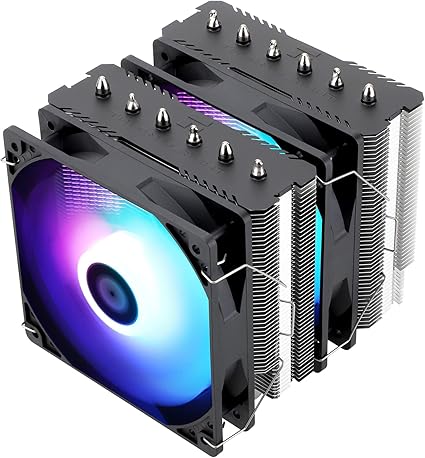
Powerful cooling and eye-catching RGB lighting make this air cooler ideal for desktop users who want both function and style. It excels at maintaining stable temperatures with an attractive ARGB setup that suits gamers and PC enthusiasts looking to add flair to their rigs.
Setting up involves a straightforward 4-pin connection running at 12 volts, keeping things compatible with most desktop motherboards. The fan speed maxes out at 1550 rpm, which keeps noise down to a reasonable 25 dB during typical use.
The ARGB lighting adds a nice touch without getting in the way of airflow or maintenance, making daily use pleasant and visually appealing.
Cooling performance is solid, moving 66.17 CFM of air quietly and efficiently to keep CPUs from overheating. The build reflects years of Thermalright’s experience, combining a well-engineered air-cooling method with quality materials that hold up well over time. Common praise focuses on its quiet operation, while the usual complaint mentions that it may not fit every case due to its size.
Quiet operation stands out as a key advantage, keeping noise levels comfortable while cooling effectively. The most common gripe relates to its size, as it can be a tight fit in compact cases, requiring careful consideration before purchase.
Those who prioritize quiet, RGB-enhanced cooling and have spacious desktop builds will find this cooler very satisfying. Smaller cases or setups needing ultra-compact coolers should explore different options better suited to limited space.
Pros
- Quiet operation at 25 dB noise level
- ARGB lighting adds customizable style
- Good airflow of 66.17 CFM for efficient cooling
- Low power draw at 7 watts
Cons
- May be bulky for smaller PC cases
- Limited to 1550 rpm max fan speed
| Specification | Details |
|---|---|
| Power Connector Type | 4-Pin |
| Voltage | 12 volts_of_direct_current |
| Wattage | 7 watts |
| Noise Level | 25 db |
| Maximum Rotational Speed | 1550 rpm |
| Air Flow Capacity | 66.17 cfm |
6. Gamma A40 ARGB CPU Cooler

Aluminum heatpipes and a compact design make the Gamma A40 ARGB CPU Cooler a solid choice for anyone looking to keep their processor cool without taking up too much space. Its height of 133mm fits comfortably in most cases, and the customizable ARGB lighting adds a nice touch for gamers and PC builders who care about aesthetics.
Setting it up is straightforward thanks to support for both Intel and AMD mainstream platforms. The 100mm fan runs quietly at 29.5 dB while spinning up to 2400 RPM, providing good airflow without noise distraction.
The direct-touch heatpipes help efficiently transfer heat, and the ARGB lighting syncs nicely with other compatible devices for a coordinated look. A practical cooler that fits well in tighter builds.
Cooling performance handles up to 200W TDP, making it capable for many mid-range CPUs. The build quality feels durable, with the unique matrix round top cover hiding subtle light strips that don’t overwhelm the design. Common praise highlights its balance of compact size and cooling power, while some note the 3-pin power connector limits fan speed control options compared to 4-pin alternatives.
The cooler is praised for balancing effective heat dissipation with a quiet fan and compact form factor. Its main drawback comes from the 3-pin power connector, which restricts fan speed adjustments compared to more advanced models.
Those building smaller, mid-range gaming or work PCs will appreciate this cooler’s fit and lighting features. Users with high-performance CPUs needing more aggressive cooling might want to consider alternatives offering higher TDP support and PWM control.
Pros
- Compact 133mm height fits most cases
- Customizable ARGB lighting with sync support
- Quiet 100mm fan with direct-touch heatpipes
- Easy installation on Intel and AMD platforms
Cons
- 3-pin connector limits precise fan speed control
- May be less ideal for high-TDP, high-performance CPUs
| Specification | Details |
|---|---|
| Maximum Rotational Speed | 2400 rpm |
| Noise Level | 29.5 db |
| Air Flow Capacity | 41 cfm |
| Power Connector Type | 3-Pin |
| Voltage | 12 volts_of_direct_current |
| Cooling Capacity | Supports up to 200W TDP |
7. Thermalright Assassin X120R SE V2 CPU Cooler

Bright RGB lighting sets the tone right away for anyone looking to add some visual flair to their PC cooler. Ideal for gamers and builders who want a balance between solid cooling and eye-catching looks, it shines brightest in its quiet operation and compatibility with various Intel and AMD setups.
Setup is straightforward thanks to included metal fasteners designed for Intel and AMD platforms, making installation secure and less fiddly. The fan’s PWM control ensures it runs quietly without sacrificing airflow.
Running at 1550 RPM, it maintains cool temperatures while keeping noise low around 22 dB, so working or gaming without distraction feels natural.
Its cooling performance holds up well with a pure copper base and four heatpipes pulling heat away efficiently. The aluminum heat sink finishes the job by dissipating heat effectively. Reviews praise the low noise output but occasionally mention that those with limited case height need to double-check compatibility due to its 148mm height.
The most praised feature is how quietly it cools the CPU while maintaining solid airflow. The most frequent concern is its 148mm height, which can be a restriction for smaller PC cases. Aside from that, the RGB lighting is a nice touch but lacks customization options.
Those building mid-tower or larger cases who want quiet cooling paired with RGB lighting will appreciate this cooler. Users with compact builds or who need adjustable RGB effects might want to explore other options better suited to those needs.
Pros
- Quiet operation under load
- Easy installation with metal fasteners
- Good airflow at 66.17 CFM
- Compatible with Intel and AMD sockets
Cons
- Taller height might not fit compact cases
- RGB lighting not customizable
| Specification | Details |
|---|---|
| Maximum Rotational Speed | 1550 rpm |
| Noise Level | 22 db |
| Air Flow Capacity | 66.17 cfm |
| Power Connector Type | 4-Pin |
| Voltage | 12 volts |
| Wattage | 15 watts |
8. Thermalright Peerless Assassin 120 Vision MAX ARGB White

RGB lighting and a customizable display set this air cooler apart, perfect for someone who wants their PC to look as cool as it runs. Its standout feature is the 5-inch IPS LCD screen on top, offering real-time system info and a personalized touch through TRCC software.
Setting it up feels straightforward, thanks to its magnetic top cover that houses the display. Daily use means you get clear system data right on the radiator, which is rare.
The dual fans run quietly at 27 dB, and the high air flow keeps your CPU at safe temperatures without needing constant tweaking.
Six pure copper heat pipes combined with a nickel-plated copper base create strong, even cooling. The dual-tower design helps maintain that efficiency while the fans can spin up to 2150 rpm. One notable point from users praises its impressive cooling performance, but some note the size can be a tight fit in smaller cases.
Cooling efficiency earns high marks thanks to the dual-tower design and six copper heat pipes. The standout feature is the built-in IPS LCD screen that keeps system stats visible at a glance. On the downside, the cooler’s size can be problematic for compact builds, limiting compatibility options.
Those interested in visual customization alongside solid cooling will be pleased with this model. It suits users with room in their case and a desire for monitoring right on the cooler. For cramped setups, a smaller or simpler air cooler might work better.
Pros
- Bright 5-inch IPS LCD screen for real-time monitoring
- Strong cooling with six pure copper heat pipes
- Quiet operation at 27 dB noise level
- Customizable backgrounds via TRCC control software
Cons
- May not fit well in smaller PC cases
- Higher fan speed can increase noise slightly
| Specification | Details |
|---|---|
| Cooling Method | Air |
| Noise Level | 27 db |
| Maximum Rotational Speed | 2150 rpm |
| Air Flow Capacity | 69 cfm |
| Power Connector Type | 4-Pin |
9. Thermalright Peerless Assassin 120 Vision MAX ARGB Black

Hot PCs can slow down your work or gaming, and a solid air cooler matters in tight setups. The Peerless Assassin 120 Vision MAX ARGB Black suits desktop users who want strong cooling power with eye-catching lighting.
Its standout feature is the dual-tower dual-fan design that handles heat well while fitting around other parts.
Setting it up is straightforward, thanks to the 4-pin power connector and PWM control that adjusts fan speed based on temperature. Running quietly at 27 db means it won’t add distracting noise during use. Soft corner pads around the fans reduce vibration and keep it stable.
It fits comfortably without blocking GPU or RAM space, so it’s good for compact builds.
Cooling works efficiently due to the six 6mm copper heat pipes using advanced AGHP Gen 5.0 technology, which performs well in both vertical and horizontal positions. The nickel-plated copper base helps transfer heat smoothly, while dual fans pushing 69 cfm airflow keep temperatures down.
Most praise its cooling strength and quiet operation, though some mention the fan speed can feel a bit high when ramped up.
High praise focuses on its powerful cooling ability combined with quiet operation, making it effective at keeping CPUs cool during intensive tasks. The most common complaint is the fan noise at peak speed, which might be louder than expected during heavy loads.
Those looking for excellent cooling with stylish lighting will appreciate this cooler, especially in mid-to-large cases. Users with very compact builds or noise sensitivity might want to explore quieter or smaller alternatives.
Pros
- Dual-tower dual-fan design for strong heat dissipation
- PWM intelligent temperature control for quiet running
- Soft corner pads reduce vibrations effectively
- Copper heat pipes with a nickel-plated base improve cooling performance
Cons
- Maximum fan speed can be noticeably loud
- Large size may challenge very tight PC cases
| Specification | Details |
|---|---|
| Cooling Method | Air |
| Maximum Rotational Speed | 2150 rpm |
| Air Flow Capacity | 69 cfm |
| Noise Level | 27 db |
| Power Connector Type | 4-Pin |
10. Cooler Master Hyper 212 Spectrum V3 ARGB CPU Cooler

1750 RPM fan speed delivers solid airflow while keeping noise low, making it ideal for AMD R7 and Intel i7 setups. It’s especially suitable for those wanting reliable cooling paired with a vivid ARGB lighting effect that spreads evenly thanks to the frosted fan blades.
Installation feels straightforward thanks to simplified brackets compatible with AM5 and LGA 1851|1700 platforms. The PWM 4-pin connection lets you tweak fan speeds between 650 and 1750 RPM so you can manage noise easily.
The Spectrum 120 fan’s optimized blades push air efficiently, helping keep CPU temperatures in check during daily workloads or gaming sessions.
Four heat pipes combined with a silver nickel-plated copper base provide effective heat transfer and quiet cooling overall. The build quality supports stable operation, with users praising its ease of installation and lighting effects.
Some mention airflow could be stronger for aggressively overclocked CPUs, but noise remains pleasantly low at 27.2 dB.
Most positive feedback highlights how simple and clean the installation process is, especially on newer AM5 and LGA sockets. The frosted blades create smooth, colorful lighting that users really appreciate. On the downside, some say the airflow might fall short during very intense CPU loads.
People running mid to high-end Ryzen or Intel CPUs with moderate workloads will find this cooler a good fit, thanks to its quiet fan and decent cooling capacity. Those pushing extreme overclocks or needing maximum airflow might want to explore alternatives better suited for heavy thermal demands.
Pros
- Easy installation with updated AM5 and LGA brackets
- Adjustable fan speed balances noise and cooling
- Attractive ARGB lighting with frosted blades
- Quiet operation at just over 27 dB
Cons
- Air flow might not suit heavy overclocking
- Wattage listed at 250 watts seems high for a cooler
| Specification | Details |
|---|---|
| Maximum Rotational Speed | 1750 rpm |
| Noise Level | 27.2 db |
| Cooling Method | Fan |
| Voltage | 3 volts |
| Power Connector Type | 4-Pin |
| Wattage | 250 watts |
11. Vetroo V5 Black CPU Cooler

Ideal for PC builders who want quiet cooling combined with customizable RGB lighting, this cooler stands out for balancing effective airflow with neat lighting integration. It suits gamers and regular users who want to keep their systems cool with minimal noise, all while displaying a stylish light show synced with their motherboard.
Setting it up requires connecting the 4-Pin PWM cable for auto speed control and syncing the RGB through a 5V 3-pin port on your motherboard. Everyday use feels smooth as the fan speed adjusts dynamically between 800 and 1700 RPM, balancing cooling when needed and quieter operation during lighter tasks.
The installation fits both Intel and AMD sockets, giving flexibility on different builds.
It cools reliably thanks to five direct contact heat pipes and a large copper base, letting your CPU stay stable under load. The blades and vibration pads make for a quiet fan that won’t dominate your room’s soundscape. A few users mention the max 150-watt cooling power might not suit extreme overclocking, but most praise the cooler’s quietness and build quality.
The cooler receives consistent praise for its quiet performance paired with good airflow and vivid ARGB lighting that matches motherboard controls. The main drawback is its cooling limit, which might not suffice for very high-power CPUs or serious overclocking setups.
Users building mid-range to high-performance systems with RGB aesthetics in mind will appreciate this cooler’s quiet and efficient design. Those running extreme overclocked processors or seeking cooling above the 150-watt threshold should explore more powerful alternatives.
Pros
- ARGB lighting syncs with motherboard easily
- Quiet operation with nine fan blades
- Supports both Intel and AMD sockets
- Good airflow with 52 cfm capacity
Cons
- 150 watts cooling limit may restrict heavy overclocking
- ARGB requires compatible motherboard for syncing
| Specification | Details |
|---|---|
| Maximum Rotational Speed | 1700 rpm |
| Noise Level | 30.8 db |
| Air Flow Capacity | 52 cfm |
| Voltage | 12 V |
| Power Connector Type | 3-Pin / 4-Pin |
12. Thermalright Peerless Assassin 120 Digital ARGB White

Thermalright Peerless Assassin 120 Digital ARGB White stands out for combining efficient cooling power with vibrant RGB lighting, perfect for desktop users wanting both performance and style. Its dual-tower design with two fans keeps CPUs cool while adding a visual boost to your setup.
Setting up the cooler is straightforward with a 4-pin PWM fan connector and a magnetic top cover that snaps on easily. Daily use means quiet operation at just 25.6 dB even when fans spin at their max 1850 RPM.
The dual fans with S-FDB bearings provide quiet airflow and reliable durability, making regular cleaning simple without sacrificing performance.
Heat dissipation works well thanks to the dual-tower design and high airflow of 88.89 CFM. The build feels solid, especially with that white finish and ARGB lighting which adds a nice touch. Most users appreciate the long-lasting fan bearings, though the size requires checking case clearance carefully.
The cooler delivers solid heat dissipation paired with quiet operation, credited largely to its dual fans and durable S-FDB bearings. Reviewers point out its size as a common concern, requiring users to verify space before purchase.
Those wanting a well-cooled, attractive build with ARGB lighting will appreciate this model. Users with compact cases or seeking ultra-high fan speeds might find this cooler less fitting for their needs.
Pros
- Strong heat dissipation with dual-tower design
- Quiet fans with long-lasting S-FDB bearings
- Customizable ARGB lighting with magnetic top cover
- Decent airflow of 88.89 CFM
Cons
- Large size may not fit smaller cases
- Fan speed slightly limited to 1850 RPM
| Specification | Details |
|---|---|
| Fan Size | 120x120x28mm |
| Fan Speed | 1850 RPM +10% |
| Air Flow Capacity | 88.89 CFM |
| Operating Noise | ≤25.6 dB(A) |
| Power Connector Type | 4-Pin PWM |
| Cooling Method | Air |
Best RGB Air Coolers Side by Side Comparison
| Product | Noise Level | Max Rotational Speed | Air Flow Capacity | Power Connector |
|---|---|---|---|---|
| Thermalright Assassin X120 SE | 25.6 db | 1550 rpm | 66.17 cfm | 4-Pin |
| Thermalright PS120SE ARGB | 25.6 db | 1500 rpm | 66.17 cfm | 4-Pin |
| Thermalright Peerless Assassin Vision | 27 db | 2150 rpm | 69 cfm | 4-Pin |
| ARCTIC Freezer 36 A-RGB | – | 2000 rpm | 48.8 cfm | 4-Pin |
| Thermalright Peerless Assassin SE | 25 db | 1550 rpm | 66.17 cfm | 4-Pin |
| Gamma A40 ARGB | 29.5 db | 2400 rpm | 41 cfm | 3-Pin |
| Thermalright Assassin X120R SE V2 | 22 db | 1550 rpm | 66.17 cfm | 4-Pin |
| Thermalright Peerless Assassin Vision White | 27 db | 2150 rpm | 69 cfm | 4-Pin |
| Thermalright Peerless Assassin Vision Black | 27 db | 2150 rpm | 69 cfm | 4-Pin |
| Cooler Master Hyper 212 Spectrum | 27.2 db | 1750 rpm | – | 4-Pin |
| Vetroo V5 Black | 30.8 db | 1700 rpm | 52 cfm | 3-Pin / 4-Pin |
| Thermalright Peerless Assassin Digital White | 25.6 db | 1850 rpm | 88.89 cfm | 4-Pin |
- Noise Level25.6 db
- Max Rotational Speed1550 rpm
- Air Flow Capacity66.17 cfm
- Power Connector4-Pin
- Noise Level25.6 db
- Max Rotational Speed1500 rpm
- Air Flow Capacity66.17 cfm
- Power Connector4-Pin
- Noise Level27 db
- Max Rotational Speed2150 rpm
- Air Flow Capacity69 cfm
- Power Connector4-Pin
- Noise Level–
- Max Rotational Speed2000 rpm
- Air Flow Capacity48.8 cfm
- Power Connector4-Pin
- Noise Level25 db
- Max Rotational Speed1550 rpm
- Air Flow Capacity66.17 cfm
- Power Connector4-Pin
- Noise Level29.5 db
- Max Rotational Speed2400 rpm
- Air Flow Capacity41 cfm
- Power Connector3-Pin
- Noise Level22 db
- Max Rotational Speed1550 rpm
- Air Flow Capacity66.17 cfm
- Power Connector4-Pin
- Noise Level27 db
- Max Rotational Speed2150 rpm
- Air Flow Capacity69 cfm
- Power Connector4-Pin
- Noise Level27 db
- Max Rotational Speed2150 rpm
- Air Flow Capacity69 cfm
- Power Connector4-Pin
- Noise Level27.2 db
- Max Rotational Speed1750 rpm
- Air Flow Capacity–
- Power Connector4-Pin
- Noise Level30.8 db
- Max Rotational Speed1700 rpm
- Air Flow Capacity52 cfm
- Power Connector3-Pin / 4-Pin
- Noise Level25.6 db
- Max Rotational Speed1850 rpm
- Air Flow Capacity88.89 cfm
- Power Connector4-Pin
How to Choose the Best RGB Air Cooler
Look for an air cooler with sufficient cooling capacity and efficient airflow to ensure comfortable temperatures, along with customizable RGB lighting that fits your style. Prioritizing energy efficiency and easy maintenance saves money and prevents future hassles, making your investment worthwhile.
Cooling Capacity
Air coolers with poor airflow can leave a room feeling muggy rather than refreshed. Small units often struggle in rooms larger than 100 square feet, causing uneven cooling and discomfort.
A fan with an output of around 200–300 cubic feet per minute (CFM) generally works well for medium-sized rooms. Adjustable fan speeds let you control how much air circulates, which also affects energy use and noise.
Switching between cooling modes, such as standard fan, natural breeze, or sleep mode, can make a noticeable difference in comfort throughout the day. A good unit has easily accessible speed controls and settings. In daily use, this means you won’t have to keep adjusting or move the cooler around constantly to stay comfortable.
Rgb Lighting Quality
Lighting quality varies widely, with some from dim and washed-out colors to vivid RGB hues. The best units offer multiple brightness levels and at least 7 to 10 color options to match different moods.
Integration with smartphone apps or home assistants can simplify control, especially if the system supports syncing lights to music or daily routines.
Special effects like breathing, color cycling, or strobe modes add ambiance without overwhelming the cooling function. Simple touch or remote controls that let you switch modes easily make a big difference. In practical terms, this lighting creates the right atmosphere without causing distractions or making the room feel too bright at night.
Power Source and Efficiency
Most coolers plug directly into the wall, providing consistent power for extended use. Models powered by USB or batteries are handy for portability but usually have limited runtime and less powerful fans. Battery-operated coolers typically run between 2 to 6 hours before needing a recharge, so they’re better suited for desk use or small spaces.
Energy efficiency can vary, with some AC-powered units drawing more power during high-speed operation. Knowing the wattage, often between 40 to 100 watts, helps gauge electricity costs.
A lightweight design combined with USB or battery power makes moving the cooler between rooms or even outdoors more practical.
Noise Level
Noise output ranges widely and is often higher at maximum fan speed. Devices producing around 50 decibels (dB) or less tend to be acceptable for bedrooms or offices.
Above 60 dB, the sound becomes noticeable and could interfere with concentration or sleep. Noise levels often rise significantly on higher fan settings.
Some coolers come with quieter modes designed specifically for nighttime or work environments, reducing fan speed to lower decibels. Controlling the fan speed isn’t just about cooling but also managing sound, which matters for prolonged use in quiet spaces.
Maintenance and Cleaning
Water tanks with wide openings and removable filters make refilling and cleaning straightforward. Small or awkwardly placed tanks can spill or require frequent refills that interrupt usage.
Regular maintenance avoids mineral buildup and mold, which can affect air quality and cooling performance.
Cleaning is generally needed every 1–2 weeks when used daily, especially if tap water is used. Durable plastic or ABS materials resist corrosion and mold better than cheaper alternatives. Easy access to parts means cleaning takes just a few minutes without needing tools or specialized supplies.
Optimizing Placement for Maximum Cooling Efficiency and RGB Visibility
Positioning an air cooler near a window or in a spot where it can draw in fresh air improves its cooling performance. Avoid placing it in corners or cramped spaces where airflow may be restricted.
For RGB lighting to have an impact, ensure the cooler is visible from the main area of the room rather than hidden behind furniture. Placing it slightly elevated, like on a table or stand, helps in dispersing cool air more evenly across the room.
Key placement tips include:
- Keep at least a foot of clearance around all sides.
- Position where RGB lighting can be seen without direct glare.
- Place near air sources such as windows or doorways for better air intake.
- Raise the unit to improve air distribution across a wider area.
Proper placement makes the cooling effect stronger and allows the RGB lighting feature to complement the room’s ambiance effectively.
Essential Maintenance Tips to Prolong the Lifespan of Your RGB Air Cooler
Regular cleaning is crucial to maintain cooling efficiency and keep RGB lights unaffected by dust buildup. Filters should be washed or replaced every few weeks depending on usage frequency. Wiping down the fan blades and exterior with a damp cloth removes dust that can block airways or dim the lighting.
Maintenance essentials for RGB air coolers:
- Clean filters and blades monthly.
- Check the water tank for mold or mineral buildup and clean thoroughly.
- Use a soft cloth for light cleaning around RGB components to avoid damage.
- Empty the water tank if the unit won’t be used for a long time to prevent stagnant water.
Consistent care ensures both cooling performance and lighting effects remain at their best over time.
Comparing RGB Air Coolers with Traditional Fans: Advantages and Limitations
Air coolers with RGB lighting add mood lighting while cooling, unlike traditional fans which only move air. Coolers use water evaporation to lower room temperature, which can be effective in dry climates but less so in high humidity. Fans are generally quieter and consume less power but do not reduce air temperature.
Advantages of RGB air coolers:
- Provide actual cooling, not just airflow.
- Visual appeal with customizable RGB light settings.
- Often include multiple speed modes and oscillation features.
Limitations compared to fans:
- Larger and sometimes heavier units.
- Require regular water refilling and maintenance.
- Less effective in humid conditions.
Choosing between the two depends on the environment and personal preference for lighting effects alongside cooling needs.
People Also Asked
How Do I Clean and Maintain an RGB Air Cooler?
Clean the filters and water tank regularly to maintain an RGB air cooler. Dust buildup can reduce airflow, and stagnant water encourages mold, so rinse parts with mild soap every few weeks for best results.
What Size RGB Air Cooler Do I Need for My Room?
Choose an RGB air cooler based on your room size; usually fans between 100 to 300 cubic feet per minute suit small to medium rooms. Measure your room’s square footage and check the cooler’s airflow rating to match capacity adequately.
Is RGB Lighting Safe to Use on an Air Cooler?
RGB lighting on air coolers is generally safe since it uses low-voltage LEDs. Make sure the cooler’s electrical components are well insulated and avoid water spills near the circuitry to prevent short circuits or damage.
How Long Does an RGB Air Cooler Usually Last?
An RGB air cooler typically lasts about 3 to 5 years with proper use and maintenance. Replacing filters and cleaning water reservoirs often can extend its operational life and keep the cooling performance steady.
What Common Issues Occur with RGB Air Coolers?
Common problems include water leakage, weak airflow, and malfunctioning LED lights. Regular cleaning and proper placement away from walls or obstructions help avoid many issues and keep both cooling and lighting working efficiently.
Conclusion
Choosing an air cooler with RGB lighting comes down to cooling capacity, noise level, and how good the lighting looks in your setup. Make sure the cooler can handle the size of your room and doesn’t get too loud while running. The RGB should be easy to customize and suit your personal taste without making the unit complicated to use.
Think about where you will use the cooler and how often before making a decision, so it fits your needs and budget. Return to the comparison table and detailed descriptions above to find the model that matches your space size and preferred features. That way, you’ll pick a cooler that works well and looks right for you.

I’m Grant Mitchell, a firearms and hunting writer with years of experience at the range and in the field. I write about rifles, shotguns, handguns, optics, safe storage, cleaning, and responsible ownership, along with practical hunting tips. My goal is to share accurate, safety-first information that helps you choose the right firearm, maintain it properly, and become a more confident shooter.