Top 12 Best Air Cooler Under 160mm You Can’t Miss
Many people who need the best air cooler under 160mm know the frustration of a unit that either does not fit their case properly or fails to keep temperatures stable during long gaming sessions. A cooler missing the mark on size or airflow often results in higher CPU temperatures and unexpected shutdowns. Choosing the right compact air cooler often means avoiding these common issues by focusing on precise dimensions and solid cooling performance.
What sets a good air cooler under 160mm apart is mainly its ability to maintain adequate airflow without taking up too much space. A fan speed between 800 and 1500 RPM typically balances noise and cooling, while heat pipes in the range of 4 to 6 mm diameter help dissipate heat efficiently.
Ease of installation and regular cleaning also matter, especially since small coolers accumulate dust more quickly, which can degrade performance over time.
Need a Quick Check?
| Image | Product | Price |
|---|---|---|
Our Top Picks 1  | Thermalright Peerless Assassin | Check Price |
Our Top Picks 2  | MONTECH NX600 Dual-Tower | Check Price |
Our Top Picks 3  | Noctua NH-D15S chromax.Black | Check Price |
Our Selected Top 12 Air Cooler Under 160mm Worth Considering
This list features compact air coolers designed to fit spaces under 160mm, ideal for personal or small areas. Each review explains the performance, suitability for different needs, and highlights the strengths and weaknesses to help you make an informed choice.
1. Thermalright Peerless Assassin 120 SE CPU Cooler
Designed for desktop users who need efficient cooling without sacrificing space, the Thermalright Peerless Assassin 120 SE is a compact air cooler that excels at keeping CPUs cool under heavy loads. Its biggest strength lies in handling up to 265 watts of heat while fitting within tight dimensions.
Setup is straightforward thanks to its 4-pin power connector and reliable mounting system. Running at a maximum rotational speed of 1550 rpm, it remains relatively quiet at 25.6 dB during operation.
The airflow capacity of 66.17 CFM ensures consistent heat dissipation, making day-to-day use smooth without unexpected noise spikes or overheating issues.
Performance-wise, this cooler handles demanding tasks effectively, maintaining stable temperatures without excessive noise. Built with solid materials and precise engineering, it offers durability alongside efficiency.
Most praise focuses on its quiet operation and strong cooling power. Common complaints mention its size requiring a 160mm slot, which won’t fit into all setups.
The strongest praise highlights the quiet cooling performance combined with solid airflow at 66.17 CFM, managing up to 265 watts without raising noise levels above 25.6 dB. The most common issue relates to the cooler’s height needing a 160mm space, limiting compatibility in smaller cases.
Anyone working with high-performance desktop CPUs who has enough clearance will appreciate this cooler’s balance of power and silence. Those with compact or low-profile cases should consider smaller options since this cooler demands room to fit properly.
Pros
- Handles high wattage cooling needs
- Quiet operation at 25.6 dB
- Compact size fits slim cases
- Reliable 4-pin connector
Cons
- Requires up to 160mm clearance
- May not fit all desktop cases
| Specification | Details |
|---|---|
| Power Connector Type | 4-Pin |
| Voltage | 12 volts |
| Wattage | 265 watts |
| Noise Level | 25.6 db |
| Maximum Rotational Speed | 1550 rpm |
| Air Flow Capacity | 66.17 cfm |
2. MONTECH NX600 Dual-Tower CPU Cooler
MONTECH NX600 stands out with its dual-tower design that offers impressive cooling power for desktops needing serious heat management. Ideal for users wanting efficient, quiet cooling without flashy LEDs, it focuses purely on performance and reliability for mid to high-demand CPUs.
Installation takes a bit of care because of the large size, but the included 4-pin connectors make fan control straightforward. Everyday operation benefits from the two MONTECH E28 PWM fans, which adjust speed based on temperature, keeping noise at a comfortable 34.17 dB.
The design avoids lighting, making it a subtle addition inside any rig.
Cooling efficiency is solid thanks to six heat pipes and two fin stacks with 52 fins each, enabling rapid heat transfer from the copper base to the air. The cooler handles heavy loads without overheating while maintaining quiet operation. A common gripe is its bulkiness, which can complicate clearance around RAM or certain cases.
Most users appreciate the excellent cooling thanks to the dual-tower and six heat pipe design combined with quiet, efficient fans. The largest downside comes from the cooler’s bulk, which might interfere with tall RAM or smaller cases during setup.
This cooler suits people who prioritize strong, quiet heat dissipation in mid to high-power desktop builds without RGB lighting. Those with compact cases or limited clearance around the CPU socket might want to look for a smaller alternative.
Pros
- Strong dual-tower design with six heat pipes
- Quiet dual MONTECH E28 PWM fans
- Flat copper base for solid heat contact
- No distracting lighting, ideal for stealth builds
Cons
- Large size can affect RAM and case compatibility
- Fans may reach 2000 rpm noise under heavy load
| Specification | Details |
|---|---|
| Cooling Method | Air |
| Noise Level | 34.17 db |
| Maximum Rotational Speed | 2000 rpm |
| Power Connector Type | 4-Pin |
| Air Flow Capacity | 85.09 cubic_centimeters_per_minute |
3. Noctua NH-D15S chromax.Black CPU Cooler
Noctua NH-D15S chromax.Black delivers excellent cooling in a 160mm height, perfect for users needing powerful air cooling without sacrificing space. Its single-fan dual-tower design stands out for fitting well in many tower cases while maintaining strong performance in a compact form.
Setup is straightforward thanks to its asymmetrical design that offers 65mm RAM clearance and avoids blocking PCIe slots on most ATX and Micro-ATX motherboards. The included NF-A15 140mm fan features PWM control, allowing the cooler to adjust its speed smoothly according to demand.
It keeps noise low, running quietly at idle and ramping up only when necessary.
Cooling power matches dual-tower expectations with an airflow capacity of 140.2 cubic meters per hour. Build quality is standout, using premium materials with an all-black design that fits many color schemes. Praise often highlights its quiet operation under load, while a common complaint points out its single-fan setup might not fully satisfy extreme overclocking.
The cooler’s quiet performance under load stands out as a major benefit, with many appreciating how it balances airflow and noise. Complaints focus on the single-fan design, which some find less effective for very high-performance or overclocked systems.
People with standard to moderately demanding workloads will find this cooler suits their needs perfectly. Users planning aggressive overclocking or needing the absolute best cooling might want to consider multi-fan or liquid cooling options instead.
Pros
- Fits most tower cases with a 160mm height
- 65mm clearance for RAM without obstruction
- Quiet operation with PWM fan control
- Does not block PCIe slot on most ATX and Micro-ATX boards
Cons
- Single fan might limit extreme overclocking potential
- All-black design could be too plain for some builds
| Specification | Details |
|---|---|
| Height | 160mm |
| Fan Size | 140mm |
| Noise Level | 24.6 dB |
| Maximum Rotational Speed | 1500 rpm |
| Air Flow Capacity | 140.2 cubic meter per hour |
| Power Connector | 4-Pin |
4. Cooler Master Hyper 612 APEX CPU Cooler

Cooling heavy CPUs quietly matters a lot during intense tasks, and this cooler fits Ryzen 9 and Intel Ultra 9 users seeking powerful, silent airflow in a compact 160mm height. Its biggest strength lies in maintaining low temperatures without much noise even at higher fan speeds.
Installation feels straightforward thanks to redesigned brackets working with AM5 and LGA 1851|1700 sockets. The dual Mobius 120 fans stay quiet at 30 db, adjusting smoothly with PWM control up to 2,400 rpm.
The minimalist black design fits well inside most cases, and daily handling reveals little hassle in cleaning or maintenance.
Heat dissipation is effective through six heat pipes paired with a copper base that keeps temperatures stable on demanding CPUs. The super conducting heat pipes improve thermal transfer noticeably.
The strongest praise highlights powerful cooling and quiet operation, while the main downside mentioned is occasional bulkiness in tighter builds.
Strong cooling and quiet fans make this cooler reliable for high-performance CPUs. Some find it a bit bulky, which can complicate installation in smaller cases. Its minimalist look keeps it from overwhelming a build visually.
Great for anyone running Ryzen 9 or Intel Ultra 9 CPUs on common motherboard platforms who want solid cooling without noise. Builders with very compact cases might prefer a lower-profile alternative to avoid fitting issues.
Pros
- Quiet operation even at high fan speeds
- Easy installation on AM5 and LGA platforms
- Effective cooling with six heat pipes
- Minimalistic, jet-black design fits many builds
Cons
- May be large for very compact cases
- Fan speed maxes out at 2400 rpm, limiting airflow
| Specification | Details |
|---|---|
| Power Connector Type | 4-Pin |
| Cooling Method | Fan |
| Noise Level | 30 db |
| Maximum Rotational Speed | 2400 rpm |
| Air Flow Capacity | 78.2 cubic_centimeters_per_minute |
5. Thermalright Assassin X120 Refined SE CPU Cooler

Compact and efficient, the Thermalright Assassin X120 Refined SE is ideal for anyone needing a reliable air cooler that fits within a 160mm height limit. Its quiet operation stands out, making it a great choice for desktop setups where noise matters most.
Installation is straightforward thanks to the well-designed mounting bracket, and the 4-pin connector allows easy fan speed control with most motherboards. Running at a max speed of 1550 rpm, the fan keeps temperatures in check without getting loud. Regular cleaning is simple since the fan and radiator are accessible, which helps maintain consistent airflow over time.
Cooling performance is solid, with heat pipe technology combined with a fan pushing 66.17 cfm of air. The build quality reflects over 20 years of Thermalright’s experience, delivering durability and stable operation. The quiet 25.6 dB noise level is a highlight, though some users mention that airflow could be stronger for intense workloads.
Users appreciate the quietness during everyday use and value the cooler’s compact dimensions for tight builds. At the same time, the air circulation might fall short under heavy processor loads, limiting its suitability in overclocked or highly demanding systems.
The cooler suits anyone needing a quiet and modest air cooler for standard desktop use in cases with height restrictions. Those seeking maximum cooling for high-performance gaming or workstation setups should consider more powerful options.
Pros
- Quiet operation at 25.6 dB
- Compact size fits 160mm height cases
- Easy installation with secure mounting bracket
- Good airflow of 66.17 cfm
Cons
- Airflow may be insufficient for very high TDP CPUs
- Not the fastest fan speed available at 1550 rpm
| Specification | Details |
|---|---|
| Power Connector Type | 4-Pin |
| Voltage | 12 volts_of_direct_current |
| Cooling Method | Heat pipe and fan-based |
| Noise Level | 25.6 db |
| Maximum Rotational Speed | 1550 rpm |
| Air Flow Capacity | 66.17 cfm |
6. ID-COOLING FROZN A620 PRO SE CPU Cooler

Copper heat pipes and a dual-tower design make this cooler a solid choice for anyone needing strong heat management in a mid-sized PC case. Its 157mm height fits comfortably into most tower cases without causing clearance issues.
Ideal for users who want reliable CPU cooling without pushing case limits.
Installation involves setting up two 120mm PWM fans, which keep noise low while adjusting speed up to 2000 rpm depending on CPU temperature. Clearance around RAM slots is generous with 40mm space for standard sticks and up to 63mm with the fin cut-out, making it compatible with taller memory modules. The blackout design blends well with dark case interiors, adding a subtle visual appeal.
Heat is absorbed efficiently by six 6mm copper pipes that transfer warmth to the dual-tower heatsinks, producing airflow up to 58 cfm at a noise level of 27.2 dB. The cooler handles everyday demands effectively, praised for solid heat dissipation and quiet operation.
Some users find the size slightly restrictive in very compact cases, but most appreciate its balance of power and compatibility.
Heat dissipation gets strong positive feedback, thanks to the combination of dual towers and six copper heat pipes. The most frequent downside mentioned is tight fitment in smaller cases where height or space is a constraint.
Those needing solid air cooling with RAM compatibility and quiet fans will like this cooler. Users with compact cases or desire for RGB lighting might want to look for alternatives.
Pros
- Good RAM clearance up to 63mm height
- Quiet operation at 27.2 dB noise level
- Fits in most tower cases with 157mm height
- Dual 120mm fans for effective heat dissipation
Cons
- May be too large for compact builds
- Blackout design limits color customization
| Specification | Details |
|---|---|
| Height | 157mm |
| Fans | Two 120mm PWM |
| Heat Pipes | Six Ф6mm copper |
| Noise Level | 27.2 dB |
| Air Flow Capacity | 58 CFM |
| Power Connector Type | 4-Pin |
7. Vetroo V5 Black CPU Cooler

ARGB lighting catches the eye right away, making it ideal for anyone who enjoys personalizing their build. Fits comfortably in cases with a 160mm height limit while focusing on quiet operation.
Its standout feature is the blend of customizable lighting and efficient cooling performance.
Setup is straightforward with support for both Intel and AMD sockets, including LGA 1851, 1700, and AM5. The 4-Pin PWM cable lets you fine-tune fan speed anywhere between 800 and 1700 RPM, balancing noise and airflow easily. The nine blades and vibration-damping pads keep noise low during daily use, so it won’t distract you during gaming or work sessions.
Cooling performance benefits from five direct contact heat pipes and a copper base that quickly transfers heat. Aluminum fins increase surface area for heat dissipation. Fans push up to 52 CFM while keeping noise at 30.8 dB, a common high praise.
Occasional notes mention that while lighting syncing is good, it may not match all motherboard software perfectly.
Reviews praise the cooler’s quiet fan and effective heat dissipation thanks to direct heat pipes and a solid copper base. Some users find the ARGB lighting synchronization isn’t perfect across all motherboards, which can limit customization options slightly.
People looking for a low-noise cooler with customizable lighting and broad CPU socket compatibility will appreciate this unit. Those needing ultra-high cooling capacity for heavy overclocking or who require flawless ARGB integration might prefer to consider other options.
Pros
- Supports both AMD and Intel sockets
- Speed adjusts between 800 and 1700 RPM
- ARGB lighting syncs with motherboard
- Quiet operation with vibration dampers
Cons
- Lighting sync may have compatibility issues
- Max speed may be insufficient for extreme overclocking
| Specification | Details |
|---|---|
| Maximum Rotational Speed | 1700 rpm |
| Air Flow Capacity | 52 cfm |
| Noise Level | 30.8 db |
| Voltage | 12 |
| Power Connector Type | 3-Pin / 4-Pin |
| Wattage | 150 watts |
8. Thermalright Phantom Spirit 120 Digital EVO CPU Cooler

Need an air cooler that fits perfectly in mainstream ATX cases and includes smart tech features? Ideal for PC builders who want strong cooling and real-time monitoring, it stands out with a digital ARGB display that tracks CPU and GPU temps right on top.
Its best strength lies in combining effective cooling with high-tech visibility.
Setup involves fitting a 160mm tall tower inside your case, which works smoothly with most ATX sizes. The magnetic ARGB display panel is easy to place and connects to your system via 4-Pin power, syncing well with the TRCC control software for monitoring system data. Day-to-day, it runs quietly at around 27 db and provides clear visual feedback on component status.
This air cooler manages heat with a 2150 rpm fan pushing up to 69 cfm of airflow, which keeps your CPU temperature well controlled during regular use. The pure black coating gives it a clean look, and the digital display offers useful real-time stats.
Users often praise its cooling efficiency, though some find the reliance on the digital panel’s software to be a slight hassle.
Strongest praise comes from its effective cooling combined with the visible temperature and utilization monitoring right on the digital ARGB panel. The most frequent complaint involves the TRCC software, which some find a little inconvenient to set up and use consistently.
People who want an air cooler that fits standard ATX builds while offering real-time system stats will appreciate the design and performance. Those using compact or non-standard cases, or looking to avoid extra software, might consider a simpler unit instead.
Pros
- Compatible with most mainstream ATX cases
- Digital ARGB display with temperature monitoring
- Quiet operation around 27 db
- Strong airflow at 69 cfm
Cons
- Depends on TRCC software for full display functionality
- May pose compatibility limits with very small cases
| Specification | Details |
|---|---|
| Maximum Rotational Speed | 2150 rpm |
| Noise Level | 27 db |
| Air Flow Capacity | 69 cfm |
| Power Connector Type | 4-Pin |
| Cooling Method | Air |
| Height | 160 mm |
9. Thermalright Peerless Assassin 120 Vision MAX ARGB CPU Cooler

Keeping your CPU cool during heavy workloads can be a challenge, especially in tighter spaces under 160mm height. Ideal for desktop users craving solid cooling power combined with a unique display, this cooler’s standout feature is its 5-inch IPS LCD screen that shows system stats right on the radiator, making monitoring quick and visually interesting without extra software windows.
Setting it up involves a bit of care due to the dual-tower design, but the magnetic top cover with the built-in screen snaps on easily. The 4-pin power connector lets you control fan speed, and the included TRCC software allows personalizing the screen with custom themes. Running at up to 2150 rpm, it keeps noise fairly low at 27 db, so daily use means a cool system without constant noise distraction.
Performance-wise, the six pure copper heat pipes combined with the nickel-plated copper base provide serious heat dissipation. The airflow rate of 69 cfm helps push the heat away from your CPU efficiently.
It’s built solid with quality materials, but the size could be an issue in some smaller cases. Most praise points to its excellent cooling and cool display, while the main drawback often mentioned is its bulk for compact setups.
Users appreciate the clear performance boost thanks to the copper heat pipes and effective airflow while enjoying the innovative LCD display that keeps important data front and center. However, the cooler’s size creates fitting challenges in smaller cases, and the two-tower setup can complicate installation for less experienced builders.
The cooler is a good match for PC builders wanting strong air cooling with a visual tech twist and enough space inside the case. People with very compact setups or who prefer straightforward installation might want to consider slimmer alternatives that don’t sacrifice convenience for cooling power.
Pros
- 5-inch IPS LCD for real-time system monitoring
- Dual-tower design with six pure copper heat pipes
- Relatively quiet operation at 27 db
- Customizable display themes via software
Cons
- Might be too large for some compact cases
- Installation can be tricky due to dual towers
| Specification | Details |
|---|---|
| Power Connector Type | 4-Pin |
| Cooling Method | Air |
| Noise Level | 27 db |
| Maximum Rotational Speed | 2150 rpm |
| Air Flow Capacity | 69 cfm |
10. Cooler Master V4 Alpha 3DHP CPU Cooler
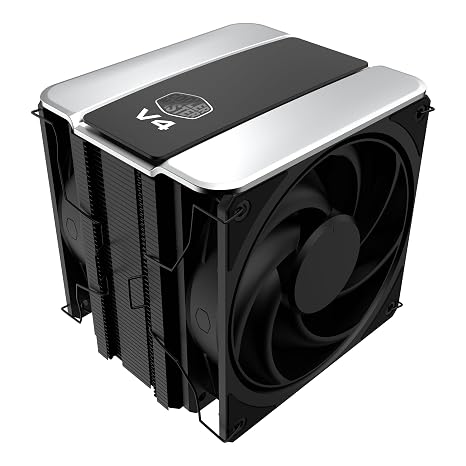
Two patented 3DHP heat pipes deliver cooling performance 30% better than usual designs, making the Cooler Master V4 Alpha 3DHP a solid pick for compact desktops under 160mm height. Its biggest strength is powerful cooling combined with quiet operation, ideal for mid-range gaming rigs or productivity setups demanding reliable temperature control without noise distractions.
Getting it installed is straightforward since it fits a wide range of CPU sockets and cases of varying sizes. The pre-installed Mobius 120mm fans use a push-pull configuration that improves airflow significantly, meaning it keeps temperatures low without needing frequent fan speed adjustments. Noise sits around 2.05 db, so it stays quiet during daily use, even under moderate loads.
Performance-wise, it maintains cool CPU temperatures efficiently, thanks to the dual 3DHP heat pipes and enhanced airflow design. The build quality feels sturdy with a minimalist black finish that blends into most systems well.
Users often praise how quiet it runs compared to similar coolers, but some mention it spins up to 2050 rpm, which can be noticeable under heavy workloads.
The standout feature praised is the quiet operation combined with better-than-average cooling performance thanks to the dual patented heat pipes. Some notice the fan noise jumps at max speed during heavy CPU loads, which can disrupt silence seekers.
Those wanting efficient cooling in a small build without noise issues will appreciate this cooler. Users prioritizing elaborate aesthetics or ultra-silent fan curves might want to explore alternatives better suited to showcase or near-silent setups.
Pros
- 30% improved cooling over standard heat pipe designs
- The push-pull fan setup improves airflow efficiency
- Very quiet operation at typical use levels
- Wide compatibility with major CPU sockets
Cons
- Maximum fan speed can be noticeably loud
- Less stylish compared to some RGB coolers
| Specification | Details |
|---|---|
| Power Connector Type | 4-Pin |
| Voltage | 12 volts |
| Cooling Method | Fan |
| Noise Level | 2.05 db |
| Maximum Rotational Speed | 2050 rpm |
11. Noctua NH-U12A chromax.Black CPU Cooler

Enthusiasts building mid-sized tower PCs or anyone needing a quiet yet powerful CPU cooler will appreciate the Noctua NH-U12A chromax.Black. Its biggest draw is balancing excellent cooling in a compact 158mm height that fits most cases without blocking RAM or PCIe slots.
Installation feels straightforward thanks to its smart size and compatibility with ATX and Micro-ATX boards. Day-to-day, the dual 120mm NF-A12x25 fans adjust their speed automatically via PWM, keeping noise minimal at just 22.6 db when idling. The included Low-Noise Adaptors help maintain quiet operation, making it unobtrusive during regular tasks.
Cooling performance stands out for a 120mm cooler, handling load without fuss while still whisper quiet when not under heavy use. The all-black design blends well for those seeking aesthetics alongside function. Reviews praise its supreme cooling with low noise.
Some mention the price as a drawback despite quality and performance.
Performance impresses with strong cooling and near-silent operation during typical use. The most frequent downside is the higher cost compared to other air coolers. The all-black look and careful design add to its appeal without sacrificing cooling power.
This cooler is ideal for builders wanting reliable, quiet cooling in a compact size that fits most mid-tower cases. Those on a tight budget or needing extreme overclocking cooling should explore alternatives offering more aggressive performance or lower prices.
Pros
- Compact 158mm height fits most tower cases
- Dual NF-A12x25 fans with automatic speed control
- Quiet operation at idle with 22.6 dB noise level
- Does not block RAM or PCIe slots on many motherboards
Cons
- Premium price point may not suit budget builds
- Maximum fan speed of 2000 rpm may limit extreme cooling
| Specification | Details |
|---|---|
| Cooling Method | Air |
| Power Connector Type | 4-Pin |
| Voltage | 12 volts |
| Noise Level | 22.6 db |
| Maximum Rotational Speed | 2000 rpm |
| Air Flow Capacity | 102.1 cfm |
12. Thermalright Peerless Assassin 140 SE CPU Cooler

Thermalright Peerless Assassin 140 SE stands out with its dual tower and dual fan setup designed for serious heat dissipation. Suited for desktop users who want powerful cooling in a relatively compact size, it excels at keeping CPUs cool without making too much noise.
Setting it up takes a bit of care due to its size, but the 4-pin PWM fans help manage speed smoothly to balance cooling and noise. The dual fan design, combined with anti-oxidation heat pipes and a copper base, means it handles heat reliably during daily use, while the fan noise stays low enough to not be distracting.
Performance is solid, with a strong airflow capacity of 166.69 CFM and noise levels under 30 dB. The materials used, like aluminum fins and fully electroplated pipes, feel durable. The main praise centers on its efficient cooling.
A common gripe is the cooler’s larger size fitting only certain cases comfortably.
Efficient cooling performance paired with low noise levels is the main praise, while the size often presents a challenge fitting into smaller or compact cases. The build quality and materials contribute to a premium feel during everyday use.
Anyone with a mid to full tower case looking for solid air cooling with quiet fans will appreciate this cooler. Users with smaller cases or limited space should consider more compact options to avoid fitting issues.
Pros
- Strong dual fan cooling design
- Quiet operation below 30 dB
- Durable aluminum and copper construction
- Good airflow capacity
Cons
- Large size may limit case compatibility
- Installation can be a bit tricky
| Specification | Details |
|---|---|
| Maximum Rotational Speed | 1850 rpm |
| Cooling Method | Air |
| Noise Level | 29.5 db |
| Air Flow Capacity | 166.69 cfm |
| Fan Size | 120x120x28mm / 140x140x27mm |
Comparison of Best Air Coolers Under 160mm
| Product | Noise Level | Max RPM | Air Flow Capacity | Compatible Devices |
|---|---|---|---|---|
| Thermalright Peerless Assassin | 25.6 db | 1550 rpm | 66.17 cfm | Desktop |
| MONTECH NX600 Dual-Tower | 34.17 db | 2000 rpm | – | Desktop |
| Noctua NH-D15S chromax.Black | 24.6 db | 1500 rpm | 140.2 m³/h | Desktop |
| Cooler Master Hyper 612 APEX | 30 db | 2400 rpm | – | Cpu, Desktop |
| Thermalright Assassin X120 Refined | 25.6 db | 1550 rpm | 66.17 cfm | Desktop |
| ID-COOLING FROZN A620 PRO SE | 27.2 db | 2000 rpm | 58 cfm | Desktop |
| Vetroo V5 Black | 30.8 db | 1700 rpm | 52 cfm | Gaming Console |
| Thermalright Phantom Spirit 120 EVO | 27 db | 2150 rpm | 69 cfm | Desktop |
| Thermalright Peerless Assassin Vision | 27 db | 2150 rpm | 69 cfm | Desktop |
| Cooler Master V4 Alpha 3DHP | 2.05 db | 2050 rpm | – | Desktop |
| Noctua NH-U12A chromax.Black | 22.6 db | 2000 rpm | 102.1 cfm | Desktop |
| Thermalright Peerless Assassin 140 SE | 29.5 db | 1850 rpm | 166.69 cfm | Desktop |
- Noise Level25.6 db
- Max RPM1550 rpm
- Air Flow Capacity66.17 cfm
- Compatible DevicesDesktop
- Noise Level34.17 db
- Max RPM2000 rpm
- Air Flow Capacity–
- Compatible DevicesDesktop
- Noise Level24.6 db
- Max RPM1500 rpm
- Air Flow Capacity140.2 m³/h
- Compatible DevicesDesktop
- Noise Level30 db
- Max RPM2400 rpm
- Air Flow Capacity–
- Compatible DevicesCpu, Desktop
- Noise Level25.6 db
- Max RPM1550 rpm
- Air Flow Capacity66.17 cfm
- Compatible DevicesDesktop
- Noise Level27.2 db
- Max RPM2000 rpm
- Air Flow Capacity58 cfm
- Compatible DevicesDesktop
- Noise Level30.8 db
- Max RPM1700 rpm
- Air Flow Capacity52 cfm
- Compatible DevicesGaming Console
- Noise Level27 db
- Max RPM2150 rpm
- Air Flow Capacity69 cfm
- Compatible DevicesDesktop
- Noise Level27 db
- Max RPM2150 rpm
- Air Flow Capacity69 cfm
- Compatible DevicesDesktop
- Noise Level2.05 db
- Max RPM2050 rpm
- Air Flow Capacity–
- Compatible DevicesDesktop
- Noise Level22.6 db
- Max RPM2000 rpm
- Air Flow Capacity102.1 cfm
- Compatible DevicesDesktop
- Noise Level29.5 db
- Max RPM1850 rpm
- Air Flow Capacity166.69 cfm
- Compatible DevicesDesktop
How to Choose the Right Air Cooler
Consider cooling capacity, size compatibility, and energy efficiency when selecting an air cooler under 160mm to ensure it fits your space and needs. Choosing the right features helps avoid unnecessary expenses and maintenance hassles while providing effective, consistent cooling.
Size and Compatibility
Many air coolers claim to fit a certain space, but the actual height can become a problem when it exceeds your setup’s limits. Keeping within a 160mm height ensures the unit won’t block vents, shelves, or other equipment around it. It’s easy to overlook the clearance needed for airflow; a cramped spot can choke the cooler’s performance and make installation frustrating.
Clearance around the unit of at least 5-10cm on all sides tends to work well to avoid heat buildup. Also, match the cooler’s rated coverage area with your room size, usually indicated in square meters. Going too large or too small can lead to ineffective cooling or wasted energy.
Cooling Performance
Airflow capacity often determines how well the cooler moves air in tight spaces. Look out for units that specify cubic meters per hour (m³/h); a number around 100-200 m³/h usually suits small rooms. The type of cooling is important too; evaporative models need adequate water circulation and pads to cool effectively.
Maintaining a steady temperature is challenging if the unit can’t adjust to different conditions. Some coolers vary fan speed or water flow to react to humidity and heat, which makes a noticeable difference during hot, dry days versus more humid times.
Noise Level
Noise levels are an immediate sign that can affect comfort, especially in bedrooms or offices. Decibel ratings near 50 dB or lower typically mean the unit won’t be disruptive.
Fan speeds influence sound, with lower speeds running quieter but offering less airflow.
High-power or continuous use can increase noise from vibrations or fan strain. Reviews that mention noise levels during extended use can help you avoid any surprises. Some models also include noise reduction features like insulated fan casings or smoother motors.
Ease of Maintenance
The easier it is to clean filters and water tanks, the less time you’ll spend on upkeep. Units that allow simple removal without tools tend to be the best.
Frequent maintenance is common since dust and mineral buildup can clog systems quickly.
A design that limits stagnant water and has antibacterial coatings helps reduce mold risks. Replacement parts should be readily available, as worn filters or pads need regular swapping to keep performance steady. Expect at least monthly cleaning for most setups.
Power Consumption and Portability
Balancing energy use with cooling output is crucial for avoiding high electric bills. Look for machines using under 40 watts on low settings to keep power consumption low. Support for different power sources like USB or AC adapters increases placement options, from desktops to portable setups.
Weight and handle design impact how easily you move the cooler around. Models around 2-3 kilograms with built-in grips make relocating a simple task. This flexibility is helpful if you want the cooler to follow you from room to room without hassle.
Optimizing Airflow Efficiency with 160mm Air Coolers
Fans with a diameter of 160mm strike a balance between airflow delivery and noise levels. They push a good volume of air without requiring excessive power, which helps keep the system cooler and quieter.
The larger blades move more air per rotation, reducing the need for higher fan speeds. This design lowers noise while maintaining efficient heat dissipation from components such as CPUs or GPUs.
Key factors to consider for optimizing airflow with 160mm air coolers:
- Ensure the fan orientation promotes direct airflow across heat sinks or radiators.
- Pair the fan with a well-designed heat sink that maximizes surface area contact for heat transfer.
- Use fan speed controls to balance cooling performance and noise according to workload.
- Check that there is enough clearance inside the case for proper air circulation around the 160mm fan.
Proper installation and positioning often have more impact on cooling efficiency than raw fan size alone.
Maintenance Tips to Prolong the Lifespan of Your Air Cooler
Routine cleaning is the most important step for maintaining an air cooler’s performance. Dust accumulation can clog the fan blades and heat sink fins, drastically reducing airflow and heat dissipation.
A soft brush or compressed air can safely clear dirt without damaging components.
Other key maintenance tips include:
- Regularly checking fan bearings for wear to avoid noisy or uneven operation.
- Ensuring all mounting screws are tight to maintain full contact between the cooler and components.
- Replacing thermal paste after a year or two to sustain good heat transfer.
- Monitoring fan connectors and cables for any signs of damage that could affect power delivery.
Consistent upkeep can extend the air cooler’s life while keeping temperatures stable and noise low.
Comparing 160mm Air Coolers with Other Cooling Solutions
Air coolers with 160mm fans generally provide a strong mix of airflow and quiet operation compared to smaller fans or liquid cooling systems. Larger fans reduce the need for high speeds, which cuts down noise. However, liquid coolers often have better thermal performance in high-load scenarios due to efficient heat transfer through coolant circulation.
Comparing air coolers to other solutions:
- Smaller fans might be easier to fit in compact builds but usually need higher speeds, resulting in more noise and lower efficiency.
- Liquid coolers can be louder and require more maintenance while offering superior cooling under sustained heavy workloads.
- Large air coolers featuring 160mm fans offer many users effective, low-noise cooling without added complexity.
Choosing between these depends on space constraints, noise tolerance, and cooling demands.
People Also Asked
How Do I Choose the Right Air Cooler Under 160mm?
Pick an air cooler under 160mm by checking your case’s maximum cooler height and your CPU socket type for compatibility. Measuring space inside the case before buying ensures no clearance issues with RAM or GPU.
What Maintenance Is Needed for Air Coolers Under 160mm?
Clean the fan blades and heatsink regularly to prevent dust buildup that reduces cooling efficiency. Use compressed air or a soft brush to keep airflow unobstructed.
Are Air Coolers Under 160mm Safe to Use Indoors?
Air coolers under 160mm are safe indoors as they work by moving air without chemicals or water leakage risk. Make sure the cooler’s fan speed is set for quiet operation if noise is a concern.
Will a 160mm Air Cooler Fit My Computer Case?
A 160mm cooler may fit your case only if the case supports that height; many mid-tower cases allow up to 160mm but check your case’s specifications. Also, consider RAM clearance since tall coolers can block nearby slots.
How Long Do Air Coolers Under 160mm Typically Last?
Air coolers under 160mm generally last several years if cleaned regularly and not physically damaged. Fan bearings and thermal paste application are common wear points that may need attention after some time.
Conclusion
Choosing the best air cooler under 160mm depends mostly on how much airflow it can provide in a small size, how quiet it runs, and how easy it is to install and maintain in a compact space. Cooling performance and noise level tend to vary a lot in this category, so prioritize what matters based on your setup.
Consider the size of your room and how frequently you’ll use the cooler to find a model that fits your budget and space. Take another look at the comparison table and the options listed above to find the right balance between cooling ability and noise for your needs.

I’m Grant Mitchell, a firearms and hunting writer with years of experience at the range and in the field. I write about rifles, shotguns, handguns, optics, safe storage, cleaning, and responsible ownership, along with practical hunting tips. My goal is to share accurate, safety-first information that helps you choose the right firearm, maintain it properly, and become a more confident shooter.