Top 12 Best Air Cooler for i7 9700k That Will Blow You Away
A common issue with the i7 9700k is overheating caused by inadequate cooling, which leads to unstable performance and frequent thermal throttling. A cheap or poorly chosen best air cooler for i7 9700k often struggles to keep temperatures in check under load, resulting in loud fan noise and reduced CPU lifespan.
Effective air coolers for the i7 9700k generally feature a large heatsink made of copper or aluminum to dissipate heat quickly, combined with multiple heat pipes to spread warmth evenly. A fan size around 120mm or larger helps move enough air at moderate noise levels, while clearance around the CPU socket is crucial to fit larger coolers without blocking RAM or other components.
Easy-to-remove fans make cleaning simpler, helping maintain performance over time.
Need a Quick Check?
| Image | Product | Price |
|---|---|---|
Our Top Picks 1  | Thermalright Peerless Assassin 120 SE | Check Price |
Our Top Picks 2  | Thermalright Phantom Spirit 120 SE | Check Price |
Our Top Picks 3  | Thermalright Peerless Assassin 120 Vision | Check Price |
Our Selected Top 12 Air Cooler for I7 9700k Worth Buying
This list features carefully chosen air coolers compatible with the i7 9700k, highlighting their cooling performance, suitability for different users, and key advantages and drawbacks. Each review provides clear insights to help you find the right balance of efficiency and fit for your specific needs.
1. Thermalright Peerless Assassin 120 SE CPU Cooler
Powerful cooling tailored for gamers and PC builders who want serious heat management for their i7 9700k. Its biggest strength lies in handling high wattage without pushing noise levels too high, making it a solid step up from basic coolers for demanding setups.
Setup is straightforward, with a 4-pin power connector delivering consistent voltage at 12 volts. The fan speed maxes out at 1550 rpm, which keeps things relatively quiet at 25.6 db. Daily use benefits from a balance of airflow and noise, thanks to 66.17 cfm moving through the system.
It’s easy to integrate into most desktop cases designed for air cooling.
Performance on heat dissipation is solid, easily tackling up to 265 watts, which suits the i7 9700k well. The build quality reflects over 20 years of know-how, using materials that feel durable and reliable.
The main praise is its quiet operation under load, though some find it slightly bulky for smaller cases. It’s a dependable cooler that puts function ahead of flashy design.
This cooler consistently receives praise for its quiet performance while managing high wattage CPUs without overheating. The most frequent downside noted is its size, which makes installation in smaller cases challenging for some.
Gamers and PC enthusiasts who prioritize quiet, efficient cooling for powerful chips will appreciate this model. Smaller builds or those wanting ultra-high fan speeds might want to consider alternatives with a more compact footprint or faster fans.
Pros
- Quiet operation at high cooling capacity
- Handles up to 265W power draw effectively
- Durable build with quality materials
- Good airflow without loud fan noise
Cons
- Can be bulky for compact PC cases
- Fan speed capped at 1550 rpm may limit overclock cooling
| Specification | Details |
|---|---|
| Power Connector Type | 4-Pin |
| Voltage | 12 volts |
| Wattage | 265 watts |
| Noise Level | 25.6 db |
| Maximum Rotational Speed | 1550 rpm |
| Air Flow Capacity | 66.17 cfm |
2. Thermalright Phantom Spirit 120 SE CPU Cooler
Keeping an Intel i7 9700k cool during heavy workloads is a challenge that demands a capable air cooler. The Thermalright Phantom Spirit 120 SE fits well on most desktops and shines at handling CPUs with higher TDPs up to 280W, making it an excellent choice for gamers and content creators looking for reliable temperature control.
Setting it up involves attaching the 4-Pin connector to your motherboard, and it runs quietly at just 25.6 dB with a maximum fan speed of 1500 rpm. Its design accounts for different mounting orientations thanks to the AGHP 4th generation heatpipe technology, which means you can install it in either vertical or horizontal positions without sacrificing performance.
Cooling is effective, keeping temperatures in a safe range even under intense processing loads, thanks to seven 6mm heatpipes that efficiently transfer heat away from the processor. The build quality feels solid and durable, though some find the fan speed somewhat limited for overclocking beyond 280W TDP CPUs. The main point of praise is its quiet operation while performing well under load.
The cooler’s quiet operation is frequently praised, making it suitable for users valuing noise control during intensive tasks. However, it can struggle with CPUs pushed beyond its 280W TDP limit, affecting its performance in such scenarios. The build quality and cooling approach accommodate both horizontal and vertical cases without issues.
Those running an i7 9700k at standard or moderately boosted speeds will find this cooler reliable and quiet. Users planning extreme overclocking or needing extra features may want to look at more advanced coolers with higher fan speeds and added functionality for better headroom.
Pros
- Supports CPU TDP from 105W to 280W
- Quiet operation at 25.6 dB noise level
- Effective heatpipe system with AGHP technology
- Compatible with both vertical and horizontal mounting
Cons
- Fan speed capped at 1500 rpm limits overclocking potential
- Lacks advanced features found in some higher-end coolers
| Specification | Details |
|---|---|
| Power Connector Type | 4-Pin |
| Voltage | 12 volts_of_direct_current |
| Cooling Method | Air |
| Noise Level | 25.6 db |
| Maximum Rotational Speed | 1500 rpm |
| Air Flow Capacity | 66.17 cfm |
3. Thermalright Peerless Assassin 120 Vision MAX ARGB CPU Cooler
A 5-inch IPS LCD screen built into the radiator stands out, letting you monitor system data easily. Perfect for PC enthusiasts running an Intel i7 9700k who want both strong cooling and a visual display of temps and fan speed. Its cooling is its biggest strength here.
Setting it up involves attaching the dual tower cooler with its two fans to the CPU socket and connecting the 4-pin power. The included TRCC software lets you customize the display background, so the screen isn’t just useful but also personalized. Daily running noise stays low at 27 dB, so it won’t bother you during work or gaming sessions.
Six copper heat pipes paired with a nickel-plated base ensure solid heat transfer for the i7 9700k. Cooling efficiency is high thanks to fans spinning up to 2150 RPM offering 69 CFM airflow. Build quality feels sturdy, but some mention the unit’s size can challenge fit in smaller cases.
The standout feature is the LCD display, though some say it won’t completely replace dedicated temp monitors.
The main praise is for the clear LCD screen that stays useful during long sessions and the powerful cooling delivered by the dual tower and heat pipes. Common feedback points to its large size possibly limiting case compatibility and the screen’s function as more of a convenience than a full monitoring replacement.
Users wanting detailed on-case visuals and strong cooling for an i7 9700k should find satisfaction here. Those with compact builds or those requiring advanced monitoring might want to look at alternatives better suited for smaller spaces or detailed data display.
Pros
- 5-inch IPS LCD for real-time system monitoring
- Strong cooling with six copper heat pipes
- Quiet operation at 27 dB
- Customizable display via TRCC software
Cons
- Size may not fit smaller PC cases
- Display less detailed than standalone monitors
| Specification | Details |
|---|---|
| Power Connector Type | 4-Pin |
| Cooling Method | Air |
| Maximum Rotational Speed | 2150 rpm |
| Noise Level | 27 dB |
| Air Flow Capacity | 69 cfm |
4. Thermalright Assassin X90 SE V2 CPU Cooler

Enthusiasts building a desktop with an Intel i7 9700k will appreciate this air cooler for its solid cooling performance and quiet operation. It offers a great balance between airflow and low noise, making it ideal for those who want reliable cooling without too much racket.
Installation is straightforward with mounting brackets designed for compatibility with desktop processors. The 4-pin connector enables PWM control, so you can adjust fan speeds based on temperature. Day-to-day, it runs quietly at 25 dB, making it suitable for work or gaming environments where noise matters.
It handles the heat of an i7 9700k well, delivering good airflow at 32.77 cfm while keeping noise low. The fan spins up to 2200 rpm to maintain temperatures without being intrusive. Most users praise its quiet operation, but some note it’s not the most powerful cooler for extreme overclocking.
Quiet operation around 25 dB receives the most praise, providing a calm working or gaming environment. The main limitation mentioned is its cooling power, which may be stretched under heavy overclocking loads on the i7 9700k.
This cooler suits those wanting dependable performance with minimal noise and easy installation. Users planning serious overclocking might prefer a model with higher airflow or fan speed capabilities.
Pros
- Quiet operation at 25 dB
- Good airflow of 32.77 cfm
- Easy to install with 4-pin PWM control
- Low power consumption at 1.2 watts
Cons
- Not ideal for heavy overclocking
- Fan speed maxes at 2200 rpm
| Specification | Details |
|---|---|
| Power Connector Type | 4-Pin |
| Voltage | 12 volts |
| Wattage | 1.2 watts |
| Noise Level | 25 db |
| Maximum Rotational Speed | 2200 rpm |
| Air Flow Capacity | 32.77 cfm |
5. Thermalright Assassin X120 Refined SE ARGB CPU Cooler

Thermalright Assassin X120 Refined SE ARGB stands out as a powerful air cooler that suits desktop setups needing reliable heat management for an i7 9700K. Its main strength lies in delivering consistent cooling with a low noise level, keeping the processor temperature in check without being overly loud.
Setup involves a standard 4-pin power connector and runs at 12 volts, making installation straightforward for most desktop builds. The fan speed reaches up to 1550 rpm, providing good airflow of 66.17 cfm. Everyday use benefits from a quiet operation at 25.6 db, so it doesn’t disturb your work or gaming sessions, while the ARGB lighting adds a customizable visual touch.
Performance meets expectations with effective air cooling that handles the heat output fairly well. The cooler is solidly built, reflecting the brand’s two decades of experience.
Strong points mentioned include its quietness and stable cooling ability. Common feedback shows some users find it bulkier than expected, which can be tricky in tighter cases.
Quieter than many air coolers at a moderate fan speed, it handles heat from demanding CPUs well. Some find the size unwieldy, which might limit cabinet compatibility in compact setups.
Best for users with mid-to-large cases prioritizing quiet, effective cooling and customizable lighting. Those with small cases might want to look for a more compact solution.
Pros
- Quiet operation at 25.6 db
- Strong airflow of 66.17 cfm
- Simple 4-pin installation
- ARGB lighting included
Cons
- May be bulky for smaller cases
- Fan speed capped at 1550 rpm
| Specification | Details |
|---|---|
| Power Connector Type | 4-Pin |
| Voltage | 12 volts |
| Cooling Method | Air |
| Noise Level | 25.6 db |
| Maximum Rotational Speed | 1550 rpm |
| Air Flow Capacity | 66.17 cfm |
6. Be Quiet! Pure Rock Pro 3 CPU Cooler

be quiet! Pure Rock Pro 3 is an air cooler designed to keep powerful CPUs like the i7 9700k cool under pressure.
Its main strength is handling high heat loads with six nickel-plated copper heat pipes, making it a solid pick for those who need reliable cooling in overclocked or demanding systems.
Setting it up involves standard Intel compatible mounting, which fits sockets 1151 through 1851. The Pure Wings 3 120mm PWM fan runs quietly at max 2000 rpm, with specially shaped blades that improve airflow over the cooling fins. Daily use benefits from its 34.8 dB noise level, keeping your PC maintain a balance between performance and sound.
Cooling performance is strong thanks to its nickel-plated copper base and heat pipes, pushing heat away effectively. Build quality ranks high with durable materials and thoughtful design like the funnel air outlet that optimizes airflow. The common praise highlights efficient heat dissipation, while the frequent downside mentioned is its noise under full load, which some might find noticeable.
The cooler is praised for excellent heat management even during overclocking, maintaining stable CPU temperatures. Noise levels rise noticeably at full fan speed, which leads to some concern for quiet PC builds.
Suitable for users who want solid cooling for an i7 9700k without spending on liquid cooling. Those prioritizing whisper-quiet operation or limited space might consider alternative coolers.
Pros
- Effective cooling with six copper heat pipes
- Quiet 120mm fan optimized for airflow
- Compatible with a wide range of Intel sockets
- Nickel-plated surfaces resist corrosion
Cons
- Can get noisy at maximum fan speed
- Not the smallest cooler, may block tall RAM modules
| Specification | Details |
|---|---|
| Power Connector Type | 4-Pin |
| Voltage | 12 volts |
| Wattage | 3.6 watts |
| Noise Level | 34.8 dB |
| Maximum Rotational Speed | 2000 rpm |
| Cooling Method | Air |
7. Be Quiet! Dark Rock Pro 6 CPU Cooler
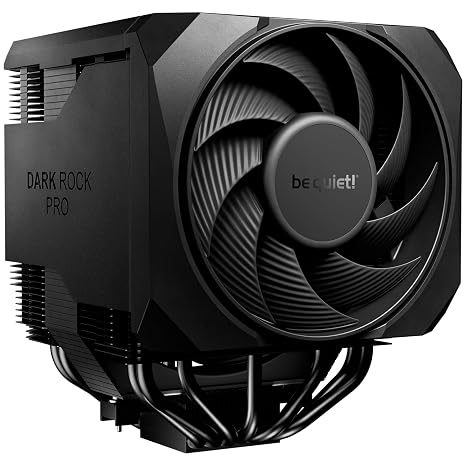
Quiet operation paired with strong cooling power makes it ideal for anyone wanting serious temperature control without the noise, especially for intense gaming or workstation setups. Its main strength lies in balancing performance and silence, giving you dependable heat management for your i7 9700k.
Installation is straightforward thanks to a pre-installed mounting bridge and a gentle yet secure fixing system. Adjusting the rail-mounted front fan height helps with fitting inside different cases. Quiet operation stays consistent whether running in active mode for max cooling or semi-passive mode where the fans stop below 40% PWM, keeping noise minimal during light tasks.
Keeping the i7 9700k cool is well handled by seven copper heat pipes and an optimized heatsink design. It manages heat effectively even under heavy load, though some notice the fan speed can get audible when pushed to maximum RPM.
It feels solid and well-built, with the biggest praise revolving around how quiet it runs, while occasional noise at full speed is the main issue.
Quiet operation during most use is consistently praised. However, when pushed to full speed, the fan noise becomes more apparent and can be disruptive in otherwise silent environments.
Users seeking quiet performance with strong cooling for overclocked CPUs will appreciate this cooler. Those with smaller cases or who prefer completely silent operation under heavy load might want to consider alternatives.
Pros
- Extremely quiet operation in semi-passive mode
- Strong heat dissipation with seven copper heat pipes
- Easy installation with pre-mounted bracket
- Adjustable fan height for better compatibility
Cons
- Fan noise noticeable at maximum RPM
- Large size may limit compatibility in some cases
| Specification | Details |
|---|---|
| Power Connector Type | 4-Pin |
| Voltage | 12 volts |
| Wattage | 300 watts |
| Maximum Rotational Speed | 2000 rpm |
| Air Flow Capacity | 68.7 cfm |
8. Thermalright PS120 SE ARGB CPU Cooler

Strong cooling performance and durability make the Thermalright PS120 SE ARGB a solid choice for anyone running an i7 9700K. Its standout feature is the upgraded AGHP heatpipe technology, designed to handle demanding temperatures effectively while fitting into a wide range of desktop setups.
Installation is straightforward thanks to its 154mm height, which fits many chassis without issues. The 4-pin power connector offers standard PWM control for fan speed management.
The fan runs quietly at 25.6 dB, so daily use stays calm without adding distracting noise. Long-lasting S-FDB bearings mean it’s built for consistent performance over time.
The cooling method relies on air and provides a solid airflow of 66.17 cfm, which keeps the i7 9700K’s temps in check under typical loads. The build quality uses industrial-strength PBT + PC materials with UL class A safety insulation, ensuring reliability.
Praise commonly highlights how durable and quiet it is, while some mention occasional worries about space in very compact cases.
The cooler is praised for its quiet operation and long-lasting build, thanks to the advanced heatpipe technology and strong bearing design. Some critiques focus on its size, which can cause fitment worries in very small PC cases.
People wanting quiet but capable cooling for the i7 9700K will find this a good fit. Those working with minimal space or needing extreme high-RPM performance might want to explore other options better suited to tight layouts or higher speed fans.
Pros
- Low noise level at 25.6 db
- Compact fit with 154mm height
- Durable S-FDB bearings for long life
- Strong airflow of 66.17 cfm
Cons
- Might struggle in extremely tight cases
- Fan speed maxes out at 1500 rpm
| Specification | Details |
|---|---|
| Cooling Method | Air |
| Noise Level | 25.6 db |
| Maximum Rotational Speed | 1500 rpm |
| Air Flow Capacity | 66.17 cfm |
| Power Connector Type | 4-Pin |
9. Noctua NH-D15 G2 chromax.Black CPU Cooler

Built with high-quality materials and a dense heatpipe design, this air cooler suits anyone running an Intel Core i7 9700K who wants serious cooling power. Its standout feature is the deep black finish combined with eight heatpipes and larger surface area that quietly manage CPU temperatures under load.
Setup involves securing the cooler onto the CPU with a strong mounting system that fits well in most desktop cases. Day-to-day use is quiet thanks to the two NF-A14x25r G2 140mm fans that adjust speed automatically through PWM control. The noise stays low when idling, while the included Low-Noise Adaptors help further reduce sound if needed.
Cooling performance is reliable due to 20% more surface area and an improved fan design. The build is solid and sturdy with attention to detail, mainly all black for a clean look. Most praise points to its near-silent operation at idle, while some note its size may require checking case compatibility before purchase.
The cooler is praised for maintaining near-silent operation during light use while effectively managing heat under heavy loads. Most common concerns arise from its bulky size, which means checking for sufficient clearance in the computer case before buying is important.
Enthusiasts looking for powerful air cooling with quiet fans will be satisfied, especially those with mid- to full-tower desktops. Users with compact cases or tight internal space may want to explore smaller coolers to ensure compatibility and easy installation.
Pros
- Quiet at idle with PWM fan control
- Strong cooling with 8 heatpipes
- All-black finish blends well in builds
- Includes Low-Noise Adaptors for quieter use
Cons
- Large size may cause fit issues in smaller cases
- Power use relatively low but fixed at 2.28 watts
| Specification | Details |
|---|---|
| Power Connector Type | 4-Pin |
| Voltage | 12 volts |
| Wattage | 2.28 watts |
| Noise Level | 24.8 db |
| Maximum Rotational Speed | 1500 rpm |
| Air Flow Capacity | 155.6 cubic meter per hour |
10. Thermalright Peerless Assassin 120 Black CPU Cooler

Strong dual-tower design with a compact footprint makes it great for gamers and PC builders needing solid cooling on an i7 9700k. Its biggest strength lies in combining ample airflow with a layout that fits on top of the first graphics card slot without blocking it.
Installation works smoothly thanks to metal fasteners made for both Intel and AMD platforms, which secure the cooler firmly. The cooler runs quietly at 25.6 dB and draws only 4.8 watts, making day-to-day use comfortable without excessive noise or power drain. The offset asymmetric layout allows it to fit neatly with other components, cutting down installation headaches.
Cooling power impresses with airflow capacity of 66.17 cfm and a max fan speed of 1550 rpm. Heat sinks use aluminum and feature nanoscale black paint for better heat dissipation across a 9600 cm² area. Most praise mentions excellent thermal performance for the price, while a common complaint involves the cooler’s height potentially causing clearance issues in smaller cases.
The cooler delivers solid thermal performance with a large heat dissipation area and impressive airflow, keeping the i7 9700k cool under load according to reviews. Some find the height challenging in smaller PC cases or those with tall memory modules.
Someone building a mid to full tower gaming PC will appreciate its fit and performance. Those with compact cases or concern about component clearance might want to consider a smaller cooler option.
Pros
- Strong double-tower cooling design
- Quiet operation at 25.6 dB
- Fits over first graphics card slot
- Compatible with Intel and AMD metal fasteners
Cons
- Tall height may block memory or case clearance
- Black paint coating can show fingerprints easily
| Specification | Details |
|---|---|
| Power Connector Type | 4-Pin |
| Voltage | 12 volts_of_direct_current |
| Wattage | 4.8 watts |
| Noise Level | 25.6 db |
| Maximum Rotational Speed | 1550 rpm |
| Air Flow Capacity | 66.17 cfm |
11. Thermalright Peerless Assassin 120 Vision MAX ARGB CPU Cooler

Choosing a powerful air cooler that handles high-performance CPUs like the i7 9700k is crucial, and the Thermalright Peerless Assassin 120 Vision MAX ARGB stands out for its advanced heat pipe technology and dual-fan setup. It’s well suited for those wanting consistent cooling without worrying about fitting their RAM or GPU.
Setting it up is straightforward, with a 4-pin PWM connector controlling fan speed based on temperature. The two 2150 RPM fans keep airflow steady at 69 cfm, while vibration is minimized thanks to soft corner pads. You’ll find it adapts well whether your motherboard layout or case orientation changes, thanks to its AGHP Gen 5.0 heat pipes design.
Cooling performance is solid, effectively managing the heat output of the 9700k under load. Its nickel-plated copper base and pure copper heat pipes mean durable materials built to last.
Positive notes focus on noise kept to 27 dB and strong temperature control, whereas a common complaint is the cooler’s size, which might cause clearance issues in smaller cases.
Many appreciate its effective cooling and quiet operation when not at full speed. The cooler’s size is often pointed out as tricky for smaller builds, requiring careful case compatibility checks. Fan speed control works well, adjusting automatically to the processor’s demands.
Ideal for gamers or creators running intense workloads who have enough space inside their cases. Those with smaller or tight PC builds might find it too bulky and could look for a more compact air cooler alternative.
Pros
- Dual high-speed fans for strong heat dissipation
- AGHP Gen 5.0 heat pipes for multi-orientation use
- Soft corner pads reduce vibration noise
- Offset design avoids GPU and RAM clearance issues
Cons
- May be too large for compact cases
- Fans can be loud at maximum speed
| Specification | Details |
|---|---|
| Power Connector Type | 4-Pin |
| Cooling Method | Air |
| Maximum Rotational Speed | 2150 rpm |
| Air Flow Capacity | 69 cfm |
| Noise Level | 27 db |
12. Thermalright Peerless Assassin 120 Vision MAX ARGB CPU Cooler
Keeping an i7 9700K cool under load can be a challenge, and the Thermalright Peerless Assassin 120 Vision MAX ARGB offers a clear view where it counts. It suits anyone wanting solid air cooling performance with the added novelty of a real-time system display right on the radiator.
Its best feature is the built-in 5-inch IPS LCD screen that tracks system stats without needing a separate monitor.
Setting it up requires paying attention to airflow direction due to the ARGB fan and six 6mm heat pipes with AGHP Gen 5.0 technology that work well in different mounting orientations. The included software allows customizing the LCD themes, giving daily monitoring a personal touch. The fan runs quietly at 27 dB and spins up to 2150 rpm, which balances noise and cooling nicely for everyday use.
Cooling efficiency holds up strongly against demanding CPUs like the i7 9700K, managing the heat without much struggle. The construction feels solid, with a well-built radiator and efficient heat pipes.
Most find the display a cool bonus, while a few note the fan speed can get a bit loud when pushed hard. Its design keeps temperatures in check without making too much noise.
The standout feature is the integrated LCD screen that allows constant monitoring of key system stats without additional hardware, appreciated during intensive workloads. On the downside, some find the fan gets louder at its highest RPM, which might disrupt a quiet environment when pushed hard.
Users who want a mix of effective air cooling and unique visual monitoring will benefit from this cooler’s design. Those prioritizing ultra-low noise might look elsewhere, especially if their motherboard lacks ARGB support for full lighting customization.
Pros
- Built-in 5-inch IPS LCD for real-time monitoring
- Efficient heat pipes with AGHP Gen 5.0 technology
- Quiet operation at 27 dB under normal conditions
- Customizable ARGB lighting with motherboard control
Cons
- Fan noise increases noticeably at maximum speed
- Requires motherboard support for ARGB customization
| Specification | Details |
|---|---|
| Cooling Method | Air |
| Maximum Rotational Speed | 2150 rpm |
| Noise Level | 27 db |
| Air Flow Capacity | 69 cfm |
| Power Connector Type | 4-Pin |
Best Air Coolers for i7 9700k Comparison Table
| Product | Max RPM | Noise Level | Air Flow | Wattage |
|---|---|---|---|---|
| Thermalright Peerless Assassin 120 SE | 1550 rpm | 25.6 db | 66.17 cfm | 265 watts |
| Thermalright Phantom Spirit 120 SE | 1500 rpm | 25.6 db | 66.17 cfm | – |
| Thermalright Peerless Assassin 120 Vision | 2150 rpm | 27 db | 69 cfm | – |
| Thermalright Assassin X90 SE V2 | 2200 rpm | 25 db | 32.77 cfm | 1.2 watts |
| Thermalright Assassin X120 Refined SE | 1550 rpm | 25.6 db | 66.17 cfm | – |
| be quiet! Pure Rock Pro | 2000 rpm | 34.8 db | – | 3.6 watts |
| be quiet! Dark Rock Pro | 2000 rpm | 32.4 db | 68.7 cfm | 300 watts |
| Thermalright PS120 SE ARGB | 1500 rpm | 25.6 db | 66.17 cfm | – |
| Noctua NH-D15 G2 chromax.Black | 1500 rpm | 24.8 db | 91.5 cfm | 2.28 watts |
| Thermalright Peerless Assassin 120 Black | 1550 rpm | 25.6 db | 66.17 cfm | 4.8 watts |
| Thermalright Peerless Assassin Vision MAX | 2150 rpm | 27 db | 69 cfm | – |
| Thermalright Peerless Assassin Vision MAX | 2150 rpm | 27 db | 69 cfm | – |
- Max RPM1550 rpm
- Noise Level25.6 db
- Air Flow66.17 cfm
- Wattage265 watts
- Max RPM1500 rpm
- Noise Level25.6 db
- Air Flow66.17 cfm
- Wattage–
- Max RPM2150 rpm
- Noise Level27 db
- Air Flow69 cfm
- Wattage–
- Max RPM2200 rpm
- Noise Level25 db
- Air Flow32.77 cfm
- Wattage1.2 watts
- Max RPM1550 rpm
- Noise Level25.6 db
- Air Flow66.17 cfm
- Wattage–
- Max RPM2000 rpm
- Noise Level34.8 db
- Air Flow–
- Wattage3.6 watts
- Max RPM2000 rpm
- Noise Level32.4 db
- Air Flow68.7 cfm
- Wattage300 watts
- Max RPM1500 rpm
- Noise Level25.6 db
- Air Flow66.17 cfm
- Wattage–
- Max RPM1500 rpm
- Noise Level24.8 db
- Air Flow91.5 cfm
- Wattage2.28 watts
- Max RPM1550 rpm
- Noise Level25.6 db
- Air Flow66.17 cfm
- Wattage4.8 watts
- Max RPM2150 rpm
- Noise Level27 db
- Air Flow69 cfm
- Wattage–
- Max RPM2150 rpm
- Noise Level27 db
- Air Flow69 cfm
- Wattage–
How to Choose the Best Air Cooler for i7 9700k
Choosing the right air cooler for an i7 9700k depends on cooling capacity, noise levels, size compatibility, and build quality. Prioritizing these factors ensures efficient heat management, quieter operation, and easy installation, preventing overheating and costly damage while extending your CPU’s lifespan.
Cooling Performance
High heat output from Intel’s mid to high-end processors demands efficient cooling, especially during extended gaming sessions or multitasking. A cooler that lacks sufficient heat pipe quality or fin density will struggle to transfer heat away quickly, causing the CPU temperature to rise and potentially triggering thermal throttling.
This leads to lower performance and unstable system behavior.
Good cooling solutions for these processors typically have at least three or four heat pipes made of copper, combined with dense aluminum fins for effective heat dissipation. Larger surface area in the fin stack helps spread the heat evenly.
Fans capable of moving air efficiently at moderate rpm also improve overall thermal performance during high loads.
Size and Compatibility
Many users have found that large air coolers can interfere with tall RAM modules or obstruct the PCIe slots, affecting GPU installation. It’s important to check the cooler’s height and width against your PC case dimensions and motherboard layout. Common cases support coolers up to around 160mm in height without clearance issues.
Compatibility with the specific socket type is essential. Most coolers compatible with Intel’s mainstream sockets fit this processor well. Pay attention to clearance around the socket so mounting points do not clash with components like VRM heatsinks or nearby capacitors.
Noise Levels
Fan noise can be an issue during intense workloads if the cooler lacks good speed control or sound dampening. Some fans run too fast under load, producing distracting noise levels around 40 to 50 decibels or higher.
Quiet operation during idle states at around 20 to 30 decibels makes a big difference in a daily work or gaming environment.
Look for fan speed adjustment via PWM support or manual control to maintain a good balance between cooling and noise. Anti-vibration mounts also help reduce mechanical noise from the cooler.
Build Quality and Materials
The long-term reliability of a cooling solution largely depends on its build materials and construction quality. Copper heat pipes are preferred over aluminum for their superior heat conduction. Aluminum fins keep the weight manageable without compromising surface area.
Fan bearings play a key role; high-quality sleeve or hydraulic bearings offer quiet and smooth spinning for years. Mounting hardware should feel sturdy and enable a secure installation that doesn’t wobble or loosen over time.
Ease of Installation and Maintenance
Mounting a cooler should not require specialty tools beyond a Phillips screwdriver. Overly complex bracket systems or tight clearances can cause headaches during installation. Ease of installation saves time and reduces the risk of damaging the motherboard.
Accessibility is important for routine maintenance. Coolers that allow easy dust cleaning by removing fans or offering open fin designs help maintain performance.
Clear instructions and compatibility with standard thermal paste application methods make the setup straightforward.
Optimizing Air Cooler Performance for the i7 9700K Through Proper Installation
Positioning the air cooler correctly on the i7 9700K’s CPU is key to maintaining ideal temperatures. The thermal paste application should be thin and even, as too much paste can hinder heat transfer while too little may cause hotspots.
Align the cooler’s base flat and secure it firmly without over-tightening screws, which could damage the motherboard. Clear airflow paths inside the case improve cooling effectiveness, so placing intake and exhaust fans strategically matters. For example, cooler intake fans should face the air cooler’s heatsink directly to help dissipate heat swiftly.
Using RAM modules with lower height can prevent airflow blockage around the cooler, improving ventilation. The air cooler’s fan speed settings in the BIOS or through software allow you to balance noise levels and temperature control depending on workloads.
Maintenance Tips to Extend the Lifespan of Your Air Cooler
Dust buildup on the air cooler’s fins and fan blades reduces its ability to cool the i7 9700K effectively. Cleaning the cooler every few months helps maintain airflow and prevents overheating. Use compressed air to blow dust out of tight spaces or a soft brush for more stubborn dirt.
Check the fan bearings to ensure smooth rotation; replace fans that become noisy or sluggish. Reapplying thermal paste annually can restore proper heat conduction as paste dries out over time.
Monitor temperatures regularly using system software to catch any dips in cooling performance early. Worn or damaged mounting clips should be replaced to keep the cooler securely fastened.
Keeping cables tidy inside the case also prevents obstruction of airflow.
Comparing Air Cooling and Liquid Cooling Solutions for the i7 9700K
- Air coolers typically cost less than liquid cooling setups and are easier to install and maintain.
- High-quality air coolers can handle the heat output of an i7 9700K at stock speeds without much noise or heat issues.
- Liquid coolers can offer better temperature control under heavy overclocking but may require pump maintenance and pose a risk of leaks.
- Air coolers usually last longer since they lack moving parts like pumps and do not have liquid reservoirs that can degrade.
- Liquid cooling systems often take up more space inside the case and need radiators to be mounted, which can limit compatibility with some setups.
For most users running an i7 9700K at standard speeds, a well-designed air cooler provides sufficient cooling without the extra complexity of liquid solutions.
People Also Asked
How Do I Install an Air Cooler on i7 9700k Safely?
Start by grounding yourself to prevent static damage, remove the old cooler carefully, apply a thin layer of thermal paste, and securely mount the new cooler using the provided brackets. Double-check that the cooler is firmly attached and the fan cables are connected to the motherboard’s CPU fan header for proper operation.
What Size Air Cooler Fits Best with i7 9700k CPU?
A mid-sized air cooler with a 120mm to 140mm fan usually fits well with the i7 9700k while providing effective cooling. Larger coolers might improve temperature but check for clearance inside your case to avoid blocking RAM slots or GPU space.
How Long Does an Air Cooler Last with Regular Use?
An air cooler typically lasts around 5 to 7 years depending on the quality and maintenance. Cleaning dust from the fins and lubricating or replacing fans can extend the cooler’s usable life significantly.
Can Air Coolers Cause Damage to i7 9700k Processor?
Air coolers rarely cause damage to the i7 9700k as long as they are installed correctly and not over-tightened. Over-tightening the heatsink mounting screws can stress the CPU die, so apply moderate pressure evenly when securing the cooler.
What Are Common Problems with Air Coolers on i7 9700k?
Common problems include insufficient cooling due to poor contact or dried thermal paste, loud fan noise from dust buildup or worn bearings, and clearance issues inside the case. Regular cleaning and checking for proper fan operation help prevent these issues.
Conclusion
Choosing the right air cooler for an i7 9700k mainly depends on cooling performance, noise level, and compatibility with your case. The cooler needs to handle the heat this CPU generates under load without getting too loud. It’s also essential to check that it fits inside your PC case without blocking other components or memory slots.
Consider your available space and how much noise you can tolerate day-to-day. Budget is another factor since better coolers usually cost more.
Review the comparison table and the detailed picks above to find a cooler that fits your setup and budget. Matching these basics will help you keep your i7 9700k running smoothly and cool.

I’m Grant Mitchell, a firearms and hunting writer with years of experience at the range and in the field. I write about rifles, shotguns, handguns, optics, safe storage, cleaning, and responsible ownership, along with practical hunting tips. My goal is to share accurate, safety-first information that helps you choose the right firearm, maintain it properly, and become a more confident shooter.