Top 12 Best AIO Cooler Under 150 That Will Blow Your Mind
People who rely on a best aio cooler under 150 know how frustrating it is when temperatures spike unexpectedly. Without proper cooling, the CPU can throttle performance or even shut down to prevent damage. Budget AIO coolers often cut corners on the pump or radiator size, leading to noisy operation and insufficient heat dissipation.
A good AIO cooler in this price range typically has a pump speed around 2,000 to 3,000 RPM and a radiator size of at least 120mm to handle average workloads. The quality of the cooling block materials, usually copper or nickel plating, affects thermal conductivity and lifespan.
Easy installation and low maintenance, especially simple fan and radiator cleaning, also matter for keeping the system reliable over time.
Need a Quick Check?
| Image | Product | Price |
|---|---|---|
Our Top Picks 1  | ARCTIC Liquid Freezer III 360 | Check Price |
Our Top Picks 2  | ARCTIC Liquid Freezer III 360 | Check Price |
Our Top Picks 3  | CoolerMaster ML240L RGB V2 | Check Price |
Our Selected Top 12 Aio Cooler Under 150 for Different Needs
This list features a selection of efficient all-in-one coolers that balance performance and affordability. Each review highlights how well the cooler performs, identifies the best user scenarios, and discusses its strengths and weaknesses to help you find the right fit for your needs.
1. ARCTIC Liquid Freezer III Pro 360 CPU Cooler
Spinning up to 3000 rpm, the ARCTIC Liquid Freezer III Pro 360 is made for those who demand strong cooling power without noise headaches. Its integrated VRM fan and optimized contact pressure stand out for anyone wanting to protect their CPU while keeping temperatures low under intense loads.
Installation leans on the native offset mounting for Intel and AMD, helping the cold plate focus on the CPU hotspot directly. The 4-pin connector matches well with most setups, and daily use showcases the P12 PRO fan’s quiet but effective airflow. The built-in VRM fan is a nice touch, managing voltage converter heat, which you not only hear less but also see cooler VRM temps.
It excels in keeping CPUs cool, even during high demand thanks to its 77 cfm airflow and high max speed. The liquid cooling setup feels solid, and the build quality reassures you that it’ll last. A commonly mentioned downside is the size; fitting the cooler requires ample case space and attention to clearances.
Many users appreciate how quietly the P12 PRO fan runs while still pushing plenty of air to keep CPUs and VRMs cool. The most frequent drawback is the physical size, which can be an issue in smaller cases or tight builds.
This cooler will suit gamers and PC builders looking for solid liquid performance and reliable VRM cooling without loud fans. Anyone with a smaller case or who prefers a compact setup might want to look for a smaller solution instead.
Pros
- Strong cooling with high max fan speed
- Integrated VRM fan improves stability
- Quiet operation at low speeds
- Optimized cold plate for better heat transfer
Cons
- Large size requires spacious case
- Installation needs careful mounting attention
| Specification | Details |
|---|---|
| Maximum Rotational Speed | 3000 rpm |
| Air Flow Capacity | 77 cfm |
| Power Connector Type | 4-Pin |
| Voltage | 12 volts |
| Wattage | 3.96 watts |
2. ARCTIC Liquid Freezer III Pro 360 A-RGB CPU Cooler
People building powerful gaming or workstation PCs looking for a strong cooling solution under $150 will appreciate the ARCTIC Liquid Freezer III Pro 360 A-RGB. Its biggest strength is the optimized contact pressure and native offset mounting that target CPU hotspots precisely, improving heat dissipation for extended CPU longevity.
Setting it up requires attention to compatibility with Intel LGA1851 and LGA1700 sockets, where its contact frame ensures efficient pressure. The included P12 PRO fans run quietly at low speeds yet can ramp up to 3000 rpm for powerful airflow when needed.
An integrated PWM-controlled VRM fan adds an extra layer of cooling for voltage converters, helping maintain stable performance during intense use.
Performance-wise, it offers high airflow up to 77 cfm, which keeps temps down even under heavy workloads. The build quality feels solid with a sturdy pump design and reliable connectors. Strong points highlighted often include excellent cooling efficiency and quiet operation at regular speeds.
Common complaints center on occasional noise spikes when fans hit maximum speed.
The cooler is praised for excellent heat dissipation thanks to the offset mounting and contact frame, which efficiently target the CPU hotspot, resulting in longer CPU life. The most frequent complaint involves noise spikes when the fans reach their highest speed during intense workloads.
Ideal for those seeking effective liquid cooling on Intel LGA1700 or AMD builds who value quiet everyday operation. Users sensitive to occasional loud fan noise or needing a universally fitting solution might want to consider other options.
Pros
- Optimized contact for better heat transfer
- Quiet operation at low fan speeds
- Integrated VRM fan adds extra cooling
- High maximum fan speed for heavy loads
Cons
- Fan noise spikes at maximum speed
- Requires correct socket support for best fit
| Specification | Details |
|---|---|
| Power Connector Type | 4-Pin |
| Voltage | 12 volts |
| Wattage | 3.96 watts |
| Maximum Rotational Speed | 3000 rpm |
| Air Flow Capacity | 77 cfm |
| Cooling Method | Liquid |
3. CoolerMaster MasterLiquid ML240L RGB V2 CPU Cooler
CoolerMaster MasterLiquid ML240L RGB V2 is a water cooler designed for desktop CPUs, standing out with a 3rd generation dual chamber pump that prioritizes reliable cooling and quieter operation. It fits a wide range of Intel and AMD sockets, making it ideal for those wanting effective cooling with customizable RGB lighting without breaking the bank.
Installation is straightforward thanks to its comprehensive compatibility with sockets like Intel LGA1700 and AMD AM4. The refreshed SickleFlow fans run quietly at up to 1800 rpm, creating a good balance between airflow and noise at about 30 db.
The 4-pin power connector ensures simple motherboard integration, while the RGB lighting can be synchronized with many setups for added style.
Performance centers on keeping temperatures down at a max wattage of 260 watts, which handles most gaming and productivity setups fine. The industrial-grade EPDM seal adds durability and reduces the chance of leaks, though some users note the fan noise can occasionally rise under heavy load.
The overall build feels solid, with carefully designed fans and pump contributing to a dependable cooling setup.
The cooler excels at providing reliable, quiet cooling with well-made fans and a strong pump. Common downsides include occasional increases in fan noise under heavy workloads, which may bother sensitive users looking for ultra-quiet operation.
Great choice for those wanting solid cooling performance combined with RGB lighting on mainstream desktop CPUs. Users targeting extreme overclocking or whisper-quiet silence might want to explore higher-end or specialized models instead.
Pros
- Quiet airflow performance with improved fan blade design
- Wide socket compatibility, including LGA1700 and AM4
- Durable industrial-grade EPDM seal to prevent leaks
- Customizable RGB lighting for aesthetic builds
Cons
- Fan noise can increase noticeably during heavy use
- Wattage limit may not suit extreme overclocked CPUs
| Specification | Details |
|---|---|
| Voltage | 12 volts |
| Maximum Rotational Speed | 1800 rpm |
| Noise Level | 30 db |
| Air Flow Capacity | 62 cfm |
| Power Connector Type | 4-Pin |
4. Thermalright Frozen Warframe 360 SE ARGB V2 CPU Cooler
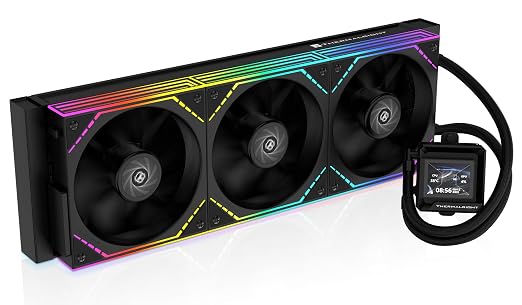
Thermalright Frozen Warframe 360 SE ARGB V2 is a water cooling solution designed for gamers and creators who need stable and efficient CPU temperature control. Its biggest strength lies in the combination of a large 360mm radiator and a customizable 2 LCD screen that adds a personal touch to your setup.
Installation is straightforward with support for a wide range of platforms like AMD AM5, AM4, and Intel LGA1851, 1700, 1200, and 115X. The three daisy-chained 120mm PWM fans keep cable management tidy while running up to 2000 RPM, balancing airflow and noise levels. You can customize the LCD screen to show system status or personal images, which adds a bit of character to your PC build.
Performance-wise, the cooler offers solid heat dissipation thanks to the 397×120×27mm aluminum radiator and 3000 RPM pump, keeping high-end CPUs within safe temperature limits. It’s built with quality materials, but some users note the noise can get noticeable during full load. Most praise revolves around the customizable display and effective cooling, while the common gripe is the noise level at peak speed.
The cooler’s customizable LCD screen receives strong praise for making system monitoring visually appealing, while the pump and fans reliably keep CPU temperatures down. Noise at peak speeds is the most frequently mentioned drawback, which might be distracting for quiet environments.
People who appreciate a personalized setup and need reliable cooling for gaming or creative workloads will find this cooler fitting. Those who prioritize ultra-quiet operation might consider other options with lower noise levels.
Pros
- Supports multiple AMD and Intel platforms
- Customizable 2″ LCD screen adds personalization
- High airflow with daisy-chained PWM fans
- Large aluminum radiator for better cooling
Cons
- Noise can be noticeable at maximum fan speed
- Consumes 3 watts, slightly higher power draw
| Specification | Details |
|---|---|
| Radiator Size | 397×120×27mm |
| Pump Speed | 3000 RPM |
| Fan Size | 3×120mm |
| Fan Maximum Speed | 2000 RPM |
| Noise Level | 28.2 db |
| Airflow | 68.9 CFM |
5. Minorsonic 360mm AIO CPU Cooler

Running cool and quiet feels natural once this cooler is installed. Perfect for those wanting solid thermal performance without loud fan noise. Its biggest strength lies in maintaining stable operation through a high-speed ceramic bearing pump that keeps coolant flowing fast and reliably.
Setup includes mounting the 360mm radiator, which fits well in larger cases. The pump runs at 3000 RPM with a 4-pin power connector giving precise speed control.
Fans max out at 1600 RPM and keep noise around 30 dB, making it easy to work or game without distraction. The water cooling method handles heat better than typical air coolers, especially during heavy CPU use.
Performance impresses by keeping CPU temperatures consistently low even under load. The ceramic bearing pump promises a long lifespan with stable, smooth operation thanks to a 3-phase, 4-pole motor that reduces vibration. Reviews point out its quietness as a highlight, though some mention the size requiring a spacious case and cautious installation.
The pump delivers steady, quiet performance with a long service life, highly praised in reviews. Size and installation complexity are the most cited challenges that may require patience and a compatible case.
Anyone needing a reliable cooler that tames heat and noise will appreciate this. Users with compact cases or limited assembly experience might prefer a smaller or simpler solution.
Pros
- Quiet operation with minimal vibration
- High-speed ceramic bearing pump for longevity
- Efficient coolant flow for strong heat transfer
- Compatible with larger cases due to 360mm radiator
Cons
- Requires ample space for radiator installation
- Setup can be tricky for beginners
| Specification | Details |
|---|---|
| Power Connector Type | 4-Pin |
| Voltage | 12 volts |
| Wattage | 5 watts |
| Maximum Rotational Speed | 1600 rpm |
| Noise Level | 30 db |
| Cooling Method | Water, Fan |
6. MSI MAG Coreliquid A13 240 CPU Cooler

Great cooling performance meets quiet operation in an affordable package. Ideal for gamers and PC builders looking for strong, reliable cooling without spending a fortune, especially for those ready with LGA 1851 sockets. Its biggest strength lies in balancing power and noise through a well-designed pump and radiator.
Installation is straightforward, and it’s ready to fit LGA 1851 sockets right out of the box. The split-flow radiator with an integrated pump quietly circulates coolant, reducing noise while keeping temperatures in check.
The pump runs up to 3800 RPM and uses ceramic bearings to last longer and keep motor noise low. Setting it up with the 4-pin power connector is simple and compatible with most modern motherboards.
Cooling feels solid under load, with air flow just over 60 CFM helping dissipate heat efficiently. The aluminium radiator is durable and the pump design reduces motor resonance, so it won’t become a noisy distraction.
Many find the quiet operation the best feature, but some mention the max 5200 RPM fan speed can get noticed in very demanding tasks. It’s a trustworthy liquid cooler that does its job well for its price point.
Praise often centers on the quiet and durable pump performance preventing loud motor noise during use. The most frequent complaint involves the fan speed reaching 5200 rpm, which might produce noticeable sound during intense tasks.
Those seeking efficient and silent cooling for everyday or gaming PCs fitted with LGA 1851 sockets will appreciate this cooler. Users demanding maximum cooling power or very low noise at extreme loads might want to explore other options with higher wattage or different fan designs.
Pros
- Ready for LGA 1851 out of the box
- Quiet operation with ceramic bearing pump
- Durable aluminium split-flow radiator
- Balanced pump speed and noise level
Cons
- Fan speed up to 5200 rpm can be audible under load
- Limited wattage at 2.16 watts for high-end overclocking
| Specification | Details |
|---|---|
| Power Connector Type | 4-Pin |
| Voltage | 12 volts_of_direct_current |
| Wattage | 2.16 watts |
| Noise Level | 14.4 db |
| Maximum Rotational Speed | 5200 rpm |
| Air Flow Capacity | 60.78 cfm |
7. Thermalright Aqua Elite 120 V3 CPU Cooler

Black aluminium fins paired with a fourth generation pump head define this water cooler’s design, ideal for desktop users wanting balanced cooling and aesthetics. Its standout feature is the low vibration operation combined with effective heat dissipation, making it suitable for everyday PC builds that need quiet yet efficient cooling.
Setup involves connecting the 4-pin power plug and syncing the ARGB lighting with a motherboard’s 5V 3pin header. The included 120mm ARGB fan runs quietly at 1500 rpm with a noise level of 25.6 dB, so it does not disrupt daily work or gaming. The protective mesh on the water pipe adds durability, contributing to low evaporation and a long lifespan in regular use.
Cooling performance stays consistent thanks to the moderate 7.2 watt power consumption. The aluminium fin heat sink and effective airflow of 66.17 cfm keep CPU temperatures well-managed under typical desktop workloads.
The main praise comes from the quiet operation and solid build, while some note the fan speed could be higher for overclocked setups.
Runs quietly with low power usage while maintaining good heat dissipation thanks to aluminium fins and efficient airflow. Common limitation is the fan’s maximum speed of 1500 rpm which might not satisfy users with high-end overclocked CPUs.
Great fit for users wanting effective cooling with low noise and vibrant lighting synced to their motherboard. Those seeking higher fan speeds or who lack ARGB headers may prefer alternative coolers without such requirements.
Pros
- Quiet operation at only 25.6 dB noise
- Durable construction with protective mesh water pipe
- ARGB lighting syncs smoothly with motherboard
- Efficient cooling with moderate 7.2 watt power
Cons
- Fan speed capped at 1500 rpm may limit peak cooling
- ARGB lighting requires compatible motherboard header
| Specification | Details |
|---|---|
| Power Connector Type | 4-Pin |
| Voltage | 12 volts |
| Wattage | 7.2 watts |
| Noise Level | 25.6 db |
| Maximum Rotational Speed | 1500 rpm |
| Air Flow Capacity | 66.17 cfm |
8. CORSAIR Nautilus 360 RS CPU Cooler

Strong airflow and focused cooling stand out the most with this AIO, making it ideal for anyone looking to keep a powerful CPU within safe temperatures. Compatibility with the latest AMD and Intel sockets suits builders who want a reliable cooler without spending a fortune.
Installation is easier than expected thanks to daisy-chained RS120 fans that reduce cable clutter by connecting with a single cable to your motherboard. Those fans include CORSAIR AirGuide technology, which helps direct the airflow exactly where it needs to go.
The water cooling setup keeps noise levels down during daily use, supported by the magnetic dome bearing in the fans that cuts down friction and sound.
Cooling performance is solid for demanding desktops, handling hot CPUs well thanks to the high static pressure fans. Build quality feels sturdy and well thought out, with a 4-pin power connector that’s standard for most setups.
The biggest plus is quiet operation combined with strong airflow. A common drawback is the maximum fan speed capped at 2100 rpm, which might limit overclocking headroom for extreme users.
Strong airflow and low noise operation are praised most, thanks to the RS120 fans with magnetic dome bearings and AirGuide technology. The frequent downside is the 2100 rpm max fan speed, which could restrict cooling performance under heavy overclocks or extremely hot CPUs.
Builders aiming for a quiet and effective cooler with wide socket support will appreciate this product. Those pushing their CPU past standard speeds or needing ultra-high cooling power should consider options with higher max fan speeds or additional cooling features.
Pros
- Strong airflow with high static pressure fans
- Single cable connection reduces motherboard clutter
- Magnetic Dome bearing keeps fan noise low
- Supports latest AMD AM5, AM4 and Intel LGA 1851, LGA 1700 sockets
Cons
- Max fan speed limited to 2100 rpm
- Cooling may fall short for extreme overclocking
| Specification | Details |
|---|---|
| Cooling Method | Water |
| Compatible Devices | Desktop |
| Maximum Rotational Speed | 2100 rpm |
| Power Connector Type | 4-Pin |
9. Thermalright Aqua Elite 360 V6 ARGB CPU Cooler

Choosing a water cooling setup under $150 that combines solid cooling with vibrant lighting leads straight to the Thermalright Aqua Elite 360 V6 ARGB. Perfect for gamers and PC builders who want serious heat dissipation and eye-catching effects without stepping into premium pricing.
Setting it up involves fitting the 360mm radiator and synchronizing the ARGB lighting easily through the 5V 3-pin connection on your motherboard. The pump head’s round vortex design isn’t just for looks; it keeps things running at about 2800RPM to keep CPU temps low.
Fans operate quietly at around 29.8 dB, so noise rarely becomes a distraction during long sessions.
Cooling performance holds strong thanks to water cooling and the 70.84 CFM airflow capacity. The build quality feels solid with a nicely designed pump head featuring an illuminated logo. One common praise revolves around the smooth lighting effects, while a noted drawback is the absence of more advanced lighting interface options for certain motherboards.
The lighting setup stands out with smooth synchronization and colorful effects that complement the solid cooling performance. Some setups might struggle with lighting interface compatibility, causing slight frustration during installation.
Gamers and PC enthusiasts wanting a balance of good cooling and striking lighting will appreciate this cooler. Those needing flawless lighting compatibility or extremely precise pump speed control might consider alternatives.
Pros
- ARGB lighting synced with motherboard 5V 3-pin
- Pump speed up to 2800 RPM for effective cooling
- Quiet operation at 29.8 decibels
- Large airflow capacity of 70.84 CFM
Cons
- Lighting interfaces may not suit all motherboards
- Pump speed variance can be ±10%
| Specification | Details |
|---|---|
| Power Connector Type | 4-Pin |
| Cooling Method | Water |
| Compatible Devices | Desktop |
| Noise Level | 29.8 dB |
| Maximum Rotational Speed | 2000 RPM |
| Air Flow Capacity | 70.84 CFM |
10. ARCTIC Liquid Freezer III Pro 240 CPU Cooler

Keeping CPU temperatures low during intense gaming or heavy workloads requires efficient cooling, and this AIO cooler fits that need perfectly. Its greatest strength lies in the integrated VRM fan, which helps maintain stable power delivery under load, making it ideal for those running demanding Intel or AMD builds.
Setup feels straightforward thanks to the native offset mounting that aligns the cold plate right over the CPU hotspot. The ARCTIC P12 PRO fans run quietly even at higher speeds, so daily use stays whisper-quiet.
The built-in VRM fan is PWM-controlled, automatically adjusting speeds to keep voltage regulators cool during peak performance.
The cooling performs well at dissipating heat, even with CPUs operating near max load, thanks to a maximum fan speed of 3000 rpm that delivers a strong 77 cfm airflow. The build quality feels solid, with a design focused on contact pressure distribution tailored for Intel sockets.
The most common complaint revolves around the fan noise when pushing speeds toward maximum.
Integrated VRM fan ensures voltage converters stay cooler under load, enhancing performance. Fan noise can be noticeable when running at full speed, especially during heavy usage scenarios.
People needing reliable cooling for gaming or workloads will appreciate this model’s balance of quiet operation and performance. Those prioritizing near-silent operation under max load may want to consider alternatives.
Pros
- Quiet operation at low to medium fan speeds
- Integrated VRM fan improves voltage regulator cooling
- Optimized cold plate placement for better heat transfer
- Compatible with Intel and AMD sockets
Cons
- Noisy when fans run near maximum speed
- Limited wattage suggests moderate power consumption only
| Specification | Details |
|---|---|
| Maximum Rotational Speed | 3000 rpm |
| Air Flow Capacity | 77 cfm |
| Power Connector Type | 4-Pin |
| Voltage | 12 volts |
| Wattage | 3.96 watts |
| Cooling Method | Water |
11. ARCTIC Liquid Freezer III Pro 240 A-RGB CPU Cooler
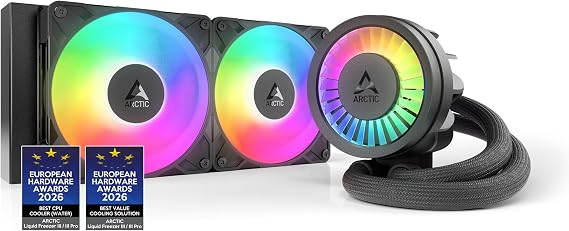
Quiet operation combined with a powerful ARCTIC P12 PRO fan makes the Liquid Freezer III Pro 240 A-RGB a smart choice for those wanting strong cooling without noise distractions. It’s especially suited for setups needing efficient heat dissipation around the latest Intel and AMD processors. Its standout feature is the integrated VRM fan targeting voltage converter cooling.
Setting up involves the native offset mounting system that aligns perfectly with Intel and AMD CPUs, improving heat transfer where the processor runs hottest. You connect the 4-pin power connector, and the water-cooling method takes over quietly while the PWM fan adjusts speeds to keep the VRMs cool too. It runs efficiently even at low fan speeds, making day-to-day operation smooth and unobtrusive.
Performance-wise, the cooler effectively handles high loads thanks to a max rotational speed of 1 rpm on the fan and an airflow capacity of 77 cfm. The build focuses on durable materials ensuring a solid, reliable setup over time.
Positive feedback highlights its quiet, powerful operation, while some mention the integrated fan’s size as a minor fit concern in tighter cases.
Strong cooling performance paired with quiet operation stands out as the main positive aspect. The integrated VRM fan adds value, although some users find the size a bit tight in smaller cases.
Those wanting quiet, effective cooling with an eye on VRM temperatures will benefit most. Custom builders with limited case space might want to explore smaller alternatives.
Pros
- Integrated VRM fan improves voltage converter cooling
- Quiet yet powerful ARCTIC P12 PRO fan performance
- Optimized contact for Intel LGA1851 and LGA1700 CPUs
- Supports both AMD and Intel sockets natively
Cons
- Integrated fan size may cause fitting issues in small cases
- Maximum rotational speed is relatively low at 1 rpm
| Specification | Details |
|---|---|
| Power Connector Type | 4-Pin |
| Voltage | 12 volts |
| Wattage | 3.96 watts |
| Cooling Method | Water |
| Maximum Rotational Speed | 1 rpm |
| Air Flow Capacity | 77 cfm |
12. Antec Skeleton Matrix 360 ARGB CPU Cooler

Enthusiasts building high-performance rigs will appreciate how well this cooler handles heat without pushing their budget over $150. Its standout feature is the combination of a big copper base plate and powerful ARGB fans, designed to keep temperatures low under heavy loads while adding customizable lighting flair.
Installing the cooler requires some patience but the universal compatibility helps ensure it fits on most Intel and AMD sockets without extra hassle. The ARGB lighting syncs nicely with most motherboards, turning your build into a light show that can be fine-tuned exactly to your taste. Daily noise stays low thanks to hydraulic bearing fans and elastic tubing that reduces vibration transmission.
Cold air flows consistently through the high-density fins allowing the pump and radiator fans to pull off solid cooling performance even during demanding tasks. The build feels durable thanks to well-made tubing and a strong pump design.
Praise often focuses on quiet operation and strong cooling. Some users noticed the pump’s unique skeleton-frame design can be bulky, which might complicate installation in tight cases.
Many users highlight the cooler’s reliable quiet operation paired with strong airflow and heat transfer. Common difficulties come from fitting the bulky skeleton-frame pump into smaller or cramped cases, which may require extra care or space planning during setup.
Ideal for gamers and PC builders wanting effective water cooling and customizable lighting. Those with compact cases or a preference for minimal pump size might look for a smaller footprint cooler instead.
Pros
- Supports a wide range of Intel and AMD sockets
- Quiet hydraulic bearing fans reduce noise
- Customizable ARGB lighting via motherboard sync
- Powerful airflow at 74.23 cfm
Cons
- Skeleton-frame pump design can be bulky
- Noise level peaks at 32.13 dB under load
| Specification | Details |
|---|---|
| Power Connector Type | Pump: 4-pin | LED: 3-pin |
| Cooling Method | Water |
| Noise Level | 32.13 dB |
| Maximum Rotational Speed | 2800 rpm |
| Air Flow Capacity | 74.23 cfm |
Best AIO Coolers Under 150 Compared Side by Side
| Product | Compatible Devices | Cooling Method | Maximum Rotational Speed | Air Flow Capacity |
|---|---|---|---|---|
| ARCTIC Liquid Freezer III 360 | Desktop, Gaming Console | Liquid | 3000 rpm | 77 cfm |
| ARCTIC Liquid Freezer III 360 | Cpu | Liquid | 3000 rpm | 77 cfm |
| CoolerMaster ML240L RGB V2 | Desktop | Water | 1800 rpm | 62 cfm |
| Thermalright Frozen Warframe 360 SE | Desktop | Water | 2000 rpm | 68.9 cfm |
| Minorsonic 360mm AIO | Cpu | Water, Fan | 1600 rpm | – |
| MSI MAG Coreliquid A13 240 | Desktop | Water | 5200 rpm | 60.78 cfm |
| Thermalright Aqua Elite 120 V3 | Desktop | Water | 1500 rpm | 66.17 cfm |
| CORSAIR Nautilus 360 RS | Desktop | Water | 2100 rpm | – |
| Thermalright Aqua Elite 360 V6 | Desktop | Water | 2000 rpm | 70.84 cfm |
| ARCTIC Liquid Freezer III 240 | AMD, Intel | Water | 3000 rpm | 77 cfm |
| ARCTIC Liquid Freezer III 240 | AMD, Intel | Water | 1 rpm | 77 cfm |
| Antec Skeleton Matrix 360 A-RGB | Desktop | Water | 2800 rpm | 74.23 cfm |
- Compatible DevicesDesktop, Gaming Console
- Cooling MethodLiquid
- Maximum Rotational Speed3000 rpm
- Air Flow Capacity77 cfm
- Compatible DevicesCpu
- Cooling MethodLiquid
- Maximum Rotational Speed3000 rpm
- Air Flow Capacity77 cfm
- Compatible DevicesDesktop
- Cooling MethodWater
- Maximum Rotational Speed1800 rpm
- Air Flow Capacity62 cfm
- Compatible DevicesDesktop
- Cooling MethodWater
- Maximum Rotational Speed2000 rpm
- Air Flow Capacity68.9 cfm
- Compatible DevicesCpu
- Cooling MethodWater, Fan
- Maximum Rotational Speed1600 rpm
- Air Flow Capacity–
- Compatible DevicesDesktop
- Cooling MethodWater
- Maximum Rotational Speed5200 rpm
- Air Flow Capacity60.78 cfm
- Compatible DevicesDesktop
- Cooling MethodWater
- Maximum Rotational Speed1500 rpm
- Air Flow Capacity66.17 cfm
- Compatible DevicesDesktop
- Cooling MethodWater
- Maximum Rotational Speed2100 rpm
- Air Flow Capacity–
- Compatible DevicesDesktop
- Cooling MethodWater
- Maximum Rotational Speed2000 rpm
- Air Flow Capacity70.84 cfm
- Compatible DevicesAMD, Intel
- Cooling MethodWater
- Maximum Rotational Speed3000 rpm
- Air Flow Capacity77 cfm
- Compatible DevicesAMD, Intel
- Cooling MethodWater
- Maximum Rotational Speed1 rpm
- Air Flow Capacity77 cfm
- Compatible DevicesDesktop
- Cooling MethodWater
- Maximum Rotational Speed2800 rpm
- Air Flow Capacity74.23 cfm
How to Choose the Best AIO Cooler Under 150
Choosing an AIO cooler involves focusing on cooling performance, compatibility with your CPU and case, and noise levels to ensure efficient and quiet operation. Prioritizing these factors helps avoid overheating issues and keeps your system stable, ultimately saving money on repairs and replacements.
Cooling Performance
Having a 240mm radiator instead of a 120mm one made a clear difference in cooling performance during heavy gaming sessions. Larger radiator size means more surface area to dissipate heat, which helps keep CPU temperatures lower for longer. Fan quality also directly impacts how well heat moves away from the radiator; quieter, higher static pressure fans push air through dense radiator fins more effectively.
The pump plays a crucial role by maintaining steady coolant flow. A weak pump can lead to temperature spikes under load, even if the radiator is large.
It’s important that the cooler’s rated thermal design power (TDP) matches or exceeds your CPU’s requirements. For example, higher-end CPUs often need coolers rated for 150W or more to avoid throttling or overheating.
Compatibility and Fit
Choosing a cooler with broad socket support avoids compatibility headaches. Coolers that fit Intel’s LGA1700, AM4, and other common sockets cover most builds. The radiator size must fit inside your PC case without blocking other components.
A 360mm radiator can be tricky in mid-towers or compact cases where space is tight.
RAM clearance near the CPU socket is frequently overlooked but essential. A radiator or fan mounted too close can interfere with tall memory modules, forcing compromises either in performance or component choice. Checking measurements against your motherboard layout before purchase saves reinstallation problems.
Noise Levels
Fans with adjustable speed profiles help balance noise against cooling need. Running fans at full speed keeps temperatures low but produces noticeable noise during gaming or rendering.
Lower RPM settings reduce sound but raise temperatures slightly. Pump noise is usually minimal, though budget units sometimes produce faint whining sounds that become distracting over time.
Typical noise levels for quality units sit around 20-30 decibels at idle, rising to 35-40 decibels under load. Knowing these numbers helps manage expectations about how loud a system will be during intensive tasks.
Build Quality and Materials
Radiators made from thick aluminum with dense fin arrays last longer and cool better compared to thinner, cheaper models. The tubing should be sturdy, flexible rubber or reinforced material that resists cracking and leaks over years of use. Pump housing quality affects reliability; plastic housings can warp, metal ones tend to hold up better.
A few coolers come with decent thermal paste included, which can improve initial heat transfer. Some include high-quality pre-applied paste or offer a separate tube of premium compound for reapplications, a practical benefit that’s easy to overlook.
Installation and Maintenance
Installing the cooler should feel secure without forcing awkward angles. Screw holes and brackets that align precisely reduce risk of damage or poor contact with the CPU.
Some units include reusable mounting hardware, saving time if upgrading or moving components.
Access for cleaning is often easier with quick-release fittings and detachable fans. Dust buildup on radiator fins and fan blades significantly hampers cooling efficiency over time.
Maintenance is less of a chore when you can remove parts without hassle or needing extra tools.
Proper Installation Techniques for Optimal AIO Cooler Performance
Applying the correct amount of thermal paste plays a crucial role in the efficiency of an AIO cooler. Too much paste can create a barrier for heat transfer, while too little won’t cover the CPU surface adequately.
Mounting the radiator securely without overtightening the screws helps avoid uneven pressure on the CPU block. The cooler should sit flat and firmly against the processor for consistent contact.
Positioning the radiator in a location where airflow is unobstructed maximizes cooling. Common placements include the front or top of the case, ensuring intake or exhaust fans promote proper circulation.
- Align tubing to prevent kinks or bends that may impede liquid flow.
- Connect power cables firmly to the correct headers to avoid pump or fan failure.
- Match the radiator size to your case dimensions to avoid fitment issues.
Following these steps ensures the AIO cooler operates at its intended performance level.
Routine Maintenance Tips to Extend the Lifespan of Your AIO Cooler
Cleaning dust from radiator fins and fan blades helps maintain airflow and heat dissipation. Dust buildup restricts air movement and raises CPU temperatures.
Checking pump operation periodically by feeling for vibration or monitoring temperature changes confirms the cooler is functioning properly.
Replacing fans if they become noisy or slow can prevent overheating. Fans that run smoothly contribute to stable thermal performance.
- Inspect tubing for cracks or leaks to avoid liquid damage.
- Keep cables organized to prevent interference with fan blades.
- Perform these checks every few months for consistent results.
Regular maintenance extends the lifespan of the AIO cooler and keeps your PC running reliably.
Comparing AIO Coolers to Air Coolers: Which Is Best for Your Setup?
AIO coolers generally offer better thermal performance compared to traditional air coolers, especially under heavy loads. The liquid circulates heat away from the CPU more efficiently.
Air coolers are simpler in design, usually quieter, and don’t require pump power or risk of leaks. They’re often easier to install and maintain.
Choosing between the two depends on your case size, noise tolerance, and cooling needs. Some compact cases can better accommodate air coolers, while larger cases may support bigger radiators.
- AIO units handle overclocking demands more effectively due to superior heat transfer.
- Air coolers have fewer moving parts and less potential points of failure.
- Budget considerations might favor air coolers, though some AIOs provide good value under $150.
Assessing your specific setup and workload will guide the right choice for cooling.
People Also Asked
How Do I Install an AIO Cooler Properly Inside My PC?
Secure the mounting bracket to the CPU first, then carefully align and attach the radiator inside your case. Keep the tubing free of kinks and ensure good contact between the CPU block and processor with thermal paste applied.
What Size AIO Cooler Fits Best in a Mid-Tower Case?
A 240mm radiator usually fits well in most mid-tower cases without issues. Check your case specifications to confirm radiator mounting points and clearance for fans and other components.
Are AIO Coolers Safe to Use for Continuous Gaming Sessions?
AIO coolers are suitable for long gaming sessions provided they are installed correctly with adequate airflow in the case. Cleaning dust from fans and radiator regularly will help maintain optimal cooling performance.
How Long Does an AIO Cooler Typically Last Before Replacement?
AIO coolers typically last around 3 to 5 years before signs of wear show, such as pump noise or rising temperatures. Periodic monitoring of temperatures can indicate when a replacement might be necessary.
What Common Problems Should I Watch for with AIO Coolers?
Watch for signs like pump noise, coolant leakage, or rising CPU temperatures. Also, dust buildup on the radiator and fans can reduce cooling efficiency, so regular cleaning is important to avoid overheating.
Conclusion
Cooling performance, noise level, and compatibility with your CPU socket are the most important aspects to consider when choosing an all-in-one cooler under $150. Balancing these factors ensures your system stays cool without being too loud or expensive, while also fitting your motherboard and case layout.
Think about the size of your case and how much noise you’re willing to tolerate, especially if you use your PC for long sessions. Check the comparison table and the detailed picks above to find one that matches your setup and budget closely.

I’m Grant Mitchell, a firearms and hunting writer with years of experience at the range and in the field. I write about rifles, shotguns, handguns, optics, safe storage, cleaning, and responsible ownership, along with practical hunting tips. My goal is to share accurate, safety-first information that helps you choose the right firearm, maintain it properly, and become a more confident shooter.