Top 12 Best AIO Cooler for Ryzen 9 7950X3D You Need Now
Overheating is a common issue with high-performance CPUs like the Ryzen 9 7950x3d, especially when paired with an inadequate cooler. The best aio cooler for ryzen 9 7950x3d needs to handle the chip’s considerable heat output during intense workloads without causing thermal throttling or loud fan noise. A cheap or poorly designed cooler often fails to maintain stable temperatures, leading to reduced performance and possible long-term damage.
Key factors that distinguish a good aio cooler for the Ryzen 9 7950x3d are the radiator size, pump power, and compatibility. Radiators around 240mm or 360mm typically provide sufficient surface area to dissipate heat effectively. The pump should move coolant efficiently to prevent hotspots, while the cooler’s contact plate must fit securely on the chip’s surface to ensure proper heat transfer.
Ease of maintenance and sturdy materials also matter for longevity and consistent performance.
Need a Quick Check?
| Image | Product | Price |
|---|---|---|
Our Top Picks 1  | ARCTIC Liquid Freezer III Pro | Check Price |
Our Top Picks 2  | Noctua NL-LC1-36 Cooler | Check Price |
Our Top Picks 3  | ASUS ROG Ryuo IV | Check Price |
Our Selected Top 12 Aio Cooler for Ryzen 9 7950x3d for Different Needs
This list features a variety of all-in-one coolers designed for the Ryzen 9 7950x3d, highlighting their cooling performance, compatibility, and noise levels. Each review explains which user needs each cooler meets, including strengths and potential drawbacks to help make an informed choice.
1. ARCTIC Liquid Freezer III Pro 360 CPU Cooler
Strong cooling power and smart design make it ideal for anyone running a Ryzen 9 7950X3D who wants to keep temps under control. It stands out by focusing on optimal heat transfer right where the CPU needs it most, making it a good match for demanding setups that benefit from sustained performance.
Setting up involves a native offset mounting system that aligns perfectly with the CPU hotspot, so heat doesn’t just sit in one place. The included P12 PRO fans run quietly even when pushed hard and adjust speed depending on workload thanks to PWM control.
An integrated VRM fan adds extra cooling for voltage converters, helping with long-term stability. It fits neatly on desktops and gaming rigs without much fuss.
Heat dissipation is impressive thanks to a well-built contact frame that applies balanced pressure, contributing also to longer CPU life. The materials feel solid, showing a focus on durability and quiet operation.
One clear positive is how effectively it cools under load without making a lot of noise, though some might find the maximum fan speed of 3000 rpm a bit high when it ramps up under extreme conditions.
Many users appreciate how effectively the cooler manages heat while keeping noise levels down for daily tasks and gaming. The most common complaint revolves around the fan speed hitting 3000 rpm, which can be noticeable during heavy loads.
Those wanting reliable, quiet cooling with added VRM support will find this cooler suits their needs well. Users looking for a very quiet setup with minimal noise at full operation might consider other options that run at lower maximum speeds.
Pros
- Balanced contact pressure for better heat transfer
- Quiet P12 PRO fans at low to medium speeds
- Integrated VRM fan improves component stability
- Compatible with Intel and AMD sockets
Cons
- Fan can get loud at maximum speed
- Setup requires attention to proper mounting alignment
| Specification | Details |
|---|---|
| Cooling Method | Liquid |
| Power Connector Type | 4-Pin |
| Maximum Rotational Speed | 3000 rpm |
| Air Flow Capacity | 77 cfm |
| Voltage | 12 volts |
| Wattage | 3.96 watts |
2. Noctua NL-LC1-36 360mm AIO CPU Cooler
Struggling to keep a Ryzen 9 7950X3D cool during intense workloads? The Noctua NL-LC1-36 360mm AIO CPU cooler suits anyone pushing demanding desktop setups, offering quiet yet effective liquid cooling as its biggest asset.
It’s great for builders focused on maintaining low noise without sacrificing performance.
Installation is straightforward with a 360mm radiator and three 120mm fans, fitting comfortably in larger cases that support this size. The integrated pump noise absorber helps keep vibration and hum to a minimum during daily use, while the PWM fans adjust speeds to balance airflow and silence. Routine cleaning mostly involves dusting the radiator fans to keep airflow optimal.
Thermal performance stays reliable thanks to the high-quality Asetek Emma V2 platform combined with Noctua’s famed fans. The build feels solid and well-engineered, highlighting efficient heat transfer and quiet operation.
Common feedback notes how quiet the pump runs, but some mention the large radiator could be a tight fit in smaller PC cases.
The pump runs quieter than many others due to a three-layer acoustic absorber and tuned-mass damper, which lowers vibration and noise during operation. The large radiator paired with three PWM fans delivers solid temperature control, but some users find the size challenging for smaller or mid-sized cases.
Builders prioritizing near-silent operation combined with strong cooling performance will be pleased, especially those with spacious cases that can house a 360mm radiator. Users with tighter case constraints might want to look into smaller AIO models better suited for compact builds.
Pros
- Quiet pump with soundproofing technology
- Three efficient, low-noise fans included
- Large 360mm radiator for strong cooling
- Reliable Asetek Emma V2 cooling platform
Cons
- Radiator size may not fit all cases
- Pump noise reduction could still be improved
| Specification | Details |
|---|---|
| Power Connector Type | 4-Pin |
| Voltage | 12 volts |
| Wattage | 1.8 watts |
| Cooling Method | Water |
| Noise Level | 22.5 db |
| Maximum Rotational Speed | 1800 rpm |
3. ASUS ROG Ryuo IV 360mm Liquid CPU Cooler
Featuring a movable 6.67-inch AMOLED display, the ASUS ROG Ryuo IV 360mm Liquid CPU Cooler stands out for its unique visual customization while handling high-performance cooling. It suits Ryzen 9 7950X3D users who want a blend of strong thermal management and eye-catching system info display in one package.
Installation is simplified with daisy-chained fans reducing cable clutter to just one connection, making setup straightforward even in tight builds. The pre-applied thermal paste coupled with the Precision Mount System ensures consistent pressure across the CPU surface, helping maintain reliability over time. Daily operation benefits from stable airflow thanks to the pre-installed fans that maintain consistent cooling without frequent adjustments.
Cooling performance comes from the Asetek Emma Gen8 V2 pump, designed to keep temperatures optimal during heavy workloads. The cooler’s build quality highlights uniform pressure application to ensure long-term durability.
Reviews highlight the outstanding thermal management, though some note the 2000 rpm fan speed can be a bit noisy during intense use.
The exceptional thermal performance and vibrant AMOLED display receive strong praise for both function and style. Most reports mention fan noise as a downside when pushed to maximum speed, which may affect quieter environments.
Ideal for those with a Ryzen 9 7950X3D who want powerful cooling combined with customizable visuals. Those prioritizing very quiet operation or smaller builds could consider more compact or lower-RPM alternatives.
Pros
- Unique 6.67-inch AMOLED display for system info
- Pre-applied thermal paste simplifies installation
- Daisy-chained fans reduce cable clutter
- Solid cooling with consistent CPU contact pressure
Cons
- Fan noise noticeable at full 2000 rpm speed
- Cooling solution might be oversized for some setups
| Specification | Details |
|---|---|
| Power Connector Type | 4-Pin |
| Cooling Method | Fan |
| Maximum Rotational Speed | 2000 rpm |
| Air Flow Capacity | 56.66 cfm |
| Compatible Devices | Desktop, Laptop |
4. LIAN LI HydroShift II OLED 360mm AIO Cooler

Anyone building a high-performance Ryzen 9 7950X3D rig will appreciate the LIAN LI HydroShift II OLED 360mm AIO Cooler, which stands out with its unique motorized pump head and a 6.67” 2K curved OLED display that gives visual feedback during use. Its versatility in positioning the display makes it especially appealing for those who want both great cooling and an eye-catching build.
Setting the cooler up involves mounting the large 360mm radiator and connecting the motorized pump head, which can be adjusted on three axes via the L-Connect 3 software. Daily use feels modern with the bright OLED panel showing system details or custom animations, viewable from many angles thanks to the motorized lift and rotation. The software interface makes it straightforward to tweak settings without hunting for controls on the rig itself.
Performance-wise, it handles the demanding heat output of a Ryzen 9 7950X3D well, running quietly at 33 db even when the pump spins up to 2600 rpm. The build quality feels solid, with effective water cooling and a well-engineered pump design. Praise often highlights the impressive OLED, while the most common gripe concerns the size and installation complexity of the radiator and pump system overall.
The OLED display delivers bright, clear visuals with versatile motion control that users find impressive, while the cooler’s size and installation effort frequently come up as drawbacks in practical settings. Its silent yet powerful water cooling keeps a Ryzen 9 chip comfortable under load.
Gamers and creators wanting a distinctive aesthetic and solid cooling will appreciate this cooler, especially if their case supports a 360mm radiator. Those seeking simpler installation or working in smaller cases might consider alternative AIOs with less demanding mounting requirements.
Pros
- Motorized pump head offers full viewing angle control
- 6.67” 2K curved OLED panel with bright visuals
- Quiet operation at 33 db despite high-performance cooling
- L-Connect 3 software intuitive for custom setup
Cons
- Large radiator size can complicate case compatibility
- Installation more involved due to motorized pump assembly
| Specification | Details |
|---|---|
| Cooling Method | Water |
| Compatible Devices | Cpu, Desktop |
| Noise Level | 33 db |
| Maximum Rotational Speed | 2600 rpm |
5. ARCTIC Liquid Freezer III Pro 360 A-RGB CPU Cooler

ARCTIC Liquid Freezer III Pro 360 A-RGB stands out for its smart design focused on effective heat transfer and quiet operation. Tailored for high-end builds like those with Ryzen 9 7950X3D, it keeps even demanding CPUs cool while integrating a unique VRM fan for added reliability.
Setup involves matching the mounting system that shifts the cold plate to target the CPU hotspot. The inclusion of ARCTIC’s P12 PRO fans means you get quieter airflow without giving up on power. Its PWM-controlled VRM fan actively cools voltage converters, helping with stability during heavy workloads.
Cooling performance is strong, with fans spinning up to 3000 rpm and pushing 77 cfm of air, handling heat spikes well under load. It uses optimized contact pressure to extend CPU life by improving heat dissipation. Most appreciate the quietness combined with powerful cooling, though some mention fan noise at higher speeds can be noticeable.
Many users praise the balance between quiet operation and strong cooling thanks to the P12 PRO fans and optimized cold plate. The most common downside is the increase in fan noise when pushing the system at full speed, which some find distracting.
This cooler suits those who want reliable, efficient cooling for high-performance CPUs and don’t mind a slightly more involved installation. Those seeking an ultra-quiet setup at maximum load may want to consider alternative options.
Pros
- Optimized cold plate placement for efficient cooling
- Quiet operation at low and mid fan speeds
- PWM-controlled integrated VRM fan adds reliability
- High air flow with P12 PRO fans
Cons
- Fan noise noticeable at maximum rotational speed
- Mounting system more complex than basic coolers
| Specification | Details |
|---|---|
| Power Connector Type | 4-Pin |
| Voltage | 12 volts |
| Wattage | 3.96 watts |
| Maximum Rotational Speed | 3000 rpm |
| Air Flow Capacity | 77 cfm |
6. CORSAIR iCUE LINK TITAN II 360 RX LCD AIO Cooler

Corsair iCUE LINK TITAN II 360 RX LCD AIO Cooler offers excellent water cooling with a unique 5 IPS LCD display, great for Ryzen 9 7950X3D users seeking both strong performance and customization. Its standout feature is the bright, high-resolution screen that can show temps or fun visuals.
Setup is easier than expected thanks to the unified fan frame that cuts down on screws and cable clutter. The RX II fans keep noise low with magnetic dome bearings and AirGuide technology, so it’s quiet under load. You can monitor temps directly on the display or through Windows for added flexibility.
Cooling performance proves solid on demanding CPUs, handling heat efficiently while staying relatively quiet at 32.8 dB. Build quality feels durable with quality fans and a well-designed frame. Reviews praise the vivid screen but mention the complexity of software customization as a minor downside.
The vivid IPS display is widely praised for showing temperatures and fun visuals, while some find the software for customization less intuitive. Cooling remains quiet and effective, supporting high-performance CPUs like the Ryzen 9 7950X3D well.
Anyone wanting a mix of performance and personalization will appreciate this cooler, especially fans of monitoring on the go. Users looking for very simple controls or lower brightness might prefer alternative options.
Pros
- Colorful 5″ IPS display with multiple uses
- Quiet RX II fans optimized for low noise
- Unified fan frame simplifies installation
- Real-time thermal monitoring available
Cons
- Software customization can be complicated
- Brightness might be too strong for some setups
| Specification | Details |
|---|---|
| Cooling Method | Water |
| Compatible Devices | Desktop |
| Noise Level | 32.8 db |
| Display Type | IPS LCD, 5″, 720×1280 resolution |
| Fan Features | RX II Fans with magnetic dome bearings and AirGuide |
7. Thermalright Frozen Warframe 360 SE ARGB AIO Cooler
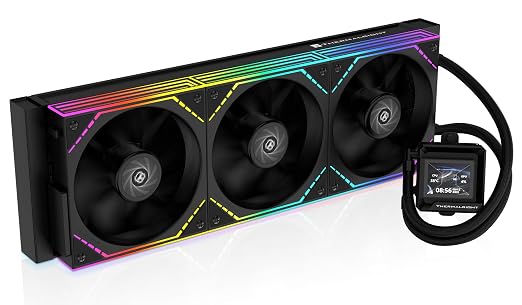
Owning a liquid cooler that handles the Ryzen 9 7950X3D smoothly changes your whole PC experience. Suited for gamers and creators with high demands, it stands out with a striking 2 LCD screen offering real-time system info and customization while keeping temperatures steady during heavy loads.
Installation involves mounting a spacious 397×120×27mm aluminum radiator, which fits well in most cases designed for 360mm cooling. The triple 120mm fans running up to 2000RPM ensure good airflow without cluttering cables, thanks to daisy-chain wiring.
Using the Thermalright software, you get to display system stats or your own GIFs on the LCD, adding a personal touch while keeping an eye on performance easily.
Performance-wise, the powerful 3000RPM pump maintains stable cooling under stress, essential for the Ryzen 9 7950X3D’s temperature demands. The build feels solid with quality materials, but the loudness peaks at 28.2 dB can be a concern during full load. Reviews highlight the customizable LCD as a favorite feature while some mention fan noise as less than ideal for quiet setups.
The customizable 2″ LCD screen draws lots of positive attention, bringing visuals and info directly to your rig. Many find the fan noise at high RPMs a drawback when aiming for a quieter setup. The triple fan design keeps the powerful Ryzen 9 7950X3D temperatures in check effectively.
Those prioritizing aesthetics and solid cooling for gaming or creative work will appreciate the features offered here. Quiet users or builds with limited space might look for alternatives with quieter fans or smaller radiators to better fit their needs.
Pros
- Customizable 2″ LCD screen with system status
- Strong pump speed supports demanding CPUs
- Daisy-chain fans reduce cable clutter effectively
- Compatible with AMD AM5 and Intel platforms
Cons
- Fan noise noticeable under heavy load
- Large radiator needs sufficient case space
| Specification | Details |
|---|---|
| Radiator Size | 397×120×27mm aluminum |
| Fan Size and RPM | 3×120mm fans, up to 2000 RPM |
| Max Air Flow | 68.9 CFM |
| Noise Level | 28.2 dB |
| Pump Speed | 3000 RPM |
| Power Connector Type | 4-Pin |
8. CORSAIR NAUTILUS 360 RS AIO Liquid CPU Cooler

Quiet operation and solid cooling power make this AIO a great match for the Ryzen 9 7950X3D. It works well in systems where airflow management and noise levels matter most, standing out for its efficient fan setup that keeps temperatures in check without becoming a distraction.
Installation feels straightforward thanks to the daisy-chained RS120 fans, which reduce cable clutter and simplify motherboard connections. Those fans offer focused airflow through AirGuide technology, helping cool the CPU effectively.
Running quietly thanks to magnetic dome bearings, everyday use keeps the system cool without that constant loud fan noise that can be very annoying during gaming or heavy workloads.
Cooling performance meets expectations for a large 360mm radiator setup, handling the heat output from demanding CPUs like the Ryzen 9 without struggle. Build quality is solid with sturdy fittings and effective water cooling, though some users might notice fan noise at maximum speed. The standout praise highlights its quiet operation, while complaints mostly mention the noise when pushed to higher RPMs.
Quieter than many competitors due to magnetic dome bearings, the fans stand out as a big plus, but when spun up to their max 2100 rpm, noise levels rise and can become distracting during intensive tasks. The setup’s ease thanks to daisy-chained connectors makes managing cables less of a chore, which really helps with a clean build.
This cooler fits well in builds where silent or low-noise operation is a priority, especially with powerful Ryzen 9 processors. Users seeking the quietest cooling at all times will appreciate it. Those wanting precise PWM control or needing ultra-low noise under heavy load might want to explore options with 3 or 4-pin fan connectors and lower max RPM.
Pros
- Quiet operation thanks to magnetic dome bearing fans
- Easy installation with daisy-chained fan cables
- Strong focused airflow from RS120 fans with AirGuide tech
- Wide compatibility across AMD and Intel sockets
Cons
- Fan noise increases noticeably at full 2100 rpm speed
- Only 4-pin power connectors which may limit custom fan control
| Specification | Details |
|---|---|
| Maximum Rotational Speed | 2100 rpm |
| Power Connector Type | 4-Pin |
| Cooling Method | Water |
| Compatible Devices | Desktop |
| CPU Socket Compatibility | AMD AM5, AM4; Intel LGA 1851, LGA 1700 |
9. ASUS TUF Gaming LC III 360mm AIO CPU Cooler

Copper forms the core of this 360mm AIO cooler, making it a solid choice for anyone building around a Ryzen 9 7950X3D who values durability and efficient heat transfer. Its standout feature is the pre-installed fans that combine airflow and static pressure to keep temperatures down without extra setup fuss.
Installation is straightforward thanks to the integrated fans already mounted on the radiator, which saves time and effort. The 400mm sleeved rubber tubing is flexible enough to fit most chassis layouts comfortably.
Daily monitoring and tuning are handled through ASUS’s TUF Gaming software, which shows real-time hardware status and lets you customize fan speeds depending on your workload.
Cooling performance reliably handles the heat output from the Ryzen 9 7950X3D, with noise levels peaking at a manageable 37.4 dB under load. The build quality feels sturdy, with an aluminum radiator and thick copper CPU plate ensuring good heat dispersion.
Strong points noted are the quiet operation and toughness of the tubing, while some mention that the aluminum radiator could feel a little less premium compared to higher-end models.
The cooler’s quiet operation combined with its durable build and effective heat dissipation receives the most praise. A common downside is the aluminum radiator, which some feel doesn’t match the premium feel of competitors with copper radiators.
Those wanting reliable cooling with straightforward installation and software customization will find it a fitting match. Users seeking ultra-quiet running or an all-copper build might consider exploring other AIO options.
Pros
- Pre-installed fans simplify initial setup
- High airflow and static pressure performance
- Reinforced sleeved tubing resists wear
- Real-time hardware monitoring with TUF software
Cons
- Aluminum radiator not as premium as copper options
- Noise can reach 37.4 dB under heavy load
| Specification | Details |
|---|---|
| Cooling Method | Fan |
| Air Flow Capacity | 90.78 cfm |
| Noise Level | 37.4 db |
| Tube Length | 400 mm |
| Radiator Material | Aluminum |
10. TRYX Panorama SE 360mm AIO CPU Cooler

A standout feature on this cooler is its 6.67-inch rotatable AMOLED curved screen, offering a unique visual twist for Ryzen 9 7950X3D users who want a combination of performance and flair. Its main strength lies in delivering competent cooling paired with an eye-catching display that can adapt to your setup’s angle.
Setting it up involves dealing with a 360mm radiator, which may require a roomy case, but the multi-angle adjustable screen adds a touch of personalization to day-to-day use. The water cooling system works quietly at 27.86 dB, so it won’t draw attention in normal conditions.
The Asetek Adela system keeps heavy workloads like gaming and video encoding steady, making it more than a pretty face.
Performance-wise, it manages heat well with airflow rated at 66.09 CFM and a max fan speed of 3600 rpm, keeping your CPU under control during extended use. The build focuses on quality with a 7-pin power connector ensuring stable power delivery at 12 volts and 5.5 watts.
Positive points highlight the screen’s impressive resolution and brightness, while a common drawback is the relatively high fan speed, which might boost noise under full load.
The most praised aspect is the AMOLED screen providing vibrant visuals and adjustable angles, making it unique among AIO coolers. The most noted downside is the fan noise increase at top speeds, which could be noticeable during intense CPU workloads.
Those who enjoy a visually striking build and heavy CPU use will find it suitable. People with smaller cases or in need of ultra-quiet cooling might prefer a different option.
Pros
- Rotatable 6.67″ AMOLED screen with high pixel density
- Quiet operation at 27.86 db during typical use
- Effective cooling via Asetek Adela system
- Strong airflow capacity of 66.09 cfm
Cons
- High maximum fan speed may increase noise under load
- Requires a spacious case for 360mm radiator
| Specification | Details |
|---|---|
| Cooling Method | Water |
| Power Connector Type | 7-Pin |
| Voltage | 12 volts_of_direct_current |
| Noise Level | 27.86 db |
| Maximum Rotational Speed | 3600 rpm |
| Air Flow Capacity | 66.09 cfm |
11. ASUS ROG Ryujin III ARGB 360mm Liquid CPU Cooler

Built for extreme cooling needs, this AIO cooler suits anyone running a Ryzen 9 7950X3D who wants high-performance liquid cooling with a unique LCD display. Its biggest strength lies in powerful heat dissipation combined with visually customizable monitoring on a 3.5 screen.
Installation is straightforward thanks to magnetic fan attachments, making setup feel less fiddly. The embedded fan helps keep the motherboard VRMs cool, important for stable daily use under heavy loads. Control over pump and fan speeds from software helps balance cooling efficiency against noise levels, which stay very low at just 16 dB.
It cools the CPU exceptionally well, maintaining low temperatures even under demanding tasks. The build quality feels solid, featuring the latest Asetek Emma Gen8 V2 pump and thickened ARGB fans optimized for airflow and noise. Users appreciate the clear LCD screen, though some find the software features a bit complex to use.
The cooler repeatedly gains praise for its excellent temperature management and silent operation at 16 dB. The software control panel, while feature-rich, tends to be challenging for some users to fully utilize.
People who want top-tier cooling with stylish LCD monitoring will find it highly satisfying. Those preferring simpler controls or lower power consumption might want to consider alternatives.
Pros
- Strong cooling with latest Gen8 pump
- 3.5″ LCD for customizable monitoring
- Magnetic fans enable easy installation
- Embedded fan cools motherboard VRMs
Cons
- Software controls can be complicated
- High power usage at 1.2 kwh
| Specification | Details |
|---|---|
| Power Connector Type | 4-Pin |
| Voltage | 2 volts |
| Wattage | 1.2 kwh |
| Cooling Method | Fan, Water |
| Noise Level | 16 db |
12. Thermalright FW360 Black ARGB 360mm AIO CPU Cooler

Handling the heat from a Ryzen 9 7950X3D demands serious cooling power, which the Thermalright FW360 Black ARGB manages well. It suits anyone wanting a large 360mm radiator setup that stays quiet while pushing cool air efficiently.
Its standout feature is maintaining low noise under demanding workloads.
Setting it up involves installing the all-black nano-painted aluminum radiator, which fits most wide cases thanks to its 397mm length. The detachable LCD on the water block lets you monitor temps easily.
The 120mm PWM fans adjust speed based on heat, helping keep noise to around 23dBA. Regular maintenance is straightforward with polymer protective tubing designed for durability.
The cooler handles heavy CPU loads with strong airflow capacity at 70.84 CFM and a water pump spinning at 3000 RPM. Build quality includes a solid black radiator and a well-sized 69.2mm cold head for good contact with the CPU.
The most common praise is about quiet operation, while some mention the size might be too large for compact cases.
Quietness stands out as the main positive, making it ideal for those who prefer a silent PC while running demanding CPUs. Most common concern revolves around its size, which requires enough clearance in the case for proper installation.
This cooler works well for users with roomy cases who want efficient, quiet cooling. Anyone with a smaller case or stricter space limitations may need to consider a smaller or different cooling solution.
Pros
- Quiet operation under load
- Large 360mm radiator for strong cooling
- Detachable LCD screen on water block
- Durable polymer protective water pipe
Cons
- Radiator size may not fit small cases
- Water pump speed can be noisy at max RPM
| Specification | Details |
|---|---|
| Voltage | 12 volts |
| Maximum Rotational Speed | 3000 rpm |
| Air Flow Capacity | 70.84 cfm |
| Noise Level | 23 db |
| Power Connector Type | 4-Pin |
Best AIO Coolers for Ryzen 9 7950X3D Comparison
| Product | Cooling Method | Maximum Rotational Speed | Noise Level | Air Flow Capacity |
|---|---|---|---|---|
| ARCTIC Liquid Freezer III Pro | Liquid | 3000 rpm | – | 77 cfm |
| Noctua NL-LC1-36 Cooler | Water | 1800 rpm | 22.5 db | 63 cfm (converted from 107.3 m³/h) |
| ASUS ROG Ryuo IV | Fan | 2000 rpm | – | 56.66 cfm |
| LIAN LI HydroShift II OLED | Water | 2600 rpm | 33 db | – |
| ARCTIC Liquid Freezer III Pro | Liquid | 3000 rpm | – | 77 cfm |
| CORSAIR iCUE LINK TITAN II | Water | – | 32.8 db | – |
| Thermalright Frozen Warframe 360 SE | Water | 2000 rpm | 28.2 db | 68.9 cfm |
| CORSAIR Nautilus 360 RS | Water | 2100 rpm | – | – |
| ASUS TUF Gaming LC III | Fan | – | 37.4 db | 90.78 cfm |
| TRYX Panorama SE 360 | Water | 3600 rpm | 27.86 db | 66.09 cfm |
| ASUS ROG Ryujin III ARGB | Fan, Water | – | 16 db | – |
| Thermalright FW360 Black ARGB | Water | 3000 rpm | 23 db | 70.84 cfm |
- Cooling MethodLiquid
- Maximum Rotational Speed3000 rpm
- Noise Level–
- Air Flow Capacity77 cfm
- Cooling MethodWater
- Maximum Rotational Speed1800 rpm
- Noise Level22.5 db
- Air Flow Capacity63 cfm (converted from 107.3 m³/h)
- Cooling MethodFan
- Maximum Rotational Speed2000 rpm
- Noise Level–
- Air Flow Capacity56.66 cfm
- Cooling MethodWater
- Maximum Rotational Speed2600 rpm
- Noise Level33 db
- Air Flow Capacity–
- Cooling MethodLiquid
- Maximum Rotational Speed3000 rpm
- Noise Level–
- Air Flow Capacity77 cfm
- Cooling MethodWater
- Maximum Rotational Speed–
- Noise Level32.8 db
- Air Flow Capacity–
- Cooling MethodWater
- Maximum Rotational Speed2000 rpm
- Noise Level28.2 db
- Air Flow Capacity68.9 cfm
- Cooling MethodWater
- Maximum Rotational Speed2100 rpm
- Noise Level–
- Air Flow Capacity–
- Cooling MethodFan
- Maximum Rotational Speed–
- Noise Level37.4 db
- Air Flow Capacity90.78 cfm
- Cooling MethodWater
- Maximum Rotational Speed3600 rpm
- Noise Level27.86 db
- Air Flow Capacity66.09 cfm
- Cooling MethodFan, Water
- Maximum Rotational Speed–
- Noise Level16 db
- Air Flow Capacity–
- Cooling MethodWater
- Maximum Rotational Speed3000 rpm
- Noise Level23 db
- Air Flow Capacity70.84 cfm
How to Choose the Best AIO Cooler for Ryzen 9 7950X3D
Choosing the right AIO cooler for the Ryzen 9 7950X3D depends on factors like cooling performance, radiator size, and compatibility with your case and CPU socket. Getting these elements right ensures efficient heat management, preventing overheating and costly hardware damage.
Cooling Performance
High-performance processors generate significant heat under load, and managing that heat efficiently is critical to maintaining stable operation. A cooler with a weak pump or a small radiator will struggle to keep temperatures in check during intense tasks, leading to throttling or reduced lifespan.
In daily use, a reliable AIO unit with a decent pump flow rate and at least a 240mm radiator ensures the CPU stays cool even in prolonged workloads. Dual or triple fan radiators improve heat dissipation, spreading the load more evenly. Pump efficiency and radiator size directly impact how well the system handles heat spikes without excessive noise or temperature swings.
Compatibility and Fit
Many users find their chosen cooling solution doesn’t fit well inside their case or clashes with other components. AM5 socket support must be verified since mounting brackets vary and not every AIO supports the latest platforms out of the box.
A 240mm radiator is often a safe middle ground for most cases, but larger 280mm or 360mm options require more space and airflow considerations. RAM clearance is another frequent stumbling block, especially with tall heat spreaders; some coolers offer low-profile pump designs to help avoid interference.
Noise Levels
Fan and pump noise can become highly noticeable under load, disrupting focus or gaming sessions. Higher RPM fans cool better but generate more sound, making quieter operation modes or customizable fan curves valuable for balancing performance versus noise.
Pumps should run smoothly without rattling or vibration, since noisy pumps become a constant annoyance. Look for units with well-damped pumps and fans rated for quiet performance to ensure a calmer working environment.
Build Quality and Materials
Coolers with flimsy tubing or plastic fittings can develop leaks or degrade quickly, creating costly problems. Silicone or rubber tubing tends to last longer and resist kinks, while thick radiator fins hold up better across multiple cleanings.
Fan blades made from sturdy materials maintain performance over time and handle dust buildup without warping. Leak resistance features like reinforced joints and secure seals enhance durability and help prevent leaks.
Installation and Maintenance
Complex installation processes cause frustration, especially if bracket changes or backplates require removing the motherboard. Models with straightforward mounting kits and clear instructions speed up setup and reduce errors.
Routine maintenance involves easier cleaning when fans and radiators are accessible without disassembly of the entire system. Including thermal paste or thermal pads saves time and ensures users apply the right materials for effective heat transfer.
Optimizing Thermal Performance: Installation and Fan Configuration Tips
Proper installation significantly influences the cooling efficiency of an AIO cooler on the Ryzen 9 7950X3D. Applying a thin, even layer of thermal paste ensures maximum contact between the processor and the cold plate, avoiding hotspots.
Align the cooler’s cold plate squarely on the CPU to prevent uneven pressure that could reduce heat transfer. Fan orientation matters as well; setting up a push-pull configuration on the radiator improves airflow, reducing temperatures effectively. Typically, intake fans at the front and exhaust fans at the rear or top create balanced airflow through the case, which aids overall system cooling.
Tighten screws in a cross pattern to secure the block without overtightening, preventing damage or poor contact. Monitoring fan speeds through software helps identify if adjustments are needed during heavy workloads.
These practical steps contribute to harnessing the full potential of the cooler’s design and maintaining steady thermal performance under demanding conditions.
Preventing Pump Noise and Ensuring Long-Term AIO Cooler Reliability
Pump noise often stems from mounting issues or air trapped inside the loops of an AIO cooler. Ensuring the pump is mounted upright, meaning the tubes exit from the top or the side, helps reduce noise caused by air bubbles.
The radiator should be positioned higher than the pump to encourage air to rise out of the system naturally. Using proper mounting brackets prevents excessive vibration that can translate into rattling or humming sounds. Check the pump’s RPM using motherboard software to verify it runs within manufacturer-recommended speeds, as overspinning can increase noise and reduce pump lifespan.
Over time, the coolant may degrade or evaporate slightly, so occasional inspection and maintenance can prevent performance dips. Avoid bending tubes sharply to prevent flow restrictions.
These steps support quieter operation and extend the operational life of the AIO cooler, which is vital for high-performance processors like the Ryzen 9 7950X3D.
Comparing AIO Coolers with High-End Air Coolers for Ryzen 9 7950X3D Systems
AIO coolers offer a more compact cooling solution compared to large air coolers but come with different trade-offs. High-end air coolers rely on mass and large fin arrays to absorb and dissipate heat passively, which can produce less noise since they don’t have pumps.
This can be beneficial for users sensitive to pump noise or seeking fewer moving parts. However, AIO coolers often achieve lower CPU temperatures faster due to the liquid’s ability to move heat away from the processor promptly. Installation complexity is higher for AIO units, while air coolers are often simpler to set up and maintain.
Air coolers also usually take up more space around the CPU socket, potentially interfering with tall RAM modules. For the Ryzen 9 7950X3D, where thermal demands are significant, a quality AIO may outperform even the largest air coolers in sustained loads, but noise levels and maintenance needs can influence the decision based on usage patterns and case airflow.
People Also Asked
How Do I Install an AIO Cooler on Ryzen 9 7950X3D?
Install the AIO cooler by first securing the backplate behind the motherboard, then attach the pump block on the CPU with thermal paste applied, and finally mount the radiator and fans in your case. Tighten screws evenly to ensure proper contact and avoid overtightening which can damage components.
Is a 240mm AIO Cooler Sufficient for Ryzen 9 7950X3D?
A 240mm AIO cooler can handle the Ryzen 9 7950X3D but might run warmer under heavy loads or overclocking. Larger radiators like 280mm or 360mm models provide better thermal performance, especially for prolonged demanding tasks.
What Maintenance Is Needed to Keep an AIO Cooler Working Well?
Regularly check for dust buildup on the radiator and fans and clean them using compressed air. Ensure the pump and fans are running properly to maintain cooling efficiency. Also, monitor for any unusual noises or leaks as signs of potential failure.
Can an AIO Cooler Cause Damage If Mounted Incorrectly?
Incorrect mounting can cause poor contact between the cooler and CPU leading to higher temperatures, which might throttle performance or damage the CPU over time. Make sure the cooler is aligned properly and screws are tightened evenly but not too tight.
How Long Do AIO Coolers Typically Last with Heavy CPU Usage?
AIO coolers usually last between 3 to 7 years under heavy use depending on build quality and maintenance. Over time, the pump and seals may degrade, so expect some drop in performance or need for replacement after several years.
Conclusion
Cooling capacity and radiator size are the most important factors to consider for a Ryzen 9 7950X3D. This CPU pulls a lot of power and generates significant heat, so the cooler needs to keep temperatures stable. Noise levels also matter, especially if you want a quieter system.
Compatibility with your case and motherboard socket should not be overlooked.
Think about the space you have inside your case and your budget before making a final choice. A larger radiator cools better but might not fit in smaller setups, and pricier models usually offer quieter operation.
Check the comparison table and the detailed picks above to find a cooler that matches your needs and build preferences.

I’m Grant Mitchell, a firearms and hunting writer with years of experience at the range and in the field. I write about rifles, shotguns, handguns, optics, safe storage, cleaning, and responsible ownership, along with practical hunting tips. My goal is to share accurate, safety-first information that helps you choose the right firearm, maintain it properly, and become a more confident shooter.