Top 12 Best AIO Cooler 7800X3D That Will Blow Your Mind!
Overheating and loud fan noise are common issues with a cheap or mismatched cooler when running a high-performance CPU like the 7800x3d. A good best aio cooler 7800x3d handles these problems by providing efficient heat dissipation without excessive noise, avoiding thermal throttling during heavy workloads. Many find out the hard way that generic coolers just don’t cut it for this type of processor.
The key factors that separate a solid aio cooler for the 7800x3d include radiator size, pump quality, and mounting compatibility. A 240mm or 280mm radiator is usually a minimum for consistent cooling, with well-maintained pump speeds around 2500 RPM to push coolant effectively. Proper mounting brackets that fit the 7800x3d socket ensure even pressure and prevent leaks, while materials like copper for the cold plate and aluminum for the radiator offer a good balance of heat transfer and durability.
Need a Quick Check?
| Image | Product | Price |
|---|---|---|
Our Top Picks 1  | ARCTIC Liquid Freezer III Pro | Check Price |
Our Top Picks 2  | ARCTIC Liquid Freezer III Pro | Check Price |
Our Top Picks 3  | LIAN LI HydroShift II OLED | Check Price |
Our Selected Top 12 Aio Cooler 7800x3d for Different Needs
This list features carefully chosen all-in-one coolers designed for optimal performance with the 7800x3d. Each review explains how the cooler performs, identifies the best user fit, and highlights its main strengths and weaknesses to help you make an informed decision.
1. ARCTIC Liquid Freezer III Pro 360 CPU Cooler
Ideal for gamers and heavy PC users looking to keep their 7800x3d cool during intense sessions, this cooler delivers exceptional heat dissipation thanks to its large 360mm radiator and precision mounting designed to align with the CPU hotspot. Its single biggest strength lies in the combined cooling of both the CPU and VRM with a dedicated fan.
Installation is straightforward with the native offset mounting that ensures the cold plate hits the hotspot precisely, which helps with better heat transfer. The included ARCTIC P12 PRO fans run quietly even when spinning faster, and the integrated VRM fan automatically adjusts through PWM to keep those voltage converters cool under load.
Daily use means quieter operation without worrying about thermal throttling.
Cooling performance matches what you’d expect from a 360mm liquid cooler, handling heat loads efficiently thanks to a max fan speed of 3000 rpm and airflow up to 77 cfm. The build quality stands out with a smart contact frame that spreads pressure evenly on Intel sockets LGA1851 and LGA1700 for longer CPU life.
People often note how quiet the fans are in normal conditions, though some mention the size can make fitting in smaller cases tricky.
The cooler’s ability to maintain low temperatures quietly is frequently praised, with the offset mounting helping improve heat transfer on Intel CPUs. However, some users find its physical size challenging for compact builds, and the fans can become noticeably loud when pushed to their top speeds.
Those who need strong performance for demanding workloads or gaming will appreciate the extra VRM fan and precise mounting, especially in spacious cases. People with smaller cases or sensitive to noise at max fan speeds might want to consider a smaller or quieter alternative.
Pros
- Optimized contact pressure for Intel CPUs
- Powerful and quiet ARCTIC P12 PRO fans
- Integrated VRM fan improves voltage stability
- High airflow of 77 cfm at 3000 rpm max speed
Cons
- Large size may not fit smaller PC cases
- Fans can run loud at maximum RPM
| Specification | Details |
|---|---|
| Power Connector Type | 4-Pin |
| Voltage | 12 volts |
| Wattage | 3.96 watts |
| Maximum Rotational Speed | 3000 rpm |
| Air Flow Capacity | 77 cfm |
| Cooling Method | Liquid |
2. ARCTIC Liquid Freezer III Pro 360 A-RGB CPU Cooler
Liquid cooling meets precise engineering in a cooler built with CPU longevity in mind. Suited for those running high-demand setups, it focuses on even heat dissipation and CPU hotspot targeting for better performance under strain.
Setup involves matching the mounting system to your Intel or AMD socket without hassle, thanks to tailored offsets and contact pressure. Daily operation keeps things quiet with ARCTIC’s P12 PRO fans running efficiently at variable speeds, while the dedicated VRM fan helps lower board temperatures, aiding overall stability in longer sessions.
Performance centers on strong cooling output, maintaining CPU temps even under load with a fairly quiet profile. The build stands out for its design that shifts cold plate placement for better hotspot coverage. Most praise highlights its quiet fan operation, but some notice the fan speed can ramp up noisily during intense workloads.
Quiet fan performance at moderate loads is a strong point, making the cooler unobtrusive during day-to-day use. Noise increase under maximum speeds is the most frequent downside noted, requiring a balance between sound and cooling needs.
Builders focused on consistent cooling and CPU longevity will appreciate this unit’s approach. Those seeking ultra-quiet operation regardless of load might want to explore alternatives with lower peak fan speeds.
Pros
- Optimized contact pressure for longer CPU life
- Pumps and fans operate quietly at low speeds
- Integrated VRM fan improves voltage converter temperatures
- Shifts cold plate toward CPU hotspot for better cooling
Cons
- Fan speed can get noisy under heavy load
- Power consumption near 4 watts might impact efficiency
| Specification | Details |
|---|---|
| Power Connector Type | 4-Pin |
| Voltage | 12 volts |
| Wattage | 3.96 watts |
| Maximum Rotational Speed | 3000 rpm |
| Air Flow Capacity | 77 cfm |
| Cooling Method | Liquid |
3. LIAN LI HydroShift II OLED Curved 360 AIO Cooler
LIAN LI HydroShift II OLED Curved 360 AIO Cooler stands out with its unique combination of advanced water cooling and a vivid 6.67” 2K curved OLED display. Ideal for gamers and PC enthusiasts looking to keep their 7800x3d running cool while adding a striking visual touch to their build.
Setting it up requires managing a motorized pump head that adjusts the display’s angle through L-Connect 3 software. This smart feature allows you to customize the screen’s position without much effort, making day-to-day adjustments easy. Noise remains low at 33 db, helping maintain a quiet workspace or gaming environment.
Cooling performance is efficient for demanding CPUs, with the pump capable of spinning up to 2600 rpm to handle high thermal loads. The build quality reflects LIAN LI’s focus on durable materials and precise engineering.
Most enjoy the twist-and-turn OLED feature, while some mention a learning curve with the software controls.
The OLED display provides impressive clarity and vivid visuals, which many find captivating, though using the accompanying software to control the pump head can be tricky at first. Cooling runs quietly and efficiently, suitable for intense CPU workloads.
Those who want a visually dynamic cooler with customizable angles will appreciate this model. Users preferring simple, minimal setups might prefer a more basic AIO without extra display features or complex controls.
Pros
- Vibrant 2K curved OLED panel for visual appeal
- Motorized pump head adjustable via software
- Quiet operation at 33 db
- Solid water cooling performance
Cons
- Software controls take time to master
- OLED screen adds complexity and cost
| Specification | Details |
|---|---|
| Cooling Method | Water |
| Compatible Devices | Cpu, Desktop |
| Noise Level | 33 db |
| Maximum Rotational Speed | 2600 rpm |
4. Thermalright Wonder Vision 360 UB White AIO Cooler

Cooling a high-performance CPU like the 7800x3d needs a reliable system that stays quiet while running cool. Suited for desktop setups aiming for serious thermal management, the Thermalright Wonder Vision 360 UB White stands out with its triple fan design and strong water pump speed, mainly focusing on maintaining low CPU temperatures under load.
Installation involves mounting a sizable 403x120x52mm radiator and connecting the triple 120mm fans that run up to 2150 RPM. The fans adjust speed automatically using PWM, reacting to the CPU heat, which keeps noise levels reasonable at 27 dBA max. The water pump spins at 6400 RPM, circulating coolant efficiently.
Daily use means it keeps temperatures down without sounding like a jet engine or needing constant manual tweaking.
Performance-wise, the cooler handles heat dissipation well for demanding processing tasks, backed by a sturdy build that feels solid and durable. The three fans produce enough airflow and consistent pressure to keep things cool.
Most voices appreciate how quietly it runs given the fan speed, but some mention the radiator size can make fitting it in smaller cases tricky.
The coolest advantage lies in its ability to keep CPU temperatures low through powerful fans and a fast pump while staying quiet for most scenarios. The main downside is its bulky radiator size, which can limit compatibility with compact desktop cases.
Those with roomy PC cases and an emphasis on steady, strong cooling will appreciate how well it manages demanding CPUs. People with smaller cases or who want extremely quiet operation under max load might want to consider other, more compact options.
Pros
- Strong cooling with high-speed triple fans
- Quiet operation despite fan speed
- PWM control adjusts fans to CPU temperature
- Solid build quality with durable parts
Cons
- Large radiator size needs ample case space
- Fan noise noticeable at maximum speed
| Specification | Details |
|---|---|
| CPU Fan Size | 360x120x25mm |
| Fan Speed | 2150 RPM ±10% |
| Noise Level | ≤27 dBA |
| Water Pump Speed | 6400 RPM ±10% |
| Voltage | DC 12V |
| Air Pressure | 2.87 mm H2O |
5. Noctua NL-LC1-36 360mm AIO CPU Cooler

Noctua NL-LC1-36 360mm AIO CPU Cooler suits gamers and professionals looking for excellent cooling paired with impressive quietness. Its standout feature is the 360mm radiator combined with three NF-A12x25 G2 PWM fans, keeping temperatures low while running surprisingly silent.
Setting it up involves managing a large radiator and three 120mm fans, requiring enough case space but rewarding with low noise levels thanks to the speed-offset fan design. Day-to-day, the pump noise absorber reduces annoying vibrations, making it easy to forget the cooler is even running while gaming or working.
Thermal performance is strong thanks to the premium Asetek Emma V2 platform, consistently handling high loads without overheating. Build quality feels durable with quality components, and users praise the low noise output around 22.5 dB.
Some find the size challenging for smaller cases or tight layouts, which can complicate installation.
The combination of the 3-layer soundproofing pump and speed-offset fans keeps noise impressively low for a liquid cooler, making it suitable for near-silent builds. Some difficulty fitting the sizable 360mm radiator into compact cases is noted often, which restricts where it can be installed comfortably.
Anyone with enough case room and a focus on balancing strong cooling with quiet operation will appreciate this cooler. Those with smaller enclosures or limited space might prefer a smaller, more straightforward solution.
Pros
- Quiet pump with acoustic soundproofing layers
- Large 360mm radiator improves cooling efficiency
- Three award-winning Noctua NF-A12x25 fans included
- Low noise level at 22.5 dB during operation
Cons
- Size can complicate installation in smaller cases
- Higher rotational speed may increase noise under load
| Specification | Details |
|---|---|
| Cooling Method | Water |
| Power Connector Type | 4-Pin |
| Maximum Rotational Speed | 1800 rpm |
| Noise Level | 22.5 db |
| Voltage | 12 volts |
| Air Flow Capacity | 107.3 cubic meter per hour |
6. Chill Arc 360mm AIO CPU Cooler

Aluminum and glass form a solid base for this cooler, which includes a unique 6.67 2K AMOLED rotatable screen. Designed for those who want advanced cooling with a visual twist, it’s especially suited to users running high-performance CPUs like the 7800X3D who want clear system monitoring and custom looks.
Installation fits a range of Intel and AMD sockets, so compatibility is simple. The three 120mm ARGB fans make daily operation quiet at 30 dB while pushing plenty of airflow.
The rotatable screen offers a neat way to keep an eye on temperatures or display custom images that brighten the workspace without interfering with other components.
Cooling power handles up to 320W TDP, keeping demanding CPUs stable under heavy loads. Build quality is sturdy, with efficient water cooling combined with strong airflow from fans spinning up to 2700 rpm.
Most users praise the screen and cooling ability, though some find the 4-pin power connector limits customization.
The standout feature is the sharp, fully rotatable 2K AMOLED screen that allows you to watch system stats or customize visuals while the cooler keeps your CPU stable under heavy use. Complaints typically focus on the limited fan control stemming from the 4-pin connector, which can restrict fine-tuning for noise or performance preferences.
Those running demanding processors who value both performance and aesthetics will appreciate the cooling power paired with a unique display. Users seeking extensive fan control or quieter operation at peak speeds might prefer a different cooler with more advanced power connectors and quieter maximum fan speeds.
Pros
- 320W TDP cooling suitable for high-end CPUs
- 2K AMOLED rotatable screen for system monitoring
- Quiet operation at only 30 dB noise level
- Wide compatibility with Intel and AMD sockets
Cons
- 4-pin power connector limits fan control options
- High maximum fan speed may lead to noise under load
| Specification | Details |
|---|---|
| Cooling Method | Air, Water |
| Power Connector Type | 4-Pin |
| Noise Level | 30 db |
| Maximum Rotational Speed | 2700 rpm |
| Air Flow Capacity | 165 cfm |
| Voltage | 12 volts_of_direct_current |
7. Thermalright Frozen Warframe 360 SE ARGB V2 AIO Cooler
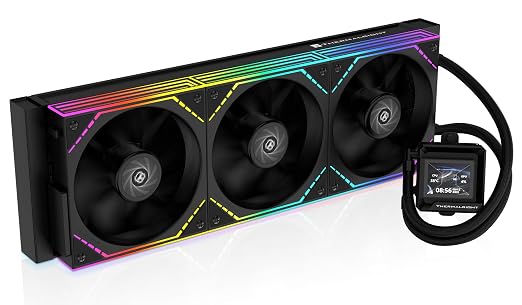
Visually, it’s the 2 LCD screen on the pump that first catches the eye, perfect for anyone building a gaming or content creation PC who wants some personality alongside cooling power. The Frozen Warframe 360 SE ARGB V2 stands out by combining performance with the unique feature of a customizable display.
Setting it up involves mounting the large 397×120×27mm radiator inside your case, which is a snug but doable fit for big builds. The fans operate quietly up to 2000RPM and daisy-chain to reduce cable clutter, making everyday airflow management straightforward. Using the Thermalright software to show system stats or custom images on the screen adds a fun touch to daily use.
Performance-wise, it keeps AMD AM4/AM5 and Intel 115X/1700 CPUs cool under heavy loads without sounding too loud, staying around 28.2 dB. The aluminum radiator feels solid and well-made, with the pump hitting 3000RPM for stability.
Reviews praise its cooling reliability, though some mention the size means it won’t fit every case comfortably.
The cooler reliably maintains stable CPU temperatures with a quiet pump and fans, while users appreciate the unique customizable LCD screen. Common feedback centers on the bulky radiator size that limits compatibility with compact cases and the complexity of the software controlling the display.
People with mid to full tower cases who want a combination of strong cooling and a unique visual feature will like this cooler. Those with smaller cases or who prefer plug-and-play simplicity should consider more compact or simpler AIO coolers instead.
Pros
- Customizable 2″ LCD screen on the pump
- Three fans daisy-chain to reduce cable clutter
- Supports AM5, AM4, and various Intel sockets
- Quiet operation at 28.2 dB noise level
Cons
- Large radiator size may not fit smaller cases
- Software for LCD customization can be fiddly
| Specification | Details |
|---|---|
| Radiator Size | 397×120×27 mm |
| Fan Size and Type | 3× TL-M12Q 120mm PWM |
| Maximum Fan Speed | 2000 RPM |
| Maximum Pump Speed | 3000 RPM |
| Noise Level | 28.2 dB |
| Power Connector Type | 4-Pin |
8. ASUS ROG Ryuo IV ARGB 360mm CPU Cooler

High-end cooling power and a unique AMOLED display make the ASUS ROG Ryuo IV ARGB 360mm ideal for anyone running a demanding CPU like the 7800x3d. The standout feature here is the moving, curved display that lets you track system info or show off custom animations while maintaining serious cooling performance.
Setting it up is fairly straightforward, especially since it reduces cable clutter with daisy-chained fans, cutting six cables down to just one. The Precision Mount System ensures the cooler sits evenly on your CPU for consistent contact. The pre-applied thermal paste simplifies installation, and the integrated pump design keeps temperatures stable during heavy daily workloads.
Its main job of keeping the CPU cool is handled well thanks to the Asetek Emma Gen8 V2 pump and solid airflow from the 2000 rpm fans pushing up to 56.66 cfm. The cooler is built to last, with reliable mount pressure and a smooth thermal interface. The coolest feature for many is the AMOLED display, while some find the 360mm radiator size bulky for smaller cases.
The cooler consistently manages CPU temperatures well even under heavy use, and its standout AMOLED display draws a lot of attention for custom visuals. On the downside, the sizeable radiator limits compatibility with compact builds, which can be a drawback in smaller setups.
Gamers and content creators running high-performance CPUs will appreciate the strong cooling and visual customization options. Those with smaller cases or budgets should consider more compact or simpler alternatives.
Pros
- Unique curved 6.67-inch AMOLED display
- Excellent cooling with Asetek Emma Gen8 V2 pump
- Daisy-chained fans reduce cable clutter
- Uniform contact pressure for reliable cooling
Cons
- Large 360mm radiator may not fit smaller cases
- Complexity of AMOLED display adds to price
| Specification | Details |
|---|---|
| Cooling Method | Fan |
| Maximum Rotational Speed | 2000 rpm |
| Air Flow Capacity | 56.66 cfm |
| Power Connector Type | 4-Pin |
9. Thermalright Aqua Elite 360 V6 ARGB CPU Cooler

Keeping your 7800X3D cool under heavy loads can be tricky, but this AIO cooler handles heat like a champ. It’s best suited for desktop users wanting serious cooling power combined with eye-catching RGB lighting.
Its biggest strength lies in the pump’s high speed and the vibrant ARGB effects that don’t compromise on performance.
Setting it up involves mounting the water block with ease, thanks to its standard 4-pin power connector and straightforward compatibility with motherboard lighting controls. The pump runs fast at 2800RPM, which helps keep temps down. Fans spin up to 2000 RPM, delivering strong airflow without going too loud.
The ARGB lighting syncs smoothly with your motherboard, creating a dynamic look while keeping the system cool.
It does a solid job at keeping CPU temperatures low thanks to the fourth-generation pump with vortex design, built for efficient heat dispersal. The build quality is solid and feels durable, with a quiet operation level of 29.8 dB that won’t distract you.
One common gripe is the limited number of lighting headers needed to get full effect, which might require some motherboard planning.
The most praised feature is the combination of powerful cooling through the vortex pump and the striking ARGB lighting that adds flair without volume. The main drawback comes from the lighting setup needing a specific header, which can limit synchronization if your motherboard lacks extras.
Anyone prioritizing effective heat management alongside custom lighting will appreciate this cooler. Users with limited lighting connections or who prefer ultra-quiet cooling might want to consider other options.
Pros
- Strong cooling with 2800 RPM pump speed
- Vibrant ARGB lighting effects synced to motherboard
- Quiet operation at under 30 dB
- Good airflow with 70.84 cfm fans
Cons
- Requires 5V 3-pin header for full lighting sync
- Pump speed may generate subtle noise at max RPM
| Specification | Details |
|---|---|
| Maximum Rotational Speed | 2000 rpm |
| Noise Level | 29.8 db |
| Air Flow Capacity | 70.84 cfm |
| Power Connector Type | 4-Pin |
| Cooling Method | Water |
10. Be Quiet! Light Loop 360mm CPU Liquid Cooler

Featuring 64 LEDs across its cooling block and fans, the Light Loop 360mm is perfect for anyone wanting vibrant visuals alongside serious cooling. Ideal for 7800x3d builds, its standout feature is the mix of high airflow and colorful lighting that suits both performance and style-focused setups.
Setup involves mounting the large 360mm radiator with three 120mm fans that have a combined airflow of 61.8 cfm. The fans run at up to 2100 rpm, controlled by PWM through a 4-pin connection, allowing smooth noise adjustment. LEDs scatter evenly on the fan blades, letting you adjust colors and effects to match your PC’s theme.
The 12V power supply and moderate noise level help maintain comfort during day-to-day use.
Performance-wise, it keeps CPUs cool with water-based cooling at a wattage of 5.4W, making it efficient for demanding processors like the 7800x3d. Build quality feels solid with durable components and stylish lighting elements.
It’s praised for its stunning visuals and effective cooling, though some mention the noise level can reach 36.8 dB during intense loads, which might bother quieter builds.
The cooler is highly praised for its visual impact thanks to the 64 LEDs and smooth lighting effects. The most frequent downside mentioned is the increased noise when the fans hit higher speeds during demanding tasks.
Those who want strong cooling combined with eye-catching lighting will appreciate this model. Users with smaller cases or noise-sensitive environments might prefer a quieter or smaller cooler alternative.
Pros
- 64 LEDs for customizable vibrant lighting
- Three 120mm PWM fans with adjustable speeds
- Compatible with multiple Intel and AMD sockets
- Balanced airflow and noise for performance use
Cons
- Noisy under heavy load at 36.8 dB
- Larger radiator requires sufficient case space
| Specification | Details |
|---|---|
| Air Flow Capacity | 61.8 cfm |
| Maximum Rotational Speed | 2100 rpm |
| Power Connector Type | 4-Pin |
| Voltage | 12 volts |
| Wattage | 5.4 watts |
| Noise Level | 36.8 dB |
11. Chill Arc 360mm AIO CPU Cooler

Perfect for gamers and heavy multitaskers using powerful CPUs, like a Ryzen 7 7800X3D, this cooler stands out for its exceptional cooling capacity combined with a unique rotatable AMOLED display. Its main strength lies in managing high thermal loads while offering a stylish visual experience on your desktop setup.
Setting it up is straightforward with compatibility across many current Intel and AMD sockets, including AM5 and LGA1851. The three 120mm ARGB fans offer adjustable speeds up to 2700 rpm, keeping noise around a quiet 30 dB during typical use.
The 6.67 2K AMOLED screen rotates to fit your case orientation, allowing for on-the-fly system monitoring or personalization with custom images.
It handles up to 320W TDP, which keeps the CPU temperatures well controlled under heavy gaming or rendering tasks. The build feels solid, especially the pure white body complementing the display’s aesthetics.
Most praise tracks the powerful cooling and visual flair, while a common complaint mentions the 4-pin power connector limiting advanced fan speed control.
The cooling performance impresses by maintaining stable temperatures on demanding CPUs, while the rotatable AMOLED screen adds a personalized touch many users appreciate. The main drawback noted is the fan speed control, which is less flexible due to the 4-pin power connector design.
Enthusiasts who want solid cooling performance and a visual flair on their high-end build will find this a good fit. Those seeking finer fan tuning or with smaller cases might prefer different options that better match those needs.
Pros
- Handles high TDP up to 320W efficiently
- 360-degree rotatable 2K AMOLED screen
- Supports latest Intel and AMD sockets
- Quiet operation at 30 db noise level
Cons
- Limited fan speed control with 4-pin connector
- Requires ample case space for 360mm radiator
| Specification | Details |
|---|---|
| Cooling Method | Air, Water |
| Power Connector Type | 4-Pin |
| Voltage | 12 volts_of_direct_current |
| Noise Level | 30 db |
| Maximum Rotational Speed | 2700 rpm |
| Air Flow Capacity | 165 cfm |
12. Thermalright Trofeo Vision 360 ARGB White AIO Cooler

Designed for high-performance cooling, the Thermalright Trofeo Vision 360 ARGB White AIO Cooler is perfect for desktop users running demanding CPUs like the 7800X3D. Its standout feature is the triple high-speed 2150RPM fans combined with a powerful 6400RPM pump, ensuring efficient heat dissipation while adding a visual edge with ARGB lighting.
Installation and daily operation benefit from the cooler’s substantial size and solid construction. The CPU heat sink measures 403x120x52mm, providing extensive surface area for heat transfer. The three fans come pre-installed with ARGB lighting and use S-FDB V2 bearings that cut down on noise and vibrations, making the unit quieter during intensive tasks without losing cooling power.
The cooling setup excels at keeping CPU temperatures low, thanks to its fast pump and high airflow fans rated at 207 cfm. Build quality is firm, with a well-engineered heat sink and water pump. Positive notes include quiet operation at 27 db, while the main drawback is the cooler’s bulky size, which might cause fitment challenges in smaller cases.
Users appreciate how well the cooler manages CPU temperatures quietly thanks to the efficient fans and anti-vibration design. On the flip side, the sheer size of the heat sink commonly creates installation challenges, especially in compact builds.
Ideal for PC builders with spacious cases who want strong cooling and eye-catching aesthetics. Those with smaller systems or strict noise limits might want to explore smaller or slower-running options instead.
Pros
- High airflow with 207 cfm from triple fans
- Quiet operation at around 27 db
- Durable bearing reduces vibration and noise
- Attractive ARGB lighting on all fans
Cons
- Large heat sink size may limit case compatibility
- Water pump runs at a very fast 6400 RPM, potentially louder under load
| Specification | Details |
|---|---|
| Water Pump Speed | 6400RPM ±10% |
| Fan Speed | 2150 RPM |
| Noise Level | 27 db |
| Air Flow Capacity | 207 cfm |
| Heat Sink Size | 403x120x52 mm |
Best AIO Coolers for 7800X3D Comparison Table
| Product | Cooling Method | Max Rotational Speed | Air Flow Capacity | Noise Level |
|---|---|---|---|---|
| ARCTIC Liquid Freezer III Pro | Liquid | 3000 rpm | 77 cfm | – |
| ARCTIC Liquid Freezer III Pro | Liquid | 3000 rpm | 77 cfm | – |
| LIAN LI HydroShift II OLED | Water | 2600 rpm | – | 33 db |
| Thermalright Wonder Vision 360 White | Water | 2150 rpm | 207 cfm | 27 db |
| Noctua NL-LC1 360mm Cooler | Water | 1800 rpm | 107.3 m³/h | 22.5 db |
| Chill Arc 360 AIO | Air, Water | 2700 rpm | 165 cfm | 30 db |
| Thermalright Frozen Warframe 360 SE | Water | 2000 rpm | 68.9 cfm | 28.2 db |
| ASUS ROG Ryuo IV ARGB | Fan | 2000 rpm | 56.66 cfm | – |
| Thermalright Aqua Elite 360 V6 | Water | 2000 rpm | 70.84 cfm | 29.8 db |
| be quiet! Light Loop 360 | Water | 2100 rpm | 61.8 cfm | 36.8 db |
| Chill Arc 360 AIO (Alt) | Air, Water | 2700 rpm | 165 cfm | 30 db |
| Thermalright Trofeo Vision 360 ARGB | Water | 2150 rpm | 207 cfm | 27 db |
- Cooling MethodLiquid
- Max Rotational Speed3000 rpm
- Air Flow Capacity77 cfm
- Noise Level–
- Cooling MethodLiquid
- Max Rotational Speed3000 rpm
- Air Flow Capacity77 cfm
- Noise Level–
- Cooling MethodWater
- Max Rotational Speed2600 rpm
- Air Flow Capacity–
- Noise Level33 db
- Cooling MethodWater
- Max Rotational Speed2150 rpm
- Air Flow Capacity207 cfm
- Noise Level27 db
- Cooling MethodWater
- Max Rotational Speed1800 rpm
- Air Flow Capacity107.3 m³/h
- Noise Level22.5 db
- Cooling MethodAir, Water
- Max Rotational Speed2700 rpm
- Air Flow Capacity165 cfm
- Noise Level30 db
- Cooling MethodWater
- Max Rotational Speed2000 rpm
- Air Flow Capacity68.9 cfm
- Noise Level28.2 db
- Cooling MethodFan
- Max Rotational Speed2000 rpm
- Air Flow Capacity56.66 cfm
- Noise Level–
- Cooling MethodWater
- Max Rotational Speed2000 rpm
- Air Flow Capacity70.84 cfm
- Noise Level29.8 db
- Cooling MethodWater
- Max Rotational Speed2100 rpm
- Air Flow Capacity61.8 cfm
- Noise Level36.8 db
- Cooling MethodAir, Water
- Max Rotational Speed2700 rpm
- Air Flow Capacity165 cfm
- Noise Level30 db
- Cooling MethodWater
- Max Rotational Speed2150 rpm
- Air Flow Capacity207 cfm
- Noise Level27 db
How to Choose the Right AIO Cooler for 7800x3d
Choosing the right AIO cooler for the 7800x3d depends on factors like cooling capacity, radiator size, and compatibility with your case. Prioritizing efficient heat dissipation and quiet operation ensures your processor runs smoothly, preventing overheating while avoiding unnecessary expenses or frequent replacements.
Compatibility and Socket Support
Installing a cooler that does not fit the motherboard socket or case can ruin your build frustration early on. The latest AMD AM5 socket requires specific mounting brackets and block size.
Using a cooler not designed for this socket often means missing backplates or holes that don’t line up, resulting in a loose or uneven fit. Radiator size is equally important; many cases only accommodate 240mm or 280mm radiators. Placing too large a radiator can block RAM slots or GPU space, which forces compromises in component choice or airflow.
Strong preference goes to coolers that include all mounting hardware for AM5 and clearly specify radiator dimensions. Measuring your case beforehand saves a lot of hassle.
Radiators with sizes like 240mm or 360mm tend to be ideal for performance without crowding typical mid-tower layouts. Confirming this compatibility avoids unexpected returns or modding.
Cooling Performance and Efficiency
Cooling performance depends largely on radiator size and how many fans you pair with it. A 360mm radiator with three 120mm fans generally offers better heat dissipation than a smaller 240mm with two fans.
More surface area means hot air dissipates faster, which is crucial when handling CPUs with high core counts and heavy boosting like this model.
The pump’s role extends beyond just moving coolant; a high-quality pump maintains steady flow rates to prevent temperature spikes under load. Cooling blocks with efficient channel designs further improve thermal transfer.
Overlooking pump quality often results in uneven temperatures or louder operation as it strains. Components that combine a well-sized radiator with a reliable pump and thoughtful thermal engineering deliver consistent performance during prolonged gaming or rendering sessions.
Noise Levels and Fan Control
Noise is a frequent complaint with liquid coolers running under heavy load. Fans and pumps producing more than about 35 decibels at max speed become distracting, especially in quiet rooms. Good coolers offer customizable fan speed curves that let you lower the RPM during light tasks, keeping noise below 25 decibels at idle.
Pump noise also matters, some models emit a subtle whining or vibration that can resonate in the case if mounting is poor.
Users who ignore this end up with a louder system or have to compromise cooling by reducing fan speeds. Choosing coolers that have documented noise levels along with software-controlled fan and pump speeds helps balance sound and thermal performance.
Attention to anti-vibration mounts and rubber dampeners further reduce unwanted resonance.
Build Quality and Materials
The reliability of a cooler is closely tied to the materials used in its radiator and tubing. Radiators often employ aluminum or copper; copper radiators generally have better heat conduction but weigh more. Tubing made from reinforced rubber or braided nylon resists cracks and corrosion over time.
Cpu block quality is another factor; blocks with machined copper bases and mirror-like finishes transfer heat more effectively to the coolant.
Fittings and clamps that are sturdy and easy to tighten cut down installation time and reduce leak risks. Cheap plastic fittings can loosen or crack under heat, whereas metal or reinforced fittings hold well.
A well-built cooler feels solid throughout without flimsy parts, which pays off in fewer issues and longer service.
Maintenance and Durability
Keeping a liquid cooler clean extends its life and maintains stable temperatures. Dust buildup on fans and radiators can severely reduce cooling efficiency. Models that allow easy removal of fans and straightforward access to radiator fins simplify cleaning.
Some designs include dust filters that prevent buildup in the first place.
Durability also hinges on pump lifespan and warranty coverage. Pumps with known failure points or short warranties indicate risk.
Features like double ball bearings and corrosion-resistant coolant formulas help prevent pump breakdown and leaks. Investing in a cooler with at least a 3-year warranty and maintenance-friendly design reduces the chance of having to replace or service the unit prematurely.
Optimizing AIO Cooler Performance with the 7800X3D
The 7800X3D processor generates significant heat during heavy workloads, so pairing it with an efficient AIO cooler is essential to keep temperatures manageable. Ensuring proper installation of the cooler is crucial; apply thermal paste evenly and securely mount the pump to the CPU surface without excess pressure.
Airflow around the radiator directly impacts cooling performance. Position fans to create a clear intake and exhaust path, avoiding obstructions inside the case.
Fan speed configuration also plays a key role. Adjusting fan curves in the BIOS or software allows the cooler to respond dynamically to temperature changes, balancing noise and cooling demands. Some AIO coolers offer RGB lighting or customizable pump speeds, but focusing on consistent contact between the cold plate and CPU and maintaining good case ventilation will have the most practical effect on keeping the 7800X3D running cool under stress.
Routine Maintenance Tips to Prolong Your AIO Cooler’s Lifespan
Regular maintenance keeps an AIO cooler functioning as intended and reduces the risk of component failure. Dust buildup on radiator fins and fan blades can significantly reduce heat dissipation. Every few months, use compressed air or a soft brush to clear dust from the radiator and fans.
Check for unusual noises from the pump or fans, which can indicate wear or impending failure.
Inspect tubing for any signs of leaks, cracks, or kinks. Although most modern AIO units are sealed, the possibility of coolant evaporation over years exists.
Maintaining clear airflow within the PC case also helps the cooler operate efficiently, so periodically clean intake filters and ensure cables are tidy to avoid airflow disruption.
- Clean radiator and fans regularly
- Inspect pump and tubing for damage
- Maintain good case airflow
Comparing AIO Coolers to Air Cooling Solutions for the 7800X3D
Air coolers remain a popular choice for the 7800X3D due to their simpler design and lower cost. High-quality air coolers can handle the heat output from this CPU effectively, especially larger models featuring multiple heat pipes and large surface areas. They tend to be easier to install and require less long-term maintenance compared to AIO units.
AIO coolers generally provide more consistent temperature control under heavy loads thanks to liquid transfer and larger radiators, which can be mounted in positions that optimize airflow. However, they add complexity and slightly higher risk of leaks or pump failure.
Choosing between the two depends on case compatibility, noise tolerance, and cooling expectations. Air coolers offer reliability and simplicity, while AIO coolers give more mounting options and can handle sustained high thermal loads better.
Both can adequately cool a 7800X3D when selected and installed properly.
People Also Asked
How Do I Install an AIO Cooler on a 7800X3D?
Installation involves mounting the cold plate on the CPU with thermal paste, securing the brackets to the motherboard socket. Tighten screws evenly and connect the pump and radiator fans to the motherboard headers for power and monitoring. Using the manual specific to your cooler model and the motherboard helps align everything correctly and prevents damage.
Is an AIO Cooler Compatible with the 7800X3D Socket?
An AIO cooler is generally compatible with the 7800X3D socket, which uses the AM5 platform. Most AIO coolers come with mounting kits for multiple sockets including AM5, but it’s important to confirm this in the product specs or packaging. The mounting bracket must fit precisely to ensure good contact with the CPU.
What Is the Average Lifespan of an AIO Cooler for 7800X3D?
The average lifespan of an AIO cooler is typically between 3 to 5 years before pump performance noticeably declines. Regular monitoring of pump noise and coolant leakage helps catch issues early. Replacing the unit after this period ensures optimal cooling and avoids unexpected failures under high CPU loads.
How Do I Maintain or Clean My AIO Cooler Properly?
Maintain an AIO cooler by regularly dusting radiator fans and checking for any coolant residue. Use compressed air to blow dust off fins without damaging the radiator. Checking for pump noise and fan speeds via BIOS or software lets you catch early signs of wear or failure before they affect CPU temperatures.
What Common Problems Occur with AIO Coolers on 7800X3D CPUs?
Common problems include pump failure, radiator clogging, and fan malfunction which can lead to higher CPU temperatures. Poor mounting or insufficient thermal paste application also causes overheating. Regular inspection of coolant levels, pump noise, and fan operation helps identify issues that may require reinstallation or replacement.
Conclusion
Choosing the right AIO cooler for a 7800X3D depends mainly on cooling performance, noise levels, and compatibility with your case and motherboard. Effective heat dissipation is important to keep temperatures down during heavy use. Also, quieter fans improve the experience during long sessions, so consider that alongside how much space the cooler will occupy.
Think about the size of your PC case and your budget before making a purchase. A larger radiator might cool better but won’t fit in all builds.
Look over the comparison table and the options discussed above to find a cooler that matches your needs without overspending.

I’m Grant Mitchell, a firearms and hunting writer with years of experience at the range and in the field. I write about rifles, shotguns, handguns, optics, safe storage, cleaning, and responsible ownership, along with practical hunting tips. My goal is to share accurate, safety-first information that helps you choose the right firearm, maintain it properly, and become a more confident shooter.