Top 12 Best 360mm AIO Cooler for Ultimate Cooling Power
Many who try fitting a radiator that’s too small or poorly designed for their CPU end up with high temperatures and noisy fans. The best 360mm aio cooler usually avoids these issues by offering enough surface area for heat exchange and strong, quiet fans.
A standard 360mm radiator has three 120mm fans, which generally handle heat much better than smaller coolers, keeping your system stable under load.
Key factors that distinguish the best 360mm aio cooler include radiator construction, fan quality, and ease of installation. Radiators made from dense aluminum or copper provide better thermal transfer. Fans rated around 1000 to 2000 RPM balance airflow and noise levels, while pressure ratings affect how well air passes through dense fins.
A secure, leak-proof pump and easy mounting system also matter since these affect longevity and compatibility with different cases and CPU sockets.
Need a Quick Check?
| Image | Product | Price |
|---|---|---|
Our Top Picks 1  | ARCTIC Liquid Freezer III Pro | Check Price |
Our Top Picks 2  | ARCTIC Liquid Freezer III Pro | Check Price |
Our Top Picks 3  | Thermalright Peerless Vision 360 | Check Price |
Our Selected Top 12 360mm Aio Cooler for Different Needs
This list features a carefully chosen selection of 360mm all-in-one liquid coolers suitable for various setups and preferences. Each review covers performance details, ideal user scenarios, and highlights strengths and weaknesses to help readers find the right cooler for their needs.
1. ARCTIC Liquid Freezer III Pro 360 CPU Cooler
High-performance cooling for demanding PCs or gaming rigs keeps processors stable under heavy loads. Designed for desktop users focused on powerful heat dissipation, it excels at maintaining low temperatures during intense use thanks to its optimized contact pressure and smart mounting.
Installation prioritizes precise fit, especially on Intel LGA1851 and LGA1700 sockets, where contact pressure is balanced to extend CPU lifespan. The integrated VRM fan runs silently when not under stress but ramps up to cool voltage regulators as needed. The P12 PRO fans offer quiet operation even at higher speeds, making daily use comfortable without extra noise distractions.
Heat management works well with a cold plate centered near CPU hotspots, maximizing efficiency. Build quality feels solid, with attention to mounting and cooling detail. Praises focus on effective cooling and low noise, while some note the large radiator size may be cumbersome in smaller cases or complicated to install.
The integrated VRM fan and optimized cold plate position work together to provide consistent and reliable cooling performance while keeping noise low. On the downside, its size and installation complexity can present challenges for smaller cases or less experienced builders.
This cooler suits gamers and PC builders who want quiet but powerful liquid cooling and have room for a 360mm radiator. Those with compact cases or who prefer simpler installs might look for smaller or air-based coolers instead.
Pros
- Optimized contact pressure for better heat dissipation
- Quiet P12 PRO fans even at higher speeds
- Built-in VRM fan cools voltage converters effectively
- Native offset mounting targets CPU hotspots precisely
Cons
- Large 360mm radiator requires spacious case
- Installation can be tricky in compact setups
| Specification | Details |
|---|---|
| Power Connector Type | 4-Pin |
| Voltage | 12 volts |
| Wattage | 3.96 watts |
| Cooling Method | Liquid |
| Maximum Rotational Speed | 3000 rpm |
| Air Flow Capacity | 77 cfm |
2. ARCTIC Liquid Freezer III Pro 360 A-RGB CPU Cooler
With a maximum rotational speed of 3000 rpm, this cooler suits anyone looking for serious heat dissipation from a 360mm liquid cooling setup. Its integrated VRM fan keeps voltage converters cool, making it ideal for demanding Intel and AMD desktop CPUs. The standout feature is its optimized contact pressure for longer CPU life and better cooling performance.
Setup involves native offset mounting, which aligns the cold plate with the CPU’s hotspot to boost heat transfer efficiency. The ARCTIC P12 PRO fan runs quietly even at lower speeds, while offering more power when needed. The PWM-controlled VRM fan adapts automatically to keep system temperatures in check during heavy workloads.
Performance is strong with effective heat transfer and excellent airflow at 77 cfm. Its build includes a contact frame tailored for Intel LGA1851 and LGA1700 sockets, ensuring a secure fit.
Many appreciate the quieter fan operation, but some mention the fan speed can get loud at maximum RPM.
The strongest praise highlights the quieter operation of the upgraded P12 PRO fan combined with the efficient heat transfer from its offset mounting. A common complaint centers on fan noise rising when running at the maximum rotational speed of 3000 rpm, which can be noticeable in quieter setups.
People looking for high-performance cooling with effective voltage regulator management will appreciate this liquid cooler. Those seeking ultra-quiet operation at top speeds or broader device compatibility might want to explore different options better suited to those needs.
Pros
- Optimized contact for better heat dissipation
- Powerful and quiet P12 PRO fan at low speeds
- Integrated VRM fan for reliable voltage converter cooling
- Compatible with Intel LGA1851 and LGA1700 sockets
Cons
- Fan noise increases considerably at high speeds
- Only supports desktop devices
| Specification | Details |
|---|---|
| Cooling Method | liquid |
| Maximum Rotational Speed | 3000 rpm |
| Air Flow Capacity | 77 cfm |
| Voltage | 12 volts |
| Power Connector Type | 4-Pin |
| Wattage | 3.96 watts |
3. Thermalright Peerless Vision 360 ARGB CPU Cooler
People building high-performance desktops that need excellent cooling and a visual flair will appreciate this CPU cooler. It suits gamers and PC enthusiasts who want a quiet yet efficient way to manage heat while adding a striking display to their setup.
Its magnetic screen with video and animation support is the biggest attraction.
Installation is straightforward thanks to the magnetic pump head that snaps on and off easily. Day-to-day use benefits from the three PWM fans running at up to 2000 rpm, which are designed to operate quietly and last longer due to their S-FDB bearings. The infinity mirror lighting on the fans improves the look, adding a nice touch without requiring extra effort.
Cooling performance is solid, with a water-based system capable of handling 45 watts effectively. The cooler is built with a high-quality 3.95-inch screen and supports full-color animations at 480×480 resolution.
The fans move a good airflow of 68.9 cfm and keep noise levels at a reasonable 28.2 decibels. Most praise mentions its unique display feature, while some find the noise level at maximum speed a bit noticeable.
The built-in 3.95-inch magnetic screen is well-liked for adding a personal touch with animations and video support. Noise levels stay low under normal use but tend to rise noticeably when fans hit their top speed. The cooler balances aesthetics and function without being completely silent.
Enthusiasts looking for a visually engaging cooler that also performs reliably under load will be satisfied here. This unit fits those who accept a moderate noise increase at peak performance. Someone prioritizing absolute silence or higher-resolution displays should look at alternative models.
Pros
- Magnetic pump head for easy installation and removal
- Supports video, animation, and screen projection
- Quiet operation with durable S-FDB bearing fans
- High-speed fans quickly cool hot CPU temperatures
Cons
- Noisy at maximum rotational speed (2000 rpm)
- Screen resolution limited to 480×480 pixels
| Specification | Details |
|---|---|
| Power Connector Type | 4-Pin |
| Wattage | 45 watts |
| Maximum Rotational Speed | 2000 rpm |
| Air Flow Capacity | 68.9 cfm |
| Noise Level | 28.2 db |
4. Noctua NL-LC1-36 360mm AIO CPU Cooler

Exceptional quietness sets this 360mm AIO cooler apart, making it ideal for gamers and professionals wanting powerful cooling without noise distractions. Its large radiator and optimized fans focus on low sound levels without compromising cooling efficiency.
Perfect for systems where silence matters just as much as performance.
Installing the cooler involves mounting its sizeable 360mm radiator and connecting the three 120mm fans via 4-pin PWM headers, which lets you control fan speeds smoothly. Its innovative pump noise absorber reduces vibrations, helping the system stay quiet during everyday use. Fan speed offset further balances sound and airflow, making it suitable for work or gaming setups that run for hours.
Handling heat loads impressively, the cooler’s Asetek Emma V2 platform delivers reliable thermal performance consistently. Build quality feels solid with durable materials and quiet operation achieved through soundproofing layers and vibration damping. The main praise centers on how silent the pump and fans run, while a common critique relates to the large radiator’s size demanding adequate case compatibility.
Quiet pump operation combined with three optimized fans reduces the noise level to a subtle 22.5 dB, earning praise for silent performance. The most common drawback is the sizeable 360mm radiator, which may not fit all desktop cases without careful planning.
This cooler suits anyone building a near-silent gaming PC or workstation with room for a large radiator. Smaller cases or users seeking a compact cooling solution should explore smaller or alternative designs better matched to limited space.
Pros
- Very quiet pump operation with noise absorber
- Three high-efficiency 120mm fans included
- Large 360mm radiator for strong cooling
- Low vibration for steady performance
Cons
- Large radiator requires spacious case
- Pump wattage might be higher than some competitors
| Specification | Details |
|---|---|
| Power Connector Type | 4-Pin |
| Voltage | 12 volts |
| Wattage | 1.8 watts |
| Noise Level | 22.5 dB |
| Maximum Rotational Speed | 1800 rpm |
5. LIAN LI HydroShift II OLED Curved 360 AIO Cooler

LIAN LI HydroShift II OLED Curved 360 AIO Cooler stands out with its 6.67” 2K curved OLED screen that offers vivid visuals and bright clarity. Designed for PC enthusiasts who value both top-tier cooling and a customizable aesthetic experience, it provides more than just temperature control.
Setup includes managing the motorized pump head which moves smoothly with lift, rotation, and dual-axis adjustments via L-Connect 3 software. Its water cooling system operates quietly at 33 db noise level, making it unobtrusive during daily use. The vibrant OLED display can be angled to suit your viewing preference while the radiator and fans fit well in most 360mm compatible cases.
Performance-wise, the cooler handles heat with an air flow capacity of 90.1 cfm and a maximum fan speed of 2600 rpm. Build quality feels solid, with attention on user-friendly, motorized control of the display and positioning.
Common praise highlights the sharp OLED visuals and silent operation. Some mention the complexity of angle adjustments and software control as a minor hassle.
The sharp and bright OLED display offers a visually engaging experience while keeping noise levels low during operation. Some users find the motorized control system and its software a bit tricky to master when setting up custom angles for the pump head.
Those who enjoy customizing their PC’s look and want a balance of high cooling performance alongside impressive display visuals will appreciate this cooler. Users seeking a simpler or more straightforward setup might prefer something without motorized adjustments or software controls.
Pros
- 6.67” 2K curved OLED with 500 nits brightness
- Motorized pump head for easy angle adjustments
- Quiet operation at 33 db noise level
- Strong airflow with 90.1 cfm capacity
Cons
- Angle adjustment can feel complicated at times
- L-Connect 3 software requires familiarity
| Specification | Details |
|---|---|
| Cooling Method | Water |
| Noise Level | 33 db |
| Maximum Rotational Speed | 2600 rpm |
| Air Flow Capacity | 90.1 cfm |
| Compatible Devices | Cpu, Desktop |
6. Antec Ultra 360 ARGB Liquid CPU Cooler

Cooling power feels solid and quiet, with a design that fits many PC builds comfortably. Ideal for gamers or anyone pushing their CPUs hard, it keeps temperatures steady under load.
Its standout feature is the combination of effective water cooling and attractive multi-angle ARGB lighting that adds a subtle flair to your setup.
Installation is straightforward with support for a broad range of Intel and AMD sockets, making compatibility easy. The pump’s copper base plate ensures good thermal transfer while the three 120mm ARGB PWM fans push plenty of air through the radiator.
Noise stays manageable around 33 dB, so daily use stays fairly quiet even under load.
It cools efficiently thanks to a powerful pump paired with strong 67.62 CFM airflow fans. Construction feels durable with quality materials like copper at the base, matching well with modern gaming rigs.
Most praise tends to focus on exceptional cooling and lighting effects. A common complaint involves the fan speed maxing out at 2600 RPM, which can sometimes be louder than hoped.
Many appreciate the cooler’s strong thermal performance paired with eye-catching lighting. A fairly frequent issue is the noise level climbing noticeably when the fans ramp up to full speed during heavy usage.
Those who want solid and stylish cooling with decent noise control will find it fitting. Users sensitive to fan noise or needing quieter builds may prefer an alternative option with lower max RPM fans.
Pros
- Strong cooling with copper base plate
- Attractive multi-angle ARGB lighting effects
- Quiet operation around 33 dB most of the time
- Supports many Intel and AMD sockets
Cons
- Fans can get quite loud at max speed
- Uses 3-pin connectors that might limit control options
| Specification | Details |
|---|---|
| Maximum Rotational Speed | 2600 rpm |
| Air Flow Capacity | 67.62 cfm |
| Noise Level | 33.05 db |
| Power Connector Type | Pump: 3-pin | LED: 3-pin |
| Voltage | 12 volts_of_direct_current |
| Wattage | 20 watts |
7. Thermalright Frozen Notte 360 Black ARGB CPU Cooler
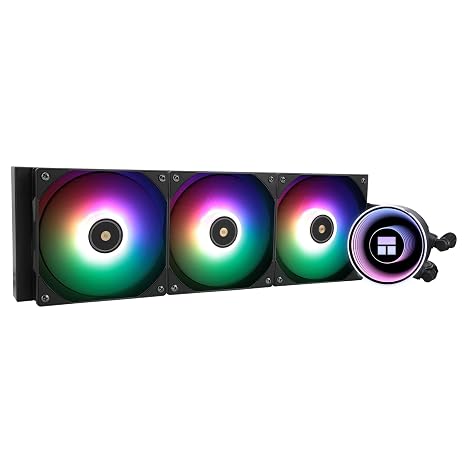
Powerful cooling combined with a quiet ARGB setup makes this cooler ideal for enthusiasts with high-performance CPUs. It stands out mainly for its ability to keep temperatures down during intense loads, thanks to the triple 120mm fan design and a 360mm radiator.
Installation requires some space due to the large 397 x 120 x 27mm radiator and 450mm tubing, fitting best in cases that support 360mm radiators. The 4-pin PWM fans manage speed effectively, keeping noise to a minimum while pumping water at 5300RPM.
Daily use benefits from the copper base and aluminum fin design, which help maintain stable temperatures during longer sessions.
The cooler handles heat removal impressively for its size, using a full copper mirror base and dense black aluminum fins. Build quality feels solid, combining polymer protective tubing with standard ARGB fans.
Most praise centers on how efficiently and quietly it operates, although some notice the radiator’s thickness requires careful case compatibility checks.
Highly effective cooling paired with near-silent fans is the main highlight, but the larger radiator size means not every case can easily fit it. The water pump runs steadily but might cause mild vibrations in some setups. It’s designed with durability and low resistance in mind, delivering solid performance day to day.
People running powerful CPUs who have cases that support large 360mm radiators will appreciate the cooling power and quietness. Those with smaller or compact cases should look at more compact cooling options to avoid fitting issues. The ARGB fans add a visual touch without sacrificing function.
Pros
- Quiet operation at just 1 db noise level
- Strong cooling with triple 120mm fans
- Durable copper base and polymer tubing
- ARGB lighting for customizable aesthetics
Cons
- Radiator thickness may limit case compatibility
- Maximum pump speed can create slight vibrations
| Specification | Details |
|---|---|
| Heat Sink Size | 397 * 120 * 27mm |
| Water Pump Speed | 5300RPM ± 10% |
| Fan Type | 120mm ARGB, 4-pin PWM |
| Noise Level | 1 db |
| Air Flow Capacity | 72.37 cfm |
8. Thermalright Frozen Warframe 360 SE ARGB CPU Cooler
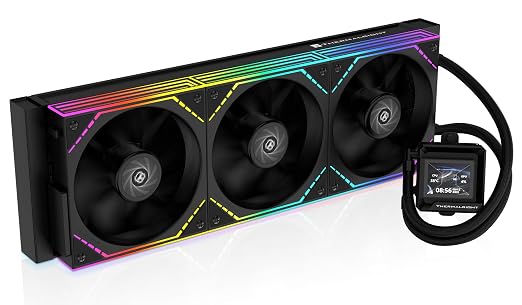
Aluminum forms the core of the radiator in this 360mm AIO cooler, paired with a high-speed 3000RPM pump that targets stable cooling for intense desktop workloads. Designed for gamers and creators, its standout feature is the 2 LCD screen that lets you keep an eye on system status or show custom images.
Setting it up involves connecting the daisy-chained PWM fans, which reduces cable clutter and helps airflow inside the case, keeping things tidy. The software lets you easily customize that small LCD with system info or visuals, adding a bit of personality without complicating daily use. Fans can ramp up to 2000RPM, balancing noise and performance as you push the system.
The cooler handles heat efficiently thanks to its large aluminum radiator and powerful pump, maintaining good temperatures under load. It supports key socket types from AMD and Intel, making it compatible with most current setups. Most praise notes the effective cooling and nice LCD feature, while some mention noise levels from the fans when spinning fast as a trade-off.
Reviews highlight strong cooling performance paired with a unique customizable LCD screen as the biggest plus. The main drawback reported is fan noise, especially when they run at full 2000RPM speed during load.
This cooler suits users who want effective temperature control and system monitoring in one package. Those sensitive to noise or looking for a quieter setup might want to consider alternatives with lower fan speeds.
Pros
- Customizable 2″ LCD screen for system info and images
- Three PWM fans reduce cable clutter
- Compatible with AMD AM5, AM4 and Intel LGA sockets
- Powerful 3000RPM pump supports heavy workloads
Cons
- Fans can be noisy at maximum speed
- Relatively high pump speed may add to sound levels
| Specification | Details |
|---|---|
| Voltage | 12 volts |
| Wattage | 3 watts |
| Maximum Rotational Speed | 2000 rpm |
| Air Flow Capacity | 68.9 cfm |
| Noise Level | 28.2 db |
9. Thermalright FW 360 White ARGB CPU Cooler

One of the first things you’ll notice about this cooler is the IPS LCD screen on the water pump, which adds a custom visual touch while keeping your CPU cool. It’s well suited for people who want a powerful 360mm AIO cooler with a bit of flair and silent operation during heavy loads.
Setting it up involves the usual mounting on compatible desktop CPUs and connecting the 4-pin power cable. The quieter pump at just 23 dB keeps noise low without sacrificing cooling efficiency.
The dynamic display on the pump can be customized with different images or system stats, which adds an interesting visual element during daily use without getting in the way.
The cooler handles heat well thanks to its water cooling system and a pump with a max speed of 3000 rpm. The build quality feels solid, and the airflow of 70.84 CFM helps move warm air away efficiently. Praise often highlights how quiet it stays under pressure, while some users mention the software for screen customization could be tricky at times.
Many appreciate the quiet running and efficient cooling while enjoying the visual appeal of the IPS LCD screen on the pump. The most common issue involves some difficulty navigating the screen’s software for customizing display options.
People who want strong cooling with a unique visual feature will find this cooler appealing. Those who prefer simpler setups without extra software or worry about pump longevity might want to explore other options.
Pros
- Quiet operation at 23 db
- Customizable IPS LCD screen on pump
- Good airflow of 70.84 cfm
- Solid build and effective heat absorption
Cons
- Screen customization software can be difficult
- Relatively high pump speed may affect longevity
| Specification | Details |
|---|---|
| Power Connector Type | 4-Pin |
| Voltage | 12 volts |
| Wattage | 3.4 watts |
| Noise Level | 23 db |
| Maximum Rotational Speed | 3000 rpm |
| Air Flow Capacity | 70.84 cfm |
10. MSI MAG Coreliquid A13 360 CPU Cooler

Powerful cooling meets quiet operation in the MSI MAG Coreliquid A13 360, perfect for desktop users aiming to push their CPUs without the typical noise. Its standout feature is the split-flow radiator and integrated pump design, tailored for durability and steady cooling performance on the latest LGA 1851 sockets.
Setup is straightforward, thanks to out-of-the-box support for LGA 1851. The integrated three-phase pump runs quietly while spinning up to 3800 RPM, balancing high performance with low noise output at just 14.4 dB.
The aluminium radiator’s split-flow design helps maintain efficient cooling during daily tasks and heavier workloads alike, without demanding extra attention or frequent maintenance.
It performs well for intense computing, keeping temperatures stable with a water cooling method that relies on a solid 25 watts of power. The high-quality ceramic bearings and pump speed up to 5200 rpm add to the cooler’s build durability and quiet function. Common praise revolves around its noise levels being minimal, while some mention the integrated pump can be noticeable at higher speeds.
The MSI cooler’s low noise level stands out as a real benefit, making it easy to run quietly during everyday use while handling demanding loads. However, the integrated pump’s noise becomes noticeable when spinning near maximum speeds, which can detract from the overall quiet experience.
This cooler suits users building with the latest LGA 1851 sockets who want efficient liquid cooling without too much sound. Those sensitive to pump noise or looking for lower power options might consider alternatives with quieter pumps or lower wattage requirements.
Pros
- Reliable LGA 1851 compatibility
- Quiet operation at 14.4 dB noise level
- Durable aluminium split-flow radiator
- High-performance pump with ceramic bearings
Cons
- Integrated pump noise noted at high speeds
- Runs on relatively high power consumption (25 watts)
| Specification | Details |
|---|---|
| Compatible Devices | Desktop |
| Power Connector Type | 4-Pin |
| Voltage | 10 volts_of_direct_current |
| Wattage | 25 watts |
| Noise Level | 14.4 db |
| Maximum Rotational Speed | 5200 rpm |
11. Be Quiet! Silent Loop 3 360mm AIO CPU Cooler
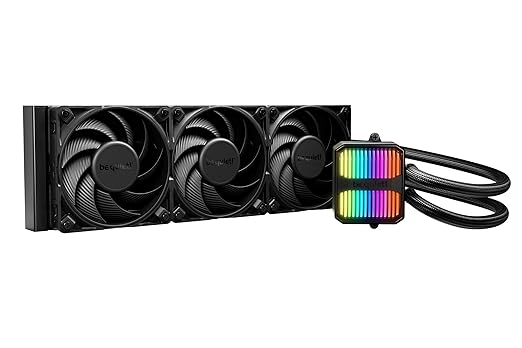
Keeping a high-performance CPU cool under heavy loads is a priority for anyone pushing their system hard, and the Silent Loop 3 360mm water cooler fits that role well. It’s best suited for those with CPUs like Threadripper or Intel’s latest sockets, offering reliable cooling with very low noise as its standout feature.
Setting up the cooler involves mounting a wide CPU plate that supports both Intel and AMD sockets, including Threadripper processors. The pump’s design is engineered to keep noise minimal thanks to a three-chamber setup and a quiet 6-pole motor.
Three Silent Wings 4 120mm PWM fans operate quietly, with adjustable speeds allowing you to balance performance and sound depending on your workload.
The cooler maintains impressive temperature control thanks to its engineered cooling block and the efficient 360mm radiator. It’s constructed solidly, focusing on durability and quiet operation.
Most find its whisper-quiet fan operation a highlight, while the pump noise level at maximum RPM is the main complaint, though still relatively low at 38.8 dB.
The product is praised for extremely quiet fan operation even during heavy loads, while the pump noise can be a bit more noticeable when running at full speed. Its build quality and cooling effectiveness suit high-end setups looking for silence and performance.
Those running powerful CPUs like Threadripper or modern Intel systems benefit most from its cooling capability and low noise. Users prioritizing absolute silence at all times might want to consider alternatives with quieter pumps.
Pros
- Quiet operation with 3 Silent Wings 4 120mm PWM fans
- Wide CPU plate coverage including Threadripper support
- Adjustable pump reduces noise and vibrations
- High cooling performance for demanding CPUs
Cons
- Pump noise noticeable at maximum speed
- Relatively high maximum fan speed can be loud
| Specification | Details |
|---|---|
| Maximum Rotational Speed | 2500 rpm |
| Noise Level | 38.8 db |
| Power Connector Type | 4-Pin |
| Voltage | 12 volts |
| Wattage | 3.6 watts |
12. NZXT Kraken Elite 360 RGB CPU Cooler

Cooling power stands out with a 10% performance boost and minimal noise, making it suited for anyone running high-demand CPUs. Its 360mm radiator keeps temps down effectively, and the large 2.72-inch IPS LCD screen adds a unique personal touch with customizable visuals and system monitoring.
Setup involves mounting the sizable radiator and connecting the 8-pin power cable, which is straightforward enough on most desktop builds with room. Daily use benefits from the quiet 30 db noise level and smooth 2400 rpm pump speed. The LCD display integrates well, letting you swap GIFs or track temps in real time without additional software clutter.
Performance excels at keeping even heat-prone CPUs cool, thanks to the NZXT Turbine pump designed for high flow and pressure. Build quality feels solid with a clear focus on durability and stylish RGB lighting.
The most frequent praise highlights its quiet operation, whereas some find the display controls a bit complex initially.
The quiet pump and effective cooling receive strong praise, making a real difference in system temperatures without loud noise. However, some find the LCD screen’s setup tricky before getting used to navigating its features.
Anyone wanting both powerful cooling and a customizable display will appreciate this cooler. Builders with limited case space or those wanting simple setups might prefer a smaller, less complex alternative.
Pros
- Custom pump efficiently cools demanding CPUs
- Large 2.72-inch IPS LCD offers vivid customization
- Quiet noise level at 30 db under load
- RGB LED ring syncs with system lighting
Cons
- Display controls may feel complicated at first
- Requires space for sizable 360mm radiator
| Specification | Details |
|---|---|
| Cooling Method | Water |
| Noise Level | 30 db |
| Maximum Rotational Speed | 2400 rpm |
| Power Connector Type | 8-Pin |
| Voltage | 12 volts |
| Air Flow Capacity | 78.86 cfm |
Best 360mm AIO Coolers Comparison Table
| Product | Maximum Rotational Speed | Air Flow Capacity | Noise Level | Wattage |
|---|---|---|---|---|
| ARCTIC Liquid Freezer III Pro | 3000 rpm | 77 cfm | – | 3.96 watts |
| ARCTIC Liquid Freezer III Pro | 3000 rpm | 77 cfm | – | 3.96 watts |
| Thermalright Peerless Vision 360 | 2000 rpm | 68.9 cfm | 28.2 db | 45 watts |
| Noctua NL-LC1-36 AIO | 1800 rpm | 107.3 m³/h | 22.5 db | 1.8 watts |
| LIAN LI HydroShift II OLED | 2600 rpm | 90.1 cfm | 33 db | – |
| Antec Ultra 360 ARGB | 2600 rpm | 67.62 cfm | 33.05 db | 20 watts |
| Thermalright Frozen Notte 360 | 1 rpm | 72.37 cfm | 1 db | 150 watts |
| Thermalright Frozen Warframe 360 SE | 2000 rpm | 68.9 cfm | 28.2 db | 3 watts |
| Thermalright FW 360 White | 3000 rpm | 70.84 cfm | 23 db | 3.4 watts |
| MSI MAG Coreliquid A13 360 | 5200 rpm | – | 14.4 db | 25 watts |
| be quiet! Silent Loop 3 | 2500 rpm | – | 38.8 db | 3.6 watts |
| NZXT Kraken Elite 360 | 2400 rpm | 78.86 cfm | 30 db | 28.44 watts |
- Maximum Rotational Speed3000 rpm
- Air Flow Capacity77 cfm
- Noise Level–
- Wattage3.96 watts
- Maximum Rotational Speed3000 rpm
- Air Flow Capacity77 cfm
- Noise Level–
- Wattage3.96 watts
- Maximum Rotational Speed2000 rpm
- Air Flow Capacity68.9 cfm
- Noise Level28.2 db
- Wattage45 watts
- Maximum Rotational Speed1800 rpm
- Air Flow Capacity107.3 m³/h
- Noise Level22.5 db
- Wattage1.8 watts
- Maximum Rotational Speed2600 rpm
- Air Flow Capacity90.1 cfm
- Noise Level33 db
- Wattage–
- Maximum Rotational Speed2600 rpm
- Air Flow Capacity67.62 cfm
- Noise Level33.05 db
- Wattage20 watts
- Maximum Rotational Speed1 rpm
- Air Flow Capacity72.37 cfm
- Noise Level1 db
- Wattage150 watts
- Maximum Rotational Speed2000 rpm
- Air Flow Capacity68.9 cfm
- Noise Level28.2 db
- Wattage3 watts
- Maximum Rotational Speed3000 rpm
- Air Flow Capacity70.84 cfm
- Noise Level23 db
- Wattage3.4 watts
- Maximum Rotational Speed5200 rpm
- Air Flow Capacity–
- Noise Level14.4 db
- Wattage25 watts
- Maximum Rotational Speed2500 rpm
- Air Flow Capacity–
- Noise Level38.8 db
- Wattage3.6 watts
- Maximum Rotational Speed2400 rpm
- Air Flow Capacity78.86 cfm
- Noise Level30 db
- Wattage28.44 watts
How to Choose the Right 360mm AIO Cooler
Cooling performance, noise levels, and radiator compatibility are the most important factors to consider when selecting a 360mm AIO cooler. Choosing the right balance ensures efficient heat management and quieter operation, preventing overheating issues and reducing the need for costly replacements or upgrades.
Cooling Performance
Large radiators with 360mm length spread heat over more surface area, which makes a real difference on hot summer days or during long gaming sessions. A big radiator size paired with good heat dissipation efficiency means your CPU stays cooler under load. Pumps with high power and flow rate push coolant faster, preventing hotspots inside the loop.
Fans with strong static pressure ratings can push air through dense radiator fins effectively, unlike high airflow fans that might just move air around without forcing it through.
Those who have stuck with smaller 240mm or 280mm radiators often notice higher CPU temps at load. On the other hand, a quality build with a solid pump flow rate of over 300 liters per hour and fans rated for at least 2 mmH2O static pressure keeps temps lower and stable. It’s worth checking specs like the radiator fin density (around 20 fins per inch) because it affects cooling efficiency too.
Compatibility and Fit
Some coolers come with mounting hardware for a range of CPU sockets, from older Intel LGA115x to newer AM5 and LGA1700 platforms. It pays off to double-check these details before buying since a missing bracket can add days to your build time. The available space inside the case is equally important.
A 360mm radiator is long, so some mid-tower cases won’t fit it in the front or top without removing drive cages or other components.
Clearance around other parts matters as well. RAM modules with tall heat spreaders sometimes clash with cooler tubes or pump blocks. Some pump units are bulky and can interfere with the GPU, especially in compact builds.
Measure the case’s radiator mounting spots and look up known compatibility notes to avoid surprises.
Noise Levels
Fans spinning at high RPM produce noticeable noise, which runs from a faint whirr to an annoying buzz depending on the fan model. It’s common to hear pump humming during operation; some pumps are louder than others, especially cheap or older designs. Balancing fan speed and pump power ensures cooling doesn’t come at the cost of constant noise distractions.
Running fans at 1000–1500 RPM usually keeps noise under control while maintaining good airflow. Pumps with ceramic bearings or better designs can be nearly silent but check for reviews on noise since specs rarely tell the full story.
Fans with good static pressure ratings also allow dialling down the speed for quieter operation.
Build Quality and Materials
Radiators made from aluminum are common but prone to corrosion if the coolant isn’t compatible. High-end models use copper or nickel-plated copper radiators, which last longer and avoid discoloration.
Tubing quality affects flexibility and resistance to cracking over time; thick rubber or braided sleeves are better than thin plastic. Pump housing with solid metal bases improves heat conduction versus plastic ones.
Cold plates made from copper combined with a smooth finish improve contact with the CPU’s IHS, which lowers thermal resistance. Anticorrosion additives in the coolant prevent buildup inside the loop.
Proper sealing and quality fittings reduce leak risks, making all the difference in long-term durability.
Installation and Maintenance
Mounting a large radiator can be tricky without the right screws or brackets. Some brands provide clear instructions and tools that speed up installation. Securing the pump block firmly but not too tight prevents damage to the motherboard while ensuring good contact.
Access for cleaning is vital; dust buildup clogs the radiator fins and fans, reducing cooling.
Those who routinely remove front panels or top covers find it easier to wipe dust away before it settles. Pumps with well-engineered bearings last years without noise or failure, minimizing the maintenance needed.
Over time, refillable coolers require less upkeep if the loop remains sealed and corrosion-free.
Optimizing 360mm AIO Cooler Performance Through BIOS and Software Settings
Adjusting fan curves in the BIOS or through dedicated software can significantly impact the cooling efficiency of a 360mm AIO cooler. Most motherboards allow setting fan speeds based on temperature thresholds, which helps balance noise levels and thermal performance.
Starting with a curve that ramps fan speed gradually as CPU temperature rises prevents sudden noise spikes while maintaining effective cooling.
Many AIO coolers come with software that controls pump speed as well as fan settings. Setting the pump to run at full speed consistently avoids temperature fluctuations caused by variable pump operation.
It’s important to monitor CPU and coolant temperatures; some programs log these values to identify thermal trends. Updating firmware and software ensures compatibility and potential improvements in control features.
Tips for optimizing performance:
- Set custom fan curves in BIOS or manufacturer software to respond to CPU load.
- Maintain pump speed at a steady rate, typically 100%.
- Check for software updates to improve control accuracy.
- Use temperature monitoring tools to fine-tune your settings.
Essential Maintenance Practices to Extend the Lifespan of Your 360mm AIO Cooler
Routine cleaning is crucial for maintaining a 360mm AIO cooler’s cooling efficiency over time. Dust buildup on radiator fins and fans reduces air flow and increases CPU temperatures. A compressed air canister and a soft brush help remove dust without damaging delicate components.
Regular inspection should take place every few months depending on your environment.
Checking for leaks around tubing and fittings prevents damage to your PC components. Any signs of discoloration or wetness warrant immediate attention. Ensuring the cooler is securely mounted maintains good contact with the CPU and proper heat transfer.
Over time, thermal paste can dry out, so reapplying it roughly once a year keeps thermal conductivity optimal.
Maintenance checklist:
- Clean radiator fins and fans regularly to avoid dust buildup.
- Inspect tubing and connections for leaks or damage.
- Verify mounting screws are tight and secure.
- Reapply thermal paste around yearly or if temperatures rise.
Comparing 360mm AIO Coolers with Custom Water Cooling Loops: Pros and Cons
360mm AIO coolers provide a straightforward liquid cooling solution with pre-filled loops and compact design, which simplifies installation compared to building a custom water cooling loop. They offer effective cooling right out of the box without the need for assembling separate components.
This reduces setup time and potential errors.
However, custom water cooling loops allow more flexibility and possible performance improvements by selecting larger radiators, varied tubing lengths, and additional cooling blocks for other components. These systems can also be easier to repair and customize over time but require more knowledge and maintenance.
Comparison points:
- AIO coolers are easier to install and require less upkeep.
- Custom loops offer more customization and potentially better cooling.
- AIO units are typically more compact and better suited for standard cases.
- Custom loops are more expensive and complex but can cool multiple components.
People Also Asked
How Do I Install a 360mm AIO Cooler Properly?
Secure the radiator and fans to your case, mount the pump block on your CPU, and connect power and fan cables properly. Make sure thermal paste is applied evenly and double-check your case’s support for radiator placement to avoid clearance issues.
Will a 360mm AIO Fit in My Mid-Tower Case?
Most mid-tower cases can accommodate a 360mm AIO but only at the top or front. Measure your available space and check radiator thickness to ensure it doesn’t block RAM or interfere with other components.
How Long Does a 360mm AIO Cooler Typically Last?
A 360mm AIO cooler usually lasts around 5 to 7 years before showing signs of reduced performance or noise. Keeping the radiator and fans dust-free helps prolong its lifespan.
What Are Common Problems with 360mm AIO Coolers?
Common issues include pump failure, coolant leakage, and fan noise. Monitoring temperature and listening for unusual sounds early on can prevent damage and tell you if maintenance or replacement is needed.
Is It Safe to Leave a 360mm AIO Running 24/7?
Running a 360mm AIO 24/7 is generally safe with proper cooling and maintenance. Make sure your pump is functioning well, and keep the system clean to avoid dust buildup which can reduce cooling efficiency.
Conclusion
Choosing a 360mm aio cooler comes down to three main points: how well it keeps your CPU temperature down, how loud the fans and pump get during use, and how easy it is to install in your case. Pay attention to radiator size and fan quality, since those directly affect cooling performance and noise levels.
Also consider the reliability of the pump and any extra features like customizable lighting only as a bonus, not a priority.
Make sure the cooler fits your case and matches your budget. You might not need the most expensive option unless you overclock a lot.
Check the comparison table above to see which models match your needs and read through the individual reviews for more detail on installation and performance.

I’m Grant Mitchell, a firearms and hunting writer with years of experience at the range and in the field. I write about rifles, shotguns, handguns, optics, safe storage, cleaning, and responsible ownership, along with practical hunting tips. My goal is to share accurate, safety-first information that helps you choose the right firearm, maintain it properly, and become a more confident shooter.